
Category
Tips
-
30 Coolest iOS 18 Setups To Get Inspired From
The Home Screen customization on iOS 18 is taking the world by storm. By rearranging the widgets and app icons, changing the tint, adjusting…
-
How to Add Location to Your Threads Post
What to know Threads now lets you add location tags in your posts. Tap on the + icon to create a post. Tap on the Pin icon…
-
How to Add Separate Toggles for Wi-Fi, Bluetooth, Personal Hotspot, Airplane Mode, and VPN to iPhone’s Control Center in iOS 18.1
What to know On iOS 18.1, you can add separate toggle controls in the Control Center for most connectivity options. There are now standalone…
-
How to Add Bluetooth Toggle to iPhone’s Control Center
What to know iOS 18.1 lets you add a separate Bluetooth toggle in the Control Center, allowing you to break away from the ‘Connectivity…
-
How to Add Wi-Fi Toggle to iPhone’s Control Centre
What to know iOS 18.1 lets you add a separate Wi-Fi toggle in the Control Center, allowing you to break away from the ‘Connectivity…
-
![How to Enable and Listen to Music Haptics on iPhone [Text and Video Guide]](https://cdn.nerdschalk.com/wp-content/uploads/2024/09/apple-music-haptics-featured.png)
How to Enable and Listen to Music Haptics on iPhone [Text and Video Guide]
What to know The Music Haptics feature on the iOS 18 is a great accessibility feature that lets you ‘feel’ the music. Music Haptics…
-
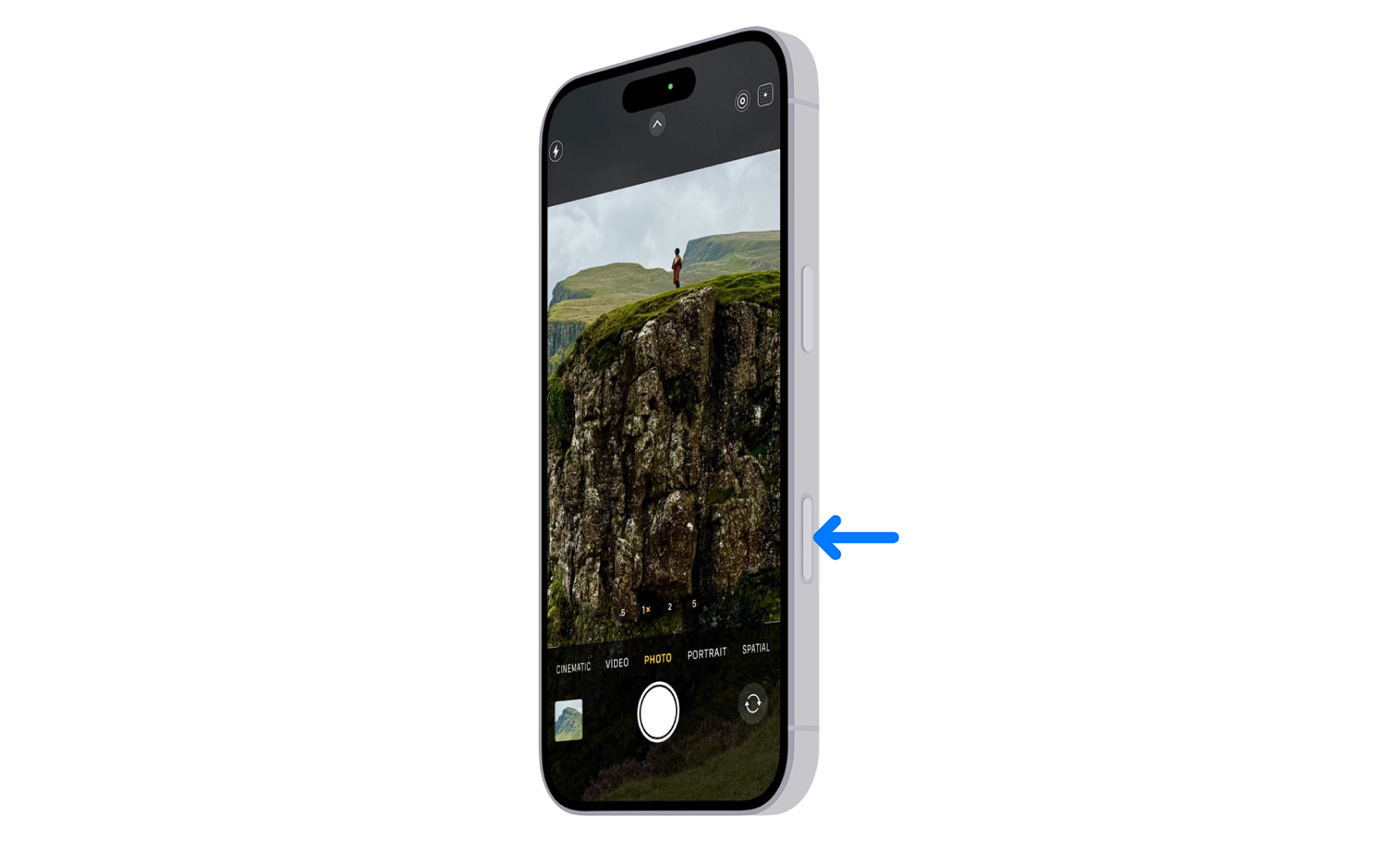
How to Disable the Camera Control Button on iPhone 16 Partially or Completely
The iPhone 16 introduces a new camera control button, offering users more features and customization options. In this article, we’ll explore various ways to…
-
How to Lock Messages in iOS 18 (Also, Allow Notifications as Exception for New Messages)
iOS 18 introduces a powerful new feature that allows users to lock individual apps, including the Messages app, for enhanced privacy and security. This…
-
How to Put Face ID on Messages App in iOS 18
What to know iOS 18 introduces the ability to lock individual apps with Face ID. The Messages app can be secured using Face ID…
-
How to View Hidden Apps on iOS 18 on the Home Screen and the Settings App
What to know iOS 18 introduces a new feature to hide apps in a dedicated Hidden folder. Hidden apps can be accessed through the…
-

iOS 18 Flashlight Width Not Working? Know about Supported Devices and Fixes
What to know iOS 18 introduces flashlight beam width adjustment on select iPhone models. Only iPhone 14 Pro, 15 Pro, 16 Pro and Pro…
-
iOS 18 RCS Not Working? How to Fix
What to know iOS 18 has introduced RCS messaging support for iPhones but some users are experiencing issues with RCS not working properly. Common…
-
iOS 17.7 vs iOS 18: What to Install First? And Why?
What to know iPhone users are faced with the option of installing either iOS 17.7 or jump directly to iOS 18. Although iOS 18…
-
How Apple’s Voice Memo App Just Became the Most Useful Tool for Musicians
What to know The Voice Memos app will soon let you layer a second track in your recordings. Tap on the + icon and record…
-

How to Enable or Disable Comments on Your Instagram Story
What to know Instagram’s Story Comments feature is enabled by default. Turn off comments while posting a story from the three-dot icon in the…
-

How to Launch Apps as Admin in PowerToys Workspaces
What to know Open your workspace via Workspace Editor (Win+Ctrl+`). Click on an app and select Launch as admin from its dropdown menu. In v0.84.0,…
-
4 Best Ways to Record Audio on Windows 11
What to know Windows has a built-in Sound Recorder app for recording audio on your computer in multiple formats and audio quality. For additional…
-

How to Add a Song on Your Instagram Profile
What to know Instagram’s ‘Music on Profile’ feature lets you add 30-second song clips on your profile. Go to your Instagram profile, tap on…
-
Gemini Live Review: An Improved Assistant Stymied by Its AI Model
What to know Gemini Live is an impressive digital assistant voice mode feature with 10 different voices, quick conversational responses, and chat transcripts. Unfortunately,…
-

How to Add Collaborator on Instagram After Posting
What to know Instagram lets you add collaborators to Reels even after you post them. Open the posted Reel, tap on the three-dot icon,…