

- The short version
- PROLED XDR brightness, color, and motion
- Calibration and reference modes for specialist work
- Touch gestures, existing apps, and creative workflows
- Dynamic Island, macOS 27, and Siri AI
- Size, weight, and the thinner enclosure
- M5 Pro and M5 Max configuration choices
- Battery ratings, included adapters, and fast charging
- Ports, wireless networking, and external displays
- Audio and camera changes
- PROLED versus Liquid Retina XDR buying choices
- MacBook Pro with PROLED XDR Display release date and price
- FAQs
The short version
- MacBook Pro with PROLED XDR Display introduces tandem OLED, Touch, Dynamic Island, and M5 Pro or M5 Max.
- The thinner 14-inch and 16-inch models start at 3.0 pounds and 4.0 pounds with M5 Pro; M5 Max configurations weigh more.
- US prices start at $2,899, or $2,749 with education savings.
- Pre-orders open October 28, 2026, with customer arrivals and retail availability beginning Friday, November 6.
Apple announced MacBook Pro with PROLED XDR Display on October 28, 2026, bringing its first Touch experience to Mac, with availability beginning November 6 and US prices starting at $2,899. The display expands the laptop’s color capabilities and introduces direct onscreen interaction, while the continuing Liquid Retina XDR family gives buyers a separate choice that includes M6.
PROLED XDR brightness, color, and motion
PROLED XDR uses two self-illuminating pixel layers. Each pixel can switch on and off independently, placing dark areas beside bright highlights without relying on a backlight. Apple describes the tandem OLED construction as delivering uniform brightness and grayscale while reducing internal reflections.
The display engine controls each pixel’s color and luminance at sub-millisecond intervals, compensating for content, pixel use, temperature, and environment. It also tracks pixel usage over time and adjusts its operation to preserve image quality.
Brightness, color, and refresh specifications
| Display specification | PROLED XDR |
|---|---|
| Panel technology | Tandem OLED |
| Peak HDR brightness | Up to 2000 nits |
| Peak SDR brightness outdoors | Up to 2000 nits |
| Sustained full-screen HDR brightness | Up to 1000 nits at temperatures less than 25° C |
| Sustained full-screen SDR brightness | Up to 1000 nits at temperatures less than 25° C |
| Contrast ratio | 10,000,000:1 |
| Minimum brightness | 1 nit |
| Colors | 1 billion |
| Wide color gamuts | P3 + Adobe RGB |
| Rec. 2020 coverage | More than 80 percent |
| True Tone | Supported |
| ProMotion adaptive refresh rate | 10Hz to 120Hz |
| Fixed refresh rates | 47.95Hz, 48.00Hz, 50.00Hz, 59.94Hz, 60.00Hz |
P3 and Adobe RGB are accessible within a single default preset. That accommodates HDR video and color-grading work alongside photography and print-design workflows, with expanded coverage in greens and cyans. Factory calibration aligns luminance, white point, and color gamut with standard targets.
ProMotion adjusts the refresh rate to suit the content, supporting power efficiency during less active use and responsive motion during interaction. Fixed refresh options provide alternatives for workflows built around particular frame rates.
The cover glass has an antireflective coating and a fingerprint-resistant oleophobic coating. Apple also offers nano-texture glass, with the texture etched into the cover glass to further reduce reflections and glare in bright surroundings.
Calibration and reference modes for specialist work
Apple Pro Display Calibrator lets you calibrate the screen to specific targets. The available reference modes cover video standards, cinema, design, print, photography, web content, and medical imaging.
The DICOM medical imaging presets are intended only for nondiagnostic reviews, research, and educational purposes.
Available display reference presets
| Reference mode group | Available presets |
|---|---|
| Apple XDR | Apple XDR Display (P3-2000 nits) Apple XDR Display (P3 + Adobe RGB-2000 nits) |
| Video | HDR Video (P3-ST 2084) HDTV Video (BT.709-BT.1886) NTSC Video (BT.601 SMPTE-C) PAL and SECAM Video (BT.601 EBU) |
| Digital cinema | Digital Cinema (P3-DCI) Digital Cinema (P3-D65) |
| Design and print | Design and Print (P3-D50) Design and Print (Adobe RGB-D50) |
| Photography | Photography (P3-D65) Photography (Adobe RGB-D65) HDR Photography (P3-D65) |
| Internet and web | Internet and Web (sRGB) |
| Medical imaging | Medical Imaging (DICOM-350 nits) Medical Imaging (DICOM-600 nits) |
Apple Color Matching Function 2026 supports a consistent visual match when pairing the display with iPhone 18 Pro or Studio Display XDR.
Genlock synchronizes the display’s refresh with camera capture to minimize ghosting, tearing, and other filming artifacts during virtual production and on-set work. It requires compatible third-party hardware and software.
Touch gestures, existing apps, and creative workflows
Touch works directly on the MacBook Pro display, with scrolling, pinch-to-zoom, rotation, and drawing. You can drag slides between presentations, double-tap a window to fill the screen, or flick a window into a tiled position.
The touch sensor is integrated into the display panel, which Apple says reduces latency. A redesigned hinge provides stability during onscreen interaction, and automatic video stabilization smooths the camera feed when you use Touch during a call.
Many existing apps work with Touch immediately because macOS translates touches into clicks. Updated system gesture APIs let developers build interactions specifically for the screen, while keyboard shortcuts and trackpad gestures remain part of the same workflow.
Apple has also announced dedicated Touch experiences across productivity, collaboration, creative, 3D, and music apps.
The listed third-party Touch experiences arrive later this year.
- Productivity and collaboration: Notion, Canva, Zoom, Microsoft Word, Excel, PowerPoint, and Outlook.
- Photo and video editing: Adobe Lightroom and DaVinci Resolve.
- 3D modeling and animation: Blender, Maxon Cinema 4D, Maxon ZBrush, and Shapr3D.
- Music: Algoriddim djay Pro.
Pixelmator Pro supports direct canvas interaction for drawing, painting, and selecting. That gives designers the display itself as a working surface.
Logic Pro adds a Multi-Touch polyphonic keyboard, alongside onscreen chord and drum pads. Musicians can play software instruments with their fingers and interact directly with controls such as faders.
Final Cut Pro supports Touch for range selection and clip placement, with pinch-to-zoom for working on a cut. Developers can also test Touch interactions in iOS and iPadOS apps directly on the Mac display.
Dynamic Island, macOS 27, and Siri AI
Dynamic Island brings Spotlight, Live Activities, and Siri AI together at the top of the screen. Spotlight can find documents, images, contacts, emails, and other Mac content, open apps, send a message, and show Clipboard history.
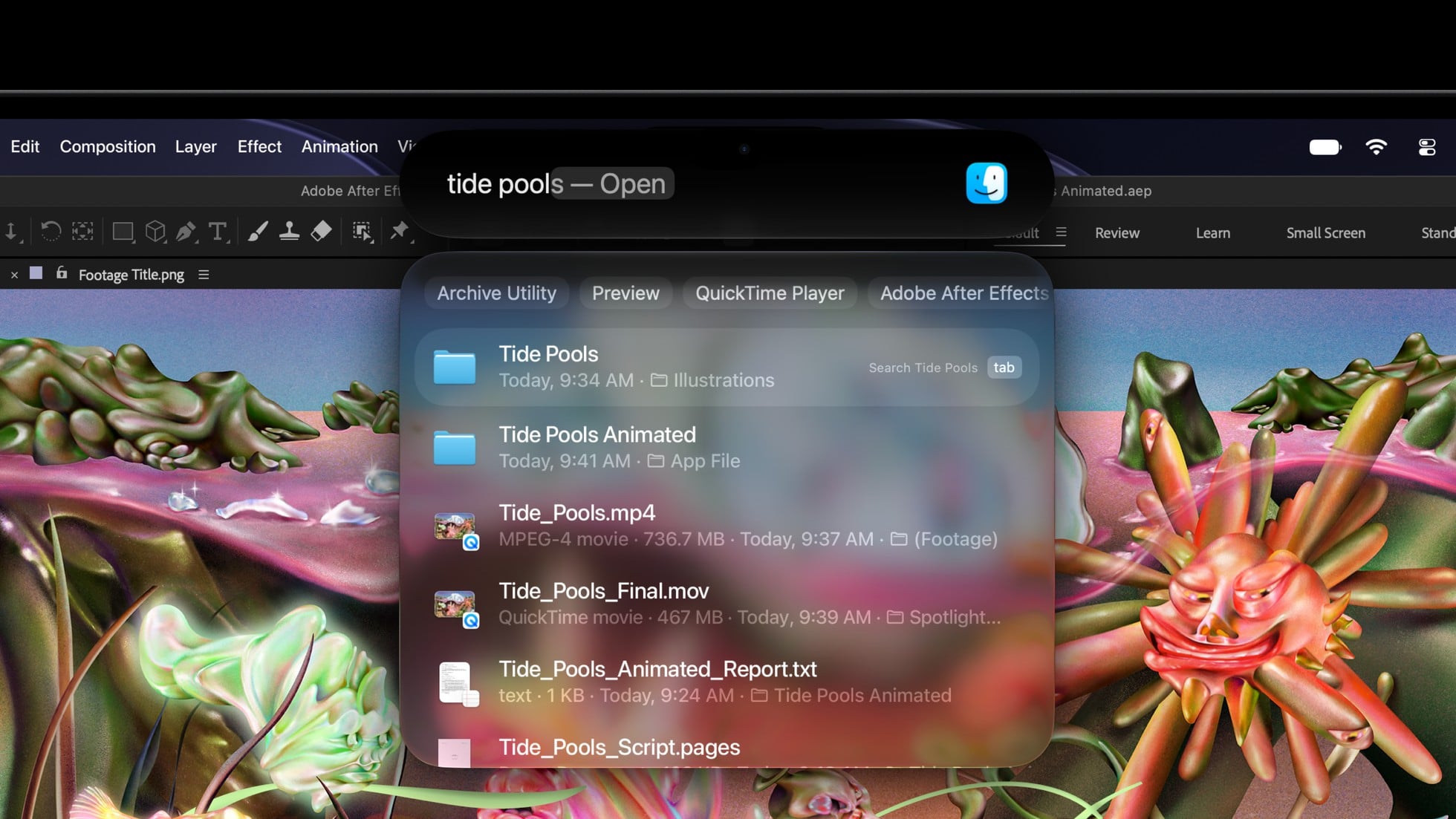
Live Activities provide updates you can see and act on while working. Dynamic Island also handles taking calls, accepting AirDrop requests, controlling music, and tracking activities such as a food delivery.
The laptop runs macOS 27 Golden Gate. Siri AI adds conversational assistance that can use personal context across messages, emails, photos, and notes, and take actions across apps based on what you are doing.
Visual Intelligence is accessible through a dedicated keyboard shortcut for asking about something onscreen. Siri is also integrated into Spotlight and systemwide context menus, with writing and editing assistance available in places where you type.
Safari gains page-change notifications and automatic tab organization by topic, plus the ability to create custom extensions from a description. Shortcuts can build automations from a description, Photos gains intelligent editing tools, and a Settings slider adjusts Liquid Glass from ultraclear to fully tinted.
Siri AI is available in beta and requires an Apple Intelligence-enabled device set to a supported language. Its starting languages are:
- English
- French
- Japanese
- Korean
- Portuguese
- Spanish
Features vary by language and region. Apple’s stated initial EU restriction names iOS, iPadOS, and watchOS.
Siri AI is unavailable to users under 13.
Server-based Apple Intelligence features have variable daily usage limits, including Siri AI, intelligent photo editing, Image Playground, and AFM 3 Cloud models in Shortcuts. Limits can change with the feature, request complexity, system demand, system policies, and other factors; Apple plans paid expanded access in the future.
Size, weight, and the thinner enclosure
The new enclosure has slimmer display borders and a redesigned thermal architecture that redirects warm air away from the screen. Apple describes the 14-inch design as half a millimeter thinner and the 16-inch design as nearly a millimeter thinner than their Liquid Retina XDR counterparts.
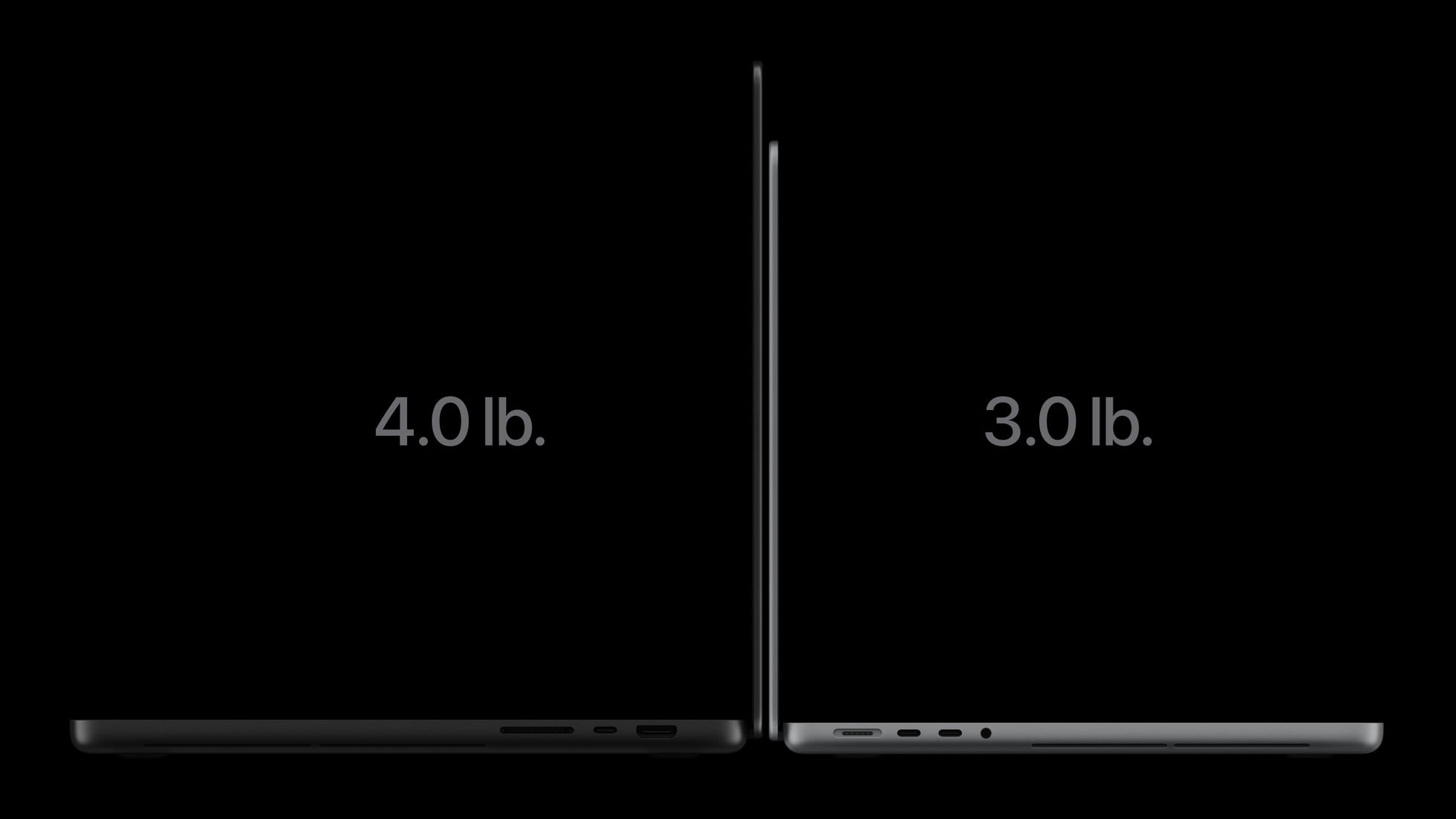
Both sizes come in Space Black and Silver. The chip choice affects weight as well as the internal configuration.
Dimensions and chip-specific weights
| Specification | 14-inch | 16-inch |
|---|---|---|
| Screen diagonal | 14.2 inches | 16.3 inches |
| Native resolution | 3024-by-1986 at 254 pixels per inch | 3472-by-2266 at 254 pixels per inch |
| Height | 0.59 inch (1.50 cm) | 0.63 inch (1.60 cm) |
| Width | 12.24 inches (31.08 cm) | 14.0 inches (35.55 cm) |
| Depth | 8.52 inches (21.63 cm) | 9.62 inches (24.42 cm) |
| M5 Pro weight | 3.0 pounds (1.38 kg) | 4.0 pounds (1.82 kg) |
| M5 Max weight | 3.1 pounds (1.40 kg) | 4.1 pounds (1.84 kg) |
Screen diagonals are measured as standard rectangles; rounded corners reduce the actual viewable area. Weight varies by configuration and manufacturing process.
M5 Pro and M5 Max configuration choices
Apple positions M5 Pro for compiling code, scientific work, and multiple-stream 8K ProRes editing, including tasks such as DNA sequencing. M5 Max targets demanding visual effects, 3D animation, film scoring, AI development, and 8K post-production.
Memory and SSD choices are tied to the specific CPU/GPU configuration. Selecting a chip tier determines which upgrades are available.
CPU, GPU, memory, and storage choices
| Chip and CPU/GPU | Available sizes | Memory bandwidth | Unified memory | SSD options |
|---|---|---|---|---|
| M5 Pro: 15-core CPU with 5 super cores and 10 performance cores; 16-core GPU | 14-inch only | 307GB/s | 24GB or 48GB | 1TB, 2TB, or 4TB |
| M5 Pro: 18-core CPU with 6 super cores and 12 performance cores; 20-core GPU | 14-inch and 16-inch | 307GB/s | 24GB, 48GB, or 64GB | 1TB, 2TB, or 4TB |
| M5 Max: 18-core CPU with 6 super cores and 12 performance cores; 32-core GPU | 14-inch and 16-inch | 460GB/s | 36GB | 2TB, 4TB, 8TB, or 16TB |
| M5 Max: 18-core CPU with 6 super cores and 12 performance cores; 40-core GPU | 14-inch and 16-inch | 614GB/s | 48GB, 64GB, or 128GB | 2TB, 4TB, 8TB, or 16TB |
Both chips have Neural Accelerators in their GPU cores and a 16-core Neural Engine for AI processing. Apple describes support for demanding on-device workloads, including local language models and AI-assisted creative work.
The graphics architecture includes hardware-accelerated ray tracing, enhanced shader cores, and a third-generation ray-tracing engine. Dynamic Caching manages on-chip memory to improve GPU utilization in graphics applications and games.
Both media engines provide hardware acceleration for H.264, HEVC, ProRes, and ProRes RAW, plus AV1 decoding. M5 Pro has one video encode engine and one ProRes encode/decode engine; M5 Max has two of each.
Actual formatted SSD capacity is less than the stated storage capacity.
Battery ratings, included adapters, and fast charging
Battery life depends on both size and chip. Apple’s ratings distinguish video streaming from wireless web browsing, with separate figures for each model.
Apple’s battery ratings by model
| Model | Video streaming | Wireless web | Battery |
|---|---|---|---|
| 14-inch M5 Pro | Up to 22 hours | Up to 14 hours | 72.6-watt-hour lithium-polymer |
| 14-inch M5 Max | Up to 20 hours | Up to 13 hours | 72.6-watt-hour lithium-polymer |
| 16-inch M5 Pro | Up to 24 hours | Up to 17 hours | 100-watt-hour lithium-polymer |
| 16-inch M5 Max | Up to 22 hours | Up to 16 hours | 100-watt-hour lithium-polymer |
Apple conducted its September 2026 battery and fast-charge testing on preproduction systems with these configurations:
- 14-inch M5 Pro: 18-core CPU, 20-core GPU, 24GB unified memory, and 4TB SSD.
- 14-inch M5 Max: 18-core CPU, 32-core GPU, 36GB unified memory, and 4TB SSD.
- 16-inch M5 Pro: 18-core CPU, 20-core GPU, 48GB unified memory, and 2TB SSD.
- 16-inch M5 Max: 18-core CPU, 40-core GPU, 48GB unified memory, and 8TB SSD.
Wireless web testing involved browsing 25 popular websites over Wi-Fi. Video testing streamed 1080p content in Safari over Wi-Fi, with display brightness set eight clicks from the bottom and the keyboard backlight off.
Apple’s fast-charge result is up to 50 percent charge in 30 minutes.
Fast charging requires a 96W or higher USB PD power source for the 14-inch model and a 140W or higher USB PD power source for the 16-inch model.
For its charging tests, Apple used the 96W USB-C Power Adapter, Model A2166, with the 14-inch systems and the 140W USB-C Power Adapter, Model A2452, with the 16-inch systems. Both used a USB-C to MagSafe 3 Cable, Model A2363.
The charging tests began with drained units. Timing started when the computer began waking from hibernate or when the Apple logo appeared during startup.
The 14-inch M5 Pro with a 15-core CPU includes a 70W Power Adapter. Other 14-inch configurations include a 96W Power Adapter, while the 16-inch includes a 140W USB-C Power Adapter.
Battery life and charging time vary with use, configuration, settings, and environmental conditions.
Ports, wireless networking, and external displays
Each PROLED XDR model has three Thunderbolt 5 USB-C ports supporting charging, DisplayPort, Thunderbolt 5 up to 120Gb/s, and USB 4 up to 120Gb/s. The ports support native DisplayPort 2.1 speeds.
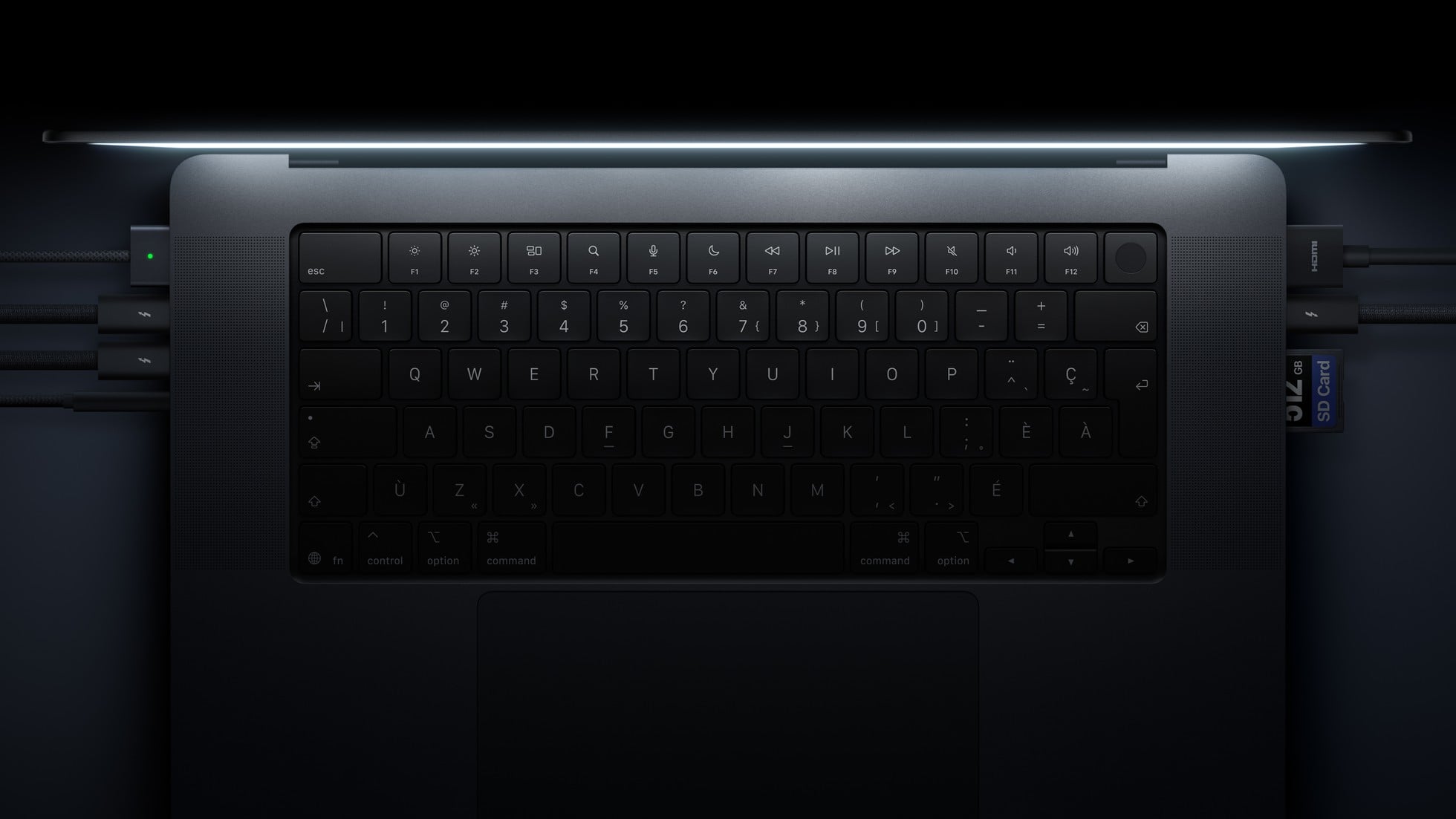
The remaining connections are:
- HDMI
- SDXC card slot
- MagSafe 3
- 3.5 mm headphone jack
The Apple N1 wireless networking chip supports Wi-Fi 7 (802.11be), Bluetooth 6, and Thread networking technology. Wi-Fi 7 availability varies by country.
Supported external screen combinations
| Chip | External-display support |
|---|---|
| M5 Pro | Up to three external displays using Thunderbolt and HDMI in combination: three at up to 6K at 60Hz or 4K at 165Hz. Alternatively, one at up to 8K at 60Hz, 5K at 120Hz, or 4K at 240Hz, plus a second at up to 5K at 120Hz or 4K at 200Hz. |
| M5 Max | Up to four external displays using Thunderbolt and HDMI in combination: four at up to 6K at 60Hz or 4K at 165Hz. Alternatively, two at up to 8K at 60Hz, 5K at 120Hz, or 4K at 240Hz. |
Each chip supports its maximum external-display count over a single Thunderbolt port, while the built-in screen continues operating at full native resolution.
Audio and camera changes
The six-speaker system uses force-cancelling woofers and redesigned tweeters. Apple claims 50 percent deeper bass, and the laptop adds dedicated audio tuning for closed-lid use with an external display.
Spatial Audio supports Dolby Atmos playback through the built-in speakers. Supported AirPods, AirPods Pro, and AirPods Max models also provide Spatial Audio with dynamic head tracking.
The three-microphone array includes directional beamforming, with Voice Isolation and Wide Spectrum microphone modes for calls. The headphone jack supports high-impedance headphones, and HDMI supports multichannel audio output.
The 12MP Center Stage camera keeps participants in frame as they move or more people join. Desk View shares the workspace, while an advanced image signal processor provides computational video processing and the camera supports 1080p HD recording.
PROLED versus Liquid Retina XDR buying choices
Apple continues selling both display families. Liquid Retina XDR retains M5 Pro and M5 Max options and gains a new 14-inch M6 configuration, giving buyers different combinations of display features and chip choices.
The M6 model has a 12-core CPU, 12-core GPU, and Dual 16-core Neural Engine, with 16GB, 24GB, or 32GB unified memory. Its CPU combines two super cores, four performance cores, and six efficiency cores.
Display families and shared features
| Feature | MacBook Pro with PROLED XDR Display | MacBook Pro with Liquid Retina XDR Display |
|---|---|---|
| Display technology | Tandem OLED | Mini-LED |
| Screen sizes | 14.2-inch or 16.3-inch | 14.2-inch or 16.2-inch |
| Peak HDR brightness | Up to 2000 nits | 1600 nits |
| Outdoor SDR brightness | Up to 2000 nits peak | Up to 1000 nits |
| Sustained full-screen XDR brightness | Up to 1000 nits at temperatures less than 25° C | Up to 1000 nits at temperatures less than 25° C |
| Contrast ratio | 10,000,000:1 | 1,000,000:1 |
| Wide color | P3 + Adobe RGB | P3 |
| Touch | Supported | No Touch |
| ProMotion | Adaptive 10Hz to 120Hz | Adaptive up to 120Hz |
| Nano-texture option | Available | Available |
| Chip options | M5 Pro or M5 Max in both sizes | M6, M5 Pro, or M5 Max in 14-inch; M5 Pro or M5 Max in 16-inch |
| M5 Max SSD ceiling | Up to 16TB | Up to 8TB |
| M5 Max unified-memory ceiling | Up to 128GB with 40-core GPU | Up to 128GB with 40-core GPU |
| 14-inch M5 Pro weight | 3.0 pounds | 3.5 pounds |
| 14-inch M5 Max weight | 3.1 pounds | 3.6 pounds |
| 16-inch M5 Pro weight | 4.0 pounds | 4.7 pounds |
| 16-inch M5 Max weight | 4.1 pounds | 4.7 pounds |
| 14-inch height | 0.59 inch (1.50 cm) | 0.61 inch (1.55 cm) |
| 16-inch height | 0.63 inch (1.60 cm) | 0.66 inch (1.68 cm) |
| Thunderbolt ports | Three Thunderbolt 5 | Three Thunderbolt 5 with M5 Pro or M5 Max; three Thunderbolt 4 with M6 |
| Maximum external displays | Three with M5 Pro; four with M5 Max | Three with M5 Pro; four with M5 Max; two with M6 |
| 4K refresh in M5 Pro three-display or M5 Max four-display setups | Up to 165Hz | Up to 144Hz |
| Wireless networking | N1, Wi-Fi 7, Bluetooth 6, and Thread | N1, Wi-Fi 7, Bluetooth 6, and Thread |
| Camera | 12MP Center Stage with Desk View | 12MP Center Stage with Desk View |
| 14-inch M5 Pro battery ratings | Up to 22 hours streaming; up to 14 hours web | Up to 22 hours streaming; up to 14 hours web |
| 14-inch M5 Max battery ratings | Up to 20 hours streaming; up to 13 hours web | Up to 20 hours streaming; up to 13 hours web |
| 16-inch M5 Pro battery ratings | Up to 24 hours streaming; up to 17 hours web | Up to 24 hours streaming; up to 17 hours web |
| 16-inch M5 Max battery ratings | Up to 22 hours streaming; up to 16 hours web | Up to 22 hours streaming; up to 16 hours web |
| 14-inch M6 battery ratings | — | Up to 24 hours streaming; up to 16 hours web |
These battery figures come from Apple’s separate preproduction test runs. Liquid Retina XDR M5 Pro and M5 Max testing took place in January and February 2026, while M6 testing took place in September 2026; runtime varies with use, configuration, and environmental conditions.
For carrying a laptop between work locations, compare weight at the same size and chip tier. For storage-heavy projects, the available internal SSD choices provide another reason to distinguish the two families before configuring a machine.
Compare MacBook Pro models (pick a model)
Compare MacBook Pro models by display, screen size, Touch support, chip options, weight, battery life, and available starting prices.
Start with the capabilities your work calls for: direct interaction with creative content, print-oriented color work, portability, or a particular chip configuration. That keeps the buying decision tied to the tasks you plan to do.
MacBook Pro with PROLED XDR Display release date and price
Apple announced MacBook Pro with PROLED XDR Display on October 28, 2026, with pre-orders beginning the same day through the online store and Apple Store app in 30 countries and regions, including the U.S. It arrives to customers and in stores, including Apple Store locations and Apple Authorized Resellers, from Friday, November 6.
Laptop purchase starting prices
| PROLED XDR model | US starting price | US education starting price |
|---|---|---|
| 14-inch M5 Pro | $2,899 (U.S.) | $2,749 (U.S.) |
| 16-inch M5 Pro | $3,399 (U.S.) | $3,199 (U.S.) |
| 14-inch M5 Max | $4,499 (U.S.) | $4,199 (U.S.) |
| 16-inch M5 Max | $4,799 (U.S.) | $4,499 (U.S.) |
Apple Creator Studio’s Touch-related updates arrive this November through the App Store, free for existing subscribers. New subscribers can start with a one-month free trial.
Creator Studio subscription prices
| Apple Creator Studio plan | Monthly | Annual |
|---|---|---|
| Standard | $12.99 (U.S.) per month | $129 (U.S.) per year |
| Education: eligible college students and educators | $2.99 (U.S.) per month | $29.99 (U.S.) per year |
The education subscription requires eligibility verification and automatically renews at the selected monthly or annual rate until canceled. Its savings apply to the eligible college student or educator and do not extend to a Family Sharing group.
An eligible new Mac or qualifying iPad purchased from Apple or an Apple Authorized Reseller can include three months of Apple Creator Studio for new and qualified returning subscribers. A qualifying iPad needs at least 6GB memory and an A16, A17 Pro, A20 Pro, or M-series chip or later.
The three-month offer is limited to one per Apple Account and one per family for Family Sharing members, regardless of how many eligible devices are purchased. It excludes accounts or families in which any member has already accepted an Apple Creator Studio three-month free offer.
The redemption window runs until the later of three months after eligible device activation or three months after the subscription first becomes available. The offer is available for a limited time and is subject to restrictions; the standard plan automatically renews at the selected monthly or annual price until canceled.
Apple separately lists these accessory prices:
- 70W Power Adapter: $59 (U.S.).
- 96W Power Adapter: $79 (U.S.).
- 140W Power Adapter: $99 (U.S.).
- World Travel Adapter Kit: $39 (U.S.).
Consider the MacBook Pro with PROLED XDR Display if your work needs Touch on the display or Adobe RGB color; look to the Liquid Retina XDR family for the new 14-inch M6 configuration. PROLED XDR pre-orders are open, with arrivals from November 6, when the 14-inch M6 model also becomes available.
FAQs
When is the MacBook Pro with PROLED XDR Display release date?
MacBook Pro with PROLED XDR Display arrives to customers, Apple Store locations, and Apple Authorized Resellers from Friday, November 6, 2026. Apple announced it on October 28, 2026, with pre-orders opening that day through apple.com/store and the Apple Store app in 30 countries and regions, including the U.S.
How much does MacBook Pro with PROLED XDR Display cost?
US prices for MacBook Pro with PROLED XDR Display start at $2,899 for the 14-inch M5 Pro and $3,399 for the 16-inch M5 Pro. M5 Max models start at $4,499 for the 14-inch and $4,799 for the 16-inch. Education starting prices are $2,749, $3,199, $4,199, and $4,499, respectively.
Does MacBook Pro with PROLED XDR Display have a touchscreen?
Yes, MacBook Pro with PROLED XDR Display supports Multi-Touch, bringing Touch to Mac for the first time. It supports direct onscreen scrolling, pinch-to-zoom, rotation, and drawing. Many existing apps work with Touch because macOS translates touches into clicks.
Which chips does the PROLED XDR MacBook Pro use, and is there an M6 model?
MacBook Pro with PROLED XDR Display uses M5 Pro or M5 Max in both 14-inch and 16-inch sizes. There is no M6 option in the PROLED XDR family at this launch. Apple’s new 14-inch M6 MacBook Pro belongs to the Liquid Retina XDR family and has a 12-core CPU and 12-core GPU.
How does PROLED XDR differ from the Liquid Retina XDR MacBook Pro?
MacBook Pro with PROLED XDR Display uses tandem OLED with Touch, up to 2000 nits peak HDR brightness, up to 2000 nits peak outdoor SDR brightness, a 10,000,000:1 contrast ratio, and P3 plus Adobe RGB color support. The Liquid Retina XDR MacBook Pro uses mini-LED without Touch, with 1600 nits peak HDR brightness, up to 1000 nits outdoor SDR brightness, a 1,000,000:1 contrast ratio, and P3 color support.
How long does the PROLED XDR MacBook Pro battery last?
Apple rates MacBook Pro with PROLED XDR Display for up to 24 hours of video streaming or 17 hours of wireless web browsing on the 16-inch M5 Pro. The 14-inch M5 Pro is rated for up to 22 hours streaming or 14 hours browsing; the 14-inch M5 Max for up to 20 or 13 hours; and the 16-inch M5 Max for up to 22 or 16 hours, respectively. These ratings come from Apple’s September 2026 preproduction testing; actual battery life varies with use, configuration, settings, and environmental conditions.
Related guides


Leave a Reply