
The short version
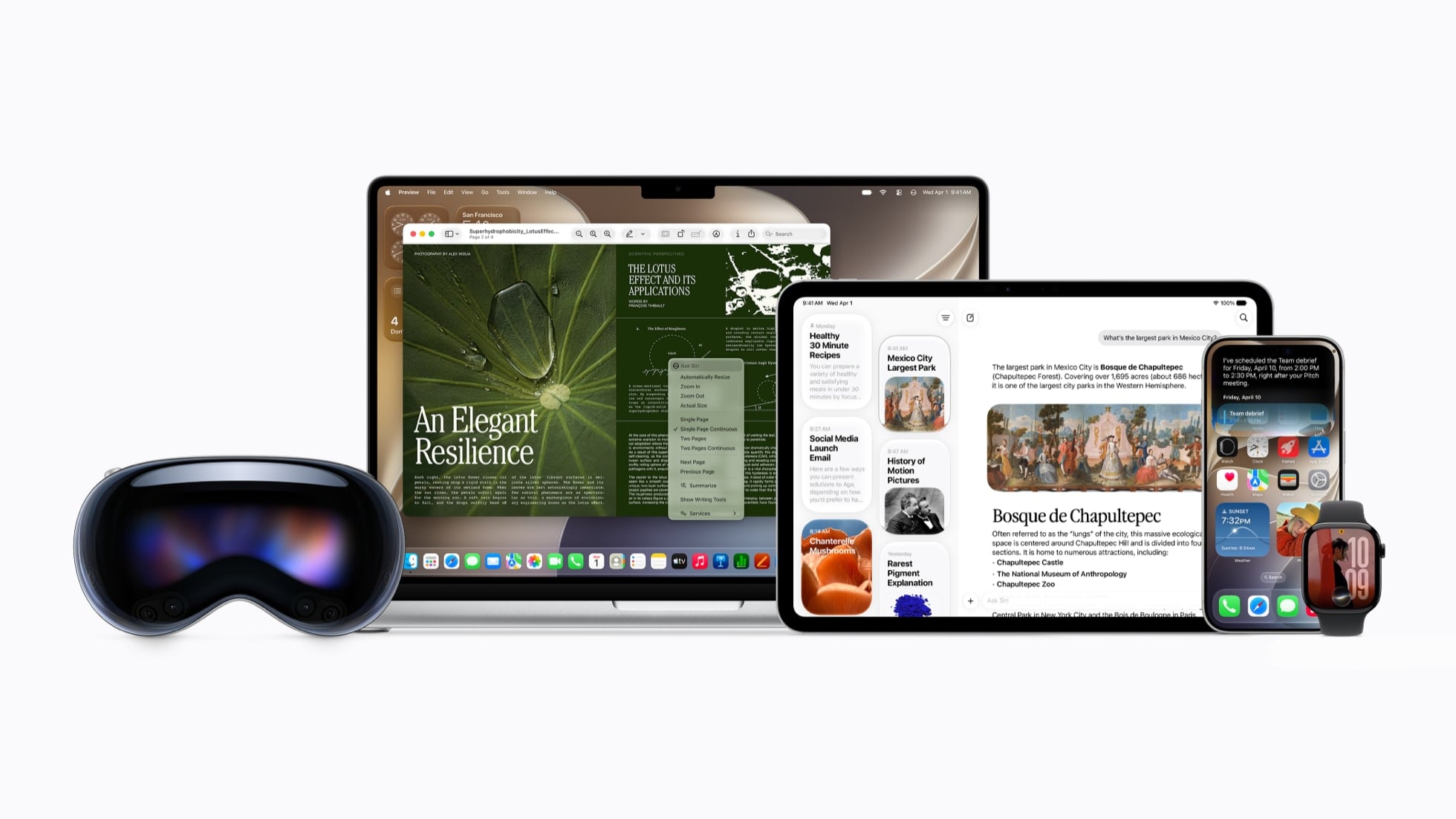
- Apple Intelligence in iOS 27 adds features inside Photos, Image Playground, Safari, Shortcuts, Calendar, Phone, Mail, Messages, Wallet, Home and Passwords.
- It needs an iPhone 15 Pro, iPhone 15 Pro Max, or an iPhone 16 or later. Older iPhones run iOS 27 and get none of these features.
- 16 languages qualify, and your device language and Siri language both have to be set to the same one.
- Limits are set per feature. Devices bought in China mainland get no Apple Intelligence, and three features run in English only or in English and Spanish only.
Photos: Clean Up, Extend and Spatial Reframing
Spatial Reframing changes the viewpoint of a photo after you have taken it. Apple’s description is “reframe a photo after it’s been taken”, which covers moving the angle or zooming in as if you had stood somewhere else at the time. It draws on the spatial models Apple built for Vision Pro. You drag the picture, the perspective shifts as you drag, and new content is filled in only where the new angle exposes it.
Extend paints past the edges of the original frame. Apple’s line is “expand your shots with the Extend tool”. Use it to straighten a crooked horizon without cropping anything important, or to change the aspect ratio and let Extend fill in the missing edges.
Clean Up can now “remove even larger objects”, with more realistic infill when the scene behind the distraction is complicated. Anything you edit with the three tools carries a hidden SynthID watermark identifying it as AI-edited.
Clean Up, Extend and Spatial Reframing side by side
| Tool | What it does | Availability |
|---|---|---|
| Spatial Reframing | Shifts viewpoint, angle or zoom after the shot, filling only what the new angle exposes | The 16 languages |
| Extend | Paints beyond the original frame to straighten a horizon or change aspect ratio | The 16 languages |
| Clean Up | Removes larger distractions, with convincing infill in busy scenes | Worldwide, except China mainland |
Clean Up is the only one of the three with no language requirement, so it still works if your device language is not one of the 16.
Photo tools: Clean Up, Extend and Spatial Reframing, each with Apple’s description.
Image Playground and Genmoji
Image Playground produces photorealistic images in iOS 27, not only stylized ones. The model behind that runs on Private Cloud Compute rather than on your iPhone, so it counts against the daily usage limits.
You can also edit by describing what you want changed, in Image Playground and in Genmoji. That works on results you already have, so an image or a Genmoji you made earlier can be adjusted instead of generated again.
Image Playground and Genmoji changes in iOS 27
| Change | Detail |
|---|---|
| Photorealistic style | A new generative model on Private Cloud Compute adds photorealism to the style set |
| Touch editing | Describe a change, or tap, circle or brush an object to move or resize it |
| New destinations | Lock Screen wallpapers, Contact Posters and Messages backgrounds |
| Aspect ratio | Choose landscape or portrait before generating rather than cropping afterward |
| Genmoji | Higher quality, and you can describe the edits you want made |
| Watermark | Every generated image carries a hidden SynthID marker |
Shortcuts, Safari and Calendar
Describe a Shortcut turns a sentence into an automation that runs across your apps. Apple’s example is “When I’m leaving work, message Pedro I’m on my way with my ETA”. If a step comes out wrong you describe the correction instead of rebuilding the shortcut. It runs on AFM 3 Cloud models, so it counts against the daily usage limits.
Safari sorts your open tabs into topics, so a weekend of travel research collects under one heading and new tabs get filed with it. Notify Me watches a page you nominate, which saves checking a restock or a price drop by hand. Describe an extension turns a sentence into a working extension in the toolbar, such as a button that saves and rates recipes.
Calendar reads a typed description of an event and fills in the contacts, the location and the title. Edits work the same way, so a lunch meeting becomes a coffee chat without retyping the invite.
Shortcuts, Safari and Calendar features by platform
| Feature | What it does | Where it works |
|---|---|---|
| Describe a Shortcut | Builds a multi-app automation from a sentence, and edits it from another one | The 16 languages, under daily limits |
| Safari tab topics | Sorts open tabs into subjects and files new ones correctly | The 16 languages |
| Notify Me | Monitors a page and alerts you on a restock or price drop | The 16 languages |
| Describe an extension | Generates a custom Safari extension from a description | The 16 languages |
| Describe a calendar event | Creates or edits an event from plain text, extracting contacts and title | The 16 languages |
Phone, Mail, Messages and Wallet
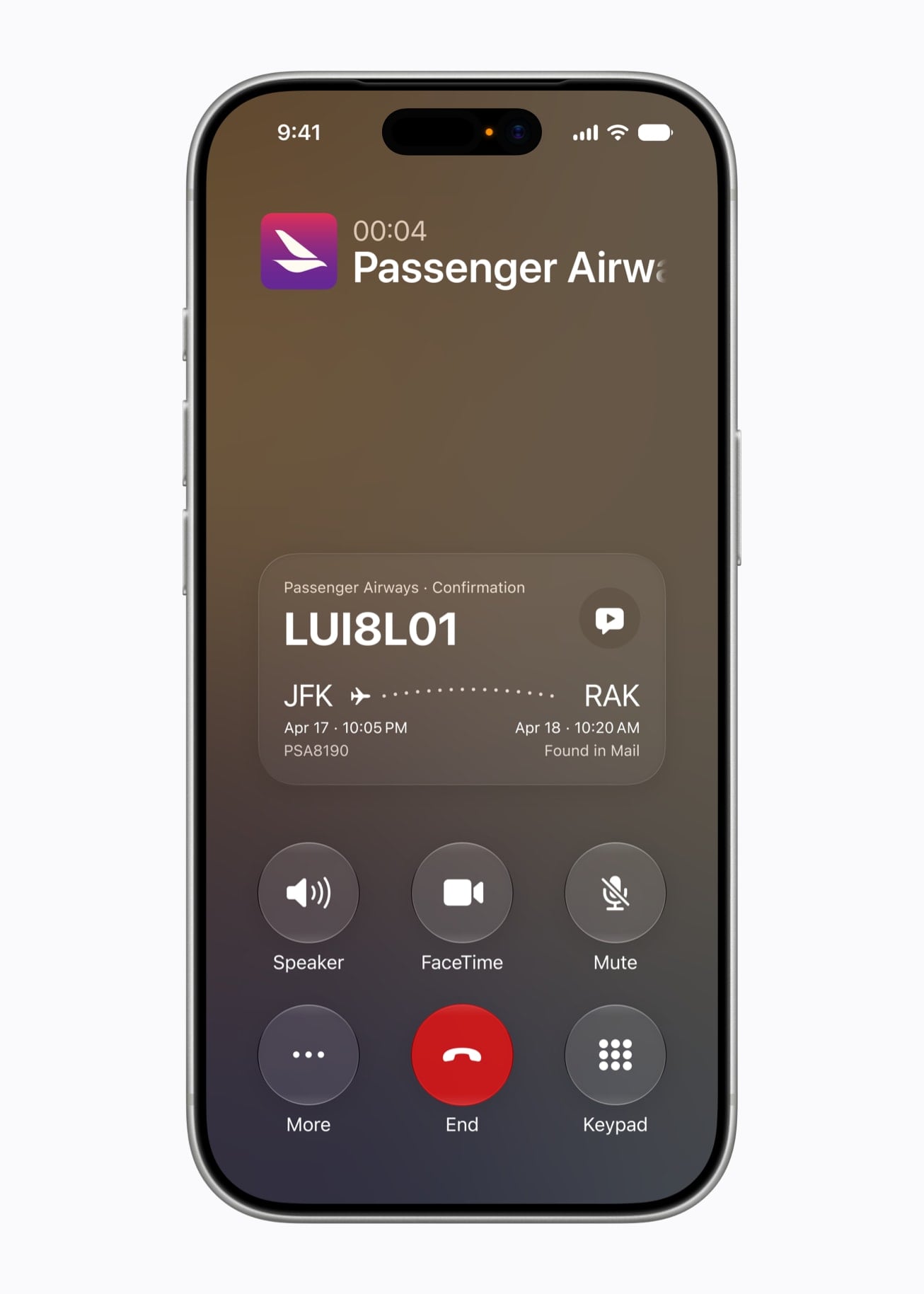
Call a business and the Phone app brings up the relevant detail from your other apps, such as the confirmation code sitting in Mail when you ring an airline. Call Context works from who you are calling rather than from what you say during the call.
The Mail half of Suggestions is there on September 14, with one-tap actions taken from the thread you are reading. The Messages half, the tap under a conversation that adds a calendar event or searches your photo library, comes in a later software update.
Wallet adds enhanced Order Tracking, tied to specific English regions rather than to the 16-language list. Proofread as you type is tied to no list at all and runs wherever you type.
Phone, Mail, Messages and Wallet features and their limits
| Feature | What it does | The catch |
|---|---|---|
| Call Context | Pulls a confirmation code or reservation detail into the call screen | On device; the 16 languages |
| Suggestions in Mail | One-tap actions from thread context, including third-party apps | Available in English |
| Suggestions in Messages | Adds an event or finds a photo from a tap under the conversation | Coming in a future software update |
| Smart Reply | Drafts replies in Mail and Messages in your own writing style | Available in English |
| Order Tracking in Wallet | Enhanced tracking for orders you have placed | English (United Kingdom) and English (United States) |
| Proofread as you type | Checks grammar and spelling anywhere you type | Systemwide |
Live Translation everywhere it now works
Live Translation runs on iPhone, iPad and Mac, and the Messages side also works on Apple Watch Series 9 and later, Apple Watch Ultra 2 and later, and Apple Watch SE 3. Turn it on once and it applies everywhere it appears.
The four do not share a language list. Messages covers all 16, while Phone, FaceTime and AirPods cover nine spoken languages, so a language you can text in is not necessarily one you can take a call in.
Live Translation languages by app
| Where | What it does | Languages |
|---|---|---|
| Messages | Translates texts as you send and receive them | All 16, from English and Danish through to Turkish and Vietnamese |
| FaceTime | Shows live translated captions during the call | Nine: Mandarin Chinese, English, French, German, Italian, Japanese, Korean, Portuguese, Spanish |
| Phone | Speaks the translation during a voice call | The same nine as FaceTime |
| AirPods | Translates a face-to-face conversation into your ears | The same nine, minus the Italian (Switzerland) variant |
Home, Passwords and the rest
The Home app groups related accessory notifications into one activity that updates as it happens. It also describes what happened across a run of HomeKit Secure Video clips, so you can skip watching them, and it searches your footage by event rather than by timestamp.
Captions and video search need a home hub: a HomePod (2nd generation), HomePod mini or Apple TV 4K, plus an Apple Intelligence-enabled iPhone and an eligible iCloud+ plan.
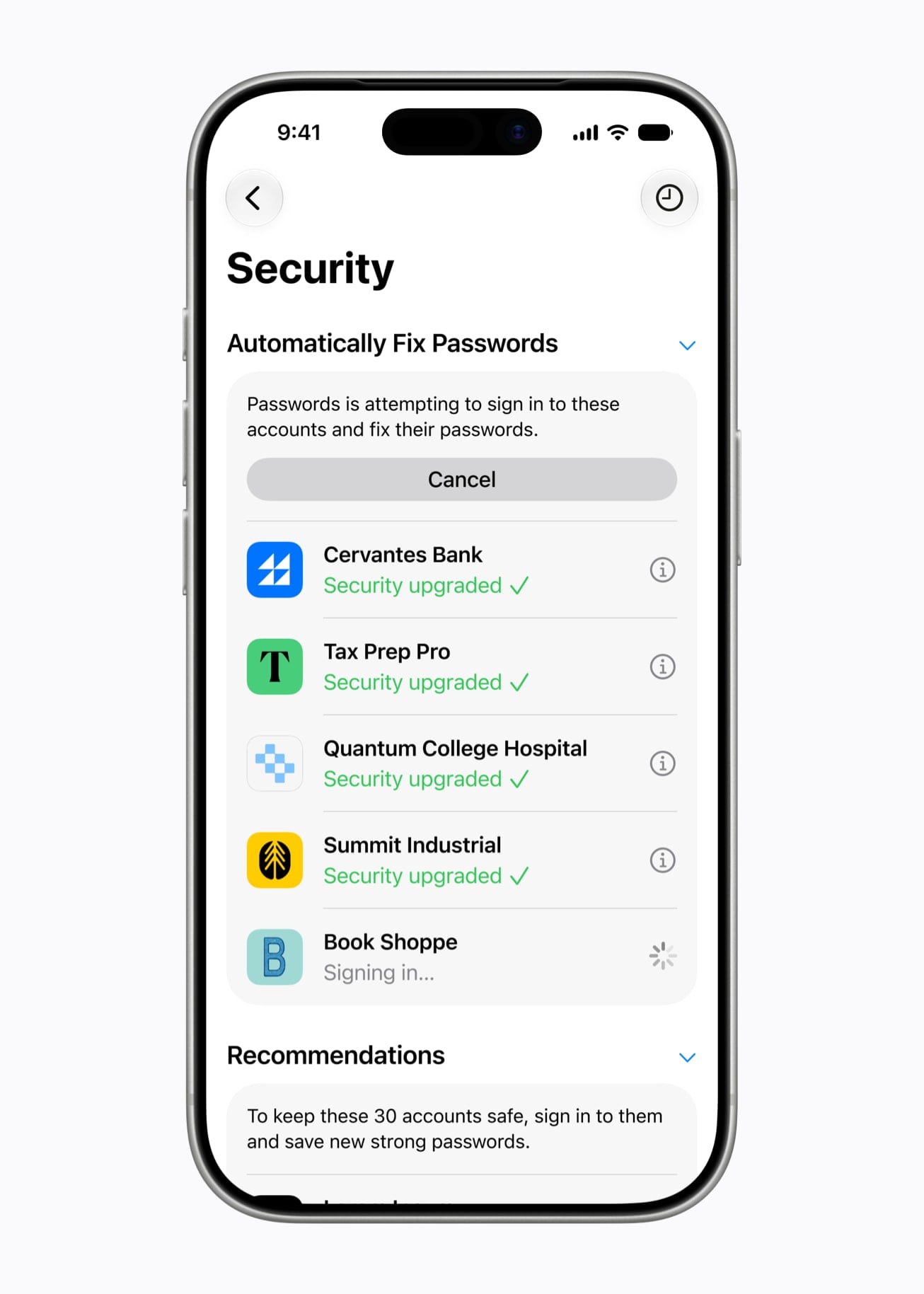
Passwords already flags weak and compromised entries, and in iOS 27 it replaces them for you. Apple Intelligence and Safari open the site, sign in and swap in a strong one. Apple tags this as coming in a future software update rather than at launch.
Workout Buddy gets deeper insights, more of your fitness data behind its motivational reads, and Spanish. It runs on Apple Watch with no iPhone nearby, as long as the watch has Wi-Fi or cellular.
Where each feature works
The 16 languages are Chinese (Simplified), Chinese (Traditional), Danish, Dutch, English, French, German, Italian, Japanese, Korean, Norwegian, Portuguese, Spanish, Swedish, Turkish and Vietnamese. Most in-app features accept the same 34 language and region combinations built from those, so a language and region setting that works for one feature works for nearly all of them.
China mainland is the exception throughout. Apple Intelligence features will not currently work on supported devices purchased there, whatever the device language is set to. Three features go the other way and run in English alone, or in English and Spanish alone.
Apple lists the per-feature breakdown on its feature availability page.
Availability picker: choose a language and region to see which features work for you.
Language and region limits by feature
| Feature | Languages | Not available in |
|---|---|---|
| Photos: Spatial Reframing and Extend | The 16 languages | China mainland |
| Photos: Clean Up | Worldwide, no language list | China mainland |
| Image Playground, Genmoji, Messages backgrounds | The 16 languages | China mainland |
| Safari: tab topics, Notify Me, Describe an extension | The 16 languages | China mainland |
| Shortcuts and Calendar: describe a shortcut or event | The 16 languages | China mainland |
| Phone: Call Context, plus the Home app features | The 16 languages | China mainland |
| Live Translation in Messages | The same 16 languages | China mainland |
| Live Translation in Phone, FaceTime and AirPods | Nine spoken languages | China mainland |
| Order Tracking in Wallet | English (United Kingdom) and English (United States) | Every other language |
| Workout Buddy | English in nine regions, Spanish in five | Every other language |
What it needs
Apple Intelligence needs an iPhone 15 Pro, iPhone 15 Pro Max, or an iPhone 16 or later. That takes in every iPhone 16, 17 and 18 generation model, plus iPhone Air and iPhone Duo. Our iOS 27 hub covers compatibility for the update itself, which reaches back to iPhone 11.
You also need 7GB of free storage for the models. Device language and Siri language have to match, and both have to be one of the 16. Changing your Siri language takes Apple Intelligence offline until the new one downloads. All of it sits in Settings, under Apple Intelligence & Siri.
Features that use server-side models carry daily usage limits. Apple names Siri AI, the intelligent photo editing tools, Image Playground and the AFM 3 Cloud models in Shortcuts. The limits vary by feature, by how complex the request is and by system demand, and Apple says expanded access will be available for a fee in the future. Hitting a limit throttles or pauses that one feature until it resets, and the rest of Apple Intelligence keeps working.
Device checker: pick your iPhone to see whether it gets iOS 27, Apple Intelligence and the memory-heavy features.
FAQs
Does my iPhone get these features?
Yes if it is an iPhone 15 Pro, iPhone 15 Pro Max, or any iPhone 16 or newer. Every other iPhone on the iOS 27 list, down to iPhone 11 and iPhone SE (2nd generation), installs the update and gets the design and speed changes without the Apple Intelligence features.
Do I have to pay for any of this?
No. Everything here comes with iOS 27 on September 14. Apple has published no price, no date and no request count for the paid tier it mentions. The one part with a paid dependency is the Home app’s camera captions and search, which need an eligible iCloud+ plan.
Which features are English only?
Suggestions in Mail and Messages, and improved Dictation accuracy. Order Tracking in Wallet needs English (United Kingdom) or English (United States) specifically. Workout Buddy runs in English and Spanish. Everything else uses the 16-language list.
Can I use these in the EU?
Yes. The EU restriction Apple published covers Siri AI on iOS, iPadOS and watchOS. It does not cover the in-app features, whose language lists include French (France), German (Germany), Italian (Italy) and Spanish (Spain).
What is not ready on day one?
Suggestions inside Messages conversations, and the automatic password replacements in Passwords. Both are tagged as coming in a future software update. Everything else here ships with iOS 27 on September 14.
Related guides


Leave a Reply