
- The short version
- What’s new in iOS 27, at a glance
- Which iPhones get iOS 27, and which get the AI features
- Siri AI: what the new Siri actually does
- The fine print on Apple Intelligence usage limits
- Apple Intelligence beyond Siri
- Liquid Glass and the everyday changes
- Faster, and how Apple measured it
- iPhone Handoff, Wi-Fi switching and calls
- Screen Time and the new child safety controls
- Health app: what arrives later this year
- iOS 27 on iPhone Duo
- FAQs
The short version
- iOS 27 arrives Monday, September 14, 2026. Its compatibility list runs 33 models, from iPhone Duo back to iPhone 11 and iPhone SE (2nd generation and later).
- Siri AI is the headline. Apple ships it as a beta, in English, across iOS 27, iPadOS 27, macOS 27, watchOS 27 and visionOS 27.
- Apple Intelligence needs iPhone 15 Pro, iPhone 15 Pro Max, or any iPhone 16 model or later. A few features go further and want one of six newer iPhones.
- Siri AI support for French, Japanese, Korean, Portuguese and Spanish follows in October.
What’s new in iOS 27, at a glance
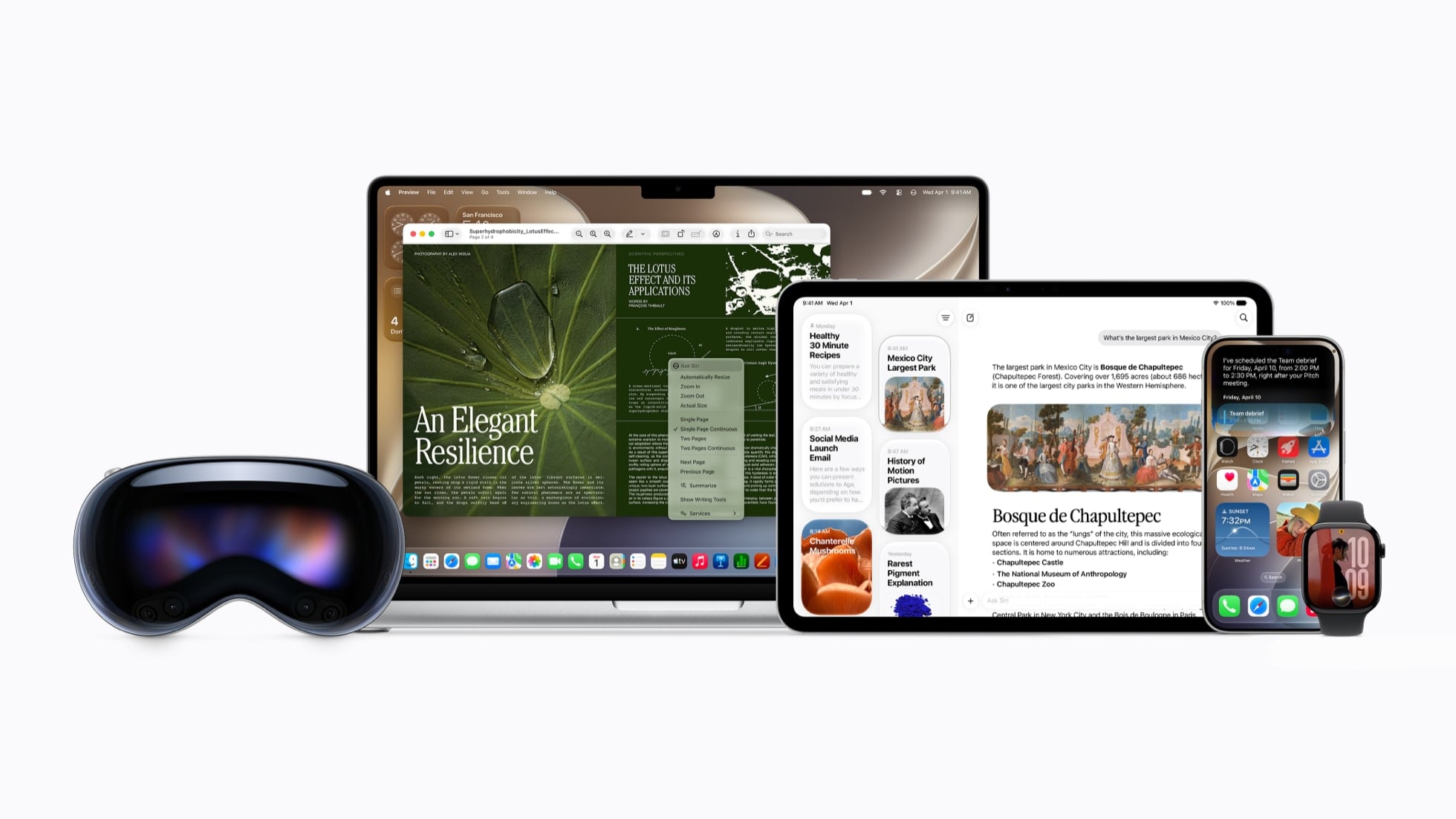
Three separate things ship in one release. Siri AI replaces the old assistant and gets an app of its own. Apple Intelligence moves further into Photos, Safari, Phone, Shortcuts and Passwords. A performance and design pass runs across the whole system, and it reaches iPhones far too old for any of the AI. Apple lists all three together on its iOS 27 page, so which group a feature falls into is what decides whether your iPhone gets it.
Feature browser: filter every iOS 27 feature by what it needs and by the app it lives in.
Roughly half of these features run on any iPhone that takes the update. The rest need Siri AI or Apple Intelligence hardware.
Every feature, its app and its AI tier
| Feature | App or area | What it does | Needs |
|---|---|---|---|
| Siri AI | Siri | Takes open-ended questions and holds natural back-and-forth conversations | Siri AI |
| Personal context | Siri | Finds a photo from years ago, a buried email or a saved note from a plain description | Siri AI |
| Actions in more apps | Siri | Edits a message you just sent, adds a song to a playlist, acts across Messages, Music, Reminders and more | Siri AI |
| World knowledge | Siri | References information online for detailed, current answers on almost any topic | Siri AI |
| Siri app | Siri | A dedicated app that gathers every conversation, pins the ones you want, and picks up on another device | Siri AI |
| Siri mode in Camera | Camera | Search, ask and act on whatever is in the viewfinder with one tap | Siri AI |
| Voice customization | Settings | Pick a Siri voice, then tune expressivity and pace | Siri AI |
| Write with Siri | Systemwide | Drafts from scratch or reacts to what you wrote, matching your style in Messages and Mail | Siri AI |
| Spatial Reframing | Photos | Moves the viewpoint, angle or zoom of a shot after it was taken | Apple Intelligence |
| Extend | Photos | Expands a photo past its original edges | Apple Intelligence |
| Clean Up | Photos | Removes larger objects than the old version could | Apple Intelligence |
| Image Playground | Image Playground | Creates and transforms images in most styles, photorealistic included | Apple Intelligence |
| Suggestions | Messages, Mail | One-tap actions pulled from the conversation, like adding a calendar event or finding a photo; the Messages half lands in a later update | Apple Intelligence |
| Call Context | Phone | Surfaces a confirmation code or booking detail from your apps while you call a business | Apple Intelligence |
| Tab groups | Safari | Sorts open tabs into topics automatically | Apple Intelligence |
| Notify Me | Safari | Watches a page for a price change or restock and alerts you | Apple Intelligence |
| Fix passwords with a tap | Passwords | Flags weak or compromised passwords and updates them for you | Apple Intelligence |
| Describe a shortcut | Shortcuts | Builds an automation across several apps out of one sentence | Apple Intelligence |
| Smarter Home | Home | Combines related activity notifications, describes camera footage before you watch, finds a clip by what happened | Apple Intelligence |
| Setup Assistant app picking | Screen Time | Parents choose which system apps a child starts with, then add more through Ask to Buy | |
| Ask to Browse | Safari | Kids request access to a new website and parents approve it in Messages | |
| Communication Safety | Messages, FaceTime | Already handles nudity, now steps in before gore or violence in shared images and video | |
| Time Allowances and Schedules | Screen Time | Per-category time limits with age-based guidance, plus which apps work on which days | |
| Redesigned parental controls | Settings | New layout with usage at a glance and one-tap changes in the moment | |
| Liquid Glass slider | Systemwide | Sets the look anywhere from ultraclear to fully tinted | |
| Design refinements | Systemwide | More uniform refraction, better contrast, sharper and more detailed app icons | |
| Faster performance | Systemwide | Quicker app launches, photo loading and AirDrop transfers | |
| Optimized CPU scheduler | System | Core scheduling change underneath the speed gains | |
| Smoother network transitions | Wi-Fi, cellular | Picks the better of Wi-Fi and cellular as you move | |
| Search in Mail | New ranking system puts the result you wanted on top | ||
| Accessibility upgrades | Accessibility | Richer VoiceOver image descriptions, Action button integration, auto-generated and translatable video captions, new Magnifier tools for low vision | |
| iCloud Shared Albums | Photos | Friends on Android or Windows can join and contribute on iCloud.com, with full-resolution sharing and new filters | |
| Perimenopause and menopause support | Health | Cycle Tracking notifies you when logged patterns suggest perimenopause, and tracks related symptoms | |
| Enhanced Flyover | Maps | Aerial imagery plus Visual Intelligence models render architectural fixtures and individual trees | |
| AirPods Custom EQ | AirPods settings | Adjust lows, mids and highs yourself | |
| 4K HomeKit Secure Video | Home | Supported cameras stream and record in 4K | |
| GymKit on iPhone | Fitness | Connects to treadmills, ellipticals, bikes and stair-steppers for live metrics, with heart rate from AirPods Pro 3 | |
| iPhone Handoff | Phone | Moves one phone number between two iPhones on a supported carrier |
Which iPhones get iOS 27, and which get the AI features
iOS 27 reaches back much further than the AI does. It installs on iPhone 11 and on iPhone SE from the 2nd generation onward. Those phones get the design and performance work and none of the assistant.
Apple Intelligence starts at iPhone 15 Pro and iPhone 15 Pro Max. The standard iPhone 15 and iPhone 15 Plus are not on that list, and every iPhone 16 model and later is. A third tier sits above it, named in a footnote: iPhone 18 Pro, iPhone 18 Pro Max, iPhone Duo, iPhone 17 Pro, iPhone 17 Pro Max and iPhone Air, written for iPad and Mac as M4 or M3 silicon with at least 12GB of unified memory. Apple attaches that footnote to Siri’s voice customization and to the new on-device Dictation model.
Compatibility checker: pick your iPhone to see whether it gets iOS 27, Apple Intelligence and Siri AI, and the features that need 12GB of memory.
The tiers nest. A phone in the 12GB group has everything in the two below it, and the iPhone 15 Pro pair stops at the middle one.
Three hardware tiers and the models in each
| Tier | iPhones |
|---|---|
| iOS 27 itself | iPhone Duo, iPhone 18 Pro Max, iPhone 18 Pro, iPhone 17 Pro Max, iPhone 17 Pro, iPhone Air, iPhone 17, iPhone 17e, iPhone 16 Pro Max, iPhone 16 Pro, iPhone 16 Plus, iPhone 16, iPhone 16e, iPhone 15 Pro Max, iPhone 15 Pro, iPhone 15 Plus, iPhone 15, iPhone 14 Pro Max, iPhone 14 Pro, iPhone 14 Plus, iPhone 14, iPhone 13 Pro Max, iPhone 13 Pro, iPhone 13, iPhone 13 mini, iPhone 12 Pro Max, iPhone 12 Pro, iPhone 12, iPhone 12 mini, iPhone 11 Pro Max, iPhone 11 Pro, iPhone 11, iPhone SE (2nd generation and later) |
| Apple Intelligence and Siri AI | iPhone 15 Pro, iPhone 15 Pro Max, iPhone 16e, iPhone 16, iPhone 16 Plus, iPhone 16 Pro, iPhone 16 Pro Max, iPhone 17, iPhone 17e, iPhone 17 Pro, iPhone 17 Pro Max, iPhone Air, iPhone 18 Pro, iPhone 18 Pro Max, iPhone Duo |
| The 12GB memory tier | iPhone 18 Pro, iPhone 18 Pro Max, iPhone Duo, iPhone 17 Pro, iPhone 17 Pro Max, iPhone Air |
Two requirements sit under all of it. Apple Intelligence downloads its on-device models after you update, and that needs 7GB of storage on the device. Your device language and your Siri language have to be set to the same supported language, and Apple says changing the Siri language may make Apple Intelligence unavailable until the new one finishes downloading and the two match.
Siri AI: what the new Siri actually does
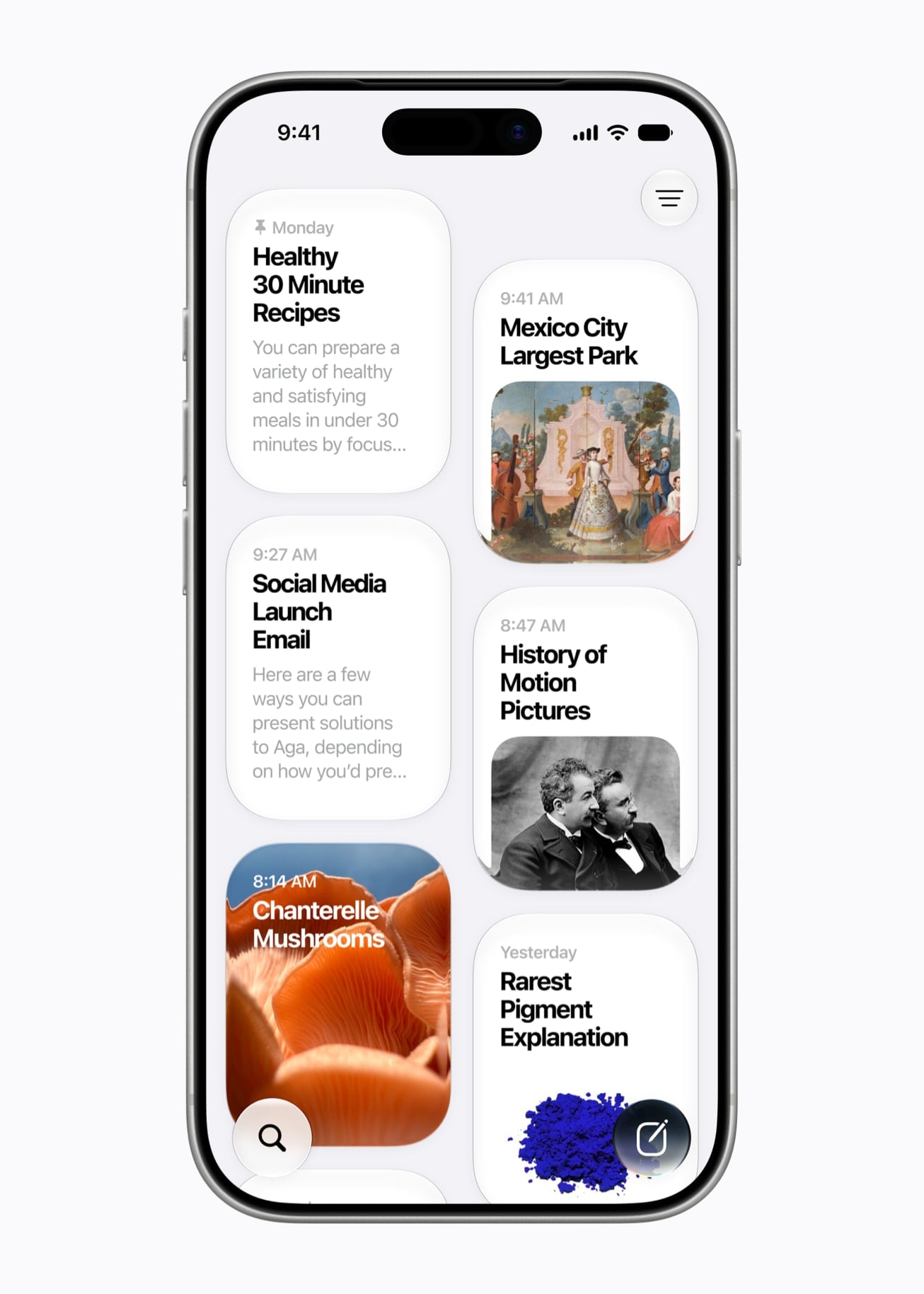
Siri AI is built around conversation instead of commands. You ask open-ended questions, brainstorm out loud, and hold a back-and-forth instead of restarting with every request. Apple ships it as a beta, and names it first among the features that rely on server-side models and carry daily usage limits.
Personal context works from a description rather than a filename, so a photo from years ago or a note you saved comes back without you remembering what you called it. World knowledge runs the other way, with Siri AI referencing information online for answers on virtually any topic, from important facts to recipes and restaurant recommendations. Actions happen inside apps like Messages, Music and Reminders, based on what you are doing at that moment.
The Siri app keeps the conversations. They sync between devices, so a question asked on iPhone is waiting on iPad, and you can pin the ones you keep coming back to. Siri mode in Camera puts the same assistant behind the viewfinder, and Apple lists it as iPhone only.
Write with Siri works virtually anywhere you type, and in Messages and Mail it matches your writing style, punctuation and tone. Expressive voices are narrower than the rest of Siri AI, at English (United Kingdom) and English (United States) only. Dictation runs on a new on-device model and is available in English.
Languages on each device today and in October
| Where it works | Languages now | Coming next |
|---|---|---|
| iPhone, iOS 27 | English | French, Japanese, Korean, Portuguese and Spanish in October |
| iPad, iPadOS 27 | English | French, Japanese, Korean, Portuguese and Spanish in October |
| Mac, macOS 27 | English | French, Japanese, Korean, Portuguese and Spanish in October |
| Apple Watch, watchOS 27 | English, in its regional variants | French, Japanese, Korean, Portuguese and Spanish in October |
| Apple Vision Pro, visionOS 27 | English | French, Japanese, Korean, Portuguese and Spanish in October |
Siri AI will not be initially available in the EU on iOS, iPadOS and watchOS, and it is not available in China mainland. Mac and Apple Vision Pro users in the EU can reach it with the device set to a supported language. There is an age floor as well: Siri AI is not available to users under 13.
The fine print on Apple Intelligence usage limits
Some of Apple Intelligence is metered. Features that rely on server-side models carry daily usage limits, and Apple names Siri AI, the intelligent photo editing tools, Image Playground and the AFM 3 Cloud models in Shortcuts as examples rather than as the full list. The limits themselves move: Apple says they vary by feature, request complexity, system demand and system policies.
Apple’s footnote on what comes next reads: “Expanded access to such features will be available for a fee in the future.” No price and no date are attached to it.
The Apple Intelligence Usage Terms, published September 9, 2026, put the rest in legal form. Apple reserves the right to change which features are limited, and the limits themselves, at any time. Reach a limit and that feature may become unavailable, or work with reduced functionality, until the limit resets. Excessive, abusive, automated, fraudulent, illegal or otherwise unreasonable use may be restricted, throttled, suspended or given extra limits. Some features may carry age restrictions, and those may vary by region.
Apple Intelligence beyond Siri
Five of the features here carry Apple’s “usage limits may apply” note: Spatial Reframing, Extend, Clean Up, Image Playground and Describe a shortcut. That note is the daily server-side metering. Clean Up also has its own region rule, listed as available worldwide except in China mainland.
Not all of this lands on September 14. Suggestions ships in English, and the Messages half of it is coming in a future software update. Live Translation and Image Wand have already shipped and carry over.
What each tool does, app by app
| Feature | App | What you get |
|---|---|---|
| Clean Up | Photos | Removes bigger unwanted objects with more realistic infill |
| Extend | Photos | Widens the frame past the original crop |
| Spatial Reframing | Photos | Re-aims the shot after it was taken |
| Image Playground | Image Playground | Images in most styles, photorealistic included, from a description or by touch |
| Genmoji | Systemwide | Custom emoji built to match the moment |
| Image Wand | Notes | Turns a rough sketch into a finished image |
| Describe a shortcut | Shortcuts | Builds a multi-app automation from one sentence |
| Notify Me | Safari | Alerts you to a price change or a restock on a watched page |
| Call Context | Phone | Brings up the relevant code or reservation while you call a business |
| Live Translation | Messages, FaceTime, Phone, AirPods | Translated texts, live captions and spoken translation on calls |
| Proofread as you type | Systemwide | Grammar and spelling checks with suggestions wherever you type |
| Describe a calendar event | Calendar | Adds or edits an event from a description, including changing one you already made |
| Order Tracking in Wallet | Wallet | Order tracking for your purchases, kept inside Wallet |
Most of these features share one list of 35 language and region combinations. Order Tracking in Wallet is the narrowest of them, at English (United Kingdom) and English (United States) only. Apple keeps the full breakdown on its iOS feature availability page.
Availability checker: pick your language and region to see which Apple Intelligence features you actually get.
Liquid Glass and the everyday changes
The Liquid Glass work is mostly readability. Refraction is more uniform, contrast is improved, and app icons are sharper and more detailed. Apple also names an optimized CPU scheduler among the changes at the core of the system.
Ten updates, from Safari tabs to GymKit
| Change | What it does |
|---|---|
| Liquid Glass slider | Sets the material from ultraclear to fully tinted, systemwide |
| Safari tab groups | Groups your open tabs into topics automatically |
| Passwords fix-with-a-tap | Flags weak or compromised passwords and updates them on your behalf |
| iCloud Shared Albums | Friends on Android or Windows join and contribute on iCloud.com, with full-resolution sharing, new filters and reactions |
| Search in Mail | A new ranking system surfaces the message you wanted first |
| Enhanced Flyover in Maps | Aerial imagery plus Visual Intelligence models render fixtures and individual trees in sharp detail |
| Smarter Home | Related activity notifications merge, camera footage gets described before you watch, and clips are searchable by what happened |
| AirPods Custom EQ | Lows, mids and highs, adjustable in AirPods settings |
| GymKit on iPhone | Live metrics from treadmills, ellipticals, bikes and stair-steppers, with heart rate from AirPods Pro 3 |
| Accessibility | Richer VoiceOver image descriptions, Action button integration, automatic synced captions for any video with translation, and new Magnifier tools for low vision |
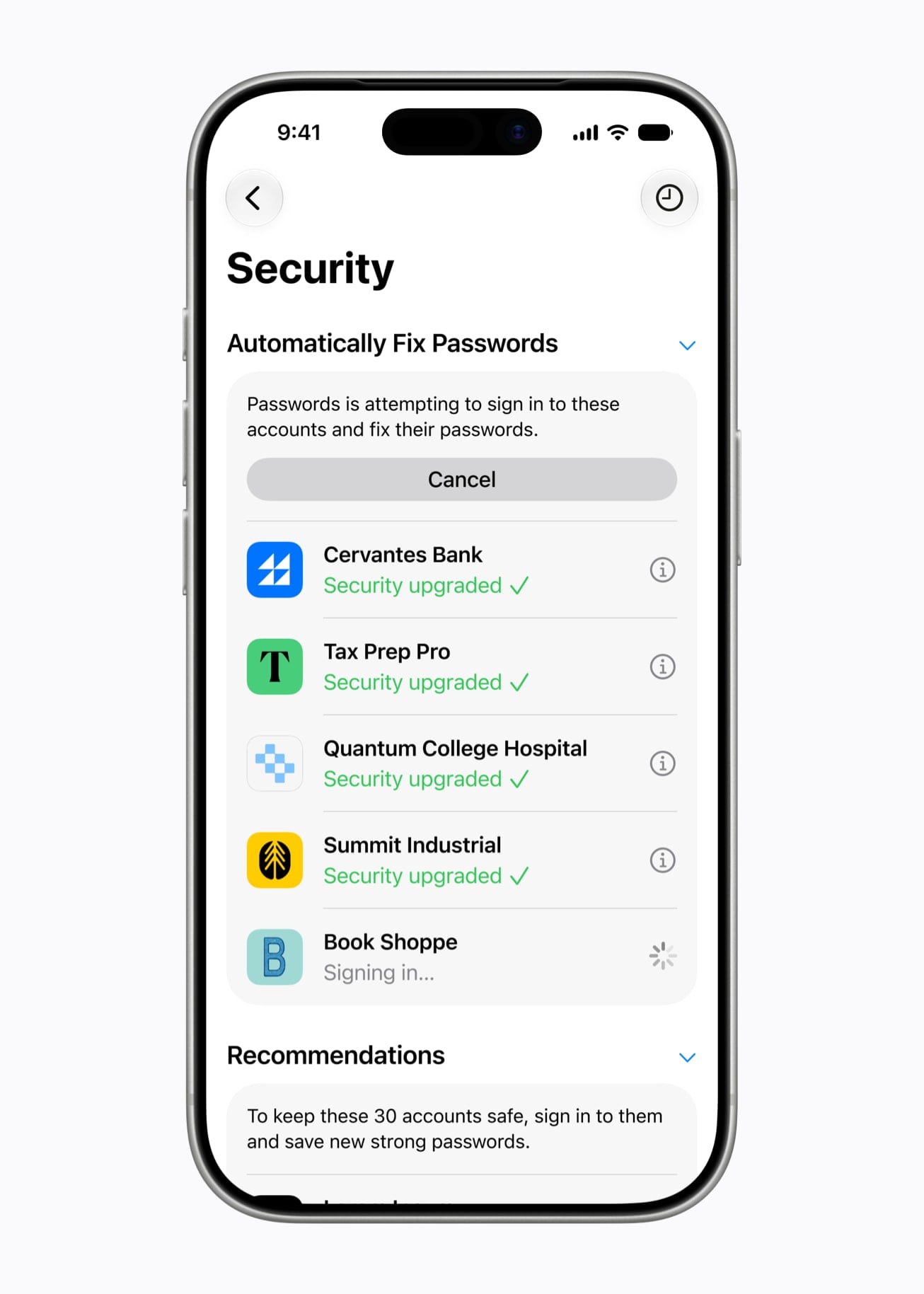
Two of those come with conditions. The Passwords fix is coming in a future software update rather than on September 14. The Home app’s camera descriptions and clip search need a home hub, Apple Intelligence turned on in the Home app, and an eligible iCloud+ plan.
Faster, and how Apple measured it
Apple’s three speed gains are all up to figures, from tests it ran in July and August 2026. Each one compared iOS 26.6 against prerelease iOS 27, on a different iPhone.
Speed claims: Apple’s three figures for iOS 27, with the iPhone each one was measured on.
Only the AirDrop figure involved a second device. The other two measured one iPhone against itself on the older release.
The three claims, their iPhones and conditions
| Claim | Tested on | Test conditions |
|---|---|---|
| App launches up to 30 percent faster | iPhone 11 Pro Max | August 2026, iOS 26.6 against prerelease iOS 27, measured after many cycles of device usage |
| New photos load up to 70 percent faster | iPhone 15 | July 2026, iOS 26.6 against prerelease iOS 27, a 50,000-asset Photos library plus new shots from the Camera app |
| AirDrop transfers up to 80 percent faster | iPhone 16 Plus | July 2026, iOS 26.6 against prerelease iOS 27, multiple photos totaling 30MB sent to a nearby contact with no Wi-Fi network attached |
The same caveat sits under all three: performance varies with configuration, settings, content, usage, software versions and environmental conditions. They are ceilings, not averages.
iPhone Handoff, Wi-Fi switching and calls
iPhone Handoff is a carrier feature as much as a software one. It moves a single phone number back and forth between two iPhones, and both ends need a supported carrier. At launch that means T-Mobile in the US and Telekom Germany in Germany.
Network selection changed underneath. iPhone now picks the best available Wi-Fi or cellular connection on its own, and Apple’s two examples are getting directions as you leave home and taking a FaceTime call as you step off a plane.
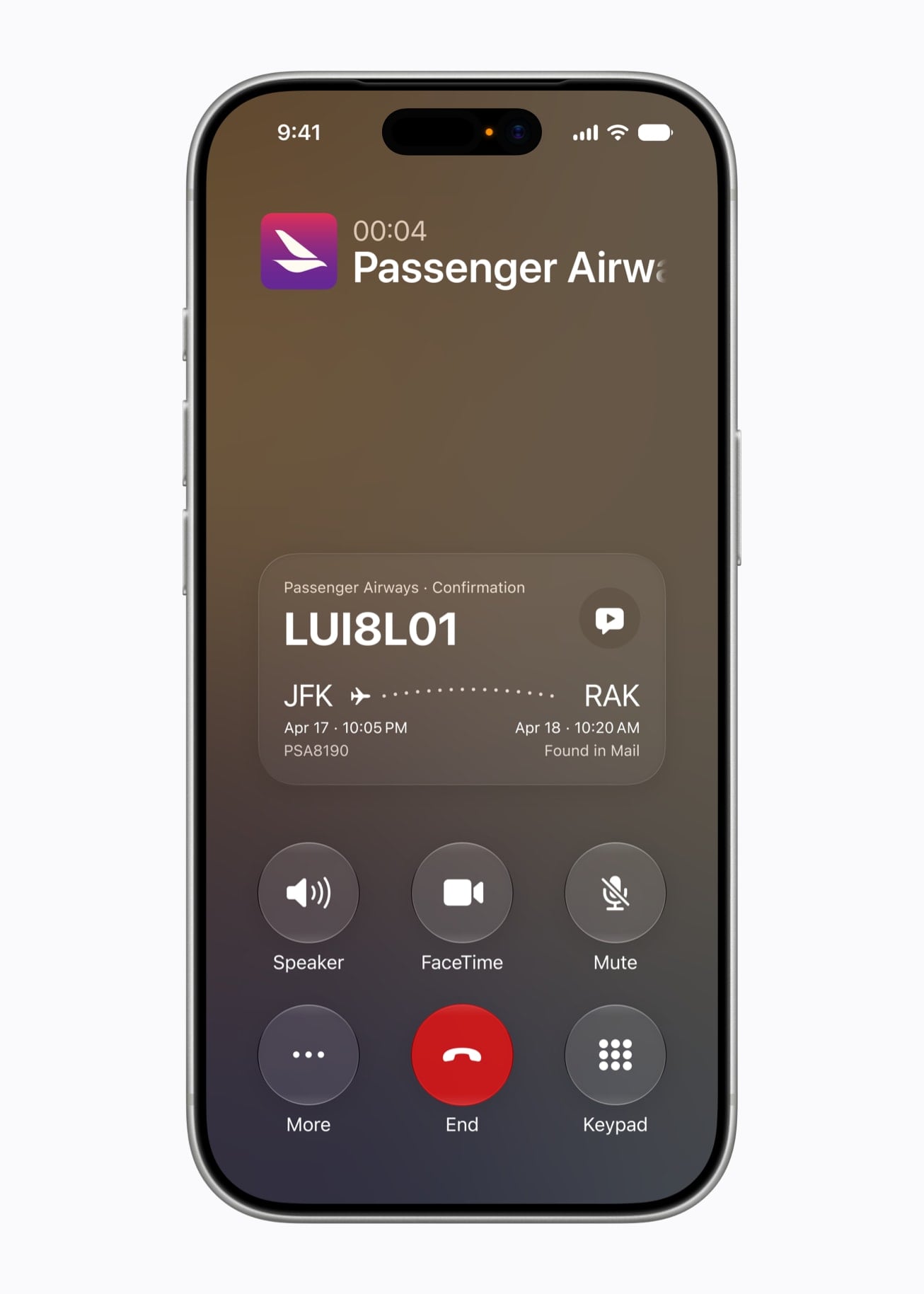
Call Context needs Apple Intelligence, and Apple says it runs entirely on device, so nothing is shared with Apple or anyone else. It looks at who you are calling rather than what you are saying, then pulls up the confirmation code or reservation number sitting in another app.
Screen Time and the new child safety controls
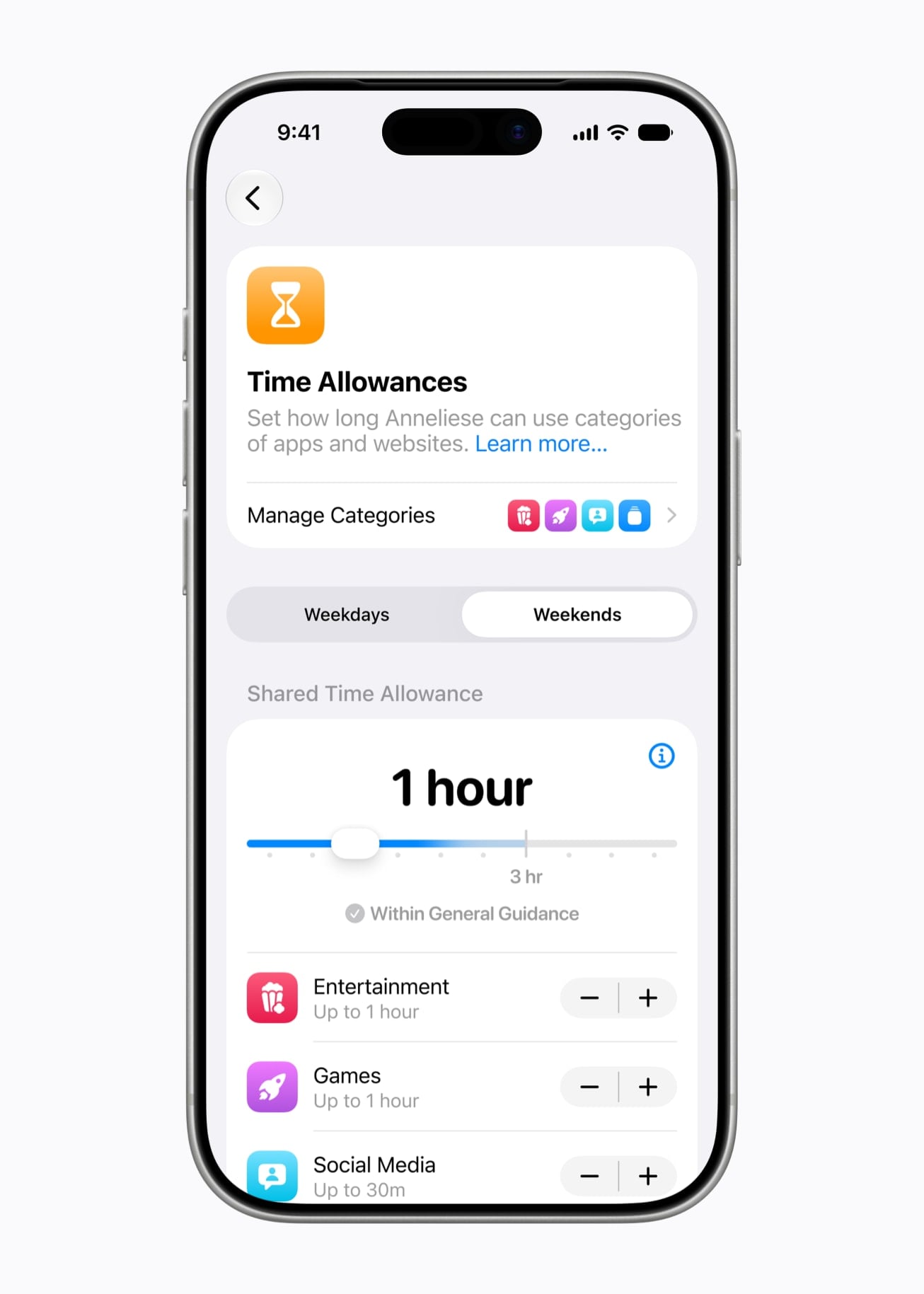
Parental controls in Settings have an all-new design. Parents get an at-a-glance view of how a child has been using their iPhone, and can adjust access in the moment with a tap.
Time Allowances sets limits per category, across Entertainment, Games and Social Media. Apple supplies age-based guidance for those limits, developed with clinical and child development experts, and parents can adjust them. Schedules decides which apps are available at which times or on which days of the week.
In Setup Assistant, parents pick which system apps a child can use, choosing a few essentials, a recommended set or a specific list, and Ask to Buy adds more over time. Ask to Browse makes a child request permission for a new website, and the request arrives in Messages so a parent can look at it before approving. It works in Safari and other WebKit browsers on iOS 27, iPadOS 27 and macOS 27 once Screen Time has been updated.
Communication Safety already protects children from viewing or sharing nudity in Messages, FaceTime and elsewhere. It now also intervenes before a child sees gore or violence in shared images and videos.
Apple previewed this set on June 8, 2026. A Child Account is required for children under 13 and available for children up to 18, and Apple is working with the American Academy of Pediatrics to adapt its Family Media Plan into a guide parents can reference. Developers got matching tools, including a Declared Age Range API that shares an age band without sharing a child’s birthday.
Health app: what arrives later this year
The Health app redesign does not land on September 14. It arrives later this year on Apple Intelligence-enabled iPhone and iPad models, starting in US English with more languages to follow, and some of it is iPhone only. One Health change does ship on day one: Cycle Tracking adds perimenopause and menopause support, and users aged 40 and over get a notification when their logged cycle patterns suggest perimenopause.
Seven new features, their devices and dates
| Feature | What it does | Who gets it and when |
|---|---|---|
| Readiness score | Reads recent activity, vitals and sleep score, then returns one score from 0 to 10 each day with a recommendation: Recover, Pace Yourself, Ready or Go For It. It updates through the day after an intense workout or a shift in daytime vitals. | Apple Watch Series 12 and Apple Watch Ultra 4, on watchOS 27 from September 14 |
| Health Age | Shows how your metrics track against your chronological age using VO2 max, resting heart rate, sleep and HRV. Add lab values like A1c and LDL to sharpen the picture. | Inside the Longevity tab, later this year; requires an Apple Watch |
| Longevity tab | Reads your longitudinal data across heart health, sleep, mental wellbeing, movement health, metabolic health, hearing and nutrition. | iPhone and iPad, later this year |
| Insights tab and For You | Summarizes the day across heart, sleep, readiness, fitness, vitals and cycle data. For You adds personal recommendations and articles, such as fixing a wind-down routine after a run of late nights. | iPhone and iPad, later this year |
| Quest lab panel | Schedule and buy a panel covering more than 50 key biomarkers straight from the Health app. | $119, at roughly 2,000 Quest Diagnostics locations in the US, later this year |
| VO2 max and mobility assessments | On-demand at-home tests for flexibility, strength, balance, movement mechanics and VO2 max, run with the iPhone camera and Apple Watch and giving real-time audio and visual feedback. Everything happens on device and no video is recorded, stored or shared. | iPhone, later this year; the VO2 max test needs Apple Watch, AirPods Pro 3 or a third-party heart rate sensor |
| Expanded GymKit | Syncs heart rate from AirPods Pro 3 through iPhone to compatible gym equipment, including treadmills and indoor bikes. | iPhone, with iOS 27 on September 14 |
Those notifications rest only on your own logged cycle history, and Apple says they are not meant to replace traditional methods of diagnosis, monitoring or treatment. Cycle Tracking should not be used for birth control or to diagnose a health condition.
Tap-to-expand cards for the seven new Health features and when each one arrives.
watchOS 27 ships on September 14 for Apple Watch Series 9 or later, Apple Watch SE 3 and Apple Watch Ultra 2 or later, and it needs an iPhone 11 or later, or an iPhone SE 3, running iOS 27. The higher-frequency heart rate and HRV sensing that readiness is built on is limited to Apple Watch Series 12 and Apple Watch Ultra 4.
iOS 27 on iPhone Duo
iOS 27 is tailored for iPhone Duo. Lock Screen controls, the Dock on the Home Screen and in-app controls sit on the side to maximize vertical space for content, and the open phone shows two Home Screen pages with Today View scrolling vertically on the left. The Dynamic Island is redesigned to fit vertically on the side of the outer and inner displays, and expands to show Live Activities and alerts. Content reacts as the phone folds, reorients when it is turned to the side, and switches to the appropriate display when it is flipped over. Our iPhone Duo hub covers the hardware all of that is built around.
FAQs
When exactly does iOS 27 come out?
Monday, September 14, 2026. The new Apple Intelligence features arrive on the same day.
Is my iPhone supported?
If it is an iPhone 11 or newer, or an iPhone SE (2nd generation and later), yes. Apple Intelligence also reaches Apple Watch Series 9 and later, Apple Watch Ultra 2 and later and Apple Watch SE 3, but only when they are paired with an Apple Intelligence-enabled iPhone nearby.
Does Apple Intelligence cost money?
Apple names no price for it in iOS 27. The Usage Terms add that the features may require compatible devices, compatible operating systems, internet access and certain software, and that fees may apply to those.
Is Siri AI available in my country?
Not everywhere. Apple says Apple Intelligence features do not currently work on supported devices bought in China mainland, wherever you take them, and Siri AI is held back in the EU on iPhone, iPad and Apple Watch. Everywhere else it is English first.
How much storage do I need?
7GB on the device, for the on-device models. Apple Watch is the exception: Apple says the space is not required for it.
Can I turn Apple Intelligence off?
Yes. The controls sit in Settings under Apple Intelligence & Siri. Apple also reserves the right to change, suspend, remove or disable access to any part of Apple Intelligence at any time and without notice.
Related guides


Leave a Reply