

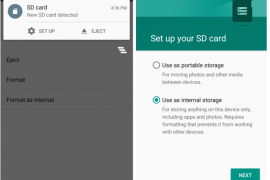
One of the most beautiful feature on Android 6.0 Marshmallow is that you can use the external SD card as internal storage on your device. Meaning the system will secure and adopt the SD card as its own and hence lift all restrictions as to access from apps, and most importantly, it’ll completely shift the app storage burden on internal storage to the SD card.
This also makes your SD card secure and ties it to your device only. Once you format your external SD card as internal storage on Marshmallow, it can only be used on the same device then. To use it on other devices, a format will be required, which ensures the safety of your data on the SD card.
And for super budget devices like Android One phones, which come with internal storage as low as 4GB, it solves the low storage issue as it allows the system to install apps on SD card directly (once adopted as internal) with complete data and obb files.
Of course, this feature has no use for devices with no SD card support (like Nexuses, Galaxy S6, Note 5, Moto X, etc.), but Android One and many other devices with SD card support will find this very useful to secure their SD card data and extend internal storage capacity.
How to turn external SD card into internal storage on Marshmallow
- Go to device “Settings” > select “Storage”.
- Select your SD Card > tap the three-dot menu on top-right corner > and select “Settings” from there.
- Select “Format as internal” > and then “Erase & Format” on the next screen.
- Your SD Card will now be formatted as internal storage.
- Reboot phone.
└ This is very important, otherwise you may end up frustrated with issues like MTP not showing SD card, some apps not working properly, etc.
That’s all. Enjoy your extended internal storage and freedom from low storage space issue.
Happy Androiding!


247 responses to “How to Use SD Card as Internal Storage on Marshmallow”
What is there no way to change the default storage for photos, downloads, music & videos to sd as there was on the previous (not 6.0) versions of my htc one m8? I have over 45 gb already on my sd, now I have to find something to back my sd up & format it then reinstall? The apps do not move so the actual applications will be internal but the contents will be on my sd??? Doesn’t make sense… This marshmallow update has been a nightmare & looks like a waste of time as well, it better be able to get downgraded cause I’m done w it unless there is a way to go into the phone and change where it downloads n stores to without formatting etc!!!
Joke
What is there no way to change the default storage for photos, downloads, music & videos to sd as there was on the previous (not 6.0) versions of my htc one m8? I have over 45 gb already on my sd, now I have to find something to back my sd up & format it then reinstall? The apps do not move so the actual applications will be internal but the contents will be on my sd??? Doesn’t make sense… This marshmallow update has been a nightmare & looks like a waste of time as well, it better be able to get downgraded cause I’m done w it unless there is a way to go into the phone and change where it downloads n stores to without formatting etc!!!
Joke
What is there no way to change the default storage for photos, downloads, music & videos to sd as there was on the previous (not 6.0) versions of my htc one m8? I have over 45 gb already on my sd, now I have to find something to back my sd up & format it then reinstall? The apps do not move so the actual applications will be internal but the contents will be on my sd??? Doesn’t make sense… This marshmallow update has been a nightmare & looks like a waste of time as well, it better be able to get downgraded cause I’m done w it unless there is a way to go into the phone and change where it downloads n stores to without formatting etc!!!
Joke
i tried twice, it STUCKS at 20% !!! . i reboot my phone, sd card is corrupted, i had to install everything from the rom to the kernel again with TMW recovery . >:c what the heck?
i tried twice, it STUCKS at 20% !!! . i reboot my phone, sd card is corrupted, i had to install everything from the rom to the kernel again with TMW recovery . >:c what the heck?
i tried twice, it STUCKS at 20% !!! . i reboot my phone, sd card is corrupted, i had to install everything from the rom to the kernel again with TMW recovery . >:c what the heck?
I also change sd card as intenal storage but there is no response
I also change sd card as intenal storage but there is no response
I also change sd card as intenal storage but there is no response