

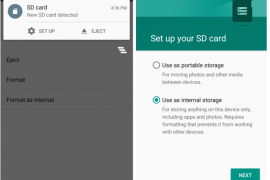
One of the most beautiful feature on Android 6.0 Marshmallow is that you can use the external SD card as internal storage on your device. Meaning the system will secure and adopt the SD card as its own and hence lift all restrictions as to access from apps, and most importantly, it’ll completely shift the app storage burden on internal storage to the SD card.
This also makes your SD card secure and ties it to your device only. Once you format your external SD card as internal storage on Marshmallow, it can only be used on the same device then. To use it on other devices, a format will be required, which ensures the safety of your data on the SD card.
And for super budget devices like Android One phones, which come with internal storage as low as 4GB, it solves the low storage issue as it allows the system to install apps on SD card directly (once adopted as internal) with complete data and obb files.
Of course, this feature has no use for devices with no SD card support (like Nexuses, Galaxy S6, Note 5, Moto X, etc.), but Android One and many other devices with SD card support will find this very useful to secure their SD card data and extend internal storage capacity.
How to turn external SD card into internal storage on Marshmallow
- Go to device “Settings” > select “Storage”.
- Select your SD Card > tap the three-dot menu on top-right corner > and select “Settings” from there.
- Select “Format as internal” > and then “Erase & Format” on the next screen.
- Your SD Card will now be formatted as internal storage.
- Reboot phone.
└ This is very important, otherwise you may end up frustrated with issues like MTP not showing SD card, some apps not working properly, etc.
That’s all. Enjoy your extended internal storage and freedom from low storage space issue.
Happy Androiding!


247 responses to “How to Use SD Card as Internal Storage on Marshmallow”
I accidentally my phone is broken or not working condition then what to do retrieve data from SD card ?
Hi! You must do this. Connect you SD card into you PC. Run any Partition Manager like Easeus Partition Manager and you will see you SD card with multiples partition. All that you must do is delete all partitions and create a new one FAT32 or any file System that you like and so you SD card is normal.
Hi… sd card is not detected at all.
what should i be doing in that case
I tried this and was having problems on all file systems (fat32 exfat); but finally, what finally worked for me was deleting all partitions on card and putting it in the cwm 13 Marshmallow totally UN-partitioned. The erase and format finally worked this way and this way only for me. I know it is supposed to go through (format as internal) without problem using a file system but for me it did not. If anyone else is having trouble formatting as internal I would suggest to try the UN-partitioned method.
Yes, after formatted as internal storage my sd card showing corrupted, and its its showing tat my sd card dont have enough speed to perform as internal memory. But am using SanDisk 32gb clads 10
Can u help me on this issue??
Hey bro!!
I unpartitioned my sd card and created a primary partitioned in it. Then, when i tried to use the it( my sd card) as internal storage in my android marshmallow but it gave an error that my sd card is too slow( it is an ultra SDHC class 10 32gb card with reading speed upto 48 MB/s, i’ve personally verified it) and then asked again if i should procced. When i gave a yes, it showed that there wasn’t enough memory. Please give me your opinion for this. I believe it is a bug in the android, which is btw CM 13. It is unlikely that its a fault with the sd card.
So I was using my memory card as internal storage on my lenovo k4. My phone had some issues and gave it to the service center and they formatted my phone. Now my SD card does not work on the phone anymore, isn’t reading on the laptop. How can I recover my data?
I accidentally my phone is broken or not working condition then what to do retrieve data from SD card ?
Hi! You must do this. Connect you SD card into you PC. Run any Partition Manager like Easeus Partition Manager and you will see you SD card with multiples partition. All that you must do is delete all partitions and create a new one FAT32 or any file System that you like and so you SD card is normal.
Hi… sd card is not detected at all.
what should i be doing in that case
I tried this and was having problems on all file systems (fat32 exfat); but finally, what finally worked for me was deleting all partitions on card and putting it in the cwm 13 Marshmallow totally UN-partitioned. The erase and format finally worked this way and this way only for me. I know it is supposed to go through (format as internal) without problem using a file system but for me it did not. If anyone else is having trouble formatting as internal I would suggest to try the UN-partitioned method.
Yes, after formatted as internal storage my sd card showing corrupted, and its its showing tat my sd card dont have enough speed to perform as internal memory. But am using SanDisk 32gb clads 10
Can u help me on this issue??
Hey bro!!
I unpartitioned my sd card and created a primary partitioned in it. Then, when i tried to use the it( my sd card) as internal storage in my android marshmallow but it gave an error that my sd card is too slow( it is an ultra SDHC class 10 32gb card with reading speed upto 48 MB/s, i’ve personally verified it) and then asked again if i should procced. When i gave a yes, it showed that there wasn’t enough memory. Please give me your opinion for this. I believe it is a bug in the android, which is btw CM 13. It is unlikely that its a fault with the sd card.
So I was using my memory card as internal storage on my lenovo k4. My phone had some issues and gave it to the service center and they formatted my phone. Now my SD card does not work on the phone anymore, isn’t reading on the laptop. How can I recover my data?
I already have some apps installed and other media stored in SD card. Do they still be intact or do i have to take a backup and then use “Format as Internal” option, bcoz, the label itself sounds like it will remove all my existing data and keep it fresh to use as internal memory. Please clarify on this. Thanks in advance.
Yes, this will Format your SD card. Make sure you take a backup.
For the apps, move them back to internal storage. As for media, back it up, either to internal, or transferring it to your PC. It does wipe the card.
it will also encrypt the card so that it can only be used by that device
I already have some apps installed and other media stored in SD card. Do they still be intact or do i have to take a backup and then use “Format as Internal” option, bcoz, the label itself sounds like it will remove all my existing data and keep it fresh to use as internal memory. Please clarify on this. Thanks in advance.
Yes, this will Format your SD card. Make sure you take a backup.
For the apps, move them back to internal storage. As for media, back it up, either to internal, or transferring it to your PC. It does wipe the card.
it will also encrypt the card so that it can only be used by that device
How can I transfer files to this SD card after doing the process. I’m unable to copy files to it. Please help.
Did you reboot phone after formatting SD card as Internal?
Yes he did.
once you set it up as internal storage it will not be able to be used as a normal sd card
I just updated to 6.0 and I noticed that when I plug in to pc via USB cable at home my pc doesn’t read the device at all (Win 10) – when I plug in at work (win 7) it recognizes both internal and SD drives, however, when I open the SD drive I can’t see the files but I know they are there. The internal drive opens and I can see my files and folders. That being said, I was successful at transferring files from my work PC to the internal storage then when I disconnect the USB I can move the file to the SD card via file folder app (ES file Manager). hope this helps
um so just read on win 7. if you can help microSD who always ask in format?
I’ve used various ways but all failed
Hello,
Recently I’ve upgraded my android one phone to Android marshmallow from lollipop. It was alright but I’m facing a problem when I’m trying to capture a photo with my phone camera.
A screen is popping up with the message “SD card unmounted or not present.” Literally I can’t use my gallery at all.
I’m feeling very disappointed with my phone now.I’m not a developer just a normal smartphone user. I’ve tried all option by googling about the problem. Marshmallow sucks. I’ve already damaged two of my memory cards by marshmallow. What can I do now?
Go into the camera options and change the file save location back to internal storage. The phone doesnt know it is the same sd because it is part of the internal storage now.
How can I transfer files to this SD card after doing the process. I’m unable to copy files to it. Please help.
Did you reboot phone after formatting SD card as Internal?
Yes he did.
once you set it up as internal storage it will not be able to be used as a normal sd card
I just updated to 6.0 and I noticed that when I plug in to pc via USB cable at home my pc doesn’t read the device at all (Win 10) – when I plug in at work (win 7) it recognizes both internal and SD drives, however, when I open the SD drive I can’t see the files but I know they are there. The internal drive opens and I can see my files and folders. That being said, I was successful at transferring files from my work PC to the internal storage then when I disconnect the USB I can move the file to the SD card via file folder app (ES file Manager). hope this helps
um so just read on win 7. if you can help microSD who always ask in format?
I’ve used various ways but all failed
Hello,
Recently I’ve upgraded my android one phone to Android marshmallow from lollipop. It was alright but I’m facing a problem when I’m trying to capture a photo with my phone camera.
A screen is popping up with the message “SD card unmounted or not present.” Literally I can’t use my gallery at all.
I’m feeling very disappointed with my phone now.I’m not a developer just a normal smartphone user. I’ve tried all option by googling about the problem. Marshmallow sucks. I’ve already damaged two of my memory cards by marshmallow. What can I do now?
Go into the camera options and change the file save location back to internal storage. The phone doesnt know it is the same sd because it is part of the internal storage now.
What if i take my sd card out will the phone still work if we switch internal storage to sd card
What if i take my sd card out will the phone still work if we switch internal storage to sd card
Hey buddy, i want to know the reason that my android one is unable to encrypt 32 gb samsung sd card in marshmallow. While 8 gb san disk card is supporting as internal storage. When i encrypt 32 gb, it leaves the process in middle and shows the sd card is corrupted. But it is working fine in any other device.
I also have a toshiba 32gb sd card and my phone doesnt encrypt my sd card. Its completely fine when you use it as portable storage but I need more internal storage.
https://goo.gl/photos/JYVQBys63f4JgF6N9h ttps://goo.gl/photos/j1svF9CpmrKi3okA7 https://goo.gl/photos/H3ugPyvskW65rthD9 this 3 pictures happens when i format as internal. Is it working for me or not?
Hey buddy, i want to know the reason that my android one is unable to encrypt 32 gb samsung sd card in marshmallow. While 8 gb san disk card is supporting as internal storage. When i encrypt 32 gb, it leaves the process in middle and shows the sd card is corrupted. But it is working fine in any other device.
I also have a toshiba 32gb sd card and my phone doesnt encrypt my sd card. Its completely fine when you use it as portable storage but I need more internal storage.
https://goo.gl/photos/JYVQBys63f4JgF6N9h ttps://goo.gl/photos/j1svF9CpmrKi3okA7 https://goo.gl/photos/H3ugPyvskW65rthD9 this 3 pictures happens when i format as internal. Is it working for me or not?
mx player is not working after my upgrade to 6.0….
mx player is not working after my upgrade to 6.0….
I was happy to see the update but now since I formatted the SD card as Internal storage and rebooted my phone, my camera app does not work and says “insert an SD card before using Camera”. Anything that i try to download in whatsapp says the same. Anything i try to transfer over bluetooth gets denied stating “No SD card”. I am pretty confused as to what I need to change in my settings to make sure the default storage is taken as the internal storage as now even the SD card is considered to be internal storage. I tried doing this vice versa, formatting the SD card as portable device and yet the same issue. I am using Android One for Sparkle V.
Please help.
Did you reboot phone after format?
I have the same issue. In the native camera app I am unable to go to any menu options either (yo see if I can change default storage). Even whatsapp asks for ext sdcard when I try to download a media file. I’ve turned off and on the phone several times but it didn’t help. Also tried to eject the sdcard safely (from android options) and mount it again but didn’t make any difference. Please help
I was happy to see the update but now since I formatted the SD card as Internal storage and rebooted my phone, my camera app does not work and says “insert an SD card before using Camera”. Anything that i try to download in whatsapp says the same. Anything i try to transfer over bluetooth gets denied stating “No SD card”. I am pretty confused as to what I need to change in my settings to make sure the default storage is taken as the internal storage as now even the SD card is considered to be internal storage. I tried doing this vice versa, formatting the SD card as portable device and yet the same issue. I am using Android One for Sparkle V.
Please help.
Did you reboot phone after format?
I have the same issue. In the native camera app I am unable to go to any menu options either (yo see if I can change default storage). Even whatsapp asks for ext sdcard when I try to download a media file. I’ve turned off and on the phone several times but it didn’t help. Also tried to eject the sdcard safely (from android options) and mount it again but didn’t make any difference. Please help
How do you reboot androidone?
If I long click on Power button, it shows “Power off” option only.
Powering off IS rebooting
How do you reboot androidone?
If I long click on Power button, it shows “Power off” option only.
Powering off IS rebooting
Hello! I tried adopting my SD card as an internal memory in my android one device. The problem now is that I can no longer access my internal storage. How can I possibly get access to my internal through my computer? Please reply. Thanks!
Unfortunately, you can’t. Access to internal storage is restricted after the process. If you opted for moving all of your apps, you’ll at least be able to access the SD card.
Hello! I tried adopting my SD card as an internal memory in my android one device. The problem now is that I can no longer access my internal storage. How can I possibly get access to my internal through my computer? Please reply. Thanks!
Unfortunately, you can’t. Access to internal storage is restricted after the process. If you opted for moving all of your apps, you’ll at least be able to access the SD card.
I have android one (spice uno) recently update to Marshmallow (android 6) adopting my SD card (32 GB) as an internal memory in my android one device. The problem now is that when ever I am switch off the phone then switch on the phone it showing boot logo only. After removing SD card, the phone is working. Even after inserting SD card and formatting as internal memory it will work but when the switched off and on again the phone hangup. without switching off the phone the internal memory (SD card) works. How I over come the issues. I use the scandisk 32 gb class 4 memory card. It is working, but while turning on the phone it will hang. Even after formatting power off and on the same issue I have faced. please reply
I have android one (spice uno) recently update to Marshmallow (android 6) adopting my SD card (32 GB) as an internal memory in my android one device. The problem now is that when ever I am switch off the phone then switch on the phone it showing boot logo only. After removing SD card, the phone is working. Even after inserting SD card and formatting as internal memory it will work but when the switched off and on again the phone hangup. without switching off the phone the internal memory (SD card) works. How I over come the issues. I use the scandisk 32 gb class 4 memory card. It is working, but while turning on the phone it will hang. Even after formatting power off and on the same issue I have faced. please reply
I clicked the option ‘format as internal’ but it got suck at 30% while formatting so I repeated the process but the same thing happened again. Please help
I clicked the option ‘format as internal’ but it got suck at 30% while formatting so I repeated the process but the same thing happened again. Please help
Maybe be a problem with Cyanogenmod 13 as it never works. It tries to format the card but never completes.
Maybe be a problem with Cyanogenmod 13 as it never works. It tries to format the card but never completes.
whoever is having a problem with message “corrupted sdcard” or the formatting of sdcard as internal getting stuck at 30% or whatever %, do what I’m saying.
eject ur sdcard, connect it to ur pc via a card reader. then delete the partition and format it to ext4 from ur pc using partitioning tools like mini tool partitioning wizard. then insert it to ur mobile and format it as an internal storage, u are good to go.
still stuck at 20% and format as sd card crashes. same thing happens. helppp
when i inserted my sd card in my phone after i deleted the partition and formatted my sd card as ext4 my phone says it is unsupported format. I disregarded that and formatted it as internal and same thing happens, stuck at 20%
I had the same problem with a 128GB PNY UHS 1 card getting stuck at the initial 30% when formatting for internal storage on a Moto G4 plus. I tried everything, but could never get it to work. I had the theory that is was just too big for the phone to format before the software timed out. I bought a 32GB Sandisk Extreme Pro UHS 3 and haven’t looked back. The phone formatted it as adoptable storage right away, and it’s been working flawlessly ever since.
whoever is having a problem with message “corrupted sdcard” or the formatting of sdcard as internal getting stuck at 30% or whatever %, do what I’m saying.
eject ur sdcard, connect it to ur pc via a card reader. then delete the partition and format it to ext4 from ur pc using partitioning tools like mini tool partitioning wizard. then insert it to ur mobile and format it as an internal storage, u are good to go.
still stuck at 20% and format as sd card crashes. same thing happens. helppp
when i inserted my sd card in my phone after i deleted the partition and formatted my sd card as ext4 my phone says it is unsupported format. I disregarded that and formatted it as internal and same thing happens, stuck at 20%
I had the same problem with a 128GB PNY UHS 1 card getting stuck at the initial 30% when formatting for internal storage on a Moto G4 plus. I tried everything, but could never get it to work. I had the theory that is was just too big for the phone to format before the software timed out. I bought a 32GB Sandisk Extreme Pro UHS 3 and haven’t looked back. The phone formatted it as adoptable storage right away, and it’s been working flawlessly ever since.
problem i cant seam to get the option to format to internal on my lg g4 only normal format
running android 6.0 and i have a 128gb sandisk sd card ???
Same issue for me and the same setup! Did you ever figure it out?
problem i cant seam to get the option to format to internal on my lg g4 only normal format
running android 6.0 and i have a 128gb sandisk sd card ???
Same issue for me and the same setup! Did you ever figure it out?
I formatted my SD card as internal and now when m trying to install big apps from play store it says check external storage but in storage it shows 13 GB available.
Please sum1 tell me how would I install big apps?
Thanks in advance
I formatted my SD card as internal and now when m trying to install big apps from play store it says check external storage but in storage it shows 13 GB available.
Please sum1 tell me how would I install big apps?
Thanks in advance
My cm 13 don’t even give me a formating option, it automatically format as extra storage, which is invisible. No format as internal option!
When I go to format my SD card as internal storage on my LG G4, there is no option to do so. Only to format as external storage.
My cm 13 don’t even give me a formating option, it automatically format as extra storage, which is invisible. No format as internal option!
When I go to format my SD card as internal storage on my LG G4, there is no option to do so. Only to format as external storage.
Hi there. I’ve tried formatting as portable, then formatting as internal. Keeps saying it’s corrupted. Even tried a restart, nothing is working for me.
Hi there. I’ve tried formatting as portable, then formatting as internal. Keeps saying it’s corrupted. Even tried a restart, nothing is working for me.
I hope they roll out another update soon. I didn’t opt for formatting as internal storage until I’d seen a few user reviews and I’m glad I didn’t.
However, the Marshmallow update has affected my Moto G3 usability as well, even without opting for the formatting. The card appears blank on Windows, although the phone is reading everything within it just fine.
The problem, however, is that I can no longer move ANY apps to the SD card. To test this I even moved an app from the SD card back to internal storage (Pinterest), and now I can’t move it back to the SD card -the option doesn’t exist.
In short, I have no way to back up my card and it looks like my internal memory will eventually fill up with apps.
Thankfully, I have it set to record photos and videos on the SD card. But how the hell do I access them!?
Really disappointed, what a headache.
Dude i own a moto g3 myself and i am facing this issue too. Please leave a coment if you find any solution to not showing sd card in windows. thanks
Hey Saurabh.
OK, so I got the PC to read/write the SD card at least. Still can’t move apps to the card, although maybe I’ll try formatting the card and changing the memory to internal once I’ve backed everything up.
Steps that fixed it:
1. Go to Settings –> Storage and USB.
2. Go to Internal Storage –> Cached Data to clear cache.
3. Go to Settings –> Apps. Hit the top right corner ellipses, hit “Show System”. That should bring up “Media Storage” in the list of apps.
4. Once you open Media Storage, hit “Force Stop”.
5. Switch of the phone, and turn it back on.
That should solve the problem, hopefully. It did for me. Repeat 1-5 and try disabling media storage and re-enabling it before turning it back on if a cache dump and force stop doesn’t work.
Post back if it worked. I’m not entirely sure whether it’s these exact steps that solved the problem, as I tried a bunch of other things as well.
Anyway, at least I’ve backed up all my SD card data now.
Hope it works for you!
Just thought I should also mention: make sure you’ve disconnected the phone beforehand.
Have you been having the trouble of the Google keyboard? I mean I can’t move any of my apps to my SD card either. That’s a horrible thing to take away from us lol. Hopefully they’ll fix some bugs. Other wise its a good update.
Yes, it worked for me as well. Thanks!
And me. Got a moto g3, bought a Sandisk 32Gb card, formatted as internal storage, and I can’t move any apps to it. (Am running Android 6 Marshmallow). Really hacked off, as I have now filled internal storage.
Did you find a fix?
Confirmed Working on AOKP KLTE, CAVEAT: NOW I ONLY SEE SD CARD IN WINDOWS, but thats fine with me!! Thanks
AKSHAY SINGH JAMWAL!!! I looked all over for this, I suspect its the first thing people want to do after backing up, formatting, then next step is return data to SD card!
There’s a great reddit thread about the caveats and pitfalls that I found about changing SD cards to internal (and changing back to portable if you’re unhappy with it):
https://www.reddit.com/r/Android/comments/3oz7eu/guidelines_for_marshmallow_users_formatting/
I hope they roll out another update soon. I didn’t opt for formatting as internal storage until I’d seen a few user reviews and I’m glad I didn’t.
However, the Marshmallow update has affected my Moto G3 usability as well, even without opting for the formatting. The card appears blank on Windows, although the phone is reading everything within it just fine.
The problem, however, is that I can no longer move ANY apps to the SD card. To test this I even moved an app from the SD card back to internal storage (Pinterest), and now I can’t move it back to the SD card -the option doesn’t exist.
In short, I have no way to back up my card and it looks like my internal memory will eventually fill up with apps.
Thankfully, I have it set to record photos and videos on the SD card. But how the hell do I access them!?
Really disappointed, what a headache.
Dude i own a moto g3 myself and i am facing this issue too. Please leave a coment if you find any solution to not showing sd card in windows. thanks
Hey Saurabh.
OK, so I got the PC to read/write the SD card at least. Still can’t move apps to the card, although maybe I’ll try formatting the card and changing the memory to internal once I’ve backed everything up.
Steps that fixed it:
1. Go to Settings –> Storage and USB.
2. Go to Internal Storage –> Cached Data to clear cache.
3. Go to Settings –> Apps. Hit the top right corner ellipses, hit “Show System”. That should bring up “Media Storage” in the list of apps.
4. Once you open Media Storage, hit “Force Stop”.
5. Switch of the phone, and turn it back on.
That should solve the problem, hopefully. It did for me. Repeat 1-5 and try disabling media storage and re-enabling it before turning it back on if a cache dump and force stop doesn’t work.
Post back if it worked. I’m not entirely sure whether it’s these exact steps that solved the problem, as I tried a bunch of other things as well.
Anyway, at least I’ve backed up all my SD card data now.
Hope it works for you!
Just thought I should also mention: make sure you’ve disconnected the phone beforehand.
Yes, it worked for me as well. Thanks!
Confirmed Working on AOKP KLTE, CAVEAT: NOW I ONLY SEE SD CARD IN WINDOWS, but thats fine with me!! Thanks
AKSHAY SINGH JAMWAL!!! I looked all over for this, I suspect its the first thing people want to do after backing up, formatting, then next step is return data to SD card!
And me. Got a moto g3, bought a Sandisk 32Gb card, formatted as internal storage, and I can’t move any apps to it. (Am running Android 6 Marshmallow). Really hacked off, as I have now filled internal storage.
Did you find a fix?
Have you been having the trouble of the Google keyboard? I mean I can’t move any of my apps to my SD card either. That’s a horrible thing to take away from us lol. Hopefully they’ll fix some bugs. Other wise its a good update.
There’s a great reddit thread about the caveats and pitfalls that I found about changing SD cards to internal (and changing back to portable if you’re unhappy with it):
https://www.reddit.com/r/Android/comments/3oz7eu/guidelines_for_marshmallow_users_formatting/
Tried to use a sandisk 32gb SD card, I start the process to format as internal memory but it only makes it to 40% then says my card is formatted but then displays that the SD card is corrupted, I’ve formatted it in my PC as fat32 and as external memory in my phone then tried using it as internal memory but it always end up the same as corrupted. It works fine as external but not as internal memory. Any ideas? (I’ve sent for a 16gb micro SD card to see if a smaller card makes a difference and I’ll report back here if it works.)
Tried to use a sandisk 32gb SD card, I start the process to format as internal memory but it only makes it to 40% then says my card is formatted but then displays that the SD card is corrupted, I’ve formatted it in my PC as fat32 and as external memory in my phone then tried using it as internal memory but it always end up the same as corrupted. It works fine as external but not as internal memory. Any ideas? (I’ve sent for a 16gb micro SD card to see if a smaller card makes a difference and I’ll report back here if it works.)
I am having the same problem trying to use a large card as internal storage. Stops at 40percent and shows corrupt. I have an older 8gb card that works fine as internal, and the 128 works fine in a pc and as portable storage. Anyone found a solution to this?
I am having the same problem trying to use a large card as internal storage. Stops at 40percent and shows corrupt. I have an older 8gb card that works fine as internal, and the 128 works fine in a pc and as portable storage. Anyone found a solution to this?
I am having the same error. I have tried two different SDcards so far and none of them works as internal.. I am trying to format trick now and let you guys know if it works.
I am having the same error. I have tried two different SDcards so far and none of them works as internal.. I am trying to format trick now and let you guys know if it works.
My mobile is not showing
“Format as internal”
What to doo guys
Exhausted in finding the answer
Please guys, help me out this problam
Mine either, All I get when I format my SD Card is Format as Portable Storage … What can i do ?
My mobile is not showing
“Format as internal”
What to doo guys
Exhausted in finding the answer
Please guys, help me out this problam
Mine either, All I get when I format my SD Card is Format as Portable Storage … What can i do ?