

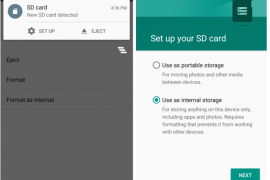
One of the most beautiful feature on Android 6.0 Marshmallow is that you can use the external SD card as internal storage on your device. Meaning the system will secure and adopt the SD card as its own and hence lift all restrictions as to access from apps, and most importantly, it’ll completely shift the app storage burden on internal storage to the SD card.
This also makes your SD card secure and ties it to your device only. Once you format your external SD card as internal storage on Marshmallow, it can only be used on the same device then. To use it on other devices, a format will be required, which ensures the safety of your data on the SD card.
And for super budget devices like Android One phones, which come with internal storage as low as 4GB, it solves the low storage issue as it allows the system to install apps on SD card directly (once adopted as internal) with complete data and obb files.
Of course, this feature has no use for devices with no SD card support (like Nexuses, Galaxy S6, Note 5, Moto X, etc.), but Android One and many other devices with SD card support will find this very useful to secure their SD card data and extend internal storage capacity.
How to turn external SD card into internal storage on Marshmallow
- Go to device “Settings” > select “Storage”.
- Select your SD Card > tap the three-dot menu on top-right corner > and select “Settings” from there.
- Select “Format as internal” > and then “Erase & Format” on the next screen.
- Your SD Card will now be formatted as internal storage.
- Reboot phone.
└ This is very important, otherwise you may end up frustrated with issues like MTP not showing SD card, some apps not working properly, etc.
That’s all. Enjoy your extended internal storage and freedom from low storage space issue.
Happy Androiding!


247 responses to “How to Use SD Card as Internal Storage on Marshmallow”
I found one way to solve the issue of the card only formatting part way then showing as corrupt, I changed the software from aicp Rom to the cyangen version of marshmallow and it worked perfectly, changed it back just to see and the aicp version still won’t format the card. So in my case it was just the Rom that was at fault.
I found one way to solve the issue of the card only formatting part way then showing as corrupt, I changed the software from aicp Rom to the cyangen version of marshmallow and it worked perfectly, changed it back just to see and the aicp version still won’t format the card. So in my case it was just the Rom that was at fault.
Hi, on my phone the option to ‘Format as internal’ doesn’t show up. Only Format and when I choose that it says portable. It may be a bug on the firmware perhaps.
I have the same problem. I’m thinking Verizon removed the option in the latest update.
Same here bro . Did you find a solution ?
Hi, on my phone the option to ‘Format as internal’ doesn’t show up. Only Format and when I choose that it says portable. It may be a bug on the firmware perhaps.
I have the same problem. I’m thinking Verizon removed the option in the latest update.
Same here bro . Did you find a solution ?
Also do not have option to “Format As Internal” on my LG G4.
Android 6.0, Kernel 3.10.84, Build MRA58K, Software Version V20d-ZAF-XX
The problem is after i formatted my 32gb card. it workz fine in apps moved to sdcard from internal memory
but question is when i connect phone with MTP to pc. the only drive is the orignal internal memory
how to access media files or how to copy music and video files on the external sd card which has been converted to internal storage.
should i copy to internal memory original which is less and then migrate it to ext sd card
how to copy biggr files like twrp backups on the remaining space of the extsd card which has been converted into internal memory
would appreciate an answer from anyone .as i have read a lot online but not found solution
and yes i reeboted the phone
Also do not have option to “Format As Internal” on my LG G4.
Android 6.0, Kernel 3.10.84, Build MRA58K, Software Version V20d-ZAF-XX
The problem is after i formatted my 32gb card. it workz fine in apps moved to sdcard from internal memory
but question is when i connect phone with MTP to pc. the only drive is the orignal internal memory
how to access media files or how to copy music and video files on the external sd card which has been converted to internal storage.
should i copy to internal memory original which is less and then migrate it to ext sd card
how to copy biggr files like twrp backups on the remaining space of the extsd card which has been converted into internal memory
would appreciate an answer from anyone .as i have read a lot online but not found solution
and yes i reeboted the phone
Hi… In my lg g4 (h635) no option to format sd like internal memory… Only external storage. Why?
Hi… In my lg g4 (h635) no option to format sd like internal memory… Only external storage. Why?
Same thing here, my LG G4 (VS986) has only Eject and Format options, no Format as Internal. I am pissed off about this, I factory reset my phone specifically to use ‘Adoptible Storage’. LG, get your sh*t together and fix this bug.
Same thing here, my LG G4 (VS986) has only Eject and Format options, no Format as Internal. I am pissed off about this, I factory reset my phone specifically to use ‘Adoptible Storage’. LG, get your sh*t together and fix this bug.
Hii… how to remove sd card as internal storage in motog3…i want to set my device memory as internal storage….how to do it? Plz help
Hii… how to remove sd card as internal storage in motog3…i want to set my device memory as internal storage….how to do it? Plz help
I was running a cm13 unofficial build. My problem now is that I chose to encrpyt my SD card but now my phone only boots up when I remove the SD card. I can have the phone on, once I public the ad card in it reboots to the note 4 logo then nothing. Please help
I was running a cm13 unofficial build. My problem now is that I chose to encrpyt my SD card but now my phone only boots up when I remove the SD card. I can have the phone on, once I public the ad card in it reboots to the note 4 logo then nothing. Please help
os marshmallow failed miserably in its operations according to me, I can not use the data backup twrp
I was disappointed with this os
os marshmallow failed miserably in its operations according to me, I can not use the data backup twrp
I was disappointed with this os
to reformat the partition trying to use the app in pc. wear was certainly a powerful
to reformat the partition trying to use the app in pc. wear was certainly a powerful
hey guys I have rooted My Moto-E and Installed CM 13, everything is ok but when I’m trying to format My SD-card as internal it is saying that Your card Is Slow even though Mine in SanDisk Ultra and its writing speed is 80Mbps. Plzz help me Guys Its Urgent
maybe this is the problem which the ultra sandisk microSD me at sepertin you first walk normally but after how long what happened to my microSD damaged and can not be used again. better not do that or you’ll end up like microSD me
hey guys I have rooted My Moto-E and Installed CM 13, everything is ok but when I’m trying to format My SD-card as internal it is saying that Your card Is Slow even though Mine in SanDisk Ultra and its writing speed is 80Mbps. Plzz help me Guys Its Urgent
maybe this is the problem which the ultra sandisk microSD me at sepertin you first walk normally but after how long what happened to my microSD damaged and can not be used again. better not do that or you’ll end up like microSD me
I got a xperia X5 with marshmallow recently installed (yesterday), the sd card in inserted in the device but this doesn’t appear anywhere of settings storage.
The sd card format is Fat32 model Samsung Evo 32 GB
it was a xperia z5 sorry
Same with my z5 but i use sandisk 64gb how to fix it
I got a xperia X5 with marshmallow recently installed (yesterday), the sd card in inserted in the device but this doesn’t appear anywhere of settings storage.
The sd card format is Fat32 model Samsung Evo 32 GB
it was a xperia z5 sorry
Same with my z5 but i use sandisk 64gb how to fix it
marshmallow micro sd makes me broken, I was disappointed with this os I do not want to wear again this os.
marshmallow micro sd makes me broken, I was disappointed with this os I do not want to wear again this os.
How to do the opposite of that? please help
with Prtsc please
How to do the opposite of that? please help
with Prtsc please
I have scrolled all the way of this thread for solutions, none of them worked for me. I am using samsung galaxy s4 mini LTE with CM 13 and open gapps. The problem for me is that I cannot still see the sd adopted as internal storage with my pc (Windows 7). Cleaning cache and disabling and force stopping the media storage did not work for me sadly, I was really hopeful about that.
After moving transfering files, PC now recognizes both storages as one. It is working now!
I have scrolled all the way of this thread for solutions, none of them worked for me. I am using samsung galaxy s4 mini LTE with CM 13 and open gapps. The problem for me is that I cannot still see the sd adopted as internal storage with my pc (Windows 7). Cleaning cache and disabling and force stopping the media storage did not work for me sadly, I was really hopeful about that.
After moving transfering files, PC now recognizes both storages as one. It is working now!
My Sparkle V fails to mount SD card whenever i eject it.
How could I do that?
My Sparkle V fails to mount SD card whenever i eject it.
How could I do that?
Hi, Iam using CM13 on my moto device i do have a 16 gb sandisk sd card which iam using it as external memory only ie i have not formated it as internal storage the issue is i do not see any options where i can move apps to sd card like in lollipop. Is this how it is or the only option is to format it as internal memory. It is sad that cynogen guys had not been able to find a fix yet. Thanks.
Hi, Iam using CM13 on my moto device i do have a 16 gb sandisk sd card which iam using it as external memory only ie i have not formated it as internal storage the issue is i do not see any options where i can move apps to sd card like in lollipop. Is this how it is or the only option is to format it as internal memory. It is sad that cynogen guys had not been able to find a fix yet. Thanks.
I have a Lenovo K3 Note (K50a40) and I was running Android 5.0 Lollipop until last week. I had **set the default storage as SD Card** on lollipop in storage settings, but that option seems to have disappeared in Android 6.0 Marshmallow. It only allows users to “**Adopt the SD Card as internal storage**”. I *do not want to reformat the SD Card* as internal, as that will result in encryption of the SD Card. **I just want the downloaded data, and the screenshots, Instagram pics, Whatsapp media etc to go to the SD Card**, as was the case in Lollipop with SD Card as the default storage.
I have a Lenovo K3 Note (K50a40) and I was running Android 5.0 Lollipop until last week. I had **set the default storage as SD Card** on lollipop in storage settings, but that option seems to have disappeared in Android 6.0 Marshmallow. It only allows users to “**Adopt the SD Card as internal storage**”. I *do not want to reformat the SD Card* as internal, as that will result in encryption of the SD Card. **I just want the downloaded data, and the screenshots, Instagram pics, Whatsapp media etc to go to the SD Card**, as was the case in Lollipop with SD Card as the default storage.
after formatting SD card is ot detecting in PC moreover what will be the size of 32 GB after this process. Bcoz nothing is showing only internal memory is displaying in file manager.
after formatting SD card is ot detecting in PC moreover what will be the size of 32 GB after this process. Bcoz nothing is showing only internal memory is displaying in file manager.
Hi. What if my phone don’t have ‘format as internal’ option? Mine is Xperia Z3, Marshmallow 6.0.1 update.
Hi. What if my phone don’t have ‘format as internal’ option? Mine is Xperia Z3, Marshmallow 6.0.1 update.
How i can make it in the lg g4 beat?
How i can make it in the lg g4 beat?
My phone is completely fine with this internal storage feature…BT when I want take files from share it shows insufficient storage and I am having 11 GB free at the moment…what to do?
My phone is completely fine with this internal storage feature…BT when I want take files from share it shows insufficient storage and I am having 11 GB free at the moment…what to do?
I dont see 3 dots in right corner
I have 32GB EVO Pro and 6.0.1 🙁
I dont see 3 dots in right corner
I have 32GB EVO Pro and 6.0.1 🙁
If you want to transfer files the only way in android 6.0 is the airdroid app.Thanks a lot.
If you want to transfer files the only way in android 6.0 is the airdroid app.Thanks a lot.
I know this is an old thread, but is it possible to format the SD card with two partitions? I would like to use one partition as internal storage and the second partition as external storage. This would allow me to easily transfer music and photos on the external, but use the internal for apps. I am using a Samsung Galaxy S5.
Thanks,
JB
That’s the default setting on Marshmallow, just leave it as is. DON’T adopt the SD card as internal storage.
I know this is an old thread, but is it possible to format the SD card with two partitions? I would like to use one partition as internal storage and the second partition as external storage. This would allow me to easily transfer music and photos on the external, but use the internal for apps. I am using a Samsung Galaxy S5.
Thanks,
JB
That’s the default setting on Marshmallow, just leave it as is. DON’T adopt the SD card as internal storage.