

In Ultimate Team, open Club → Gallery, choose a category and set, add an eligible Player Item to a slot, then select Confirm Changes.
Gallery Sets collect eligible Player Items in EA Sports FC 27 Ultimate Team. Sets can group players by club, league or nation, so the card you add needs to fit the set you choose.
Adding a Player Item raises your Gallery Level; completing a set has its own requirement and rewards. This guide covers how to save a player to a set, which Items qualify and what completing a set can unlock.
How to add players to Gallery in EA Sports FC 27
Choose a set, put an eligible Player Item into a slot and save the change.
STEP 1/9
11%
Open Ultimate Team
Open the game and choose Ultimate Team to reach its home page.
STEP 2/9
22%
Enter Club
From the Football Ultimate Team Main menu tab, move to the Club tab and select the Enter Club prompt on its hub card.
STEP 3/9
33%
Enter Gallery
Use L1 or R1 to move through the Club tabs until you reach the Gallery tile, then select Enter Gallery at the bottom of its card.
STEP 4/9
44%
Open Categories
From Summary, press R1 to reach Categories in the top navigation; L1 or R1 lets you move between tabs.
STEP 5/9
56%
Choose a category
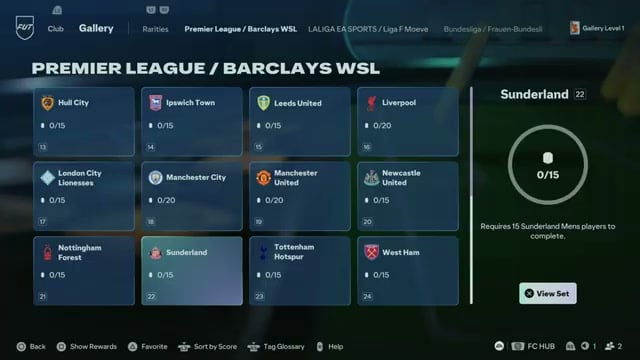
Browse the categories, including different leagues, and open Premier League / Barclays WSL for the Manchester United example; other displayed choices include Rarities, LALIGA EA SPORTS / Liga F Moeve, Bundesliga / Frauen-Bundesliga, Ligue 1 McDonald’s / Arkema PL, Serie A Enlive and Leagues.
STEP 6/9
67%
View the club set
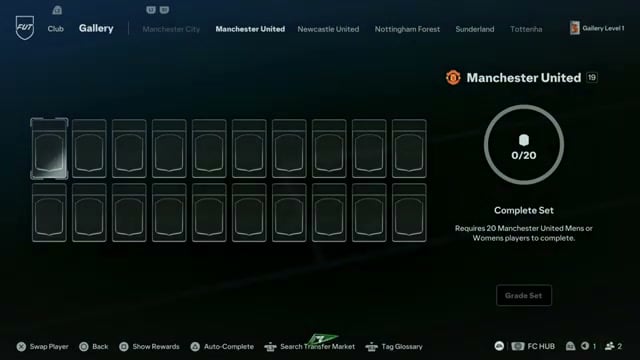
Browse the category’s team cards, highlight Manchester United and select View Set on its overview panel. The completion requirement appears on the right: this set needs 20 Manchester United men’s or women’s players.
STEP 7/9
78%
Select a slot
The Manchester United example opens with an empty 20-card grid; press X on a vacant slot to bring up players you can choose for the set.
STEP 8/9
89%
Add a Player Item
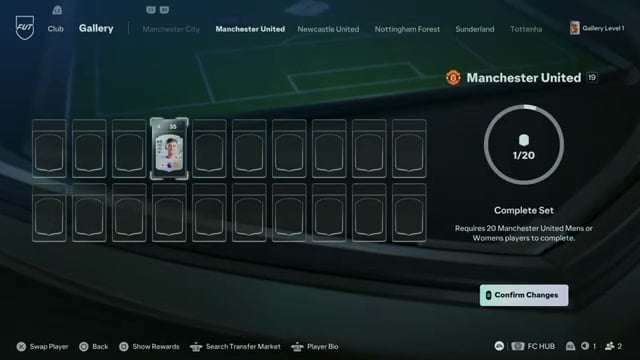
Manual selection lets you choose an eligible Manchester United Player Item from your club; select Swap to place it in the slot and add it to Gallery. For example, selecting Lacey for the empty set fills its first slot and moves the counter to 1/20.
STEP 9/9
100%
Save the addition
Press Options for Confirm Changes; this applies the change and saves the player in the Gallery set. After saving, leave the set to return to the team list.
Press Triangle for Auto-Complete to add the best available eligible Player Items to a Gallery Set.
Which Player Items can you add to Gallery in EA Sports FC 27?
| Player Items | Gallery rule |
|---|---|
| Items from Packs, the Transfer Market, Objectives, SBCs and other Ultimate Team rewards | Most are accepted. |
| Evolution Items | Gallery records the original Item version. |
| Items sold after contributing | They can still count toward Gallery. |
A Player Item must satisfy the set’s requirement as well as Gallery’s item rules. When choosing another card, use the requirement displayed for that set to decide which of your eligible players fits.
What rewards do Gallery Sets unlock in EA Sports FC 27?
Adding a card contributes to its set; completing the set produces a grade based on the Player Items it contains. Completed sets can earn Gallery Tokens, which you can use to unlock Hall of FUT Player Items.
Related EA Sports FC 27 guides





Leave a Reply