
Category
Tips
-

This Galaxy Note 4 TWRP Recovery Theme is Cool
Theming is one of the coolest feature of TWRP recovery, and with the new material design language that Google introduced with the Lollipop release, TWRP themes took…
-

How to Install Stock Motorola Camera on CM12.1
Flashing a custom ROM is fun, but it is sometimes at the cost of losing features that you actually love from your stock ROM. To…
-

Restore T-Mobile Galaxy S6 Edge Back To Stock with G925TUVU2COF8 firmware and recovery
Here, we have back to stock guide for T-Mobile Galaxy S6 Edge for all those people who want their device to be on original…
-

How to Install Galaxy Note 4 eXtremeBeats MOD with Viper4Android on Lollipop 5.0.2
Cheers audiophiles! Viper4Android and eXtremeBeats are among the best sound MODs ever made for Android devices. Both of these MODs are universal and can…
-

How to Fix WiFi on CM12.1 on your Moto X
Having trouble connecting to WiFi networks on your Moto X running CM12.1?Specifically the ones with WPA2 encryption? Well, your trouble might just end with…
-

How to Unlock Moto G 2015 Bootloader
Almost all of Motorola devices released since 2013 are bootloader unlock capable and the Moto G 2015 is no different. However, unlocking the bootloader on…
-

How to Boot into Moto G 2015 Recovery Mode
It hasn’t even been 24 hours of Moto G 2015’s official announcement, and the device is already shipping to those who didn’t flinch a second before placing…
-

How to Boot into Moto G 2015 Bootloader / Fastboot Mode
Motorola announced the 3rd Gen. Moto G on 28th July in India. The device is a budget smartphone running the latest of Android, Lollipop 5.1.1. But what…
-

Boot OnePlus 2 into bootloader/fastboot mode
It’s uh, simple. Here’s how you do it. To boot your OnePlus 2 into bootloader/fastboot mode, just do this: power off your device, and then…
-

How to Restore or Factory Reset OnePlus 2
Doing a factory reset on OnePlus 2 is easy, and you can do it either using Settings, or if the phone is not responding, then…
-
Boot OnePlus 2 into recovery mode
In order to boot your OnePlus 2 into recovery mode, you need to do this: first power off your device, and then after waiting for…
-
How to Force Restart/Shutdown OnePlus Two
Well, in case your speedy beats of a OnePlus 2 ever hangs up, so much that screen stops responding to touch at all, then in…
-

Download Stock OnePlus 2 Wallpapers from OxygenOS 2.0
Update (July 31, 2015): Download all OnePlus 2 wallpapers from the direct link here (mirror link). Well, your wish comes true. Here is the OxygenOS 2.0’s default…
-

How to Force Reboot / Shutdown OnePlus 2
No matter how much perfection manufacturers like OnePlus intend to put on the software part, your OnePlus 2 could still hang for many reasons.…
-

How to Boot Into OnePlus 2 Recovery Mode
Like almost all Android devices, OnePlus 2 too has multiple ways to boot into recovery mode. While the most reliable way is using the hardware buttons to…
-
How to Boot into OnePlus 2 Fastboot Mode
OnePlus is probably the only manufacturer out there which clearly states that “rooting or unlocking the bootloader does not void the warranty” of OnePlus devices. And…
-

How to Unlock OnePlus 2 Bootloader
[up] Update: Just so you know, unlocking the bootloader will NOT void the warranty on your OnePlus 2. This was confirmed by a OnePlus representative.…
-

How to Install OTA Updates Manually using Recovery and ADB sideload
If there’s one thing that Android devices have had right for a very long time, then it’s the system of Over-The-Air a.k.a OTA updates. This ensures that…
-
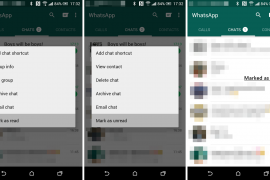
How to “Mark as Read” Messages on WhatsApp
WhatsApp has gained a number of new features in a recent update (2.12.200) which is yet to go official on the Play Store. Among these…
-

How to take silent photos on Android
Want to take a photo silently from your Android device without anyone around knowing about it? Well, there are certain apps on the Play Store…