

NerdsChalk News Desk
-

Here’s How The New iOS 26 Screenshot UI Looks Like!
A redesigned screenshot UI arrives with iOS 26, bringing a sleeker look and better annotation tools—especially for quick edits.
-

iOS 26 Adds Message Filtering Toggles for Personalized Notifications
iOS 26 now lets you choose which type of message notifications you actually care about—right from the Messages app settings.
-

iOS 26 Lets You Customize Alarm Snooze Time — Finally!
iOS 26 now lets users choose their own alarm snooze duration, breaking away from the fixed 9-minute standard.
-

iOS 26 Adds Option to Save Visited Locations in Maps
Apple Maps now remembers places you’ve visited, with end-to-end encryption and sync across devices—new in iOS 26.
-

iOS 26 Lets You Adjust Volume Straight From Audio Output Picker
iOS 26 adds a volume slider directly within the audio output picker for faster, cleaner audio control.
-

Title: iOS 26 Lets You Teach iPhone to Recognize Your Name and Notify You When It’s Said
iOS 26 introduces a cool new feature—name recognition with alerts when someone says your name. Perfect for noisy environments.
-

iOS 26 Lets You Create Playlist Folders in Apple Music for the First Time
iOS 26 finally adds playlist folder creation in the Music app — a feature long requested by power users.
-

iOS 26 Now Shows Estimated Time to Next Charge Level on Lock Screen
iOS 26 introduces a handy charging estimate right on the Lock Screen—finally some real-time clarity on your battery top-ups.
-

iOS 26 Lets You Disable CarPlay Screenshots for a Cleaner Photo Library
No more unwanted screenshots from your car display—iOS 26 now gives you the power to turn them off entirely.
-
iOS 26 Adds “Send Photo Previews” in Messages for Low Data Mode
iOS 26 introduces an option to send photo previews before full images in Messages, saving data while staying connected.
-
iOS 26 Lets You View Full Call History for Contacts in Phone App
iOS 26 now shows the entire call history for individual contacts, right inside the Phone app.
-
iOS 26 Adds “Step-by-Step Guides” for Apple Support Calls
iOS 26 now offers interactive support guides when calling AppleCare, making troubleshooting way easier—right from your dial screen.
-
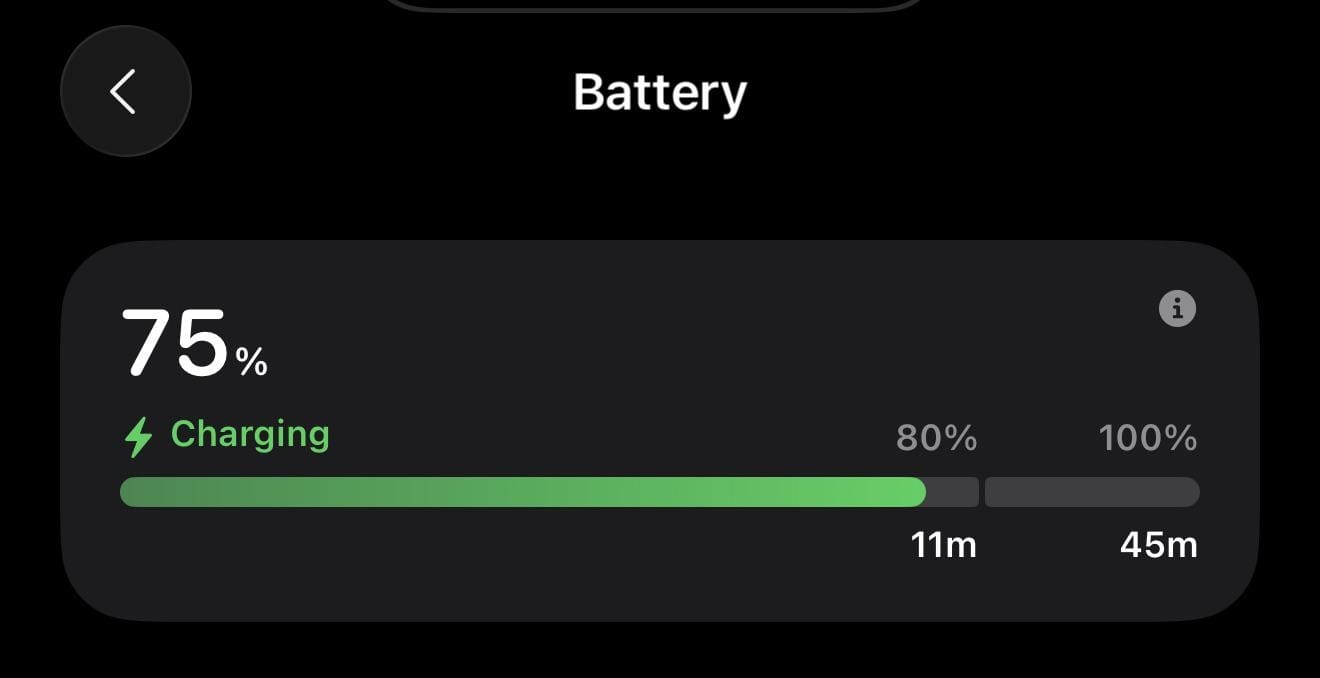
iOS 26 Adds Charging Time Estimates for 80% and 100% (Full Battery) in Battery Screen
iOS 26 now displays estimated charging times for both 80% and full charge, giving users more control over battery usage.
-
iOS 26 DB1: Private Browsing Now Works in Screen Time-Limited Safari
iOS 26 quietly enables Private Browsing in Safari even under Screen Time limits—something many didn’t see coming.
-
iOS 26 Adds Custom Camera Control Toggles and Gestures (Developer Beta 1)
iOS 26 now lets users reorder, disable, and personalize camera controls and gestures like Light Press and Swipe.
-
iOS 26 Adds Screenshot Summarize and Read Aloud Features Using On-Device Visual Intelligence
Apple’s iOS 26 brings new on-screen intelligence with “Summarize” and “Read Aloud” options for screenshots, enhancing accessibility and productivity.
-

Apple Releases First Developer Betas for iOS 26 macOS Tahoe and More
Apple has made the first developer betas for iOS 26, macOS Tahoe, iPadOS 26, and other platforms available following WWDC 2025. Public betas will…
-
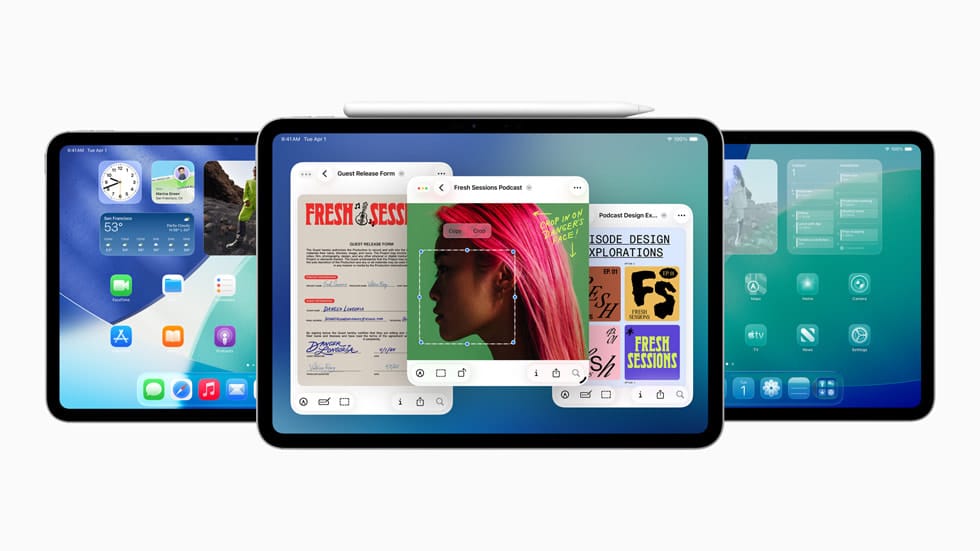
Apple Adds Windowing, Menu Bar, and Pointer to iPadOS in Major Update
Apple introduces windowing, menu bar, and pointer support to iPadOS, making the iPad experience more like a Mac. The update was announced at WWDC…
-

Intel Macs Will Stop Receiving Updates After macOS 26 Tahoe
Apple announced that Intel-based Macs will not receive updates beyond macOS Tahoe, marking the end of software support for these devices.
-

watchOS 26 adds new gesture for dismissing notifications
watchOS 26 introduces a new gesture that lets you quickly dismiss notifications on your Apple Watch. This update aims to make notification management easier…