
NOTE: The Android Market is known as Google Play store now. And the web version, market.android.com has been changed by Google to play.google.com/store.
Below are the most recent versions of Play Store:
[posts-by-tag tags = “google-play-apk” number = “5”]
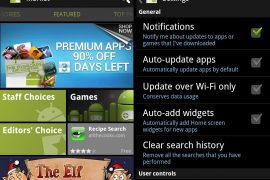
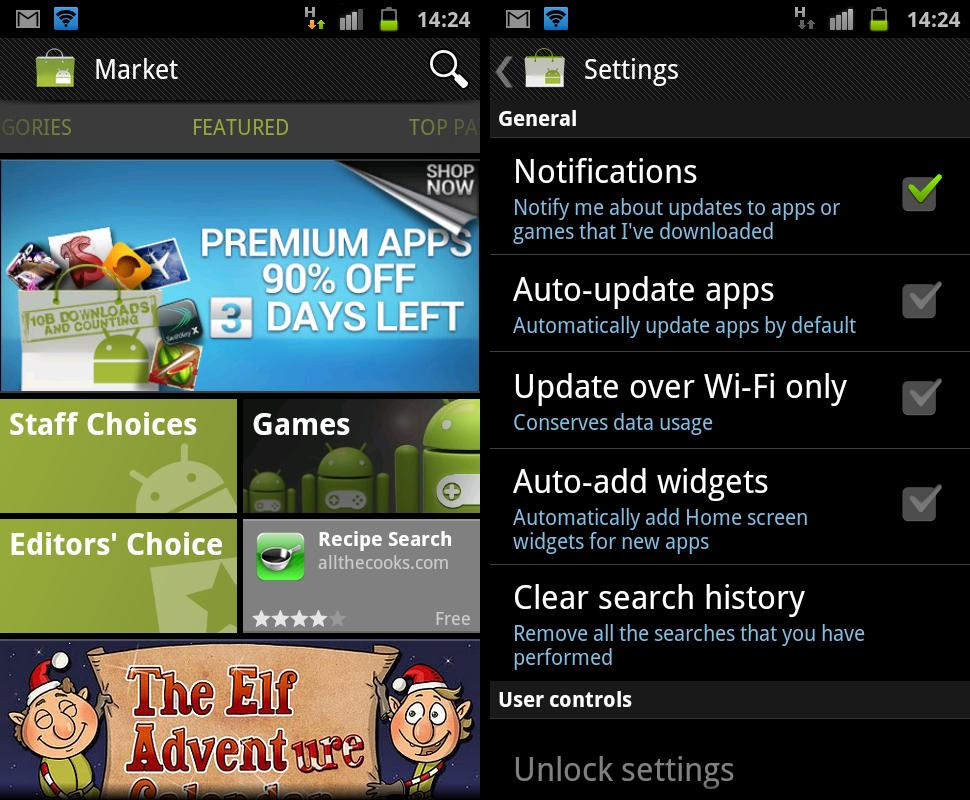
Google has just updated the Android Market to version 3.4.4. A few changes have been made, here’s a list of what I found so far:
- Added free songs of the week
- Auto-add shortcuts removed from the settings, and replaced by Auto-add widgets feature which will automatically add Home screen widgets for new apps (let’s see how it goes..)
- New App drawer icon for Market
- Minor UI tweak ─ the green line below the top things stuff (Top Paid, Top Free, Top Grossing….) removed.
The update will slowly roll out for everyone, but if you want it just now ─ here’s the APK file for you to manually download and install the new Market v3.4.4 on your Android device.
Download Android Market v3.4.4 APK file
Download the latest Android Market update apk → link here.
How to install the new Market v3.4.4 APK file
Installing the update manually is simple. You don’t have to root your phone or mess with adb, just download & transfer the apk file given above to your phone’s SD Card and install using a file manager (don’t forget check the “Unknown sources” check box under Applications settings)
For the newbies, here’s a detailed step by step guide:
- Download the APK file of new market → from here.
- If you downloaded it on PC, transfer it to phone.
- You’ll need a file manager to browse through SD Card. If you don’t have one already, use this file manager (install for free from market).
- Enable “Unknown sources” under settings » Applications, so that you can install applications from SD Card.
- Open file manager app and go to directly where you transferred the apk file in Step 2.
- Find and tap on the file to install.
- That’s it.
111 responses to “Android Market Updated to v3.4.4 (apk file available)”
I downloaded it in file manager app does that mean it work it only say save or close
I’ve got a tablet that can’t connect directly with google play store, for it does not have a license or something. By installing this app, does it mean that I can use it ‘ directly?’
I’ve got a tablet that can’t connect directly with google play store, for it does not have a license or something. By installing this app, does it mean that I can use it ‘ directly?’
I’ve got a tablet that can’t connect directly with google play store, for it does not have a license or something. By installing this app, does it mean that I can use it ‘ directly?’
Which Play store version works with the Coby MID9740? I tried the 3.10 & 3.4 but after installation it won’t even launch at all…please help…
Which Play store version works with the Coby MID9740? I tried the 3.10 & 3.4 but after installation it won’t even launch at all…please help…
Which Play store version works with the Coby MID9740? I tried the 3.10 & 3.4 but after installation it won’t even launch at all…please help…
doesn even appear in in the files manager
doesn even appear in in the files manager
doesn even appear in in the files manager
Step 4 doesn’t work with me , I CAN’T FOUND “Unknown sources” under settings » Applications,
!!!!! WHY PLEASE ???
Step 4 doesn’t work with me , I CAN’T FOUND “Unknown sources” under settings » Applications,
!!!!! WHY PLEASE ???
Step 4 doesn’t work with me , I CAN’T FOUND “Unknown sources” under settings » Applications,
!!!!! WHY PLEASE ???
hi
hi
hi
hi
hi
hi
Actually this is the outdated version of Google Play So Just use google play
Actually this is the outdated version of Google Play So Just use google play
Actually this is the outdated version of Google Play So Just use google play