
NOTE: The Android Market is known as Google Play store now. And the web version, market.android.com has been changed by Google to play.google.com/store.
Below are the most recent versions of Play Store:
[posts-by-tag tags = “google-play-apk” number = “5”]
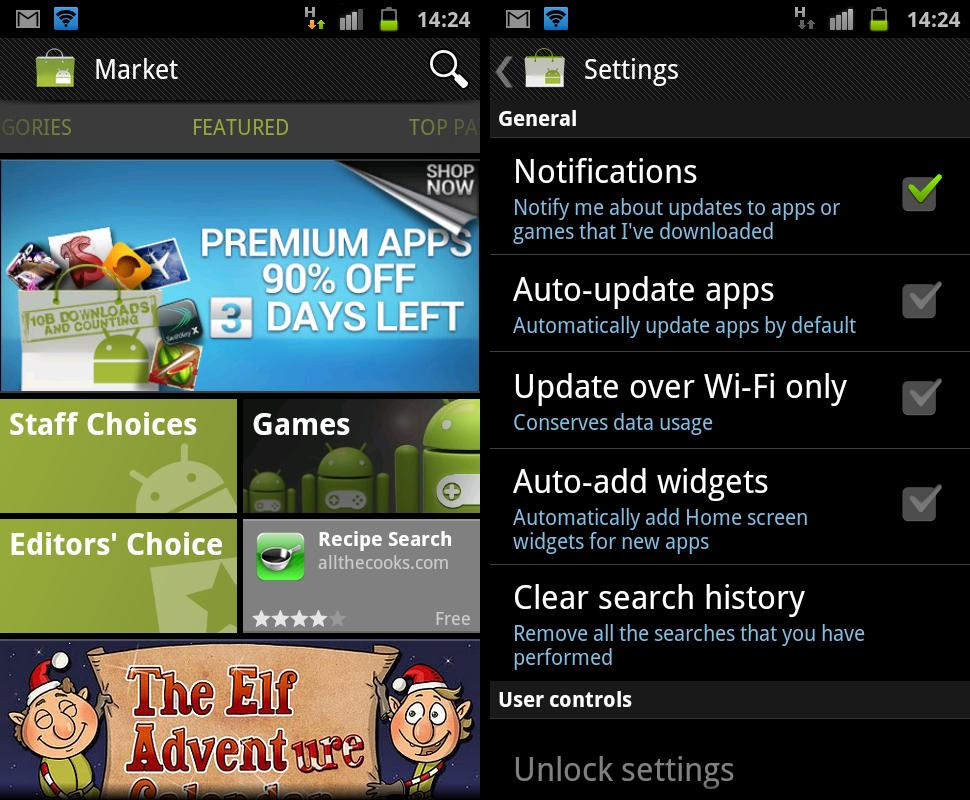
Google has just updated the Android Market to version 3.4.4. A few changes have been made, here’s a list of what I found so far:
- Added free songs of the week
- Auto-add shortcuts removed from the settings, and replaced by Auto-add widgets feature which will automatically add Home screen widgets for new apps (let’s see how it goes..)
- New App drawer icon for Market
- Minor UI tweak ─ the green line below the top things stuff (Top Paid, Top Free, Top Grossing….) removed.
The update will slowly roll out for everyone, but if you want it just now ─ here’s the APK file for you to manually download and install the new Market v3.4.4 on your Android device.
Download Android Market v3.4.4 APK file
Download the latest Android Market update apk → link here.
How to install the new Market v3.4.4 APK file
Installing the update manually is simple. You don’t have to root your phone or mess with adb, just download & transfer the apk file given above to your phone’s SD Card and install using a file manager (don’t forget check the “Unknown sources” check box under Applications settings)
For the newbies, here’s a detailed step by step guide:
- Download the APK file of new market → from here.
- If you downloaded it on PC, transfer it to phone.
- You’ll need a file manager to browse through SD Card. If you don’t have one already, use this file manager (install for free from market).
- Enable “Unknown sources” under settings » Applications, so that you can install applications from SD Card.
- Open file manager app and go to directly where you transferred the apk file in Step 2.
- Find and tap on the file to install.
- That’s it.




111 responses to “Android Market Updated to v3.4.4 (apk file available)”
Brilliant install directions. You’re trying to install the market and it says if you don’t already have a file manager, you can download one from the market. Nothing like posting general directions for everything without really reading it first.
You can access the market through your PC….
Every time I try to download or update something through the market it will say: unfortunately market has stopped. I can clear the data again to start it up once more but doing the same thing will end up with the same result.
What’s your device?
not without an account. And you can’t make an account without an android device(please correct me if i’m wrong).
same problem wit me dude. I have a samsung mini.
Which android version you are trying this on?
I think it might require v2.3 at the very least (but I’m not that sure, either).
The same as me
i using a chinese tablet Android 2.3.4
Brilliant install directions. You’re trying to install the market and it says if you don’t already have a file manager, you can download one from the market. Nothing like posting general directions for everything without really reading it first.
You can access the market through your PC….
Every time I try to download or update something through the market it will say: unfortunately market has stopped. I can clear the data again to start it up once more but doing the same thing will end up with the same result.
What’s your device?
same problem wit me dude. I have a samsung mini.
Which android version you are trying this on?
I think it might require v2.3 at the very least (but I’m not that sure, either).
The same as me
i using a chinese tablet Android 2.3.4
not without an account. And you can’t make an account without an android device(please correct me if i’m wrong).
Brilliant install directions. You’re trying to install the market and it says if you don’t already have a file manager, you can download one from the market. Nothing like posting general directions for everything without really reading it first.
You can access the market through your PC….
Every time I try to download or update something through the market it will say: unfortunately market has stopped. I can clear the data again to start it up once more but doing the same thing will end up with the same result.
What’s your device?
same problem wit me dude. I have a samsung mini.
Which android version you are trying this on?
I think it might require v2.3 at the very least (but I’m not that sure, either).
The same as me
i using a chinese tablet Android 2.3.4
not without an account. And you can’t make an account without an android device(please correct me if i’m wrong).
You are basically installing a new updated version of AM, basically it must work if you already have an older version installed on your android unit.
You are basically installing a new updated version of AM, basically it must work if you already have an older version installed on your android unit.
You are basically installing a new updated version of AM, basically it must work if you already have an older version installed on your android unit.
i tried installing it on HCL ME AE7 A1 but it did not work.. please help. [email protected]
i tried installing it on HCL ME AE7 A1 but it did not work.. please help. [email protected]
i tried installing it on HCL ME AE7 A1 but it did not work.. please help. [email protected]
I’m trying to put it on my kindle and it says gives me a dialogue “You must add an account to the device to continue. Do you want to add one now?” I say yes, and the application terminates.
Search for — Kindle Fire Android Market — here on this site. And I think you’ll get a step by step procedure for that. If it fails too, lemme know I’ll help you out.
It doesn’t make sense that i have to root it. The app installs fine, I think it might be trying to open a browser window. I’d rather not become god user until I understand what i’m doing more. I’d hate to brick my kindle.
I’m trying to put it on my kindle and it says gives me a dialogue “You must add an account to the device to continue. Do you want to add one now?” I say yes, and the application terminates.
Search for — Kindle Fire Android Market — here on this site. And I think you’ll get a step by step procedure for that. If it fails too, lemme know I’ll help you out.
It doesn’t make sense that i have to root it. The app installs fine, I think it might be trying to open a browser window. I’d rather not become god user until I understand what i’m doing more. I’d hate to brick my kindle.
I’m trying to put it on my kindle and it says gives me a dialogue “You must add an account to the device to continue. Do you want to add one now?” I say yes, and the application terminates.
Search for — Kindle Fire Android Market — here on this site. And I think you’ll get a step by step procedure for that. If it fails too, lemme know I’ll help you out.
It doesn’t make sense that i have to root it. The app installs fine, I think it might be trying to open a browser window. I’d rather not become god user until I understand what i’m doing more. I’d hate to brick my kindle.
When i install this market apk file. i am getting message like “application not installed”
Are you on Android 2.1, or 2.2?
I’m having the same problem, I’m on 2.3.4.
please help i am unable to install this android market apk file in my X8. i am getting message “Application Not installed”
When i install this market apk file. i am getting message like “application not installed”
Are you on Android 2.1, or 2.2?
I’m having the same problem, I’m on 2.3.4.
When i install this market apk file. i am getting message like “application not installed”
Are you on Android 2.1, or 2.2?
I’m having the same problem, I’m on 2.3.4.
please help i am unable to install this android market apk file in my X8. i am getting message “Application Not installed”
please help i am unable to install this android market apk file in my X8. i am getting message “Application Not installed”
i keep getting a parse error when i try to load the apk
I keep getting a parse error when i try to load the market apk on my samsung s I-500 with android 2.1
Sadly, it doesn’t support Android 2.1. So, it won’t work 🙁
i keep getting a parse error when i try to load the apk
i keep getting a parse error when i try to load the apk
I keep getting a parse error when i try to load the market apk on my samsung s I-500 with android 2.1
Sadly, it doesn’t support Android 2.1. So, it won’t work 🙁
I keep getting a parse error when i try to load the market apk on my samsung s I-500 with android 2.1
Sadly, it doesn’t support Android 2.1. So, it won’t work 🙁
Worked awesome on my Samsung Galaxy S2. Thanks
Heey !! ^^
Step 4 doesn’t work with me , I CAN’T FOUND “Unknown sources” under settings » Applications,
I have Galaxy S2 too , could you tell me how you did it please ?? =D
Worked awesome on my Samsung Galaxy S2. Thanks
Heey !! ^^
Step 4 doesn’t work with me , I CAN’T FOUND “Unknown sources” under settings » Applications,
I have Galaxy S2 too , could you tell me how you did it please ?? =D
Worked awesome on my Samsung Galaxy S2. Thanks
Heey !! ^^
Step 4 doesn’t work with me , I CAN’T FOUND “Unknown sources” under settings » Applications,
I have Galaxy S2 too , could you tell me how you did it please ?? =D
It doesn’t work! Anything I try to do it times out. I can’t even search.
It doesn’t work! Anything I try to do it times out. I can’t even search.
It doesn’t work! Anything I try to do it times out. I can’t even search.
Does this works on China tablets?
Does this works on China tablets?
Does this works on China tablets?
I have a rooted Polaroid 7″ tablet with gingerbread on it. It says that the market installs but still get the “The application Market (process com.android.vending) has stopped unexpectedly. Please try again.” I have been trying to install a flash player so I can get websites using flash video and such to work. I am guessing that the problem stems from the market not functioning. There are tons of forums with people boasting fixes but none seem to actually fix anything… Whats up with trying to get a flash player too. I have not been able to download a .apk for flash. I have followed all kinds of dead end leads. Is there anyone out there that can actually get this POS working???
I have a rooted Polaroid 7″ tablet with gingerbread on it. It says that the market installs but still get the “The application Market (process com.android.vending) has stopped unexpectedly. Please try again.” I have been trying to install a flash player so I can get websites using flash video and such to work. I am guessing that the problem stems from the market not functioning. There are tons of forums with people boasting fixes but none seem to actually fix anything… Whats up with trying to get a flash player too. I have not been able to download a .apk for flash. I have followed all kinds of dead end leads. Is there anyone out there that can actually get this POS working???
I have a rooted Polaroid 7″ tablet with gingerbread on it. It says that the market installs but still get the “The application Market (process com.android.vending) has stopped unexpectedly. Please try again.” I have been trying to install a flash player so I can get websites using flash video and such to work. I am guessing that the problem stems from the market not functioning. There are tons of forums with people boasting fixes but none seem to actually fix anything… Whats up with trying to get a flash player too. I have not been able to download a .apk for flash. I have followed all kinds of dead end leads. Is there anyone out there that can actually get this POS working???
i have android 2.1 and wen i install
Google Play Store APK 3.5.15. it says parsing error wat to do
i have android 2.1 and wen i install
Google Play Store APK 3.5.15. it says parsing error wat to do
i have android 2.1 and wen i install
Google Play Store APK 3.5.15. it says parsing error wat to do
it says add a account to device then when i press add it going to home screen tht s it
it says add a account to device then when i press add it going to home screen tht s it
it says add a account to device then when i press add it going to home screen tht s it
If there any possible to get android market (.apk) 4.0.3 file …..please let me know ,i have lenovo s880 mobile but there is no market
If there any possible to get android market (.apk) 4.0.3 file …..please let me know ,i have lenovo s880 mobile but there is no market
If there any possible to get android market (.apk) 4.0.3 file …..please let me know ,i have lenovo s880 mobile but there is no market
Very Very Nice Post Bro
Very Very Nice Post Bro
Very Very Nice Post Bro
I downloaded it in file manager app does that mean it work it only say save or close
I downloaded it in file manager app does that mean it work it only say save or close