

Required files:
Flashtool — Download link
Firmwares — Download the “.ftf” firmware file for your phone. Below are the links:
Android 2.3.4 [4.0.2.A.0.62]
[warning] The methods and procedures discussed here are considered risky and you should not attempt anything if you don’t know completely what it is. Do this only if you’re capable of getting your phone back right on your own. If any damage occurs to you or your device, we won’t be held liable. You only will be responsible — you’ve been warned. Okay![/warning]
Video instructions:
Instructions:
- Switch off your phone and put it aside.
- Extract the “FlashTool_x.x.x.x.exe” file on your PC (you can just double click on it to extract)
- Few files and folders will be extracted — the two which we’ll be using are the ‘drivers‘ folder and the ‘firmwares‘ folder.
- Inside the ‘drivers‘ folder there’s a file named “ggsetup-2.2.0.10.exe”, double click on this file to install the proper driver on your PC.
- Now copy the “.ftf” firmware file that you downloaded for your phone, and paste it inside the “firmwares” folder.
- Double click the “X10FlashTool.exe” file.
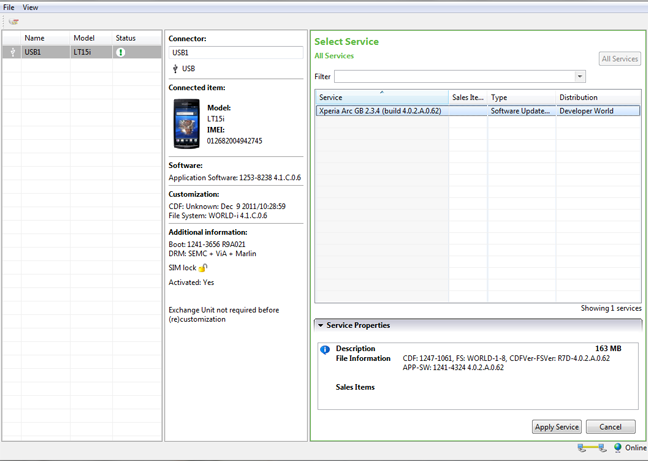
- Once the program opens — click on the “Flash” button.
- You’ll see the firmware that you copied in Step 5 loaded on the screen — click “Ok”!
- Now it should ask you to connect your phone to the PC. So first plug the USB cable to PC, then pick up your phone and hold the “Back” key (key at the bottom left on your Arc), and then connect the USB cable to your phone. Remember you’ve to hold the “Back” key while connecting the USB cable to phone.
- Once the phone gets connected — Flashtool will automatically start the flashing process.
- Keep an eye on the Flashtool’s screen.
- And once the process gets finished, disconnect your phone from PC and switch it ON.
- Don’t freak if it takes longer to boot (that’s normal) as the phone has to build the cache again after flashing.
Enjoy!
Many thanks to the XDA Developer community for firmwares.



310 responses to “[TUTORIAL] How To Flash a Firmware Using Flashtool on Xperia Arc”
hey i have a error in flashtool while am upgradeing my xperia x10…error loading file,i have alrdy rooted my mble…nw i want it to upgrade it to android 4.0…plz help me
hey i have a error in flashtool while am upgradeing my xperia x10…error loading file,i have alrdy rooted my mble…nw i want it to upgrade it to android 4.0…plz help me
hey i have a error in flashtool while am upgradeing my xperia x10…error loading file,i have alrdy rooted my mble…nw i want it to upgrade it to android 4.0…plz help me
hey android soul team.
i tried upgrading my arc to a newer firmware but it FAILED. i was using the rooted LT15i_4.0.1.A.0.283_Generic_Global as posted on this site. then i tried fixing it by using the SEUS. it downloaded and completed the update successfully but my phone still wont start. then i came by this thread. there were some problems in downloading the .ftf file link given in this thread (i could not find the .ftf file in the extracted files). i downloaded another firmware (4.0.A.2.368) from the XDA forums and tried to flash it as instructed here. the flash was completed successfully but my phone still doesnt start. when i press the power button the green light flashes for a second then goes off and this keeps on happening. nothing on the screen.. please help me out. tell me what to do. awaiting reply anxiously 🙁
Try flashing this firmware [4.0.2.A.0.42]: Download link → http://goo.gl/hq051
AND use the latest Flashtool version: Download link → http://goo.gl/U0kRb
Hope it helps 🙂
Try flashing this firmware [4.0.2.A.0.42] → Download link
AND use the latest Flashtool version → Download link
Hope it helps 🙂
fixed the download links in my comment below 🙂
fixed the download links in my comment below 🙂
can u post img of firmware [4.0.2.A.0.42] for rooting phone
hey android soul team.
i tried upgrading my arc to a newer firmware but it FAILED. i was using the rooted LT15i_4.0.1.A.0.283_Generic_Global as posted on this site. then i tried fixing it by using the SEUS. it downloaded and completed the update successfully but my phone still wont start. then i came by this thread. there were some problems in downloading the .ftf file link given in this thread (i could not find the .ftf file in the extracted files). i downloaded another firmware (4.0.A.2.368) from the XDA forums and tried to flash it as instructed here. the flash was completed successfully but my phone still doesnt start. when i press the power button the green light flashes for a second then goes off and this keeps on happening. nothing on the screen.. please help me out. tell me what to do. awaiting reply anxiously 🙁
Try flashing this firmware [4.0.2.A.0.42] → Download link
AND use the latest Flashtool version → Download link
Hope it helps 🙂
can u post img of firmware [4.0.2.A.0.42] for rooting phone
fixed the download links in my comment below 🙂
hey android soul team.
i tried upgrading my arc to a newer firmware but it FAILED. i was using the rooted LT15i_4.0.1.A.0.283_Generic_Global as posted on this site. then i tried fixing it by using the SEUS. it downloaded and completed the update successfully but my phone still wont start. then i came by this thread. there were some problems in downloading the .ftf file link given in this thread (i could not find the .ftf file in the extracted files). i downloaded another firmware (4.0.A.2.368) from the XDA forums and tried to flash it as instructed here. the flash was completed successfully but my phone still doesnt start. when i press the power button the green light flashes for a second then goes off and this keeps on happening. nothing on the screen.. please help me out. tell me what to do. awaiting reply anxiously 🙁
Try flashing this firmware [4.0.2.A.0.42]: Download link → http://goo.gl/hq051
AND use the latest Flashtool version: Download link → http://goo.gl/U0kRb
Hope it helps 🙂
can u post img of firmware [4.0.2.A.0.42] for rooting phone
fixed the download links in my comment below 🙂
Ty for tutorial, you saved me 🙂
Ty for tutorial, you saved me 🙂
Ty for tutorial, you saved me 🙂
hey my xperia play was working fine after i rooted and flashed to us 2.3.3 generic fw so i can get the 2.3.4 update which worked fine until, like an idiot, i did factory data reset. after that the home button doesn’t work, can’t recieve incoming calls, when I hold down the power button i only get two options (power off and screenshot). I fixed this problem before but i can’t remember. PPPPPPPPPLLLLLLLLLLLLEEEEEAAAAAAASSSSSSS hellp
hey my xperia play was working fine after i rooted and flashed to us 2.3.3 generic fw so i can get the 2.3.4 update which worked fine until, like an idiot, i did factory data reset. after that the home button doesn’t work, can’t recieve incoming calls, when I hold down the power button i only get two options (power off and screenshot). I fixed this problem before but i can’t remember. PPPPPPPPPLLLLLLLLLLLLEEEEEAAAAAAASSSSSSS hellp
hey my xperia play was working fine after i rooted and flashed to us 2.3.3 generic fw so i can get the 2.3.4 update which worked fine until, like an idiot, i did factory data reset. after that the home button doesn’t work, can’t recieve incoming calls, when I hold down the power button i only get two options (power off and screenshot). I fixed this problem before but i can’t remember. PPPPPPPPPLLLLLLLLLLLLEEEEEAAAAAAASSSSSSS hellp
thnx a million…. you guys are really doing a good job.. it took some time for me to fix it.. but then finally got this website and my DEAD BRICKED SONY XPERIA ARC is back in business again.. Thanks again.
thnx a million…. you guys are really doing a good job.. it took some time for me to fix it.. but then finally got this website and my DEAD BRICKED SONY XPERIA ARC is back in business again.. Thanks again.
thnx a million…. you guys are really doing a good job.. it took some time for me to fix it.. but then finally got this website and my DEAD BRICKED SONY XPERIA ARC is back in business again.. Thanks again.
Hi Kapil, in the step 9 we need to hold and press Volume down button for xperia ray. please correct it.
Hi Kapil, in the step 9 we need to hold and press Volume down button for xperia ray. u00a0please correct it.
Hi Kapil, in the step 9 we need to hold and press Volume down button for xperia ray. u00a0please correct it.
Hi Kapil, in the step 9 we need to hold and press Volume down button for xperia ray. please correct it.
does this unlock your phone as well?
does this unlock your phone as well?
does this unlock your phone as well?
i was falsing my phone and in the middle it asked me to unplug the phone and to turn on turn on Unknown Sources and
Debugging but i am not able to start my phone it is showing just sony eriscsson text and then it turn off………….plzzzz help me plzzzz
mine too, did you fix yours?
i was falsing my phone and in the middle it asked me to unplug the phone and to turn onu00a0turn on Unknown Sources and n Debugging but i am not able to start my phone it is showing just sony eriscsson text and then it turn off………….plzzzz help me plzzzzu00a0nn
mine too, did you fix yours?
i was falsing my phone and in the middle it asked me to unplug the phone and to turn onu00a0turn on Unknown Sources and n Debugging but i am not able to start my phone it is showing just sony eriscsson text and then it turn off………….plzzzz help me plzzzzu00a0nn
mine too, did you fix yours?
i was falsing my phone and in the middle it asked me to unplug the phone and to turn on turn on Unknown Sources and
Debugging but i am not able to start my phone it is showing just sony eriscsson text and then it turn off………….plzzzz help me plzzzz
mine too, did you fix yours?
I successfully rooted my xperia arc. Suddenly the phone come out with the upgrade “Build number 4.0.2.A.0.42” and I just upgrade it. But after I upgrade it and restart my phone, it does not on anymore. So what should I do?
I successfully rooted my xperia arc. Suddenly the phone come out with the upgrade “Build number 4.0.2.A.0.42” and I just upgrade it. But after I upgrade it and restart my phone, it does not on anymore. So what should I do?
I successfully rooted my xperia arc. Suddenly the phone come out with the upgrade “Build number 4.0.2.A.0.42” and I just upgrade it. But after I upgrade it and restart my phone, it does not on anymore. So what should I do?
outdated
outdated
outdated
THANK YOU SO VERY MUCH
THANK YOU SO VERY MUCH
THANK YOU SO VERY MUCH
firmware content does not read content
firmware content does not read content
firmware content does not read content
The downloading link doesn’t work!
The downloading link doesn’t work!
The downloading link doesn’t work!
You are the best man i successfully flashed my Xperia neo and now the china restriction has been removed from it
You are the best man i successfully flashed my Xperia neo and now the china restriction has been removed from it
You are the best man i successfully flashed my Xperia neo and now the china restriction has been removed from it
it says flashing complete but no response from my xperia play
failed to update and cant even switch on some one please help immediately
it says flashing complete but no response from my xperia play
failed to update and cant even switch on some one please help immediately
it says flashing complete but no response from my xperia play
failed to update and cant even switch on some one please help immediately
someone please help me, i flashed my sony ericsson xperia pro following these steps and it completed the flash but now it wont turn on. WHAT DO I DO? :O
someone please help me, i flashed my sony ericsson xperia pro following these steps and it completed the flash but now it wont turn on. WHAT DO I DO? :O
someone please help me, i flashed my sony ericsson xperia pro following these steps and it completed the flash but now it wont turn on. WHAT DO I DO? :O