

Required files:
Flashtool — Download link
Firmwares — Download the “.ftf” firmware file for your phone. Below are the links:
Android 2.3.4 [4.0.2.A.0.62]
[warning] The methods and procedures discussed here are considered risky and you should not attempt anything if you don’t know completely what it is. Do this only if you’re capable of getting your phone back right on your own. If any damage occurs to you or your device, we won’t be held liable. You only will be responsible — you’ve been warned. Okay![/warning]
Video instructions:
Instructions:
- Switch off your phone and put it aside.
- Extract the “FlashTool_x.x.x.x.exe” file on your PC (you can just double click on it to extract)
- Few files and folders will be extracted — the two which we’ll be using are the ‘drivers‘ folder and the ‘firmwares‘ folder.
- Inside the ‘drivers‘ folder there’s a file named “ggsetup-2.2.0.10.exe”, double click on this file to install the proper driver on your PC.
- Now copy the “.ftf” firmware file that you downloaded for your phone, and paste it inside the “firmwares” folder.
- Double click the “X10FlashTool.exe” file.
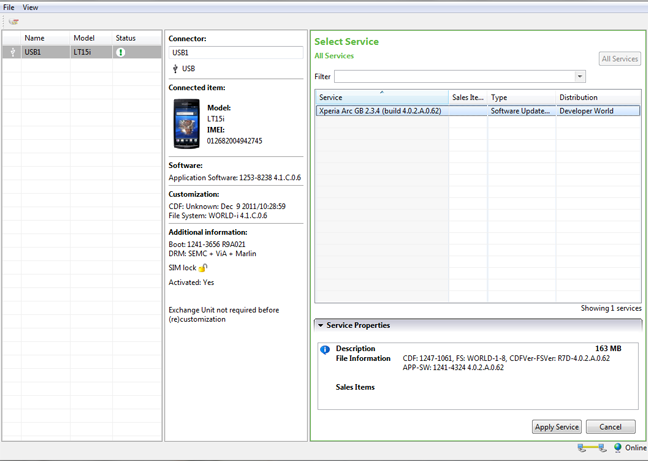
- Once the program opens — click on the “Flash” button.
- You’ll see the firmware that you copied in Step 5 loaded on the screen — click “Ok”!
- Now it should ask you to connect your phone to the PC. So first plug the USB cable to PC, then pick up your phone and hold the “Back” key (key at the bottom left on your Arc), and then connect the USB cable to your phone. Remember you’ve to hold the “Back” key while connecting the USB cable to phone.
- Once the phone gets connected — Flashtool will automatically start the flashing process.
- Keep an eye on the Flashtool’s screen.
- And once the process gets finished, disconnect your phone from PC and switch it ON.
- Don’t freak if it takes longer to boot (that’s normal) as the phone has to build the cache again after flashing.
Enjoy!
Many thanks to the XDA Developer community for firmwares.


310 responses to “[TUTORIAL] How To Flash a Firmware Using Flashtool on Xperia Arc”
hello will this unlock you mobile
No it won’t.
Follow this guide to unlock your phone — https://nerdschalk.com/how-to-unlock-bootloader-xperia-arc-play-neo-pro/
No it won’t.
Follow this guide to unlock your phone — https://nerdschalk.com/how-to-unlock-bootloader-xperia-arc-play-neo-pro/
hello will this unlock you mobile
No it won’t.
Follow this guide to unlock your phone — https://nerdschalk.com/how-to-unlock-bootloader-xperia-arc-play-neo-pro/
hello will this unlock you mobile
No it won’t.
Follow this guide to unlock your phone — https://nerdschalk.com/how-to-unlock-bootloader-xperia-arc-play-neo-pro/
Hi, i flashed my arc but now i cant send / receive calls but full signal is shown. Any ideas? Cheers
Which firmware you flashed?
Which firmware you flashed?
It was locked on orange so i got my 02 sim card unlock and it worked fine but i wanted to flash it to improve speed etc but now cant send / receive calls. the phone is android version 2.3.3 and i have tried flashing with UK generic / Global generic / 02 Branded but with no success!
Well try updating your firmware through SEUS — http://www.sonyericsson.com/cws/support/softwaredownloads/detailed/updateservice/xperiaarc?cc=gb&lc=en
It may help.
Well try updating your firmware through SEUS — http://www.sonyericsson.com/cws/support/softwaredownloads/detailed/updateservice/xperiaarc?cc=gb&lc=en
It may help.
Yeah i tried that but still no success. Its a shame as i love this phone. cheers for your help
Hi, i flashed my arc but now i cant send / receive calls but full signal is shown. Any ideas? Cheers
Which firmware you flashed?
It was locked on orange so i got my 02 sim card unlock and it worked fine but i wanted to flash it to improve speed etc but now cant send / receive calls. the phone is android version 2.3.3 and i have tried flashing with UK generic / Global generic / 02 Branded but with no success!
Well try updating your firmware through SEUS — http://www.sonyericsson.com/cws/support/softwaredownloads/detailed/updateservice/xperiaarc?cc=gb&lc=en
It may help.
Yeah i tried that but still no success. Its a shame as i love this phone. cheers for your help
Hi, i flashed my arc but now i cant send / receive calls but full signal is shown. Any ideas? Cheers
Which firmware you flashed?
It was locked on orange so i got my 02 sim card unlock and it worked fine but i wanted to flash it to improve speed etc but now cant send / receive calls. the phone is android version 2.3.3 and i have tried flashing with UK generic / Global generic / 02 Branded but with no success!
Well try updating your firmware through SEUS — http://www.sonyericsson.com/cws/support/softwaredownloads/detailed/updateservice/xperiaarc?cc=gb&lc=en
It may help.
Yeah i tried that but still no success. Its a shame as i love this phone. cheers for your help
okay it works! thankyou sooo much ! 😀
but can sumone tellme the differences between the branded thing?
im at Indonesia, which one shud i choose then??
thanks..
I think you should choose the Global firmware..
To confirm, do the following:Go to Settings → About phone → and check if your baseband version is this → 7X30A-AAABQMAZM-1290_21-22.
If yes, then definitely go for the the Global firmware.
I think you should choose the Global firmware..
To confirm, do the following:Go to Settings → About phone → and check if your baseband version is this → 7X30A-AAABQMAZM-1290_21-22.
If yes, then definitely go for the the Global firmware.
yup, thanks for the fast answer 😀
I think you should choose the Global firmware..
To confirm, do the following:
Go to Settings → About phone → and check if your baseband version is this → 7X30A-AAABQMAZM-1290_21-22.If yes, then definitely go for the the Global firmware.
I think you should choose the Global firmware..
To confirm, do the following:
Go to Settings → About phone → and check if your baseband version is this → 7X30A-AAABQMAZM-1290_21-22.If yes, then definitely go for the the Global firmware.
okay it works! thankyou sooo much ! 😀
but can sumone tellme the differences between the branded thing?
im at Indonesia, which one shud i choose then??
thanks..
I think you should choose the Global firmware..
To confirm, do the following:Go to Settings → About phone → and check if your baseband version is this → 7X30A-AAABQMAZM-1290_21-22.
If yes, then definitely go for the the Global firmware.
yup, thanks for the fast answer 😀
okay it works! thankyou sooo much ! 😀
but can sumone tellme the differences between the branded thing?
im at Indonesia, which one shud i choose then??
thanks..
I think you should choose the Global firmware..
To confirm, do the following:Go to Settings → About phone → and check if your baseband version is this → 7X30A-AAABQMAZM-1290_21-22.
If yes, then definitely go for the the Global firmware.
yup, thanks for the fast answer 😀
I think you should choose the Global firmware..
To confirm, do the following:
Go to Settings → About phone → and check if your baseband version is this → 7X30A-AAABQMAZM-1290_21-22.If yes, then definitely go for the the Global firmware.
I think you should choose the Global firmware..
To confirm, do the following:
Go to Settings → About phone → and check if your baseband version is this → 7X30A-AAABQMAZM-1290_21-22.If yes, then definitely go for the the Global firmware.
hi ı have problem with my xperia arc. ı’m trying to flash using flashtool but when ı look the firmware content in the flashtool program there is only one file is simlock.ta file.and when ı look up in video ı’m seeing a lot of file in the firmware content.due to this ı cant flashh my phone tanks from now
hi ı have problem with my xperia arc. ı’m trying to flash using flashtool but when ı look the firmware content in the flashtool program there is only one file is simlock.ta file.and when ı look up in video ı’m seeing a lot of file in the firmware content.due to this ı cant flashh my phone tanks from now
hi ı have problem with my xperia arc. ı’m trying to flash using flashtool but when ı look the firmware content in the flashtool program there is only one file is simlock.ta file.and when ı look up in video ı’m seeing a lot of file in the firmware content.due to this ı cant flashh my phone tanks from now
“Don’t freak if it takes longer to boot (that’s normal) as the phone has to build the cache again after flashing.”
can i know how much time? hours??
No — not hours. It shouldn’t take more than 15-20 mins.
No — not hours. It shouldn’t take more than 15-20 mins.
“Don’t freak if it takes longer to boot (that’s normal) as the phone has to build the cache again after flashing.”
can i know how much time? hours??
No — not hours. It shouldn’t take more than 15-20 mins.
“Don’t freak if it takes longer to boot (that’s normal) as the phone has to build the cache again after flashing.”
can i know how much time? hours??
No — not hours. It shouldn’t take more than 15-20 mins.
I tried many times but the same error message appeared on the while in the flashtool box – Please install or reinstall drivers.Please help. Thanks.
Open the “drivers” folder after you extract flashtool. There’ll be a setup file in there to install the drivers.
Hope that helps 🙂
Open the “drivers” folder after you extract flashtool. There’ll be a setup file in there to install the drivers.
Hope that helps 🙂
can this use for xperia play?
THX YOU Shivam U ARE AWESOME
and one more question after i flash done i open my phone but just got light for 10sec then turn to black edi why?
Buddy these firmwares are for Xperia Arc only. So if you’ve flashed any of these firmwares onto your Xperia Play, it most certainly won’t boot.
Buddy these firmwares are for Xperia Arc only. So if you’ve flashed any of these firmwares onto your Xperia Play, it most certainly won’t boot.
it most certainly won’t boot.mean what? my phone died?
shivam what can i do now i cannot on my phone
Yes I’m looking for a compatible ROM for your phone..
Yes I’m looking for a compatible ROM for your phone..
help my phone…i very scare and want cry edi my new phone T.T
Okay download the firmware from this link — http://www.multiupload.com/U6XELL1KFV
You’ll get a .rar file, extract it, and you’ll get .ftf firmware file, put that firmware file in the “firmwares” folder and flash it.
Let me know if it solves your problem 🙂
Okay download the firmware from this link — http://www.multiupload.com/U6XELL1KFV
You’ll get a .rar file, extract it, and you’ll get .ftf firmware file, put that firmware file in the “firmwares” folder and flash it.
Let me know if it solves your problem 🙂
should that Xperia_Play_Release_Generic_UK.ftf can save me?
R800i_4.0.A.2.368_World.rar is 2.3.3 android version?and can i have ur msn
anyware thx i fix the problem edi
Oh great you got it all fixed. Cheers.
And sorry I don’t have MSN, but you can have my gtalk (if you still need it). Okay 🙂
Oh great you got it all fixed. Cheers.
And sorry I don’t have MSN, but you can have my gtalk (if you still need it). Okay 🙂
hello shivam i have a problem plz help i was updating my experia arc by phone and after it download my phone wouldn’t switch on and also when i connect it to the computer no light would show up plz help me
I tried many times but the same error message appeared on the while in the flashtool box – Please install or reinstall drivers.Please help. Thanks.
Open the “drivers” folder after you extract flashtool. There’ll be a setup file in there to install the drivers.
Hope that helps 🙂
I tried many times but the same error message appeared on the while in the flashtool box – Please install or reinstall drivers.Please help. Thanks.
Open the “drivers” folder after you extract flashtool. There’ll be a setup file in there to install the drivers.
Hope that helps 🙂
can this use for xperia play?
can this use for xperia play?
THX YOU Shivam U ARE AWESOME
THX YOU Shivam U ARE AWESOME
and one more question after i flash done i open my phone but just got light for 10sec then turn to black edi why?
Buddy these firmwares are for Xperia Arc only. So if you’ve flashed any of these firmwares onto your Xperia Play, it most certainly won’t boot.
and one more question after i flash done i open my phone but just got light for 10sec then turn to black edi why?
Buddy these firmwares are for Xperia Arc only. So if you’ve flashed any of these firmwares onto your Xperia Play, it most certainly won’t boot.
haha…i face the other problem -.-…after root how to download free app…
it most certainly won’t boot.mean what? my phone died?
it most certainly won’t boot.mean what? my phone died?
shivam what can i do now i cannot on my phone
Yes I’m looking for a compatible ROM for your phone..
shivam what can i do now i cannot on my phone
Yes I’m looking for a compatible ROM for your phone..
help my phone…i very scare and want cry edi my new phone T.T
Okay download the firmware from this link — http://www.multiupload.com/U6XELL1KFV
You’ll get a .rar file, extract it, and you’ll get .ftf firmware file, put that firmware file in the “firmwares” folder and flash it.
Let me know if it solves your problem 🙂
help my phone…i very scare and want cry edi my new phone T.T
Okay download the firmware from this link — http://www.multiupload.com/U6XELL1KFV
You’ll get a .rar file, extract it, and you’ll get .ftf firmware file, put that firmware file in the “firmwares” folder and flash it.
Let me know if it solves your problem 🙂
should that Xperia_Play_Release_Generic_UK.ftf can save me?
should that Xperia_Play_Release_Generic_UK.ftf can save me?
R800i_4.0.A.2.368_World.rar is 2.3.3 android version?and can i have ur msn
R800i_4.0.A.2.368_World.rar is 2.3.3 android version?and can i have ur msn
anyware thx i fix the problem edi
Oh great you got it all fixed. Cheers.
And sorry I don’t have MSN, but you can have my gtalk (if you still need it). Okay 🙂
hello shivam i have a problem plz help i was updating my experia arc by phone and after it download my phone wouldn’t switch on and also when i connect it to the computer no light would show up plz help me
anyware thx i fix the problem edi
Oh great you got it all fixed. Cheers.
And sorry I don’t have MSN, but you can have my gtalk (if you still need it). Okay 🙂
hello shivam i have a problem plz help i was updating my experia arc by phone and after it download my phone wouldn’t switch on and also when i connect it to the computer no light would show up plz help me