

Required files:
Flashtool — Download link
Firmwares — Download the “.ftf” firmware file for your phone. Below are the links:
Android 2.3.4 [4.0.2.A.0.62]
[warning] The methods and procedures discussed here are considered risky and you should not attempt anything if you don’t know completely what it is. Do this only if you’re capable of getting your phone back right on your own. If any damage occurs to you or your device, we won’t be held liable. You only will be responsible — you’ve been warned. Okay![/warning]
Video instructions:
Instructions:
- Switch off your phone and put it aside.
- Extract the “FlashTool_x.x.x.x.exe” file on your PC (you can just double click on it to extract)
- Few files and folders will be extracted — the two which we’ll be using are the ‘drivers‘ folder and the ‘firmwares‘ folder.
- Inside the ‘drivers‘ folder there’s a file named “ggsetup-2.2.0.10.exe”, double click on this file to install the proper driver on your PC.
- Now copy the “.ftf” firmware file that you downloaded for your phone, and paste it inside the “firmwares” folder.
- Double click the “X10FlashTool.exe” file.
- Once the program opens — click on the “Flash” button.
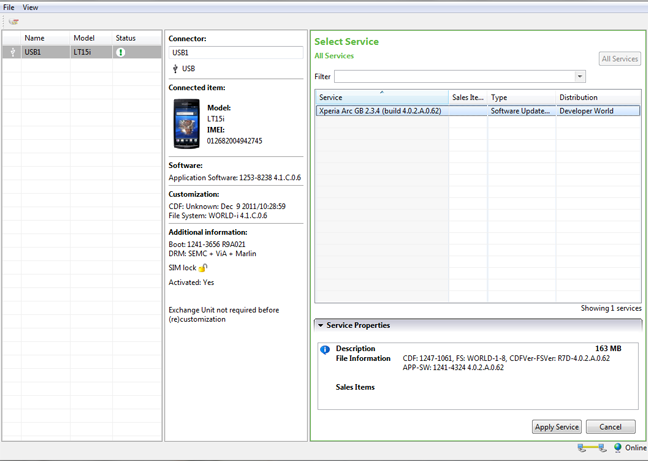
- You’ll see the firmware that you copied in Step 5 loaded on the screen — click “Ok”!
- Now it should ask you to connect your phone to the PC. So first plug the USB cable to PC, then pick up your phone and hold the “Back” key (key at the bottom left on your Arc), and then connect the USB cable to your phone. Remember you’ve to hold the “Back” key while connecting the USB cable to phone.
- Once the phone gets connected — Flashtool will automatically start the flashing process.
- Keep an eye on the Flashtool’s screen.
- And once the process gets finished, disconnect your phone from PC and switch it ON.
- Don’t freak if it takes longer to boot (that’s normal) as the phone has to build the cache again after flashing.
Enjoy!
Many thanks to the XDA Developer community for firmwares.



310 responses to “[TUTORIAL] How To Flash a Firmware Using Flashtool on Xperia Arc”
haha…i face the other problem -.-…after root how to download free app…
haha…i face the other problem -.-…after root how to download free app…
hi guys, I rooted my device accidently before flashing, and now it is not working just showing sony ericsson logo and never change, I tried to re-lock the bootloader, but nothing happened, what to do ?
hi guys, I rooted my device accidently before flashing, and now it is not working just showing sony ericsson logo and never change, I tried to re-lock the bootloader, but nothing happened, what to do ?
hi guys, I rooted my device accidently before flashing, and now it is not working just showing sony ericsson logo and never change, I tried to re-lock the bootloader, but nothing happened, what to do ?
THANK YOUUUUUUUUU SO MUCH!!! worked perfectly<3
Cool! 😉
THANK YOUUUUUUUUU SO MUCH!!! worked perfectly<3
Cool! 😉
THANK YOUUUUUUUUU SO MUCH!!! worked perfectly<3
Cool! 😉
could you help me please. I’d unlocked the bootloader. When I wanted to flash it, this things kept saying “Please install or reinstall device drivers from drivers folder” on my flash tool. What should I do?
it just worked out! It was an order since the beginning. Fool me-___-. I’m sorry for bothering you guys:)
No probe — happens with everyone, I guess 😉
No probs — happens with everyone, I guess 😉
No buddy you didn’t bothered us 😉
Anyway, glad it worked for you 🙂
No buddy you didn’t bothered us 😉
Anyway, glad it worked for you 🙂
could you help me please. I’d unlocked the bootloader. When I wanted to flash it, this things kept saying “Please install or reinstall device drivers from drivers folder” on my flash tool. What should I do?
it just worked out! It was an order since the beginning. Fool me-___-. I’m sorry for bothering you guys:)
No probe — happens with everyone, I guess 😉
No buddy you didn’t bothered us 😉
Anyway, glad it worked for you 🙂
could you help me please. I’d unlocked the bootloader. When I wanted to flash it, this things kept saying “Please install or reinstall device drivers from drivers folder” on my flash tool. What should I do?
it just worked out! It was an order since the beginning. Fool me-___-. I’m sorry for bothering you guys:)
No probs — happens with everyone, I guess 😉
No buddy you didn’t bothered us 😉
Anyway, glad it worked for you 🙂
please help me, flashtool says flashing aborted, i’m slightly panicked right now, please help
I’ll be clear, i have followed all the steps and when i started te flash the flashtool said :
Flashing adsp.sin
Error – Error flashing. Aborted
and my phone does not boot right now, can someone pleease help me
This is for Xperia Arc only, so I hope you tried it on an Arc only.
Anyway, you should try again because normally it doesn’t happen. And make sure your USB cable isn’t loose.
This is for Xperia Arc only, so I hope you tried it on an Arc only.
Anyway, you should try again because normally it doesn’t happen. And make sure your USB cable isn’t loose.
Yes, I do have an Xperia Arc. I’ve tried several times, first two times it stopt after flashing fona1 and now it starts with flashing loader and than stops after flashing adsp. This is what it shows:
This is really strange, try updating your phone through the ‘Sony Ericsson PC Companion’ software. It may help.
Remember PC Companion software might not be able to update your phone if your phone’s boot loader is unlocked, so you’ll have to re-lock the boot loader to get PC Companion to work on your phone.
BTW, I’d suggest you to not play with your phone anymore and take it to Sony Ericsson service center.
This is really strange, try updating your phone through the ‘Sony Ericsson PC Companion’ software. It may help.
Remember PC Companion software might not be able to update your phone if your phone’s boot loader is unlocked, so you’ll have to re-lock the boot loader to get PC Companion to work on your phone.
BTW, I’d suggest you to not play with your phone anymore and take it to Sony Ericsson service center.
Hey wait. It might be possible that your firmware file is corrupted. I think you should download the firmware again. I’m providing you a different download link below, it’s a ‘.rar’ file so you’ll have to extract the file first to get the ‘.ftf’ firmware file that will be used with flashtool, alright.
So below is the download link:
http://download.theandroidsoul.com/file/LT15i_4.0.1.A.0.283_Generic-Global.rar
While you can use any program to extract ‘.rar’ file, I’d recommend you to use ‘7-zip’. It’s free and works perfect.
Hey wait. It might be possible that your firmware file is corrupted. I think you should download the firmware again. I’m providing you a different download link below, it’s a ‘.rar’ file so you’ll have to extract the file first to get the ‘.ftf’ firmware file that will be used with flashtool, alright.
So below is the download link:
http://download.theandroidsoul.com/file/LT15i_4.0.1.A.0.283_Generic-Global.rar
While you can use any program to extract ‘.rar’ file, I’d recommend you to use ‘7-zip’. It’s free and works perfect.
Thank you, i’m going to try this, I did unlocked the bootloader indeed. So it won’t update through PC companion. When my phone lives again, i’ll never try anything anymore haha. I’ll let you know if it worked 😉
I have tried this now, it’s not exactly what i was hoping for. I now says this:
BTW i’m using FlashTool 3.0.0
Try using the version of Flashtool that I’ve provided in this post. Also re-install the drivers, if it helps.
And I’ve written a guide on how to re-lock the boot loader also, so try re-locking and then try updating through PC Companion. Search this site for “re-lock Xperia Arc boot loader” to find the guide.
Try using the version of Flashtool that I’ve provided in this post. Also re-install the drivers, if it helps.
And I’ve written a guide on how to re-lock the boot loader also, so try re-locking and then try updating through PC Companion. Search this site for “re-lock Xperia Arc boot loader” to find the guide.
So i re-locked it but PC companion says i should reboot my phone and connect again !?
Damn.
Try Flashtool 2.9.x and re-installing drivers, man this is getting nuts.
Damn.
Try Flashtool 2.9.x and re-installing drivers, man this is getting nuts.
I did, first tried to flash tje firmware again. This didn’t work and after that i re-locked the bootloaders, which worked (!) But now PC Companion says the same as before, with unlocked bootloaders. Isn’t there something like a total reset? I don’t necessarily need a rooted phone, I just want one that works 🙁
may i know how to re install the driver? I tried several time but i cant get my reflash done
please share files again
files isnot there
please help me, flashtool says flashing aborted, i’m slightly panicked right now, please help
please help me, flashtool says flashing aborted, i’m slightly panicked right now, please help
I’ll be clear, i have followed all the steps and when i started te flash the flashtool said :
Flashing adsp.sin
Error – Error flashing. Aborted
and my phone does not boot right now, can someone pleease help me
This is for Xperia Arc only, so I hope you tried it on an Arc only.
Anyway, you should try again because normally it doesn’t happen. And make sure your USB cable isn’t loose.
Yes, I do have an Xperia Arc. I’ve tried several times, first two times it stopt after flashing fona1 and now it starts with flashing loader and than stops after flashing adsp. This is what it shows:
This is really strange, try updating your phone through the ‘Sony Ericsson PC Companion’ software. It may help.
Remember PC Companion software might not be able to update your phone if your phone’s boot loader is unlocked, so you’ll have to re-lock the boot loader to get PC Companion to work on your phone.
BTW, I’d suggest you to not play with your phone anymore and take it to Sony Ericsson service center.
Thank you, i’m going to try this, I did unlocked the bootloader indeed. So it won’t update through PC companion. When my phone lives again, i’ll never try anything anymore haha. I’ll let you know if it worked 😉
So i re-locked it but PC companion says i should reboot my phone and connect again !?
Damn.
Try Flashtool 2.9.x and re-installing drivers, man this is getting nuts.
I did, first tried to flash tje firmware again. This didn’t work and after that i re-locked the bootloaders, which worked (!) But now PC Companion says the same as before, with unlocked bootloaders. Isn’t there something like a total reset? I don’t necessarily need a rooted phone, I just want one that works 🙁
please share files again
files isnot there
Hey wait. It might be possible that your firmware file is corrupted. I think you should download the firmware again. I’m providing you a different download link below, it’s a ‘.rar’ file so you’ll have to extract the file first to get the ‘.ftf’ firmware file that will be used with flashtool, alright.
So below is the download link:
http://download.theandroidsoul.com/file/LT15i_4.0.1.A.0.283_Generic-Global.rar
While you can use any program to extract ‘.rar’ file, I’d recommend you to use ‘7-zip’. It’s free and works perfect.
I have tried this now, it’s not exactly what i was hoping for. I now says this:
BTW i’m using FlashTool 3.0.0
Try using the version of Flashtool that I’ve provided in this post. Also re-install the drivers, if it helps.
And I’ve written a guide on how to re-lock the boot loader also, so try re-locking and then try updating through PC Companion. Search this site for “re-lock Xperia Arc boot loader” to find the guide.
may i know how to re install the driver? I tried several time but i cant get my reflash done
I’ll be clear, i have followed all the steps and when i started te flash the flashtool said :
Flashing adsp.sin
Error – Error flashing. Aborted
and my phone does not boot right now, can someone pleease help me
This is for Xperia Arc only, so I hope you tried it on an Arc only.
Anyway, you should try again because normally it doesn’t happen. And make sure your USB cable isn’t loose.
Yes, I do have an Xperia Arc. I’ve tried several times, first two times it stopt after flashing fona1 and now it starts with flashing loader and than stops after flashing adsp. This is what it shows:
This is really strange, try updating your phone through the ‘Sony Ericsson PC Companion’ software. It may help.
Remember PC Companion software might not be able to update your phone if your phone’s boot loader is unlocked, so you’ll have to re-lock the boot loader to get PC Companion to work on your phone.
BTW, I’d suggest you to not play with your phone anymore and take it to Sony Ericsson service center.
Thank you, i’m going to try this, I did unlocked the bootloader indeed. So it won’t update through PC companion. When my phone lives again, i’ll never try anything anymore haha. I’ll let you know if it worked 😉
So i re-locked it but PC companion says i should reboot my phone and connect again !?
Damn.
Try Flashtool 2.9.x and re-installing drivers, man this is getting nuts.
I did, first tried to flash tje firmware again. This didn’t work and after that i re-locked the bootloaders, which worked (!) But now PC Companion says the same as before, with unlocked bootloaders. Isn’t there something like a total reset? I don’t necessarily need a rooted phone, I just want one that works 🙁
please share files again
files isnot there
Hey wait. It might be possible that your firmware file is corrupted. I think you should download the firmware again. I’m providing you a different download link below, it’s a ‘.rar’ file so you’ll have to extract the file first to get the ‘.ftf’ firmware file that will be used with flashtool, alright.
So below is the download link:
http://download.theandroidsoul.com/file/LT15i_4.0.1.A.0.283_Generic-Global.rar
While you can use any program to extract ‘.rar’ file, I’d recommend you to use ‘7-zip’. It’s free and works perfect.
I have tried this now, it’s not exactly what i was hoping for. I now says this:
BTW i’m using FlashTool 3.0.0
Try using the version of Flashtool that I’ve provided in this post. Also re-install the drivers, if it helps.
And I’ve written a guide on how to re-lock the boot loader also, so try re-locking and then try updating through PC Companion. Search this site for “re-lock Xperia Arc boot loader” to find the guide.
may i know how to re install the driver? I tried several time but i cant get my reflash done
hey i dit evrything you said but when i try to start the phone after im dun installing the phone dosent start the green light just blinks
befoor i installd this my phone got bricked through OTA update and it died can you help me shivam
hey i dit evrything you said but when i try to start the phone after im dun installing the phone dosent start the green light just blinks
hey i dit evrything you said but when i try to start the phone after im dun installing the phone dosent start the green light just blinks
befoor i installd this my phone got bricked through OTA update and it died can you help me shivam
befoor i installd this my phone got bricked through OTA update and it died can you help me shivam
it’s work thanks!
it’s work thanks!
it’s work thanks!
shivan i have the same problem like Jaccodevrij and i can’t solve it…there’s a way that you can help us? 🙁
always try to flahs the firmware and the error is the same..at the part of the system 🙁 i’m getting no hope 🙁
I really have no solution for your problem 🙁
But I’ll let u know if I find anything 🙂
I really have no solution for your problem 🙁
But I’ll let u know if I find anything 🙂
I followed all the steps, got everything working fine, flashed and rooted. thanks . shivam. Thanks for helping sonyericsson out.
shivan i have the same problem like Jaccodevrij and i can’t solve it…there’s a way that you can help us? 🙁
shivan i have the same problem like Jaccodevrij and i can’t solve it…there’s a way that you can help us? 🙁
always try to flahs the firmware and the error is the same..at the part of the system 🙁 i’m getting no hope 🙁
I really have no solution for your problem 🙁
But I’ll let u know if I find anything 🙂
always try to flahs the firmware and the error is the same..at the part of the system 🙁 i’m getting no hope 🙁
I really have no solution for your problem 🙁
But I’ll let u know if I find anything 🙂
I followed all the steps, got everything working fine, flashed and rooted. thanks . shivam. Thanks for helping sonyericsson out.
I followed all the steps, got everything working fine, flashed and rooted. thanks . shivam. Thanks for helping sonyericsson out.
can someone post link to 2.3.4 UK version firmvare please
can someone post link to 2.3.4 UK version firmvare please
can someone post link to 2.3.4 UK version firmvare please
hey guys. i have a problem using the flash tool…
everytime i want to flash the prgram says that i should connect the phone in flash mode… i habe installed the driver program and the light at the site s blue… i use cyanogenmod and i can flash a boot image with fastboot… whats my problem??
THX for answeres
I think you’re pressing the wrong key, press the ‘back’ key when you connect to flashtool. It will work.
The blue light appears when you press the ‘Menu’ key and it gets the phone in bootloader mode, which we don’t want when working with flashtool.
So press the ‘Back’ key 🙂
I think you’re pressing the wrong key, press the ‘back’ key when you connect to flashtool. It will work.
The blue light appears when you press the ‘Menu’ key and it gets the phone in bootloader mode, which we don’t want when working with flashtool.
So press the ‘Back’ key 🙂
oh damn. im so ashamed thad i cant read….-,- THX so much
im to stupid:-)
Lol it’s okay, mistakes happen 😉
Lol it’s okay, mistakes happen 😉
hey guys. i have a problem using the flash tool…
everytime i want to flash the prgram says that i should connect the phone in flash mode… i habe installed the driver program and the light at the site s blue… i use cyanogenmod and i can flash a boot image with fastboot… whats my problem??
THX for answeres
I think you’re pressing the wrong key, press the ‘back’ key when you connect to flashtool. It will work.
The blue light appears when you press the ‘Menu’ key and it gets the phone in bootloader mode, which we don’t want when working with flashtool.
So press the ‘Back’ key 🙂
oh damn. im so ashamed thad i cant read….-,- THX so much
im to stupid:-)
Lol it’s okay, mistakes happen 😉
hey guys. i have a problem using the flash tool…
everytime i want to flash the prgram says that i should connect the phone in flash mode… i habe installed the driver program and the light at the site s blue… i use cyanogenmod and i can flash a boot image with fastboot… whats my problem??
THX for answeres
I think you’re pressing the wrong key, press the ‘back’ key when you connect to flashtool. It will work.
The blue light appears when you press the ‘Menu’ key and it gets the phone in bootloader mode, which we don’t want when working with flashtool.
So press the ‘Back’ key 🙂
oh damn. im so ashamed thad i cant read….-,- THX so much
im to stupid:-)
Lol it’s okay, mistakes happen 😉
After flashing My Arc cannot connect to wifi (n). It does not even see any wifi signals. I hold the devise practically on top of the router but no signal on Arc. My other devises such as laptop and another mobile can see and connect to the router just fine !!!
After flashing My Arc cannot connect to wifi (n). It does not even see any wifi signals. I hold the devise practically on top of the router but no signal on Arc. My other devises such as laptop and another mobile can see and connect to the router just fine !!!
After flashing My Arc cannot connect to wifi (n). It does not even see any wifi signals. I hold the devise practically on top of the router but no signal on Arc. My other devises such as laptop and another mobile can see and connect to the router just fine !!!
i can’t run x10flasher.exe, keeps giving me java error, though jre 7 is installed on my pc & i defined it’s path, please help, my phone is stuck on boot screen 🙁
i can’t run x10flasher.exe, keeps giving me java error, though jre 7 is installed on my pc & i defined it’s path, please help, my phone is stuck on boot screen 🙁
i can’t run x10flasher.exe, keeps giving me java error, though jre 7 is installed on my pc & i defined it’s path, please help, my phone is stuck on boot screen 🙁
Special Thanks … It’s fine and perfect …
Special Thanks … It’s fine and perfect …
Special Thanks … It’s fine and perfect …