Hacks News

[TUTORIAL] How To Flash a Firmware Using Flashtool on Xperia Arc

Contents hide Required files: Video instructions: Instructions: Required files: Flashtool — Download link Firmwares — Download the “.ftf” firmware file for your phone. Below are the links: Android…

Contents hide Required files: Video instructions: Instructions: Required files: Flashtool — Download link Firmwares — Download the “.ftf” firmware file for your phone. Below are the links: Android…

310 Comments
Kapill M Malani

Kapill M Malani A die-hard Liverpool FC fan, Kapill is a big fan of Batman, Android and street Cricket. In that order, probably. Email: [email protected]

Required files:

FlashtoolDownload link

Firmwares — Download the “.ftf” firmware file for your phone. Below are the links:

Android 2.3.4    [4.0.2.A.0.62]

[warning] The methods and procedures discussed here are considered risky and you should not attempt anything if you don’t know completely what it is. Do this only if you’re capable of getting your phone back right on your own. If any damage occurs to you or your device, we won’t be held liable. You only will be responsible — you’ve been warned. Okay![/warning]

Video instructions:

Instructions:

  1. Switch off your phone and put it aside.
  2. Extract the “FlashTool_x.x.x.x.exe” file on your PC (you can just double click on it to extract)
  3. Few files and folders will be extracted — the two which we’ll be using are the ‘drivers‘ folder and the ‘firmwares‘ folder.
  4. Inside the ‘drivers‘ folder there’s a file named “ggsetup-2.2.0.10.exe”, double click on this file to install the proper driver on your PC.
  5. Now copy the “.ftf” firmware file that you downloaded for your phone, and paste it inside the “firmwares” folder.
  6. Double click the “X10FlashTool.exe” file.
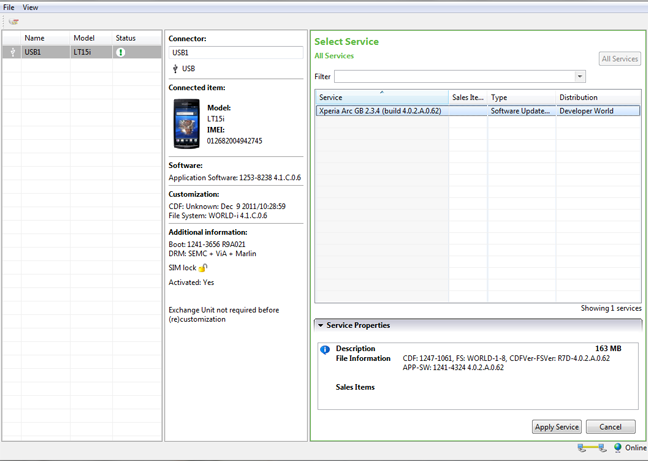
  7. Once the program opens — click on the “Flash” button.
  8. You’ll see the firmware that you copied in Step 5 loaded on the screen — click “Ok”!
  9. Now it should ask you to connect your phone to the PC. So first plug the USB cable to PC, then pick up your phone and hold the “Back” key (key at the bottom left on your Arc), and then connect the USB cable to your phone. Remember you’ve to hold the “Back” key while connecting the USB cable to phone.
  10. Once the phone gets connected — Flashtool will automatically start the flashing process.
  11. Keep an eye on the Flashtool’s screen.
  12. And once the process gets finished, disconnect your phone from PC and switch it ON.
  13. Don’t freak if it takes longer to boot (that’s normal)  as the phone has to build the cache again after flashing.

Enjoy!

Many thanks to the XDA Developer community for firmwares.

310 responses to “[TUTORIAL] How To Flash a Firmware Using Flashtool on Xperia Arc”

  1. Guest Avatar

    hello will this unlock you mobile 

    1. Androiding Staff Avatar
      Androiding Staff

      No it won’t.

      Follow this guide to unlock your phone — https://nerdschalk.com/how-to-unlock-bootloader-xperia-arc-play-neo-pro/

    2. Shivam Avatar
      Shivam

      No it won’t.

      Follow this guide to unlock your phone — https://nerdschalk.com/how-to-unlock-bootloader-xperia-arc-play-neo-pro/

  2. Dj-devastation Avatar
    Dj-devastation

    hello will this unlock you mobile 

    1. Shivam Avatar

      No it won’t.

      Follow this guide to unlock your phone — https://nerdschalk.com/how-to-unlock-bootloader-xperia-arc-play-neo-pro/

  3. Dj-devastation Avatar
    Dj-devastation

    hello will this unlock you mobile 

    1. Shivam Avatar

      No it won’t.

      Follow this guide to unlock your phone — https://nerdschalk.com/how-to-unlock-bootloader-xperia-arc-play-neo-pro/

  4. Guest Avatar

    Hi, i flashed my arc but now i cant send / receive calls but full signal is shown. Any ideas? Cheers

    1. Androiding Staff Avatar
      Androiding Staff

      Which firmware you flashed?

    2. Shivam Avatar
      Shivam

      Which firmware you flashed?

    3. Guest Avatar

      It was locked on orange so i got my 02 sim card unlock and it worked fine but i wanted to flash it to improve speed etc but now cant send / receive calls. the phone is android version 2.3.3 and i have tried flashing with UK generic / Global generic / 02 Branded but with no success!

    4. Androiding Staff Avatar
      Androiding Staff

      Well try updating your firmware through SEUS — http://www.sonyericsson.com/cws/support/softwaredownloads/detailed/updateservice/xperiaarc?cc=gb&lc=en

      It may help.

    5. Shivam Avatar
      Shivam

      Well try updating your firmware through SEUS — http://www.sonyericsson.com/cws/support/softwaredownloads/detailed/updateservice/xperiaarc?cc=gb&lc=en

      It may help.

    6. Guest Avatar

      Yeah i tried that but still no success. Its a shame as i love this phone. cheers for your help

  5. Le Jordan Avatar
    Le Jordan

    Hi, i flashed my arc but now i cant send / receive calls but full signal is shown. Any ideas? Cheers

    1. Shivam Avatar

      Which firmware you flashed?

      1. Le Jordan Avatar
        Le Jordan

        It was locked on orange so i got my 02 sim card unlock and it worked fine but i wanted to flash it to improve speed etc but now cant send / receive calls. the phone is android version 2.3.3 and i have tried flashing with UK generic / Global generic / 02 Branded but with no success!

          1. Le Jordan Avatar
            Le Jordan

            Yeah i tried that but still no success. Its a shame as i love this phone. cheers for your help

  6. Le Jordan Avatar
    Le Jordan

    Hi, i flashed my arc but now i cant send / receive calls but full signal is shown. Any ideas? Cheers

    1. Shivam Avatar

      Which firmware you flashed?

      1. Le Jordan Avatar
        Le Jordan

        It was locked on orange so i got my 02 sim card unlock and it worked fine but i wanted to flash it to improve speed etc but now cant send / receive calls. the phone is android version 2.3.3 and i have tried flashing with UK generic / Global generic / 02 Branded but with no success!

          1. Le Jordan Avatar
            Le Jordan

            Yeah i tried that but still no success. Its a shame as i love this phone. cheers for your help

  7. Guest Avatar
    Guest

    okay it works! thankyou sooo much ! 😀

    but can sumone tellme the differences between the branded thing?

    im at Indonesia, which one shud i choose then??

    thanks..

    1. Shivam Avatar
      Shivam

      I think you should choose the Global firmware..

      To confirm, do the following:Go to Settings → About phone → and check if your baseband version is this → 7X30A-AAABQMAZM-1290_21-22.
      If yes, then definitely go for the the Global firmware.

    2. Androiding Staff Avatar
      Androiding Staff

      I think you should choose the Global firmware..

      To confirm, do the following:Go to Settings → About phone → and check if your baseband version is this → 7X30A-AAABQMAZM-1290_21-22.
      If yes, then definitely go for the the Global firmware.

    3. Guest Avatar

      yup, thanks for the fast answer 😀

  8. Shivam Avatar
    Shivam

    I think you should choose the Global firmware..

    To confirm, do the following:
    Go to Settings → About phone → and check if your baseband version is this → 7X30A-AAABQMAZM-1290_21-22.If yes, then definitely go for the the Global firmware.

  9. Androiding Staff Avatar
    Androiding Staff

    I think you should choose the Global firmware..

    To confirm, do the following:
    Go to Settings → About phone → and check if your baseband version is this → 7X30A-AAABQMAZM-1290_21-22.If yes, then definitely go for the the Global firmware.

  10. frendy Avatar
    frendy

    okay it works! thankyou sooo much ! 😀

    but can sumone tellme the differences between the branded thing?

    im at Indonesia, which one shud i choose then??

    thanks..

    1. Shivam Avatar

      I think you should choose the Global firmware..

      To confirm, do the following:Go to Settings → About phone → and check if your baseband version is this → 7X30A-AAABQMAZM-1290_21-22.
      If yes, then definitely go for the the Global firmware.

      1. frendy Avatar
        frendy

        yup, thanks for the fast answer 😀

  11. frendy Avatar
    frendy

    okay it works! thankyou sooo much ! 😀

    but can sumone tellme the differences between the branded thing?

    im at Indonesia, which one shud i choose then??

    thanks..

    1. Shivam Avatar

      I think you should choose the Global firmware..

      To confirm, do the following:Go to Settings → About phone → and check if your baseband version is this → 7X30A-AAABQMAZM-1290_21-22.
      If yes, then definitely go for the the Global firmware.

      1. frendy Avatar
        frendy

        yup, thanks for the fast answer 😀

  12. Shivam Avatar

    I think you should choose the Global firmware..

    To confirm, do the following:
    Go to Settings → About phone → and check if your baseband version is this → 7X30A-AAABQMAZM-1290_21-22.If yes, then definitely go for the the Global firmware.

  13. Shivam Avatar

    I think you should choose the Global firmware..

    To confirm, do the following:
    Go to Settings → About phone → and check if your baseband version is this → 7X30A-AAABQMAZM-1290_21-22.If yes, then definitely go for the the Global firmware.

  14. Guest Avatar

    hi ı have problem with my xperia arc. ı’m trying to flash using flashtool but when ı look the firmware content in the flashtool program there is only one file is simlock.ta file.and when ı look up in video ı’m seeing a lot of file in the firmware content.due to this ı cant flashh my phone tanks from now

  15. muhammet Avatar
    muhammet

    hi ı have problem with my xperia arc. ı’m trying to flash using flashtool but when ı look the firmware content in the flashtool program there is only one file is simlock.ta file.and when ı look up in video ı’m seeing a lot of file in the firmware content.due to this ı cant flashh my phone tanks from now

  16. muhammet Avatar
    muhammet

    hi ı have problem with my xperia arc. ı’m trying to flash using flashtool but when ı look the firmware content in the flashtool program there is only one file is simlock.ta file.and when ı look up in video ı’m seeing a lot of file in the firmware content.due to this ı cant flashh my phone tanks from now

  17. Guest Avatar

    “Don’t freak if it takes longer to boot (that’s normal)  as the phone has to build the cache again after flashing.” 
    can i know how much time? hours??

    1. Androiding Staff Avatar
      Androiding Staff

      No — not hours. It shouldn’t take more than 15-20 mins.

    2. Shivam Avatar

      No — not hours. It shouldn’t take more than 15-20 mins.

  18. help me Avatar
    help me

    “Don’t freak if it takes longer to boot (that’s normal)  as the phone has to build the cache again after flashing.” 
    can i know how much time? hours??

    1. Shivam Avatar

      No — not hours. It shouldn’t take more than 15-20 mins.

  19. help me Avatar
    help me

    “Don’t freak if it takes longer to boot (that’s normal)  as the phone has to build the cache again after flashing.” 
    can i know how much time? hours??

    1. Shivam Avatar

      No — not hours. It shouldn’t take more than 15-20 mins.

  20. Guest Avatar

    I tried many times but the same error message appeared on the while in the flashtool box – Please install or reinstall drivers.Please help. Thanks.

    1. Androiding Staff Avatar
      Androiding Staff

      Open the “drivers” folder after you extract flashtool. There’ll be a setup file in there to install the drivers.

      Hope that helps 🙂

    2. Shivam Avatar

      Open the “drivers” folder after you extract flashtool. There’ll be a setup file in there to install the drivers.

      Hope that helps 🙂

  21. Guest Avatar

    can this use for xperia play?

  22. Guest Avatar

    THX YOU Shivam U ARE AWESOME

  23. Guest Avatar

    and one more question after i flash done i open my phone but just got light for 10sec then turn to black edi why?

    1. Shivam Avatar

      Buddy these firmwares are for Xperia Arc only. So if you’ve flashed any of these firmwares onto your Xperia Play, it most certainly won’t boot.

    2. Androiding Staff Avatar
      Androiding Staff

      Buddy these firmwares are for Xperia Arc only. So if you’ve flashed any of these firmwares onto your Xperia Play, it most certainly won’t boot.

  24. Guest Avatar

    it most certainly won’t boot.mean what? my phone died?

  25. Guest Avatar

    shivam what can i do now i cannot on my phone

    1. Androiding Staff Avatar
      Androiding Staff

      Yes I’m looking for a compatible ROM for your phone..

    2. Shivam Avatar

      Yes I’m looking for a compatible ROM for your phone..

  26. Guest Avatar

    help my phone…i very scare and want cry edi my new phone T.T

    1. Androiding Staff Avatar
      Androiding Staff

      Okay download the firmware from this link — http://www.multiupload.com/U6XELL1KFV

      You’ll get a .rar file, extract it, and you’ll get .ftf firmware file, put that firmware file in the “firmwares” folder and flash it.

      Let me know if it solves your problem 🙂

    2. Shivam Avatar

      Okay download the firmware from this link — http://www.multiupload.com/U6XELL1KFV

      You’ll get a .rar file, extract it, and you’ll get .ftf firmware file, put that firmware file in the “firmwares” folder and flash it.

      Let me know if it solves your problem 🙂

  27. Guest Avatar

    should that Xperia_Play_Release_Generic_UK.ftf can save me?

  28. Guest Avatar

    R800i_4.0.A.2.368_World.rar is 2.3.3 android version?and can i have ur msn 

  29. Guest Avatar

    anyware thx i fix the problem edi

    1. Shivam Avatar

      Oh great you got it all fixed. Cheers.
      And sorry I don’t have MSN, but you can have my gtalk (if you still need it). Okay 🙂

    2. Androiding Staff Avatar
      Androiding Staff

      Oh great you got it all fixed. Cheers.
      And sorry I don’t have MSN, but you can have my gtalk (if you still need it). Okay 🙂

    3. Guest Avatar

      hello shivam i have a problem plz help i was updating my experia arc by phone and after it download my phone wouldn’t switch on and also when i connect it to the computer no light would show up plz help me

  30. kk Avatar

    I tried many times but the same error message appeared on the while in the flashtool box – Please install or reinstall drivers.Please help. Thanks.

    1. Shivam Avatar

      Open the “drivers” folder after you extract flashtool. There’ll be a setup file in there to install the drivers.

      Hope that helps 🙂

  31. kk Avatar

    I tried many times but the same error message appeared on the while in the flashtool box – Please install or reinstall drivers.Please help. Thanks.

    1. Shivam Avatar

      Open the “drivers” folder after you extract flashtool. There’ll be a setup file in there to install the drivers.

      Hope that helps 🙂

  32. tan Avatar

    can this use for xperia play?

  33. tan Avatar

    can this use for xperia play?

  34. tan Avatar

    THX YOU Shivam U ARE AWESOME

  35. tan Avatar

    THX YOU Shivam U ARE AWESOME

  36. tan Avatar

    and one more question after i flash done i open my phone but just got light for 10sec then turn to black edi why?

    1. Shivam Avatar

      Buddy these firmwares are for Xperia Arc only. So if you’ve flashed any of these firmwares onto your Xperia Play, it most certainly won’t boot.

  37. tan Avatar

    and one more question after i flash done i open my phone but just got light for 10sec then turn to black edi why?

    1. Shivam Avatar

      Buddy these firmwares are for Xperia Arc only. So if you’ve flashed any of these firmwares onto your Xperia Play, it most certainly won’t boot.

  38. Guest Avatar

    haha…i face the other problem -.-…after root how to download free app…

  39. tan Avatar

    it most certainly won’t boot.mean what? my phone died?

  40. tan Avatar

    it most certainly won’t boot.mean what? my phone died?

  41. tan Avatar

    shivam what can i do now i cannot on my phone

    1. Shivam Avatar

      Yes I’m looking for a compatible ROM for your phone..

  42. tan Avatar

    shivam what can i do now i cannot on my phone

    1. Shivam Avatar

      Yes I’m looking for a compatible ROM for your phone..

  43. tan Avatar

    help my phone…i very scare and want cry edi my new phone T.T

    1. Shivam Avatar

      Okay download the firmware from this link — http://www.multiupload.com/U6XELL1KFV

      You’ll get a .rar file, extract it, and you’ll get .ftf firmware file, put that firmware file in the “firmwares” folder and flash it.

      Let me know if it solves your problem 🙂

  44. tan Avatar

    help my phone…i very scare and want cry edi my new phone T.T

    1. Shivam Avatar

      Okay download the firmware from this link — http://www.multiupload.com/U6XELL1KFV

      You’ll get a .rar file, extract it, and you’ll get .ftf firmware file, put that firmware file in the “firmwares” folder and flash it.

      Let me know if it solves your problem 🙂

  45. tan Avatar

    should that Xperia_Play_Release_Generic_UK.ftf can save me?

  46. tan Avatar

    should that Xperia_Play_Release_Generic_UK.ftf can save me?

  47. tan Avatar

    R800i_4.0.A.2.368_World.rar is 2.3.3 android version?and can i have ur msn 

  48. tan Avatar

    R800i_4.0.A.2.368_World.rar is 2.3.3 android version?and can i have ur msn 

  49. tan Avatar

    anyware thx i fix the problem edi

    1. Shivam Avatar

      Oh great you got it all fixed. Cheers.
      And sorry I don’t have MSN, but you can have my gtalk (if you still need it). Okay 🙂

      1. Mustafa Avatar

        hello shivam i have a problem plz help i was updating my experia arc by phone and after it download my phone wouldn’t switch on and also when i connect it to the computer no light would show up plz help me

  50. tan Avatar

    anyware thx i fix the problem edi

    1. Shivam Avatar

      Oh great you got it all fixed. Cheers.
      And sorry I don’t have MSN, but you can have my gtalk (if you still need it). Okay 🙂

      1. Mustafa Avatar

        hello shivam i have a problem plz help i was updating my experia arc by phone and after it download my phone wouldn’t switch on and also when i connect it to the computer no light would show up plz help me

  51. tan Avatar

    haha…i face the other problem -.-…after root how to download free app…

  52. tan Avatar

    haha…i face the other problem -.-…after root how to download free app…

  53. Guest Avatar

    hi guys, I rooted my device accidently before flashing, and now it is not working just showing sony ericsson logo and never change, I tried to re-lock the bootloader, but nothing happened, what to do ?

  54. Moustafa Ghanem Avatar
    Moustafa Ghanem

    hi guys, I rooted my device accidently before flashing, and now it is not working just showing sony ericsson logo and never change, I tried to re-lock the bootloader, but nothing happened, what to do ?

  55. Moustafa Ghanem Avatar
    Moustafa Ghanem

    hi guys, I rooted my device accidently before flashing, and now it is not working just showing sony ericsson logo and never change, I tried to re-lock the bootloader, but nothing happened, what to do ?

  56. Guest Avatar

    THANK YOUUUUUUUUU SO MUCH!!! worked perfectly<3

    1. Krishna Avatar
      Krishna

      Cool! 😉

  57. H_n_h93 Avatar
    H_n_h93

    THANK YOUUUUUUUUU SO MUCH!!! worked perfectly<3

    1. Kapil Avatar

      Cool! 😉

  58. H_n_h93 Avatar
    H_n_h93

    THANK YOUUUUUUUUU SO MUCH!!! worked perfectly<3

    1. Kapil Avatar

      Cool! 😉

  59. Guest Avatar

    could you help me please. I’d unlocked the bootloader. When I wanted to flash it, this things kept saying “Please install or reinstall device drivers from drivers folder” on my flash tool. What should I do?

    1. Guest Avatar

      it just worked out! It was an order since the beginning. Fool me-___-. I’m sorry for bothering you guys:)

    2. Krishna Avatar
      Krishna

      No probe — happens with everyone, I guess 😉

    3. Krishna Avatar
      Krishna

      No probs — happens with everyone, I guess 😉

    4. Shivam Avatar

      No buddy you didn’t bothered us 😉
      Anyway, glad it worked for you 🙂

    5. Androiding Staff Avatar
      Androiding Staff

      No buddy you didn’t bothered us 😉
      Anyway, glad it worked for you 🙂

  60. Aghnan Avatar

    could you help me please. I’d unlocked the bootloader. When I wanted to flash it, this things kept saying “Please install or reinstall device drivers from drivers folder” on my flash tool. What should I do?

    1. Aghnan Avatar

      it just worked out! It was an order since the beginning. Fool me-___-. I’m sorry for bothering you guys:)

      1. Kapil Avatar

        No probe — happens with everyone, I guess 😉

      2. Shivam Avatar

        No buddy you didn’t bothered us 😉
        Anyway, glad it worked for you 🙂

  61. Aghnan Avatar

    could you help me please. I’d unlocked the bootloader. When I wanted to flash it, this things kept saying “Please install or reinstall device drivers from drivers folder” on my flash tool. What should I do?

    1. Aghnan Avatar

      it just worked out! It was an order since the beginning. Fool me-___-. I’m sorry for bothering you guys:)

      1. Kapil Avatar

        No probs — happens with everyone, I guess 😉

      2. Shivam Avatar

        No buddy you didn’t bothered us 😉
        Anyway, glad it worked for you 🙂

  62. Guest Avatar

    please help me, flashtool says flashing aborted, i’m slightly panicked right now, please help

  63. Guest Avatar

    I’ll be clear, i have followed all the steps and when i started te flash the flashtool said :
    Flashing adsp.sin
    Error – Error flashing. Aborted

    and my phone does not boot right now, can someone pleease help me

    1. Androiding Staff Avatar
      Androiding Staff

      This is for Xperia Arc only, so I hope you tried it on an Arc only.

      Anyway, you should try again because normally it doesn’t happen. And make sure your USB cable isn’t loose.

    2. Shivam Avatar

      This is for Xperia Arc only, so I hope you tried it on an Arc only.

      Anyway, you should try again because normally it doesn’t happen. And make sure your USB cable isn’t loose.

    3. Guest Avatar

      Yes, I do have an Xperia Arc. I’ve tried several times, first two times it  stopt after flashing fona1 and now it starts with flashing loader and than stops after flashing adsp. This is what it shows:

    4. Androiding Staff Avatar
      Androiding Staff

      This is really strange, try updating your phone through the ‘Sony Ericsson PC Companion’ software. It may help.

      Remember PC Companion software might not be able to update your phone if your phone’s boot loader is unlocked, so you’ll have to re-lock the boot loader to get PC Companion to work on your phone.

      BTW, I’d suggest you to not play with your phone anymore and take it to Sony Ericsson service center.

    5. Shivam Avatar

      This is really strange, try updating your phone through the ‘Sony Ericsson PC Companion’ software. It may help.

      Remember PC Companion software might not be able to update your phone if your phone’s boot loader is unlocked, so you’ll have to re-lock the boot loader to get PC Companion to work on your phone.

      BTW, I’d suggest you to not play with your phone anymore and take it to Sony Ericsson service center.

    6. Androiding Staff Avatar
      Androiding Staff

      Hey wait. It might be possible that your firmware file is corrupted. I think you should download the firmware again. I’m providing you a different download link below, it’s a ‘.rar’ file so you’ll have to extract the file first to get the ‘.ftf’ firmware file that will be used with flashtool, alright.

      So below is the download link:

      http://download.theandroidsoul.com/file/LT15i_4.0.1.A.0.283_Generic-Global.rar

      While you can use any program to extract ‘.rar’ file, I’d recommend you to use ‘7-zip’. It’s free and works perfect.

    7. Shivam Avatar

      Hey wait. It might be possible that your firmware file is corrupted. I think you should download the firmware again. I’m providing you a different download link below, it’s a ‘.rar’ file so you’ll have to extract the file first to get the ‘.ftf’ firmware file that will be used with flashtool, alright.

      So below is the download link:

      http://download.theandroidsoul.com/file/LT15i_4.0.1.A.0.283_Generic-Global.rar

      While you can use any program to extract ‘.rar’ file, I’d recommend you to use ‘7-zip’. It’s free and works perfect.

    8. Guest Avatar

      Thank you, i’m going to try this, I did unlocked the bootloader indeed. So it won’t update through PC companion. When my phone lives again, i’ll never try anything anymore haha. I’ll let you know if it worked 😉

    9. Guest Avatar

      I have tried this now, it’s not exactly what i was hoping for. I now says this:

    10. Guest Avatar

      BTW i’m using FlashTool 3.0.0

    11. Androiding Staff Avatar
      Androiding Staff

      Try using the version of Flashtool that I’ve provided in this post. Also re-install the drivers, if it helps.

      And I’ve written a guide on how to re-lock the boot loader also, so try re-locking and then try updating through PC Companion. Search this site for “re-lock Xperia Arc boot loader” to find the guide.

    12. Shivam Avatar

      Try using the version of Flashtool that I’ve provided in this post. Also re-install the drivers, if it helps.

      And I’ve written a guide on how to re-lock the boot loader also, so try re-locking and then try updating through PC Companion. Search this site for “re-lock Xperia Arc boot loader” to find the guide.

    13. Guest Avatar

      So i re-locked it but PC companion says i should reboot my phone and connect again !?

    14. Androiding Staff Avatar
      Androiding Staff

      Damn.
      Try Flashtool 2.9.x and re-installing drivers, man this is getting nuts.

    15. Shivam Avatar

      Damn.
      Try Flashtool 2.9.x and re-installing drivers, man this is getting nuts.

    16. Guest Avatar

      I did, first tried to flash tje firmware again. This didn’t work and after that i re-locked the bootloaders, which worked (!) But now PC Companion says the same as before, with unlocked bootloaders. Isn’t there something like a total reset? I don’t necessarily need a rooted phone, I just want one that works 🙁

    17. Guest Avatar

      may i know how to re install the driver? I tried several time but i cant get my reflash done

    18. Guest Avatar

      please share files again
      files isnot there

  64. Jaccodevrij Avatar
    Jaccodevrij

    please help me, flashtool says flashing aborted, i’m slightly panicked right now, please help

  65. Jaccodevrij Avatar
    Jaccodevrij

    please help me, flashtool says flashing aborted, i’m slightly panicked right now, please help

  66. Jaccodevrij Avatar
    Jaccodevrij

    I’ll be clear, i have followed all the steps and when i started te flash the flashtool said :
    Flashing adsp.sin
    Error – Error flashing. Aborted

    and my phone does not boot right now, can someone pleease help me

    1. Shivam Avatar

      This is for Xperia Arc only, so I hope you tried it on an Arc only.

      Anyway, you should try again because normally it doesn’t happen. And make sure your USB cable isn’t loose.

      1. Jaccodevrij Avatar
        Jaccodevrij

        Yes, I do have an Xperia Arc. I’ve tried several times, first two times it  stopt after flashing fona1 and now it starts with flashing loader and than stops after flashing adsp. This is what it shows:

        1. Shivam Avatar

          This is really strange, try updating your phone through the ‘Sony Ericsson PC Companion’ software. It may help.

          Remember PC Companion software might not be able to update your phone if your phone’s boot loader is unlocked, so you’ll have to re-lock the boot loader to get PC Companion to work on your phone.

          BTW, I’d suggest you to not play with your phone anymore and take it to Sony Ericsson service center.

          1. Jaccodevrij Avatar
            Jaccodevrij

            Thank you, i’m going to try this, I did unlocked the bootloader indeed. So it won’t update through PC companion. When my phone lives again, i’ll never try anything anymore haha. I’ll let you know if it worked 😉

          2. Jaccodevrij Avatar
            Jaccodevrij

            So i re-locked it but PC companion says i should reboot my phone and connect again !?

          3. Shivam Avatar

            Damn.
            Try Flashtool 2.9.x and re-installing drivers, man this is getting nuts.

          4. Jaccodevrij Avatar
            Jaccodevrij

            I did, first tried to flash tje firmware again. This didn’t work and after that i re-locked the bootloaders, which worked (!) But now PC Companion says the same as before, with unlocked bootloaders. Isn’t there something like a total reset? I don’t necessarily need a rooted phone, I just want one that works 🙁

          5. mehran Avatar

            please share files again
            files isnot there

        2. Shivam Avatar

          Hey wait. It might be possible that your firmware file is corrupted. I think you should download the firmware again. I’m providing you a different download link below, it’s a ‘.rar’ file so you’ll have to extract the file first to get the ‘.ftf’ firmware file that will be used with flashtool, alright.

          So below is the download link:

          http://download.theandroidsoul.com/file/LT15i_4.0.1.A.0.283_Generic-Global.rar

          While you can use any program to extract ‘.rar’ file, I’d recommend you to use ‘7-zip’. It’s free and works perfect.

          1. Jaccodevrij Avatar
            Jaccodevrij

            I have tried this now, it’s not exactly what i was hoping for. I now says this:

          2. Jaccodevrij Avatar
            Jaccodevrij

            BTW i’m using FlashTool 3.0.0

          3. Shivam Avatar

            Try using the version of Flashtool that I’ve provided in this post. Also re-install the drivers, if it helps.

            And I’ve written a guide on how to re-lock the boot loader also, so try re-locking and then try updating through PC Companion. Search this site for “re-lock Xperia Arc boot loader” to find the guide.

          4. Mr Ng Avatar

            may i know how to re install the driver? I tried several time but i cant get my reflash done

  67. Jaccodevrij Avatar
    Jaccodevrij

    I’ll be clear, i have followed all the steps and when i started te flash the flashtool said :
    Flashing adsp.sin
    Error – Error flashing. Aborted

    and my phone does not boot right now, can someone pleease help me

    1. Shivam Avatar

      This is for Xperia Arc only, so I hope you tried it on an Arc only.

      Anyway, you should try again because normally it doesn’t happen. And make sure your USB cable isn’t loose.

      1. Jaccodevrij Avatar
        Jaccodevrij

        Yes, I do have an Xperia Arc. I’ve tried several times, first two times it  stopt after flashing fona1 and now it starts with flashing loader and than stops after flashing adsp. This is what it shows:

        1. Shivam Avatar

          This is really strange, try updating your phone through the ‘Sony Ericsson PC Companion’ software. It may help.

          Remember PC Companion software might not be able to update your phone if your phone’s boot loader is unlocked, so you’ll have to re-lock the boot loader to get PC Companion to work on your phone.

          BTW, I’d suggest you to not play with your phone anymore and take it to Sony Ericsson service center.

          1. Jaccodevrij Avatar
            Jaccodevrij

            Thank you, i’m going to try this, I did unlocked the bootloader indeed. So it won’t update through PC companion. When my phone lives again, i’ll never try anything anymore haha. I’ll let you know if it worked 😉

          2. Jaccodevrij Avatar
            Jaccodevrij

            So i re-locked it but PC companion says i should reboot my phone and connect again !?

          3. Shivam Avatar

            Damn.
            Try Flashtool 2.9.x and re-installing drivers, man this is getting nuts.

          4. Jaccodevrij Avatar
            Jaccodevrij

            I did, first tried to flash tje firmware again. This didn’t work and after that i re-locked the bootloaders, which worked (!) But now PC Companion says the same as before, with unlocked bootloaders. Isn’t there something like a total reset? I don’t necessarily need a rooted phone, I just want one that works 🙁

          5. mehran Avatar

            please share files again
            files isnot there

        2. Shivam Avatar

          Hey wait. It might be possible that your firmware file is corrupted. I think you should download the firmware again. I’m providing you a different download link below, it’s a ‘.rar’ file so you’ll have to extract the file first to get the ‘.ftf’ firmware file that will be used with flashtool, alright.

          So below is the download link:

          http://download.theandroidsoul.com/file/LT15i_4.0.1.A.0.283_Generic-Global.rar

          While you can use any program to extract ‘.rar’ file, I’d recommend you to use ‘7-zip’. It’s free and works perfect.

          1. Jaccodevrij Avatar
            Jaccodevrij

            I have tried this now, it’s not exactly what i was hoping for. I now says this:

          2. Jaccodevrij Avatar
            Jaccodevrij

            BTW i’m using FlashTool 3.0.0

          3. Shivam Avatar

            Try using the version of Flashtool that I’ve provided in this post. Also re-install the drivers, if it helps.

            And I’ve written a guide on how to re-lock the boot loader also, so try re-locking and then try updating through PC Companion. Search this site for “re-lock Xperia Arc boot loader” to find the guide.

          4. Mr Ng Avatar

            may i know how to re install the driver? I tried several time but i cant get my reflash done

  68. Guest Avatar

    hey i dit evrything you said but when i try to start the phone after im dun installing the phone dosent start the green light just blinks

  69. Guest Avatar

    befoor i installd this my phone got bricked through OTA update and it died can you help me shivam

  70. nasser Avatar

    hey i dit evrything you said but when i try to start the phone after im dun installing the phone dosent start the green light just blinks

  71. nasser Avatar

    hey i dit evrything you said but when i try to start the phone after im dun installing the phone dosent start the green light just blinks

  72. nasser Avatar

    befoor i installd this my phone got bricked through OTA update and it died can you help me shivam

  73. nasser Avatar

    befoor i installd this my phone got bricked through OTA update and it died can you help me shivam

  74. Guest Avatar

    it’s work thanks!

  75. trunghq Avatar

    it’s work thanks!

  76. trunghq Avatar

    it’s work thanks!

  77. Guest Avatar

    shivan i have the same problem like Jaccodevrij and i can’t solve it…there’s a way that you can help us? 🙁

  78. Guest Avatar

    always try to flahs the firmware and the error is the same..at the part of the system 🙁 i’m getting no hope 🙁

    1. Androiding Staff Avatar
      Androiding Staff

      I really have no solution for your problem 🙁
      But I’ll let u know if I find anything 🙂

    2. Shivam Avatar

      I really have no solution for your problem 🙁
      But I’ll let u know if I find anything 🙂

  79. Guest Avatar

    I followed all the steps, got everything working fine, flashed and rooted. thanks . shivam. Thanks for helping sonyericsson out.

  80. Possession Avatar
    Possession

    shivan i have the same problem like Jaccodevrij and i can’t solve it…there’s a way that you can help us? 🙁

  81. Possession Avatar
    Possession

    shivan i have the same problem like Jaccodevrij and i can’t solve it…there’s a way that you can help us? 🙁

  82. Possession Avatar
    Possession

    always try to flahs the firmware and the error is the same..at the part of the system 🙁 i’m getting no hope 🙁

    1. Shivam Avatar

      I really have no solution for your problem 🙁
      But I’ll let u know if I find anything 🙂

  83. Possession Avatar
    Possession

    always try to flahs the firmware and the error is the same..at the part of the system 🙁 i’m getting no hope 🙁

    1. Shivam Avatar

      I really have no solution for your problem 🙁
      But I’ll let u know if I find anything 🙂

  84. Dr. A. Rupasinghe Avatar
    Dr. A. Rupasinghe

    I followed all the steps, got everything working fine, flashed and rooted. thanks . shivam. Thanks for helping sonyericsson out.

  85. Dr. A. Rupasinghe Avatar
    Dr. A. Rupasinghe

    I followed all the steps, got everything working fine, flashed and rooted. thanks . shivam. Thanks for helping sonyericsson out.

  86. Guest Avatar

    can someone post link to 2.3.4 UK version firmvare please

  87. Krystian S Avatar
    Krystian S

    can someone post link to 2.3.4 UK version firmvare please

  88. Xaos Avatar

    can someone post link to 2.3.4 UK version firmvare please

  89. Guest Avatar

    hey guys. i have a problem using the flash tool…
    everytime i want to flash the prgram says that i should connect the phone in flash mode… i habe installed the driver program and the light at the site s blue… i use cyanogenmod and i can flash a boot image with fastboot… whats my problem??
    THX for answeres

    1. Androiding Staff Avatar
      Androiding Staff

      I think you’re pressing the wrong key, press the ‘back’ key when you connect to flashtool. It will work.

      The blue light appears when you press the ‘Menu’ key and it gets the phone in bootloader mode, which we don’t want when working with flashtool.

      So press the ‘Back’ key 🙂

    2. Shivam Avatar

      I think you’re pressing the wrong key, press the ‘back’ key when you connect to flashtool. It will work.

      The blue light appears when you press the ‘Menu’ key and it gets the phone in bootloader mode, which we don’t want when working with flashtool.

      So press the ‘Back’ key 🙂

    3. Guest Avatar

      oh damn. im so ashamed thad i cant read….-,- THX so much
      im to stupid:-)

    4. Androiding Staff Avatar
      Androiding Staff

      Lol it’s okay, mistakes happen 😉

    5. Shivam Avatar

      Lol it’s okay, mistakes happen 😉

  90. Jonster222 Avatar
    Jonster222

    hey guys. i have a problem using the flash tool…
    everytime i want to flash the prgram says that i should connect the phone in flash mode… i habe installed the driver program and the light at the site s blue… i use cyanogenmod and i can flash a boot image with fastboot… whats my problem??
    THX for answeres

    1. Shivam Avatar

      I think you’re pressing the wrong key, press the ‘back’ key when you connect to flashtool. It will work.

      The blue light appears when you press the ‘Menu’ key and it gets the phone in bootloader mode, which we don’t want when working with flashtool.

      So press the ‘Back’ key 🙂

      1. Jonster222 Avatar
        Jonster222

        oh damn. im so ashamed thad i cant read….-,- THX so much
        im to stupid:-)

        1. Shivam Avatar

          Lol it’s okay, mistakes happen 😉

  91. Jonster222 Avatar
    Jonster222

    hey guys. i have a problem using the flash tool…
    everytime i want to flash the prgram says that i should connect the phone in flash mode… i habe installed the driver program and the light at the site s blue… i use cyanogenmod and i can flash a boot image with fastboot… whats my problem??
    THX for answeres

    1. Shivam Avatar

      I think you’re pressing the wrong key, press the ‘back’ key when you connect to flashtool. It will work.

      The blue light appears when you press the ‘Menu’ key and it gets the phone in bootloader mode, which we don’t want when working with flashtool.

      So press the ‘Back’ key 🙂

      1. Jonster222 Avatar
        Jonster222

        oh damn. im so ashamed thad i cant read….-,- THX so much
        im to stupid:-)

        1. Shivam Avatar

          Lol it’s okay, mistakes happen 😉

  92. Guest Avatar

    After flashing My Arc cannot connect to wifi (n). It does not even see any wifi signals. I hold the devise practically on top of the router but no signal on Arc. My other devises such as laptop and another mobile can see and connect to the router just fine !!!

  93. Saleemkormath Avatar
    Saleemkormath

    After flashing My Arc cannot connect to wifi (n). It does not even see any wifi signals. I hold the devise practically on top of the router but no signal on Arc. My other devises such as laptop and another mobile can see and connect to the router just fine !!!

  94. Saleemkormath Avatar
    Saleemkormath

    After flashing My Arc cannot connect to wifi (n). It does not even see any wifi signals. I hold the devise practically on top of the router but no signal on Arc. My other devises such as laptop and another mobile can see and connect to the router just fine !!!

  95. Guest Avatar

    i can’t run x10flasher.exe, keeps giving me java error, though jre 7 is installed on my pc & i defined it’s path, please help, my phone is stuck on boot screen 🙁

  96. Lothario Avatar
    Lothario

    i can’t run x10flasher.exe, keeps giving me java error, though jre 7 is installed on my pc & i defined it’s path, please help, my phone is stuck on boot screen 🙁

  97. Lothario Avatar
    Lothario

    i can’t run x10flasher.exe, keeps giving me java error, though jre 7 is installed on my pc & i defined it’s path, please help, my phone is stuck on boot screen 🙁

  98. Guest Avatar

    Special Thanks … It’s fine and perfect …

  99. Jufz Avatar

    Special Thanks … It’s fine and perfect …

  100. Jufz Avatar

    Special Thanks … It’s fine and perfect …

  101. Guest Avatar

    hey i have a error in flashtool while am upgradeing my xperia x10…error loading file,i have alrdy rooted my mble…nw i want it to upgrade it to android 4.0…plz help me

  102. krishnam Avatar

    hey i have a error in flashtool while am upgradeing my xperia x10…error loading file,i have alrdy rooted my mble…nw i want it to upgrade it to android 4.0…plz help me

  103. krishnam Avatar

    hey i have a error in flashtool while am upgradeing my xperia x10…error loading file,i have alrdy rooted my mble…nw i want it to upgrade it to android 4.0…plz help me

  104. Guest Avatar

    hey android soul team.
    i tried upgrading my arc to a newer firmware but it FAILED. i was using the rooted LT15i_4.0.1.A.0.283_Generic_Global as posted on this site. then i tried fixing it by using the SEUS. it downloaded and completed the update successfully but my phone still wont start. then i came by this thread. there were some problems in downloading the .ftf file link given in this thread (i could not find the .ftf file in the extracted files). i downloaded another firmware (4.0.A.2.368) from the XDA forums and tried to flash it as instructed here. the flash was completed successfully but my phone still doesnt start. when i press the power button the green light flashes for a second then goes off and this keeps on happening. nothing on the screen.. please help me out. tell me what to do. awaiting reply anxiously 🙁

    1. Androiding Staff Avatar
      Androiding Staff

      Try flashing this firmware [4.0.2.A.0.42]: Download link → http://goo.gl/hq051
      AND use the latest Flashtool version: Download link → http://goo.gl/U0kRb
      Hope it helps 🙂

    2. Shivam Avatar

      Try flashing this firmware [4.0.2.A.0.42] → Download link
      AND use the latest Flashtool version → Download link
      Hope it helps 🙂

    3. Androiding Staff Avatar
      Androiding Staff

      fixed the download links in my comment below 🙂

    4. Shivam Avatar

      fixed the download links in my comment below 🙂

    5. Guest Avatar

       can u post img of firmware [4.0.2.A.0.42] for rooting phone

  105. Asad Sial Avatar
    Asad Sial

    hey android soul team.
    i tried upgrading my arc to a newer firmware but it FAILED. i was using the rooted LT15i_4.0.1.A.0.283_Generic_Global as posted on this site. then i tried fixing it by using the SEUS. it downloaded and completed the update successfully but my phone still wont start. then i came by this thread. there were some problems in downloading the .ftf file link given in this thread (i could not find the .ftf file in the extracted files). i downloaded another firmware (4.0.A.2.368) from the XDA forums and tried to flash it as instructed here. the flash was completed successfully but my phone still doesnt start. when i press the power button the green light flashes for a second then goes off and this keeps on happening. nothing on the screen.. please help me out. tell me what to do. awaiting reply anxiously 🙁

    1. Shivam Avatar

      Try flashing this firmware [4.0.2.A.0.42] → Download link
      AND use the latest Flashtool version → Download link
      Hope it helps 🙂

      1. Anilreddy Avatar
        Anilreddy

         can u post img of firmware [4.0.2.A.0.42] for rooting phone

    2. Shivam Avatar

      fixed the download links in my comment below 🙂

  106. Asad Sial Avatar
    Asad Sial

    hey android soul team.
    i tried upgrading my arc to a newer firmware but it FAILED. i was using the rooted LT15i_4.0.1.A.0.283_Generic_Global as posted on this site. then i tried fixing it by using the SEUS. it downloaded and completed the update successfully but my phone still wont start. then i came by this thread. there were some problems in downloading the .ftf file link given in this thread (i could not find the .ftf file in the extracted files). i downloaded another firmware (4.0.A.2.368) from the XDA forums and tried to flash it as instructed here. the flash was completed successfully but my phone still doesnt start. when i press the power button the green light flashes for a second then goes off and this keeps on happening. nothing on the screen.. please help me out. tell me what to do. awaiting reply anxiously 🙁

    1. Shivam Avatar

      Try flashing this firmware [4.0.2.A.0.42]: Download link → http://goo.gl/hq051
      AND use the latest Flashtool version: Download link → http://goo.gl/U0kRb
      Hope it helps 🙂

      1. Anilreddy Avatar
        Anilreddy

         can u post img of firmware [4.0.2.A.0.42] for rooting phone

    2. Shivam Avatar

      fixed the download links in my comment below 🙂

  107. Guest Avatar

    Ty for tutorial, you saved me 🙂

  108. Ivan Avatar

    Ty for tutorial, you saved me 🙂

  109. Ivan Avatar

    Ty for tutorial, you saved me 🙂

  110. Guest Avatar

    hey my xperia play was working fine after i rooted and flashed to us 2.3.3 generic fw so i can get the 2.3.4 update which worked fine until, like an idiot, i did factory data reset. after that the home button doesn’t work, can’t recieve incoming calls, when I hold down the power button i only get two options (power off and screenshot). I fixed this problem before but i can’t remember. PPPPPPPPPLLLLLLLLLLLLEEEEEAAAAAAASSSSSSS hellp

  111. Sharpz_4400 Avatar
    Sharpz_4400

    hey my xperia play was working fine after i rooted and flashed to us 2.3.3 generic fw so i can get the 2.3.4 update which worked fine until, like an idiot, i did factory data reset. after that the home button doesn’t work, can’t recieve incoming calls, when I hold down the power button i only get two options (power off and screenshot). I fixed this problem before but i can’t remember. PPPPPPPPPLLLLLLLLLLLLEEEEEAAAAAAASSSSSSS hellp

  112. Sharpz_4400 Avatar
    Sharpz_4400

    hey my xperia play was working fine after i rooted and flashed to us 2.3.3 generic fw so i can get the 2.3.4 update which worked fine until, like an idiot, i did factory data reset. after that the home button doesn’t work, can’t recieve incoming calls, when I hold down the power button i only get two options (power off and screenshot). I fixed this problem before but i can’t remember. PPPPPPPPPLLLLLLLLLLLLEEEEEAAAAAAASSSSSSS hellp

  113. Guest Avatar

    thnx a million…. you guys are really doing a good job.. it took some time for me to fix it.. but then finally got this website and my DEAD BRICKED SONY XPERIA ARC is back in business again.. Thanks again.

  114. Nick Avatar

    thnx a million…. you guys are really doing a good job.. it took some time for me to fix it.. but then finally got this website and my DEAD BRICKED SONY XPERIA ARC is back in business again.. Thanks again.

  115. Nick Avatar

    thnx a million…. you guys are really doing a good job.. it took some time for me to fix it.. but then finally got this website and my DEAD BRICKED SONY XPERIA ARC is back in business again.. Thanks again.

  116. Guest Avatar

    Hi Kapil, in the step 9 we need to hold and press Volume down button for xperia ray.  please correct it.

  117. Guest Avatar

    Hi Kapil, in the step 9 we need to hold and press Volume down button for xperia ray. u00a0please correct it.

  118. Satish Avatar

    Hi Kapil, in the step 9 we need to hold and press Volume down button for xperia ray. u00a0please correct it.

  119. Satish Avatar

    Hi Kapil, in the step 9 we need to hold and press Volume down button for xperia ray.  please correct it.

  120. Guest Avatar

    does this unlock your phone as well?

  121. Goofy_ali Avatar
    Goofy_ali

    does this unlock your phone as well?

  122. Goofy_ali Avatar
    Goofy_ali

    does this unlock your phone as well?

  123. Guest Avatar

    i was falsing my phone and in the middle it asked me to unplug the phone and to turn on turn on Unknown Sources and
    Debugging but i am not able to start my phone it is showing just sony eriscsson text and then it turn off………….plzzzz help me plzzzz 

    1. Guest Avatar

      mine too, did you fix yours?

  124. Guest Avatar

    i was falsing my phone and in the middle it asked me to unplug the phone and to turn onu00a0turn on Unknown Sources and n Debugging but i am not able to start my phone it is showing just sony eriscsson text and then it turn off………….plzzzz help me plzzzzu00a0nn

    1. Guest Avatar

      mine too, did you fix yours?

  125. Mrabhijeetdesai Avatar
    Mrabhijeetdesai

    i was falsing my phone and in the middle it asked me to unplug the phone and to turn onu00a0turn on Unknown Sources and n Debugging but i am not able to start my phone it is showing just sony eriscsson text and then it turn off………….plzzzz help me plzzzzu00a0nn

    1. Floriemaysedero Avatar
      Floriemaysedero

      mine too, did you fix yours?

  126. Mrabhijeetdesai Avatar
    Mrabhijeetdesai

    i was falsing my phone and in the middle it asked me to unplug the phone and to turn on turn on Unknown Sources and
    Debugging but i am not able to start my phone it is showing just sony eriscsson text and then it turn off………….plzzzz help me plzzzz 

    1. Floriemaysedero Avatar
      Floriemaysedero

      mine too, did you fix yours?

  127. Guest Avatar

    I successfully rooted my xperia arc. Suddenly the phone come out with the upgrade “Build number 4.0.2.A.0.42” and I just upgrade it. But after I upgrade it and restart my phone, it does not on anymore. So what should I do?

  128. Nigeltan92 Avatar
    Nigeltan92

    I successfully rooted my xperia arc. Suddenly the phone come out with the upgrade “Build number 4.0.2.A.0.42” and I just upgrade it. But after I upgrade it and restart my phone, it does not on anymore. So what should I do?

  129. Nigeltan92 Avatar
    Nigeltan92

    I successfully rooted my xperia arc. Suddenly the phone come out with the upgrade “Build number 4.0.2.A.0.42” and I just upgrade it. But after I upgrade it and restart my phone, it does not on anymore. So what should I do?

  130. Guest Avatar

    outdated

  131. Yousef Salem Avatar
    Yousef Salem

    outdated

  132. Yousef Salem Avatar
    Yousef Salem

    outdated

  133. Guest Avatar

    THANK YOU SO VERY MUCH

  134. Brian Avatar

    THANK YOU SO VERY MUCH

  135. Brian Avatar

    THANK YOU SO VERY MUCH

  136. Guest Avatar

    firmware content  does not read content

  137. Msutcugs Avatar
    Msutcugs

    firmware content  does not read content

  138. Msutcugs Avatar
    Msutcugs

    firmware content  does not read content

  139. Guest Avatar

    The downloading link doesn’t work!

  140. Maj00d 12 Avatar
    Maj00d 12

    The downloading link doesn’t work!

  141. Maj00d 12 Avatar
    Maj00d 12

    The downloading link doesn’t work!

  142. Guest Avatar

    You are the best man i successfully flashed my Xperia neo and now the china restriction has been removed from it

  143. Adi The Hbk Avatar
    Adi The Hbk

    You are the best man i successfully flashed my Xperia neo and now the china restriction has been removed from it

  144. Adi The Hbk Avatar
    Adi The Hbk

    You are the best man i successfully flashed my Xperia neo and now the china restriction has been removed from it

  145. Guest Avatar

    it says flashing complete but no response from my xperia play 
    failed to update and cant even switch on some one please help immediately 

  146. Sreejithtp53 Avatar
    Sreejithtp53

    it says flashing complete but no response from my xperia play 
    failed to update and cant even switch on some one please help immediately 

  147. Sreejithtp53 Avatar
    Sreejithtp53

    it says flashing complete but no response from my xperia play 
    failed to update and cant even switch on some one please help immediately 

  148. Guest Avatar

    someone please help me, i flashed my sony ericsson xperia pro following these steps and it completed the flash but now it wont turn on. WHAT DO I DO? :O

  149. cooper Avatar
    cooper

    someone please help me, i flashed my sony ericsson xperia pro following these steps and it completed the flash but now it wont turn on. WHAT DO I DO? :O

  150. cooper Avatar
    cooper

    someone please help me, i flashed my sony ericsson xperia pro following these steps and it completed the flash but now it wont turn on. WHAT DO I DO? :O

  151. Guest Avatar

    Shivam, can i know your GTalk…?

  152. Bagus Avatar

    Shivam, can i know your GTalk…?

  153. Bagus Avatar

    Shivam, can i know your GTalk…?

  154. Guest Avatar

    While flashing the flash tool says Bootloader status : NOT_ROOTABLE followed by WARNING that simlock.ta file is ignored. I have a Sony ericsson arco IS11S tied to AU KDDI Japan. Does it mean the sim lock cant be removed?

  155. raghav Avatar

    While flashing the flash tool says Bootloader status : NOT_ROOTABLE followed by WARNING that simlock.ta file is ignored. I have a Sony ericsson arco IS11S tied to AU KDDI Japan. Does it mean the sim lock cant be removed?

  156. raghav Avatar

    While flashing the flash tool says Bootloader status : NOT_ROOTABLE followed by WARNING that simlock.ta file is ignored. I have a Sony ericsson arco IS11S tied to AU KDDI Japan. Does it mean the sim lock cant be removed?

  157. Guest Avatar

    please re up the file again thanks. can i use this to update to 4.0.4(ICS)?

  158. Jhun Molas Calzada Avatar

    please re up the file again thanks. can i use this to update to 4.0.4(ICS)?

  159. Jhun Molas Calzada Avatar

    please re up the file again thanks. can i use this to update to 4.0.4(ICS)?

  160. Guest Avatar
    Guest

    how to get files required for xperia mini???

  161. smith Avatar
    smith

    how to get files required for xperia mini???

  162. smith Avatar
    smith

    how to get files required for xperia mini???

  163. Guest Avatar

    hi, i cant do the step 8 because the firmware doesn´t apear, what can i do?

  164. luis Avatar

    hi, i cant do the step 8 because the firmware doesn´t apear, what can i do?

  165. luis Avatar

    hi, i cant do the step 8 because the firmware doesn´t apear, what can i do?

  166. Guest Avatar

    will this work for my sony xperia arc s as well ? pls reply soon

  167. maneeshjay Avatar
    maneeshjay

    will this work for my sony xperia arc s as well ? pls reply soon

  168. maneeshjay Avatar
    maneeshjay

    will this work for my sony xperia arc s as well ? pls reply soon

  169. Guest Avatar

    to flash a .ftf file via flashtool, do i need to have a rooted device?

  170. vishal Avatar

    to flash a .ftf file via flashtool, do i need to have a rooted device?