

You reassign Focus Points for free at the Personnel console in the Den — open an operator’s Focus Tree and refund points to reallocate them between missions — and you earn more of them by completing Tactical Missions, raising operator Bond levels, and buying the Crew Focus base upgrade.
Focus Points are the currency that shapes each operator’s build in Star Wars Zero Company, and nothing about how you spend them is permanent. You can refund and reallocate them at will between deployments, so the smart play is to keep tuning your loadouts rather than hoarding points — and to know exactly where fresh ones come from. This covers both: the free respec at the Personnel console, and every source that feeds you more points.
What Focus Points actually do

Focus Points are a per-operator progression currency spent in each character’s personal Focus Tree, and two common assumptions about them are wrong. First, they do not unlock brand-new skills — they upgrade the Abilities, Passives, and Talents an operator already has, across a tiered grid that runs up to six tiers deep. Second, they are not a squad-wide pool: points invested in one operator never carry over to another, and every character — including custom operators and story characters — keeps a completely separate Focus Tree accessed at the Den.
How to refund and reassign Focus Points in Star Wars Zero Company
Reassigning points is free and unlimited between missions, so you can retune any operator’s build the moment a deployment calls for something different.
STEP 1/4
Open the operator’s Focus Tree in Personnel
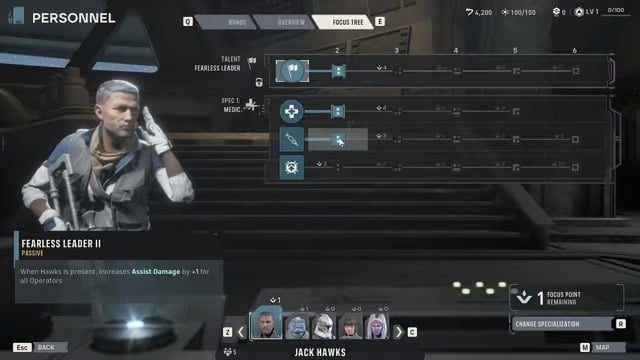
Head to the Personnel console in the Den and open the Focus Tree for the character you want to retune.
STEP 2/4
Select a node to refund or upgrade
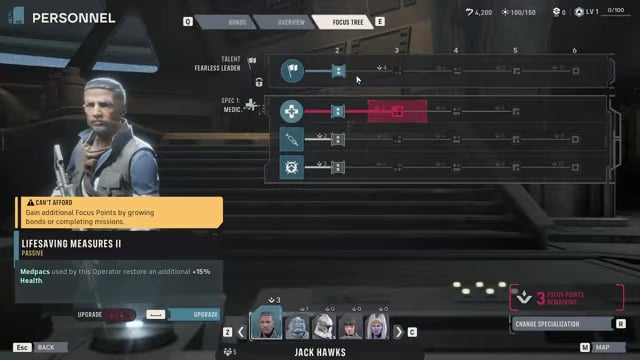
Click a purchased node and you can either refund it for a full point return or spend into it — reassigning costs nothing.
STEP 3/4
Refund down the chain to reset
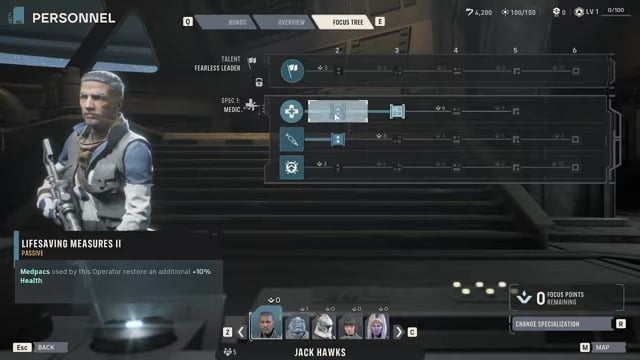
You often can’t refund a mid-chain node directly, so start at the last node in a path and work backward to fully clear it.
STEP 4/4
Re-spend before your next deployment
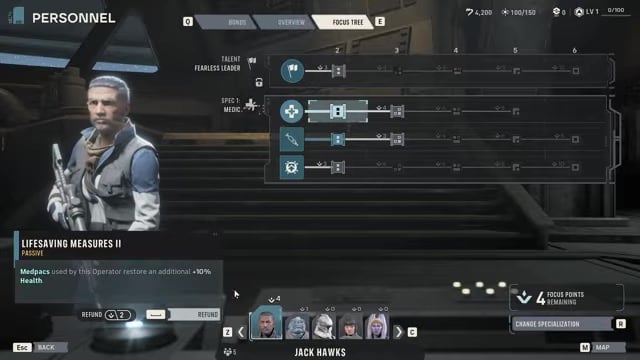
Pour the freed points into a new build between tactical missions instead of sitting on them — there’s no reason to leave points unspent.
Never sit on unspent Focus Points. Because refunding and reassigning is free between missions, retune each operator for the specific deployment ahead rather than saving points for later.
Video help
Every way to earn Focus Points
| Method | Where / how | Focus Points earned |
|---|---|---|
| Tactical Missions | Complete a mission (passive per run) | Earned each run |
| Bond levels | Raise a pair’s Bond | +1 to both operators |
| Cross Training – Freeform Training | Choose it on a Bond level-up | +2 to both operators |
| Crew Focus base upgrade | Base upgrades → Crew tab | Flat boost to all operators (+3 at Focus Point II) |
There are three reliable channels feeding your Focus Point income: the passive drip from missions, the long-term payoff of Bonds, and a one-time global boost from a base upgrade. The sections below break down each one, but the short version is that Bonds carry the most weight over a full campaign.
Earning points from Tactical Missions
The baseline source is simply playing the game. Finishing Tactical Missions naturally awards Focus Points to your active operators, so your squad steadily levels its Focus Trees just by clearing content. How fast this trickles in scales with how well you play — leaning on assists, chaining kills, and clearing missions cleanly earns points faster than grinding through the same fight in a messy, drawn-out fashion.
Building operator Bonds for Focus Points

Bonds are the source worth building your roster around, because they pay two operators at once. Every time a pair’s Bond level increases, both operators gain +1 Focus Point along with a Cross Training choice from a set of joint training bonuses. Picking Freeform Training as that reward is the standout option, since it hands +2 Focus Points to both operators in the pair — the most valuable of the training rewards for pure progression.
Key Bonds grow through combat proximity: backup assists, shared kills, healing between squadmates, and simply completing missions together all push the meter, and certain dialogue choices nudge it too. The relationship meter runs from Very Low to Very High, so the way to farm this is deliberate: keep the same partners deployed side by side across the campaign instead of rotating your lineup every mission.
The Crew Focus base upgrade
The last source is a base investment rather than something you earn in the field. Under base upgrades, open the Crew tab and find the Crew Focus line — upgrading it grants extra Focus Points to every operator at once. The Focus Point II tier, for example, adds +3 Focus Points across your whole roster, and it costs roughly 1,750 supplies plus a required Den development level to unlock. Other crew upgrades may deserve priority first, but this is a strong later-game buy that quietly boosts your entire squad, so it’s not one to sleep on.
Related Star Wars Zero Company guides
Frequently Asked Questions
Is reassigning Focus Points free, and do you have to unlock respec first?
Refunding individual Focus Tree points is free from the start — you can select a node, refund it, and reallocate the point between missions at no cost, with no currency spent. A separate, deeper option is a full class respec via Change Specialization at the bottom of the Focus Tree, which refunds every point spent in that class path so you can rebuild it from scratch; that full-specialization reset is reported to become free once you reach Cycle 3. For everyday build tweaking, though, you don’t need to wait for anything.
Can you respec story characters like Hawks, and do their unique Talent points come back?
Yes — you can change the specialization of nearly any crew member, including authored story characters like Hawks, and later add extra specializations through the same Focus Tree menu. The one catch is their personal Talent at the top of the tree: for story characters, points invested into that unique Talent are not refunded when you swap specialization — only the specialization-related points come back. Standard class abilities and passives refund freely, so you can experiment with builds without locking yourself in.






Leave a Reply