
The Get Open Pass drill fails by default because your Receiver Control is set to Handoff/Pitch Pass — switch it to Receiver Get Open in Controller Settings (Off-Ball section), then aim the Left Stick at a teammate and hold Circle (PS) / B (Xbox) to send them cutting open before releasing to pass.
The Get Open Pass drill is one of the Advanced Passing tutorials in Learn 2K, and it stops most players cold because the on-screen prompt tells you which button to hold but never mentions the one setting that actually makes it work. The pass you need isn’t a normal pass at all — it’s a receiver command that only fires when your controller is configured for it. Once that setting is right, the drill takes seconds.
Why the drill fails before you change anything
When you start the drill, the game shows “Hold O to call for a teammate to get open. Release O to pass the ball. Use L to select receiver.” So you hold Circle / B and your teammate just jogs over and takes the ball straight out of your hands. That’s a plain handoff, the drill flashes TRY AGAIN!, and nothing on screen explains what went wrong.
The reason is buried in your controller configuration. By default, Receiver Control is set to Handoff/Pitch Pass, so the same button that’s supposed to send a teammate cutting instead triggers a handoff to a stationary player. The drill is waiting for a get-open cut it never receives, so it can’t register a success — and it never hints that a setting is the cause.
How to complete the Get Open Pass drill in NBA 2K27
| Detail | Input |
|---|---|
| Setting path | Options > Controller Settings > Off-Ball |
| Setting to change | Receiver Control → Receiver Get Open |
| Pick receiver | Left Stick toward teammate |
| Call open + pass | Hold then release Circle (PS) / B (Xbox) |
The whole fix is one controller setting, so you’ll get to the drill, change Receiver Control, then do the pass the game was asking for all along.
STEP 1/4
Open the Get Open Pass drill
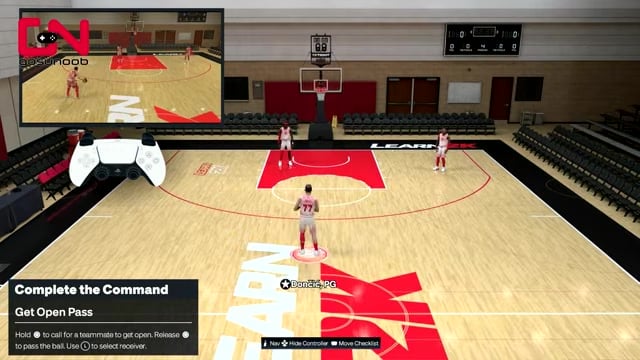
From MyCourt, enter Learn 2K, pick Advanced Tutorials, open the Passing tab, and start the Get Open Pass drill.
STEP 2/4
Open your controller settings
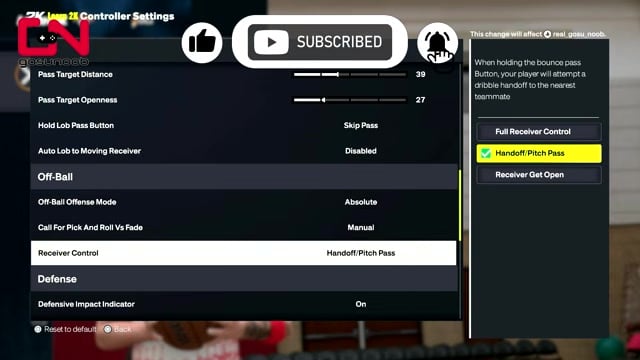
Pause with Options, choose Controller Settings, and scroll down to the Off-Ball section — not Passing.
STEP 3/4
Switch Receiver Control to Receiver Get Open
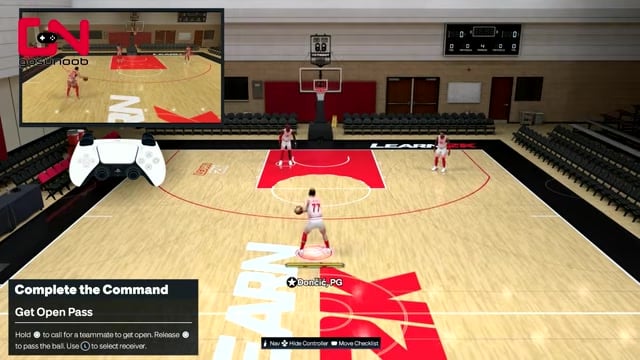
Find Receiver Control and change it from Handoff/Pitch Pass to Receiver Get Open.
STEP 4/4
Call a teammate open and pass
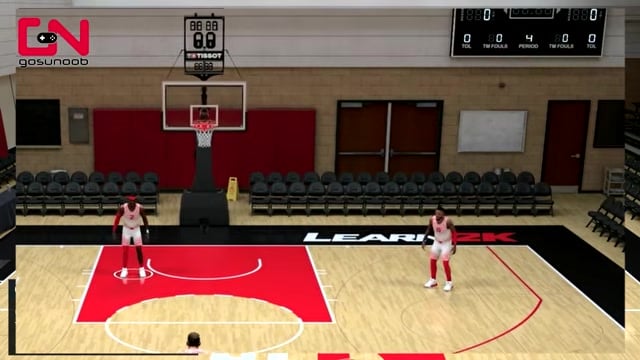
Back in the drill, hold Circle (PS) or B (Xbox) to send a teammate cutting, then release to pass and clear it for progress toward your lifetime challenges.
The setting lives under Options > Controller Settings > Off-Ball, not the Passing section — that mismatch is the whole trap, so scroll to Off-Ball and flip Receiver Control to Receiver Get Open.
Video help
Choosing which teammate cuts open
Once the setting is fixed, you get a layer of control the prompt only hints at with “Use L to select receiver.” Before you press and hold, flick the Left Stick toward the teammate you want — angle it right to send the player on your right, left for the player on your left.
Key Whoever you point at is the one who breaks open for the pass, so you’re not just clearing the drill — you’re deciding who gets the ball. In a real game that’s the difference between a pass into traffic and one to the teammate with an actual lane.
Passing tools worth learning next
This is one piece of NBA 2K27’s wider passing overhaul, so it’s worth knowing what else the receiver system feeds into. The headline new tool is the no-look pass: hold R1/RB and flick the Pro Stick straight toward your target, and the passer sells the misdirection with head tracking before dishing it.
For tighter windows there are the Flashy and Wrap passes, more advanced ball-moving options that open angles a standard pass can’t reach. None of them need the Get Open drill, but they lean on the same instinct — read the receiver first, then choose the pass that fits.
Related NBA 2K27 guides
Frequently Asked Questions
Does changing Receiver Control affect my normal games or only the drill?
Receiver Control lives in your global Controller Settings under Off-Ball, not inside the tutorial, so the change sticks everywhere — MyCAREER, online, and any mode where you’re controlling an off-ball receiver. With it set to Receiver Get Open, holding the pass button will now try to send a teammate cutting rather than call for a handoff, so it’s worth knowing that trade-off before you leave it on permanently.
Why does holding Circle/B give a handoff instead of a cut the first time?
The prompt describes the button, not the behavior. The same Circle / B input is routed by whatever Receiver Control is set to, and on default that’s Handoff/Pitch Pass — so holding it pulls a teammate in for a handoff. The on-screen text doesn’t change when you switch the setting, which is why the drill looks broken even though the button you’re pressing is correct; only the underlying setting decides whether that press calls a handoff or a get-open cut.






Leave a Reply