
News

Google Home Could Make Gemini Remember the Household Without Exposing Everything [APK Teardown]

Google Home is preparing Gemini memory controls that could let households manage saved names, relationships, preferences, privacy sharing, and deletion options before the feature officially launches.

Google Home is preparing Gemini memory controls that could let households manage saved names, relationships, preferences, privacy sharing, and deletion options before the feature officially launches.

0 Comments

What to know

  • Google Home is developing a Memory area where Gemini can retain names, relationships, and preferences.
  • Memories can be private to you or shared with household admins, with individual and bulk deletion controls.
  • We found the feature in code from the unreleased Google Home v4.25.18.0 build; we have not surfaced it in the app yet.

Gemini for Home is preparing to remember useful details about the people in your home, including names, relationships, and preferences. Google Home is also building controls that let you decide whether those details remain private or become shared household information.

Now, a teardown of Google Home v4.25.18.0 reveals a dedicated Memory area, separate personal and household sections, deletion tools, and a subscription requirement for saved information.
About APK teardowns — An APK teardown works by reading the not-yet-shipped code inside a beta build, which lets us preview features a developer is working on before they’re announced. But work-in-progress code can change, stay hidden behind a server-side flag, or be scrapped before it ever reaches your phone.
Gemini for Home memory controls

Gemini for Home is getting a dedicated Memory area

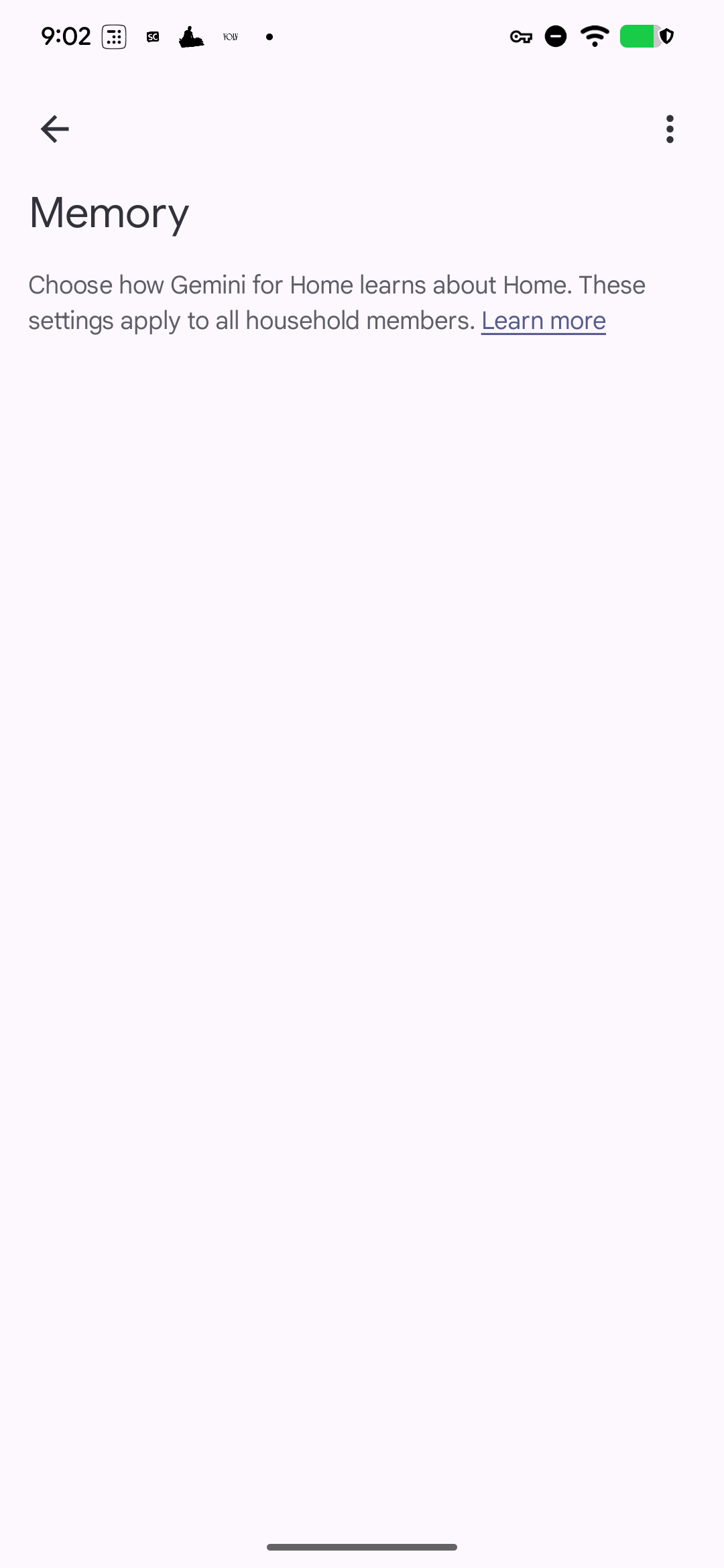
The new screen is called “Memory,” with a “Remembered details” control covering names, relationships, and preferences saved by home members. Its description says you will be able to choose how Gemini for Home learns about a particular home, suggesting memory management will be tied to the selected household.

The code also retains the “Saved info” wording in one title, while a newer title explicitly uses “Memory.” That points to Google shaping these saved details into a more clearly defined memory feature.

memory_title_v2 = “Memory”
memory_screen_description = “Choose how Gemini for Home learns about %1$s. <a href=%2$s>Learn more</a>”
memory_toggle_title = “Remembered details”
memory_toggle_description = “Names, relationships, and preferences that home members have saved”
memory_title = “Saved info”
no_memories = “No details about %1$s have been remembered yet.”

Personal and household memories have different privacy rules

Google Home divides remembered information into two groups. Personal memory contains private details that only you can view and manage. The accompanying text says you can later share that information with the household.

Household memory works differently: its details are shared, and any admin in the home can view and edit them. Entries learned automatically from a conversation can also be identified with a dedicated “Learned from the conversation” subtitle.

memory_personal_header = “Personal memory”
memory_personal_header_description = “Private details only you can view and manage. You can choose to share this information with the household at any time.”
memory_household_header = “Household memory”
memory_household_header_description = “Shared household details. Any admin in this home can view and edit this information.”
memory_subtitle_implicit = “%1$s • Learned from the conversation”
no_personal_memories = “No personal memories have been remembered.”
no_household_memories = “No household memories have been remembered.”

You can delete one memory or clear everything

The controls cover individual personal and household memories as well as bulk deletion. Google Home warns that shared information will be permanently removed for everyone in the home and cannot be recovered. A confirmation message appears after a memory is deleted, while a separate error string covers unsuccessful requests.

Another new message says Saved info requires an active Home Premium subscription. The code does not provide further plan or pricing details.

delete_personal_memory_dialog_title = “Delete this personal memory?”
delete_household_memory_dialog_title = “Delete this household memory?”
delete_all_personal_memories_dialog_title = “Delete all personal memories?”
delete_all_household_memories_dialog_title = “Delete all household memories?”
delete_all_memories = “Delete all”
delete_all_memories_dialog_title = “Delete all remembered details?”
delete_all_memories_dialog_body = “All remembered details will be permanently deleted for all users in your home. This action cannot be undone. Are you sure?”
delete_memory_confirmation = “Memory deleted”
delete_memory_error = “Something went wrong”
saved_info_subscription_required_message = “Saved info requires an active Home Premium subscription”

Gemini for Home’s Memory controls are not available to users yet, and we’ll watch future Google Home builds for their rollout.


Related guides

 

Leave a Reply

Your email address will not be published. Required fields are marked *