


OnePlus One has started receiving the CyanogenMod 12.1 update as an OTA today, but guess what, we already have the update available as download too. The CM12.1 update for OnePlus One brings the Android 5.1.1 update to the device, and is available as Full ROM download below.
While the OTA update is sized around 303 MB, the full ROM is a 645 MB download. The Android 5.1.1 update was ridiculously patiently awaited by OnePlus One owners, and once OnePlus 2 was released, the wait grew pretty loud. Thankfully, the 5.1 update is finally here, as CM12.1, as build YOG4PAS1N0.
Supported devices
- OnePlus One
- Don’t try on any other device whatsoever
There are as many as 3 methods available for you to install the update. First is the simplest one, using stock/twrp recovery. Second uses Fastboot, while the 3rd is a TWRP recovery flashable update file, already rooted.
METHOD 1: Full ROM for Stock Recovery
Downloads
- YOG4PAS1N0 Android 5.1 update (CM12.1) (Full ROM) — Link | Filename: cm-12.1-YOG4PAS1N0-bacon-signed.zip
→ Fastboot file and its installation method is also available below, under the heading METHOD 2: FASTBOOT. If the Full ROM above doesn’t work for you, then simply install the OnePlus One Android 5.1.1 CM12.1 update using fastboto method, which doesn’t require any recovery for installation.
Disclamer: You only are responsible for your device. We won’t be liable if any damage occurs to your device and/or its components.
You can use both TWRP and default stock recovery that comes pre-installed with your OnePlus One. But, if you have TWRP, make sure its version is 2.8.6.0 or above. If you have older than v2.8.6.0, then install the newer TWRP recovery, or install stock recovery back.
Step-by-step Guide (1)
- Enable developer options first. Go into Setting > About phone. Tap build no 7 times.
- Go back to settings and then choose Developer options.
- Enable Advanced reboot.
- Now, hold power button till a pop-up shows up.
- Tap on Reboot. Select Recovery. You’ll boot into recovery mode.
- On Stock Cyanogen recovery, tap on Apply update > Choose from Internal Storage > 0/ > and now select the zip file (cm-12.1-YOG4PAS1N0-bacon-signed.zip) you transferred in step 2 above.
- On TWRP recovery (v2.8.6.0 or newer), tap on Install > locate the update file (cm-12.1-YOG4PAS1N0-bacon-signed.zip) and tap on it. Then do the Swipe action at bottom to begin flashing the update.
That’s it. Wait for OnePlus One to finish booting up, it may take some time. Once it does, check the Settings > About phone> Build no. It should be YOG4PAS1N0.
Let us know if you need any help with this, via comments below.

METHOD 2: FASTBOOT
Downloads
- YOG4PAS1N0 Android 5.1 update (CM12.1) (Fastboot firmware) — Link | Filename: cm-12.1-YOG4PAS1N0-bacon-signed-fastboot.zip
Step-by-step Guide (2)
- Open that folder and then left click on empty white space in the folder.
- Now, while holding shift key, right click on empty white space to get a pop-up as shown below.
- Now choose Open command window here option from that.
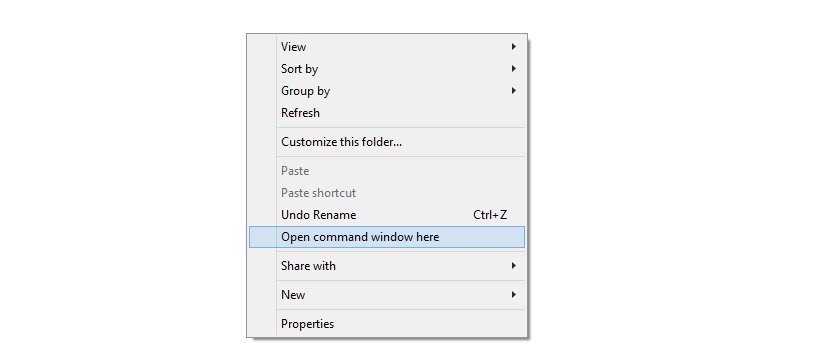
You will see a command window open up, with location directed to folder where you have all the 5.1 update related files from the firmware.
- Power off your OnePlus One. Wait for 4-5 seconds after screen is off.
- Press and hold Power+Volume Up button together for 4-5 seconds. That’s it, you will enter Fastboot mode.
fastboot devices
If you get the text fastboot with serial no. written after it, then it means fastboot is working alright. Otherwise, re-install the driver in step 1 and 2 above.
→ Unlocking bootloader will delete everything on your device.
To unlock bootloader, run the following command.
fastboot oem unlock
Look at OnePlus One’s screen, and select Yes. Device will restart. Disconnect the device. Once it has started all well, boot it into fastboot mode again. Keep the command window open, but if closed it, open it again in op1update folder as mentioned above.
fastboot flash modem NON-HLOS.bin

fastboot flash recovery recovery.img

fastboot flash sbl1 sbl1.mbn

fastboot flash dbi sdi.mbn

fastboot flash rpm rpm.mbn

fastboot flash aboot emmc_appsboot.mbn

fastboot flash tz tz.mbn

fastboot flash LOGO logo.bin

fastboot flash oppostanvbk static_nvbk.bin

fastboot flash boot boot.img

fastboot flash cache cache.img

fastboot flash system system.img
→ Btw, you could skip this command as this will delete everything on your OnePlus One.
For OnePlus One with 16GB storage, enter this command
fastboot flash userdata userdata.img
For OnePlus One with 64 GB storage, enter this command.
fastboot flash userdata userdata_64G.img
fastboot reboot
Done. Your OnePlus One will be running Android 5.1.1 update soon enough. Let it boot, and wait patiently while it does. Enjoy your OnePlus One CM12.1 build!
METHOD 3: TWRP flashable YOG4PAS1N0 ROM with Root
Downloads
- YOG4PAS1N0 ROM pre-rooted — Link | Filename: cm-12.1-YOG4PAS1N0-rooted-twrpable.zip
→ To install the above, make sure you have the TWRP recovery installed on your OnePlus One. if not, see here. Or here, to use a toolkit. Next, download the file and transfer it to your phone. Reboot the phone into recovery mode (see step 3 of method 1 above) and flash it using the Install menu in TWRP recovery. When done, tap on ‘Reboot System’ to restart the device. Done.
Need help? Do ask us in comments section below.
Via AsadP, LCOSTA17 & thoughtlesskyle



4 responses to “Download YOG4PAS1N0 OnePlus 2 Android 5.1.1 update [Cyanogen OS 12.1]”
Hi, I am trying to use method 3. I have TWRP and I am running Oxygen OS V 1.0, while trying to flash via TWRP of a binary error. I wonder what I am doing wrong.
UP!
Hi, I am trying to use method 3. I have TWRP and I am running Oxygen OS V 1.0, while trying to flash via TWRP of a binary error. I wonder what I am doing wrong.
UP!