
Below are the most recent versions of Play Store:
[posts-by-tag tags = “google-play-apk” number = “5”]
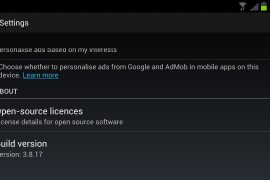
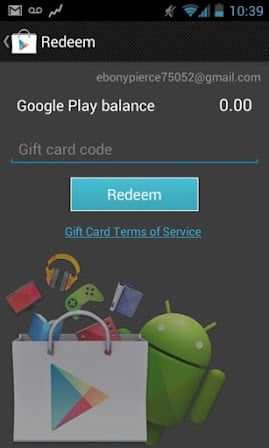
Okay, Google has pushed another update to the Play Store and this time they have enabled the gift card redeem function. The latest version of Play Store is now 3.8.17.
However, not much people are claiming that they have gotten the “Redeem” option in their Play store app yet. So I guess, as of now, it’s only some lucky folks in some regions of the world who are seeing it.
Also, some users are reporting that they are seeing the “Redeem” option even in the previous version (3.8.16) of Play Store too.
So it’s pretty clear now that Google is finally taking curtains off the gift card system on Google Play and it should soon be released everywhere in the world where Play store is accessible.
For now, lets just install the latest and greatest version of Play store that’s version 3.8.17, below is a step by step guide to help you out.
How to Install Google Play Store APK 3.8.17
- Download the latest Google Play APK 3.8.17. Filename: Gplay3.8.17.apk
- If you downloaded it on PC, connect your phone to PC and transfer it to phone. Just remember the location where you transferred it on phone or downloaded it.
- Enable installation of apps from memory/sdcard. For this, go to Settings » Applications and enable “Unknown sources” so that you can install applications from SD Card. If you are on Ice Cream Sandwich or Jelly Bean (Android 4.0 and lovely Android 4.1, respectively), find it under Settings » Security.
- Make sure you have a file manager installed. Anyone one would do, but if you want our recommendation, it would be Solid Explorer App. Open the file manager and go to folder where you downloaded/transferred the Gplay3.8.17.apk file (if you downloaded it on phone, it should be in Download folder).
- Tap on the Google Play 3.8.17′s apk file — Gplay3.8.17.apk — to begin installation procedure and it will be installed in less than a minute. That’s it. Open the Google Play app now from the app drawer.
Let us know via comments if you need any help over installing/downloading this. And, I guess, you’ll need to be on Android 2.3 and higher to be able to update your Google Play.
Google Play Store 3.8.17 Redeem Code Screen
142 responses to “Google Play APK 3.8.17”
I recently bought a android 4.0 phone, It didn’t have Google Play installed on it when I received it and when I follow the instructions here, it briefly flashes then closes when I try to run it. The device is a Lenovo A789 and is on the google play list of supported devices. Do I need to root my phone before installing this?
No, no need to root for this. It should work for you straight away.
Hmm still does the same thing. I’ve been trying different versions but they don’t seem to be helping 🙁 Will completely updating Android fix this do you think?
Thanks.
I recently bought a android 4.0 phone, It didn’t have Google Play installed on it when I received it and when I follow the instructions here, it briefly flashes then closes when I try to run it. The device is a Lenovo A789 and is on the google play list of supported devices. Do I need to root my phone before installing this?
No, no need to root for this. It should work for you straight away.
Hmm still does the same thing. I’ve been trying different versions but they don’t seem to be helping 🙁 Will completely updating Android fix this do you think?
Thanks.
I recently bought a android 4.0 phone, It didn’t have Google Play installed on it when I received it and when I follow the instructions here, it briefly flashes then closes when I try to run it. The device is a Lenovo A789 and is on the google play list of supported devices. Do I need to root my phone before installing this?
No, no need to root for this. It should work for you straight away.
Hmm still does the same thing. I’ve been trying different versions but they don’t seem to be helping 🙁 Will completely updating Android fix this do you think?
Thanks.
I ahave a chinese made tablet.. teclast a12. … its android 4.0 .. it installs google play store but does not show any I con or widget.. every time u’v to run it from the browser…. then it runs the app
I ahave a chinese made tablet.. teclast a12. … its android 4.0 .. it installs google play store but does not show any I con or widget.. every time u’v to run it from the browser…. then it runs the app
I ahave a chinese made tablet.. teclast a12. … its android 4.0 .. it installs google play store but does not show any I con or widget.. every time u’v to run it from the browser…. then it runs the app
i installed, but it’s not work properly.
i installed, but it’s not work properly.
i installed, but it’s not work properly.
unfortunetly google play store has stoppoed
it gives me that error.
any fix?
unfortunetly google play store has stoppoed
it gives me that error.
any fix?
unfortunetly google play store has stoppoed
it gives me that error.
any fix?
unfortunetly google play store has stoppoed
it gives me that error.
any fix?
unfortunetly google play store has stoppoed
it gives me that error.
any fix?
unfortunetly google play store has stoppoed
it gives me that error.
any fix?
Hello All,
It might seems funny, but I am
struggling with my first ever android (Samsung Nexus) that i bought 4 days back
(In Netherlands, Simlock free, without any contract) but I am unable to launch
even Google Play Store App on it.
As of now I am facing below issues:
1. I don’t have any default store
app ,so i tried to install multiple version of Google Play App, so that I can
access and download apps, but every time when I pressed the icon it blink for a
moment and then nothing happens. I tried to clear data, restarted cell multiple
times, but no luck. Please help how can I access Google play app or android
market to download app.
Please help.
A silly question first: Is your Nexus connected to Internet (via WiFi, 3G, 2G, anything)? Also, you might have *Market *app in your apps, which is what Google Play Store was called before — Android Market.
And btw, which Nexus it is, Nexus S or Galaxy Nexus, what’s the model number (under settings – about phone)? It would be very horrible if a nexus doesn’t run Google Play store, something which is impossible if it’s connected to internet.
Hello All,
It might seems funny, but I am
struggling with my first ever android (Samsung Nexus) that i bought 4 days back
(In Netherlands, Simlock free, without any contract) but I am unable to launch
even Google Play Store App on it.
As of now I am facing below issues:
1. I don’t have any default store
app ,so i tried to install multiple version of Google Play App, so that I can
access and download apps, but every time when I pressed the icon it blink for a
moment and then nothing happens. I tried to clear data, restarted cell multiple
times, but no luck. Please help how can I access Google play app or android
market to download app.
Please help.
A silly question first: Is your Nexus connected to Internet (via WiFi, 3G, 2G, anything)? Also, you might have *Market *app in your apps, which is what Google Play Store was called before — Android Market.
And btw, which Nexus it is, Nexus S or Galaxy Nexus, what’s the model number (under settings – about phone)? It would be very horrible if a nexus doesn’t run Google Play store, something which is impossible if it’s connected to internet.
Hello All,
It might seems funny, but I am
struggling with my first ever android (Samsung Nexus) that i bought 4 days back
(In Netherlands, Simlock free, without any contract) but I am unable to launch
even Google Play Store App on it.
As of now I am facing below issues:
1. I don’t have any default store
app ,so i tried to install multiple version of Google Play App, so that I can
access and download apps, but every time when I pressed the icon it blink for a
moment and then nothing happens. I tried to clear data, restarted cell multiple
times, but no luck. Please help how can I access Google play app or android
market to download app.
Please help.
A silly question first: Is your Nexus connected to Internet (via WiFi, 3G, 2G, anything)? Also, you might have *Market *app in your apps, which is what Google Play Store was called before — Android Market.
And btw, which Nexus it is, Nexus S or Galaxy Nexus, what’s the model number (under settings – about phone)? It would be very horrible if a nexus doesn’t run Google Play store, something which is impossible if it’s connected to internet.
“There is a problem parsing the package” after I tried installing the file…
same here.
“There is a problem parsing the package” after I tried installing the file…
same here.
same here.
“There is a problem parsing the package” after I tried installing the file…
same here.
I installed on my Coby Kyros MID7042 with Android 4.0.3.The Google Play app will open and immediately close. Anyone else having this issue?
Am having the same problem and its frustrating.
same here i think its because that you may not have a device licenced to have google play/ android market is there a root or app or something around this
same here, I tried it a while ago with same result, Is there any new way to fix this?!?
Me too ://
Any one got a solution on the copy?
I have the same problem.. 🙁
I installed on my Coby Kyros MID7042 with Android 4.0.3.The Google Play app will open and immediately close. Anyone else having this issue?
I installed on my Coby Kyros MID7042 with Android 4.0.3.The Google Play app will open and immediately close. Anyone else having this issue?
Am having the same problem and its frustrating.
same here i think its because that you may not have a device licenced to have google play/ android market is there a root or app or something around this
same here, I tried it a while ago with same result, Is there any new way to fix this?!?
Me too ://
Any one got a solution on the copy?
I have the same problem.. 🙁
I installed on my Coby Kyros MID7042 with Android 4.0.3.The Google Play app will open and immediately close. Anyone else having this issue?
Am having the same problem and its frustrating.
same here i think its because that you may not have a device licenced to have google play/ android market is there a root or app or something around this
same here, I tried it a while ago with same result, Is there any new way to fix this?!?
Me too ://
Any one got a solution on the copy?
I have the same problem.. 🙁
works on my samsung galaxy5
gr8!!
works on my samsung galaxy5
gr8!!
works on my samsung galaxy5
gr8!!
How do you access it from your SD Card if you don’t have a file manager app? I got my Evo rooted and the Google play app was not on the phone…so no downloading apps, hence the reason I’m doing. How would that work?
Al file managers have a link to sdcard. Look for a folder like external_sd or emmc, because it is your sdcard.
How do you access it from your SD Card if you don’t have a file manager app? I got my Evo rooted and the Google play app was not on the phone…so no downloading apps, hence the reason I’m doing. How would that work?
Al file managers have a link to sdcard. Look for a folder like external_sd or emmc, because it is your sdcard.
How do you access it from your SD Card if you don’t have a file manager app? I got my Evo rooted and the Google play app was not on the phone…so no downloading apps, hence the reason I’m doing. How would that work?
Al file managers have a link to sdcard. Look for a folder like external_sd or emmc, because it is your sdcard.
Many, many, many, many, thank you.
I just run the Gplay3.8.17.apk on Coby Kyros MID1024 according instructions and… only joy.
Many, many, many, many, thank you.
Many, many, many, many, thank you.
I just run the Gplay3.8.17.apk on Coby Kyros MID1024 according instructions and… only joy.
I just run the Gplay3.8.17.apk on Coby Kyros MID1024 according instructions and… only joy.
eeh. and how can i download Apk files from Pc after that
eeh. and how can i download Apk files from Pc after that
eeh. and how can i download Apk files from Pc after that
Just to let you know, if you transfer the apks via bluetooth, after they have been downloaded going in the notification panel and touching the notification one goes straight to the package. Touching it the install starts. No need for a file manager…
Just to let you know, if you transfer the apks via bluetooth, after they have been downloaded going in the notification panel and touching the notification one goes straight to the package. Touching it the install starts. No need for a file manager…
Just to let you know, if you transfer the apks via bluetooth, after they have been downloaded going in the notification panel and touching the notification one goes straight to the package. Touching it the install starts. No need for a file manager…
I have an “Unsupported” device, I have installed google play without issue however once I try to install an app I get ‘unfortunately, Google play has stopped on download’ any workaround? or a link to a decent app market place?
I was getting “Unsupported Device” … “.. something contact your hardware manufacturer… ” etc. Turned out that the phone needed to be verified with its phone number, after i verified the number everything started working as per usual
I realize that the verification step is a bit vague, so to further clarify:
For me, the verification dialog opened once i opened a google play app (Google+ Hangouts). After I opened it, it asked to verify, I am imagining that apps dependent on GooglePlayServices make a function call to (GPSs) to enable/verify the device.
Good Luck!
I have an “Unsupported” device, I have installed google play without issue however once I try to install an app I get ‘unfortunately, Google play has stopped on download’ any workaround? or a link to a decent app market place?
I was getting “Unsupported Device” … “.. something contact your hardware manufacturer… ” etc. Turned out that the phone needed to be verified with its phone number, after i verified the number everything started working as per usual
I realize that the verification step is a bit vague, so to further clarify:
For me, the verification dialog opened once i opened a google play app (Google+ Hangouts). After I opened it, it asked to verify, I am imagining that apps dependent on GooglePlayServices make a function call to (GPSs) to enable/verify the device.
Good Luck!
I have an “Unsupported” device, I have installed google play without issue however once I try to install an app I get ‘unfortunately, Google play has stopped on download’ any workaround? or a link to a decent app market place?
I was getting “Unsupported Device” … “.. something contact your hardware manufacturer… ” etc. Turned out that the phone needed to be verified with its phone number, after i verified the number everything started working as per usual
I realize that the verification step is a bit vague, so to further clarify:
For me, the verification dialog opened once i opened a google play app (Google+ Hangouts). After I opened it, it asked to verify, I am imagining that apps dependent on GooglePlayServices make a function call to (GPSs) to enable/verify the device.
Good Luck!
It doesnt work on my Galaxy S3 :// NEED HELP!
hey dude…for your info….its only for tablets 😛
Hey guys, I was wondering if you could help me. I installed play store on my tablet (Android 4.0), but when I try to open it, I receive a message that it has stopped. therefore I cannot download any app. Maybe it is because I have GetJar which was already installed when I bought my tablet. So all I can do is to deactivate it. Can you give me any advice? Thank you.
It doesnt work on my Galaxy S3 :// NEED HELP!
hey dude…for your info….its only for tablets 😛
It doesnt work on my Galaxy S3 :// NEED HELP!
hey dude…for your info….its only for tablets 😛