Unlocking the bootloader of Moto Z or Moto Z Force is a first step towards installing custom recovery like TWRP, or rooting the device. Both of which is fun, but make sure that such hack is cool with Android Pay before doing this, if you plan to use that service as root and Android pay don’t get along usually.
If you have got no concern about rooting, none for us BTW, then go ahead and unlock the bootloader of your Moto Z. You will need to use Motorola’s site for this, as they provide you the unlock token, after you provide them the code (as you’ll see soon), to enable you to unlock the bootloader.
How to Unlock Bootloader of Moto Z and Z Force
1Create necessary backup of your Moto Z (or Z Force). This will delete everything, so it’s good to have a solid backup of your personal files and pics and videos.
2Install required driver:
5Go into Developer options again, and enable the ‘OEM Unlock‘ from there.
6Reboot Moto Z into Fastboot mode. Then connect it to PC.
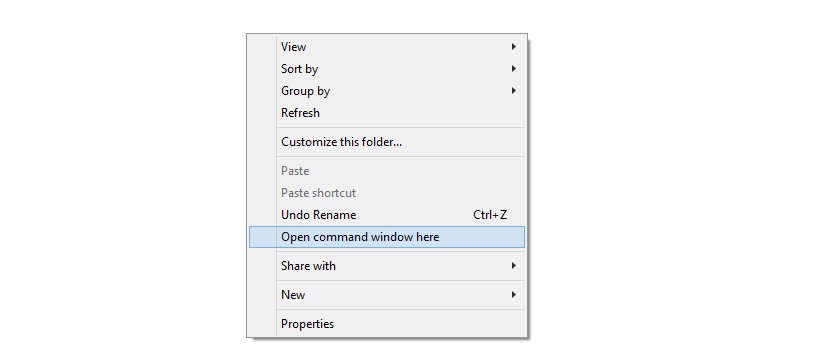
7 Now, open a command window. Here’s how.
- While holding shift key, right click from mouse on the white space inside the folder. You’ll get a pop-up as shown below.

- Select the option: Open command window here
8Now, type this into command window to get unlock data code.
fastboot oem get_unlock_data
You would gets a result which looks like below.
$ fastboot oem get_unlock_data
(bootloader) 0A40040192024205#4C4D3556313230
(bootloader) 30373731363031303332323239#BD00
(bootloader) 8A672BA4746C2CE02328A2AC0C39F95
(bootloader) 1A3E5#1F53280002000000000000000
(bootloader) 0000000
9Now,
open this
page on Motorola’s site, where you have to copy paste the string you got in command window. Sign up (use Google+ option thereat to make it quick and easy) on Motorola’s page, and make then make sure you are logged in.
10Copy the unlock code from command window. Right click and choose ‘Mark’ option in command window, and then drag using left button of mouse to select the unlock code. Then use right button to copy it. You may use Google search for more help regarding copying from command window.
11On the Motorola page, paste the unlock code in the field provided in step 6 on that page.
12Now, click on ‘Can my device be unlocked?‘ button. While Droid edition of the Moto Z can’t be unlocked, every other piece could be.
13Once Motorola confirms you can unlock your Moto Z, use the ‘I Agree‘ option below to agree to terms, and then click on ‘Request unlock key’ button.
14You will get a pop-up telling you that this will void your device’s warranty. Click on OK to confirm it.
15In return, Motorola will send the unlock key to your email ID. Check your email, and download the unlock key Motorola sent you.
16Now, run the following command to unlock Moto Z.
fastboot oem unlock UNLOCK_CODE_HERE
Use the unlock code you received in mail, in place of text UNLOCK_CODE_HERE above.
17Keep an eye on your Moto Z’s screen. It will say Unlock, and then Unlocked! The device will reboot automatically thereafter. You will see a bootloader unlocked warning every time you start your Moto Z from now on. But don’t worry, it’s okay.
Job done. Now you can install TWRP recovery and then go ahead and root your device and then play with Xposed and stuff, or simply root requiring apps.





8 responses to “Unlock Bootloader of Moto Z and Moto Z Force [Guide]”
Where do I get the signed boot.img file to relock the bootloader for the Moto Z?
Will this work on the Verizon variant?
Nope it won’t..no unlock on Moto’s website.
Will this work on the Verizon version?
Is there any way around it when “Can my device be unlocked?” comes back with “No”.
I really want to load GAPPs onto my XT1650-05…
When I am on step 8 :fastboot oem get_unlock_data my computer display waiting for device and nothing happend … What did I made wrong?
There is no fastboot mode anywhere on Moto Z, also pressing shift and right clicking mouse opens folder hut there is no option for a command window, at this point I believe it is impossible to unlock or root Moto Z Verizon has it locked down
hi sir can you please explain when i follow all steps but in the last they show the error your device is not qualify why they show this error?