

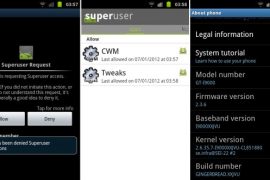
Well, it’s here. You can root your Galaxy S on XXJVU firmware now — what a quickie from Chainfire!
For those who don’t know about XXJVU, it’s the latest firmware to leak for Galaxy S i9000, brining the recently touted Value pack to the phone. Value Pack includes Face Unlock feature, New Lock Screen from Galaxy Note and a Photo Editor app from Galaxy S2.
Before using the link and guide here, make sure you’ve XXJVU firmware installed on your Galaxy S. Don’t try this on any other firmware.
To root, download the CF-Root from here, extract it to get .tar file, then put the phone is download mode and flash it using Odin. Or see the detailed guide below if you are new to this.
Warning!
The methods and procedures discussed here are considered risky and you should not attempt anything if you don’t know completely what it is. If any damage occurs to you or your device, we won’t be held liable — you only will be responsible, you’ve been warned!!!
Compatibility
This root and the guide below is compatible only and only with Galaxy S, model number i9000, running on XXJVU firmware. It’s not compatible with any other device or firmware. Check your device’s details in: Settings » About phone. Build number has to be GINGERBREAD.XXJVU on your Galaxy S i9000.
How to Root Galaxy S with on XXJVU Firmware
- Make sure you’ve installed XXJVU firmware. Try this only on XXJVU firmware and not on any other firmware.
- Download CF-Root kernel first. Filename – CF-Root-XX_OXA_JVU_2.3.6-v4.3-CWM3RFS.zip. Size 6.89 MB.
- Unzip the above file to a folder. You will get the .tar file – CF-Root-XX_OXA_JVU_2.3.6-v4.3-CWM3RFS.tar — inside the extracted folder. It’s recommended to use 7-zip free software to extract it. DO NOT extract the .tar file (even if you see it as a zip file, which it is not). You need to flash the .tar file using Odin to gain root access and install the ClockworkMod Recovery (CWM) alongside. If you’re getting zimage file, it means you’ve extracted the .tar file too! — and that’s not a right thing to do.
- Use the Odin software you used while flashing the XXJVU. No separate download is required.
- Switch Off your phone. Wait for vibration to confirm complete switch off.
- Boot your phone in Download Mode — Press and hold VolumeDOWN+HOME+POWER keys together.
- Open Odin now. Connect your phone to PC now. You’ll notice “Added! !” message in the Odin’s message box in the bottom left.
- On Odin, click the PDA tab and select the .tar file you got in step 3 — CF-Root-XX_OXA_JVU_2.3.6-v4.3-CWM3RFS.tar.
- Make sure “Re-Partition” checkbox is not selected. Leave the “Auto Reboot” and “F. Reset Time” checkboxes selected.
- Double check step 8 and step 9. Your Odin’s screen should look like this:

- Click the Start button on Odin to flash the CF-Root kernel.
- After the CF Root is installed, phone will restart automatically. When you see the PASS written in top left box, you can remove the cable. On success flashing, Odin’s screen should look like this:

- Your phone is rooted now. That surperuser app is there!
- The CWM app is also there, and clockworkmod based recovery has been installed too. Enjoy!


That’s it. Thanks the Chainfire for this!






249 responses to “Root XXJVU and Install Clockworkmod Recovery (CWM) on Galaxy S”
An easy way to do just by reading the instructions. And root it to ICS 4. Thanks Android Soul.. Now my phone is way better than before… BTW am using Samsung Galaxy S i900
what ics software did you use ???
An easy way to do just by reading the instructions. And root it to ICS 4. Thanks Android Soul.. Now my phone is way better than before… BTW am using Samsung Galaxy S i900
what ics software did you use ???
An easy way to do just by reading the instructions. And root it to ICS 4. Thanks Android Soul.. Now my phone is way better than before… BTW am using Samsung Galaxy S i900
what ics software did you use ???
ohh gosh !! .,., odin doesnot show the CONNECTED message in my PC .,. what to do ??
ohh gosh !! .,., odin doesnot show the CONNECTED message in my PC .,. what to do ??
ohh gosh !! .,., odin doesnot show the CONNECTED message in my PC .,. what to do ??
Hi, can I instal Android 4 or 2.3 to my Galaxy S I9010? I have now firmware 2.2. Thank
Hi, can I instal Android 4 or 2.3 to my Galaxy S I9010? I have now firmware 2.2. Thank
Hi, can I instal Android 4 or 2.3 to my Galaxy S I9010? I have now firmware 2.2. Thank
Ok, and where can I see software for update to my Galaxy I9010 with guide? Thank
Ok, and where can I see software for update to my Galaxy I9010 with guide? Thank
Ok, and where can I see software for update to my Galaxy I9010 with guide? Thank
Seriously. I’m the kind of person that can struggle to download something, but this was so darn simple I was gobsmaked. Brilliant. Thanks so much.
Seriously. I’m the kind of person that can struggle to download something, but this was so darn simple I was gobsmaked. Brilliant. Thanks so much.
Seriously. I’m the kind of person that can struggle to download something, but this was so darn simple I was gobsmaked. Brilliant. Thanks so much.
hi!!.
pleas help me. i install wath you says on step 2, but i get zimage. so i open it with java. and i put my phone in download stand and open odin and do it right. it says fail!!. i connect my phone and started again my phone, but if i started my phone it says phone {!} computer. PLEASE HELP ME!!!!!!
Are yous till in trouble? You didn’t have to flash the zimage…. you had to extract .tar file, and had to flash it. Do this now and your phone will be working again.
i need help too but what .tar file?! all i get is the winrar folder with another winrar folder with the zImage in it… no .tar file! Please help
hi!!.
pleas help me. i install wath you says on step 2, but i get zimage. so i open it with java. and i put my phone in download stand and open odin and do it right. it says fail!!. i connect my phone and started again my phone, but if i started my phone it says phone {!} computer. PLEASE HELP ME!!!!!!
Are yous till in trouble? You didn’t have to flash the zimage…. you had to extract .tar file, and had to flash it. Do this now and your phone will be working again.
i need help too but what .tar file?! all i get is the winrar folder with another winrar folder with the zImage in it… no .tar file! Please help
hi!!.
pleas help me. i install wath you says on step 2, but i get zimage. so i open it with java. and i put my phone in download stand and open odin and do it right. it says fail!!. i connect my phone and started again my phone, but if i started my phone it says phone {!} computer. PLEASE HELP ME!!!!!!
Are yous till in trouble? You didn’t have to flash the zimage…. you had to extract .tar file, and had to flash it. Do this now and your phone will be working again.
i need help too but what .tar file?! all i get is the winrar folder with another winrar folder with the zImage in it… no .tar file! Please help
My samsung galaxy si9000 has screen locked but i dont have gingerbread on my phone
My samsung galaxy si9000 has screen locked but i dont have gingerbread on my phone
My samsung galaxy si9000 has screen locked but i dont have gingerbread on my phone
thanks,work
thanks,work
thanks,work
I finally got round to updating my sgs from a rooted xxjvp to rooted xxjvu using your guides, they’re so simple to use, I would definitely recommend them to beginners. Cheers guys!
I finally got round to updating my sgs from a rooted xxjvp to rooted xxjvu using your guides, they’re so simple to use, I would definitely recommend them to beginners. Cheers guys!
I finally got round to updating my sgs from a rooted xxjvp to rooted xxjvu using your guides, they’re so simple to use, I would definitely recommend them to beginners. Cheers guys!
Help me please!! really want to upgrade my galaxy to ics but when i tried to unzip the folder to get the .tar all i got was another zipped folder, then when i make that a folder… all that’s inside is a zImage file :'( please help!
Help me please!! really want to upgrade my galaxy to ics but when i tried to unzip the folder to get the .tar all i got was another zipped folder, then when i make that a folder… all that’s inside is a zImage file :'( please help!
Help me please!! really want to upgrade my galaxy to ics but when i tried to unzip the folder to get the .tar all i got was another zipped folder, then when i make that a folder… all that’s inside is a zImage file :'( please help!
What to do if I wanna get back to old, stock JVU kernel without root?
What to do if I wanna get back to old, stock JVU kernel without root?
What to do if I wanna get back to old, stock JVU kernel without root?
Hi … Please help i have bean follow all steps and when i clich start on odin , its fail and and i uncheck mobile phone and when i tray to start galaxy its apears icon… mobile—alert—computer
please help me and say that im not burn up my galaxy 🙁
ok i made fix this. if you have same problem try this 1 start odin then press down but and then insert battery. and odin will find him othervise not and due like in tut.
Hi … Please help i have bean follow all steps and when i clich start on odin , its fail and and i uncheck mobile phone and when i tray to start galaxy its apears icon… mobile—alert—computer
please help me and say that im not burn up my galaxy 🙁
ok i made fix this. if you have same problem try this 1 start odin then press down but and then insert battery. and odin will find him othervise not and due like in tut.
Hi … Please help i have bean follow all steps and when i clich start on odin , its fail and and i uncheck mobile phone and when i tray to start galaxy its apears icon… mobile—alert—computer
please help me and say that im not burn up my galaxy 🙁
ok i made fix this. if you have same problem try this 1 start odin then press down but and then insert battery. and odin will find him othervise not and due like in tut.
thanks man
thanks man
thanks man
Oh my god…..thats very easy guide to understand and follow….I bookmark this site for ever…5 *s…..
Oh my god…..thats very easy guide to understand and follow….I bookmark this site for ever…5 *s…..
Oh my god…..thats very easy guide to understand and follow….I bookmark this site for ever…5 *s…..
Can I root XXJVU on DXJV9 ? I saw a similar comment but was hard to tell if it was a yes or no. Thanks.
Can I root XXJVU on DXJV9 ? I saw a similar comment but was hard to tell if it was a yes or no. Thanks.
Can I root XXJVU on DXJV9 ? I saw a similar comment but was hard to tell if it was a yes or no. Thanks.
works . I recommend it.
works . I recommend it.
works . I recommend it.
can you help me please, i have followed all the instructions and now my
phone is just flashing on the galaxy logo, ive tried taking out the
battery and putting it back, also tried to reboot but isnt working :S
can you help me please, i have followed all the instructions and now my
phone is just flashing on the galaxy logo, ive tried taking out the
battery and putting it back, also tried to reboot but isnt working :S