

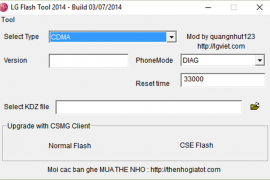
Stock firmwares for LG devices come in KDZ (and sometimes TOT) format. You can flash these firmwares using the LG Flashtool on a Windows PC to either restore a device stock firmware or downgrade from an updated release.
Below is a guide on how to flash KDZ firmwares on LG devices, follow the instructions carefully and to the point.
[icon name=”download” class=”” unprefixed_class=””] Download LG Flashtool
Instructions
- Extract/Unzip the LG Flash Tool 2014 .zip file that you downloaded above on your PC. You’ll get a bunch of files required to run the program.
- Double-click/Run LGFlashTool2014.exe file to Open LG Flash Tool.
└ If it doesn’t open, install Visual C++ Runtime Library from here and then try again. - Boot your LG device into Download Mode:
- Power off your LG device.
- Press and hold Volume Up button.
- Connect your device to PC with a USB cable while holding the Volume Up button.
- You’ll boot into download mode with “Firmware Update” written on top of the screen.
- Now load the .kdz firmware file into LG Flash Tool window on your PC. Click the browse button at the end of the “Select KDZ file” line. Leave every other option as is on the LG Flash Tool window.
- Once you’ve selected .kdz firmware file, click “CSE Flash” button to proceed on flashing the .KDZ firmware to your LG device.
└ FYI, the “Normal Flash” button doesn’t wipe data and the “CSE Flash” button wipes data. If you’re upgrading from a stock firmware, then “Normal Flash” might do. - You’ll get a “Read Phone Information” window, it will be blank for the most part. Just hit the START button and proceed.
- You’ll be asked for administrator permissions for some LG program on your PC, accept it.
- Now you’ll see “Select Country & Language” window. Select “Different” from the country list and then “English” from the language list. And remember to NOT tick the Smartphone upgrade checkbox, it’s for Windows Mobile phones not your LG device running on Android.
- To finally begin firmware flashing process, hit the “OK” button.
- You’ll see a progress bar now. Just wait until it’s 100%, after which you might get an error “Connection to server failed”. This is okay. DON’T disconnect your phone at this point.
- Watch your phone closely, you’ll see some activity going on the screen with “COM” written in green text. Once that happens click OK to the “Connection to server failed” error.
- Now watch the firmware update progress bar on your phone. Once it’s complete, your phone will automatically reboot. And then you can disconnect your phone from PC and close the LG Flash Tool utility as well.
That’s all. Happy Androiding!





141 responses to “How to Install/Flash a KDZ Firmware on LG Devices”
i have cracked my phone thank you fuckers, all i wanted is to instal 5.0 android on e988 there was some problems but phone was on download mode, suddenly program says that cannot do it cause of error, phone screen got black and cant run back again, this is my old phone, if it was my lg v10 i will destroy this page for my damage. beware of this kind of moves
Dude wtf? Why didnt you use the LG Support tool from their website? This flash tool is a last resort / advenced users stuff.
Plus how could you install Android L in the optimus G using a official firmware when theres none for that phone with that version of android, it only reached kitkat.
The only way to update your phone above kitkat is using custom ROMs.
i have cracked my phone thank you fuckers, all i wanted is to instal 5.0 android on e988 there was some problems but phone was on download mode, suddenly program says that cannot do it cause of error, phone screen got black and cant run back again, this is my old phone, if it was my lg v10 i will destroy this page for my damage. beware of this kind of moves
Dude wtf? Why didnt you use the LG Support tool from their website? This flash tool is a last resort / advenced users stuff.
Plus how could you install Android L in the optimus G using a official firmware when theres none for that phone with that version of android, it only reached kitkat.
The only way to update your phone above kitkat is using custom ROMs.
Whether this is necessary internet connection
Whether this is necessary internet connection
do you wish to cancel th lg mobile phone s/w upgrade hatası alınıyo
keeps coming with contact system administrator
no activity going on the screen with “COM” written in green text, 23 MINUTES HAD PASSED.
PLEASE HELP
keeps coming with contact system administrator
do you wish to cancel th lg mobile phone s/w upgrade hatası alınıyo
Whether this is necessary internet connection
i have cracked my phone thank you fuckers, all i wanted is to instal 5.0 android on e988 there was some problems but phone was on download mode, suddenly program says that cannot do it cause of error, phone screen got black and cant run back again, this is my old phone, if it was my lg v10 i will destroy this page for my damage. beware of this kind of moves
Lame fucker. You are that guy that downloads a weigher application and actually stands on top of the phone in order to get his weight. Pathetic.
Dude wtf? Why didnt you use the LG Support tool from their website? This flash tool is a last resort / advenced users stuff.
Plus how could you install Android L in the optimus G using a official firmware when theres none for that phone with that version of android, it only reached kitkat.
The only way to update your phone above kitkat is using custom ROMs.
Hello and thanks for this guide, it worked for me! For the others who say that they don’t see any activity on their phone screen, move the “Failed to connect to the server” window away and you’ll see does it work actually, I moved it away and found out that software was still installing my Android 🙂
worked perfectly for d855. thanks!