

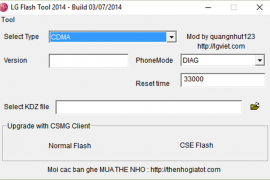
Stock firmwares for LG devices come in KDZ (and sometimes TOT) format. You can flash these firmwares using the LG Flashtool on a Windows PC to either restore a device stock firmware or downgrade from an updated release.
Below is a guide on how to flash KDZ firmwares on LG devices, follow the instructions carefully and to the point.
[icon name=”download” class=”” unprefixed_class=””] Download LG Flashtool
Instructions
- Extract/Unzip the LG Flash Tool 2014 .zip file that you downloaded above on your PC. You’ll get a bunch of files required to run the program.
- Double-click/Run LGFlashTool2014.exe file to Open LG Flash Tool.
└ If it doesn’t open, install Visual C++ Runtime Library from here and then try again. - Boot your LG device into Download Mode:
- Power off your LG device.
- Press and hold Volume Up button.
- Connect your device to PC with a USB cable while holding the Volume Up button.
- You’ll boot into download mode with “Firmware Update” written on top of the screen.
- Now load the .kdz firmware file into LG Flash Tool window on your PC. Click the browse button at the end of the “Select KDZ file” line. Leave every other option as is on the LG Flash Tool window.
- Once you’ve selected .kdz firmware file, click “CSE Flash” button to proceed on flashing the .KDZ firmware to your LG device.
└ FYI, the “Normal Flash” button doesn’t wipe data and the “CSE Flash” button wipes data. If you’re upgrading from a stock firmware, then “Normal Flash” might do. - You’ll get a “Read Phone Information” window, it will be blank for the most part. Just hit the START button and proceed.
- You’ll be asked for administrator permissions for some LG program on your PC, accept it.
- Now you’ll see “Select Country & Language” window. Select “Different” from the country list and then “English” from the language list. And remember to NOT tick the Smartphone upgrade checkbox, it’s for Windows Mobile phones not your LG device running on Android.
- To finally begin firmware flashing process, hit the “OK” button.
- You’ll see a progress bar now. Just wait until it’s 100%, after which you might get an error “Connection to server failed”. This is okay. DON’T disconnect your phone at this point.
- Watch your phone closely, you’ll see some activity going on the screen with “COM” written in green text. Once that happens click OK to the “Connection to server failed” error.
- Now watch the firmware update progress bar on your phone. Once it’s complete, your phone will automatically reboot. And then you can disconnect your phone from PC and close the LG Flash Tool utility as well.
That’s all. Happy Androiding!




141 responses to “How to Install/Flash a KDZ Firmware on LG Devices”
I keep getting a connection to network failed error. Even though that pops up, it’s still upgrading. Then, the upgrades stops under 10%, and i get a new screen that says upgrade stopped due to an error. No matter what i do, it just fails and fails.
make sure your using the original LG data cable as well. sometimes it removes any chances of issues while flashing.
I got the error “Connection to server failed”. After looking it up, I read to disregard this message:- “This is okay. DON’T disconnect your phone at this point.” So i left the phone plugged in. There was no sign of activity whatsoever on the phone – Suddenly like 15 minutes later the phone came on and the firmware had been flashed!
I keep getting a connection to network failed error. Even though that pops up, it’s still upgrading. Then, the upgrades stops under 10%, and i get a new screen that says upgrade stopped due to an error. No matter what i do, it just fails and fails.
make sure your using the original LG data cable as well. sometimes it removes any chances of issues while flashing.
I got the error “Connection to server failed”. After looking it up, I read to disregard this message:- “This is okay. DON’T disconnect your phone at this point.” So i left the phone plugged in. There was no sign of activity whatsoever on the phone – Suddenly like 15 minutes later the phone came on and the firmware had been flashed!
I keep getting a “The phone is disconnected from PC” I have tried multiple PCs using Windows 7, and still nothing.
install lg usb drive on ur pc and u will be fine
install lg usb drive on ur pc and u will be fine 🙂
also my problem
I keep getting a “The phone is disconnected from PC” I have tried multiple PCs using Windows 7, and still nothing.
install lg usb drive on ur pc and u will be fine
install lg usb drive on ur pc and u will be fine 🙂
also my problem
Hey I have a question that I am looking for answers to… Okay so it has been a week going on two weeks now since I was playing around with my LG Optimus G Pro, and It’s been so long now I can’t recall exactly what I had tried to do…. Anyways everytime I try to Boot Up my phone it Automatically goes straight to Fastboot mode. Is there anyway to fix this issue without causing any further losses?
i can help u
Hey I have a question that I am looking for answers to… Okay so it has been a week going on two weeks now since I was playing around with my LG Optimus G Pro, and It’s been so long now I can’t recall exactly what I had tried to do…. Anyways everytime I try to Boot Up my phone it Automatically goes straight to Fastboot mode. Is there anyway to fix this issue without causing any further losses?
i can help u
I keep on getting Error 495 whenever I install/update an app, I tried following the available fix for 495 in the internet can’t fix. TIA for any suggestion!
I keep on getting Error 495 whenever I install/update an app, I tried following the available fix for 495 in the internet can’t fix. TIA for any suggestion!
why is it stop until 79% and connection to server failed appear? what seems to be the problem here?
why is it stop until 79% and connection to server failed appear? what seems to be the problem here?
Hey the download link is damaged.
I can’t seem to extract it.
Fixed. Thanks for letting us know 🙂
Hey the download link is damaged.
I can’t seem to extract it.
Fixed. Thanks for letting us know 🙂
Try downloading & installing LG support tool.
Try downloading & installing LG support tool.
when i try the pc says : LGUserCSTool LGMobile Application has stopped working. I think it is a problem of the computer instead of the phone. Probably because i downloaded the latest version of the lg flash tool for windows 8, because it does not exist a version for windows 10. Can someone help me?
when i try the pc says : LGUserCSTool LGMobile Application has stopped working. I think it is a problem of the computer instead of the phone. Probably because i downloaded the latest version of the lg flash tool for windows 8, because it does not exist a version for windows 10. Can someone help me?
I have Problem. I can not connect firmware mode. but can connect portable mode. How can I do?
Plz Reply
I have Problem. I can not connect firmware mode. but can connect portable mode. How can I do?
Plz Reply
My phone kept restarting by it self often without showing the home screen. Is this a software problem or an hardware problem?
My phone kept restarting by it self often without showing the home screen. Is this a software problem or an hardware problem?
Firmware for LG g3 855 European stops down loading just over halfway to my computer before I can even try to open. Tried two different download managers but still get same message of transfered to other server and nothing happens after
Firmware for LG g3 855 European stops down loading just over halfway to my computer before I can even try to open. Tried two different download managers but still get same message of transfered to other server and nothing happens after
Hy i have a problem i have lg f200s and i am having some problem with OS can anybody tell me where to donwload lg optimus f200s firmware it will be a great help!
Hy i have a problem i have lg f200s and i am having some problem with OS can anybody tell me where to donwload lg optimus f200s firmware it will be a great help!
after the error “connection to server failed”, anything happend… i’ve been waiting like a hour and still the same ….what do i do?
then what u did about this? i am facing same problem…i have been waiting more than a hour
after the error “connection to server failed”, anything happend… i’ve been waiting like a hour and still the same ….what do i do?
then what u did about this? i am facing same problem…i have been waiting more than a hour
The process keeps stopping at 60%. Even with the phone disconnected from the PC error it still got to 60% percent and now has stalled! Is there a fix for this?
@david @viviana @ron
before you were flashing a custom recovery onto your phone you removed a file “laf.img”.
Now, put it back (It worked for me, I hope you ‘ve made a backup.) and you ´ll get the right screen with “firmware update” in big letters and a usb-symbol. If you ´re missing the laf.img try flashing your stock rom backup (which still should have the laf).
take a look at:
http://forum.xda-developers.com/tmobile-lg-g3/general/how-to-boot-lg-g3-fastboot-mode-t3087445
adb shell
su
dd if=/your_place_containig_the_file/laf.img of=/dev/block/platform/msm_sdcc.1/by-name/laf
exit
adb reboot
The process keeps stopping at 60%. Even with the phone disconnected from the PC error it still got to 60% percent and now has stalled! Is there a fix for this?
@david @viviana @ron
before you were flashing a custom recovery onto your phone you removed a file “laf.img”.
Now, put it back (It worked for me, I hope you ‘ve made a backup.) and you ´ll get the right screen with “firmware update” in big letters and a usb-symbol. If you ´re missing the laf.img try flashing your stock rom backup (which still should have the laf).
take a look at:
http://forum.xda-developers.com/tmobile-lg-g3/general/how-to-boot-lg-g3-fastboot-mode-t3087445
adb shell
su
dd if=/your_place_containig_the_file/laf.img of=/dev/block/platform/msm_sdcc.1/by-name/laf
exit
adb reboot
Does LG Flash tool work on Windows 10?
yeah
Does LG Flash tool work on Windows 10?
yeah
u’re sure to hold ‘vol-UP’ button? coz in my p990 is hold ‘vol-DOWN’ button then connect to pc usb to go download mode (lg usb restore mode in device manage,sometimes u’ll go to nvdia usb driver. u’ll go to apx if hold vol-up+vol-down.). what lg series u test? please give the right information. u just copy-paste an information from google or do it your self?
u’re sure to hold ‘vol-UP’ button? coz in my p990 is hold ‘vol-DOWN’ button then connect to pc usb to go download mode (lg usb restore mode in device manage,sometimes u’ll go to nvdia usb driver. u’ll go to apx if hold vol-up+vol-down.). what lg series u test? please give the right information. u just copy-paste an information from google or do it your self?
u’re sure to hold ‘vol-UP’ button? coz in my p990 is hold ‘vol-DOWN’ button then connect to pc usb to go download mode (lg usb restore mode in device manage,sometimes u’ll go to nvdia usb driver. u’ll go to apx if hold vol-up+vol-down.). what lg series u test? please give the right information. u just copy-paste an information from google or do it your self?
u’re sure to hold ‘vol-UP’ button? coz in my p990 is hold ‘vol-DOWN’ button then connect to pc usb to go download mode (lg usb restore mode in device manage,sometimes u’ll go to nvdia usb driver. u’ll go to apx if hold vol-up+vol-down.). what lg series u test? please give the right information. u just copy-paste an information from google or do it your self?
COM not displayed on phone and nothing happens on my vuf100 screen…what to do?
COM not displayed on phone and nothing happens on my vuf100 screen…what to do?
COM not displayed on phone and nothing happens on my vuf100 screen…what to do?
COM not displayed on phone and nothing happens on my vuf100 screen…what to do?
is it necessary to use lg cable while flashing ?
no. it doesn’t need to be LG brand, but use a cable that you know is working without issues
is it necessary to use lg cable while flashing ?
no. it doesn’t need to be LG brand, but use a cable that you know is working without issues
is it necessary to use lg cable while flashing ?
is it necessary to use lg cable while flashing ?
I got the error “Connection to server failed”. After looking it up, I read to disregard this message:- “This is okay. DON’T disconnect your phone at this point.” So i left the phone plugged in. There was no sign of activity whatsoever on the phone – Suddenly like 15 minutes later the phone came on and the firmware had been flashed!
I got the error “Connection to server failed”. After looking it up, I read to disregard this message:- “This is okay. DON’T disconnect your phone at this point.” So i left the phone plugged in. There was no sign of activity whatsoever on the phone – Suddenly like 15 minutes later the phone came on and the firmware had been flashed!
I got the error “Connection to server failed”. After looking it up, I read to disregard this message:- “This is okay. DON’T disconnect your phone at this point.” So i left the phone plugged in. There was no sign of activity whatsoever on the phone – Suddenly like 15 minutes later the phone came on and the firmware had been flashed!
I got the error “Connection to server failed”. After looking it up, I read to disregard this message:- “This is okay. DON’T disconnect your phone at this point.” So i left the phone plugged in. There was no sign of activity whatsoever on the phone – Suddenly like 15 minutes later the phone came on and the firmware had been flashed!
I got the error “Connection to server failed”. After looking it up, I read to disregard this message:- “This is okay. DON’T disconnect your phone at this point.” So i left the phone plugged in. There was no sign of activity whatsoever on the phone – Suddenly like 1 hour later and still no sign of activity help me guys my device is LG G3 D855.
then what u did about this? i am facing same problem…i have been waiting more than a hour
I got the error “Connection to server failed”. After looking it up, I read to disregard this message:- “This is okay. DON’T disconnect your phone at this point.” So i left the phone plugged in. There was no sign of activity whatsoever on the phone – Suddenly like 1 hour later and still no sign of activity help me guys my device is LG G3 D855.
then what u did about this? i am facing same problem…i have been waiting more than a hour
I got the error “Connection to server failed”. After looking it up, I read to disregard this message:- “This is okay. DON’T disconnect your phone at this point.” So i left the phone plugged in. There was no sign of activity whatsoever on the phone – Suddenly like 1 hour later and still no sign of activity help me guys my device is LG G3 D855.
I got the error “Connection to server failed”. After looking it up, I read to disregard this message:- “This is okay. DON’T disconnect your phone at this point.” So i left the phone plugged in. There was no sign of activity whatsoever on the phone – Suddenly like 1 hour later and still no sign of activity help me guys my device is LG G3 D855.