

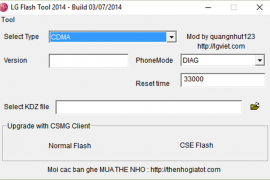
Stock firmwares for LG devices come in KDZ (and sometimes TOT) format. You can flash these firmwares using the LG Flashtool on a Windows PC to either restore a device stock firmware or downgrade from an updated release.
Below is a guide on how to flash KDZ firmwares on LG devices, follow the instructions carefully and to the point.
[icon name=”download” class=”” unprefixed_class=””] Download LG Flashtool
Instructions
- Extract/Unzip the LG Flash Tool 2014 .zip file that you downloaded above on your PC. You’ll get a bunch of files required to run the program.
- Double-click/Run LGFlashTool2014.exe file to Open LG Flash Tool.
└ If it doesn’t open, install Visual C++ Runtime Library from here and then try again. - Boot your LG device into Download Mode:
- Power off your LG device.
- Press and hold Volume Up button.
- Connect your device to PC with a USB cable while holding the Volume Up button.
- You’ll boot into download mode with “Firmware Update” written on top of the screen.
- Now load the .kdz firmware file into LG Flash Tool window on your PC. Click the browse button at the end of the “Select KDZ file” line. Leave every other option as is on the LG Flash Tool window.
- Once you’ve selected .kdz firmware file, click “CSE Flash” button to proceed on flashing the .KDZ firmware to your LG device.
└ FYI, the “Normal Flash” button doesn’t wipe data and the “CSE Flash” button wipes data. If you’re upgrading from a stock firmware, then “Normal Flash” might do. - You’ll get a “Read Phone Information” window, it will be blank for the most part. Just hit the START button and proceed.
- You’ll be asked for administrator permissions for some LG program on your PC, accept it.
- Now you’ll see “Select Country & Language” window. Select “Different” from the country list and then “English” from the language list. And remember to NOT tick the Smartphone upgrade checkbox, it’s for Windows Mobile phones not your LG device running on Android.
- To finally begin firmware flashing process, hit the “OK” button.
- You’ll see a progress bar now. Just wait until it’s 100%, after which you might get an error “Connection to server failed”. This is okay. DON’T disconnect your phone at this point.
- Watch your phone closely, you’ll see some activity going on the screen with “COM” written in green text. Once that happens click OK to the “Connection to server failed” error.
- Now watch the firmware update progress bar on your phone. Once it’s complete, your phone will automatically reboot. And then you can disconnect your phone from PC and close the LG Flash Tool utility as well.
That’s all. Happy Androiding!





141 responses to “How to Install/Flash a KDZ Firmware on LG Devices”
Can the stock rom be flashed if my phone has been rooted and flashed with a custom rom? Using an LG G3 D850.
Can the stock rom be flashed if my phone has been rooted and flashed with a custom rom? Using an LG G3 D850.
Can the stock rom be flashed if my phone has been rooted and flashed with a custom rom? Using an LG G3 D850.
hi trying to down grade from marshmellow to lollipop on my g3 d855 and it stops at 9% and says upgrade stopped due to error ? any ideas,
hi trying to down grade from marshmellow to lollipop on my g3 d855 and it stops at 9% and says upgrade stopped due to error ? any ideas,
hi trying to down grade from marshmellow to lollipop on my g3 d855 and it stops at 9% and says upgrade stopped due to error ? any ideas,
Can the stock rom be flashed if my phone has been rooted and flashed with a custom rom? Using an LG G3 D850.
hi trying to down grade from marshmellow to lollipop on my g3 d855 and it stops at 9% and says upgrade stopped due to error ? any ideas,
Plz I tried to search for my LG E970 I can’t find it ,assist me if any have
Plz I tried to search for my LG E970 I can’t find it ,assist me if any have
Plz I tried to search for my LG E970 I can’t find it ,assist me if any have
Plz I tried to search for my LG E970 I can’t find it ,assist me if any have
Well at LG L460 you need to hold both up and down button and then it finds the phone the only think you get in the screen is the LG logo and bellow a small message Download mode affter the error even if you leave it for hours i will do nothing (i have give admin rights to the program) + (full battery) + (lg cable) + (all settings corectly)…but nothign…btw in the program i only see ?????????? when the progres bar is loading is that normal too ? 🙂
Well at LG L460 you need to hold both up and down button and then it finds the phone the only think you get in the screen is the LG logo and bellow a small message Download mode affter the error even if you leave it for hours i will do nothing (i have give admin rights to the program) + (full battery) + (lg cable) + (all settings corectly)…but nothign…btw in the program i only see ?????????? when the progres bar is loading is that normal too ? 🙂
Well at LG L460 you need to hold both up and down button and then it finds the phone the only think you get in the screen is the LG logo and bellow a small message Download mode affter the error even if you leave it for hours i will do nothing (i have give admin rights to the program) + (full battery) + (lg cable) + (all settings corectly)…but nothign…btw in the program i only see ?????????? when the progres bar is loading is that normal too ? 🙂
Well at LG L460 you need to hold both up and down button and then it finds the phone the only think you get in the screen is the LG logo and bellow a small message Download mode affter the error even if you leave it for hours i will do nothing (i have give admin rights to the program) + (full battery) + (lg cable) + (all settings corectly)…but nothign…btw in the program i only see ?????????? when the progres bar is loading is that normal too ? 🙂
Mine just gets stuck at 60% for a really long time and i afraid to unplug it. What should I do?
Mine just gets stuck at 60% for a really long time and i afraid to unplug it. What should I do?
Mine just gets stuck at 60% for a really long time and i afraid to unplug it. What should I do?
Mine just gets stuck at 60% for a really long time and i afraid to unplug it. What should I do?
Please what is the name of the driver in device manager?
Please what is the name of the driver in device manager?
Please what is the name of the driver in device manager?
Please what is the name of the driver in device manager?
i can”t see different languages
i can”t see different languages
i can”t see different languages
i can”t see different languages
nice sharing thanks’
nice sharing thanks’
nice sharing thanks’
nice sharing thanks’
It also shown me connection lost to server and after 2-3 mins it shows upgrade stopped due to an error on my lg g2 vs980
It also shown me connection lost to server and after 2-3 mins it shows upgrade stopped due to an error on my lg g2 vs980
It also shown me connection lost to server and after 2-3 mins it shows upgrade stopped due to an error on my lg g2 vs980
It also shown me connection lost to server and after 2-3 mins it shows upgrade stopped due to an error on my lg g2 vs980
My computer recognizes my lg v10 but when I make an attempt to use the lg tool software it doesn’t see the phone, how can I fix this?
My computer recognizes my lg v10 but when I make an attempt to use the lg tool software it doesn’t see the phone, how can I fix this?
My computer recognizes my lg v10 but when I make an attempt to use the lg tool software it doesn’t see the phone, how can I fix this?
My computer recognizes my lg v10 but when I make an attempt to use the lg tool software it doesn’t see the phone, how can I fix this?
hi
unable to select language
hi
unable to select language
can help anyone here plz
unable to select language while loading.kdx file on flashtool window
can help anyone here plz
unable to select language while loading.kdx file on flashtool window
hi
unable to select language
can help anyone here plz
unable to select language while loading.kdx file on flashtool window
worked perfectly for d855. thanks!
worked perfectly for d855. thanks!
Hello and thanks for this guide, it worked for me! For the others who say that they don’t see any activity on their phone screen, move the “Failed to connect to the server” window away and you’ll see does it work actually, I moved it away and found out that software was still installing my Android 🙂
Hello and thanks for this guide, it worked for me! For the others who say that they don’t see any activity on their phone screen, move the “Failed to connect to the server” window away and you’ll see does it work actually, I moved it away and found out that software was still installing my Android 🙂