

Now that One A9 root is available, you will be looking at the means to unlock bootloader of the device first.
Know that the procedure is done using HTC’s own website for the purpose. So, if HTC says your device is not compatible or eligible for unlock, there is nothing that can be done. You will get to know that in step 12 below.
Unless your One A9 is from Verizon or Sprint in USA, it should be easily unlockable, or eligible from HTC.
Unlocking the bootloader of One A9 is your first step into the world of little device hacking which starts with installing TWRP recovery next, and then achieving root access, followed by root requiring apps, or even better, Xposed framework and modules.
Well, here is our guide on how to unlock One A9 bootloader, right here for you.
Info:
Unlocking bootloader of any device involves a certain degree of risk. You must note and understand the following before proceeding with bootloader unlocking process:
- Unlocking the bootloader will void the warranty of your phone permanently and you’ll be unable to get any support under warranty from HTC.
- All the data on your phone will be wiped, including personal content on the internal storage such as photos, music, videos and other files. You can take a backup of everything though and restore it later on.
- While you’ll be able to obtain official software updates from HTC after unlocking bootloader, there are chances that it might cause issues so it’s best to not accept official software updates.
Warning!
Warranty may be void of your device if you follow the procedures given on this page. You only are responsible for your device. We won’t be liable if any damage occurs to your device and/or its components.
Backup!
Backup your Android. Backup important files stored on your device before proceeding with the steps below, so that in case something goes wrong you’ll have backup of all your important files.
Before you begin with guide instructions below, make sure your android device is adequately charged — at least 50% battery of the device.
How to unlock One A9 bootloader
→ If you don’t see any mail from HTC Dev within 30 mins from registering, then also check your Spam folder.
- Left click on empty white space in the folder.
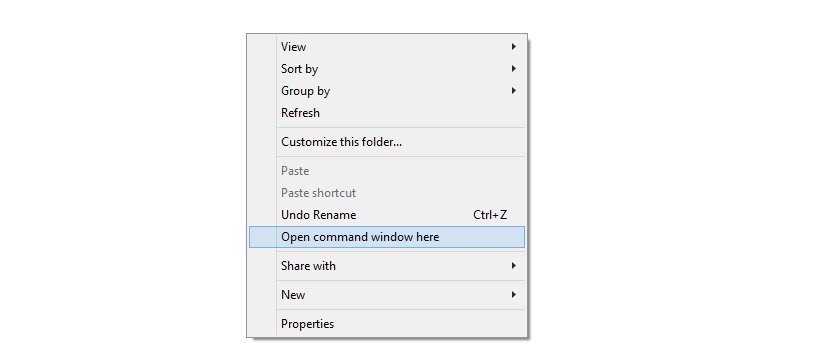
- Now, while holding shift key, right click on empty white space to get a pop-up as shown below.
- Now choose Open command window here option from that.
You will see a command window open up, with location directed to onea9unlock folder.
adb reboot download
fastboot oem get_identifier_token
- First, right click on an empty space inside command window, and select Mark.
- Now, highlight the block of text starting from <<<< Identifier Token Start >>>> and ending with <<<<< Identifier Token End >>>>>.
- Right click on the highlighted text to copy it. (Refer to the image below.) Press escape key to get rid of pop-up from last right click.
└ It may say <info> instead of <bootloader> but don’t worry, the procedure is the same.
- Go to the following link here.
- Scroll down to the bottom where it says My Device Identifier Token and paste the previously copied token here. And then click on Submit.
└ Copy and paste the token directly from Command Prompt window to the web page. DO NOT try coping it somewhere else first (Example: Notepad) and then pasting from there to web page.
fastboot flash unlocktoken Unlock_code.bin
Verify Bootloader Unlock
To confirm if your bootloader is unlocked boot into Bootloader Mode (Step 4), it should say *** UNLOCKED *** at the top of the screen.
Enjoy!
Feedback Us!
It was easy to unlock bootloader on your HTC One A9, right? Let us know how you plan to use it in comments below.
Your suggestions and queries, if any, are most welcomed!



2 responses to “HTC One A9 Bootloader Unlock: How to do it”
That didn’t work. First, you don’t tell us what screen or mode to put it phone in during the process. Second, what mode our screen should we be in when we use adb to put the phone into download mode? Shouldn’t you also tell us to make sure we have activated developer mode? And click allow boot loader unlock? Despite all that, without specific committed steps your process didn’t do anything but confuse everyone!
Worked for me, many thanks!!!!