

UPDATE 2: A new Android 2.3.3 Firmware (XWJVH) for Galaxy S i9000 has leaked. And we’ve posted installation instructions for it too. Enjoy! [link below]
How To Install XWJVH on your Galaxy S i9000
UPDATE: We will keep updating this page for other XWJVB stuff — ROMs, Mods, Hacks, Root, etc — as and when they get posted. So, keep watching this space, exciting stuff coming soon.
- How to Root XWJVB using Chainfire’s method.
- More links to be added later, when available………
Well, there is new Android 2.3.3 ROM — XWJVB — for Galaxy S on the block and we’ve already got it booting on our Galaxy S. If you want it too, here what you can do to get it.
But, warnings first, as always:
[warning] The methods and procedures discussed here are considered risky and you should not attempt anything if you don’t know completely what it is. Do this only if you’re capable of getting your phone back right on your own. If any damage occurs to you or your device, we won’t be held liable. You only will be responsible — you’ve been warned. Okay![/warning]
[info]This guide is applicable only for Samsung Galaxy S international version (i9000). If yours is Vibrant/Captivate/Fascinate/Epic 4G or any other Galaxy S variant, then this ROM — and Guide — is not for you, and that’s for definite.[/info]
You may already know that this ROM is available in two versions: one with_bootloaders and the other without_bootloaders. Flashing with_bootloaders version is considered riskier than without_bootloaders. But you have to flash with_bootloaders because this is required by Android 2.3, unless you’ve already done that while installing earlier leaked ROMs — XWJV1 or XXJVK. If you haven’t installed JV1 or JVK with bootloaders, you have to install XWJVB with_bootloaders.
We’ve tried this ROM with_bootloaders version and would recommend the same to you. If you’re confused, simply download and install the with_bootloaders version.
XWJVB Installation Video
Follow these step-by-step guide to Install XWJVB Android 2.3.3 ROM on your Galaxy S:
- Download XWJVB with_bootloaders version. File name — GT_I9000_XWJVB_XXJVK_NEEJV3_Sbl.exe. Download Link. Size: 155.64 MB. [If you already have Android 2.3 bootloaders, download XWJVB without_bootloaders version. File name — GT_I9000_XWJVB_XXJVK_NEEJV3.exe. Download Link. Size: 155.41 MB. Apply the procedures below accordingly.]
- Double click ‘GT_I9000_XWJVB_XXJVK_NEEJV3_Sbl.exe’ and select Extract to let the file extract its contents in the folder “GT_I9000_XWJVB_XXJVK_NEEJV3_Sbl” — you’ll get 3 files in this folder:
- CSC_NEE_JV3.tar.md5,
- PDA_XWJVB_Sbl.tar.md5 and
- PHONE_XXJVK.tar.md5.
- Download Odin3 v1.7.zip from here — Mediafire Link. Extract the zip file to get Odin3 v1.7.exe.
- Disconnect your phone if it’s connected to PC.
- Switch Off your phone. Wait for vibration to confirm complete switch off.
- Now, put it in Download Mode — press and hold these keys together: Volume_DOWN+Home+Power.
- Open Odin (from step 3). Connect your phone to PC now. You should get the message “Added! !” under the Odin’s message box.
- Important, uncheck the ‘Re-Partition’ button. While, keep ‘Auto Reboot’ & ‘F. Reset Time’ boxes checked.
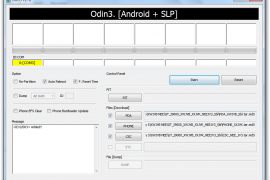
- In Odin, place these files (check out the screenshot given at the top for help):
- In the PDA box, select this file (from step 2.2) — PDA_XWJVB_Sbl.tar.md5
- In the Phone box, select this file (from step 2.3) — PHONE_XXJVK.tar.md5
- In the CSC box, select this file (from step 2.1) — CSC_NEE_JV3.tar.md5
- Leave the PIT box empty.
- Double check everything said in step 7, 8 and 9 above.
- Now, hit the START button to let the process begin.
- When process at Odin finishes your phone will automatically reboot. You can unplug the cable now.
- When your phone has restarted, you are on the XWJVB running Android 2.3.3 (Gingerbread). Congrats!
- Check your phone’s version by here: Press Options -> Settings -> Scroll down and select About Phone -> Scroll down and check your version.
Benchmarks, for what it’s worth.


XWJVB ROM Highlights
[valid] Want to get root access on XWJVB? Well, just wait a little bit till we come up with a guide (using chainfire’s root method) for that too. [/valid]
[info]If you experience any problem in installing the ROM with the steps given above, try flashing the ROM again, but with 512 PIT file this time. Download the Pit file from here. Extract the downloaded file to get the Pit File. Then, select the Pit file in Odin’s Pit box this time (step 9.4 above) and keep the ‘Re-Partition’ box (in step 8 above) checked too. All other things same as in steps given above.[/info]
Let us know in comments below how XWJVB Android 2.3.3 ROM works on your Galaxy S (i9000).







486 responses to “How to Install XWJVB Android 2.3.3 ROM on Galaxy S”
This doesn´t have english swype language, how can I get it? Tks
It does hv Swype with of course English language. I am using one right now,
actually. To use swype, hold the text input space first. You will get a
pop-up of options. Select “Input method” and then select Swype — that’s it.
Enjoy!
Does this work for any Network Provider?
Some of the comments above seem to suggest it only works for T-Mobile?
I’m on Orange.
Also, on my SGS currently I am rooted on 2.2 Froyo, does that make a difference? Do I need to perform the procedure described here from a stock phone without root?
Does this work for any Network Provider?
Some of the comments above seem to suggest it only works for T-Mobile?
I’m on Orange.
Also, on my SGS currently I am rooted on 2.2 Froyo, does that make a difference? Do I need to perform the procedure described here from a stock phone without root?
Does this work for any Network Provider?
Some of the comments above seem to suggest it only works for T-Mobile?
I’m on Orange.
Also, on my SGS currently I am rooted on 2.2 Froyo, does that make a difference? Do I need to perform the procedure described here from a stock phone without root?
it works and I like it
it works and I like it
it works and I like it
works great on my phone
works great on my phone
works great on my phone
my phone has:
my baseband version is :I9000JXJPEBuild number : FROYO.JPJPG
will this work on my phone too??
It should work!
You received this message because Kapil Malani shared it with
“I hope all of you are getting the much-wanted much-of-a-teaser precious
Google+ Invites from me and are ready to make a leap from the Mark
Zuckerburg’s no-respect-for-privacy Facebook to privacy-respecting suddenly
there social networking attempt — a mind-blowing one, mind you — the
Google+ (by Google, of course). It’s new, and it’s rad — you’ll soon find
out.
Click the “Learn More about Google+” (with orange background) in the email
you are receiving from me to get your much-deserved (since you’re in my
list, :)) chance to try the Google+ social wave that has literally taken the
Internet for the past few days — and I’m sure will continue to do so.
So, see you soon in Google+ Keep in touch. Ta Ta!
P.S. Those of you who are curious about it, hear it directly from the Google
in the link I’ve attached — Google+ Project’s official announcement from
googleblog itself!”
Accept the invitation to view the full post:
https://plus.google.com/_/notifications/ngemlink?&emid=CJCq6Mm_36kCFeJY7Aodx39XGA&path=%2F108100504619519002104%2Fposts%2Fi8Rh5MJd6mC%3Fgpinv%3DAGXbFGz-GxUnXFzp7t-e-br0gAT1x8WCFQRGTVVWmqBX4C2gF-AVc8AcQaG70tKZAA_7NXfd5qfnItszyj5VHaXUG4qDQDEaGO-KO1ib4fwi3hXHstqyg_8%26hl%3Den
The Google+ project is currently working out all the kinks with a small
group of testers. If you’re not able to access Google+, please check back
again soon. Learn more:
https://plus.google.com/_/notifications/ngemlink?&emid=CJCq6Mm_36kCFeJY7Aodx39XGA&path=%2Fwelcome%3Fgpinv%3DAGXbFGz-GxUnXFzp7t-e-br0gAT1x8WCFQRGTVVWmqBX4C2gF-AVc8AcQaG70tKZAA_7NXfd5qfnItszyj5VHaXUG4qDQDEaGO-KO1ib4fwi3hXHstqyg_8%26hl%3Den
————————
You received this message because Kapil Malani shared it with
Click here to unsubscribe from these
emails:
https://plus.google.com/_/notifications/ngemlink?&emid=CJCq6Mm_36kCFeJY7Aodx39XGA&path=%2Fnonplus%2Femailsettings%3Fgpinv%3DAGXbFGz-GxUnXFzp7t-e-br0gAT1x8WCFQRGTVVWmqBX4C2gF-AVc8AcQaG70tKZAA_7NXfd5qfnItszyj5VHaXUG4qDQDEaGO-KO1ib4fwi3hXHstqyg_8%26est%3DADH5u8Wwkgx7FMt6E-qxoXjTgEEBLFRl3LtIVDacLYuTeB0PH3GVb8idV4PnBuBKb16FHtkZ3JTv5EfyGH8iq6ETyNIZn–6Iz-bY8AlONqgMZVJyc8AIru3Qs3bbEAduHX0btHIRNyeBRDr49ZS7aqXY2HzZygLOg%26hl%3Den
my phone has:
my baseband version is :I9000JXJPEBuild number : FROYO.JPJPG
will this work on my phone too??
It should work!
You received this message because Kapil Malani shared it with
“I hope all of you are getting the much-wanted much-of-a-teaser precious
Google+ Invites from me and are ready to make a leap from the Mark
Zuckerburg’s no-respect-for-privacy Facebook to privacy-respecting suddenly
there social networking attempt — a mind-blowing one, mind you — the
Google+ (by Google, of course). It’s new, and it’s rad — you’ll soon find
out.
Click the “Learn More about Google+” (with orange background) in the email
you are receiving from me to get your much-deserved (since you’re in my
list, :)) chance to try the Google+ social wave that has literally taken the
Internet for the past few days — and I’m sure will continue to do so.
So, see you soon in Google+ Keep in touch. Ta Ta!
P.S. Those of you who are curious about it, hear it directly from the Google
in the link I’ve attached — Google+ Project’s official announcement from
googleblog itself!”
Accept the invitation to view the full post:
https://plus.google.com/_/notifications/ngemlink?&emid=CJCq6Mm_36kCFeJY7Aodx39XGA&path=%2F108100504619519002104%2Fposts%2Fi8Rh5MJd6mC%3Fgpinv%3DAGXbFGz-GxUnXFzp7t-e-br0gAT1x8WCFQRGTVVWmqBX4C2gF-AVc8AcQaG70tKZAA_7NXfd5qfnItszyj5VHaXUG4qDQDEaGO-KO1ib4fwi3hXHstqyg_8%26hl%3Den
The Google+ project is currently working out all the kinks with a small
group of testers. If you’re not able to access Google+, please check back
again soon. Learn more:
https://plus.google.com/_/notifications/ngemlink?&emid=CJCq6Mm_36kCFeJY7Aodx39XGA&path=%2Fwelcome%3Fgpinv%3DAGXbFGz-GxUnXFzp7t-e-br0gAT1x8WCFQRGTVVWmqBX4C2gF-AVc8AcQaG70tKZAA_7NXfd5qfnItszyj5VHaXUG4qDQDEaGO-KO1ib4fwi3hXHstqyg_8%26hl%3Den
————————
You received this message because Kapil Malani shared it with
Click here to unsubscribe from these
emails:
https://plus.google.com/_/notifications/ngemlink?&emid=CJCq6Mm_36kCFeJY7Aodx39XGA&path=%2Fnonplus%2Femailsettings%3Fgpinv%3DAGXbFGz-GxUnXFzp7t-e-br0gAT1x8WCFQRGTVVWmqBX4C2gF-AVc8AcQaG70tKZAA_7NXfd5qfnItszyj5VHaXUG4qDQDEaGO-KO1ib4fwi3hXHstqyg_8%26est%3DADH5u8Wwkgx7FMt6E-qxoXjTgEEBLFRl3LtIVDacLYuTeB0PH3GVb8idV4PnBuBKb16FHtkZ3JTv5EfyGH8iq6ETyNIZn–6Iz-bY8AlONqgMZVJyc8AIru3Qs3bbEAduHX0btHIRNyeBRDr49ZS7aqXY2HzZygLOg%26hl%3Den
my phone has:
my baseband version is :I9000JXJPEBuild number : FROYO.JPJPG
will this work on my phone too??
It should work!
Will this work for my phone as well??
Carrier: Telus (Canada)
Galaxy S Fascinate 3G (SGH-T959D)
Thanks!
No!
Glad I did go a head with this then, lol
Thanks!
You received this message because Kapil Malani shared it with
“I hope all of you are getting the much-wanted much-of-a-teaser precious
Google+ Invites from me and are ready to make a leap from the Mark
Zuckerburg’s no-respect-for-privacy Facebook to privacy-respecting suddenly
there social networking attempt — a mind-blowing one, mind you — the
Google+ (by Google, of course). It’s new, and it’s rad — you’ll soon find
out.
Click the “Learn More about Google+” (with orange background) in the email
you are receiving from me to get your much-deserved (since you’re in my
list, :)) chance to try the Google+ social wave that has literally taken the
Internet for the past few days — and I’m sure will continue to do so.
So, see you soon in Google+ Keep in touch. Ta Ta!
P.S. Those of you who are curious about it, hear it directly from the Google
in the link I’ve attached — Google+ Project’s official announcement from
googleblog itself!”
Accept the invitation to view the full post:
https://plus.google.com/_/notifications/ngemlink?&emid=CPDzwsq_36kCFUSw7Aodgmx0GA&path=%2F108100504619519002104%2Fposts%2Fi8Rh5MJd6mC%3Fgpinv%3DAGXbFGyA37tKcC5cGz1MMnY40JYjzsrzb1Nbg6aOZ99fmqjtTnoG15TxjJEL58iaMhPNWJrl6oCAOBHQvgYEn4ijpSE1MHM2CcKniwJeDcGOv7d7e-I2OHk%26hl%3Den
The Google+ project is currently working out all the kinks with a small
group of testers. If you’re not able to access Google+, please check back
again soon. Learn more:
https://plus.google.com/_/notifications/ngemlink?&emid=CPDzwsq_36kCFUSw7Aodgmx0GA&path=%2Fwelcome%3Fgpinv%3DAGXbFGyA37tKcC5cGz1MMnY40JYjzsrzb1Nbg6aOZ99fmqjtTnoG15TxjJEL58iaMhPNWJrl6oCAOBHQvgYEn4ijpSE1MHM2CcKniwJeDcGOv7d7e-I2OHk%26hl%3Den
————————
You received this message because Kapil Malani shared it with
Click here to unsubscribe from these
emails:
https://plus.google.com/_/notifications/ngemlink?&emid=CPDzwsq_36kCFUSw7Aodgmx0GA&path=%2Fnonplus%2Femailsettings%3Fgpinv%3DAGXbFGyA37tKcC5cGz1MMnY40JYjzsrzb1Nbg6aOZ99fmqjtTnoG15TxjJEL58iaMhPNWJrl6oCAOBHQvgYEn4ijpSE1MHM2CcKniwJeDcGOv7d7e-I2OHk%26est%3DADH5u8U48EZu9mqAJeNqqsdZp7TBKlg96fB-4UExNeRtZLQr3j_hs-s32RrRkKhwYJDWMn7JLOqaS-fYntdPyVEGm_KbRM7w5xP9S1cXLDCY2kURIFIrTppNMAQBRV5peWK539D7fYlnYfyNtsSTy8ElRj9t2bOwAw%26hl%3Den
Will this work for my phone as well??
Carrier: Telus (Canada)
Galaxy S Fascinate 3G (SGH-T959D)
Thanks!
No!
Glad I did go a head with this then, lol
Thanks!
You received this message because Kapil Malani shared it with
“I hope all of you are getting the much-wanted much-of-a-teaser precious
Google+ Invites from me and are ready to make a leap from the Mark
Zuckerburg’s no-respect-for-privacy Facebook to privacy-respecting suddenly
there social networking attempt — a mind-blowing one, mind you — the
Google+ (by Google, of course). It’s new, and it’s rad — you’ll soon find
out.
Click the “Learn More about Google+” (with orange background) in the email
you are receiving from me to get your much-deserved (since you’re in my
list, :)) chance to try the Google+ social wave that has literally taken the
Internet for the past few days — and I’m sure will continue to do so.
So, see you soon in Google+ Keep in touch. Ta Ta!
P.S. Those of you who are curious about it, hear it directly from the Google
in the link I’ve attached — Google+ Project’s official announcement from
googleblog itself!”
Accept the invitation to view the full post:
https://plus.google.com/_/notifications/ngemlink?&emid=CPDzwsq_36kCFUSw7Aodgmx0GA&path=%2F108100504619519002104%2Fposts%2Fi8Rh5MJd6mC%3Fgpinv%3DAGXbFGyA37tKcC5cGz1MMnY40JYjzsrzb1Nbg6aOZ99fmqjtTnoG15TxjJEL58iaMhPNWJrl6oCAOBHQvgYEn4ijpSE1MHM2CcKniwJeDcGOv7d7e-I2OHk%26hl%3Den
The Google+ project is currently working out all the kinks with a small
group of testers. If you’re not able to access Google+, please check back
again soon. Learn more:
https://plus.google.com/_/notifications/ngemlink?&emid=CPDzwsq_36kCFUSw7Aodgmx0GA&path=%2Fwelcome%3Fgpinv%3DAGXbFGyA37tKcC5cGz1MMnY40JYjzsrzb1Nbg6aOZ99fmqjtTnoG15TxjJEL58iaMhPNWJrl6oCAOBHQvgYEn4ijpSE1MHM2CcKniwJeDcGOv7d7e-I2OHk%26hl%3Den
————————
You received this message because Kapil Malani shared it with
Click here to unsubscribe from these
emails:
https://plus.google.com/_/notifications/ngemlink?&emid=CPDzwsq_36kCFUSw7Aodgmx0GA&path=%2Fnonplus%2Femailsettings%3Fgpinv%3DAGXbFGyA37tKcC5cGz1MMnY40JYjzsrzb1Nbg6aOZ99fmqjtTnoG15TxjJEL58iaMhPNWJrl6oCAOBHQvgYEn4ijpSE1MHM2CcKniwJeDcGOv7d7e-I2OHk%26est%3DADH5u8U48EZu9mqAJeNqqsdZp7TBKlg96fB-4UExNeRtZLQr3j_hs-s32RrRkKhwYJDWMn7JLOqaS-fYntdPyVEGm_KbRM7w5xP9S1cXLDCY2kURIFIrTppNMAQBRV5peWK539D7fYlnYfyNtsSTy8ElRj9t2bOwAw%26hl%3Den
Will this work for my phone as well??
Carrier: Telus (Canada)
Galaxy S Fascinate 3G (SGH-T959D)
Thanks!
No!
Glad I did go a head with this then, lol
Thanks!
Just installed it on my galaxy s, works great, i had to put in the internet settings manually tho, but so far it’s great:)
Just installed it on my galaxy s, works great, i had to put in the internet settings manually tho, but so far it’s great:)
Just installed it on my galaxy s, works great, i had to put in the internet settings manually tho, but so far it’s great:)
Do you know of an easy way to root galaxy s2 GingerB2.3.3? I tried the Gingerbreak made for droid and while it works on that, samsung didnt acknowledge it at all..
Do you know of an easy way to root galaxy s2 GingerB2.3.3? I tried the Gingerbreak made for droid and while it works on that, samsung didnt acknowledge it at all..
Do you know of an easy way to root galaxy s2 GingerB2.3.3? I tried the Gingerbreak made for droid and while it works on that, samsung didnt acknowledge it at all..
do i have to re-install launcher pro? it keeps failing
Clear data of launched pro in manage applications. That will delete its settings but should solve the problem.
do i have to re-install launcher pro? it keeps failing
Clear data of launched pro in manage applications. That will delete its settings but should solve the problem.
Clear data of launched pro in manage applications. That will delete its settings but should solve the problem.
do i have to re-install launcher pro? it keeps failing
do i have to re-install launcher pro? it keeps failing
Clear data of launched pro in manage applications. That will delete its settings but should solve the problem.
all ok apart from i get two sms icons now with every message a stock one (the orange/yellow one) and now a white one that i cant get rid of any help to remove this icon whenever i get message
all ok apart from i get two sms icons now with every message a stock one (the orange/yellow one) and now a white one that i cant get rid of any help to remove this icon whenever i get message
all ok apart from i get two sms icons now with every message a stock one (the orange/yellow one) and now a white one that i cant get rid of any help to remove this icon whenever i get message
it’s working great but battery draining is terrible after flashing.Can someone told me how to fix it?
it’s working great but battery draining is terrible after flashing.Can someone told me how to fix it?
it’s working great but battery draining is terrible after flashing.Can someone told me how to fix it?
why i plug in usb nothing came out on odin???
Try the latest XXJVR rom, anyway. And the problem is with drivers.
dude why after doing all the odin my galaxy s is freezing when switch on that time
why i plug in usb nothing came out on odin???
Try the latest XXJVR rom, anyway. And the problem is with drivers.
dude why after doing all the odin my galaxy s is freezing when switch on that time
dude why after doing all the odin my galaxy s is freezing when switch on that time
why i plug in usb nothing came out on odin???
why i plug in usb nothing came out on odin???
Try the latest XXJVR rom, anyway. And the problem is with drivers.
dude why after doing all the odin my galaxy s is freezing when switch on that time
thanks ! it works 100% just follow the instructions nice and easy and it will work!
thanks ! it works 100% just follow the instructions nice and easy and it will work!
thanks ! it works 100% just follow the instructions nice and easy and it will work!
i did this, and my phone just works, except i got no internet, i can make phone calls, i cant see a 3g/g/h logo in the top of my screen either..
Install the latest xxjvr firmware. Search for it on our website.
i did this, and my phone just works, except i got no internet, i can make phone calls, i cant see a 3g/g/h logo in the top of my screen either..
Install the latest xxjvr firmware. Search for it on our website.
i did this, and my phone just works, except i got no internet, i can make phone calls, i cant see a 3g/g/h logo in the top of my screen either..
Install the latest xxjvr firmware. Search for it on our website.
Hello I tried as per your instruction but i received error with system protect message and there after i see small icon of mobile and pc and nothing happening my mobile and it look rom is gone in my galaxy please help me to restore at least original version 2.2
nikhil i found the to fix that problem press the power button + home button + and on the left handside press down at the same time hold it for 10 sec and u will see a in yellow letters Downloading and then connect the galaxy to the pc with ODIN it will connect automactic an repeat the step Above
Hello I tried as per your instruction but i received error with system protect message and there after i see small icon of mobile and pc and nothing happening my mobile and it look rom is gone in my galaxy please help me to restore at least original version 2.2
nikhil i found the to fix that problem press the power button + home button + and on the left handside press down at the same time hold it for 10 sec and u will see a in yellow letters Downloading and then connect the galaxy to the pc with ODIN it will connect automactic an repeat the step Above
Hello I tried as per your instruction but i received error with system protect message and there after i see small icon of mobile and pc and nothing happening my mobile and it look rom is gone in my galaxy please help me to restore at least original version 2.2
nikhil i found the to fix that problem press the power button + home button + and on the left handside press down at the same time hold it for 10 sec and u will see a in yellow letters Downloading and then connect the galaxy to the pc with ODIN it will connect automactic an repeat the step Above
My phone bricked with these symptoms any help:
cannot power on
cannot get into restore mode by holding volume down+camera+power
cannot get into download mode by holding power + 1 on the keypad
cannot get into download mode by shorting pins 4 and 5 with 301kohm resistance
any other ideas? I think i may have to JTAG it to get it working but that I don’t know how to do exactly need help.
This guide was for Samsung Galaxy S, which does not have a camera button. Which phone did you try this thing on?
sorry, the Samsung Epic 4g. I gave up on it. I haven’t found anything about JTAG settings as far as memory location for the bootloader, memory location for the application, device Id I think I found. My choices to unbrick it right now are send it to someone and pay the $40 to do it for me, or buy the automatically setup RIFF JTAG device for $150. I am pretty sure I hosed the bootloader which is why you have to run JTAG to install some type of bootloader and go from there.
I think I can help you. But not just right now — lemme check some stuff about it.
My phone bricked with these symptoms any help:
cannot power on
cannot get into restore mode by holding volume down+camera+power
cannot get into download mode by holding power + 1 on the keypad
cannot get into download mode by shorting pins 4 and 5 with 301kohm resistance
any other ideas? I think i may have to JTAG it to get it working but that I don’t know how to do exactly need help.
This guide was for Samsung Galaxy S, which does not have a camera button. Which phone did you try this thing on?
sorry, the Samsung Epic 4g. I gave up on it. I haven’t found anything about JTAG settings as far as memory location for the bootloader, memory location for the application, device Id I think I found. My choices to unbrick it right now are send it to someone and pay the $40 to do it for me, or buy the automatically setup RIFF JTAG device for $150. I am pretty sure I hosed the bootloader which is why you have to run JTAG to install some type of bootloader and go from there.
I think I can help you. But not just right now — lemme check some stuff about it.
My phone bricked with these symptoms any help:
cannot power on
cannot get into restore mode by holding volume down+camera+power
cannot get into download mode by holding power + 1 on the keypad
cannot get into download mode by shorting pins 4 and 5 with 301kohm resistance
any other ideas? I think i may have to JTAG it to get it working but that I don’t know how to do exactly need help.
This guide was for Samsung Galaxy S, which does not have a camera button. Which phone did you try this thing on?
sorry, the Samsung Epic 4g. I gave up on it. I haven’t found anything about JTAG settings as far as memory location for the bootloader, memory location for the application, device Id I think I found. My choices to unbrick it right now are send it to someone and pay the $40 to do it for me, or buy the automatically setup RIFF JTAG device for $150. I am pretty sure I hosed the bootloader which is why you have to run JTAG to install some type of bootloader and go from there.
I think I can help you. But not just right now — lemme check some stuff about it.
Does it work for
baseband version :I9000XXJPY Build number : FROYO.XXJPY
Does it work for
baseband version :I9000XXJPY Build number : FROYO.XXJPY