

UPDATE 2: A new Android 2.3.3 Firmware (XWJVH) for Galaxy S i9000 has leaked. And we’ve posted installation instructions for it too. Enjoy! [link below]
How To Install XWJVH on your Galaxy S i9000
UPDATE: We will keep updating this page for other XWJVB stuff — ROMs, Mods, Hacks, Root, etc — as and when they get posted. So, keep watching this space, exciting stuff coming soon.
- How to Root XWJVB using Chainfire’s method.
- More links to be added later, when available………
Well, there is new Android 2.3.3 ROM — XWJVB — for Galaxy S on the block and we’ve already got it booting on our Galaxy S. If you want it too, here what you can do to get it.
But, warnings first, as always:
[warning] The methods and procedures discussed here are considered risky and you should not attempt anything if you don’t know completely what it is. Do this only if you’re capable of getting your phone back right on your own. If any damage occurs to you or your device, we won’t be held liable. You only will be responsible — you’ve been warned. Okay![/warning]
[info]This guide is applicable only for Samsung Galaxy S international version (i9000). If yours is Vibrant/Captivate/Fascinate/Epic 4G or any other Galaxy S variant, then this ROM — and Guide — is not for you, and that’s for definite.[/info]
You may already know that this ROM is available in two versions: one with_bootloaders and the other without_bootloaders. Flashing with_bootloaders version is considered riskier than without_bootloaders. But you have to flash with_bootloaders because this is required by Android 2.3, unless you’ve already done that while installing earlier leaked ROMs — XWJV1 or XXJVK. If you haven’t installed JV1 or JVK with bootloaders, you have to install XWJVB with_bootloaders.
We’ve tried this ROM with_bootloaders version and would recommend the same to you. If you’re confused, simply download and install the with_bootloaders version.
XWJVB Installation Video
Follow these step-by-step guide to Install XWJVB Android 2.3.3 ROM on your Galaxy S:
- Download XWJVB with_bootloaders version. File name — GT_I9000_XWJVB_XXJVK_NEEJV3_Sbl.exe. Download Link. Size: 155.64 MB. [If you already have Android 2.3 bootloaders, download XWJVB without_bootloaders version. File name — GT_I9000_XWJVB_XXJVK_NEEJV3.exe. Download Link. Size: 155.41 MB. Apply the procedures below accordingly.]
- Double click ‘GT_I9000_XWJVB_XXJVK_NEEJV3_Sbl.exe’ and select Extract to let the file extract its contents in the folder “GT_I9000_XWJVB_XXJVK_NEEJV3_Sbl” — you’ll get 3 files in this folder:
- CSC_NEE_JV3.tar.md5,
- PDA_XWJVB_Sbl.tar.md5 and
- PHONE_XXJVK.tar.md5.
- Download Odin3 v1.7.zip from here — Mediafire Link. Extract the zip file to get Odin3 v1.7.exe.
- Disconnect your phone if it’s connected to PC.
- Switch Off your phone. Wait for vibration to confirm complete switch off.
- Now, put it in Download Mode — press and hold these keys together: Volume_DOWN+Home+Power.
- Open Odin (from step 3). Connect your phone to PC now. You should get the message “Added! !” under the Odin’s message box.
- Important, uncheck the ‘Re-Partition’ button. While, keep ‘Auto Reboot’ & ‘F. Reset Time’ boxes checked.
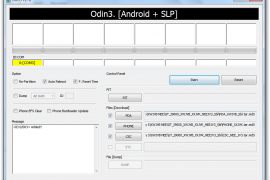
- In Odin, place these files (check out the screenshot given at the top for help):
- In the PDA box, select this file (from step 2.2) — PDA_XWJVB_Sbl.tar.md5
- In the Phone box, select this file (from step 2.3) — PHONE_XXJVK.tar.md5
- In the CSC box, select this file (from step 2.1) — CSC_NEE_JV3.tar.md5
- Leave the PIT box empty.
- Double check everything said in step 7, 8 and 9 above.
- Now, hit the START button to let the process begin.
- When process at Odin finishes your phone will automatically reboot. You can unplug the cable now.
- When your phone has restarted, you are on the XWJVB running Android 2.3.3 (Gingerbread). Congrats!
- Check your phone’s version by here: Press Options -> Settings -> Scroll down and select About Phone -> Scroll down and check your version.
Benchmarks, for what it’s worth.


XWJVB ROM Highlights
[valid] Want to get root access on XWJVB? Well, just wait a little bit till we come up with a guide (using chainfire’s root method) for that too. [/valid]
[info]If you experience any problem in installing the ROM with the steps given above, try flashing the ROM again, but with 512 PIT file this time. Download the Pit file from here. Extract the downloaded file to get the Pit File. Then, select the Pit file in Odin’s Pit box this time (step 9.4 above) and keep the ‘Re-Partition’ box (in step 8 above) checked too. All other things same as in steps given above.[/info]
Let us know in comments below how XWJVB Android 2.3.3 ROM works on your Galaxy S (i9000).







486 responses to “How to Install XWJVB Android 2.3.3 ROM on Galaxy S”
Hi, I´ve followed the guide precisely and everything is working fine ! Great work !!!
Thanks…. Glad you like it!
Hi, I´ve followed the guide precisely and everything is working fine ! Great work !!!
Thanks…. Glad you like it!
Hi, I´ve followed the guide precisely and everything is working fine ! Great work !!!
Thanks…. Glad you like it!
Help pls!!! After i success flash the 2.3.3 XXJVB. My phone just restart & start up with screen that ask me enter password in my phone??? Anybody know what is happen?
If you’re still stuck, I recommend doing a factory reset from the recovery. Let me know.
hi, just finishied flashing, phone gets stuck at S logo, S logo is coming again n again….plz advice wt went wrong…
Help pls!!! After i success flash the 2.3.3 XXJVB. My phone just restart & start up with screen that ask me enter password in my phone??? Anybody know what is happen?
If you’re still stuck, I recommend doing a factory reset from the recovery. Let me know.
hi, just finishied flashing, phone gets stuck at S logo, S logo is coming again n again….plz advice wt went wrong…
Help pls!!! After i success flash the 2.3.3 XXJVB. My phone just restart & start up with screen that ask me enter password in my phone??? Anybody know what is happen?
If you’re still stuck, I recommend doing a factory reset from the recovery. Let me know.
hi, just finishied flashing, phone gets stuck at S logo, S logo is coming again n again….plz advice wt went wrong…
Hi there! I got a question, will I keep all my contacts, apps and data after flashing this ROM or should I make a backup? Also I think Titanium backup will be useless for restoring if I wont have root on the new rom. Can u advice please?
Yes you’ll loose your contacts, apps and data. But you can have root access on this ROM too, we’ve posted a detailed guide here — https://nerdschalk.com/how-to-root-xwjvb-and-install-clockwork-mod-cwm-recovery/
So buddy you can totally rely on Titanium backup 🙂
Yes you’ll loose your contacts, apps and data. But you can have root access on this ROM too, we’ve posted a detailed guide here — https://nerdschalk.com/how-to-root-xwjvb-and-install-clockwork-mod-cwm-recovery/
So buddy you can totally rely on Titanium backup 🙂
Hey, this guide ROCKS.
I was on Darky extreme 9.5 and it was good, but got scared that I wasn’t going to be able to upgrade when Samsung/Google FINALLY release 2.3… to us. So, I flashed this ROM using odin. It was really easy, I then rooted using chainfire kernel and made sure busybox is working, so as to be able to restore my Angry Birds progress (very important).
So, it’s all good. Battery life is SUPERB compared to Darky (but Darky is very cool and I am sure that all that coolness needs more power). I don’t really think Google have fixed the SGS GPS nightmare in this release. Mine still only gets to about 10m accuracy.
However. It is a good rom and thank you for your work on it.
Cheers,
Hamish
Hi Hamish, thanks for appreciating our work.
And yeah damn right. GPS is still not good.
Hi Hamish, thanks for appreciating our work.
And yeah damn right. GPS is still not good.
Hi there! I got a question, will I keep all my contacts, apps and data after flashing this ROM or should I make a backup? Also I think Titanium backup will be useless for restoring if I wont have root on the new rom. Can u advice please?
Yes you’ll loose your contacts, apps and data. But you can have root access on this ROM too, we’ve posted a detailed guide here — https://nerdschalk.com/how-to-root-xwjvb-and-install-clockwork-mod-cwm-recovery/
So buddy you can totally rely on Titanium backup 🙂
Hi there! I got a question, will I keep all my contacts, apps and data after flashing this ROM or should I make a backup? Also I think Titanium backup will be useless for restoring if I wont have root on the new rom. Can u advice please?
Yes you’ll loose your contacts, apps and data. But you can have root access on this ROM too, we’ve posted a detailed guide here — https://nerdschalk.com/how-to-root-xwjvb-and-install-clockwork-mod-cwm-recovery/
So buddy you can totally rely on Titanium backup 🙂
Hey, this guide ROCKS.
I was on Darky extreme 9.5 and it was good, but got scared that I wasn’t going to be able to upgrade when Samsung/Google FINALLY release 2.3… to us. So, I flashed this ROM using odin. It was really easy, I then rooted using chainfire kernel and made sure busybox is working, so as to be able to restore my Angry Birds progress (very important).
So, it’s all good. Battery life is SUPERB compared to Darky (but Darky is very cool and I am sure that all that coolness needs more power). I don’t really think Google have fixed the SGS GPS nightmare in this release. Mine still only gets to about 10m accuracy.
However. It is a good rom and thank you for your work on it.
Cheers,
Hamish
Hi Hamish, thanks for appreciating our work.
And yeah damn right. GPS is still not good.
Hey, this guide ROCKS.
I was on Darky extreme 9.5 and it was good, but got scared that I wasn’t going to be able to upgrade when Samsung/Google FINALLY release 2.3… to us. So, I flashed this ROM using odin. It was really easy, I then rooted using chainfire kernel and made sure busybox is working, so as to be able to restore my Angry Birds progress (very important).
So, it’s all good. Battery life is SUPERB compared to Darky (but Darky is very cool and I am sure that all that coolness needs more power). I don’t really think Google have fixed the SGS GPS nightmare in this release. Mine still only gets to about 10m accuracy.
However. It is a good rom and thank you for your work on it.
Cheers,
Hamish
Hi Hamish, thanks for appreciating our work.
And yeah damn right. GPS is still not good.
Hi, I followed the instructions and I get a ‘pass’ in odin, however when I reboot my phone it just loops at the SGS start up screen!! please help!?!?
I hold onto vol up+ power + home button and it takes me to recovery. It then displays the following message:
# Manual mode #
applying Multi CSC
Installing Multi CSC
Can’t access to ‘/system/csc/VOD/system/’.
Successfully applied multi-CSC.
can anyone help please??
thanks!
Rai
Try doing a factory reset if you’re able to boot into Recovery.
Or you can use the EZBase ROM to painlessly update your phone to Android 2.3.3 XWJVB ROM. Here’s the link — https://nerdschalk.com/ezbase-rom-v3-0-full-installation-guide-w-video/
Try doing a factory reset if you’re able to boot into Recovery.
Or you can use the EZBase ROM to painlessly update your phone to Android 2.3.3 XWJVB ROM. Here’s the link — https://nerdschalk.com/ezbase-rom-v3-0-full-installation-guide-w-video/
Thanks for your reply Shivam!
However I tried the process again using GT_I9000_XXJVK_XXJVK_OXAJVK_Sbl and it worked! could you tell me what the difference between GT_I9000_XXJVK_XXJVK_OXAJVK_Sbl and GT_I9000_XWJVB_XXJVK_NEEJV3_Sbl are and why the former worked?
thanks
Rai
Thanks for your reply Shivam!
However I tried the process again using GT_I9000_XXJVK_XXJVK_OXAJVK_Sbl and it worked! could you tell me what the difference between GT_I9000_XXJVK_XXJVK_OXAJVK_Sbl and GT_I9000_XWJVB_XXJVK_NEEJV3_Sbl are and why the former worked?
update: I tried the odin method again with GT_I9000_XWJVB_XXJVK_NEEJV3_Sbl and all seems fine now!
thanks
Rai
There are not much differences between the two ROMs apart from the fact that XWJVB is the latest one. But users have reported that XWJVB has better battery performance & stability as compared to XXJVK.
So you did the right thing. I’d have recommended you to do the same — flash the XWJVB over XXJVK 😉
Anyway glad you got it working.
There are not much differences between the two ROMs apart from the fact that XWJVB is the latest one. But users have reported that XWJVB has better battery performance & stability as compared to XXJVK.
So you did the right thing. I’d have recommended you to do the same — flash the XWJVB over XXJVK 😉
Thanks for your help, your guide was very easy to follow!
Hopefully the root access will be available soon! 🙂
You’re welcome 🙂
And BTW we’ve already posted a guide on how to root XWJVB. Go on — https://nerdschalk.com/how-to-root-xwjvb-and-install-clockwork-mod-cwm-recovery/
You’re welcome 🙂
And BTW we’ve already posted a guide on how to root XWJVB. Go on — https://nerdschalk.com/how-to-root-xwjvb-and-install-clockwork-mod-cwm-recovery/
Hi, I followed the instructions and I get a ‘pass’ in odin, however when I reboot my phone it just loops at the SGS start up screen!! please help!?!?
I hold onto vol up+ power + home button and it takes me to recovery. It then displays the following message:
# Manual mode #
applying Multi CSC
Installing Multi CSC
Can’t access to ‘/system/csc/VOD/system/’.
Successfully applied multi-CSC.
can anyone help please??
thanks!
Rai
Try doing a factory reset if you’re able to boot into Recovery.
Or you can use the EZBase ROM to painlessly update your phone to Android 2.3.3 XWJVB ROM. Here’s the link — https://nerdschalk.com/ezbase-rom-v3-0-full-installation-guide-w-video/
Thanks for your reply Shivam!
However I tried the process again using GT_I9000_XXJVK_XXJVK_OXAJVK_Sbl and it worked! could you tell me what the difference between GT_I9000_XXJVK_XXJVK_OXAJVK_Sbl and GT_I9000_XWJVB_XXJVK_NEEJV3_Sbl are and why the former worked?
thanks
Rai
There are not much differences between the two ROMs apart from the fact that XWJVB is the latest one. But users have reported that XWJVB has better battery performance & stability as compared to XXJVK.
So you did the right thing. I’d have recommended you to do the same — flash the XWJVB over XXJVK 😉
Anyway glad you got it working.
Thanks for your help, your guide was very easy to follow!
Hopefully the root access will be available soon! 🙂
You’re welcome 🙂
And BTW we’ve already posted a guide on how to root XWJVB. Go on — https://nerdschalk.com/how-to-root-xwjvb-and-install-clockwork-mod-cwm-recovery/
Hi, I followed the instructions and I get a ‘pass’ in odin, however when I reboot my phone it just loops at the SGS start up screen!! please help!?!?
I hold onto vol up+ power + home button and it takes me to recovery. It then displays the following message:
# Manual mode #
applying Multi CSC
Installing Multi CSC
Can’t access to ‘/system/csc/VOD/system/’.
Successfully applied multi-CSC.
can anyone help please??
thanks!
Rai
Try doing a factory reset if you’re able to boot into Recovery.
Or you can use the EZBase ROM to painlessly update your phone to Android 2.3.3 XWJVB ROM. Here’s the link — https://nerdschalk.com/ezbase-rom-v3-0-full-installation-guide-w-video/
Thanks for your reply Shivam!
However I tried the process again using GT_I9000_XXJVK_XXJVK_OXAJVK_Sbl and it worked! could you tell me what the difference between GT_I9000_XXJVK_XXJVK_OXAJVK_Sbl and GT_I9000_XWJVB_XXJVK_NEEJV3_Sbl are and why the former worked?
update: I tried the odin method again with GT_I9000_XWJVB_XXJVK_NEEJV3_Sbl and all seems fine now!
thanks
Rai
There are not much differences between the two ROMs apart from the fact that XWJVB is the latest one. But users have reported that XWJVB has better battery performance & stability as compared to XXJVK.
So you did the right thing. I’d have recommended you to do the same — flash the XWJVB over XXJVK 😉
Thanks for your help, your guide was very easy to follow!
Hopefully the root access will be available soon! 🙂
You’re welcome 🙂
And BTW we’ve already posted a guide on how to root XWJVB. Go on — https://nerdschalk.com/how-to-root-xwjvb-and-install-clockwork-mod-cwm-recovery/
Works like a charm. Just did the update from 2.3.2 to 2.3.3. Thanks
Sorry for the stupid questiion but i am new on android…
Is it nescessary to root my GT-I9000 after install the 2.3.3 XWJVA???
What steps i have to make (install / root/ adb etc.) to use my SGS?
Thx a lot…
No it’s not necessary at all. You can just flash XWJVB and you’ll be good 🙂
No it’s not necessary at all. You can just flash XWJVB and you’ll be good 🙂
Works like a charm. Just did the update from 2.3.2 to 2.3.3. Thanks
Works like a charm. Just did the update from 2.3.2 to 2.3.3. Thanks
Sorry for the stupid questiion but i am new on android…
Is it nescessary to root my GT-I9000 after install the 2.3.3 XWJVA???
What steps i have to make (install / root/ adb etc.) to use my SGS?
Thx a lot…
No it’s not necessary at all. You can just flash XWJVB and you’ll be good 🙂
No it’s not necessary at all. You can just flash XWJVB and you’ll be good 🙂
Sorry for the stupid questiion but i am new on android…
Is it nescessary to root my GT-I9000 after install the 2.3.3 XWJVA???
What steps i have to make (install / root/ adb etc.) to use my SGS?
Thx a lot…
No it’s not necessary at all. You can just flash XWJVB and you’ll be good 🙂
Hi, maybe someone can help me?
I followed all the steps and when I pushed ‘start’in odin3, it kept on hanging on setup connection. So after 10 mins i stopped it and tried it again. then it suddenly said Failed
Now I cannot start my phone anymore..
tnx
nevermind, fixxed it already..
Did it again successfully last night on other SGS 2.3.2 phone. I used the version with bootloader. Many thanks again.
Hi, maybe someone can help me?
I followed all the steps and when I pushed ‘start’in odin3, it kept on hanging on setup connection. So after 10 mins i stopped it and tried it again. then it suddenly said Failed
Now I cannot start my phone anymore..
tnx
nevermind, fixxed it already..
Hi, maybe someone can help me?
I followed all the steps and when I pushed ‘start’in odin3, it kept on hanging on setup connection. So after 10 mins i stopped it and tried it again. then it suddenly said Failed
Now I cannot start my phone anymore..
tnx
nevermind, fixxed it already..
Did it again successfully last night on other SGS 2.3.2 phone. I used the version with bootloader. Many thanks again.
Did it again successfully last night on other SGS 2.3.2 phone. I used the version with bootloader. Many thanks again.
Hi guys!
Just flashed a week ago this Rom and really happy with it. Meantimes (from today actually) I am a happy owner of a Galaxy s II. So I passed my galaxy s to my wife. The problem is that I cannot perform the factory reset for some reason, and this phone is still stuck to my gmail account which I cannot remove. Some ideas?
I would like to have a full wipe of the phone — apps, data, everithing. Only pure gingerbread.
Can u help?
Well if you’re having problem with factory reset — and you want to have a full wipe — then a simple solution would be to flash the whole ROM again on your phone using the guide above.
And BTW congratulations for Galaxy S II 🙂
Well if you’re having problem with factory reset — and you want to have a full wipe — then a simple solution would be to flash the whole ROM again on your phone using the guide above.
And BTW congratulations for Galaxy S II 🙂
Ok, flashed it again. No I have a bigger problem:it wont work with my tree mobile sim. No data, no calls, nothing. I put a tmobile sim inside and it works fine. Called the guys from technical support, went to three store… They say it is a problem of the pphone. For some reason my phone does’t accept three mobile (they have a special network?) but accepts for ex. t mobile. What should I do?
And yeah: Galaxy S II is awesome, never seen anything better!!!
hi every one
can anybody help me i am using galaxy s froyo 2.2 build number FRF91.372 rooted device i want to put Gingerbread Rom XWJVB on my device should i do so or there is chances of brickage
thnx in advance
Hello Gurdyal, chances of brickage are always there for everyone — yep, that’s very ironic to say. You can flash this ROM but follow each step carefully.
one thing more that i have updatedmy stock touchwiz launcher using sgs tools and i m using modded touchwiz so i am totaly confused with all this thing so plz kindly help me
hello, i’m a newbie in all those things, but for sure i know that i have GT-I9000 2.2 froyo i didn’t do any root it’s fresh new phone before i made those steps to upgrade 2.3.3 i need to root my phone?
That’s good that you’ve i9000. You can try this ROM. There are no other requirements before flashing the JVB (no root is required!). Just make sure that your phone is able to enter download mode, because it’s a must to use Odin. That’s it.
Hi guys!
Just flashed a week ago this Rom and really happy with it. Meantimes (from today actually) I am a happy owner of a Galaxy s II. So I passed my galaxy s to my wife. The problem is that I cannot perform the factory reset for some reason, and this phone is still stuck to my gmail account which I cannot remove. Some ideas?
I would like to have a full wipe of the phone — apps, data, everithing. Only pure gingerbread.
Can u help?
Well if you’re having problem with factory reset — and you want to have a full wipe — then a simple solution would be to flash the whole ROM again on your phone using the guide above.
And BTW congratulations for Galaxy S II 🙂
Ok, flashed it again. No I have a bigger problem:it wont work with my tree mobile sim. No data, no calls, nothing. I put a tmobile sim inside and it works fine. Called the guys from technical support, went to three store… They say it is a problem of the pphone. For some reason my phone does’t accept three mobile (they have a special network?) but accepts for ex. t mobile. What should I do?
And yeah: Galaxy S II is awesome, never seen anything better!!!
Hi guys!
Just flashed a week ago this Rom and really happy with it. Meantimes (from today actually) I am a happy owner of a Galaxy s II. So I passed my galaxy s to my wife. The problem is that I cannot perform the factory reset for some reason, and this phone is still stuck to my gmail account which I cannot remove. Some ideas?
I would like to have a full wipe of the phone — apps, data, everithing. Only pure gingerbread.
Can u help?
Well if you’re having problem with factory reset — and you want to have a full wipe — then a simple solution would be to flash the whole ROM again on your phone using the guide above.
And BTW congratulations for Galaxy S II 🙂
Ok, flashed it again. No I have a bigger problem:it wont work with my tree mobile sim. No data, no calls, nothing. I put a tmobile sim inside and it works fine. Called the guys from technical support, went to three store… They say it is a problem of the pphone. For some reason my phone does’t accept three mobile (they have a special network?) but accepts for ex. t mobile. What should I do?
And yeah: Galaxy S II is awesome, never seen anything better!!!
hi every one
can anybody help me i am using galaxy s froyo 2.2 build number FRF91.372 rooted device i want to put Gingerbread Rom XWJVB on my device should i do so or there is chances of brickage
thnx in advance
Hello Gurdyal, chances of brickage are always there for everyone — yep, that’s very ironic to say. You can flash this ROM but follow each step carefully.
hi every one
can anybody help me i am using galaxy s froyo 2.2 build number FRF91.372 rooted device i want to put Gingerbread Rom XWJVB on my device should i do so or there is chances of brickage
thnx in advance
one thing more that i have updatedmy stock touchwiz launcher using sgs tools and i m using modded touchwiz so i am totaly confused with all this thing so plz kindly help me
one thing more that i have updatedmy stock touchwiz launcher using sgs tools and i m using modded touchwiz so i am totaly confused with all this thing so plz kindly help me
hello, i’m a newbie in all those things, but for sure i know that i have GT-I9000 2.2 froyo i didn’t do any root it’s fresh new phone before i made those steps to upgrade 2.3.3 i need to root my phone?
That’s good that you’ve i9000. You can try this ROM. There are no other requirements before flashing the JVB (no root is required!). Just make sure that your phone is able to enter download mode, because it’s a must to use Odin. That’s it.
hello, i’m a newbie in all those things, but for sure i know that i have GT-I9000 2.2 froyo i didn’t do any root it’s fresh new phone before i made those steps to upgrade 2.3.3 i need to root my phone?
thnks android soul team i have tried this method and successfully installed this rom and also rooted my device with that method every thing is working fine and fast once again great work done by you this is really amazing and without fearless and easy to install i am really happy with it
Cool… we’re glad to hear this. See You!
You received this message because Kapil Malani shared it with
“I hope all of you are getting the much-wanted much-of-a-teaser precious
Google+ Invites from me and are ready to make a leap from the Mark
Zuckerburg’s no-respect-for-privacy Facebook to privacy-respecting suddenly
there social networking attempt — a mind-blowing one, mind you — the
Google+ (by Google, of course). It’s new, and it’s rad — you’ll soon find
out.
Click the “Learn More about Google+” (with orange background) in the email
you are receiving from me to get your much-deserved (since you’re in my
list, :)) chance to try the Google+ social wave that has literally taken the
Internet for the past few days — and I’m sure will continue to do so.
So, see you soon in Google+ Keep in touch. Ta Ta!
P.S. Those of you who are curious about it, hear it directly from the Google
in the link I’ve attached — Google+ Project’s official announcement from
googleblog itself!”
Accept the invitation to view the full post:
https://plus.google.com/_/notifications/ngemlink?&emid=CMi8t8y_36kCFeO57Aodm1g_GA&path=%2F108100504619519002104%2Fposts%2Fi8Rh5MJd6mC%3Fgpinv%3DAGXbFGyAsGfBzldprZM1n0E4z8VpWnIP-IqmzN4FwL3FJpVVmq1U8mbRKTOxmhFzCi7giWx6wJceH9RzLHt6T3fMxRStQ-1WoHsMWJc1rX8oytQj6yt4Yjs%26hl%3Den
The Google+ project is currently working out all the kinks with a small
group of testers. If you’re not able to access Google+, please check back
again soon. Learn more:
https://plus.google.com/_/notifications/ngemlink?&emid=CMi8t8y_36kCFeO57Aodm1g_GA&path=%2Fwelcome%3Fgpinv%3DAGXbFGyAsGfBzldprZM1n0E4z8VpWnIP-IqmzN4FwL3FJpVVmq1U8mbRKTOxmhFzCi7giWx6wJceH9RzLHt6T3fMxRStQ-1WoHsMWJc1rX8oytQj6yt4Yjs%26hl%3Den
————————
You received this message because Kapil Malani shared it with
Click here to unsubscribe from these
emails:
https://plus.google.com/_/notifications/ngemlink?&emid=CMi8t8y_36kCFeO57Aodm1g_GA&path=%2Fnonplus%2Femailsettings%3Fgpinv%3DAGXbFGyAsGfBzldprZM1n0E4z8VpWnIP-IqmzN4FwL3FJpVVmq1U8mbRKTOxmhFzCi7giWx6wJceH9RzLHt6T3fMxRStQ-1WoHsMWJc1rX8oytQj6yt4Yjs%26est%3DADH5u8Vrt95ZMb4G-IkTl_-9cET6zzx3ZGT35UOkbpSvBgyr8vEqhnNCsV2OEmfsYHxcGz1BSfRPxFqldZyOadcOn6u28ifPyOoeKe4jeTkULO0m5nwPIBy76xdLN5Q8Hb69ACVrs7GmOd6vpiayGWJsA9mDh7cRgA%26hl%3Den
thnks android soul team i have tried this method and successfully installed this rom and also rooted my device with that method every thing is working fine and fast once again great work done by you this is really amazing and without fearless and easy to install i am really happy with it
Cool… we’re glad to hear this. See You!
You received this message because Kapil Malani shared it with
“I hope all of you are getting the much-wanted much-of-a-teaser precious
Google+ Invites from me and are ready to make a leap from the Mark
Zuckerburg’s no-respect-for-privacy Facebook to privacy-respecting suddenly
there social networking attempt — a mind-blowing one, mind you — the
Google+ (by Google, of course). It’s new, and it’s rad — you’ll soon find
out.
Click the “Learn More about Google+” (with orange background) in the email
you are receiving from me to get your much-deserved (since you’re in my
list, :)) chance to try the Google+ social wave that has literally taken the
Internet for the past few days — and I’m sure will continue to do so.
So, see you soon in Google+ Keep in touch. Ta Ta!
P.S. Those of you who are curious about it, hear it directly from the Google
in the link I’ve attached — Google+ Project’s official announcement from
googleblog itself!”
Accept the invitation to view the full post:
https://plus.google.com/_/notifications/ngemlink?&emid=CMi8t8y_36kCFeO57Aodm1g_GA&path=%2F108100504619519002104%2Fposts%2Fi8Rh5MJd6mC%3Fgpinv%3DAGXbFGyAsGfBzldprZM1n0E4z8VpWnIP-IqmzN4FwL3FJpVVmq1U8mbRKTOxmhFzCi7giWx6wJceH9RzLHt6T3fMxRStQ-1WoHsMWJc1rX8oytQj6yt4Yjs%26hl%3Den
The Google+ project is currently working out all the kinks with a small
group of testers. If you’re not able to access Google+, please check back
again soon. Learn more:
https://plus.google.com/_/notifications/ngemlink?&emid=CMi8t8y_36kCFeO57Aodm1g_GA&path=%2Fwelcome%3Fgpinv%3DAGXbFGyAsGfBzldprZM1n0E4z8VpWnIP-IqmzN4FwL3FJpVVmq1U8mbRKTOxmhFzCi7giWx6wJceH9RzLHt6T3fMxRStQ-1WoHsMWJc1rX8oytQj6yt4Yjs%26hl%3Den
————————
You received this message because Kapil Malani shared it with
Click here to unsubscribe from these
emails:
https://plus.google.com/_/notifications/ngemlink?&emid=CMi8t8y_36kCFeO57Aodm1g_GA&path=%2Fnonplus%2Femailsettings%3Fgpinv%3DAGXbFGyAsGfBzldprZM1n0E4z8VpWnIP-IqmzN4FwL3FJpVVmq1U8mbRKTOxmhFzCi7giWx6wJceH9RzLHt6T3fMxRStQ-1WoHsMWJc1rX8oytQj6yt4Yjs%26est%3DADH5u8Vrt95ZMb4G-IkTl_-9cET6zzx3ZGT35UOkbpSvBgyr8vEqhnNCsV2OEmfsYHxcGz1BSfRPxFqldZyOadcOn6u28ifPyOoeKe4jeTkULO0m5nwPIBy76xdLN5Q8Hb69ACVrs7GmOd6vpiayGWJsA9mDh7cRgA%26hl%3Den
You received this message because Kapil Malani shared it with
“I hope all of you are getting the much-wanted much-of-a-teaser precious
Google+ Invites from me and are ready to make a leap from the Mark
Zuckerburg’s no-respect-for-privacy Facebook to privacy-respecting suddenly
there social networking attempt — a mind-blowing one, mind you — the
Google+ (by Google, of course). It’s new, and it’s rad — you’ll soon find
out.
Click the “Learn More about Google+” (with orange background) in the email
you are receiving from me to get your much-deserved (since you’re in my
list, :)) chance to try the Google+ social wave that has literally taken the
Internet for the past few days — and I’m sure will continue to do so.
So, see you soon in Google+ Keep in touch. Ta Ta!
P.S. Those of you who are curious about it, hear it directly from the Google
in the link I’ve attached — Google+ Project’s official announcement from
googleblog itself!”
Accept the invitation to view the full post:
https://plus.google.com/_/notifications/ngemlink?&emid=CMi8t8y_36kCFeO57Aodm1g_GA&path=%2F108100504619519002104%2Fposts%2Fi8Rh5MJd6mC%3Fgpinv%3DAGXbFGyAsGfBzldprZM1n0E4z8VpWnIP-IqmzN4FwL3FJpVVmq1U8mbRKTOxmhFzCi7giWx6wJceH9RzLHt6T3fMxRStQ-1WoHsMWJc1rX8oytQj6yt4Yjs%26hl%3Den
The Google+ project is currently working out all the kinks with a small
group of testers. If you’re not able to access Google+, please check back
again soon. Learn more:
https://plus.google.com/_/notifications/ngemlink?&emid=CMi8t8y_36kCFeO57Aodm1g_GA&path=%2Fwelcome%3Fgpinv%3DAGXbFGyAsGfBzldprZM1n0E4z8VpWnIP-IqmzN4FwL3FJpVVmq1U8mbRKTOxmhFzCi7giWx6wJceH9RzLHt6T3fMxRStQ-1WoHsMWJc1rX8oytQj6yt4Yjs%26hl%3Den
————————
You received this message because Kapil Malani shared it with
Click here to unsubscribe from these
emails:
https://plus.google.com/_/notifications/ngemlink?&emid=CMi8t8y_36kCFeO57Aodm1g_GA&path=%2Fnonplus%2Femailsettings%3Fgpinv%3DAGXbFGyAsGfBzldprZM1n0E4z8VpWnIP-IqmzN4FwL3FJpVVmq1U8mbRKTOxmhFzCi7giWx6wJceH9RzLHt6T3fMxRStQ-1WoHsMWJc1rX8oytQj6yt4Yjs%26est%3DADH5u8Vrt95ZMb4G-IkTl_-9cET6zzx3ZGT35UOkbpSvBgyr8vEqhnNCsV2OEmfsYHxcGz1BSfRPxFqldZyOadcOn6u28ifPyOoeKe4jeTkULO0m5nwPIBy76xdLN5Q8Hb69ACVrs7GmOd6vpiayGWJsA9mDh7cRgA%26hl%3Den
thnks android soul team i have tried this method and successfully installed this rom and also rooted my device with that method every thing is working fine and fast once again great work done by you this is really amazing and without fearless and easy to install i am really happy with it
Cool… we’re glad to hear this. See You!
WOW MAN….AWESOME…ITS SO EASY AND TAKES 20 MIN TO COMPLETE.. I AM A HUGE FAN OF YOUR SERVICE..THANKS A LOT AGAIN
buddy even i am happy with it but do you have same problm when switchof and on device only logo appear without sound
Ok, flashed it again. No I have a bigger problem:it wont work with my tree mobile sim. No data, no calls, nothing. I put a tmobile sim inside and it works fine. Called the guys from technical support, went to three store… They say it is a problem of the pphone. For some reason my phone does’t accept three mobile (they have a special network?) but accepts for ex. t mobile. What should I do?And yeah: Galaxy S II is awesome, never seen anything better!!!
It doesnt work with O2 neither. Only with T Mobile.
WOW MAN….AWESOME…ITS SO EASY AND TAKES 20 MIN TO COMPLETE.. I AM A HUGE FAN OF YOUR SERVICE..THANKS A LOT AGAIN
buddy even i am happy with it but do you have same problm when switchof and on device only logo appear without sound
WOW MAN….AWESOME…ITS SO EASY AND TAKES 20 MIN TO COMPLETE.. I AM A HUGE FAN OF YOUR SERVICE..THANKS A LOT AGAIN
buddy even i am happy with it but do you have same problm when switchof and on device only logo appear without sound
Ok, flashed it again. No I have a bigger problem:it wont work with my tree mobile sim. No data, no calls, nothing. I put a tmobile sim inside and it works fine. Called the guys from technical support, went to three store… They say it is a problem of the pphone. For some reason my phone does’t accept three mobile (they have a special network?) but accepts for ex. t mobile. What should I do?And yeah: Galaxy S II is awesome, never seen anything better!!!
It doesnt work with O2 neither. Only with T Mobile.
Ok, flashed it again. No I have a bigger problem:it wont work with my tree mobile sim. No data, no calls, nothing. I put a tmobile sim inside and it works fine. Called the guys from technical support, went to three store… They say it is a problem of the pphone. For some reason my phone does’t accept three mobile (they have a special network?) but accepts for ex. t mobile. What should I do?And yeah: Galaxy S II is awesome, never seen anything better!!!
It doesnt work with O2 neither. Only with T Mobile.
This doesn´t have english swype language, how can I get it? Tks
It does hv Swype with of course English language. I am using one right now,
actually. To use swype, hold the text input space first. You will get a
pop-up of options. Select “Input method” and then select Swype — that’s it.
Enjoy!
It does hv Swype with of course English language. I am using one right now,
actually. To use swype, hold the text input space first. You will get a
pop-up of options. Select “Input method” and then select Swype — that’s it.
Enjoy!
You received this message because Kapil Malani shared it with
“I hope all of you are getting the much-wanted much-of-a-teaser precious
Google+ Invites from me and are ready to make a leap from the Mark
Zuckerburg’s no-respect-for-privacy Facebook to privacy-respecting suddenly
there social networking attempt — a mind-blowing one, mind you — the
Google+ (by Google, of course). It’s new, and it’s rad — you’ll soon find
out.
Click the “Learn More about Google+” (with orange background) in the email
you are receiving from me to get your much-deserved (since you’re in my
list, :)) chance to try the Google+ social wave that has literally taken the
Internet for the past few days — and I’m sure will continue to do so.
So, see you soon in Google+ Keep in touch. Ta Ta!
P.S. Those of you who are curious about it, hear it directly from the Google
in the link I’ve attached — Google+ Project’s official announcement from
googleblog itself!”
Accept the invitation to view the full post:
https://plus.google.com/_/notifications/ngemlink?&emid=CLi_n8u_36kCFeJY7Aodx39XGA&path=%2F108100504619519002104%2Fposts%2Fi8Rh5MJd6mC%3Fgpinv%3DAGXbFGyY2N2V2Wm94vBw_sD8BBAYDOeg0TDQkCyhtA389rn-TuxY2rnPTsQxkHMN3kc4K_ChMMQwbUrEIJQWlJa-4qIs1CF_-ygCiwWji8vhjUeJWU9dFe0%26hl%3Den
The Google+ project is currently working out all the kinks with a small
group of testers. If you’re not able to access Google+, please check back
again soon. Learn more:
https://plus.google.com/_/notifications/ngemlink?&emid=CLi_n8u_36kCFeJY7Aodx39XGA&path=%2Fwelcome%3Fgpinv%3DAGXbFGyY2N2V2Wm94vBw_sD8BBAYDOeg0TDQkCyhtA389rn-TuxY2rnPTsQxkHMN3kc4K_ChMMQwbUrEIJQWlJa-4qIs1CF_-ygCiwWji8vhjUeJWU9dFe0%26hl%3Den
————————
You received this message because Kapil Malani shared it with
Click here to unsubscribe from these
emails:
https://plus.google.com/_/notifications/ngemlink?&emid=CLi_n8u_36kCFeJY7Aodx39XGA&path=%2Fnonplus%2Femailsettings%3Fgpinv%3DAGXbFGyY2N2V2Wm94vBw_sD8BBAYDOeg0TDQkCyhtA389rn-TuxY2rnPTsQxkHMN3kc4K_ChMMQwbUrEIJQWlJa-4qIs1CF_-ygCiwWji8vhjUeJWU9dFe0%26est%3DADH5u8UFKv03MHLo7DYP8o9XuZeA2pJFpVzbfK6hKGL319UjlpwAo7BSqNVe69ll-VFQNg_9r3ELRS00T9n_JzXo6g0-bY2OTi_z7_yZH-9wyY4ZBeMqg2YMemu42gkYt88j5cSDVwtGcXZrckGmz3okadTrt63fcw%26hl%3Den
This doesn´t have english swype language, how can I get it? Tks
It does hv Swype with of course English language. I am using one right now,
actually. To use swype, hold the text input space first. You will get a
pop-up of options. Select “Input method” and then select Swype — that’s it.
Enjoy!
You received this message because Kapil Malani shared it with
“I hope all of you are getting the much-wanted much-of-a-teaser precious
Google+ Invites from me and are ready to make a leap from the Mark
Zuckerburg’s no-respect-for-privacy Facebook to privacy-respecting suddenly
there social networking attempt — a mind-blowing one, mind you — the
Google+ (by Google, of course). It’s new, and it’s rad — you’ll soon find
out.
Click the “Learn More about Google+” (with orange background) in the email
you are receiving from me to get your much-deserved (since you’re in my
list, :)) chance to try the Google+ social wave that has literally taken the
Internet for the past few days — and I’m sure will continue to do so.
So, see you soon in Google+ Keep in touch. Ta Ta!
P.S. Those of you who are curious about it, hear it directly from the Google
in the link I’ve attached — Google+ Project’s official announcement from
googleblog itself!”
Accept the invitation to view the full post:
https://plus.google.com/_/notifications/ngemlink?&emid=CLi_n8u_36kCFeJY7Aodx39XGA&path=%2F108100504619519002104%2Fposts%2Fi8Rh5MJd6mC%3Fgpinv%3DAGXbFGyY2N2V2Wm94vBw_sD8BBAYDOeg0TDQkCyhtA389rn-TuxY2rnPTsQxkHMN3kc4K_ChMMQwbUrEIJQWlJa-4qIs1CF_-ygCiwWji8vhjUeJWU9dFe0%26hl%3Den
The Google+ project is currently working out all the kinks with a small
group of testers. If you’re not able to access Google+, please check back
again soon. Learn more:
https://plus.google.com/_/notifications/ngemlink?&emid=CLi_n8u_36kCFeJY7Aodx39XGA&path=%2Fwelcome%3Fgpinv%3DAGXbFGyY2N2V2Wm94vBw_sD8BBAYDOeg0TDQkCyhtA389rn-TuxY2rnPTsQxkHMN3kc4K_ChMMQwbUrEIJQWlJa-4qIs1CF_-ygCiwWji8vhjUeJWU9dFe0%26hl%3Den
————————
You received this message because Kapil Malani shared it with
Click here to unsubscribe from these
emails:
https://plus.google.com/_/notifications/ngemlink?&emid=CLi_n8u_36kCFeJY7Aodx39XGA&path=%2Fnonplus%2Femailsettings%3Fgpinv%3DAGXbFGyY2N2V2Wm94vBw_sD8BBAYDOeg0TDQkCyhtA389rn-TuxY2rnPTsQxkHMN3kc4K_ChMMQwbUrEIJQWlJa-4qIs1CF_-ygCiwWji8vhjUeJWU9dFe0%26est%3DADH5u8UFKv03MHLo7DYP8o9XuZeA2pJFpVzbfK6hKGL319UjlpwAo7BSqNVe69ll-VFQNg_9r3ELRS00T9n_JzXo6g0-bY2OTi_z7_yZH-9wyY4ZBeMqg2YMemu42gkYt88j5cSDVwtGcXZrckGmz3okadTrt63fcw%26hl%3Den
You received this message because Kapil Malani shared it with
“I hope all of you are getting the much-wanted much-of-a-teaser precious
Google+ Invites from me and are ready to make a leap from the Mark
Zuckerburg’s no-respect-for-privacy Facebook to privacy-respecting suddenly
there social networking attempt — a mind-blowing one, mind you — the
Google+ (by Google, of course). It’s new, and it’s rad — you’ll soon find
out.
Click the “Learn More about Google+” (with orange background) in the email
you are receiving from me to get your much-deserved (since you’re in my
list, :)) chance to try the Google+ social wave that has literally taken the
Internet for the past few days — and I’m sure will continue to do so.
So, see you soon in Google+ Keep in touch. Ta Ta!
P.S. Those of you who are curious about it, hear it directly from the Google
in the link I’ve attached — Google+ Project’s official announcement from
googleblog itself!”
Accept the invitation to view the full post:
https://plus.google.com/_/notifications/ngemlink?&emid=CLi_n8u_36kCFeJY7Aodx39XGA&path=%2F108100504619519002104%2Fposts%2Fi8Rh5MJd6mC%3Fgpinv%3DAGXbFGyY2N2V2Wm94vBw_sD8BBAYDOeg0TDQkCyhtA389rn-TuxY2rnPTsQxkHMN3kc4K_ChMMQwbUrEIJQWlJa-4qIs1CF_-ygCiwWji8vhjUeJWU9dFe0%26hl%3Den
The Google+ project is currently working out all the kinks with a small
group of testers. If you’re not able to access Google+, please check back
again soon. Learn more:
https://plus.google.com/_/notifications/ngemlink?&emid=CLi_n8u_36kCFeJY7Aodx39XGA&path=%2Fwelcome%3Fgpinv%3DAGXbFGyY2N2V2Wm94vBw_sD8BBAYDOeg0TDQkCyhtA389rn-TuxY2rnPTsQxkHMN3kc4K_ChMMQwbUrEIJQWlJa-4qIs1CF_-ygCiwWji8vhjUeJWU9dFe0%26hl%3Den
————————
You received this message because Kapil Malani shared it with
Click here to unsubscribe from these
emails:
https://plus.google.com/_/notifications/ngemlink?&emid=CLi_n8u_36kCFeJY7Aodx39XGA&path=%2Fnonplus%2Femailsettings%3Fgpinv%3DAGXbFGyY2N2V2Wm94vBw_sD8BBAYDOeg0TDQkCyhtA389rn-TuxY2rnPTsQxkHMN3kc4K_ChMMQwbUrEIJQWlJa-4qIs1CF_-ygCiwWji8vhjUeJWU9dFe0%26est%3DADH5u8UFKv03MHLo7DYP8o9XuZeA2pJFpVzbfK6hKGL319UjlpwAo7BSqNVe69ll-VFQNg_9r3ELRS00T9n_JzXo6g0-bY2OTi_z7_yZH-9wyY4ZBeMqg2YMemu42gkYt88j5cSDVwtGcXZrckGmz3okadTrt63fcw%26hl%3Den
You received this message because Kapil Malani shared it with
“I hope all of you are getting the much-wanted much-of-a-teaser precious
Google+ Invites from me and are ready to make a leap from the Mark
Zuckerburg’s no-respect-for-privacy Facebook to privacy-respecting suddenly
there social networking attempt — a mind-blowing one, mind you — the
Google+ (by Google, of course). It’s new, and it’s rad — you’ll soon find
out.
Click the “Learn More about Google+” (with orange background) in the email
you are receiving from me to get your much-deserved (since you’re in my
list, :)) chance to try the Google+ social wave that has literally taken the
Internet for the past few days — and I’m sure will continue to do so.
So, see you soon in Google+ Keep in touch. Ta Ta!
P.S. Those of you who are curious about it, hear it directly from the Google
in the link I’ve attached — Google+ Project’s official announcement from
googleblog itself!”
Accept the invitation to view the full post:
https://plus.google.com/_/notifications/ngemlink?&emid=CLi_n8u_36kCFeJY7Aodx39XGA&path=%2F108100504619519002104%2Fposts%2Fi8Rh5MJd6mC%3Fgpinv%3DAGXbFGyY2N2V2Wm94vBw_sD8BBAYDOeg0TDQkCyhtA389rn-TuxY2rnPTsQxkHMN3kc4K_ChMMQwbUrEIJQWlJa-4qIs1CF_-ygCiwWji8vhjUeJWU9dFe0%26hl%3Den
The Google+ project is currently working out all the kinks with a small
group of testers. If you’re not able to access Google+, please check back
again soon. Learn more:
https://plus.google.com/_/notifications/ngemlink?&emid=CLi_n8u_36kCFeJY7Aodx39XGA&path=%2Fwelcome%3Fgpinv%3DAGXbFGyY2N2V2Wm94vBw_sD8BBAYDOeg0TDQkCyhtA389rn-TuxY2rnPTsQxkHMN3kc4K_ChMMQwbUrEIJQWlJa-4qIs1CF_-ygCiwWji8vhjUeJWU9dFe0%26hl%3Den
————————
You received this message because Kapil Malani shared it with
Click here to unsubscribe from these
emails:
https://plus.google.com/_/notifications/ngemlink?&emid=CLi_n8u_36kCFeJY7Aodx39XGA&path=%2Fnonplus%2Femailsettings%3Fgpinv%3DAGXbFGyY2N2V2Wm94vBw_sD8BBAYDOeg0TDQkCyhtA389rn-TuxY2rnPTsQxkHMN3kc4K_ChMMQwbUrEIJQWlJa-4qIs1CF_-ygCiwWji8vhjUeJWU9dFe0%26est%3DADH5u8UFKv03MHLo7DYP8o9XuZeA2pJFpVzbfK6hKGL319UjlpwAo7BSqNVe69ll-VFQNg_9r3ELRS00T9n_JzXo6g0-bY2OTi_z7_yZH-9wyY4ZBeMqg2YMemu42gkYt88j5cSDVwtGcXZrckGmz3okadTrt63fcw%26hl%3Den