

UPDATE 2: A new Android 2.3.3 Firmware (XWJVH) for Galaxy S i9000 has leaked. And we’ve posted installation instructions for it too. Enjoy! [link below]
How To Install XWJVH on your Galaxy S i9000
UPDATE: We will keep updating this page for other XWJVB stuff — ROMs, Mods, Hacks, Root, etc — as and when they get posted. So, keep watching this space, exciting stuff coming soon.
- How to Root XWJVB using Chainfire’s method.
- More links to be added later, when available………
Well, there is new Android 2.3.3 ROM — XWJVB — for Galaxy S on the block and we’ve already got it booting on our Galaxy S. If you want it too, here what you can do to get it.
But, warnings first, as always:
[warning] The methods and procedures discussed here are considered risky and you should not attempt anything if you don’t know completely what it is. Do this only if you’re capable of getting your phone back right on your own. If any damage occurs to you or your device, we won’t be held liable. You only will be responsible — you’ve been warned. Okay![/warning]
[info]This guide is applicable only for Samsung Galaxy S international version (i9000). If yours is Vibrant/Captivate/Fascinate/Epic 4G or any other Galaxy S variant, then this ROM — and Guide — is not for you, and that’s for definite.[/info]
You may already know that this ROM is available in two versions: one with_bootloaders and the other without_bootloaders. Flashing with_bootloaders version is considered riskier than without_bootloaders. But you have to flash with_bootloaders because this is required by Android 2.3, unless you’ve already done that while installing earlier leaked ROMs — XWJV1 or XXJVK. If you haven’t installed JV1 or JVK with bootloaders, you have to install XWJVB with_bootloaders.
We’ve tried this ROM with_bootloaders version and would recommend the same to you. If you’re confused, simply download and install the with_bootloaders version.
XWJVB Installation Video
Follow these step-by-step guide to Install XWJVB Android 2.3.3 ROM on your Galaxy S:
- Download XWJVB with_bootloaders version. File name — GT_I9000_XWJVB_XXJVK_NEEJV3_Sbl.exe. Download Link. Size: 155.64 MB. [If you already have Android 2.3 bootloaders, download XWJVB without_bootloaders version. File name — GT_I9000_XWJVB_XXJVK_NEEJV3.exe. Download Link. Size: 155.41 MB. Apply the procedures below accordingly.]
- Double click ‘GT_I9000_XWJVB_XXJVK_NEEJV3_Sbl.exe’ and select Extract to let the file extract its contents in the folder “GT_I9000_XWJVB_XXJVK_NEEJV3_Sbl” — you’ll get 3 files in this folder:
- CSC_NEE_JV3.tar.md5,
- PDA_XWJVB_Sbl.tar.md5 and
- PHONE_XXJVK.tar.md5.
- Download Odin3 v1.7.zip from here — Mediafire Link. Extract the zip file to get Odin3 v1.7.exe.
- Disconnect your phone if it’s connected to PC.
- Switch Off your phone. Wait for vibration to confirm complete switch off.
- Now, put it in Download Mode — press and hold these keys together: Volume_DOWN+Home+Power.
- Open Odin (from step 3). Connect your phone to PC now. You should get the message “Added! !” under the Odin’s message box.
- Important, uncheck the ‘Re-Partition’ button. While, keep ‘Auto Reboot’ & ‘F. Reset Time’ boxes checked.
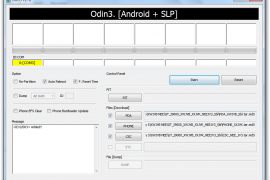
- In Odin, place these files (check out the screenshot given at the top for help):
- In the PDA box, select this file (from step 2.2) — PDA_XWJVB_Sbl.tar.md5
- In the Phone box, select this file (from step 2.3) — PHONE_XXJVK.tar.md5
- In the CSC box, select this file (from step 2.1) — CSC_NEE_JV3.tar.md5
- Leave the PIT box empty.
- Double check everything said in step 7, 8 and 9 above.
- Now, hit the START button to let the process begin.
- When process at Odin finishes your phone will automatically reboot. You can unplug the cable now.
- When your phone has restarted, you are on the XWJVB running Android 2.3.3 (Gingerbread). Congrats!
- Check your phone’s version by here: Press Options -> Settings -> Scroll down and select About Phone -> Scroll down and check your version.
Benchmarks, for what it’s worth.


XWJVB ROM Highlights
[valid] Want to get root access on XWJVB? Well, just wait a little bit till we come up with a guide (using chainfire’s root method) for that too. [/valid]
[info]If you experience any problem in installing the ROM with the steps given above, try flashing the ROM again, but with 512 PIT file this time. Download the Pit file from here. Extract the downloaded file to get the Pit File. Then, select the Pit file in Odin’s Pit box this time (step 9.4 above) and keep the ‘Re-Partition’ box (in step 8 above) checked too. All other things same as in steps given above.[/info]
Let us know in comments below how XWJVB Android 2.3.3 ROM works on your Galaxy S (i9000).







486 responses to “How to Install XWJVB Android 2.3.3 ROM on Galaxy S”
Hello all,
Update went well… but now I can’t restart my galaxy without plugin it to usb… Otherwise it just loop on the charge icon… any idea ?
I’ve just used yours instruction and now my new phone simply doen’t boot. when i press power button screen remain totaly black.it’s like i’ve don’t pressed the button…. can i do something? or i have to go to samsung???
how’s possible this???
Hello all,
Update went well… but now I can’t restart my galaxy without plugin it to usb… Otherwise it just loop on the charge icon… any idea ?
Bricked !
I’ve just used yours instruction and now my new phone simply doen’t boot. when i press power button screen remain totaly black.it’s like i’ve don’t pressed the button…. can i do something? or i have to go to samsung???
how’s possible this???
dont get panic.simply put your phone in download mode using 3 button combos and flash this rom again.i know last time you might not have ticked repartition…..plz plz plz tick the repartition option and go ahead as this is the first time you are installing 2.3.3
thanks ghost..care if you got any link for GB upgrade for my phone model.I cant seem to find any.
Bricked !
dont get panic.simply put your phone in download mode using 3 button combos and flash this rom again.i know last time you might not have ticked repartition…..plz plz plz tick the repartition option and go ahead as this is the first time you are installing 2.3.3
thanks ghost..care if you got any link for GB upgrade for my phone model.I cant seem to find any.
Hi Bhoot, so finally its proved to be a fake rom. Yaar but why the hell they did all this drama. And Samsung is still sleeping like a lazy ..ssss. Btw which rom are you using?
I’d flash 2.3.3 from Kies that was faster than this cooked rom from samfirmwares. Is it true that 2.3.3 for Galaxy S is going to get Ext4 in Stock-release???
what 2.3.3??? this is just the nomenclature…if you want i can give a rom named 3.1 HONEYCOMB or 4.2.1 ICECREAM which will be displayed under ABOUT PHONE.it does not mean that galaxy has got honeycomb or icecream.its very easy to alter the things once you know how to play with framework and how to configure a rom.
ok i wanna know these things: kapil / bhoot / anyone pls help:
1. does this rom really f-up the three button combo?
2. xxjvk’s battery life sucked big time drained in six hrs without doing much. how is xwjvb’s battery life?
3. i’ve seen kapil’s guide to downgrading to 2.2 using EZrom. bhoot, can u actually provide links to installation guides to ur said 2.2 downgrades? I could use the Australia version.
4. Also is there such a downgrade available that can let me upgrade to Samsung’s 2.3 whenever they release?
5. Can smbdy link me to a different/latest/better guide to upgrading to darky’s extreme edition? i tried a few times from a forum at darky’s page. Everything goes fine til the final reboot when i get stuck forever at the boot animation logo. help? suggestions? advice?
1. No! — as far as I know
2. Better
3. & 5. EZRom is good. It’s pre-rooted and recovery already installed. To switch to darky’s ROM, just download the ROM and put it on sd card and then using recovery on your EZRom, flash darky’s ROM. Simple!
4. It’s hard to say you can get perfect solution to become friend with Kies again. I don’t know for sure but this is what I could recommend. First, on the samfirmware.com download the latest ROM released in your country and then. install it using ODIN. Make sure while downgrading you use EZRom first and then the country-specific official ODIN ROM. Another thing you can try is using Doc’s kitchen to cook a ROM for yourself with components being what Samsung has latest issued in your specific country/area.
Hope it helps!
1. 3 button combo works fine as our mobiles are not having locked bootloaders.
2. battery life is better than xxjvk but far poor than 2.2.1 xxjpy and xwjs8
4. for upgrading via kies you must have factory provided rom not the coocked one.for INU (india) it is DDJF3 2.1 update1 eclair updated via kies to JP6 2.2 froyo.if you are using this one then only your kies will detect and let you upgrade to 2.3.3 when it arrives in your country.
5. please use the most stable version of darky that is 9.3 extreme.if you go for 9.4,9.5 or 10 problems will appear.secondly use speedmod kernel under darky configurator.
3. for downgrading you can easily use EZROM but it wont provide you the factory built rom so one has to go to samsung care for installing DDJF3 2.1 update1 as its not available anywhere else.
Thanks for all the info guys! If samsung ever comes up with an official gingerbread, i’ll try that out via eclair-froyo-ginger. If not, i’ll try out darky’s 9.3 and so on. let’s see what happens. So far i’m happy with this xwjvb. thanks again.
Hi Bhoot, so finally its proved to be a fake rom. Yaar but why the hell they did all this drama. And Samsung is still sleeping like a lazy ..ssss. Btw which rom are you using?
I’d flash 2.3.3 from Kies that was faster than this cooked rom from samfirmwares. Is it true that 2.3.3 for Galaxy S is going to get Ext4 in Stock-release???
what 2.3.3??? this is just the nomenclature…if you want i can give a rom named 3.1 HONEYCOMB or 4.2.1 ICECREAM which will be displayed under ABOUT PHONE.it does not mean that galaxy has got honeycomb or icecream.its very easy to alter the things once you know how to play with framework and how to configure a rom.
ok i wanna know these things: kapil / bhoot / anyone pls help:
1. does this rom really f-up the three button combo?
2. xxjvk’s battery life sucked big time drained in six hrs without doing much. how is xwjvb’s battery life?
3. i’ve seen kapil’s guide to downgrading to 2.2 using EZrom. bhoot, can u actually provide links to installation guides to ur said 2.2 downgrades? I could use the Australia version.
4. Also is there such a downgrade available that can let me upgrade to Samsung’s 2.3 whenever they release?
5. Can smbdy link me to a different/latest/better guide to upgrading to darky’s extreme edition? i tried a few times from a forum at darky’s page. Everything goes fine til the final reboot when i get stuck forever at the boot animation logo. help? suggestions? advice?
1. No! — as far as I know
2. Better
3. & 5. EZRom is good. It’s pre-rooted and recovery already installed. To switch to darky’s ROM, just download the ROM and put it on sd card and then using recovery on your EZRom, flash darky’s ROM. Simple!
4. It’s hard to say you can get perfect solution to become friend with Kies again. I don’t know for sure but this is what I could recommend. First, on the samfirmware.com download the latest ROM released in your country and then. install it using ODIN. Make sure while downgrading you use EZRom first and then the country-specific official ODIN ROM. Another thing you can try is using Doc’s kitchen to cook a ROM for yourself with components being what Samsung has latest issued in your specific country/area.
Hope it helps!
Thanks for all the info guys! If samsung ever comes up with an official gingerbread, i’ll try that out via eclair-froyo-ginger. If not, i’ll try out darky’s 9.3 and so on. let’s see what happens. So far i’m happy with this xwjvb. thanks again.
1. 3 button combo works fine as our mobiles are not having locked bootloaders.
2. battery life is better than xxjvk but far poor than 2.2.1 xxjpy and xwjs8
4. for upgrading via kies you must have factory provided rom not the coocked one.for INU (india) it is DDJF3 2.1 update1 eclair updated via kies to JP6 2.2 froyo.if you are using this one then only your kies will detect and let you upgrade to 2.3.3 when it arrives in your country.
5. please use the most stable version of darky that is 9.3 extreme.if you go for 9.4,9.5 or 10 problems will appear.secondly use speedmod kernel under darky configurator.
3. for downgrading you can easily use EZROM but it wont provide you the factory built rom so one has to go to samsung care for installing DDJF3 2.1 update1 as its not available anywhere else.
my data isa not working
my data package not working
reset default under the option of apn…..
my data isa not working
my data package not working
reset default under the option of apn…..
does sgs still able to make native 3g video call after update to 2.3?
ya sure
does sgs still able to make native 3g video call after update to 2.3?
ya sure
Hi Ghost / Kapil. I’ve downgraded to 2.2.1 using EZROM, but KIES doesn’t recognise it. Can I just flash JY over the top of it?
Thanks
Sorry, I mean JPY
ya sure.for that you need a single pda file jpy jpy jpy….nee.tar which is available at samfirmware.just flash it using odin without ticking repartition…enjoy
Thank you buddy
thanks ghost! =) not worried to upgrade anymore,3g video call is da most important for me
Hi Ghost / Kapil. I’ve downgraded to 2.2.1 using EZROM, but KIES doesn’t recognise it. Can I just flash JY over the top of it?
Thanks
Sorry, I mean JPY
ya sure.for that you need a single pda file jpy jpy jpy….nee.tar which is available at samfirmware.just flash it using odin without ticking repartition…enjoy
Thank you buddy
thanks ghost! =) not worried to upgrade anymore,3g video call is da most important for me
Is it works for galaxy s m110s Korean Version I9000 ???
Is it works for galaxy s m110s Korean Version I9000 ???
Hi,
Everything went pretty well except the most important thing. I can’t access my mobile network at all!!
No phone calls!
Any idea why?
Also the phone couldn’t locate my mobile network automatically.
I am from Israel.
Hi,
Everything went pretty well except the most important thing. I can’t access my mobile network at all!!
No phone calls!
Any idea why?
Also the phone couldn’t locate my mobile network automatically.
I am from Israel.
Hi.Please help me!Odin gets stuck at Setup Connection…what shall i dO?
Hi.Please help me!Odin gets stuck at Setup Connection…what shall i dO?
version with bootloader, do I have to mark Phone Bootlader Update and re-patrition ?
NO you must NOT tick the “Phone Bootloader Update” box, and “re-partition” is optional but if you plan to tick it then make sure you’re inserting a “.pit” file in the “PIT” box.
Nice guide!
Thnx man….. We would welcome if you’ve any suggestions for this blog.
version with bootloader, do I have to mark Phone Bootlader Update and re-patrition ?
NO you must NOT tick the “Phone Bootloader Update” box, and “re-partition” is optional but if you plan to tick it then make sure you’re inserting a “.pit” file in the “PIT” box.
Nice guide!
Thnx man….. We would welcome if you’ve any suggestions for this blog.
Nice guide!
Thnx man….. We would welcome if you’ve any suggestions for this blog.
Hi,
I want to make sure that I won’t mesh up upgrading my SGS from 2.1 to 2.3.3.
In order for me to follow procedure easily is to understand what are the files involve. My inquiries are:
1. when do i need the pit file? In your procedure no pit file selected but in some other posts in the web you need to have the pit file as well as tick the Re-partition box.
2. is it safe with your procedure w/o the pit file upgrading from 2.1 to 2.3.3?
Thanks a lot
Download the PIT file from here — http://www.mediafire.com/?2g3pdjd88cj8nz0 [It’s a .zip file so first extract it, you’ll get the following file “s1_odin_20100512.pit”]
Now in Step 8 of this tutorial tick the “Re-partition” box, and then in Step 9 click on the “PIT” box and select the “s1_odin_20100512.pit” file.
That should get you safely upgraded to 2.3.3 🙂
Download the PIT file from here — http://www.mediafire.com/?2g3pdjd88cj8nz0 [It’s a .zip file so first extract it, you’ll get the following file “s1_odin_20100512.pit”]
Now in Step 8 of this tutorial tick the “Re-partition” box, and then in Step 9 click on the “PIT” box and select the “s1_odin_20100512.pit” file.
That should get you safely upgraded to 2.3.3 🙂
Thanks a lot I’ll give it a try. One more thing, do I have to root the phone before proceeding with the upgrade?
Thanks again!
No that’s not needed.. matter fact it’s good that your phone is not rooted 😉
No that’s not needed.. matter fact it’s good that your phone is not rooted 😉
Thanks Shivam!
Hello again Shivam!
Thanks for everything, however I’ve got one issue re: operation of the phone.
Sometimes there is no fluidness. You can recognize that when opening some application. Is the issue due to the old data that is still in the phone? Do I have to wipe the data/factory reset or the cache partition? Which one should I consider?
Thanks
Hi,
I want to make sure that I won’t mesh up upgrading my SGS from 2.1 to 2.3.3.
In order for me to follow procedure easily is to understand what are the files involve. My inquiries are:
1. when do i need the pit file? In your procedure no pit file selected but in some other posts in the web you need to have the pit file as well as tick the Re-partition box.
2. is it safe with your procedure w/o the pit file upgrading from 2.1 to 2.3.3?
Thanks a lot
Download the PIT file from here — http://www.mediafire.com/?2g3pdjd88cj8nz0 [It’s a .zip file so first extract it, you’ll get the following file “s1_odin_20100512.pit”]
Now in Step 8 of this tutorial tick the “Re-partition” box, and then in Step 9 click on the “PIT” box and select the “s1_odin_20100512.pit” file.
That should get you safely upgraded to 2.3.3 🙂
Thanks a lot I’ll give it a try. One more thing, do I have to root the phone before proceeding with the upgrade?
Thanks again!
No that’s not needed.. matter fact it’s good that your phone is not rooted 😉
Thanks Shivam!
Hello again Shivam!
Thanks for everything, however I’ve got one issue re: operation of the phone.
Sometimes there is no fluidness. You can recognize that when opening some application. Is the issue due to the old data that is still in the phone? Do I have to wipe the data/factory reset or the cache partition? Which one should I consider?
Thanks
Hi,
I want to make sure that I won’t mesh up upgrading my SGS from 2.1 to 2.3.3.
In order for me to follow procedure easily is to understand what are the files involve. My inquiries are:
1. when do i need the pit file? In your procedure no pit file selected but in some other posts in the web you need to have the pit file as well as tick the Re-partition box.
2. is it safe with your procedure w/o the pit file upgrading from 2.1 to 2.3.3?
Thanks a lot
Download the PIT file from here — http://www.mediafire.com/?2g3pdjd88cj8nz0 [It’s a .zip file so first extract it, you’ll get the following file “s1_odin_20100512.pit”]
Now in Step 8 of this tutorial tick the “Re-partition” box, and then in Step 9 click on the “PIT” box and select the “s1_odin_20100512.pit” file.
That should get you safely upgraded to 2.3.3 🙂
Thanks a lot I’ll give it a try. One more thing, do I have to root the phone before proceeding with the upgrade?
Thanks again!
No that’s not needed.. matter fact it’s good that your phone is not rooted 😉
Thanks Shivam!
Hello again Shivam!
Thanks for everything, however I’ve got one issue re: operation of the phone.
Sometimes there is no fluidness. You can recognize that when opening some application. Is the issue due to the old data that is still in the phone? Do I have to wipe the data/factory reset or the cache partition? Which one should I consider?
Thanks
Hi all, i want to ask can i straight flash my phone(JPM) to gingerbread if my phone rooted, lagfix or tweaked = ? just do factory reset before use Odin ?
please help…thx
I think you should disable lagfix before you proceed. If you want help with that, here’s the link — https://nerdschalk.com/how-to-disable-lagfix-on-galaxy-s-i9000-instructions/
I think you should disable lagfix before you proceed. If you want help with that, here’s the link — https://nerdschalk.com/how-to-disable-lagfix-on-galaxy-s-i9000-instructions/
thanks for your reply ..
I can’t find any lagfix option in recovery mode, that mean my sgs didn’t did any lagfix ? how to check it ?
Thanks …
If it’s not in your recovery then it means you don’t have any lagfix installed on your phone. So buddy you’re good to flash XWJVB.
If it’s not in your recovery then it means you don’t have any lagfix installed on your phone. So buddy you’re good to flash XWJVB.
ok…. thx for ur help =)
Hi all, i want to ask can i straight flash my phone(JPM) to gingerbread if my phone rooted, lagfix or tweaked = ? just do factory reset before use Odin ?
please help…thx
I think you should disable lagfix before you proceed. If you want help with that, here’s the link — https://nerdschalk.com/how-to-disable-lagfix-on-galaxy-s-i9000-instructions/
thanks for your reply ..
I can’t find any lagfix option in recovery mode, that mean my sgs didn’t did any lagfix ? how to check it ?
Thanks …
If it’s not in your recovery then it means you don’t have any lagfix installed on your phone. So buddy you’re good to flash XWJVB.
ok…. thx for ur help =)
Hi all, i want to ask can i straight flash my phone(JPM) to gingerbread if my phone rooted, lagfix or tweaked = ? just do factory reset before use Odin ?
please help…thx
I think you should disable lagfix before you proceed. If you want help with that, here’s the link — https://nerdschalk.com/how-to-disable-lagfix-on-galaxy-s-i9000-instructions/
thanks for your reply ..
I can’t find any lagfix option in recovery mode, that mean my sgs didn’t did any lagfix ? how to check it ?
Thanks …
If it’s not in your recovery then it means you don’t have any lagfix installed on your phone. So buddy you’re good to flash XWJVB.
ok…. thx for ur help =)
my phone didnt come up “added” on odin3. anyone suggest a reason why??
It seems you don’t have the correct drivers installed on your PC.
Download & install the drivers from the link below:
http://drivers.softpedia.com/get/MOBILES/Samsung/Samsung-Galaxy-S-USB-Driver-for-Windows-x86.shtml
It seems you don’t have the correct drivers installed on your PC.
Download & install the drivers from the link below:
http://drivers.softpedia.com/get/MOBILES/Samsung/Samsung-Galaxy-S-USB-Driver-for-Windows-x86.shtml
my phone didnt come up “added” on odin3. anyone suggest a reason why??
It seems you don’t have the correct drivers installed on your PC.
Download & install the drivers from the link below:
http://drivers.softpedia.com/get/MOBILES/Samsung/Samsung-Galaxy-S-USB-Driver-for-Windows-x86.shtml
my phone didnt come up “added” on odin3. anyone suggest a reason why??
It seems you don’t have the correct drivers installed on your PC.
Download & install the drivers from the link below:
http://drivers.softpedia.com/get/MOBILES/Samsung/Samsung-Galaxy-S-USB-Driver-for-Windows-x86.shtml
Hi, I´ve followed the guide precisely, but something went wrong and ODIN failed.
I was trying to flash GT_I9000_XWJVB_XXJVK_NEEJV3_Sbl with bootloaders and now I can´t get anywhere besides Download mode from which I am not able to flash anything.. ODIN either hangs or woes about “PIT partition”. I´ve tried to use 512PIT too. As far as I can tell the device is not bricked since it´s not showing the “black screen of death”. Originally I was running Juwe 1.9 XWJS8 ROM without any lagfix. I am kind of hopeless now and would be grateful for any clue or guide.
Any help appreciated!
That’s unexpected but anyway you can try the following methods:
Method 1:
Try again using ODIN v1.3, download from here http://www.mediafire.com/?0uqsgfq0dlskx3u
and, 512PIT from here http://www.mediafire.com/?t4427gu89s79184
And remember when we select a PIT file we must also tick the “Re-Partition” check box in Odin.
Method 2:
If method 1 doesn’t help, then flash the EZBase ROM using the guide below:
https://nerdschalk.com/ezbase-ezrom-for-android-2-2-install-revert-back/
And after flashing the EZBase ROM try flashing the XWJVB again, but use ODIN v1.3 this time, and also use the 512PIT [I’ve given the links in Method 1]
Hope it helps. Good luck 🙂
That’s unexpected but anyway you can try the following methods:
Method 1:
Try again using ODIN v1.3, download from here http://www.mediafire.com/?0uqsgfq0dlskx3u/
and, 512PIT from here http://www.mediafire.com/?t4427gu89s79184/
And remember when we select a PIT file we must also tick the “Re-Partition” check box in Odin.
Method 2:
If method 1 doesn’t help, then flash the EZBase ROM using the guide below:
https://nerdschalk.com/ezbase-ezrom-for-android-2-2-install-revert-back/
And after flashing the EZBase ROM try flashing the XWJVB again, but use ODIN v1.3 this time, and also use the 512PIT [I’ve given the links in Method 1]
Hope it helps. Good luck 🙂
Will try and then reply 🙂
Thank you very much!
Hi, I´ve followed the guide precisely, but something went wrong and ODIN failed.
I was trying to flash GT_I9000_XWJVB_XXJVK_NEEJV3_Sbl with bootloaders and now I can´t get anywhere besides Download mode from which I am not able to flash anything.. ODIN either hangs or woes about “PIT partition”. I´ve tried to use 512PIT too. As far as I can tell the device is not bricked since it´s not showing the “black screen of death”. Originally I was running Juwe 1.9 XWJS8 ROM without any lagfix. I am kind of hopeless now and would be grateful for any clue or guide.
Any help appreciated!
That’s unexpected but anyway you can try the following methods:
Method 1:
Try again using ODIN v1.3, download from here http://www.mediafire.com/?0uqsgfq0dlskx3u
and, 512PIT from here http://www.mediafire.com/?t4427gu89s79184
And remember when we select a PIT file we must also tick the “Re-Partition” check box in Odin.
Method 2:
If method 1 doesn’t help, then flash the EZBase ROM using the guide below:
https://nerdschalk.com/ezbase-ezrom-for-android-2-2-install-revert-back/
And after flashing the EZBase ROM try flashing the XWJVB again, but use ODIN v1.3 this time, and also use the 512PIT [I’ve given the links in Method 1]
Hope it helps. Good luck 🙂
Will try and then reply 🙂
Thank you very much!
Hi, I´ve followed the guide precisely, but something went wrong and ODIN failed.
I was trying to flash GT_I9000_XWJVB_XXJVK_NEEJV3_Sbl with bootloaders and now I can´t get anywhere besides Download mode from which I am not able to flash anything.. ODIN either hangs or woes about “PIT partition”. I´ve tried to use 512PIT too. As far as I can tell the device is not bricked since it´s not showing the “black screen of death”. Originally I was running Juwe 1.9 XWJS8 ROM without any lagfix. I am kind of hopeless now and would be grateful for any clue or guide.
Any help appreciated!
That’s unexpected but anyway you can try the following methods:
Method 1:
Try again using ODIN v1.3, download from here http://www.mediafire.com/?0uqsgfq0dlskx3u/
and, 512PIT from here http://www.mediafire.com/?t4427gu89s79184/
And remember when we select a PIT file we must also tick the “Re-Partition” check box in Odin.
Method 2:
If method 1 doesn’t help, then flash the EZBase ROM using the guide below:
https://nerdschalk.com/ezbase-ezrom-for-android-2-2-install-revert-back/
And after flashing the EZBase ROM try flashing the XWJVB again, but use ODIN v1.3 this time, and also use the 512PIT [I’ve given the links in Method 1]
Hope it helps. Good luck 🙂
Will try and then reply 🙂
Thank you very much!
confused.. do i need to flash w/o bootloaders version after installing the w/ bootloaders version?
Hell no. Android 2.3 bootloaders are required when you’re installing the Android 2.3 for the first time, not again — that’s why we need to use the with_bootloaders file in the beginning. When you intend to flash a new Android 2.3 JVB, you can install using the without_bootloaders version.
But in no case both versions are required to be flashed.
Hope it helps.
confused.. do i need to flash w/o bootloaders version after installing the w/ bootloaders version?
Hell no. Android 2.3 bootloaders are required when you’re installing the Android 2.3 for the first time, not again — that’s why we need to use the with_bootloaders file in the beginning. When you intend to flash a new Android 2.3 JVB, you can install using the without_bootloaders version.
But in no case both versions are required to be flashed.
Hope it helps.
confused.. do i need to flash w/o bootloaders version after installing the w/ bootloaders version?
Hell no. Android 2.3 bootloaders are required when you’re installing the Android 2.3 for the first time, not again — that’s why we need to use the with_bootloaders file in the beginning. When you intend to flash a new Android 2.3 JVB, you can install using the without_bootloaders version.
But in no case both versions are required to be flashed.
Hope it helps.