

UPDATE 2: A new Android 2.3.3 Firmware (XWJVH) for Galaxy S i9000 has leaked. And we’ve posted installation instructions for it too. Enjoy! [link below]
How To Install XWJVH on your Galaxy S i9000
UPDATE: We will keep updating this page for other XWJVB stuff — ROMs, Mods, Hacks, Root, etc — as and when they get posted. So, keep watching this space, exciting stuff coming soon.
- How to Root XWJVB using Chainfire’s method.
- More links to be added later, when available………
Well, there is new Android 2.3.3 ROM — XWJVB — for Galaxy S on the block and we’ve already got it booting on our Galaxy S. If you want it too, here what you can do to get it.
But, warnings first, as always:
[warning] The methods and procedures discussed here are considered risky and you should not attempt anything if you don’t know completely what it is. Do this only if you’re capable of getting your phone back right on your own. If any damage occurs to you or your device, we won’t be held liable. You only will be responsible — you’ve been warned. Okay![/warning]
[info]This guide is applicable only for Samsung Galaxy S international version (i9000). If yours is Vibrant/Captivate/Fascinate/Epic 4G or any other Galaxy S variant, then this ROM — and Guide — is not for you, and that’s for definite.[/info]
You may already know that this ROM is available in two versions: one with_bootloaders and the other without_bootloaders. Flashing with_bootloaders version is considered riskier than without_bootloaders. But you have to flash with_bootloaders because this is required by Android 2.3, unless you’ve already done that while installing earlier leaked ROMs — XWJV1 or XXJVK. If you haven’t installed JV1 or JVK with bootloaders, you have to install XWJVB with_bootloaders.
We’ve tried this ROM with_bootloaders version and would recommend the same to you. If you’re confused, simply download and install the with_bootloaders version.
XWJVB Installation Video
Follow these step-by-step guide to Install XWJVB Android 2.3.3 ROM on your Galaxy S:
- Download XWJVB with_bootloaders version. File name — GT_I9000_XWJVB_XXJVK_NEEJV3_Sbl.exe. Download Link. Size: 155.64 MB. [If you already have Android 2.3 bootloaders, download XWJVB without_bootloaders version. File name — GT_I9000_XWJVB_XXJVK_NEEJV3.exe. Download Link. Size: 155.41 MB. Apply the procedures below accordingly.]
- Double click ‘GT_I9000_XWJVB_XXJVK_NEEJV3_Sbl.exe’ and select Extract to let the file extract its contents in the folder “GT_I9000_XWJVB_XXJVK_NEEJV3_Sbl” — you’ll get 3 files in this folder:
- CSC_NEE_JV3.tar.md5,
- PDA_XWJVB_Sbl.tar.md5 and
- PHONE_XXJVK.tar.md5.
- Download Odin3 v1.7.zip from here — Mediafire Link. Extract the zip file to get Odin3 v1.7.exe.
- Disconnect your phone if it’s connected to PC.
- Switch Off your phone. Wait for vibration to confirm complete switch off.
- Now, put it in Download Mode — press and hold these keys together: Volume_DOWN+Home+Power.
- Open Odin (from step 3). Connect your phone to PC now. You should get the message “Added! !” under the Odin’s message box.
- Important, uncheck the ‘Re-Partition’ button. While, keep ‘Auto Reboot’ & ‘F. Reset Time’ boxes checked.
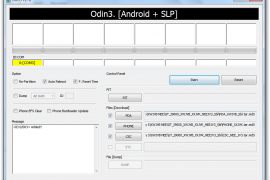
- In Odin, place these files (check out the screenshot given at the top for help):
- In the PDA box, select this file (from step 2.2) — PDA_XWJVB_Sbl.tar.md5
- In the Phone box, select this file (from step 2.3) — PHONE_XXJVK.tar.md5
- In the CSC box, select this file (from step 2.1) — CSC_NEE_JV3.tar.md5
- Leave the PIT box empty.
- Double check everything said in step 7, 8 and 9 above.
- Now, hit the START button to let the process begin.
- When process at Odin finishes your phone will automatically reboot. You can unplug the cable now.
- When your phone has restarted, you are on the XWJVB running Android 2.3.3 (Gingerbread). Congrats!
- Check your phone’s version by here: Press Options -> Settings -> Scroll down and select About Phone -> Scroll down and check your version.
Benchmarks, for what it’s worth.


XWJVB ROM Highlights
[valid] Want to get root access on XWJVB? Well, just wait a little bit till we come up with a guide (using chainfire’s root method) for that too. [/valid]
[info]If you experience any problem in installing the ROM with the steps given above, try flashing the ROM again, but with 512 PIT file this time. Download the Pit file from here. Extract the downloaded file to get the Pit File. Then, select the Pit file in Odin’s Pit box this time (step 9.4 above) and keep the ‘Re-Partition’ box (in step 8 above) checked too. All other things same as in steps given above.[/info]
Let us know in comments below how XWJVB Android 2.3.3 ROM works on your Galaxy S (i9000).







486 responses to “How to Install XWJVB Android 2.3.3 ROM on Galaxy S”
this guide is good. thank u
Would like to know if this ROM has the portuguese language. Thank you!
A rom tem língua portuguesa, mas não tem português no dicionário t9, vais ter de tirar um do market.
Obrigado. A instalação do XWJB correu bem? É que tentei fazer no meu mas faz reboot repetidamente sem pedir o PIN. Tive de voltar para o XXJVK…
A mim não deu problema, pede o pin normalmente e eu também venho da XXJVK, o meu galaxy está desbloqueado não sei se existe alguma relação, mas podes sempre perguntar no forum tuga “android PT”, já existe um tópico para esta rom.
O meu também está desbloqueado. Vou procurar a ajuda no forum AndroidPT. Existe alguma diferença entre XXJVK e XWJVB?
Obrigado pela ajuda.
A única diferença que notei foi ter perdido o t9 português (obviamente a mais grave), e repararam um bug que quando se ouvia musica com o ecrã desligado as teclas de volume não funcionavam… agora já funcionam.
this guide is good. thank u
Would like to know if this ROM has the portuguese language. Thank you!
A rom tem língua portuguesa, mas não tem português no dicionário t9, vais ter de tirar um do market.
Obrigado. A instalação do XWJB correu bem? É que tentei fazer no meu mas faz reboot repetidamente sem pedir o PIN. Tive de voltar para o XXJVK…
A mim não deu problema, pede o pin normalmente e eu também venho da XXJVK, o meu galaxy está desbloqueado não sei se existe alguma relação, mas podes sempre perguntar no forum tuga “android PT”, já existe um tópico para esta rom.
O meu também está desbloqueado. Vou procurar a ajuda no forum AndroidPT. Existe alguma diferença entre XXJVK e XWJVB?
Obrigado pela ajuda.
A única diferença que notei foi ter perdido o t9 português (obviamente a mais grave), e repararam um bug que quando se ouvia musica com o ecrã desligado as teclas de volume não funcionavam… agora já funcionam.
Thank you for the guide .. Just flashed my SGS from XXJVK to XXJVB without bootloaders. After rebooting I can see some of my applications are there still. I didn’t wiped my phone .. but those application gave me force close error.. so I uninstalled and reinstalled those apps and everything is working fine .. I felt XXJVB is faster and smoother than XXJVK .. Need to check the battery ..
How much free ram do you have????
@ghost.bhoot2k – Available RAM is less compared to 2.2.1 and XXJVK(2.3.3) .. It is showing in between 212 to 260. But the phone is fast compared to the previous versions 🙂
How ca you have between 212 and 260??? I have between 100 and 150.. and i use task kiler and fast reebot.
dont lie dear,it cant be more than 115 mb…….i think either u r a fool or u think that others r fool……
Sorry 🙁 .. that was a mistake .. I checked it again .. it is showing 129MB of free RAM 🙂
Thank you for the guide .. Just flashed my SGS from XXJVK to XXJVB without bootloaders. After rebooting I can see some of my applications are there still. I didn’t wiped my phone .. but those application gave me force close error.. so I uninstalled and reinstalled those apps and everything is working fine .. I felt XXJVB is faster and smoother than XXJVK .. Need to check the battery ..
How much free ram do you have????
@ghost.bhoot2k – Available RAM is less compared to 2.2.1 and XXJVK(2.3.3) .. It is showing in between 212 to 260. But the phone is fast compared to the previous versions 🙂
How ca you have between 212 and 260??? I have between 100 and 150.. and i use task kiler and fast reebot.
dont lie dear,it cant be more than 115 mb…….i think either u r a fool or u think that others r fool……
Sorry 🙁 .. that was a mistake .. I checked it again .. it is showing 129MB of free RAM 🙂
I,this ROM have voodoo sound?
thanks
What country version is this firmware?
I’m from Australia.
Finland………but in Sweden its out too….
It’s for Europe. I think Germany and some other countries are getting this. Samsung should be launching this update via Kies in Australia soon.
is this upgrade will run on galaxy s i9003?
Dear, I don’t know. I can’t recommend this to you.
Forget dear….this rom isnt meant for Duplicate galaxy SL,its only for the Original one galaxy S
Is this a deodexed rom?
No….this is not and forget deodexing gingerbread…
Does the back light of the buton menus still always on???
I,this ROM have voodoo sound?
thanks
What country version is this firmware?
I’m from Australia.
Finland………but in Sweden its out too….
It’s for Europe. I think Germany and some other countries are getting this. Samsung should be launching this update via Kies in Australia soon.
is this upgrade will run on galaxy s i9003?
Dear, I don’t know. I can’t recommend this to you.
Forget dear….this rom isnt meant for Duplicate galaxy SL,its only for the Original one galaxy S
Is this a deodexed rom?
No….this is not and forget deodexing gingerbread…
Does the back light of the buton menus still always on???
this is superb…hats off to u guys and chanfire….brilliant job..
Yup, Chainfire is just Awesome 🙂
Of course chainfire is fine but but but its the hacked one……let the stable be out
I think one should still stick to 2.2.1 xwjs8 deodex rom with gingermix theme and voodoo or speedmod lagfix…….
benchmark-1600 plus
awsome speed,no lagfix at all
free ram – >240
battery back up is like heaven…>24hrs with heavy 3g and wifi usage with transparent theme
maildroid works fine
and so on…….
That’s cool custom ROM and thnx for sharing it with us… You used doc’s kitchen to make this one, right? I’ll try and if I find it cool, would review it. 🙂
dont configure it through roms kitchen….use the cygwin application to confiogure…..
this is superb…hats off to u guys and chanfire….brilliant job..
Yup, Chainfire is just Awesome 🙂
Of course chainfire is fine but but but its the hacked one……let the stable be out
I think one should still stick to 2.2.1 xwjs8 deodex rom with gingermix theme and voodoo or speedmod lagfix…….
benchmark-1600 plus
awsome speed,no lagfix at all
free ram – >240
battery back up is like heaven…>24hrs with heavy 3g and wifi usage with transparent theme
maildroid works fine
and so on…….
That’s cool custom ROM and thnx for sharing it with us… You used doc’s kitchen to make this one, right? I’ll try and if I find it cool, would review it. 🙂
dont configure it through roms kitchen….use the cygwin application to confiogure…..
My samsung galaxy s is stuck on the startup screen (the one with the letter S shining) Any suggestions?
Make sure you followed the steps correctly…. doubled check everything.
same with me 🙁
works now. Restarted Odin
Amazing guide!! Thanks a lot. Works fine. Phone is super smooth 🙂
Facing problem only with few installed games like Asphalt 5,CutTheRope etc, unable to start the game.
Otherwise other apps are working fine.
wipe cache and dalvik cache then reinstall ur games….everything will be fine
Anyone else find that they are getting more FORCE CLOSE messages than with JVK??
I’ve uninstalled and re-installed the apps that are being affected but still the same force close issues.
do a factory reset after installing xwjvb and DONT put the backed up applications……of course ur data will be lost
Thanks, I’ll give that a go.
demerits of xwjvb——
1. email apk goes back to 2.1 eclair
2. no new market is placed.instead market updater is placed
3. wifi is again 2.1 eclair based
4. cant configure an stable yahoomail
5. less free ram—-hangs like anything while multiple app are opened
6. more force closes
7. cant deodex…soooooo sad
8. no stable kernel yet
9. cant apply lagfix—benchmark-around 900 only
and so on……..let a good stable version be out.
TRYING HARD TO CONFIGURE A GOOD STABLE CUSTOM ROM.WISH ME BEST OF LUCK…..
My samsung galaxy s is stuck on the startup screen (the one with the letter S shining) Any suggestions?
Make sure you followed the steps correctly…. doubled check everything.
same with me 🙁
works now. Restarted Odin
Amazing guide!! Thanks a lot. Works fine. Phone is super smooth 🙂
Facing problem only with few installed games like Asphalt 5,CutTheRope etc, unable to start the game.
Otherwise other apps are working fine.
wipe cache and dalvik cache then reinstall ur games….everything will be fine
Anyone else find that they are getting more FORCE CLOSE messages than with JVK??
I’ve uninstalled and re-installed the apps that are being affected but still the same force close issues.
do a factory reset after installing xwjvb and DONT put the backed up applications……of course ur data will be lost
Thanks, I’ll give that a go.
demerits of xwjvb——
1. email apk goes back to 2.1 eclair
2. no new market is placed.instead market updater is placed
3. wifi is again 2.1 eclair based
4. cant configure an stable yahoomail
5. less free ram—-hangs like anything while multiple app are opened
6. more force closes
7. cant deodex…soooooo sad
8. no stable kernel yet
9. cant apply lagfix—benchmark-around 900 only
and so on……..let a good stable version be out.
TRYING HARD TO CONFIGURE A GOOD STABLE CUSTOM ROM.WISH ME BEST OF LUCK…..
Hey guys listen listen…this rom is not the original gingerbread update but the COOKED one released by samfirmware as
1. I have checked through hacked kies,there is no such release of 2.3.3. The latest in Europe is still 2.2.1 xxjpy in some countries and xwjs8 in others.
2. The original gingerbread is based on ext4 whereas this fake release of samfirmware is still rfs.
3. Read my previous post-it has used 2.1 eclair for few apks which itself proves that its a fake rom.
4. Modem used is still JVK……i think you people are wise enough to decide the part of jvk…???
So please dont be in a hurry to wipe all your datas and install 2.3.3 xwjvb.Let the kies release be oht either in your country or uploaded on samfirmware.
Hey guys listen listen…this rom is not the original gingerbread update but the COOKED one released by samfirmware as
1. I have checked through hacked kies,there is no such release of 2.3.3. The latest in Europe is still 2.2.1 xxjpy in some countries and xwjs8 in others.
2. The original gingerbread is based on ext4 whereas this fake release of samfirmware is still rfs.
3. Read my previous post-it has used 2.1 eclair for few apks which itself proves that its a fake rom.
4. Modem used is still JVK……i think you people are wise enough to decide the part of jvk…???
So please dont be in a hurry to wipe all your datas and install 2.3.3 xwjvb.Let the kies release be oht either in your country or uploaded on samfirmware.
Hi Kapil,
I’ve one question. As per your instruction there is no need to tick re partition option in Odin. However as per samfirmware guide, always use Pit & re partition option while flashing rom with three files.
I am totally confused on this part. I am using Froyo 2.2 updated through Kies only. Never install any other rom. What should i do.
Thanks..
I wil giv you the key of your doubt becoz i am THE BHOOT having all the keys.just remember one thing…….
Pit file is used for partitioning your device for the FIRST TIME meaningby if you are flashing your device with 2.2.1xwjs3 for the first time just tick repartition.but when you upgrade with same version 2.2.1 xwjs8 then you are not supposed to tick repartition as your device has already been repartitioned with 2.2.1 version.
Likewise if you are installing 2.3.3 xwjsb for the first time just tick repartition but if you are upgrading from 2.3.3 xxjvk to xwjvb then no need to tick it…..
Hey, you’re cool. Thnx for sharing stuff here. BTW, where you from? India, I suppose, but where in India?
yup of course,m from delhi……may i know from where u r???its very nice to have some frnds who knows how to fix samsung galaxy s problems…..
Hi Kapil,
I’ve one question. As per your instruction there is no need to tick re partition option in Odin. However as per samfirmware guide, always use Pit & re partition option while flashing rom with three files.
I am totally confused on this part. I am using Froyo 2.2 updated through Kies only. Never install any other rom. What should i do.
Thanks..
I wil giv you the key of your doubt becoz i am THE BHOOT having all the keys.just remember one thing…….
Pit file is used for partitioning your device for the FIRST TIME meaningby if you are flashing your device with 2.2.1xwjs3 for the first time just tick repartition.but when you upgrade with same version 2.2.1 xwjs8 then you are not supposed to tick repartition as your device has already been repartitioned with 2.2.1 version.
Likewise if you are installing 2.3.3 xwjsb for the first time just tick repartition but if you are upgrading from 2.3.3 xxjvk to xwjvb then no need to tick it…..
Hey, you’re cool. Thnx for sharing stuff here. BTW, where you from? India, I suppose, but where in India?
yup of course,m from delhi……may i know from where u r???its very nice to have some frnds who knows how to fix samsung galaxy s problems…..
Mr Bhoot. Thanks for your help. But are you sure that this is not the official ROM..Should we try this or wait to get it through Kies only.
I am really bored of this 2.2 :(==
Sry for interrupting the conversation between you and Mr. cool-bhoot, but I think if you’re really bored of Android 2.2, XWJVB is worth it — go for the with_bootloaders version, since I think this will be your first partition. You can do with or without PIT files, both options worked pretty well on my SGS. BTW, why don’t you try some custom ROMs, hmm?
100 % sure…if you want to double check it just patch your kies with 2. registry and go for product code xee and nee.it will show you the latest update in european countries…..after double checking please do reply…
Quick question: my phones 3-button combo fix wasn’t worked so I installed a 3-combo fix. Will the with_bootloader version mess with my fix or will it stay intact?
No idea — 🙁
The “with_bootloader” will not remove your 3-button combo fix. I did the same thing and then flashed the “with_bootloader” to correct the graphical error I got after the fix. I still have the 3-button combo in my beloved SGS.
wait a second dear….dont be confused…i will explain everything to u becoz i am THE BHOOT
bootloaders are internal programmes which are locked and unlocked by factory.fortunately our galaxy s european version is not locked one however newer mobiles and tabs are coming with locked bootloaders.now when you are flashing any rom you are free to flash with or without bootloaders.however some fake (2.3.3 xxjvk and xwjvb beta version) roms with bootloaders are programmed in such a way that it gets locked..(unusable)….so better not to put bootloaders with FAKE ROMS.
Samsung’s update to the Galaxy S Gingerbread – withheld by Google.
JVB/JVK FAIL !!!
Not complete Fail, many users — including me — are enjoying the JVB — it’s cool!
Fail because:
1. Battery drain (lot of people complain),
2. Someone can use your account to buy sth @ Market
3. Low scores in benchmarks
4. Google withheld samsung updates.
Great because:
1. If you like(chose) you can use 2.3.3 on GS
2. They share source and guys from XDA started making “kitchen”
3. Your own reason.
But anyway you guys are doing great job. Thanks to your posts i started updating my GS via Odin, Great job again. Thx
Sorry for my english…
i do agree
Hi, wanna ask,
normally 1st boot after flash this ROM will take how long?
thanks
Shouldn’t take more than 10 mins!
ok thanks,
at first I wait until 17 minutes, it only bootloop,
flash again and factory and cache reset then only ok.
take 2 minutes to boot..huh!
Thanks for the guide guys…
Now after root installing GOATRIP ROM…yuhuuu
Mr Bhoot. Thanks for your help. But are you sure that this is not the official ROM..Should we try this or wait to get it through Kies only.
I am really bored of this 2.2 :(==
Sry for interrupting the conversation between you and Mr. cool-bhoot, but I think if you’re really bored of Android 2.2, XWJVB is worth it — go for the with_bootloaders version, since I think this will be your first partition. You can do with or without PIT files, both options worked pretty well on my SGS. BTW, why don’t you try some custom ROMs, hmm?
100 % sure…if you want to double check it just patch your kies with 2. registry and go for product code xee and nee.it will show you the latest update in european countries…..after double checking please do reply…
Quick question: my phones 3-button combo fix wasn’t worked so I installed a 3-combo fix. Will the with_bootloader version mess with my fix or will it stay intact?
No idea — 🙁
The “with_bootloader” will not remove your 3-button combo fix. I did the same thing and then flashed the “with_bootloader” to correct the graphical error I got after the fix. I still have the 3-button combo in my beloved SGS.
wait a second dear….dont be confused…i will explain everything to u becoz i am THE BHOOT
bootloaders are internal programmes which are locked and unlocked by factory.fortunately our galaxy s european version is not locked one however newer mobiles and tabs are coming with locked bootloaders.now when you are flashing any rom you are free to flash with or without bootloaders.however some fake (2.3.3 xxjvk and xwjvb beta version) roms with bootloaders are programmed in such a way that it gets locked..(unusable)….so better not to put bootloaders with FAKE ROMS.
Samsung’s update to the Galaxy S Gingerbread – withheld by Google.
JVB/JVK FAIL !!!
Not complete Fail, many users — including me — are enjoying the JVB — it’s cool!
Fail because:
1. Battery drain (lot of people complain),
2. Someone can use your account to buy sth @ Market
3. Low scores in benchmarks
4. Google withheld samsung updates.
Great because:
1. If you like(chose) you can use 2.3.3 on GS
2. They share source and guys from XDA started making “kitchen”
3. Your own reason.
But anyway you guys are doing great job. Thanks to your posts i started updating my GS via Odin, Great job again. Thx
Sorry for my english…
i do agree
Hi, wanna ask,
normally 1st boot after flash this ROM will take how long?
thanks
Shouldn’t take more than 10 mins!
ok thanks,
at first I wait until 17 minutes, it only bootloop,
flash again and factory and cache reset then only ok.
take 2 minutes to boot..huh!
Thanks for the guide guys…
Now after root installing GOATRIP ROM…yuhuuu
can i able to flash any custom gingerbread rom after flashing this stock JVB rom…. (like darkys JVK v10)
ya of course u can put darky 10 extreme beta version.but but but i strongly recoommend u not to put becoz it has OVERSTOCK kernel.now please dont ask what is this kernel and what are the demerits..
can i able to flash any custom gingerbread rom after flashing this stock JVB rom…. (like darkys JVK v10)
ya of course u can put darky 10 extreme beta version.but but but i strongly recoommend u not to put becoz it has OVERSTOCK kernel.now please dont ask what is this kernel and what are the demerits..
hey guys..I own a galaxy S korean model,I think its commonly known as shw-m110s..I wonder if my phone can be updated to this GB?
Thanks guys.
no way…bcoz this rom is only for samsung galaxy gt i9000 international…dont try otherwise you may brick your mobile
@Kapil — It will be very helpful if you could post a how-to guide on “down grading SGS to stock firmware i.e 2.2 from this 2.3.3 gingerbread”
Thanks 🙂
hi sir,so finally u have decided to downgrade.i will give you a full tutorial how to install 2.2 via odin and via kies.but before that i would like to know what all problems you faced with this fake rom????and one more thing i would like to know that which country update you want to install–germany or australia or sweden or india or china or any other??????
Hey, I’ve already posted a guide, which is very good, I suppose. Use the EZRom to downgrade to Android 2.2.1. This ROM is pretty complete and would also take care of Android 2.2 bootloaders — so, use this ROM to go back to Android 2.2. Here’s the link — https://nerdschalk.com/ezbase-ezrom-for-android-2-2-install-revert-back/
hey guys..I own a galaxy S korean model,I think its commonly known as shw-m110s..I wonder if my phone can be updated to this GB?
Thanks guys.
no way…bcoz this rom is only for samsung galaxy gt i9000 international…dont try otherwise you may brick your mobile
@Kapil — It will be very helpful if you could post a how-to guide on “down grading SGS to stock firmware i.e 2.2 from this 2.3.3 gingerbread”
Thanks 🙂
hi sir,so finally u have decided to downgrade.i will give you a full tutorial how to install 2.2 via odin and via kies.but before that i would like to know what all problems you faced with this fake rom????and one more thing i would like to know that which country update you want to install–germany or australia or sweden or india or china or any other??????
Hey, I’ve already posted a guide, which is very good, I suppose. Use the EZRom to downgrade to Android 2.2.1. This ROM is pretty complete and would also take care of Android 2.2 bootloaders — so, use this ROM to go back to Android 2.2. Here’s the link — https://nerdschalk.com/ezbase-ezrom-for-android-2-2-install-revert-back/