
Hacks how to News

How to Install XWJVB Android 2.3.3 ROM on Galaxy S

  UPDATE 2: A new Android 2.3.3 Firmware (XWJVH) for Galaxy S i9000 has leaked. And we’ve posted installation instructions for it too. Enjoy! [link below] How To…

  UPDATE 2: A new Android 2.3.3 Firmware (XWJVH) for Galaxy S i9000 has leaked. And we’ve posted installation instructions for it too. Enjoy! [link below] How To…

486 Comments
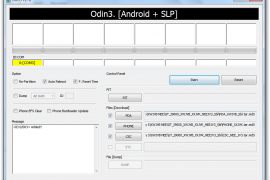
Odin Screenshot XWJVB
Kapill M Malani

Kapill M Malani A die-hard Liverpool FC fan, Kapill is a big fan of Batman, Android and street Cricket. In that order, probably. Email: [email protected]


UPDATE 2: A new Android 2.3.3 Firmware (XWJVH) for Galaxy S i9000 has leaked. And we’ve posted installation instructions for it too. Enjoy! [link below]

How To Install XWJVH on your Galaxy S i9000

UPDATE: We will keep updating this page for other XWJVB stuff — ROMs, Mods, Hacks, Root, etc — as and when they get posted. So, keep watching this space, exciting stuff coming soon.

  • How to Root XWJVB using Chainfire’s method.
  • More links to be added later, when available………

Well, there is new Android 2.3.3 ROM — XWJVB — for Galaxy S on the block and we’ve already got it booting on our Galaxy S. If you want it too, here what you can do to get it.

But, warnings first, as always:

[warning] The methods and procedures discussed here are considered risky and you should not attempt anything if you don’t know completely what it is. Do this only if you’re capable of getting your phone back right on your own. If any damage occurs to you or your device, we won’t be held liable. You only will be responsible — you’ve been warned. Okay![/warning]

[info]This guide is applicable only for Samsung Galaxy S international version (i9000). If yours is Vibrant/Captivate/Fascinate/Epic 4G or any other Galaxy S variant, then this ROM — and Guide — is not for you, and that’s for definite.[/info]

You may already know that this ROM is available in two versions: one with_bootloaders and the other without_bootloaders. Flashing with_bootloaders version is considered riskier than without_bootloaders. But you have to flash with_bootloaders because this is required by Android 2.3, unless you’ve already done that while installing earlier leaked ROMs — XWJV1 or XXJVK. If you haven’t installed JV1 or JVK with bootloaders, you have to install XWJVB with_bootloaders.

We’ve tried this ROM with_bootloaders version and would recommend the same to you. If you’re confused, simply download and install the with_bootloaders version.

XWJVB Installation Video


Follow these step-by-step guide to Install XWJVB Android 2.3.3 ROM on your Galaxy S:

  1. Download XWJVB with_bootloaders version. File name — GT_I9000_XWJVB_XXJVK_NEEJV3_Sbl.exe. Download Link. Size: 155.64 MB.  [If you already have Android 2.3 bootloaders, download XWJVB without_bootloaders version. File name — GT_I9000_XWJVB_XXJVK_NEEJV3.exe. Download Link. Size: 155.41 MB. Apply the procedures below accordingly.]
  2. Double click ‘GT_I9000_XWJVB_XXJVK_NEEJV3_Sbl.exe’ and select Extract to let the file extract its contents in the folder “GT_I9000_XWJVB_XXJVK_NEEJV3_Sbl” — you’ll get 3 files in this folder:
    1. CSC_NEE_JV3.tar.md5,
    2. PDA_XWJVB_Sbl.tar.md5 and
    3. PHONE_XXJVK.tar.md5.
  3. Download Odin3 v1.7.zip from here — Mediafire Link. Extract the zip file to get Odin3 v1.7.exe.
  4. Disconnect your phone if it’s connected to PC.
  5. Switch Off your phone. Wait for vibration to confirm complete switch off.
  6. Now, put it in Download Mode — press and hold these keys together: Volume_DOWN+Home+Power.
  7. Open Odin (from step 3). Connect your phone to PC now. You should get the message “Added! !” under the Odin’s message box.
  8. Important, uncheck the ‘Re-Partition’ button. While, keep ‘Auto Reboot’ & ‘F. Reset Time’ boxes checked.
  9. In Odin, place these files (check out the screenshot given at the top for help):
    1. In the PDA box, select this file (from step 2.2) — PDA_XWJVB_Sbl.tar.md5
    2. In the Phone box, select this file (from step 2.3) — PHONE_XXJVK.tar.md5
    3. In the CSC box, select this file (from step 2.1) — CSC_NEE_JV3.tar.md5
    4. Leave the PIT box empty.
  10. Double check everything said in step 7, 8 and 9 above.
  11. Now, hit the START button to let the process begin.
  12. When process at Odin finishes your phone will automatically reboot. You can unplug the cable now.
  13. When your phone has restarted, you are on the XWJVB running Android 2.3.3 (Gingerbread). Congrats!
  14. Check your phone’s version by here: Press Options -> Settings -> Scroll down and select About Phone -> Scroll down and check your version.

Benchmarks, for what it’s worth.

Linkpack Score Quadrant Score Smartbench 2010 Score

XWJVB ROM Highlights


[valid] Want to get root access on XWJVB? Well, just wait a little bit till we come up with a guide (using chainfire’s root method) for that too. [/valid]

[info]If you experience any problem in installing the ROM with the steps given above, try flashing the ROM again, but with 512 PIT file this time. Download the Pit file from here. Extract the downloaded file to get the Pit File. Then, select the Pit file in Odin’s Pit box this time (step 9.4 above) and keep the ‘Re-Partition’ box (in step 8 above) checked too. All other things same as in steps given above.[/info]

Let us know in comments below how XWJVB Android 2.3.3 ROM works on your Galaxy S (i9000).

486 responses to “How to Install XWJVB Android 2.3.3 ROM on Galaxy S”

  1. Guest Avatar

    this guide is good. thank u

  2. Guest Avatar

    Would like to know if this ROM has the portuguese language. Thank you!

    1. Guest Avatar

      A rom tem língua portuguesa, mas não tem português no dicionário t9, vais ter de tirar um do market.

    2. Guest Avatar

      Obrigado. A instalação do XWJB correu bem? É que tentei fazer no meu mas faz reboot repetidamente sem pedir o PIN. Tive de voltar para o XXJVK…

    3. Guest Avatar

      A mim não deu problema, pede o pin normalmente e eu também venho da XXJVK, o meu galaxy está desbloqueado não sei se existe alguma relação, mas podes sempre perguntar no forum tuga “android PT”, já existe um tópico para esta rom.

    4. Guest Avatar

      O meu também está desbloqueado. Vou procurar a ajuda no forum AndroidPT. Existe alguma diferença entre XXJVK e XWJVB?
      Obrigado pela ajuda.

    5. Guest Avatar

      A única diferença que notei foi ter perdido o t9 português (obviamente a mais grave), e repararam um bug que quando se ouvia musica com o ecrã desligado as teclas de volume não funcionavam… agora já funcionam.

  3. shujah Avatar

    this guide is good. thank u

  4. Paulo Costa Avatar
    Paulo Costa

    Would like to know if this ROM has the portuguese language. Thank you!

    1. CHERENCO Avatar
      CHERENCO

      A rom tem língua portuguesa, mas não tem português no dicionário t9, vais ter de tirar um do market.

      1. Paulo Costa Avatar
        Paulo Costa

        Obrigado. A instalação do XWJB correu bem? É que tentei fazer no meu mas faz reboot repetidamente sem pedir o PIN. Tive de voltar para o XXJVK…

        1. CHERENCO Avatar
          CHERENCO

          A mim não deu problema, pede o pin normalmente e eu também venho da XXJVK, o meu galaxy está desbloqueado não sei se existe alguma relação, mas podes sempre perguntar no forum tuga “android PT”, já existe um tópico para esta rom.

          1. Paulo Costa Avatar
            Paulo Costa

            O meu também está desbloqueado. Vou procurar a ajuda no forum AndroidPT. Existe alguma diferença entre XXJVK e XWJVB?
            Obrigado pela ajuda.

        2. CHERENCO Avatar
          CHERENCO

          A única diferença que notei foi ter perdido o t9 português (obviamente a mais grave), e repararam um bug que quando se ouvia musica com o ecrã desligado as teclas de volume não funcionavam… agora já funcionam.

  5. Guest Avatar

    Thank you for the guide .. Just flashed my SGS from XXJVK to XXJVB without bootloaders. After rebooting I can see some of my applications are there still. I didn’t wiped my phone .. but those application gave me force close error.. so I uninstalled and reinstalled those apps and everything is working fine .. I felt XXJVB is faster and smoother than XXJVK .. Need to check the battery ..

    1. Guest Avatar

      How much free ram do you have????

    2. Guest Avatar

      @ghost.bhoot2k – Available RAM is less compared to 2.2.1 and XXJVK(2.3.3) .. It is showing in between 212 to 260. But the phone is fast compared to the previous versions 🙂

    3. Guest Avatar

      How ca you have between 212 and 260??? I have between 100 and 150.. and i use task kiler and fast reebot.

    4. Guest Avatar

      dont lie dear,it cant be more than 115 mb…….i think either u r a fool or u think that others r fool……

    5. Guest Avatar

      Sorry 🙁 .. that was a mistake .. I checked it again .. it is showing 129MB of free RAM 🙂

  6. Krishna K Balla Avatar

    Thank you for the guide .. Just flashed my SGS from XXJVK to XXJVB without bootloaders. After rebooting I can see some of my applications are there still. I didn’t wiped my phone .. but those application gave me force close error.. so I uninstalled and reinstalled those apps and everything is working fine .. I felt XXJVB is faster and smoother than XXJVK .. Need to check the battery ..

    1. ghost.bhoot2k Avatar
      ghost.bhoot2k

      How much free ram do you have????

      1. Krishna K Balla Avatar

        @ghost.bhoot2k – Available RAM is less compared to 2.2.1 and XXJVK(2.3.3) .. It is showing in between 212 to 260. But the phone is fast compared to the previous versions 🙂

        1. CHERENCO Avatar
          CHERENCO

          How ca you have between 212 and 260??? I have between 100 and 150.. and i use task kiler and fast reebot.

        2. ghost Avatar

          dont lie dear,it cant be more than 115 mb…….i think either u r a fool or u think that others r fool……

          1. Krishna K Balla Avatar

            Sorry 🙁 .. that was a mistake .. I checked it again .. it is showing 129MB of free RAM 🙂

  7. Guest Avatar

    I,this ROM have voodoo sound?
    thanks

  8. Guest Avatar

    What country version is this firmware?
    I’m from Australia.

    1. Guest Avatar

      Finland………but in Sweden its out too….

    2. Guest Avatar

      It’s for Europe. I think Germany and some other countries are getting this. Samsung should be launching this update via Kies in Australia soon.

  9. Guest Avatar

    is this upgrade will run on galaxy s i9003?

    1. Guest Avatar

      Dear, I don’t know. I can’t recommend this to you.

    2. Guest Avatar

      Forget dear….this rom isnt meant for Duplicate galaxy SL,its only for the Original one galaxy S

  10. Guest Avatar

    Is this a deodexed rom?

    1. Guest Avatar

      No….this is not and forget deodexing gingerbread…

  11. Guest Avatar

    Does the back light of the buton menus still always on???

  12. HUMBERTO LOPES Avatar
    HUMBERTO LOPES

    I,this ROM have voodoo sound?
    thanks

  13. David Avatar

    What country version is this firmware?
    I’m from Australia.

    1. ghost.bhoot2k Avatar
      ghost.bhoot2k

      Finland………but in Sweden its out too….

    2. Kapil Avatar

      It’s for Europe. I think Germany and some other countries are getting this. Samsung should be launching this update via Kies in Australia soon.

  14. efte Avatar

    is this upgrade will run on galaxy s i9003?

    1. Kapil Avatar

      Dear, I don’t know. I can’t recommend this to you.

    2. ghost.bhoot2k Avatar
      ghost.bhoot2k

      Forget dear….this rom isnt meant for Duplicate galaxy SL,its only for the Original one galaxy S

  15. baha Avatar

    Is this a deodexed rom?

    1. ghost.bhoot2k Avatar
      ghost.bhoot2k

      No….this is not and forget deodexing gingerbread…

  16. CHERENCO Avatar
    CHERENCO

    Does the back light of the buton menus still always on???

  17. Guest Avatar

    this is superb…hats off to u guys and chanfire….brilliant job..

    1. Guest Avatar

      Yup, Chainfire is just Awesome 🙂

    2. Guest Avatar

      Of course chainfire is fine but but but its the hacked one……let the stable be out

    3. Guest Avatar

      I think one should still stick to 2.2.1 xwjs8 deodex rom with gingermix theme and voodoo or speedmod lagfix…….
      benchmark-1600 plus
      awsome speed,no lagfix at all
      free ram – >240
      battery back up is like heaven…>24hrs with heavy 3g and wifi usage with transparent theme
      maildroid works fine
      and so on…….

    4. Guest Avatar

      That’s cool custom ROM and thnx for sharing it with us… You used doc’s kitchen to make this one, right? I’ll try and if I find it cool, would review it. 🙂

    5. Guest Avatar

      dont configure it through roms kitchen….use the cygwin application to confiogure…..

  18. Vignesh Avatar

    this is superb…hats off to u guys and chanfire….brilliant job..

    1. Kapil Avatar

      Yup, Chainfire is just Awesome 🙂

      1. ghost.bhoot2k Avatar
        ghost.bhoot2k

        Of course chainfire is fine but but but its the hacked one……let the stable be out

    2. ghost.bhoot2k Avatar
      ghost.bhoot2k

      I think one should still stick to 2.2.1 xwjs8 deodex rom with gingermix theme and voodoo or speedmod lagfix…….
      benchmark-1600 plus
      awsome speed,no lagfix at all
      free ram – >240
      battery back up is like heaven…>24hrs with heavy 3g and wifi usage with transparent theme
      maildroid works fine
      and so on…….

      1. Kapil Avatar

        That’s cool custom ROM and thnx for sharing it with us… You used doc’s kitchen to make this one, right? I’ll try and if I find it cool, would review it. 🙂

        1. ghost Avatar

          dont configure it through roms kitchen….use the cygwin application to confiogure…..

  19. Guest Avatar

    My samsung galaxy s is stuck on the startup screen (the one with the letter S shining) Any suggestions?

    1. Guest Avatar

      Make sure you followed the steps correctly…. doubled check everything.

    2. Guest Avatar

      same with me 🙁

  20. Guest Avatar

    works now. Restarted Odin

  21. Guest Avatar

    Amazing guide!! Thanks a lot. Works fine. Phone is super smooth 🙂

    Facing problem only with few installed games like Asphalt 5,CutTheRope etc, unable to start the game.
    Otherwise other apps are working fine.

    1. Guest Avatar

      wipe cache and dalvik cache then reinstall ur games….everything will be fine

  22. Guest Avatar

    Anyone else find that they are getting more FORCE CLOSE messages than with JVK??
    I’ve uninstalled and re-installed the apps that are being affected but still the same force close issues.

    1. Guest Avatar

      do a factory reset after installing xwjvb and DONT put the backed up applications……of course ur data will be lost

    2. Guest Avatar

      Thanks, I’ll give that a go.

  23. Guest Avatar

    demerits of xwjvb——
    1. email apk goes back to 2.1 eclair
    2. no new market is placed.instead market updater is placed
    3. wifi is again 2.1 eclair based
    4. cant configure an stable yahoomail
    5. less free ram—-hangs like anything while multiple app are opened
    6. more force closes
    7. cant deodex…soooooo sad
    8. no stable kernel yet
    9. cant apply lagfix—benchmark-around 900 only
    and so on……..let a good stable version be out.
    TRYING HARD TO CONFIGURE A GOOD STABLE CUSTOM ROM.WISH ME BEST OF LUCK…..

  24. gregory Avatar

    My samsung galaxy s is stuck on the startup screen (the one with the letter S shining) Any suggestions?

    1. Kapil Avatar

      Make sure you followed the steps correctly…. doubled check everything.

    2. John Avatar

      same with me 🙁

  25. gregory Avatar

    works now. Restarted Odin

  26. Kiran Avatar

    Amazing guide!! Thanks a lot. Works fine. Phone is super smooth 🙂

    Facing problem only with few installed games like Asphalt 5,CutTheRope etc, unable to start the game.
    Otherwise other apps are working fine.

    1. ghost Avatar

      wipe cache and dalvik cache then reinstall ur games….everything will be fine

  27. tojjer Avatar

    Anyone else find that they are getting more FORCE CLOSE messages than with JVK??
    I’ve uninstalled and re-installed the apps that are being affected but still the same force close issues.

    1. ghost Avatar

      do a factory reset after installing xwjvb and DONT put the backed up applications……of course ur data will be lost

      1. tojjer Avatar

        Thanks, I’ll give that a go.

  28. ghost Avatar

    demerits of xwjvb——
    1. email apk goes back to 2.1 eclair
    2. no new market is placed.instead market updater is placed
    3. wifi is again 2.1 eclair based
    4. cant configure an stable yahoomail
    5. less free ram—-hangs like anything while multiple app are opened
    6. more force closes
    7. cant deodex…soooooo sad
    8. no stable kernel yet
    9. cant apply lagfix—benchmark-around 900 only
    and so on……..let a good stable version be out.
    TRYING HARD TO CONFIGURE A GOOD STABLE CUSTOM ROM.WISH ME BEST OF LUCK…..

  29. Guest Avatar

    Hey guys listen listen…this rom is not the original gingerbread update but the COOKED one released by samfirmware as
    1. I have checked through hacked kies,there is no such release of 2.3.3. The latest in Europe is still 2.2.1 xxjpy in some countries and xwjs8 in others.
    2. The original gingerbread is based on ext4 whereas this fake release of samfirmware is still rfs.
    3. Read my previous post-it has used 2.1 eclair for few apks which itself proves that its a fake rom.
    4. Modem used is still JVK……i think you people are wise enough to decide the part of jvk…???
    So please dont be in a hurry to wipe all your datas and install 2.3.3 xwjvb.Let the kies release be oht either in your country or uploaded on samfirmware.

  30. ghost.bhoot2k Avatar
    ghost.bhoot2k

    Hey guys listen listen…this rom is not the original gingerbread update but the COOKED one released by samfirmware as
    1. I have checked through hacked kies,there is no such release of 2.3.3. The latest in Europe is still 2.2.1 xxjpy in some countries and xwjs8 in others.
    2. The original gingerbread is based on ext4 whereas this fake release of samfirmware is still rfs.
    3. Read my previous post-it has used 2.1 eclair for few apks which itself proves that its a fake rom.
    4. Modem used is still JVK……i think you people are wise enough to decide the part of jvk…???
    So please dont be in a hurry to wipe all your datas and install 2.3.3 xwjvb.Let the kies release be oht either in your country or uploaded on samfirmware.

  31. Guest Avatar

    Hi Kapil,

    I’ve one question. As per your instruction there is no need to tick re partition option in Odin. However as per samfirmware guide, always use Pit & re partition option while flashing rom with three files.

    I am totally confused on this part. I am using Froyo 2.2 updated through Kies only. Never install any other rom. What should i do.

    Thanks..

    1. Guest Avatar

      I wil giv you the key of your doubt becoz i am THE BHOOT having all the keys.just remember one thing…….
      Pit file is used for partitioning your device for the FIRST TIME meaningby if you are flashing your device with 2.2.1xwjs3 for the first time just tick repartition.but when you upgrade with same version 2.2.1 xwjs8 then you are not supposed to tick repartition as your device has already been repartitioned with 2.2.1 version.
      Likewise if you are installing 2.3.3 xwjsb for the first time just tick repartition but if you are upgrading from 2.3.3 xxjvk to xwjvb then no need to tick it…..

    2. Guest Avatar

      Hey, you’re cool. Thnx for sharing stuff here. BTW, where you from? India, I suppose, but where in India?

    3. Guest Avatar

      yup of course,m from delhi……may i know from where u r???its very nice to have some frnds who knows how to fix samsung galaxy s problems…..

  32. Ammad Avatar

    Hi Kapil,

    I’ve one question. As per your instruction there is no need to tick re partition option in Odin. However as per samfirmware guide, always use Pit & re partition option while flashing rom with three files.

    I am totally confused on this part. I am using Froyo 2.2 updated through Kies only. Never install any other rom. What should i do.

    Thanks..

    1. ghost.bhoot2k Avatar
      ghost.bhoot2k

      I wil giv you the key of your doubt becoz i am THE BHOOT having all the keys.just remember one thing…….
      Pit file is used for partitioning your device for the FIRST TIME meaningby if you are flashing your device with 2.2.1xwjs3 for the first time just tick repartition.but when you upgrade with same version 2.2.1 xwjs8 then you are not supposed to tick repartition as your device has already been repartitioned with 2.2.1 version.
      Likewise if you are installing 2.3.3 xwjsb for the first time just tick repartition but if you are upgrading from 2.3.3 xxjvk to xwjvb then no need to tick it…..

      1. Kapil Avatar

        Hey, you’re cool. Thnx for sharing stuff here. BTW, where you from? India, I suppose, but where in India?

        1. ghost Avatar

          yup of course,m from delhi……may i know from where u r???its very nice to have some frnds who knows how to fix samsung galaxy s problems…..

  33. Guest Avatar

    Mr Bhoot. Thanks for your help. But are you sure that this is not the official ROM..Should we try this or wait to get it through Kies only.

    I am really bored of this 2.2 :(==

    1. Guest Avatar

      Sry for interrupting the conversation between you and Mr. cool-bhoot, but I think if you’re really bored of Android 2.2, XWJVB is worth it — go for the with_bootloaders version, since I think this will be your first partition. You can do with or without PIT files, both options worked pretty well on my SGS. BTW, why don’t you try some custom ROMs, hmm?

    2. Guest Avatar

      100 % sure…if you want to double check it just patch your kies with 2. registry and go for product code xee and nee.it will show you the latest update in european countries…..after double checking please do reply…

  34. Guest Avatar

    Quick question: my phones 3-button combo fix wasn’t worked so I installed a 3-combo fix. Will the with_bootloader version mess with my fix or will it stay intact?

    1. Guest Avatar

      No idea — 🙁

    2. Guest Avatar

      The “with_bootloader” will not remove your 3-button combo fix. I did the same thing and then flashed the “with_bootloader” to correct the graphical error I got after the fix. I still have the 3-button combo in my beloved SGS.

    3. Guest Avatar

      wait a second dear….dont be confused…i will explain everything to u becoz i am THE BHOOT
      bootloaders are internal programmes which are locked and unlocked by factory.fortunately our galaxy s european version is not locked one however newer mobiles and tabs are coming with locked bootloaders.now when you are flashing any rom you are free to flash with or without bootloaders.however some fake (2.3.3 xxjvk and xwjvb beta version) roms with bootloaders are programmed in such a way that it gets locked..(unusable)….so better not to put bootloaders with FAKE ROMS.

  35. Guest Avatar

    Samsung’s update to the Galaxy S Gingerbread – withheld by Google.

    JVB/JVK FAIL !!!

    1. Guest Avatar

      Not complete Fail, many users — including me — are enjoying the JVB — it’s cool!

    2. Guest Avatar

      Fail because:

      1. Battery drain (lot of people complain),
      2. Someone can use your account to buy sth @ Market
      3. Low scores in benchmarks
      4. Google withheld samsung updates.

      Great because:

      1. If you like(chose) you can use 2.3.3 on GS
      2. They share source and guys from XDA started making “kitchen”
      3. Your own reason.

      But anyway you guys are doing great job. Thanks to your posts i started updating my GS via Odin, Great job again. Thx

      Sorry for my english…

    3. Guest Avatar

      i do agree

  36. Guest Avatar

    Hi, wanna ask,
    normally 1st boot after flash this ROM will take how long?
    thanks

    1. Guest Avatar

      Shouldn’t take more than 10 mins!

  37. Guest Avatar

    ok thanks,
    at first I wait until 17 minutes, it only bootloop,
    flash again and factory and cache reset then only ok.
    take 2 minutes to boot..huh!

  38. Guest Avatar

    Thanks for the guide guys…
    Now after root installing GOATRIP ROM…yuhuuu

  39. Ammad Avatar

    Mr Bhoot. Thanks for your help. But are you sure that this is not the official ROM..Should we try this or wait to get it through Kies only.

    I am really bored of this 2.2 :(==

    1. Kapil Avatar

      Sry for interrupting the conversation between you and Mr. cool-bhoot, but I think if you’re really bored of Android 2.2, XWJVB is worth it — go for the with_bootloaders version, since I think this will be your first partition. You can do with or without PIT files, both options worked pretty well on my SGS. BTW, why don’t you try some custom ROMs, hmm?

    2. ghost Avatar

      100 % sure…if you want to double check it just patch your kies with 2. registry and go for product code xee and nee.it will show you the latest update in european countries…..after double checking please do reply…

  40. deastr Avatar

    Quick question: my phones 3-button combo fix wasn’t worked so I installed a 3-combo fix. Will the with_bootloader version mess with my fix or will it stay intact?

    1. Kapil Avatar

      No idea — 🙁

    2. Christoffer Avatar

      The “with_bootloader” will not remove your 3-button combo fix. I did the same thing and then flashed the “with_bootloader” to correct the graphical error I got after the fix. I still have the 3-button combo in my beloved SGS.

    3. ghost Avatar

      wait a second dear….dont be confused…i will explain everything to u becoz i am THE BHOOT
      bootloaders are internal programmes which are locked and unlocked by factory.fortunately our galaxy s european version is not locked one however newer mobiles and tabs are coming with locked bootloaders.now when you are flashing any rom you are free to flash with or without bootloaders.however some fake (2.3.3 xxjvk and xwjvb beta version) roms with bootloaders are programmed in such a way that it gets locked..(unusable)….so better not to put bootloaders with FAKE ROMS.

  41. Modrzej Avatar
    Modrzej

    Samsung’s update to the Galaxy S Gingerbread – withheld by Google.

    JVB/JVK FAIL !!!

    1. Kapil Avatar

      Not complete Fail, many users — including me — are enjoying the JVB — it’s cool!

      1. Modrzej Avatar
        Modrzej

        Fail because:

        1. Battery drain (lot of people complain),
        2. Someone can use your account to buy sth @ Market
        3. Low scores in benchmarks
        4. Google withheld samsung updates.

        Great because:

        1. If you like(chose) you can use 2.3.3 on GS
        2. They share source and guys from XDA started making “kitchen”
        3. Your own reason.

        But anyway you guys are doing great job. Thanks to your posts i started updating my GS via Odin, Great job again. Thx

        Sorry for my english…

        1. ghost Avatar

          i do agree

  42. gaarared Avatar
    gaarared

    Hi, wanna ask,
    normally 1st boot after flash this ROM will take how long?
    thanks

    1. Kapil Avatar

      Shouldn’t take more than 10 mins!

  43. gaarared Avatar
    gaarared

    ok thanks,
    at first I wait until 17 minutes, it only bootloop,
    flash again and factory and cache reset then only ok.
    take 2 minutes to boot..huh!

  44. gaarared Avatar
    gaarared

    Thanks for the guide guys…
    Now after root installing GOATRIP ROM…yuhuuu

  45. Guest Avatar

    can i able to flash any custom gingerbread rom after flashing this stock JVB rom…. (like darkys JVK v10)

    1. Guest Avatar

      ya of course u can put darky 10 extreme beta version.but but but i strongly recoommend u not to put becoz it has OVERSTOCK kernel.now please dont ask what is this kernel and what are the demerits..

  46. mak3r Avatar

    can i able to flash any custom gingerbread rom after flashing this stock JVB rom…. (like darkys JVK v10)

    1. ghost Avatar

      ya of course u can put darky 10 extreme beta version.but but but i strongly recoommend u not to put becoz it has OVERSTOCK kernel.now please dont ask what is this kernel and what are the demerits..

  47. Guest Avatar

    hey guys..I own a galaxy S korean model,I think its commonly known as shw-m110s..I wonder if my phone can be updated to this GB?

    Thanks guys.

    1. Guest Avatar

      no way…bcoz this rom is only for samsung galaxy gt i9000 international…dont try otherwise you may brick your mobile

  48. Guest Avatar

    @Kapil — It will be very helpful if you could post a how-to guide on “down grading SGS to stock firmware i.e 2.2 from this 2.3.3 gingerbread”
    Thanks 🙂

    1. Guest Avatar

      hi sir,so finally u have decided to downgrade.i will give you a full tutorial how to install 2.2 via odin and via kies.but before that i would like to know what all problems you faced with this fake rom????and one more thing i would like to know that which country update you want to install–germany or australia or sweden or india or china or any other??????

    2. Guest Avatar

      Hey, I’ve already posted a guide, which is very good, I suppose. Use the EZRom to downgrade to Android 2.2.1. This ROM is pretty complete and would also take care of Android 2.2 bootloaders — so, use this ROM to go back to Android 2.2. Here’s the link — https://nerdschalk.com/ezbase-ezrom-for-android-2-2-install-revert-back/

  49. SexyGirl Avatar
    SexyGirl

    hey guys..I own a galaxy S korean model,I think its commonly known as shw-m110s..I wonder if my phone can be updated to this GB?

    Thanks guys.

    1. ghost Avatar

      no way…bcoz this rom is only for samsung galaxy gt i9000 international…dont try otherwise you may brick your mobile

  50. krishna k balla Avatar

    @Kapil — It will be very helpful if you could post a how-to guide on “down grading SGS to stock firmware i.e 2.2 from this 2.3.3 gingerbread”
    Thanks 🙂

    1. ghost Avatar

      hi sir,so finally u have decided to downgrade.i will give you a full tutorial how to install 2.2 via odin and via kies.but before that i would like to know what all problems you faced with this fake rom????and one more thing i would like to know that which country update you want to install–germany or australia or sweden or india or china or any other??????

    2. Kapil Avatar

      Hey, I’ve already posted a guide, which is very good, I suppose. Use the EZRom to downgrade to Android 2.2.1. This ROM is pretty complete and would also take care of Android 2.2 bootloaders — so, use this ROM to go back to Android 2.2. Here’s the link — https://nerdschalk.com/ezbase-ezrom-for-android-2-2-install-revert-back/

  51. Guest Avatar

    Hello all,

    Update went well… but now I can’t restart my galaxy without plugin it to usb… Otherwise it just loop on the charge icon… any idea ?

  52. Guest Avatar

    I’ve just used yours instruction and now my new phone simply doen’t boot. when i press power button screen remain totaly black.it’s like i’ve don’t pressed the button…. can i do something? or i have to go to samsung???
    how’s possible this???

  53. michael Avatar
    michael

    Hello all,

    Update went well… but now I can’t restart my galaxy without plugin it to usb… Otherwise it just loop on the charge icon… any idea ?

  54. Guest Avatar

    Bricked !

  55. Riccardo Avatar
    Riccardo

    I’ve just used yours instruction and now my new phone simply doen’t boot. when i press power button screen remain totaly black.it’s like i’ve don’t pressed the button…. can i do something? or i have to go to samsung???
    how’s possible this???

  56. Guest Avatar

    dont get panic.simply put your phone in download mode using 3 button combos and flash this rom again.i know last time you might not have ticked repartition…..plz plz plz tick the repartition option and go ahead as this is the first time you are installing 2.3.3

  57. Guest Avatar

    thanks ghost..care if you got any link for GB upgrade for my phone model.I cant seem to find any.

  58. simple Avatar

    Bricked !

  59. ghost.bhoot2k Avatar
    ghost.bhoot2k

    dont get panic.simply put your phone in download mode using 3 button combos and flash this rom again.i know last time you might not have ticked repartition…..plz plz plz tick the repartition option and go ahead as this is the first time you are installing 2.3.3

  60. SexyGirl Avatar
    SexyGirl

    thanks ghost..care if you got any link for GB upgrade for my phone model.I cant seem to find any.

  61. Guest Avatar

    Hi Bhoot, so finally its proved to be a fake rom. Yaar but why the hell they did all this drama. And Samsung is still sleeping like a lazy ..ssss. Btw which rom are you using?

    1. Guest Avatar

      I’d flash 2.3.3 from Kies that was faster than this cooked rom from samfirmwares. Is it true that 2.3.3 for Galaxy S is going to get Ext4 in Stock-release???

    2. Guest Avatar

      what 2.3.3??? this is just the nomenclature…if you want i can give a rom named 3.1 HONEYCOMB or 4.2.1 ICECREAM which will be displayed under ABOUT PHONE.it does not mean that galaxy has got honeycomb or icecream.its very easy to alter the things once you know how to play with framework and how to configure a rom.

  62. Guest Avatar

    ok i wanna know these things: kapil / bhoot / anyone pls help:

    1. does this rom really f-up the three button combo?
    2. xxjvk’s battery life sucked big time drained in six hrs without doing much. how is xwjvb’s battery life?
    3. i’ve seen kapil’s guide to downgrading to 2.2 using EZrom. bhoot, can u actually provide links to installation guides to ur said 2.2 downgrades? I could use the Australia version.
    4. Also is there such a downgrade available that can let me upgrade to Samsung’s 2.3 whenever they release?
    5. Can smbdy link me to a different/latest/better guide to upgrading to darky’s extreme edition? i tried a few times from a forum at darky’s page. Everything goes fine til the final reboot when i get stuck forever at the boot animation logo. help? suggestions? advice?

    1. Guest Avatar

      1. No! — as far as I know
      2. Better
      3. & 5. EZRom is good. It’s pre-rooted and recovery already installed. To switch to darky’s ROM, just download the ROM and put it on sd card and then using recovery on your EZRom, flash darky’s ROM. Simple!
      4. It’s hard to say you can get perfect solution to become friend with Kies again. I don’t know for sure but this is what I could recommend. First, on the samfirmware.com download the latest ROM released in your country and then. install it using ODIN. Make sure while downgrading you use EZRom first and then the country-specific official ODIN ROM. Another thing you can try is using Doc’s kitchen to cook a ROM for yourself with components being what Samsung has latest issued in your specific country/area.

      Hope it helps!

    2. Guest Avatar

      1. 3 button combo works fine as our mobiles are not having locked bootloaders.
      2. battery life is better than xxjvk but far poor than 2.2.1 xxjpy and xwjs8
      4. for upgrading via kies you must have factory provided rom not the coocked one.for INU (india) it is DDJF3 2.1 update1 eclair updated via kies to JP6 2.2 froyo.if you are using this one then only your kies will detect and let you upgrade to 2.3.3 when it arrives in your country.
      5. please use the most stable version of darky that is 9.3 extreme.if you go for 9.4,9.5 or 10 problems will appear.secondly use speedmod kernel under darky configurator.
      3. for downgrading you can easily use EZROM but it wont provide you the factory built rom so one has to go to samsung care for installing DDJF3 2.1 update1 as its not available anywhere else.

    3. Guest Avatar

      Thanks for all the info guys! If samsung ever comes up with an official gingerbread, i’ll try that out via eclair-froyo-ginger. If not, i’ll try out darky’s 9.3 and so on. let’s see what happens. So far i’m happy with this xwjvb. thanks again.

  63. Ammad Avatar

    Hi Bhoot, so finally its proved to be a fake rom. Yaar but why the hell they did all this drama. And Samsung is still sleeping like a lazy ..ssss. Btw which rom are you using?

    1. Christoffer Avatar

      I’d flash 2.3.3 from Kies that was faster than this cooked rom from samfirmwares. Is it true that 2.3.3 for Galaxy S is going to get Ext4 in Stock-release???

    2. ghost Avatar

      what 2.3.3??? this is just the nomenclature…if you want i can give a rom named 3.1 HONEYCOMB or 4.2.1 ICECREAM which will be displayed under ABOUT PHONE.it does not mean that galaxy has got honeycomb or icecream.its very easy to alter the things once you know how to play with framework and how to configure a rom.

  64. Sanket Rathod Avatar
    Sanket Rathod

    ok i wanna know these things: kapil / bhoot / anyone pls help:

    1. does this rom really f-up the three button combo?
    2. xxjvk’s battery life sucked big time drained in six hrs without doing much. how is xwjvb’s battery life?
    3. i’ve seen kapil’s guide to downgrading to 2.2 using EZrom. bhoot, can u actually provide links to installation guides to ur said 2.2 downgrades? I could use the Australia version.
    4. Also is there such a downgrade available that can let me upgrade to Samsung’s 2.3 whenever they release?
    5. Can smbdy link me to a different/latest/better guide to upgrading to darky’s extreme edition? i tried a few times from a forum at darky’s page. Everything goes fine til the final reboot when i get stuck forever at the boot animation logo. help? suggestions? advice?

    1. Kapil Avatar

      1. No! — as far as I know
      2. Better
      3. & 5. EZRom is good. It’s pre-rooted and recovery already installed. To switch to darky’s ROM, just download the ROM and put it on sd card and then using recovery on your EZRom, flash darky’s ROM. Simple!
      4. It’s hard to say you can get perfect solution to become friend with Kies again. I don’t know for sure but this is what I could recommend. First, on the samfirmware.com download the latest ROM released in your country and then. install it using ODIN. Make sure while downgrading you use EZRom first and then the country-specific official ODIN ROM. Another thing you can try is using Doc’s kitchen to cook a ROM for yourself with components being what Samsung has latest issued in your specific country/area.

      Hope it helps!

      1. Sanket Rathod Avatar

        Thanks for all the info guys! If samsung ever comes up with an official gingerbread, i’ll try that out via eclair-froyo-ginger. If not, i’ll try out darky’s 9.3 and so on. let’s see what happens. So far i’m happy with this xwjvb. thanks again.

    2. ghost Avatar

      1. 3 button combo works fine as our mobiles are not having locked bootloaders.
      2. battery life is better than xxjvk but far poor than 2.2.1 xxjpy and xwjs8
      4. for upgrading via kies you must have factory provided rom not the coocked one.for INU (india) it is DDJF3 2.1 update1 eclair updated via kies to JP6 2.2 froyo.if you are using this one then only your kies will detect and let you upgrade to 2.3.3 when it arrives in your country.
      5. please use the most stable version of darky that is 9.3 extreme.if you go for 9.4,9.5 or 10 problems will appear.secondly use speedmod kernel under darky configurator.
      3. for downgrading you can easily use EZROM but it wont provide you the factory built rom so one has to go to samsung care for installing DDJF3 2.1 update1 as its not available anywhere else.

  65. Guest Avatar

    my data isa not working

  66. Guest Avatar

    my data package not working

    1. Guest Avatar

      reset default under the option of apn…..

  67. sujith Avatar

    my data isa not working

  68. sujith Avatar

    my data package not working

    1. ghost Avatar

      reset default under the option of apn…..

  69. Guest Avatar

    does sgs still able to make native 3g video call after update to 2.3?

    1. Guest Avatar

      ya sure

  70. dreqs Avatar

    does sgs still able to make native 3g video call after update to 2.3?

    1. ghost.bhoot2k Avatar
      ghost.bhoot2k

      ya sure

  71. Guest Avatar

    Hi Ghost / Kapil. I’ve downgraded to 2.2.1 using EZROM, but KIES doesn’t recognise it. Can I just flash JY over the top of it?
    Thanks

    1. Guest Avatar

      Sorry, I mean JPY

    2. Guest Avatar

      ya sure.for that you need a single pda file jpy jpy jpy….nee.tar which is available at samfirmware.just flash it using odin without ticking repartition…enjoy

    3. Guest Avatar

      Thank you buddy

  72. Guest Avatar

    thanks ghost! =) not worried to upgrade anymore,3g video call is da most important for me

  73. tojjer Avatar

    Hi Ghost / Kapil. I’ve downgraded to 2.2.1 using EZROM, but KIES doesn’t recognise it. Can I just flash JY over the top of it?
    Thanks

    1. tojjer Avatar

      Sorry, I mean JPY

      1. ghost.bhoot2k Avatar
        ghost.bhoot2k

        ya sure.for that you need a single pda file jpy jpy jpy….nee.tar which is available at samfirmware.just flash it using odin without ticking repartition…enjoy

        1. tojjer Avatar

          Thank you buddy

  74. dreqs Avatar

    thanks ghost! =) not worried to upgrade anymore,3g video call is da most important for me

  75. Guest Avatar

    Is it works for galaxy s m110s Korean Version I9000 ???

  76. BEKU Avatar

    Is it works for galaxy s m110s Korean Version I9000 ???

  77. Guest Avatar

    Hi,

    Everything went pretty well except the most important thing. I can’t access my mobile network at all!!

    No phone calls!

    Any idea why?

    Also the phone couldn’t locate my mobile network automatically.

    I am from Israel.

  78. Hanan Avatar

    Hi,

    Everything went pretty well except the most important thing. I can’t access my mobile network at all!!

    No phone calls!

    Any idea why?

    Also the phone couldn’t locate my mobile network automatically.

    I am from Israel.

  79. Guest Avatar

    Hi.Please help me!Odin gets stuck at Setup Connection…what shall i dO?

  80. Radu Avatar

    Hi.Please help me!Odin gets stuck at Setup Connection…what shall i dO?

  81. Guest Avatar

    version with bootloader, do I have to mark Phone Bootlader Update and re-patrition ?

    1. Androiding Staff Avatar
      Androiding Staff

      NO you must NOT tick the “Phone Bootloader Update” box, and “re-partition” is optional but if you plan to tick it then make sure you’re inserting a “.pit” file in the “PIT” box.

  82. Guest Avatar

    Nice guide!

    1. Krishna Avatar
      Krishna

      Thnx man….. We would welcome if you’ve any suggestions for this blog.

  83. khak Avatar

    version with bootloader, do I have to mark Phone Bootlader Update and re-patrition ?

    1. Shivam Avatar

      NO you must NOT tick the “Phone Bootloader Update” box, and “re-partition” is optional but if you plan to tick it then make sure you’re inserting a “.pit” file in the “PIT” box.

  84. Kishan Avatar

    Nice guide!

    1. Kapil Avatar

      Thnx man….. We would welcome if you’ve any suggestions for this blog.

  85. Kishan Avatar

    Nice guide!

    1. Kapil Avatar

      Thnx man….. We would welcome if you’ve any suggestions for this blog.

  86. Guest Avatar

    Hi,

    I want to make sure that I won’t mesh up upgrading my SGS from 2.1 to 2.3.3.

    In order for me to follow procedure easily is to understand what are the files involve. My inquiries are:

    1. when do i need the pit file? In your procedure no pit file selected but in some other posts in the web you need to have the pit file as well as tick the Re-partition box.
    2. is it safe with your procedure w/o the pit file upgrading from 2.1 to 2.3.3?

    Thanks a lot

    1. Shivam Avatar

      Download the PIT file from here — http://www.mediafire.com/?2g3pdjd88cj8nz0 [It’s a .zip file so first extract it, you’ll get the following file “s1_odin_20100512.pit”]

      Now in Step 8 of this tutorial tick the “Re-partition” box, and then in Step 9 click on the “PIT” box and select the “s1_odin_20100512.pit” file.

      That should get you safely upgraded to 2.3.3 🙂

    2. Androiding Staff Avatar
      Androiding Staff

      Download the PIT file from here — http://www.mediafire.com/?2g3pdjd88cj8nz0 [It’s a .zip file so first extract it, you’ll get the following file “s1_odin_20100512.pit”]

      Now in Step 8 of this tutorial tick the “Re-partition” box, and then in Step 9 click on the “PIT” box and select the “s1_odin_20100512.pit” file.

      That should get you safely upgraded to 2.3.3 🙂

    3. Guest Avatar

      Thanks a lot I’ll give it a try. One more thing, do I have to root the phone before proceeding with the upgrade?
      Thanks again!

    4. Shivam Avatar

      No that’s not needed.. matter fact it’s good that your phone is not rooted 😉

    5. Androiding Staff Avatar
      Androiding Staff

      No that’s not needed.. matter fact it’s good that your phone is not rooted 😉

    6. Guest Avatar

      Thanks Shivam!

    7. Guest Avatar
      Guest

      Hello again Shivam!

      Thanks for everything, however I’ve got one issue re: operation of the phone.

      Sometimes there is no fluidness. You can recognize that when opening some application. Is the issue due to the old data that is still in the phone? Do I have to wipe the data/factory reset or the cache partition? Which one should I consider?

      Thanks

  87. Bobbi Avatar

    Hi,

    I want to make sure that I won’t mesh up upgrading my SGS from 2.1 to 2.3.3.

    In order for me to follow procedure easily is to understand what are the files involve. My inquiries are:

    1. when do i need the pit file? In your procedure no pit file selected but in some other posts in the web you need to have the pit file as well as tick the Re-partition box.
    2. is it safe with your procedure w/o the pit file upgrading from 2.1 to 2.3.3?

    Thanks a lot

    1. Shivam Avatar

      Download the PIT file from here — http://www.mediafire.com/?2g3pdjd88cj8nz0 [It’s a .zip file so first extract it, you’ll get the following file “s1_odin_20100512.pit”]

      Now in Step 8 of this tutorial tick the “Re-partition” box, and then in Step 9 click on the “PIT” box and select the “s1_odin_20100512.pit” file.

      That should get you safely upgraded to 2.3.3 🙂

      1. Bobbi Avatar

        Thanks a lot I’ll give it a try. One more thing, do I have to root the phone before proceeding with the upgrade?
        Thanks again!

        1. Shivam Avatar

          No that’s not needed.. matter fact it’s good that your phone is not rooted 😉

          1. Bobbi Avatar

            Thanks Shivam!

          2. Bobbi Avatar
            Bobbi

            Hello again Shivam!

            Thanks for everything, however I’ve got one issue re: operation of the phone.

            Sometimes there is no fluidness. You can recognize that when opening some application. Is the issue due to the old data that is still in the phone? Do I have to wipe the data/factory reset or the cache partition? Which one should I consider?

            Thanks

  88. Bobbi Avatar

    Hi,

    I want to make sure that I won’t mesh up upgrading my SGS from 2.1 to 2.3.3.

    In order for me to follow procedure easily is to understand what are the files involve. My inquiries are:

    1. when do i need the pit file? In your procedure no pit file selected but in some other posts in the web you need to have the pit file as well as tick the Re-partition box.
    2. is it safe with your procedure w/o the pit file upgrading from 2.1 to 2.3.3?

    Thanks a lot

    1. Shivam Avatar

      Download the PIT file from here — http://www.mediafire.com/?2g3pdjd88cj8nz0 [It’s a .zip file so first extract it, you’ll get the following file “s1_odin_20100512.pit”]

      Now in Step 8 of this tutorial tick the “Re-partition” box, and then in Step 9 click on the “PIT” box and select the “s1_odin_20100512.pit” file.

      That should get you safely upgraded to 2.3.3 🙂

      1. Bobbi Avatar

        Thanks a lot I’ll give it a try. One more thing, do I have to root the phone before proceeding with the upgrade?
        Thanks again!

        1. Shivam Avatar

          No that’s not needed.. matter fact it’s good that your phone is not rooted 😉

          1. Bobbi Avatar

            Thanks Shivam!

          2. Bobbi Avatar
            Bobbi

            Hello again Shivam!

            Thanks for everything, however I’ve got one issue re: operation of the phone.

            Sometimes there is no fluidness. You can recognize that when opening some application. Is the issue due to the old data that is still in the phone? Do I have to wipe the data/factory reset or the cache partition? Which one should I consider?

            Thanks

  89. Guest Avatar

    Hi all, i want to ask can i straight flash my phone(JPM) to gingerbread if my phone rooted, lagfix or tweaked = ? just do factory reset before use Odin ?

    please help…thx

    1. Androiding Staff Avatar
      Androiding Staff

      I think you should disable lagfix before you proceed. If you want help with that, here’s the link — https://nerdschalk.com/how-to-disable-lagfix-on-galaxy-s-i9000-instructions/

    2. Shivam Avatar

      I think you should disable lagfix before you proceed. If you want help with that, here’s the link — https://nerdschalk.com/how-to-disable-lagfix-on-galaxy-s-i9000-instructions/

    3. Guest Avatar

      thanks for your reply ..
      I can’t find any lagfix option in recovery mode, that mean my sgs didn’t did any lagfix ? how to check it ?

      Thanks …

    4. Androiding Staff Avatar
      Androiding Staff

      If it’s not in your recovery then it means you don’t have any lagfix installed on your phone. So buddy you’re good to flash XWJVB.

    5. Shivam Avatar

      If it’s not in your recovery then it means you don’t have any lagfix installed on your phone. So buddy you’re good to flash XWJVB.

    6. Guest Avatar

      ok…. thx for ur help =)

  90. Guest Avatar

    Hi all, i want to ask can i straight flash my phone(JPM) to gingerbread if my phone rooted, lagfix or tweaked = ? just do factory reset before use Odin ?

    please help…thx

    1. Shivam Avatar

      I think you should disable lagfix before you proceed. If you want help with that, here’s the link — https://nerdschalk.com/how-to-disable-lagfix-on-galaxy-s-i9000-instructions/

      1. Guest Avatar

        thanks for your reply ..
        I can’t find any lagfix option in recovery mode, that mean my sgs didn’t did any lagfix ? how to check it ?

        Thanks …

        1. Shivam Avatar

          If it’s not in your recovery then it means you don’t have any lagfix installed on your phone. So buddy you’re good to flash XWJVB.

          1. Guest Avatar

            ok…. thx for ur help =)

  91. Guest Avatar

    Hi all, i want to ask can i straight flash my phone(JPM) to gingerbread if my phone rooted, lagfix or tweaked = ? just do factory reset before use Odin ?

    please help…thx

    1. Shivam Avatar

      I think you should disable lagfix before you proceed. If you want help with that, here’s the link — https://nerdschalk.com/how-to-disable-lagfix-on-galaxy-s-i9000-instructions/

      1. Guest Avatar

        thanks for your reply ..
        I can’t find any lagfix option in recovery mode, that mean my sgs didn’t did any lagfix ? how to check it ?

        Thanks …

        1. Shivam Avatar

          If it’s not in your recovery then it means you don’t have any lagfix installed on your phone. So buddy you’re good to flash XWJVB.

          1. Guest Avatar

            ok…. thx for ur help =)

  92. Guest Avatar

    my phone didnt come up “added” on odin3. anyone suggest a reason why??

    1. Shivam Avatar

      It seems you don’t have the correct drivers installed on your PC.
      Download & install the drivers from the link below:
      http://drivers.softpedia.com/get/MOBILES/Samsung/Samsung-Galaxy-S-USB-Driver-for-Windows-x86.shtml

    2. Androiding Staff Avatar
      Androiding Staff

      It seems you don’t have the correct drivers installed on your PC.
      Download & install the drivers from the link below:
      http://drivers.softpedia.com/get/MOBILES/Samsung/Samsung-Galaxy-S-USB-Driver-for-Windows-x86.shtml

  93. Aaron Avatar

    my phone didnt come up “added” on odin3. anyone suggest a reason why??

    1. Shivam Avatar

      It seems you don’t have the correct drivers installed on your PC.
      Download & install the drivers from the link below:
      http://drivers.softpedia.com/get/MOBILES/Samsung/Samsung-Galaxy-S-USB-Driver-for-Windows-x86.shtml

  94. Aaron Avatar

    my phone didnt come up “added” on odin3. anyone suggest a reason why??

    1. Shivam Avatar

      It seems you don’t have the correct drivers installed on your PC.
      Download & install the drivers from the link below:
      http://drivers.softpedia.com/get/MOBILES/Samsung/Samsung-Galaxy-S-USB-Driver-for-Windows-x86.shtml

  95. Guest Avatar

    Hi, I´ve followed the guide precisely, but something went wrong and ODIN failed.
    I was trying to flash GT_I9000_XWJVB_XXJVK_NEEJV3_Sbl with bootloaders and now I can´t get anywhere besides Download mode from which I am not able to flash anything.. ODIN either hangs or woes about “PIT partition”. I´ve tried to use 512PIT too. As far as I can tell the device is not bricked since it´s not showing the “black screen of death”. Originally I was running Juwe 1.9 XWJS8 ROM without any lagfix. I am kind of hopeless now and would be grateful for any clue or guide.
    Any help appreciated!

    1. Shivam Avatar

      That’s unexpected but anyway you can try the following methods:

      Method 1:
      Try again using ODIN v1.3, download from here http://www.mediafire.com/?0uqsgfq0dlskx3u
      and, 512PIT from here http://www.mediafire.com/?t4427gu89s79184
      And remember when we select a PIT file we must also tick the “Re-Partition” check box in Odin.

      Method 2:
      If method 1 doesn’t help, then flash the EZBase ROM using the guide below:
      https://nerdschalk.com/ezbase-ezrom-for-android-2-2-install-revert-back/

      And after flashing the EZBase ROM try flashing the XWJVB again, but use ODIN v1.3 this time, and also use the 512PIT [I’ve given the links in Method 1]

      Hope it helps. Good luck 🙂

    2. Androiding Staff Avatar
      Androiding Staff

      That’s unexpected but anyway you can try the following methods:

      Method 1:
      Try again using ODIN v1.3, download from here http://www.mediafire.com/?0uqsgfq0dlskx3u/
      and, 512PIT from here http://www.mediafire.com/?t4427gu89s79184/
      And remember when we select a PIT file we must also tick the “Re-Partition” check box in Odin.

      Method 2:
      If method 1 doesn’t help, then flash the EZBase ROM using the guide below:
      https://nerdschalk.com/ezbase-ezrom-for-android-2-2-install-revert-back/

      And after flashing the EZBase ROM try flashing the XWJVB again, but use ODIN v1.3 this time, and also use the 512PIT [I’ve given the links in Method 1]

      Hope it helps. Good luck 🙂

    3. Guest Avatar

      Will try and then reply 🙂
      Thank you very much!

  96. Azarro Avatar

    Hi, I´ve followed the guide precisely, but something went wrong and ODIN failed.
    I was trying to flash GT_I9000_XWJVB_XXJVK_NEEJV3_Sbl with bootloaders and now I can´t get anywhere besides Download mode from which I am not able to flash anything.. ODIN either hangs or woes about “PIT partition”. I´ve tried to use 512PIT too. As far as I can tell the device is not bricked since it´s not showing the “black screen of death”. Originally I was running Juwe 1.9 XWJS8 ROM without any lagfix. I am kind of hopeless now and would be grateful for any clue or guide.
    Any help appreciated!

    1. Shivam Avatar

      That’s unexpected but anyway you can try the following methods:

      Method 1:
      Try again using ODIN v1.3, download from here http://www.mediafire.com/?0uqsgfq0dlskx3u
      and, 512PIT from here http://www.mediafire.com/?t4427gu89s79184
      And remember when we select a PIT file we must also tick the “Re-Partition” check box in Odin.

      Method 2:
      If method 1 doesn’t help, then flash the EZBase ROM using the guide below:
      https://nerdschalk.com/ezbase-ezrom-for-android-2-2-install-revert-back/

      And after flashing the EZBase ROM try flashing the XWJVB again, but use ODIN v1.3 this time, and also use the 512PIT [I’ve given the links in Method 1]

      Hope it helps. Good luck 🙂

      1. Azarro Avatar

        Will try and then reply 🙂
        Thank you very much!

  97. Azarro Avatar

    Hi, I´ve followed the guide precisely, but something went wrong and ODIN failed.
    I was trying to flash GT_I9000_XWJVB_XXJVK_NEEJV3_Sbl with bootloaders and now I can´t get anywhere besides Download mode from which I am not able to flash anything.. ODIN either hangs or woes about “PIT partition”. I´ve tried to use 512PIT too. As far as I can tell the device is not bricked since it´s not showing the “black screen of death”. Originally I was running Juwe 1.9 XWJS8 ROM without any lagfix. I am kind of hopeless now and would be grateful for any clue or guide.
    Any help appreciated!

    1. Shivam Avatar

      That’s unexpected but anyway you can try the following methods:

      Method 1:
      Try again using ODIN v1.3, download from here http://www.mediafire.com/?0uqsgfq0dlskx3u/
      and, 512PIT from here http://www.mediafire.com/?t4427gu89s79184/
      And remember when we select a PIT file we must also tick the “Re-Partition” check box in Odin.

      Method 2:
      If method 1 doesn’t help, then flash the EZBase ROM using the guide below:
      https://nerdschalk.com/ezbase-ezrom-for-android-2-2-install-revert-back/

      And after flashing the EZBase ROM try flashing the XWJVB again, but use ODIN v1.3 this time, and also use the 512PIT [I’ve given the links in Method 1]

      Hope it helps. Good luck 🙂

      1. Azarro Avatar

        Will try and then reply 🙂
        Thank you very much!

  98. Guest Avatar

    confused.. do i need to flash w/o bootloaders version after installing the w/ bootloaders version?

    1. Krishna Avatar
      Krishna

      Hell no. Android 2.3 bootloaders are required when you’re installing the Android 2.3 for the first time, not again — that’s why we need to use the with_bootloaders file in the beginning. When you intend to flash a new Android 2.3 JVB, you can install using the without_bootloaders version.

      But in no case both versions are required to be flashed.

      Hope it helps.

  99. Born_wild009 Avatar
    Born_wild009

    confused.. do i need to flash w/o bootloaders version after installing the w/ bootloaders version?

    1. Kapil Avatar

      Hell no. Android 2.3 bootloaders are required when you’re installing the Android 2.3 for the first time, not again — that’s why we need to use the with_bootloaders file in the beginning. When you intend to flash a new Android 2.3 JVB, you can install using the without_bootloaders version.

      But in no case both versions are required to be flashed.

      Hope it helps.

  100. Born_wild009 Avatar
    Born_wild009

    confused.. do i need to flash w/o bootloaders version after installing the w/ bootloaders version?

    1. Kapil Avatar

      Hell no. Android 2.3 bootloaders are required when you’re installing the Android 2.3 for the first time, not again — that’s why we need to use the with_bootloaders file in the beginning. When you intend to flash a new Android 2.3 JVB, you can install using the without_bootloaders version.

      But in no case both versions are required to be flashed.

      Hope it helps.

  101. Guest Avatar

    Hi, I´ve followed the guide precisely and everything is working fine ! Great work !!!

    1. Krishna Avatar
      Krishna

      Thanks…. Glad you like it!

  102. Dexy004 Avatar
    Dexy004

    Hi, I´ve followed the guide precisely and everything is working fine ! Great work !!!

    1. Kapil Avatar

      Thanks…. Glad you like it!

  103. Dexy004 Avatar
    Dexy004

    Hi, I´ve followed the guide precisely and everything is working fine ! Great work !!!

    1. Kapil Avatar

      Thanks…. Glad you like it!

  104. Guest Avatar

    Help pls!!! After i success flash the 2.3.3 XXJVB. My phone just restart & start up with screen that ask me enter password in my phone??? Anybody know what is happen?

    1. Krishna Avatar
      Krishna

      If you’re still stuck, I recommend doing a factory reset from the recovery. Let me know.

    2. Guest Avatar
      Guest

      hi, just finishied flashing, phone gets stuck at S logo, S logo is coming again n again….plz advice wt went wrong…

  105. james looyinkeat Avatar

    Help pls!!! After i success flash the 2.3.3 XXJVB. My phone just restart & start up with screen that ask me enter password in my phone??? Anybody know what is happen?

    1. Kapil Avatar

      If you’re still stuck, I recommend doing a factory reset from the recovery. Let me know.

      1. Pardesiiii Avatar
        Pardesiiii

        hi, just finishied flashing, phone gets stuck at S logo, S logo is coming again n again….plz advice wt went wrong…

  106. james looyinkeat Avatar

    Help pls!!! After i success flash the 2.3.3 XXJVB. My phone just restart & start up with screen that ask me enter password in my phone??? Anybody know what is happen?

    1. Kapil Avatar

      If you’re still stuck, I recommend doing a factory reset from the recovery. Let me know.

      1. Pardesiiii Avatar
        Pardesiiii

        hi, just finishied flashing, phone gets stuck at S logo, S logo is coming again n again….plz advice wt went wrong…

  107. Guest Avatar
    Guest

    Hi there! I got a question, will I keep all my contacts, apps and data after flashing this ROM or should I make a backup? Also I think Titanium backup will be useless for restoring if I wont have root on the new rom. Can u advice please?

    1. Guest Avatar
      Guest

      Yes you’ll loose your contacts, apps and data. But you can have root access on this ROM too, we’ve posted a detailed guide here — https://nerdschalk.com/how-to-root-xwjvb-and-install-clockwork-mod-cwm-recovery/

      So buddy you can totally rely on Titanium backup 🙂

    2. Guest Avatar
      Guest

      Yes you’ll loose your contacts, apps and data. But you can have root access on this ROM too, we’ve posted a detailed guide here — https://nerdschalk.com/how-to-root-xwjvb-and-install-clockwork-mod-cwm-recovery/

      So buddy you can totally rely on Titanium backup 🙂

  108. Guest Avatar
    Guest

    Hey, this guide ROCKS.
    I was on Darky extreme 9.5 and it was good, but got scared that I wasn’t going to be able to upgrade when Samsung/Google FINALLY release 2.3… to us. So, I flashed this ROM using odin. It was really easy, I then rooted using chainfire kernel and made sure busybox is working, so as to be able to restore my Angry Birds progress (very important).
    So, it’s all good. Battery life is SUPERB compared to Darky (but Darky is very cool and I am sure that all that coolness needs more power). I don’t really think Google have fixed the SGS GPS nightmare in this release. Mine still only gets to about 10m accuracy.
    However. It is a good rom and thank you for your work on it.
    Cheers,
    Hamish

    1. Shivam Avatar
      Shivam

      Hi Hamish, thanks for appreciating our work.

      And yeah damn right. GPS is still not good.

    2. Androiding Staff Avatar
      Androiding Staff

      Hi Hamish, thanks for appreciating our work.

      And yeah damn right. GPS is still not good.

  109. dima Avatar

    Hi there! I got a question, will I keep all my contacts, apps and data after flashing this ROM or should I make a backup? Also I think Titanium backup will be useless for restoring if I wont have root on the new rom. Can u advice please?

    1. The Android Soul Avatar

      Yes you’ll loose your contacts, apps and data. But you can have root access on this ROM too, we’ve posted a detailed guide here — https://nerdschalk.com/how-to-root-xwjvb-and-install-clockwork-mod-cwm-recovery/

      So buddy you can totally rely on Titanium backup 🙂

  110. dima Avatar

    Hi there! I got a question, will I keep all my contacts, apps and data after flashing this ROM or should I make a backup? Also I think Titanium backup will be useless for restoring if I wont have root on the new rom. Can u advice please?

    1. The Android Soul Avatar

      Yes you’ll loose your contacts, apps and data. But you can have root access on this ROM too, we’ve posted a detailed guide here — https://nerdschalk.com/how-to-root-xwjvb-and-install-clockwork-mod-cwm-recovery/

      So buddy you can totally rely on Titanium backup 🙂

  111. Hamish3596 Avatar
    Hamish3596

    Hey, this guide ROCKS.
    I was on Darky extreme 9.5 and it was good, but got scared that I wasn’t going to be able to upgrade when Samsung/Google FINALLY release 2.3… to us. So, I flashed this ROM using odin. It was really easy, I then rooted using chainfire kernel and made sure busybox is working, so as to be able to restore my Angry Birds progress (very important).
    So, it’s all good. Battery life is SUPERB compared to Darky (but Darky is very cool and I am sure that all that coolness needs more power). I don’t really think Google have fixed the SGS GPS nightmare in this release. Mine still only gets to about 10m accuracy.
    However. It is a good rom and thank you for your work on it.
    Cheers,
    Hamish

    1. Shivam Avatar

      Hi Hamish, thanks for appreciating our work.

      And yeah damn right. GPS is still not good.

  112. Hamish3596 Avatar
    Hamish3596

    Hey, this guide ROCKS.
    I was on Darky extreme 9.5 and it was good, but got scared that I wasn’t going to be able to upgrade when Samsung/Google FINALLY release 2.3… to us. So, I flashed this ROM using odin. It was really easy, I then rooted using chainfire kernel and made sure busybox is working, so as to be able to restore my Angry Birds progress (very important).
    So, it’s all good. Battery life is SUPERB compared to Darky (but Darky is very cool and I am sure that all that coolness needs more power). I don’t really think Google have fixed the SGS GPS nightmare in this release. Mine still only gets to about 10m accuracy.
    However. It is a good rom and thank you for your work on it.
    Cheers,
    Hamish

    1. Shivam Avatar

      Hi Hamish, thanks for appreciating our work.

      And yeah damn right. GPS is still not good.

  113. Guest Avatar
    Guest

    Hi, I followed the instructions and I get a ‘pass’ in odin, however when I reboot my phone it just loops at the SGS start up screen!! please help!?!?

    I hold onto vol up+ power + home button and it takes me to recovery. It then displays the following message:

    # Manual mode #

    applying Multi CSC
    Installing Multi CSC
    Can’t access to ‘/system/csc/VOD/system/’.
    Successfully applied multi-CSC.

    can anyone help please??

    thanks!

    Rai

    1. Shivam Avatar
      Shivam

      Try doing a factory reset if you’re able to boot into Recovery.
      Or you can use the EZBase ROM to painlessly update your phone to Android 2.3.3 XWJVB ROM. Here’s the link — https://nerdschalk.com/ezbase-rom-v3-0-full-installation-guide-w-video/

    2. Androiding Staff Avatar
      Androiding Staff

      Try doing a factory reset if you’re able to boot into Recovery.
      Or you can use the EZBase ROM to painlessly update your phone to Android 2.3.3 XWJVB ROM. Here’s the link — https://nerdschalk.com/ezbase-rom-v3-0-full-installation-guide-w-video/

    3. Guest Avatar
      Guest

      Thanks for your reply Shivam!

      However I tried the process again using GT_I9000_XXJVK_XXJVK_OXAJVK_Sbl and it worked! could you tell me what the difference between GT_I9000_XXJVK_XXJVK_OXAJVK_Sbl and GT_I9000_XWJVB_XXJVK_NEEJV3_Sbl are and why the former worked?

      thanks

      Rai

    4. Guest Avatar
      Guest

      Thanks for your reply Shivam!

      However I tried the process again using GT_I9000_XXJVK_XXJVK_OXAJVK_Sbl and it worked! could you tell me what the difference between GT_I9000_XXJVK_XXJVK_OXAJVK_Sbl and GT_I9000_XWJVB_XXJVK_NEEJV3_Sbl are and why the former worked?

      update: I tried the odin method again with GT_I9000_XWJVB_XXJVK_NEEJV3_Sbl and all seems fine now!

      thanks

      Rai

    5. Shivam Avatar
      Shivam

      There are not much differences between the two ROMs apart from the fact that XWJVB is the latest one. But users have reported that XWJVB has better battery performance & stability as compared to XXJVK.

      So you did the right thing. I’d have recommended you to do the same — flash the XWJVB over XXJVK 😉

      Anyway glad you got it working.

    6. Androiding Staff Avatar
      Androiding Staff

      There are not much differences between the two ROMs apart from the fact that XWJVB is the latest one. But users have reported that XWJVB has better battery performance & stability as compared to XXJVK.

      So you did the right thing. I’d have recommended you to do the same — flash the XWJVB over XXJVK 😉

    7. Guest Avatar
      Guest

      Thanks for your help, your guide was very easy to follow!

      Hopefully the root access will be available soon! 🙂

    8. Shivam Avatar
      Shivam

      You’re welcome 🙂

      And BTW we’ve already posted a guide on how to root XWJVB. Go on — https://nerdschalk.com/how-to-root-xwjvb-and-install-clockwork-mod-cwm-recovery/

    9. Androiding Staff Avatar
      Androiding Staff

      You’re welcome 🙂

      And BTW we’ve already posted a guide on how to root XWJVB. Go on — https://nerdschalk.com/how-to-root-xwjvb-and-install-clockwork-mod-cwm-recovery/

  114.  Avatar
    Anonymous

    Hi, I followed the instructions and I get a ‘pass’ in odin, however when I reboot my phone it just loops at the SGS start up screen!! please help!?!?

    I hold onto vol up+ power + home button and it takes me to recovery. It then displays the following message:

    # Manual mode #

    applying Multi CSC
    Installing Multi CSC
    Can’t access to ‘/system/csc/VOD/system/’.
    Successfully applied multi-CSC.

    can anyone help please??

    thanks!

    Rai

    1. Shivam Avatar

      Try doing a factory reset if you’re able to boot into Recovery.
      Or you can use the EZBase ROM to painlessly update your phone to Android 2.3.3 XWJVB ROM. Here’s the link — https://nerdschalk.com/ezbase-rom-v3-0-full-installation-guide-w-video/

      1.  Avatar
        Anonymous

        Thanks for your reply Shivam!

        However I tried the process again using GT_I9000_XXJVK_XXJVK_OXAJVK_Sbl and it worked! could you tell me what the difference between GT_I9000_XXJVK_XXJVK_OXAJVK_Sbl and GT_I9000_XWJVB_XXJVK_NEEJV3_Sbl are and why the former worked?

        thanks

        Rai

        1. Shivam Avatar

          There are not much differences between the two ROMs apart from the fact that XWJVB is the latest one. But users have reported that XWJVB has better battery performance & stability as compared to XXJVK.

          So you did the right thing. I’d have recommended you to do the same — flash the XWJVB over XXJVK 😉

          Anyway glad you got it working.

          1.  Avatar
            Anonymous

            Thanks for your help, your guide was very easy to follow!

            Hopefully the root access will be available soon! 🙂

          2. Shivam Avatar

            You’re welcome 🙂

            And BTW we’ve already posted a guide on how to root XWJVB. Go on — https://nerdschalk.com/how-to-root-xwjvb-and-install-clockwork-mod-cwm-recovery/

  115. kicsrepins Avatar
    kicsrepins

    Hi, I followed the instructions and I get a ‘pass’ in odin, however when I reboot my phone it just loops at the SGS start up screen!! please help!?!?

    I hold onto vol up+ power + home button and it takes me to recovery. It then displays the following message:

    # Manual mode #

    applying Multi CSC
    Installing Multi CSC
    Can’t access to ‘/system/csc/VOD/system/’.
    Successfully applied multi-CSC.

    can anyone help please??

    thanks!

    Rai

    1. Shivam Avatar

      Try doing a factory reset if you’re able to boot into Recovery.
      Or you can use the EZBase ROM to painlessly update your phone to Android 2.3.3 XWJVB ROM. Here’s the link — https://nerdschalk.com/ezbase-rom-v3-0-full-installation-guide-w-video/

      1. kicsrepins Avatar
        kicsrepins

        Thanks for your reply Shivam!

        However I tried the process again using GT_I9000_XXJVK_XXJVK_OXAJVK_Sbl and it worked! could you tell me what the difference between GT_I9000_XXJVK_XXJVK_OXAJVK_Sbl and GT_I9000_XWJVB_XXJVK_NEEJV3_Sbl are and why the former worked?

        update: I tried the odin method again with GT_I9000_XWJVB_XXJVK_NEEJV3_Sbl and all seems fine now!

        thanks

        Rai

        1. Shivam Avatar

          There are not much differences between the two ROMs apart from the fact that XWJVB is the latest one. But users have reported that XWJVB has better battery performance & stability as compared to XXJVK.

          So you did the right thing. I’d have recommended you to do the same — flash the XWJVB over XXJVK 😉

          1. kicsrepins Avatar
            kicsrepins

            Thanks for your help, your guide was very easy to follow!

            Hopefully the root access will be available soon! 🙂

          2. Shivam Avatar

            You’re welcome 🙂

            And BTW we’ve already posted a guide on how to root XWJVB. Go on — https://nerdschalk.com/how-to-root-xwjvb-and-install-clockwork-mod-cwm-recovery/

  116. Guest Avatar
    Guest

    Works like a charm. Just did the update from 2.3.2 to 2.3.3. Thanks

  117. Guest Avatar
    Guest

    Sorry for the stupid questiion but i am new on android…
    Is it nescessary to root my GT-I9000 after install the 2.3.3 XWJVA???

    What steps i have to make (install / root/ adb etc.) to use my SGS?

    Thx a lot…

    1. Shivam Avatar
      Shivam

      No it’s not necessary at all. You can just flash XWJVB and you’ll be good 🙂

    2. Androiding Staff Avatar
      Androiding Staff

      No it’s not necessary at all. You can just flash XWJVB and you’ll be good 🙂

  118. dr34dy Avatar

    Works like a charm. Just did the update from 2.3.2 to 2.3.3. Thanks

  119. dr34dy Avatar

    Works like a charm. Just did the update from 2.3.2 to 2.3.3. Thanks

  120. Mike Avatar

    Sorry for the stupid questiion but i am new on android…
    Is it nescessary to root my GT-I9000 after install the 2.3.3 XWJVA???

    What steps i have to make (install / root/ adb etc.) to use my SGS?

    Thx a lot…

    1. Shivam Avatar

      No it’s not necessary at all. You can just flash XWJVB and you’ll be good 🙂

    2. Shivam Avatar

      No it’s not necessary at all. You can just flash XWJVB and you’ll be good 🙂

  121. Mike Avatar

    Sorry for the stupid questiion but i am new on android…
    Is it nescessary to root my GT-I9000 after install the 2.3.3 XWJVA???

    What steps i have to make (install / root/ adb etc.) to use my SGS?

    Thx a lot…

    1. Shivam Avatar

      No it’s not necessary at all. You can just flash XWJVB and you’ll be good 🙂

  122. Guest Avatar
    Guest

    Hi, maybe someone can help me?

    I followed all the steps and when I pushed ‘start’in odin3, it kept on hanging on setup connection. So after 10 mins i stopped it and tried it again. then it suddenly said Failed
    Now I cannot start my phone anymore..

    tnx

    1. Guest Avatar
      Guest

      nevermind, fixxed it already..

  123. Guest Avatar
    Guest

    Did it again successfully last night on other SGS 2.3.2 phone. I used the version with bootloader. Many thanks again.

  124. Paul Avatar

    Hi, maybe someone can help me?

    I followed all the steps and when I pushed ‘start’in odin3, it kept on hanging on setup connection. So after 10 mins i stopped it and tried it again. then it suddenly said Failed
    Now I cannot start my phone anymore..

    tnx

    1. Paul Avatar

      nevermind, fixxed it already..

  125. Paul Avatar

    Hi, maybe someone can help me?

    I followed all the steps and when I pushed ‘start’in odin3, it kept on hanging on setup connection. So after 10 mins i stopped it and tried it again. then it suddenly said Failed
    Now I cannot start my phone anymore..

    tnx

    1. Paul Avatar

      nevermind, fixxed it already..

  126. dr34dy Avatar

    Did it again successfully last night on other SGS 2.3.2 phone. I used the version with bootloader. Many thanks again.

  127. dr34dy Avatar

    Did it again successfully last night on other SGS 2.3.2 phone. I used the version with bootloader. Many thanks again.

  128. Guest Avatar
    Guest

    Hi guys!
    Just flashed a week ago this Rom and really happy with it. Meantimes (from today actually) I am a happy owner of a Galaxy s II. So I passed my galaxy s to my wife. The problem is that I cannot perform the factory reset for some reason, and this phone is still stuck to my gmail account which I cannot remove. Some ideas?
    I would like to have a full wipe of the phone — apps, data, everithing. Only pure gingerbread.
    Can u help?

    1. Shivam Avatar
      Shivam

      Well if you’re having problem with factory reset — and you want to have a full wipe — then a simple solution would be to flash the whole ROM again on your phone using the guide above.

      And BTW congratulations for Galaxy S II 🙂

    2. Androiding Staff Avatar
      Androiding Staff

      Well if you’re having problem with factory reset — and you want to have a full wipe — then a simple solution would be to flash the whole ROM again on your phone using the guide above.

      And BTW congratulations for Galaxy S II 🙂

    3. Guest Avatar
      Guest

      Ok, flashed it again. No I have a bigger problem:it wont work with my tree mobile sim. No data, no calls, nothing. I put a tmobile sim inside and it works fine. Called the guys from technical support, went to three store… They say it is a problem of the pphone. For some reason my phone does’t accept three mobile (they have a special network?) but accepts for ex. t mobile. What should I do?
      And yeah: Galaxy S II is awesome, never seen anything better!!!

  129. Guest Avatar
    Guest

    hi every one
    can anybody help me i am using galaxy s froyo 2.2 build number FRF91.372 rooted device i want to put Gingerbread Rom XWJVB on my device should i do so or there is chances of brickage
    thnx in advance

    1. Guest Avatar
      Guest

      Hello Gurdyal, chances of brickage are always there for everyone — yep, that’s very ironic to say. You can flash this ROM but follow each step carefully.

  130. Guest Avatar
    Guest

    one thing more that i have updatedmy stock touchwiz launcher using sgs tools and i m using modded touchwiz so i am totaly confused with all this thing so plz kindly help me

  131. Guest Avatar
    Guest

    hello, i’m a newbie in all those things, but for sure i know that i have GT-I9000 2.2 froyo i didn’t do any root it’s fresh new phone before i made those steps to upgrade 2.3.3 i need to root my phone?

    1. Guest Avatar
      Guest

      That’s good that you’ve i9000. You can try this ROM. There are no other requirements before flashing the JVB (no root is required!). Just make sure that your phone is able to enter download mode, because it’s a must to use Odin. That’s it.

  132. dima Avatar

    Hi guys!
    Just flashed a week ago this Rom and really happy with it. Meantimes (from today actually) I am a happy owner of a Galaxy s II. So I passed my galaxy s to my wife. The problem is that I cannot perform the factory reset for some reason, and this phone is still stuck to my gmail account which I cannot remove. Some ideas?
    I would like to have a full wipe of the phone — apps, data, everithing. Only pure gingerbread.
    Can u help?

    1. Shivam Avatar

      Well if you’re having problem with factory reset — and you want to have a full wipe — then a simple solution would be to flash the whole ROM again on your phone using the guide above.

      And BTW congratulations for Galaxy S II 🙂

      1. dima Avatar

        Ok, flashed it again. No I have a bigger problem:it wont work with my tree mobile sim. No data, no calls, nothing. I put a tmobile sim inside and it works fine. Called the guys from technical support, went to three store… They say it is a problem of the pphone. For some reason my phone does’t accept three mobile (they have a special network?) but accepts for ex. t mobile. What should I do?
        And yeah: Galaxy S II is awesome, never seen anything better!!!

  133. dima Avatar

    Hi guys!
    Just flashed a week ago this Rom and really happy with it. Meantimes (from today actually) I am a happy owner of a Galaxy s II. So I passed my galaxy s to my wife. The problem is that I cannot perform the factory reset for some reason, and this phone is still stuck to my gmail account which I cannot remove. Some ideas?
    I would like to have a full wipe of the phone — apps, data, everithing. Only pure gingerbread.
    Can u help?

    1. Shivam Avatar

      Well if you’re having problem with factory reset — and you want to have a full wipe — then a simple solution would be to flash the whole ROM again on your phone using the guide above.

      And BTW congratulations for Galaxy S II 🙂

      1. dima Avatar

        Ok, flashed it again. No I have a bigger problem:it wont work with my tree mobile sim. No data, no calls, nothing. I put a tmobile sim inside and it works fine. Called the guys from technical support, went to three store… They say it is a problem of the pphone. For some reason my phone does’t accept three mobile (they have a special network?) but accepts for ex. t mobile. What should I do?
        And yeah: Galaxy S II is awesome, never seen anything better!!!

  134. Gurdyal Avatar
    Gurdyal

    hi every one
    can anybody help me i am using galaxy s froyo 2.2 build number FRF91.372 rooted device i want to put Gingerbread Rom XWJVB on my device should i do so or there is chances of brickage
    thnx in advance

    1. Kapil Avatar

      Hello Gurdyal, chances of brickage are always there for everyone — yep, that’s very ironic to say. You can flash this ROM but follow each step carefully.

  135. Gurdyal Avatar
    Gurdyal

    hi every one
    can anybody help me i am using galaxy s froyo 2.2 build number FRF91.372 rooted device i want to put Gingerbread Rom XWJVB on my device should i do so or there is chances of brickage
    thnx in advance

  136. Gurdyal Avatar
    Gurdyal

    one thing more that i have updatedmy stock touchwiz launcher using sgs tools and i m using modded touchwiz so i am totaly confused with all this thing so plz kindly help me

  137. Gurdyal Avatar
    Gurdyal

    one thing more that i have updatedmy stock touchwiz launcher using sgs tools and i m using modded touchwiz so i am totaly confused with all this thing so plz kindly help me

  138. icul Avatar

    hello, i’m a newbie in all those things, but for sure i know that i have GT-I9000 2.2 froyo i didn’t do any root it’s fresh new phone before i made those steps to upgrade 2.3.3 i need to root my phone?

    1. Kapil Avatar

      That’s good that you’ve i9000. You can try this ROM. There are no other requirements before flashing the JVB (no root is required!). Just make sure that your phone is able to enter download mode, because it’s a must to use Odin. That’s it.

  139. icul Avatar

    hello, i’m a newbie in all those things, but for sure i know that i have GT-I9000 2.2 froyo i didn’t do any root it’s fresh new phone before i made those steps to upgrade 2.3.3 i need to root my phone?

  140. Guest Avatar
    Guest

    thnks android soul team i have tried this method and successfully installed this rom and also rooted my device with that method every thing is working fine and fast once again great work done by you this is really amazing and without fearless and easy to install i am really happy with it

    1. Krishna Avatar
      Krishna

      Cool… we’re glad to hear this. See You!

    2. Krishna Avatar
      Krishna

      You received this message because Kapil Malani shared it with

      “I hope all of you are getting the much-wanted much-of-a-teaser precious
      Google+ Invites from me and are ready to make a leap from the Mark
      Zuckerburg’s no-respect-for-privacy Facebook to privacy-respecting suddenly
      there social networking attempt — a mind-blowing one, mind you — the
      Google+ (by Google, of course). It’s new, and it’s rad — you’ll soon find
      out.

      Click the “Learn More about Google+” (with orange background) in the email
      you are receiving from me to get your much-deserved (since you’re in my
      list, :)) chance to try the Google+ social wave that has literally taken the
      Internet for the past few days — and I’m sure will continue to do so.

      So, see you soon in Google+ Keep in touch. Ta Ta!

      P.S. Those of you who are curious about it, hear it directly from the Google
      in the link I’ve attached — Google+ Project’s official announcement from
      googleblog itself!”

      Accept the invitation to view the full post:
      https://plus.google.com/_/notifications/ngemlink?&emid=CMi8t8y_36kCFeO57Aodm1g_GA&path=%2F108100504619519002104%2Fposts%2Fi8Rh5MJd6mC%3Fgpinv%3DAGXbFGyAsGfBzldprZM1n0E4z8VpWnIP-IqmzN4FwL3FJpVVmq1U8mbRKTOxmhFzCi7giWx6wJceH9RzLHt6T3fMxRStQ-1WoHsMWJc1rX8oytQj6yt4Yjs%26hl%3Den

      The Google+ project is currently working out all the kinks with a small
      group of testers. If you’re not able to access Google+, please check back
      again soon. Learn more:
      https://plus.google.com/_/notifications/ngemlink?&emid=CMi8t8y_36kCFeO57Aodm1g_GA&path=%2Fwelcome%3Fgpinv%3DAGXbFGyAsGfBzldprZM1n0E4z8VpWnIP-IqmzN4FwL3FJpVVmq1U8mbRKTOxmhFzCi7giWx6wJceH9RzLHt6T3fMxRStQ-1WoHsMWJc1rX8oytQj6yt4Yjs%26hl%3Den
      ————————
      You received this message because Kapil Malani shared it with
      Click here to unsubscribe from these
      emails:
      https://plus.google.com/_/notifications/ngemlink?&emid=CMi8t8y_36kCFeO57Aodm1g_GA&path=%2Fnonplus%2Femailsettings%3Fgpinv%3DAGXbFGyAsGfBzldprZM1n0E4z8VpWnIP-IqmzN4FwL3FJpVVmq1U8mbRKTOxmhFzCi7giWx6wJceH9RzLHt6T3fMxRStQ-1WoHsMWJc1rX8oytQj6yt4Yjs%26est%3DADH5u8Vrt95ZMb4G-IkTl_-9cET6zzx3ZGT35UOkbpSvBgyr8vEqhnNCsV2OEmfsYHxcGz1BSfRPxFqldZyOadcOn6u28ifPyOoeKe4jeTkULO0m5nwPIBy76xdLN5Q8Hb69ACVrs7GmOd6vpiayGWJsA9mDh7cRgA%26hl%3Den

  141. Gurdyal Avatar
    Gurdyal

    thnks android soul team i have tried this method and successfully installed this rom and also rooted my device with that method every thing is working fine and fast once again great work done by you this is really amazing and without fearless and easy to install i am really happy with it

    1. Kapil Avatar

      Cool… we’re glad to hear this. See You!

    2. Kapil Avatar

      You received this message because Kapil Malani shared it with

      “I hope all of you are getting the much-wanted much-of-a-teaser precious
      Google+ Invites from me and are ready to make a leap from the Mark
      Zuckerburg’s no-respect-for-privacy Facebook to privacy-respecting suddenly
      there social networking attempt — a mind-blowing one, mind you — the
      Google+ (by Google, of course). It’s new, and it’s rad — you’ll soon find
      out.

      Click the “Learn More about Google+” (with orange background) in the email
      you are receiving from me to get your much-deserved (since you’re in my
      list, :)) chance to try the Google+ social wave that has literally taken the
      Internet for the past few days — and I’m sure will continue to do so.

      So, see you soon in Google+ Keep in touch. Ta Ta!

      P.S. Those of you who are curious about it, hear it directly from the Google
      in the link I’ve attached — Google+ Project’s official announcement from
      googleblog itself!”

      Accept the invitation to view the full post:
      https://plus.google.com/_/notifications/ngemlink?&emid=CMi8t8y_36kCFeO57Aodm1g_GA&path=%2F108100504619519002104%2Fposts%2Fi8Rh5MJd6mC%3Fgpinv%3DAGXbFGyAsGfBzldprZM1n0E4z8VpWnIP-IqmzN4FwL3FJpVVmq1U8mbRKTOxmhFzCi7giWx6wJceH9RzLHt6T3fMxRStQ-1WoHsMWJc1rX8oytQj6yt4Yjs%26hl%3Den

      The Google+ project is currently working out all the kinks with a small
      group of testers. If you’re not able to access Google+, please check back
      again soon. Learn more:
      https://plus.google.com/_/notifications/ngemlink?&emid=CMi8t8y_36kCFeO57Aodm1g_GA&path=%2Fwelcome%3Fgpinv%3DAGXbFGyAsGfBzldprZM1n0E4z8VpWnIP-IqmzN4FwL3FJpVVmq1U8mbRKTOxmhFzCi7giWx6wJceH9RzLHt6T3fMxRStQ-1WoHsMWJc1rX8oytQj6yt4Yjs%26hl%3Den
      ————————
      You received this message because Kapil Malani shared it with
      Click here to unsubscribe from these
      emails:
      https://plus.google.com/_/notifications/ngemlink?&emid=CMi8t8y_36kCFeO57Aodm1g_GA&path=%2Fnonplus%2Femailsettings%3Fgpinv%3DAGXbFGyAsGfBzldprZM1n0E4z8VpWnIP-IqmzN4FwL3FJpVVmq1U8mbRKTOxmhFzCi7giWx6wJceH9RzLHt6T3fMxRStQ-1WoHsMWJc1rX8oytQj6yt4Yjs%26est%3DADH5u8Vrt95ZMb4G-IkTl_-9cET6zzx3ZGT35UOkbpSvBgyr8vEqhnNCsV2OEmfsYHxcGz1BSfRPxFqldZyOadcOn6u28ifPyOoeKe4jeTkULO0m5nwPIBy76xdLN5Q8Hb69ACVrs7GmOd6vpiayGWJsA9mDh7cRgA%26hl%3Den

    3. Kapil Avatar

      You received this message because Kapil Malani shared it with

      “I hope all of you are getting the much-wanted much-of-a-teaser precious
      Google+ Invites from me and are ready to make a leap from the Mark
      Zuckerburg’s no-respect-for-privacy Facebook to privacy-respecting suddenly
      there social networking attempt — a mind-blowing one, mind you — the
      Google+ (by Google, of course). It’s new, and it’s rad — you’ll soon find
      out.

      Click the “Learn More about Google+” (with orange background) in the email
      you are receiving from me to get your much-deserved (since you’re in my
      list, :)) chance to try the Google+ social wave that has literally taken the
      Internet for the past few days — and I’m sure will continue to do so.

      So, see you soon in Google+ Keep in touch. Ta Ta!

      P.S. Those of you who are curious about it, hear it directly from the Google
      in the link I’ve attached — Google+ Project’s official announcement from
      googleblog itself!”

      Accept the invitation to view the full post:
      https://plus.google.com/_/notifications/ngemlink?&emid=CMi8t8y_36kCFeO57Aodm1g_GA&path=%2F108100504619519002104%2Fposts%2Fi8Rh5MJd6mC%3Fgpinv%3DAGXbFGyAsGfBzldprZM1n0E4z8VpWnIP-IqmzN4FwL3FJpVVmq1U8mbRKTOxmhFzCi7giWx6wJceH9RzLHt6T3fMxRStQ-1WoHsMWJc1rX8oytQj6yt4Yjs%26hl%3Den

      The Google+ project is currently working out all the kinks with a small
      group of testers. If you’re not able to access Google+, please check back
      again soon. Learn more:
      https://plus.google.com/_/notifications/ngemlink?&emid=CMi8t8y_36kCFeO57Aodm1g_GA&path=%2Fwelcome%3Fgpinv%3DAGXbFGyAsGfBzldprZM1n0E4z8VpWnIP-IqmzN4FwL3FJpVVmq1U8mbRKTOxmhFzCi7giWx6wJceH9RzLHt6T3fMxRStQ-1WoHsMWJc1rX8oytQj6yt4Yjs%26hl%3Den
      ————————
      You received this message because Kapil Malani shared it with
      Click here to unsubscribe from these
      emails:
      https://plus.google.com/_/notifications/ngemlink?&emid=CMi8t8y_36kCFeO57Aodm1g_GA&path=%2Fnonplus%2Femailsettings%3Fgpinv%3DAGXbFGyAsGfBzldprZM1n0E4z8VpWnIP-IqmzN4FwL3FJpVVmq1U8mbRKTOxmhFzCi7giWx6wJceH9RzLHt6T3fMxRStQ-1WoHsMWJc1rX8oytQj6yt4Yjs%26est%3DADH5u8Vrt95ZMb4G-IkTl_-9cET6zzx3ZGT35UOkbpSvBgyr8vEqhnNCsV2OEmfsYHxcGz1BSfRPxFqldZyOadcOn6u28ifPyOoeKe4jeTkULO0m5nwPIBy76xdLN5Q8Hb69ACVrs7GmOd6vpiayGWJsA9mDh7cRgA%26hl%3Den

  142. Gurdyal Avatar
    Gurdyal

    thnks android soul team i have tried this method and successfully installed this rom and also rooted my device with that method every thing is working fine and fast once again great work done by you this is really amazing and without fearless and easy to install i am really happy with it

    1. Kapil Avatar

      Cool… we’re glad to hear this. See You!

  143. Guest Avatar
    Guest

    WOW MAN….AWESOME…ITS SO EASY AND TAKES 20 MIN TO COMPLETE.. I AM A HUGE FAN OF YOUR SERVICE..THANKS A LOT AGAIN

    1. Guest Avatar
      Guest

      buddy even i am happy with it but do you have same problm when switchof and on device only logo appear without sound

  144. Guest Avatar
    Guest

    Ok, flashed it again. No I have a bigger problem:it wont work with my tree mobile sim. No data, no calls, nothing. I put a tmobile sim inside and it works fine. Called the guys from technical support, went to three store… They say it is a problem of the pphone. For some reason my phone does’t accept three mobile (they have a special network?) but accepts for ex. t mobile. What should I do?And yeah: Galaxy S II is awesome, never seen anything better!!!

    1. Guest Avatar
      Guest

      It doesnt work with O2 neither. Only with T Mobile.

  145. Harsh Avatar
    Harsh

    WOW MAN….AWESOME…ITS SO EASY AND TAKES 20 MIN TO COMPLETE.. I AM A HUGE FAN OF YOUR SERVICE..THANKS A LOT AGAIN

    1. Gurdyal Avatar
      Gurdyal

      buddy even i am happy with it but do you have same problm when switchof and on device only logo appear without sound

  146. Harsh Avatar
    Harsh

    WOW MAN….AWESOME…ITS SO EASY AND TAKES 20 MIN TO COMPLETE.. I AM A HUGE FAN OF YOUR SERVICE..THANKS A LOT AGAIN

    1. Gurdyal Avatar
      Gurdyal

      buddy even i am happy with it but do you have same problm when switchof and on device only logo appear without sound

  147. dima Avatar

    Ok, flashed it again. No I have a bigger problem:it wont work with my tree mobile sim. No data, no calls, nothing. I put a tmobile sim inside and it works fine. Called the guys from technical support, went to three store… They say it is a problem of the pphone. For some reason my phone does’t accept three mobile (they have a special network?) but accepts for ex. t mobile. What should I do?And yeah: Galaxy S II is awesome, never seen anything better!!!

    1. dima Avatar

      It doesnt work with O2 neither. Only with T Mobile.

  148. dima Avatar

    Ok, flashed it again. No I have a bigger problem:it wont work with my tree mobile sim. No data, no calls, nothing. I put a tmobile sim inside and it works fine. Called the guys from technical support, went to three store… They say it is a problem of the pphone. For some reason my phone does’t accept three mobile (they have a special network?) but accepts for ex. t mobile. What should I do?And yeah: Galaxy S II is awesome, never seen anything better!!!

    1. dima Avatar

      It doesnt work with O2 neither. Only with T Mobile.

  149. Guest Avatar
    Guest

    This doesn´t have english swype language, how can I get it? Tks

    1. Krishna Avatar
      Krishna

      It does hv Swype with of course English language. I am using one right now,
      actually. To use swype, hold the text input space first. You will get a
      pop-up of options. Select “Input method” and then select Swype — that’s it.
      Enjoy!

    2. Krishna Avatar
      Krishna

      It does hv Swype with of course English language. I am using one right now,
      actually. To use swype, hold the text input space first. You will get a
      pop-up of options. Select “Input method” and then select Swype — that’s it.
      Enjoy!

    3. Krishna Avatar
      Krishna

      You received this message because Kapil Malani shared it with

      “I hope all of you are getting the much-wanted much-of-a-teaser precious
      Google+ Invites from me and are ready to make a leap from the Mark
      Zuckerburg’s no-respect-for-privacy Facebook to privacy-respecting suddenly
      there social networking attempt — a mind-blowing one, mind you — the
      Google+ (by Google, of course). It’s new, and it’s rad — you’ll soon find
      out.

      Click the “Learn More about Google+” (with orange background) in the email
      you are receiving from me to get your much-deserved (since you’re in my
      list, :)) chance to try the Google+ social wave that has literally taken the
      Internet for the past few days — and I’m sure will continue to do so.

      So, see you soon in Google+ Keep in touch. Ta Ta!

      P.S. Those of you who are curious about it, hear it directly from the Google
      in the link I’ve attached — Google+ Project’s official announcement from
      googleblog itself!”

      Accept the invitation to view the full post:
      https://plus.google.com/_/notifications/ngemlink?&emid=CLi_n8u_36kCFeJY7Aodx39XGA&path=%2F108100504619519002104%2Fposts%2Fi8Rh5MJd6mC%3Fgpinv%3DAGXbFGyY2N2V2Wm94vBw_sD8BBAYDOeg0TDQkCyhtA389rn-TuxY2rnPTsQxkHMN3kc4K_ChMMQwbUrEIJQWlJa-4qIs1CF_-ygCiwWji8vhjUeJWU9dFe0%26hl%3Den

      The Google+ project is currently working out all the kinks with a small
      group of testers. If you’re not able to access Google+, please check back
      again soon. Learn more:
      https://plus.google.com/_/notifications/ngemlink?&emid=CLi_n8u_36kCFeJY7Aodx39XGA&path=%2Fwelcome%3Fgpinv%3DAGXbFGyY2N2V2Wm94vBw_sD8BBAYDOeg0TDQkCyhtA389rn-TuxY2rnPTsQxkHMN3kc4K_ChMMQwbUrEIJQWlJa-4qIs1CF_-ygCiwWji8vhjUeJWU9dFe0%26hl%3Den
      ————————
      You received this message because Kapil Malani shared it with
      Click here to unsubscribe from these
      emails:
      https://plus.google.com/_/notifications/ngemlink?&emid=CLi_n8u_36kCFeJY7Aodx39XGA&path=%2Fnonplus%2Femailsettings%3Fgpinv%3DAGXbFGyY2N2V2Wm94vBw_sD8BBAYDOeg0TDQkCyhtA389rn-TuxY2rnPTsQxkHMN3kc4K_ChMMQwbUrEIJQWlJa-4qIs1CF_-ygCiwWji8vhjUeJWU9dFe0%26est%3DADH5u8UFKv03MHLo7DYP8o9XuZeA2pJFpVzbfK6hKGL319UjlpwAo7BSqNVe69ll-VFQNg_9r3ELRS00T9n_JzXo6g0-bY2OTi_z7_yZH-9wyY4ZBeMqg2YMemu42gkYt88j5cSDVwtGcXZrckGmz3okadTrt63fcw%26hl%3Den

  150. Alexander Avatar
    Alexander

    This doesn´t have english swype language, how can I get it? Tks

    1. Kapil Avatar

      It does hv Swype with of course English language. I am using one right now,
      actually. To use swype, hold the text input space first. You will get a
      pop-up of options. Select “Input method” and then select Swype — that’s it.
      Enjoy!

    2. Kapil Avatar

      You received this message because Kapil Malani shared it with

      “I hope all of you are getting the much-wanted much-of-a-teaser precious
      Google+ Invites from me and are ready to make a leap from the Mark
      Zuckerburg’s no-respect-for-privacy Facebook to privacy-respecting suddenly
      there social networking attempt — a mind-blowing one, mind you — the
      Google+ (by Google, of course). It’s new, and it’s rad — you’ll soon find
      out.

      Click the “Learn More about Google+” (with orange background) in the email
      you are receiving from me to get your much-deserved (since you’re in my
      list, :)) chance to try the Google+ social wave that has literally taken the
      Internet for the past few days — and I’m sure will continue to do so.

      So, see you soon in Google+ Keep in touch. Ta Ta!

      P.S. Those of you who are curious about it, hear it directly from the Google
      in the link I’ve attached — Google+ Project’s official announcement from
      googleblog itself!”

      Accept the invitation to view the full post:
      https://plus.google.com/_/notifications/ngemlink?&emid=CLi_n8u_36kCFeJY7Aodx39XGA&path=%2F108100504619519002104%2Fposts%2Fi8Rh5MJd6mC%3Fgpinv%3DAGXbFGyY2N2V2Wm94vBw_sD8BBAYDOeg0TDQkCyhtA389rn-TuxY2rnPTsQxkHMN3kc4K_ChMMQwbUrEIJQWlJa-4qIs1CF_-ygCiwWji8vhjUeJWU9dFe0%26hl%3Den

      The Google+ project is currently working out all the kinks with a small
      group of testers. If you’re not able to access Google+, please check back
      again soon. Learn more:
      https://plus.google.com/_/notifications/ngemlink?&emid=CLi_n8u_36kCFeJY7Aodx39XGA&path=%2Fwelcome%3Fgpinv%3DAGXbFGyY2N2V2Wm94vBw_sD8BBAYDOeg0TDQkCyhtA389rn-TuxY2rnPTsQxkHMN3kc4K_ChMMQwbUrEIJQWlJa-4qIs1CF_-ygCiwWji8vhjUeJWU9dFe0%26hl%3Den
      ————————
      You received this message because Kapil Malani shared it with
      Click here to unsubscribe from these
      emails:
      https://plus.google.com/_/notifications/ngemlink?&emid=CLi_n8u_36kCFeJY7Aodx39XGA&path=%2Fnonplus%2Femailsettings%3Fgpinv%3DAGXbFGyY2N2V2Wm94vBw_sD8BBAYDOeg0TDQkCyhtA389rn-TuxY2rnPTsQxkHMN3kc4K_ChMMQwbUrEIJQWlJa-4qIs1CF_-ygCiwWji8vhjUeJWU9dFe0%26est%3DADH5u8UFKv03MHLo7DYP8o9XuZeA2pJFpVzbfK6hKGL319UjlpwAo7BSqNVe69ll-VFQNg_9r3ELRS00T9n_JzXo6g0-bY2OTi_z7_yZH-9wyY4ZBeMqg2YMemu42gkYt88j5cSDVwtGcXZrckGmz3okadTrt63fcw%26hl%3Den

    3. Kapil Avatar

      You received this message because Kapil Malani shared it with

      “I hope all of you are getting the much-wanted much-of-a-teaser precious
      Google+ Invites from me and are ready to make a leap from the Mark
      Zuckerburg’s no-respect-for-privacy Facebook to privacy-respecting suddenly
      there social networking attempt — a mind-blowing one, mind you — the
      Google+ (by Google, of course). It’s new, and it’s rad — you’ll soon find
      out.

      Click the “Learn More about Google+” (with orange background) in the email
      you are receiving from me to get your much-deserved (since you’re in my
      list, :)) chance to try the Google+ social wave that has literally taken the
      Internet for the past few days — and I’m sure will continue to do so.

      So, see you soon in Google+ Keep in touch. Ta Ta!

      P.S. Those of you who are curious about it, hear it directly from the Google
      in the link I’ve attached — Google+ Project’s official announcement from
      googleblog itself!”

      Accept the invitation to view the full post:
      https://plus.google.com/_/notifications/ngemlink?&emid=CLi_n8u_36kCFeJY7Aodx39XGA&path=%2F108100504619519002104%2Fposts%2Fi8Rh5MJd6mC%3Fgpinv%3DAGXbFGyY2N2V2Wm94vBw_sD8BBAYDOeg0TDQkCyhtA389rn-TuxY2rnPTsQxkHMN3kc4K_ChMMQwbUrEIJQWlJa-4qIs1CF_-ygCiwWji8vhjUeJWU9dFe0%26hl%3Den

      The Google+ project is currently working out all the kinks with a small
      group of testers. If you’re not able to access Google+, please check back
      again soon. Learn more:
      https://plus.google.com/_/notifications/ngemlink?&emid=CLi_n8u_36kCFeJY7Aodx39XGA&path=%2Fwelcome%3Fgpinv%3DAGXbFGyY2N2V2Wm94vBw_sD8BBAYDOeg0TDQkCyhtA389rn-TuxY2rnPTsQxkHMN3kc4K_ChMMQwbUrEIJQWlJa-4qIs1CF_-ygCiwWji8vhjUeJWU9dFe0%26hl%3Den
      ————————
      You received this message because Kapil Malani shared it with
      Click here to unsubscribe from these
      emails:
      https://plus.google.com/_/notifications/ngemlink?&emid=CLi_n8u_36kCFeJY7Aodx39XGA&path=%2Fnonplus%2Femailsettings%3Fgpinv%3DAGXbFGyY2N2V2Wm94vBw_sD8BBAYDOeg0TDQkCyhtA389rn-TuxY2rnPTsQxkHMN3kc4K_ChMMQwbUrEIJQWlJa-4qIs1CF_-ygCiwWji8vhjUeJWU9dFe0%26est%3DADH5u8UFKv03MHLo7DYP8o9XuZeA2pJFpVzbfK6hKGL319UjlpwAo7BSqNVe69ll-VFQNg_9r3ELRS00T9n_JzXo6g0-bY2OTi_z7_yZH-9wyY4ZBeMqg2YMemu42gkYt88j5cSDVwtGcXZrckGmz3okadTrt63fcw%26hl%3Den

    4. Kapil Avatar

      You received this message because Kapil Malani shared it with

      “I hope all of you are getting the much-wanted much-of-a-teaser precious
      Google+ Invites from me and are ready to make a leap from the Mark
      Zuckerburg’s no-respect-for-privacy Facebook to privacy-respecting suddenly
      there social networking attempt — a mind-blowing one, mind you — the
      Google+ (by Google, of course). It’s new, and it’s rad — you’ll soon find
      out.

      Click the “Learn More about Google+” (with orange background) in the email
      you are receiving from me to get your much-deserved (since you’re in my
      list, :)) chance to try the Google+ social wave that has literally taken the
      Internet for the past few days — and I’m sure will continue to do so.

      So, see you soon in Google+ Keep in touch. Ta Ta!

      P.S. Those of you who are curious about it, hear it directly from the Google
      in the link I’ve attached — Google+ Project’s official announcement from
      googleblog itself!”

      Accept the invitation to view the full post:
      https://plus.google.com/_/notifications/ngemlink?&emid=CLi_n8u_36kCFeJY7Aodx39XGA&path=%2F108100504619519002104%2Fposts%2Fi8Rh5MJd6mC%3Fgpinv%3DAGXbFGyY2N2V2Wm94vBw_sD8BBAYDOeg0TDQkCyhtA389rn-TuxY2rnPTsQxkHMN3kc4K_ChMMQwbUrEIJQWlJa-4qIs1CF_-ygCiwWji8vhjUeJWU9dFe0%26hl%3Den

      The Google+ project is currently working out all the kinks with a small
      group of testers. If you’re not able to access Google+, please check back
      again soon. Learn more:
      https://plus.google.com/_/notifications/ngemlink?&emid=CLi_n8u_36kCFeJY7Aodx39XGA&path=%2Fwelcome%3Fgpinv%3DAGXbFGyY2N2V2Wm94vBw_sD8BBAYDOeg0TDQkCyhtA389rn-TuxY2rnPTsQxkHMN3kc4K_ChMMQwbUrEIJQWlJa-4qIs1CF_-ygCiwWji8vhjUeJWU9dFe0%26hl%3Den
      ————————
      You received this message because Kapil Malani shared it with
      Click here to unsubscribe from these
      emails:
      https://plus.google.com/_/notifications/ngemlink?&emid=CLi_n8u_36kCFeJY7Aodx39XGA&path=%2Fnonplus%2Femailsettings%3Fgpinv%3DAGXbFGyY2N2V2Wm94vBw_sD8BBAYDOeg0TDQkCyhtA389rn-TuxY2rnPTsQxkHMN3kc4K_ChMMQwbUrEIJQWlJa-4qIs1CF_-ygCiwWji8vhjUeJWU9dFe0%26est%3DADH5u8UFKv03MHLo7DYP8o9XuZeA2pJFpVzbfK6hKGL319UjlpwAo7BSqNVe69ll-VFQNg_9r3ELRS00T9n_JzXo6g0-bY2OTi_z7_yZH-9wyY4ZBeMqg2YMemu42gkYt88j5cSDVwtGcXZrckGmz3okadTrt63fcw%26hl%3Den

  151. Alexander Avatar
    Alexander

    This doesn´t have english swype language, how can I get it? Tks

    1. Kapil Avatar

      It does hv Swype with of course English language. I am using one right now,
      actually. To use swype, hold the text input space first. You will get a
      pop-up of options. Select “Input method” and then select Swype — that’s it.
      Enjoy!

  152. Guest Avatar
    Guest

    Does this work for any Network Provider?
    Some of the comments above seem to suggest it only works for T-Mobile?
    I’m on Orange.

    Also, on my SGS currently I am rooted on 2.2 Froyo, does that make a difference? Do I need to perform the procedure described here from a stock phone without root?

  153. Fearthespork Avatar
    Fearthespork

    Does this work for any Network Provider?
    Some of the comments above seem to suggest it only works for T-Mobile?
    I’m on Orange.

    Also, on my SGS currently I am rooted on 2.2 Froyo, does that make a difference? Do I need to perform the procedure described here from a stock phone without root?

  154. Fearthespork Avatar
    Fearthespork

    Does this work for any Network Provider?
    Some of the comments above seem to suggest it only works for T-Mobile?
    I’m on Orange.

    Also, on my SGS currently I am rooted on 2.2 Froyo, does that make a difference? Do I need to perform the procedure described here from a stock phone without root?

  155. Guest Avatar
    Guest

     it works and I like it

  156. Assael Avatar
    Assael

     it works and I like it

  157. Assael Avatar
    Assael

     it works and I like it

  158. Guest Avatar
    Guest

    works great on my phone

  159. Saska Avatar
    Saska

    works great on my phone

  160. Saska Avatar
    Saska

    works great on my phone

  161. Guest Avatar
    Guest

    my phone has:
    my baseband version is :I9000JXJPEBuild number : FROYO.JPJPG
    will this work on my phone too??

    1. Krishna Avatar
      Krishna

      It should work!

    2. Krishna Avatar
      Krishna

      You received this message because Kapil Malani shared it with

      “I hope all of you are getting the much-wanted much-of-a-teaser precious
      Google+ Invites from me and are ready to make a leap from the Mark
      Zuckerburg’s no-respect-for-privacy Facebook to privacy-respecting suddenly
      there social networking attempt — a mind-blowing one, mind you — the
      Google+ (by Google, of course). It’s new, and it’s rad — you’ll soon find
      out.

      Click the “Learn More about Google+” (with orange background) in the email
      you are receiving from me to get your much-deserved (since you’re in my
      list, :)) chance to try the Google+ social wave that has literally taken the
      Internet for the past few days — and I’m sure will continue to do so.

      So, see you soon in Google+ Keep in touch. Ta Ta!

      P.S. Those of you who are curious about it, hear it directly from the Google
      in the link I’ve attached — Google+ Project’s official announcement from
      googleblog itself!”

      Accept the invitation to view the full post:
      https://plus.google.com/_/notifications/ngemlink?&emid=CJCq6Mm_36kCFeJY7Aodx39XGA&path=%2F108100504619519002104%2Fposts%2Fi8Rh5MJd6mC%3Fgpinv%3DAGXbFGz-GxUnXFzp7t-e-br0gAT1x8WCFQRGTVVWmqBX4C2gF-AVc8AcQaG70tKZAA_7NXfd5qfnItszyj5VHaXUG4qDQDEaGO-KO1ib4fwi3hXHstqyg_8%26hl%3Den

      The Google+ project is currently working out all the kinks with a small
      group of testers. If you’re not able to access Google+, please check back
      again soon. Learn more:
      https://plus.google.com/_/notifications/ngemlink?&emid=CJCq6Mm_36kCFeJY7Aodx39XGA&path=%2Fwelcome%3Fgpinv%3DAGXbFGz-GxUnXFzp7t-e-br0gAT1x8WCFQRGTVVWmqBX4C2gF-AVc8AcQaG70tKZAA_7NXfd5qfnItszyj5VHaXUG4qDQDEaGO-KO1ib4fwi3hXHstqyg_8%26hl%3Den
      ————————
      You received this message because Kapil Malani shared it with
      Click here to unsubscribe from these
      emails:
      https://plus.google.com/_/notifications/ngemlink?&emid=CJCq6Mm_36kCFeJY7Aodx39XGA&path=%2Fnonplus%2Femailsettings%3Fgpinv%3DAGXbFGz-GxUnXFzp7t-e-br0gAT1x8WCFQRGTVVWmqBX4C2gF-AVc8AcQaG70tKZAA_7NXfd5qfnItszyj5VHaXUG4qDQDEaGO-KO1ib4fwi3hXHstqyg_8%26est%3DADH5u8Wwkgx7FMt6E-qxoXjTgEEBLFRl3LtIVDacLYuTeB0PH3GVb8idV4PnBuBKb16FHtkZ3JTv5EfyGH8iq6ETyNIZn–6Iz-bY8AlONqgMZVJyc8AIru3Qs3bbEAduHX0btHIRNyeBRDr49ZS7aqXY2HzZygLOg%26hl%3Den

  162. mirrorz Avatar
    mirrorz

    my phone has:
    my baseband version is :I9000JXJPEBuild number : FROYO.JPJPG
    will this work on my phone too??

    1. Kapil Avatar

      It should work!

    2. Kapil Avatar

      You received this message because Kapil Malani shared it with

      “I hope all of you are getting the much-wanted much-of-a-teaser precious
      Google+ Invites from me and are ready to make a leap from the Mark
      Zuckerburg’s no-respect-for-privacy Facebook to privacy-respecting suddenly
      there social networking attempt — a mind-blowing one, mind you — the
      Google+ (by Google, of course). It’s new, and it’s rad — you’ll soon find
      out.

      Click the “Learn More about Google+” (with orange background) in the email
      you are receiving from me to get your much-deserved (since you’re in my
      list, :)) chance to try the Google+ social wave that has literally taken the
      Internet for the past few days — and I’m sure will continue to do so.

      So, see you soon in Google+ Keep in touch. Ta Ta!

      P.S. Those of you who are curious about it, hear it directly from the Google
      in the link I’ve attached — Google+ Project’s official announcement from
      googleblog itself!”

      Accept the invitation to view the full post:
      https://plus.google.com/_/notifications/ngemlink?&emid=CJCq6Mm_36kCFeJY7Aodx39XGA&path=%2F108100504619519002104%2Fposts%2Fi8Rh5MJd6mC%3Fgpinv%3DAGXbFGz-GxUnXFzp7t-e-br0gAT1x8WCFQRGTVVWmqBX4C2gF-AVc8AcQaG70tKZAA_7NXfd5qfnItszyj5VHaXUG4qDQDEaGO-KO1ib4fwi3hXHstqyg_8%26hl%3Den

      The Google+ project is currently working out all the kinks with a small
      group of testers. If you’re not able to access Google+, please check back
      again soon. Learn more:
      https://plus.google.com/_/notifications/ngemlink?&emid=CJCq6Mm_36kCFeJY7Aodx39XGA&path=%2Fwelcome%3Fgpinv%3DAGXbFGz-GxUnXFzp7t-e-br0gAT1x8WCFQRGTVVWmqBX4C2gF-AVc8AcQaG70tKZAA_7NXfd5qfnItszyj5VHaXUG4qDQDEaGO-KO1ib4fwi3hXHstqyg_8%26hl%3Den
      ————————
      You received this message because Kapil Malani shared it with
      Click here to unsubscribe from these
      emails:
      https://plus.google.com/_/notifications/ngemlink?&emid=CJCq6Mm_36kCFeJY7Aodx39XGA&path=%2Fnonplus%2Femailsettings%3Fgpinv%3DAGXbFGz-GxUnXFzp7t-e-br0gAT1x8WCFQRGTVVWmqBX4C2gF-AVc8AcQaG70tKZAA_7NXfd5qfnItszyj5VHaXUG4qDQDEaGO-KO1ib4fwi3hXHstqyg_8%26est%3DADH5u8Wwkgx7FMt6E-qxoXjTgEEBLFRl3LtIVDacLYuTeB0PH3GVb8idV4PnBuBKb16FHtkZ3JTv5EfyGH8iq6ETyNIZn–6Iz-bY8AlONqgMZVJyc8AIru3Qs3bbEAduHX0btHIRNyeBRDr49ZS7aqXY2HzZygLOg%26hl%3Den

  163. mirrorz Avatar
    mirrorz

    my phone has:
    my baseband version is :I9000JXJPEBuild number : FROYO.JPJPG
    will this work on my phone too??

    1. Kapil Avatar

      It should work!

  164. Guest Avatar
    Guest

    Will this work for my phone as well??
    Carrier: Telus (Canada)
    Galaxy S Fascinate 3G (SGH-T959D)

    Thanks!

    1. Krishna Avatar
      Krishna

      No!

    2. Guest Avatar

      Glad I did go a head with this then, lol
      Thanks!

    3. Krishna Avatar
      Krishna

      You received this message because Kapil Malani shared it with

      “I hope all of you are getting the much-wanted much-of-a-teaser precious
      Google+ Invites from me and are ready to make a leap from the Mark
      Zuckerburg’s no-respect-for-privacy Facebook to privacy-respecting suddenly
      there social networking attempt — a mind-blowing one, mind you — the
      Google+ (by Google, of course). It’s new, and it’s rad — you’ll soon find
      out.

      Click the “Learn More about Google+” (with orange background) in the email
      you are receiving from me to get your much-deserved (since you’re in my
      list, :)) chance to try the Google+ social wave that has literally taken the
      Internet for the past few days — and I’m sure will continue to do so.

      So, see you soon in Google+ Keep in touch. Ta Ta!

      P.S. Those of you who are curious about it, hear it directly from the Google
      in the link I’ve attached — Google+ Project’s official announcement from
      googleblog itself!”

      Accept the invitation to view the full post:
      https://plus.google.com/_/notifications/ngemlink?&emid=CPDzwsq_36kCFUSw7Aodgmx0GA&path=%2F108100504619519002104%2Fposts%2Fi8Rh5MJd6mC%3Fgpinv%3DAGXbFGyA37tKcC5cGz1MMnY40JYjzsrzb1Nbg6aOZ99fmqjtTnoG15TxjJEL58iaMhPNWJrl6oCAOBHQvgYEn4ijpSE1MHM2CcKniwJeDcGOv7d7e-I2OHk%26hl%3Den

      The Google+ project is currently working out all the kinks with a small
      group of testers. If you’re not able to access Google+, please check back
      again soon. Learn more:
      https://plus.google.com/_/notifications/ngemlink?&emid=CPDzwsq_36kCFUSw7Aodgmx0GA&path=%2Fwelcome%3Fgpinv%3DAGXbFGyA37tKcC5cGz1MMnY40JYjzsrzb1Nbg6aOZ99fmqjtTnoG15TxjJEL58iaMhPNWJrl6oCAOBHQvgYEn4ijpSE1MHM2CcKniwJeDcGOv7d7e-I2OHk%26hl%3Den
      ————————
      You received this message because Kapil Malani shared it with
      Click here to unsubscribe from these
      emails:
      https://plus.google.com/_/notifications/ngemlink?&emid=CPDzwsq_36kCFUSw7Aodgmx0GA&path=%2Fnonplus%2Femailsettings%3Fgpinv%3DAGXbFGyA37tKcC5cGz1MMnY40JYjzsrzb1Nbg6aOZ99fmqjtTnoG15TxjJEL58iaMhPNWJrl6oCAOBHQvgYEn4ijpSE1MHM2CcKniwJeDcGOv7d7e-I2OHk%26est%3DADH5u8U48EZu9mqAJeNqqsdZp7TBKlg96fB-4UExNeRtZLQr3j_hs-s32RrRkKhwYJDWMn7JLOqaS-fYntdPyVEGm_KbRM7w5xP9S1cXLDCY2kURIFIrTppNMAQBRV5peWK539D7fYlnYfyNtsSTy8ElRj9t2bOwAw%26hl%3Den

  165. Adam Avatar

    Will this work for my phone as well??
    Carrier: Telus (Canada)
    Galaxy S Fascinate 3G (SGH-T959D)

    Thanks!

    1. Kapil Avatar

      No!

      1. Adam Avatar

        Glad I did go a head with this then, lol
        Thanks!

    2. Kapil Avatar

      You received this message because Kapil Malani shared it with

      “I hope all of you are getting the much-wanted much-of-a-teaser precious
      Google+ Invites from me and are ready to make a leap from the Mark
      Zuckerburg’s no-respect-for-privacy Facebook to privacy-respecting suddenly
      there social networking attempt — a mind-blowing one, mind you — the
      Google+ (by Google, of course). It’s new, and it’s rad — you’ll soon find
      out.

      Click the “Learn More about Google+” (with orange background) in the email
      you are receiving from me to get your much-deserved (since you’re in my
      list, :)) chance to try the Google+ social wave that has literally taken the
      Internet for the past few days — and I’m sure will continue to do so.

      So, see you soon in Google+ Keep in touch. Ta Ta!

      P.S. Those of you who are curious about it, hear it directly from the Google
      in the link I’ve attached — Google+ Project’s official announcement from
      googleblog itself!”

      Accept the invitation to view the full post:
      https://plus.google.com/_/notifications/ngemlink?&emid=CPDzwsq_36kCFUSw7Aodgmx0GA&path=%2F108100504619519002104%2Fposts%2Fi8Rh5MJd6mC%3Fgpinv%3DAGXbFGyA37tKcC5cGz1MMnY40JYjzsrzb1Nbg6aOZ99fmqjtTnoG15TxjJEL58iaMhPNWJrl6oCAOBHQvgYEn4ijpSE1MHM2CcKniwJeDcGOv7d7e-I2OHk%26hl%3Den

      The Google+ project is currently working out all the kinks with a small
      group of testers. If you’re not able to access Google+, please check back
      again soon. Learn more:
      https://plus.google.com/_/notifications/ngemlink?&emid=CPDzwsq_36kCFUSw7Aodgmx0GA&path=%2Fwelcome%3Fgpinv%3DAGXbFGyA37tKcC5cGz1MMnY40JYjzsrzb1Nbg6aOZ99fmqjtTnoG15TxjJEL58iaMhPNWJrl6oCAOBHQvgYEn4ijpSE1MHM2CcKniwJeDcGOv7d7e-I2OHk%26hl%3Den
      ————————
      You received this message because Kapil Malani shared it with
      Click here to unsubscribe from these
      emails:
      https://plus.google.com/_/notifications/ngemlink?&emid=CPDzwsq_36kCFUSw7Aodgmx0GA&path=%2Fnonplus%2Femailsettings%3Fgpinv%3DAGXbFGyA37tKcC5cGz1MMnY40JYjzsrzb1Nbg6aOZ99fmqjtTnoG15TxjJEL58iaMhPNWJrl6oCAOBHQvgYEn4ijpSE1MHM2CcKniwJeDcGOv7d7e-I2OHk%26est%3DADH5u8U48EZu9mqAJeNqqsdZp7TBKlg96fB-4UExNeRtZLQr3j_hs-s32RrRkKhwYJDWMn7JLOqaS-fYntdPyVEGm_KbRM7w5xP9S1cXLDCY2kURIFIrTppNMAQBRV5peWK539D7fYlnYfyNtsSTy8ElRj9t2bOwAw%26hl%3Den

  166. Adam Stewart Avatar

    Will this work for my phone as well??
    Carrier: Telus (Canada)
    Galaxy S Fascinate 3G (SGH-T959D)

    Thanks!

    1. Kapil Avatar

      No!

      1. Adam Stewart Avatar

        Glad I did go a head with this then, lol
        Thanks!

  167. Guest Avatar

    Just installed it on my galaxy s, works great, i had to put in the internet settings manually tho, but so far it’s great:)

  168. Derekdevos87 Avatar
    Derekdevos87

    Just installed it on my galaxy s, works great, i had to put in the internet settings manually tho, but so far it’s great:)

  169. Derekdevos87 Avatar
    Derekdevos87

    Just installed it on my galaxy s, works great, i had to put in the internet settings manually tho, but so far it’s great:)

  170. Guest Avatar

    Do you know of an easy way to root galaxy s2 GingerB2.3.3? I tried the Gingerbreak made for droid and while it works on that, samsung didnt acknowledge it at all..

  171. burn Avatar

    Do you know of an easy way to root galaxy s2 GingerB2.3.3? I tried the Gingerbreak made for droid and while it works on that, samsung didnt acknowledge it at all..

  172. burn Avatar

    Do you know of an easy way to root galaxy s2 GingerB2.3.3? I tried the Gingerbreak made for droid and while it works on that, samsung didnt acknowledge it at all..

  173. Guest Avatar

    do i have to re-install launcher pro? it keeps failing

    1. Krishna Avatar
      Krishna

      Clear data of launched pro in manage applications. That will delete its settings but should solve the problem.

  174. Fulo Avatar

    do i have to re-install launcher pro? it keeps failing

    1. Kapil Avatar

      Clear data of launched pro in manage applications. That will delete its settings but should solve the problem.

    2. Kapil Avatar

      Clear data of launched pro in manage applications. That will delete its settings but should solve the problem.

  175. Fulo Avatar

    do i have to re-install launcher pro? it keeps failing

  176. Fulo Avatar

    do i have to re-install launcher pro? it keeps failing

    1. Kapil Avatar

      Clear data of launched pro in manage applications. That will delete its settings but should solve the problem.

  177. Guest Avatar

    all ok apart from i get two sms icons now with every message a stock one (the orange/yellow one) and now a white one that i cant get rid of any help to remove this icon whenever i get message

  178. Dpsmith81 Avatar
    Dpsmith81

    all ok apart from i get two sms icons now with every message a stock one (the orange/yellow one) and now a white one that i cant get rid of any help to remove this icon whenever i get message

  179. Dpsmith81 Avatar
    Dpsmith81

    all ok apart from i get two sms icons now with every message a stock one (the orange/yellow one) and now a white one that i cant get rid of any help to remove this icon whenever i get message

  180. Guest Avatar

    it’s working great but battery draining is terrible after flashing.Can someone told me how to fix it?

  181. Blackparadise94 Avatar
    Blackparadise94

    it’s working great but battery draining is terrible after flashing.Can someone told me how to fix it?

  182. Blackparadise94 Avatar
    Blackparadise94

    it’s working great but battery draining is terrible after flashing.Can someone told me how to fix it?

  183. Guest Avatar

    why i plug in usb nothing came out on odin???

    1. Krishna Avatar
      Krishna

      Try the latest XXJVR rom, anyway. And the problem is with drivers.

    2. Guest Avatar

      dude why after doing all  the odin my galaxy s is freezing when switch on that time

  184. galaxys user Avatar
    galaxys user

    why i plug in usb nothing came out on odin???

    1. Kapil Avatar

      Try the latest XXJVR rom, anyway. And the problem is with drivers.

    2. galaxys user Avatar
      galaxys user

      dude why after doing all  the odin my galaxy s is freezing when switch on that time

    3. galaxys user Avatar
      galaxys user

      dude why after doing all  the odin my galaxy s is freezing when switch on that time

  185. galaxys user Avatar
    galaxys user

    why i plug in usb nothing came out on odin???

  186. galaxys user Avatar
    galaxys user

    why i plug in usb nothing came out on odin???

    1. Kapil Avatar

      Try the latest XXJVR rom, anyway. And the problem is with drivers.

    2. galaxys user Avatar
      galaxys user

      dude why after doing all  the odin my galaxy s is freezing when switch on that time

  187. Guest Avatar

    thanks ! it works 100% just follow the instructions nice and easy and it will work!

  188. happy samsung user Avatar
    happy samsung user

    thanks ! it works 100% just follow the instructions nice and easy and it will work!

  189. happy samsung user Avatar
    happy samsung user

    thanks ! it works 100% just follow the instructions nice and easy and it will work!

  190. Guest Avatar

    i did this, and my phone just works, except i got no internet, i can make phone calls, i cant see a 3g/g/h logo in the top of my screen either..

    1. Krishna Avatar

      Install the latest xxjvr firmware. Search for it on our website.

  191. help! Avatar

    i did this, and my phone just works, except i got no internet, i can make phone calls, i cant see a 3g/g/h logo in the top of my screen either..

    1. Kapil Avatar

      Install the latest xxjvr firmware. Search for it on our website.

  192. help! Avatar

    i did this, and my phone just works, except i got no internet, i can make phone calls, i cant see a 3g/g/h logo in the top of my screen either..

    1. Kapil Avatar

      Install the latest xxjvr firmware. Search for it on our website.

  193. Guest Avatar

    Hello I tried as per your instruction but i received error with system protect message and there after i see small icon of mobile and pc and nothing happening my mobile and it look rom is gone in my  galaxy please help me to restore at least original version 2.2

    1. Guest Avatar

      nikhil i found the to fix that problem press the power button + home button + and on the left handside press down at the same time hold it for 10 sec and u will see a in yellow letters Downloading and then connect the galaxy to the pc with ODIN it will connect automactic an repeat the step Above

  194. Nikhil Avatar

    Hello I tried as per your instruction but i received error with system protect message and there after i see small icon of mobile and pc and nothing happening my mobile and it look rom is gone in my  galaxy please help me to restore at least original version 2.2

    1. Josepastrana87 Avatar
      Josepastrana87

      nikhil i found the to fix that problem press the power button + home button + and on the left handside press down at the same time hold it for 10 sec and u will see a in yellow letters Downloading and then connect the galaxy to the pc with ODIN it will connect automactic an repeat the step Above

  195. Nikhil Avatar

    Hello I tried as per your instruction but i received error with system protect message and there after i see small icon of mobile and pc and nothing happening my mobile and it look rom is gone in my  galaxy please help me to restore at least original version 2.2

    1. Josepastrana87 Avatar
      Josepastrana87

      nikhil i found the to fix that problem press the power button + home button + and on the left handside press down at the same time hold it for 10 sec and u will see a in yellow letters Downloading and then connect the galaxy to the pc with ODIN it will connect automactic an repeat the step Above

  196. Guest Avatar

    My phone bricked with these symptoms any help:
    cannot power on
    cannot get into restore mode by holding volume down+camera+power
    cannot get into download mode by holding power + 1 on the keypad
    cannot get into download mode by shorting pins 4 and 5 with 301kohm resistance

    any other ideas?  I think i may have to JTAG it to get it working but that I don’t know how to do exactly need help.

    1. Krishna Avatar
      Krishna

      This guide was for Samsung Galaxy S, which does not have a camera button. Which phone did you try this thing on?

    2. Guest Avatar

      sorry, the Samsung Epic 4g.  I gave up on it.  I haven’t found anything about JTAG settings as far as memory location for the bootloader, memory location for the application, device Id I think I found.  My choices to unbrick it right now are send it to someone and pay the $40 to do it for me, or buy the automatically setup RIFF JTAG device for $150.  I am pretty sure I hosed the bootloader which is why you have to run JTAG to install some type of bootloader and go from there.

    3. Krishna Avatar

      I think I can help you. But not just right now — lemme check some stuff about it.

  197. Jason Avatar

    My phone bricked with these symptoms any help:
    cannot power on
    cannot get into restore mode by holding volume down+camera+power
    cannot get into download mode by holding power + 1 on the keypad
    cannot get into download mode by shorting pins 4 and 5 with 301kohm resistance

    any other ideas?  I think i may have to JTAG it to get it working but that I don’t know how to do exactly need help.

    1. Kapil Avatar

      This guide was for Samsung Galaxy S, which does not have a camera button. Which phone did you try this thing on?

      1. Jason Avatar

        sorry, the Samsung Epic 4g.  I gave up on it.  I haven’t found anything about JTAG settings as far as memory location for the bootloader, memory location for the application, device Id I think I found.  My choices to unbrick it right now are send it to someone and pay the $40 to do it for me, or buy the automatically setup RIFF JTAG device for $150.  I am pretty sure I hosed the bootloader which is why you have to run JTAG to install some type of bootloader and go from there.

        1. Kapil Avatar

          I think I can help you. But not just right now — lemme check some stuff about it.

  198. Jason Avatar

    My phone bricked with these symptoms any help:
    cannot power on
    cannot get into restore mode by holding volume down+camera+power
    cannot get into download mode by holding power + 1 on the keypad
    cannot get into download mode by shorting pins 4 and 5 with 301kohm resistance

    any other ideas?  I think i may have to JTAG it to get it working but that I don’t know how to do exactly need help.

    1. Kapil Avatar

      This guide was for Samsung Galaxy S, which does not have a camera button. Which phone did you try this thing on?

      1. Jason Avatar

        sorry, the Samsung Epic 4g.  I gave up on it.  I haven’t found anything about JTAG settings as far as memory location for the bootloader, memory location for the application, device Id I think I found.  My choices to unbrick it right now are send it to someone and pay the $40 to do it for me, or buy the automatically setup RIFF JTAG device for $150.  I am pretty sure I hosed the bootloader which is why you have to run JTAG to install some type of bootloader and go from there.

        1. Kapil Avatar

          I think I can help you. But not just right now — lemme check some stuff about it.

  199. Guest Avatar

    Does it work for
    baseband version  :I9000XXJPY Build number : FROYO.XXJPY

  200. Pubudu Dissanayake Avatar
    Pubudu Dissanayake

    Does it work for
    baseband version  :I9000XXJPY Build number : FROYO.XXJPY

  201. Pubudu Dissanayake Avatar
    Pubudu Dissanayake

    Does it work for
    baseband version  :I9000XXJPY Build number : FROYO.XXJPY

  202. Guest Avatar

    Nice i did it and it works but i cant see my carrier logo on the left hand side and 3g letter on the right.

  203. Josepastrana87 Avatar
    Josepastrana87

    Nice i did it and it works but i cant see my carrier logo on the left hand side and 3g letter on the right.

  204. Josepastrana87 Avatar
    Josepastrana87

    Nice i did it and it works but i cant see my carrier logo on the left hand side and 3g letter on the right.

  205. Guest Avatar

    where i can get stopwatch? i dont understand how to get:(

  206. Andis-11 Avatar
    Andis-11

    where i can get stopwatch? i dont understand how to get:(

  207. Andis-11 Avatar
    Andis-11

    where i can get stopwatch? i dont understand how to get:(

  208. Guest Avatar

    I have some problem … My computer not find my phone -.-” i need driver. is this work on galaxy s plus??

  209. Hollos13 Avatar
    Hollos13

    I have some problem … My computer not find my phone -.-” i need driver. is this work on galaxy s plus??

  210. Hollos13 Avatar
    Hollos13

    I have some problem … My computer not find my phone -.-” i need driver. is this work on galaxy s plus??

  211. Guest Avatar

    Broken link! Fix it please!!

  212. Steven Jacob Gergus Avatar

    Broken link! Fix it please!!

  213. Steven Jacob Gergus Avatar

    Broken link! Fix it please!!

  214. Guest Avatar
    Guest

    does it support arabic?

  215. nourhanov Avatar
    nourhanov

    does it support arabic?

  216. nourhanov Avatar
    nourhanov

    does it support arabic?

  217. Guest Avatar

    could you please update the links, their broken.

  218. Bart Avatar

    could you please update the links, their broken.

  219. Bart Avatar

    could you please update the links, their broken.



