

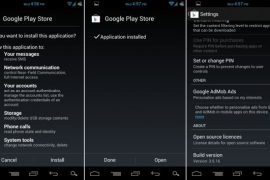
Below are the most recent versions of Play Store:
[posts-by-tag tags = “google-play-apk” number = “5”]
We just found a new version of Google Play Store making rounds on internet and thought it’s worth sharing with you guys. The new Google Play app’s version is 3.5.16, the last one being 3.5.15.
Yep, not a big update clearly, going by the change in version number (just an addition of 0.0.0.1) and it’s being said that it basically fixes problems with purchased apps not appearing under the My Apps section for many users. I you had any such problem with the earlier Play Store app, do try this.
How to Install Google Play 3.5.16
One can download the APK of Google Play v3.5.16 and install it like any other app. You don’t need root, ADB or anything, just download the Google Play’s APK file from step 1 below and transfer it to your phone’s SD Card and then use a file manager to browse to it and install. (Don’t forget select the “Unknown sources” check box under applications settings before that so that you’re able to install apps manually.)
For those pretty new on android scene, first of all welcome to android world, and check out the detailed procedure below on how to install Play Store’s using its APK:
- Download Google Play 3.5.16 APK file.
- If you downloaded it on PC, transfer it to phone.
- You’ll need a file manager to browse through SD Card. If you don’t have one already, use this file manager (install for free from your current market app, which will soon be Google Play Store App.
- Enable “Unknown sources” under Settings » Applications, so that you can install applications from SD Card. If you are on Ice Cream Sandwich, Android 4.0, find it under Settings » Security.
- Open file manager app and go to directly where you transferred the apk file in Step 2.
- Find and tap on the file to begin installation procedure and it will be installed in a minute. That’s it.
We haven’t spotted any changes — at least in appearances, that is — whatsoever with the new version 3.5.16 yet. If you do, do share it in comments. Ad in case you need help with anything regarding this, feel free to ask in comments below.

155 responses to “Google Play APK 3.5.16”
how do you “Add an account” When I double click, it says it installed, but asks me to Add an account, and when I say yes, nothing happens…. ?
Go to settings – Accounts and Sync and then add an account there. Which phone and rom are you using btw?
But if i use a tablet android whitch not a phone i cant have access too i try it the same thing can u help me please
same problem
yes, that’s the same problem happening to me, i am using Galaxy note (GT-I9228) . After installing the google play APK , -> i tab the google play -> it says ” add an account” -> when i say ‘yes’ nothing happens, it just closes. What’s the solution, could anyone please help . Thanks a lot in advance.
One more thing is My Galaxy note (GT-I9228) doesn;t have a GMAIL for mobile app, when i got that from GMAIL and installed it. i tried to create a GMAIl account (GMAIL on mobile APP) , it does the same, nothing happens when i tap it. Please help.
I also download it but I cannot open it- any help? I have tablet android 4.0
I am facing the same problem its hows “no internet connection”…
same with me but i use bluestacks
how do you “Add an account” When I double click, it says it installed, but asks me to Add an account, and when I say yes, nothing happens…. ?
Go to settings – Accounts and Sync and then add an account there. Which phone and rom are you using btw?
But if i use a tablet android whitch not a phone i cant have access too i try it the same thing can u help me please
same problem
I also download it but I cannot open it- any help? I have tablet android 4.0
same with me but i use bluestacks
I am facing the same problem its hows “no internet connection”…
yes, that’s the same problem happening to me, i am using Galaxy note (GT-I9228) . After installing the google play APK , -> i tab the google play -> it says ” add an account” -> when i say ‘yes’ nothing happens, it just closes. What’s the solution, could anyone please help . Thanks a lot in advance.
One more thing is My Galaxy note (GT-I9228) doesn;t have a GMAIL for mobile app, when i got that from GMAIL and installed it. i tried to create a GMAIl account (GMAIL on mobile APP) , it does the same, nothing happens when i tap it. Please help.
how do you “Add an account” When I double click, it says it installed, but asks me to Add an account, and when I say yes, nothing happens…. ?
Go to settings – Accounts and Sync and then add an account there. Which phone and rom are you using btw?
But if i use a tablet android whitch not a phone i cant have access too i try it the same thing can u help me please
same problem
I also download it but I cannot open it- any help? I have tablet android 4.0
same with me but i use bluestacks
I am facing the same problem its hows “no internet connection”…
yes, that’s the same problem happening to me, i am using Galaxy note (GT-I9228) . After installing the google play APK , -> i tab the google play -> it says ” add an account” -> when i say ‘yes’ nothing happens, it just closes. What’s the solution, could anyone please help . Thanks a lot in advance.
One more thing is My Galaxy note (GT-I9228) doesn;t have a GMAIL for mobile app, when i got that from GMAIL and installed it. i tried to create a GMAIl account (GMAIL on mobile APP) , it does the same, nothing happens when i tap it. Please help.
when I create an account on setting>account&sync. after I typed the email address and password and clicked okay it says that unable to open connection to server. My wifi is okay so there is no problem on my connection. what should I do?
It seems there is problem with internet connection. Can you open google.comin browser app, test your connection with that and then try again.
I got the same problem plz help
get many more apps apk http://androidappmarkets.blogspot.com/
Same problem, it says “no connection” but my wi-fi is okay. please help
when I create an account on setting>account&sync. after I typed the email address and password and clicked okay it says that unable to open connection to server. My wifi is okay so there is no problem on my connection. what should I do?
It seems there is problem with internet connection. Can you open google.comin browser app, test your connection with that and then try again.
I got the same problem plz help
get many more apps apk http://androidappmarkets.blogspot.com/
Same problem, it says “no connection” but my wi-fi is okay. please help
Same problem, it says “no connection” but my wi-fi is okay. please help
when I create an account on setting>account&sync. after I typed the email address and password and clicked okay it says that unable to open connection to server. My wifi is okay so there is no problem on my connection. what should I do?
It seems there is problem with internet connection. Can you open google.comin browser app, test your connection with that and then try again.
I got the same problem plz help
Same problem, it says “no connection” but my wi-fi is okay. please help
well if you use airdroid.apk airdroid will update it.
It worked with me.
where can we get airdroid.apk file dude???????????
well if you use airdroid.apk airdroid will update it.
It worked with me.
where can we get airdroid.apk file dude???????????
well if you use airdroid.apk airdroid will update it.
It worked with me.
where can we get airdroid.apk file dude???????????
I have dat same prob when i enter the email in the password it said eneable to connect wit the server i dont know wat happen i better buy an ipad if dat shit dont work why do i use it danm it
Are you connected to WiFi, I mean is Internet working on your tablet? Which Android tablet you got yourself btw?
I have dat same prob when i enter the email in the password it said eneable to connect wit the server i dont know wat happen i better buy an ipad if dat shit dont work why do i use it danm it
Are you connected to WiFi, I mean is Internet working on your tablet? Which Android tablet you got yourself btw?
I have dat same prob when i enter the email in the password it said eneable to connect wit the server i dont know wat happen i better buy an ipad if dat shit dont work why do i use it danm it
Are you connected to WiFi, I mean is Internet working on your tablet? Which Android tablet you got yourself btw?
I can’ use google play market.It said me “Authentication is required.You need to sign in to your Google Account.” So what shout i do?I have already sign in my google account in google.
I guess you haven’t, otherwise it wouldn’t ask. Try again, go to settings – accounts and sync and setup your account from there.
I have already Sync my account in my phone.But It’s still said Authentication is required. How can I do? I need to authenticate my account.
the same problem with me 🙁
I can’ use google play market.It said me “Authentication is required.You need to sign in to your Google Account.” So what shout i do?I have already sign in my google account in google.
I guess you haven’t, otherwise it wouldn’t ask. Try again, go to settings – accounts and sync and setup your account from there.
I have already Sync my account in my phone.But It’s still said Authentication is required. How can I do? I need to authenticate my account.
the same problem with me 🙁
I can’ use google play market.It said me “Authentication is required.You need to sign in to your Google Account.” So what shout i do?I have already sign in my google account in google.
I guess you haven’t, otherwise it wouldn’t ask. Try again, go to settings – accounts and sync and setup your account from there.
I have already Sync my account in my phone.But It’s still said Authentication is required. How can I do? I need to authenticate my account.
the same problem with me 🙁
when i ttried installing it it came up with a message saying ‘problem parsing package :/ whats that?
when i ttried installing it it came up with a message saying ‘problem parsing package :/ whats that?
when i ttried installing it it came up with a message saying ‘problem parsing package :/ whats that?
I downloaded it on to my Polaroid PMID701i tablet running 4.0
It recognized my device but it keeps saying Google Play must stop.
It says I loaded Adobe Flash 11 and Dolphin Browser but when I look at my downloaded apps in the settings, neither one appears.
I downloaded it on to my Polaroid PMID701i tablet running 4.0
It recognized my device but it keeps saying Google Play must stop.
It says I loaded Adobe Flash 11 and Dolphin Browser but when I look at my downloaded apps in the settings, neither one appears.
I downloaded it on to my Polaroid PMID701i tablet running 4.0
It recognized my device but it keeps saying Google Play must stop.
It says I loaded Adobe Flash 11 and Dolphin Browser but when I look at my downloaded apps in the settings, neither one appears.
When I tried installing it, it came up with a message saying ‘Problem Parsing Package’..Could someone please answers.
Thanks.
What android OS version you have. Check that in settings – about phone. I think one needs to have Android 2.2 or above on the android device to be able to install the Google Play v3.5.16.
When I tried installing it, it came up with a message saying ‘Problem Parsing Package’..Could someone please answers.
Thanks.
What android OS version you have. Check that in settings – about phone. I think one needs to have Android 2.2 or above on the android device to be able to install the Google Play v3.5.16.
When I tried installing it, it came up with a message saying ‘Problem Parsing Package’..Could someone please answers.
Thanks.
What android OS version you have. Check that in settings – about phone. I think one needs to have Android 2.2 or above on the android device to be able to install the Google Play v3.5.16.
Hi. I have a Kindle Fire and would love to access Google Play for more apps not offered by Amazon. My K-Fire is not rooted, so I sideloaded the app. It installed fine. It asked me to set up an account when I launched. I select YES but nothing happens. I know the K-fire is not listed on the Google Play page, but was hoping a sideload would work. Your thoughts?
Try another version of Google Play then, like 3.5.15, or an older market 3.4.6. Search for both of them on our site to get link and guide.
Hi. I have a Kindle Fire and would love to access Google Play for more apps not offered by Amazon. My K-Fire is not rooted, so I sideloaded the app. It installed fine. It asked me to set up an account when I launched. I select YES but nothing happens. I know the K-fire is not listed on the Google Play page, but was hoping a sideload would work. Your thoughts?
Try another version of Google Play then, like 3.5.15, or an older market 3.4.6. Search for both of them on our site to get link and guide.
Hi. I have a Kindle Fire and would love to access Google Play for more apps not offered by Amazon. My K-Fire is not rooted, so I sideloaded the app. It installed fine. It asked me to set up an account when I launched. I select YES but nothing happens. I know the K-fire is not listed on the Google Play page, but was hoping a sideload would work. Your thoughts?
Try another version of Google Play then, like 3.5.15, or an older market 3.4.6. Search for both of them on our site to get link and guide.
hi,i have a problem with market, my device can not login to google account with this error message”authentication is required,you need to sign into your google account”
i see my accounts but google play market cant sign in.
hi…. rahi peyda kardi vase in ghazie… manam hamin moshkel ro daram
hi,i have a problem with market, my device can not login to google account with this error message”authentication is required,you need to sign into your google account”
i see my accounts but google play market cant sign in.
hi…. rahi peyda kardi vase in ghazie… manam hamin moshkel ro daram
hi,i have a problem with market, my device can not login to google account with this error message”authentication is required,you need to sign into your google account”
i see my accounts but google play market cant sign in.
hi…. rahi peyda kardi vase in ghazie… manam hamin moshkel ro daram
when i install google play it was installed , but when I open the app it says google play has stopped working…. this android is 4.0.3……
Go to settings – apps – ALL – scroll down and tap on Google Play Store, then do clear data. I think this will fix it.
Unfortunately it doesn’t 🙁
I installed CM7.2 on O2x and I’m having the same problem.
I noticed that no google app is installed. Maybe installing an apk pakage would solve?
when i install google play it was installed , but when I open the app it says google play has stopped working…. this android is 4.0.3……
Go to settings – apps – ALL – scroll down and tap on Google Play Store, then do clear data. I think this will fix it.
Unfortunately it doesn’t 🙁
I installed CM7.2 on O2x and I’m having the same problem.
I noticed that no google app is installed. Maybe installing an apk pakage would solve?
when i install google play it was installed , but when I open the app it says google play has stopped working…. this android is 4.0.3……
Go to settings – apps – ALL – scroll down and tap on Google Play Store, then do clear data. I think this will fix it.
Unfortunately it doesn’t 🙁
I installed CM7.2 on O2x and I’m having the same problem.
I noticed that no google app is installed. Maybe installing an apk pakage would solve?
You also can download apk from
http://yes2android.blogspot.com/2012/04/google-play-3516.html
You also can download apk from
http://yes2android.blogspot.com/2012/04/google-play-3516.html
that is exactly wat happin 2 me
that is exactly wat happin 2 me
that is exactly wat happin 2 me
it works on tablets
it works on tablets
it works on tablets
I nearly did everything offered in all google searches. nothing works successfully for google play to work in HCL ME U1.
Installing Android SDK and running ADB shell etc. also sometime does not allow file to be copied to system/app file and it’s very tedious thing if you are not familiar with java and linux commands.
There seems to be some restriction by HCL in startup for disabling google play.
following is the option which worked for me and very easy and using which so fart I have installed about 100 applications form google play and using my HCL ME U1 without any problem
1) Install JDK in PC. You may also require HCL ME connect for drivers of HCL U1.
2) Install Android commander (PC program. download and install from net) (http://androidcommander.com/)
3) using android commander Copy android apk file in system/app folder. (get it from internet http://www.mediafire.com/?071li69rh7x3yhh) also copy the same apk to SD card folder.
4)Now when you restart tab it read as ‘android upgrading’ , but soon yo will get message “Unfortunately google play stopped working”.then try open google play it will show an error “unfortunately google stopped working” again
6) Now go to you SD card where you have google play apk
7) Double tap on that and install google play. will give message that you are replacing main application etc. say ok.
8) Now google play will work/download/install any application from marketplace. now google play will work like anything.
9)the moment you shutdown or reboot tab you will start getting “Unfortunately google play stopped working” message again
10) So whenever you want to use google play double tap and install google play from sd card. for that time being it will work until you reboot or shutdown and start.
so use that way it hardly takes 5-6 seconds to install google play apk from sdcard whenever you start tab.
PLEASE NOTE it is very important that to have android.apk in root of system/app folder. without that it will not work.
— What I feel is that HCL has made some restriction by disabling something in startup. Anyway it takes only 5 seconds to install google play apk from sdcard. and for that time it works just pefect. i tried all other way but this is the only way it works.
help me out in installing google play at my hcl tab me u1…
help me out mehul………….
pls specify which jdk file to be downloaded.
I nearly did everything offered in all google searches. nothing works successfully for google play to work in HCL ME U1.
Installing Android SDK and running ADB shell etc. also sometime does not allow file to be copied to system/app file and it’s very tedious thing if you are not familiar with java and linux commands.
There seems to be some restriction by HCL in startup for disabling google play.
following is the option which worked for me and very easy and using which so fart I have installed about 100 applications form google play and using my HCL ME U1 without any problem
1) Install JDK in PC. You may also require HCL ME connect for drivers of HCL U1.
2) Install Android commander (PC program. download and install from net) (http://androidcommander.com/)
3) using android commander Copy android apk file in system/app folder. (get it from internet http://www.mediafire.com/?071li69rh7x3yhh) also copy the same apk to SD card folder.
4)Now when you restart tab it read as ‘android upgrading’ , but soon yo will get message “Unfortunately google play stopped working”.then try open google play it will show an error “unfortunately google stopped working” again
6) Now go to you SD card where you have google play apk
7) Double tap on that and install google play. will give message that you are replacing main application etc. say ok.
8) Now google play will work/download/install any application from marketplace. now google play will work like anything.
9)the moment you shutdown or reboot tab you will start getting “Unfortunately google play stopped working” message again
10) So whenever you want to use google play double tap and install google play from sd card. for that time being it will work until you reboot or shutdown and start.
so use that way it hardly takes 5-6 seconds to install google play apk from sdcard whenever you start tab.
PLEASE NOTE it is very important that to have android.apk in root of system/app folder. without that it will not work.
— What I feel is that HCL has made some restriction by disabling something in startup. Anyway it takes only 5 seconds to install google play apk from sdcard. and for that time it works just pefect. i tried all other way but this is the only way it works.
help me out in installing google play at my hcl tab me u1…
help me out mehul………….
pls specify which jdk file to be downloaded.
I nearly did everything offered in all google searches. nothing works successfully for google play to work in HCL ME U1.
Installing Android SDK and running ADB shell etc. also sometime does not allow file to be copied to system/app file and it’s very tedious thing if you are not familiar with java and linux commands.
There seems to be some restriction by HCL in startup for disabling google play.
following is the option which worked for me and very easy and using which so fart I have installed about 100 applications form google play and using my HCL ME U1 without any problem
1) Install JDK in PC. You may also require HCL ME connect for drivers of HCL U1.
2) Install Android commander (PC program. download and install from net) (http://androidcommander.com/)
3) using android commander Copy android apk file in system/app folder. (get it from internet http://www.mediafire.com/?071li69rh7x3yhh) also copy the same apk to SD card folder.
4)Now when you restart tab it read as ‘android upgrading’ , but soon yo will get message “Unfortunately google play stopped working”.then try open google play it will show an error “unfortunately google stopped working” again
6) Now go to you SD card where you have google play apk
7) Double tap on that and install google play. will give message that you are replacing main application etc. say ok.
8) Now google play will work/download/install any application from marketplace. now google play will work like anything.
9)the moment you shutdown or reboot tab you will start getting “Unfortunately google play stopped working” message again
10) So whenever you want to use google play double tap and install google play from sd card. for that time being it will work until you reboot or shutdown and start.
so use that way it hardly takes 5-6 seconds to install google play apk from sdcard whenever you start tab.
PLEASE NOTE it is very important that to have android.apk in root of system/app folder. without that it will not work.
— What I feel is that HCL has made some restriction by disabling something in startup. Anyway it takes only 5 seconds to install google play apk from sdcard. and for that time it works just pefect. i tried all other way but this is the only way it works.
help me out in installing google play at my hcl tab me u1…
help me out mehul………….
pls specify which jdk file to be downloaded.
App fails to load on Arnova 10b G3 using Android 4.0
App fails to load on Arnova 10b G3 using Android 4.0
App fails to load on Arnova 10b G3 using Android 4.0
why i need to add an an account???
what’s the problem?
why i need to add an an account???
what’s the problem?
why i need to add an an account???
what’s the problem?