

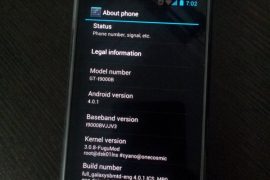
While Samsung would take ages — if they intend to bring the update in first place, which itself is debatable — to release the latest Android 4.0 update to Galaxy S officially via Kies, our beloved developers have already started burning their midnight oil to get you Ice Cream Sandwich love on your very dear very venerable phone in android blogosphere, the Galaxy S.
And their hard work is showing up now in the form of a custom ROM — we’re talking about the first ICS (Android 4.0) port for Galaxy S, made by pretty famous now on Galaxy S development scene, Galnet.
Developers: Galnet was first one to boot ICS on Galaxy S but since then, he and his team has been quite on this. The development came to life only after Onecosmic started working on it and he is the one who took further, making it a bit usable and fixing the touchscreen and doing all the crazy part. After Onecosmic got busy with other stuff, work was resumed by PaulForde, who is responsible for current stage of rom, among with other devs who are working continuously on it right now.
Developers and Donation Link
Here is list to all devs who are currently active on this rom. And we hope you donate them to show your gratitude to them for work they have, while also encouraging them for working more on this development.
Android 4.0 Ice Cream Sandwich (ICS) ROM Status
Update (As of February 12, 2012): RC 4.2 is out — it’s simply one incredible rom, by certain awesome teams of devs.
Big Update: RC1 is out. Features working from this release: Video recording and playback, Hardware Acceleration, Calendar Sync, etc. You may want to celebrate this!! People avoiding the ICS — somehow, I mean — should try this version. Kudos to PaulForde (we’re really thankful to him for this) and Onecosmic.
Almost everything is working — though, of course, there are bugs!
COMPATIBILITY
[error]This guide is applicable only for Samsung’s Galaxy S international version — GT-i9000 and GT-i9000B. Check your phone’s version in Settings – About Phone. It has to be “GT-i9000” or “GT-i9000B” for this Android 4.0 port ROM to be compatible with your phone. Otherwise, simply don’t try this ROM on your android handset — don’t even think about it if you care about your android device.[/error]
WANRING!
[warning]The methods and procedures discussed here are considered risky and you should not attempt anything if you don’t know completely what it is. If any damage occurs to you or your device, we won’t be held liable — you only will be responsible, you’ve been warned!!![/warning]
Installing the Android 4.0 ICS custom ROM isn’t that hard if you’ve already done flashing stuff a couple of times. But even if you’re new to flashing and custom ROMs, don’t worry one bit, we’ve got you covered. Just watch the video below, read the instructions and you are good to do it yourself.
Pre-Installation thoughts:
- Installing/Flashing this ROM will erase your apps and data. So, it’s a very important you back them up, before proceeding further. To backup your apps and important data — bookmarks, contacts, SMS, APNs (internet settings), etc. Restore APN settings if Internet isn’t working for you. This Android backup guide would help you. And if you’ve rooted your Galaxy S, you can save application’s data too, using Titanium backup (free app on android market) to backup apps with data. And use this this app only again to restore those apps with data.
- Drivers! — it’s important you’ve the proper drivers installed. Download links below:
- If you have Samsung’s PC software Kies installed, be sure to exit it before using flashing this ROM, or anything with odin software.
Android 4.0 Ice Cream Sandwich for Galaxy S
Update: The installation process is much different now that what was for the initial release. But you can still watch the video — especially if you’re new to this — to get the idea of flashing and stuff. And the guide below has been duly updated to take care of installation needs of the latest release. So, go ahead!
So, the video below is not to be followed, but if you want to learn about rebooting into recovery, using CWM recovery, and other things, watching the video for once is recommended.
Here’s the video showing the installation of Android 4.0 custom ROM (AOSP port, version alpha4):
Note: There is a brief overview (from 6:58) of Android 4.0 running on Galaxy S in the above video.
How to Install Ice Cream Sandwich on Galaxy S [step-by-step guide]:
- Flash XXJVU Android 2.3.6 based firmware first.
- Install CWM and Root on the XXJVU.
- Download the latest version of “Android 4.0 ROM” from here — let’s call it rom file — and then continue the steps below to flash it without any worries. be careful while downloading since that page has downloads for all version of Galaxy S for which this rom is available. Download one meant for your phone, i9000.
- Transfer the rom file to your phone’s sdcard (don’t use external sdcard, btw). Remember the location where you transfer this files.
- Power Off your Galaxy S. Wait for 5-6 seconds until you feel the vibration to confirm complete switch off.
- Boot into Recovery mode. Then, press and hold these 3 buttons together: VolumeUP+Home+Power till the Galaxy S logo shows up on screen. You’ll boot into CWM recovery soon enough. (In recovery, use Volume keys to scroll up and down and power key to select an option. Use back key to go back.)
- Do Wipe Data/Factory Reset
- Do Wipe Cache Partition
- Go to advanced and do Wipe Dalvik Cache
- Now, flash the rom file. Select install zip from sdcard » choose zip from sdcard » browse through sdcard and select the rom file you downloaded in step 3 and transferred in step 4 above. Select “Yes – Install ______” on the next screen.
- After flashing necessary stuff, phone will boot up into recovery again. You will notice it’s a different recovery, colored blue now, and this is what was flashed in step 10 above to make the phone ready for installation.
- Now, flash the rom file again. Select install zip from sdcard » choose zip from sdcard » browse through sdcard and select the rom file you downloaded in step 3 and transferred in step 4 above. Select “Yes – Install ______” on the next screen.
- Go back and select ‘reboot system now’ to restart the phone. Be patient while phone boots up, it may take between 5 to 15 mins for first boot.
- IF IT FAILS TO BOOT in 15 mins, then, well we got problem here. Do this:
- When the phone is restarting (still booting up) open the back cover and REMOVE the battery. Yes you read it right. Reinsert it after 3-4 seconds and then boot into recovery again.
- In recovery, do a Wipe Data/ Factory Reset. And then, select reboot system now to restart the phone. it should boot up properly now. If it doesn’t, then perhaps you did not follow something correctly.
- Also, if you are not happy with the performance of this rom — maybe because it lacks some apps/features you cared too much for, or reboots itself — I would suggest you to install the Android 4.0 AOKP Rom for Galaxy S, it’s simply damn good.
- [Optional] Support the development and appreciate the hard work put in by the team by donating them. Find donation link given above.
- Also, it’s already rooted. You don’t need to root it.
- Just for your info, Android 4.0 custom ROM is available Galaxy S2 too — find our Installation Guide for Android 4.0 on Galaxy S2 i9100 here.
GOING BACK TO ANDROID 2.3 (Gingerbread) [IMPORTANT!!!]
Btw, if you want to revert back to Android 2.3 Gingerbread firmware from this Android 4.0 custom rom, get (install) the XXJVU firmware, linked in at step 1 above. And if wanted by you, root it as given in step 2.
Overview — Android 4.0 AOSP ROM (version Alpha 4) on Galaxy S
Screenshots:








3,840 responses to “Android 4.0 Ice Cream Sandwich (ICS) Update for Galaxy S i9000 [Custom ROM]”
Just applied latest update, very nice and so easy to install, fantastic work. Still having flash issues (BBC I Player mainly,) and a few app issues but nothing major. Disappointed at the ‘uninstall app’ option being removed when long pressing an app icon, really liked that in last version. Video recorder still not working but i’m sure you know this.
Can’t find the kernel file in the download window
Kapil said he would update the post soon, I’ve complained about the same problem.
Didnt see your post in time… sorry
Post updated.
Can’t find the kernel file in the download window
Kapil said he would update the post soon, I’ve complained about the same problem.
Didnt see your post in time… sorry
Post updated.
Where is the kernel? The link in step 4 is the same link as in step 3 (like it says) but there is no kernel if this could please be fixed or uploaded somewhere else if possible. Thank You!!!
I think kernel flashing is no longer required. It’s just one simple flash of ICS rom now, no messing up with kernel and all that. Just wait for 15 mins, I’m trying the rom again, and will update the post shortly.
Hope the video-camera works finally 🙂
Where is the kernel? The link in step 4 is the same link as in step 3 (like it says) but there is no kernel if this could please be fixed or uploaded somewhere else if possible. Thank You!!!
I think kernel flashing is no longer required. It’s just one simple flash of ICS rom now, no messing up with kernel and all that. Just wait for 15 mins, I’m trying the rom again, and will update the post shortly.
Hope the video-camera works finally 🙂
POST UPDATED.. rom has been updated with significant changes that affect the installation guide — you know, the kernel is now included in the rom file itself now. So, see the updated guide, and fyi, it’s very easy now to install ICS. No CM7 required, and just one file (of rom, of course) download required.
Thanks, flashing finally.
POST UPDATED.. rom has been updated with significant changes that affect the installation guide — you know, the kernel is now included in the rom file itself now. So, see the updated guide, and fyi, it’s very easy now to install ICS. No CM7 required, and just one file (of rom, of course) download required.
Thanks, flashing finally.BTW: Nyan cat is cute.
will FM radio be coming in future updates?
will FM radio be coming in future updates?
Just applied latest update, very nice and so easy to install, fantastic work. Still having flash issues (BBC I Player mainly,) and a few app issues but nothing major. Disappointed at the ‘uninstall app’ option being removed when long pressing an app icon, really liked that in last version. Video recorder still not working but i’m sure you know this.
Just applied latest update, very nice and so easy to install, fantastic work. Still having flash issues (BBC I Player mainly,) and a few app issues but nothing major. Disappointed at the ‘uninstall app’ option being removed when long pressing an app icon, really liked that in last version. Video recorder still not working but i’m sure you know this.
I see that a kernel has been added now for the i9000. Now I am confused. The updated guide says the Kernel is included in the ROM so must I only download the ICS_4.0.1_r1-Beta2-i9000.zip file and flash it or must I download this file and the Beta 2 Kernel aswell. Help appreciated, thank you!
Seems like it got updated again. Will update the guide in a day. Check back later, please.
I flashed it straight from rom with no problems.
Awsum thanxs I dont mind waiting…take ur time!
Can’t find the update 2.5.1 beta anywhere. Last update dates from December 3!
The update has now been marked as deprecated. I assume this means some major bugs or issues have been found? I’ve not experienced anything bad so far.
Me neither, btw.
http://code.google.com/p/ice-cream-sandwich-sgs/downloads/list?can=1&q=2.5.1&colspec=Filename+Summary+Uploaded+ReleaseDate+Size+DownloadCount
+1, 2.5.1 seems ok
i have done it but i have got the problem. i am not getting the music. and when i open storage in settings i get an error message as unfortunately,settings has stopped.
Is the insallation for 2.5.1 BETA same like this?
I see that a kernel has been added now for the i9000. Now I am confused. The updated guide says the Kernel is included in the ROM so must I only download the ICS_4.0.1_r1-Beta2-i9000.zip file and flash it or must I download this file and the Beta 2 Kernel aswell. Help appreciated, thank you!
Seems like it got updated again. Will update the guide in a day. Check back later, please.
Awsum thanxs I dont mind waiting…take ur time!
I flashed it straight from rom with no problems.
I see that a kernel has been added now for the i9000. Now I am confused. The updated guide says the Kernel is included in the ROM so must I only download the ICS_4.0.1_r1-Beta2-i9000.zip file and flash it or must I download this file and the Beta 2 Kernel aswell. Help appreciated, thank you!
Seems like it got updated again. Will update the guide in a day. Check back later, please.
Awsum thanxs I dont mind waiting…take ur time!
I flashed it straight from rom with no problems.
Does Android Beam work with this version?
Can’t find the update 2.5.1 beta anywhere. Last update dates from December 3!
The update has now been marked as deprecated. I assume this means some major bugs or issues have been found? I’ve not experienced anything bad so far.
Me neither, btw.
+1, 2.5.1 seems ok
i have done it but i have got the problem. i am not getting the music. and when i open storage in settings i get an error message as unfortunately,settings has stopped.
http://code.google.com/p/ice-cream-sandwich-sgs/downloads/list?can=1&q=2.5.1&colspec=Filename+Summary+Uploaded+ReleaseDate+Size+DownloadCount
Can’t find the update 2.5.1 beta anywhere. Last update dates from December 3!
The update has now been marked as deprecated. I assume this means some major bugs or issues have been found? I’ve not experienced anything bad so far.
Me neither, btw.
+1, 2.5.1 seems ok
i have done it but i have got the problem. i am not getting the music. and when i open storage in settings i get an error message as unfortunately,settings has stopped.
http://code.google.com/p/ice-cream-sandwich-sgs/downloads/list?can=1&q=2.5.1&colspec=Filename+Summary+Uploaded+ReleaseDate+Size+DownloadCount
Is the insallation for 2.5.1 BETA same like this?
Is the insallation for 2.5.1 BETA same like this?
work fine and nice work. only some small bugs.
Does Android Beam work with this version?
Does Android Beam work with this version?
Im on network locked tmobile uk branded
but now running xxjvs (rooted.)
Will this work for me? Or do i need to unlock the phone?
Also, what is different in this 2.5.1 version from the last? Because it isnt mentioned…
Fixes since original beta 2:
Microbes works now
Black Hole Live wallpaper added
File explorer added
Barcode Scanner added
Cache partition has been symlinked to a folder on /data so we no longer have issues with installing big apps
efs partition is no longer mounted during the install process,it is backed up a different way to cause less issues.
The camera has been updated to the one from koush’s nexus s build,it seems to perform better than what we were using.
NYANCAT BOOT ANIMATION!!!
Thanks for adding extra detail. 🙂
What about me having a network locked phone?? Does that matter?
Im on rooted jvs already (i can use odin just about)
But how do I transfer zip ( ics rom) file to my i9000 precisely?
Im unsure…
I want to get this right first time!
Nathan.
can not find..
fuguicsdrmfixi9000update zip
help
work fine and nice work. only some small bugs.
work fine and nice work. only some small bugs.
I just updated to 2.5.1. Is anyone else having problems when connecting the phone to the PC? And also when trying to open Storage Menu?
yea same problem… seems like there are more glitches in 2.5 than in 2.0. I flashed back to 2.0.
Im on network locked tmobile uk branded
but now running xxjvs (rooted.)
Will this work for me? Or do i need to unlock the phone?
Also, what is different in this 2.5.1 version from the last? Because it isnt mentioned…
Fixes since original beta 2:
Microbes works now
Black Hole Live wallpaper added
File explorer added
Barcode Scanner added
Cache partition has been symlinked to a folder on /data so we no longer have issues with installing big apps
efs partition is no longer mounted during the install process,it is backed up a different way to cause less issues.
The camera has been updated to the one from koush’s nexus s build,it seems to perform better than what we were using.
NYANCAT BOOT ANIMATION!!!
Thanks for adding extra detail. 🙂
What about me having a network locked phone?? Does that matter?
Im on rooted jvs already (i can use odin just about)
But how do I transfer zip ( ics rom) file to my i9000 precisely?
Im unsure…
I want to get this right first time!
Nathan.
can not find..
fuguicsdrmfixi9000update zip
help
Im on network locked tmobile uk branded
but now running xxjvs (rooted.)
Will this work for me? Or do i need to unlock the phone?
Also, what is different in this 2.5.1 version from the last? Because it isnt mentioned…
Fixes since original beta 2:
Microbes works now
Black Hole Live wallpaper added
File explorer added
Barcode Scanner added
Cache partition has been symlinked to a folder on /data so we no longer have issues with installing big apps
efs partition is no longer mounted during the install process,it is backed up a different way to cause less issues.
The camera has been updated to the one from koush’s nexus s build,it seems to perform better than what we were using.
NYANCAT BOOT ANIMATION!!!
Thanks for adding extra detail. 🙂
What about me having a network locked phone?? Does that matter?
Im on rooted jvs already (i can use odin just about)
But how do I transfer zip ( ics rom) file to my i9000 precisely?
Im unsure…
I want to get this right first time!
Nathan.
can not find..
fuguicsdrmfixi9000update zip
help
I just updated to 2.5.1. Is anyone else having problems when connecting the phone to the PC? And also when trying to open Storage Menu?
yea same problem… seems like there are more glitches in 2.5 than in 2.0. I flashed back to 2.0.
I just updated to 2.5.1. Is anyone else having problems when connecting the phone to the PC? And also when trying to open Storage Menu?
yea same problem… seems like there are more glitches in 2.5 than in 2.0. I flashed back to 2.0.
netwoRK is Not available ..!! 🙁
What’s your network band..? I might be able to help.
i’m facing the same problem, i’ve upgraded from baseband v. I9000XXJVQ to I9000UGKG3 and cant seem to connect to carrier, tried every forum/thread .. if you can help it would be great!
netwoRK is Not available ..!! 🙁
What’s your network band..? I might be able to help.
i’m facing the same problem, i’ve upgraded from baseband v. I9000XXJVQ to I9000UGKG3 and cant seem to connect to carrier, tried every forum/thread .. if you can help it would be great!
netwoRK is Not available ..!! 🙁
What’s your network band..? I might be able to help.
i’m facing the same problem, i’ve upgraded from baseband v. I9000XXJVQ to I9000UGKG3 and cant seem to connect to carrier, tried every forum/thread .. if you can help it would be great!
hi i already installed ICS_4.0.1_r1-Beta2-i9000.zip and really awesome everything looks different. its running smoothly to my phone, i try also the updated 2.5.1 it’s almost the same only some additional application like barcode scanner and there was a file manager but in r1-beta2 version there’s no file manager. both had same issue regarding in storage when you click it setting was force closed is someone encounter this thing? second all my mp3 and other photo cannot read in my external mmc even i install different mp3 player sometimes it force closed. also the video format regarding for all my download movies in my phone cannot play even i already download the media player in blackmart still video cannot play. is all the person encounter this? i stay in ICS_4.0.1_r1-Beta2-i9000.zip in my phone cause i dont like the boot animation on 2.5.1 version it was cat running on it. but im happy and waiting for latest update to fixed some bugs. thanks for dev team keep it up
after i install beta 2.5.1 my phone run out of battery in about 14 hours.Is that normal
?
hi i already installed ICS_4.0.1_r1-Beta2-i9000.zip and really awesome everything looks different. its running smoothly to my phone, i try also the updated 2.5.1 it’s almost the same only some additional application like barcode scanner and there was a file manager but in r1-beta2 version there’s no file manager. both had same issue regarding in storage when you click it setting was force closed is someone encounter this thing? second all my mp3 and other photo cannot read in my external mmc even i install different mp3 player sometimes it force closed. also the video format regarding for all my download movies in my phone cannot play even i already download the media player in blackmart still video cannot play. is all the person encounter this? i stay in ICS_4.0.1_r1-Beta2-i9000.zip in my phone cause i dont like the boot animation on 2.5.1 version it was cat running on it. but im happy and waiting for latest update to fixed some bugs. thanks for dev team keep it up
hi i already installed ICS_4.0.1_r1-Beta2-i9000.zip and really awesome everything looks different. its running smoothly to my phone, i try also the updated 2.5.1 it’s almost the same only some additional application like barcode scanner and there was a file manager but in r1-beta2 version there’s no file manager. both had same issue regarding in storage when you click it setting was force closed is someone encounter this thing? second all my mp3 and other photo cannot read in my external mmc even i install different mp3 player sometimes it force closed. also the video format regarding for all my download movies in my phone cannot play even i already download the media player in blackmart still video cannot play. is all the person encounter this? i stay in ICS_4.0.1_r1-Beta2-i9000.zip in my phone cause i dont like the boot animation on 2.5.1 version it was cat running on it. but im happy and waiting for latest update to fixed some bugs. thanks for dev team keep it up
after i install beta 2.5.1 my phone run out of battery in about 14 hours.Is that normal
?
after i install beta 2.5.1 my phone run out of battery in about 14 hours.Is that normal
?
Hi Kapil, Currently I am on XXJVP 2.3.4 ON Galaxy S GT-I9000. Next Updates 2.3.5 and 2.5.6 are available from long but i have been waiting for Ice Cream Sandwich version to become stable. What is the best option for me now as ICS is not yet complete. Should i move to 2.3.5 or 2.3.6 till then? What is the best option ?
Android 4.0 ICS roms are not good for daily use right now.. so stick with Android 2.3.x rom. Btw, we’ll be posting a guide to update Galaxy S to Android 2.3.6 shortly, within a couple of hrs. Stay tuned.
Can’t agree with you less. Rom is not ideal, I admit but the most important work without tok much bugs (I’m speaking of beta 2.0)
Hi Kapil, Currently I am on XXJVP 2.3.4 ON Galaxy S GT-I9000. Next Updates 2.3.5 and 2.5.6 are available from long but i have been waiting for Ice Cream Sandwich version to become stable. What is the best option for me now as ICS is not yet complete. Should i move to 2.3.5 or 2.3.6 till then? What is the best option ?
Android 4.0 ICS roms are not good for daily use right now.. so stick with Android 2.3.x rom. Btw, we’ll be posting a guide to update Galaxy S to Android 2.3.6 shortly, within a couple of hrs. Stay tuned.
Can’t agree with you less. Rom is not ideal, I admit but the most important work without tok much bugs (I’m speaking of beta 2.0)
Hi Kapil, Currently I am on XXJVP 2.3.4 ON Galaxy S GT-I9000. Next Updates 2.3.5 and 2.5.6 are available from long but i have been waiting for Ice Cream Sandwich version to become stable. What is the best option for me now as ICS is not yet complete. Should i move to 2.3.5 or 2.3.6 till then? What is the best option ?
Android 4.0 ICS roms are not good for daily use right now.. so stick with Android 2.3.x rom. Btw, we’ll be posting a guide to update Galaxy S to Android 2.3.6 shortly, within a couple of hrs. Stay tuned.
Can’t agree with you less. Rom is not ideal, I admit but the most important work without tok much bugs (I’m speaking of beta 2.0)
My carrier network uses 850Mhz WCDMA band, if I install ICS on my Samsung Galaxy S I9000 will I be able to use the 850 band..? please I need ur help..!
My carrier network uses 850Mhz WCDMA band, if I install ICS on my Samsung Galaxy S I9000 will I be able to use the 850 band..? please I need ur help..!
My carrier network uses 850Mhz WCDMA band, if I install ICS on my Samsung Galaxy S I9000 will I be able to use the 850 band..? please I need ur help..!
Needed some help.
I installed just the ICS_4.0.1 zip file on my GT-I9000. Everything seems to be working fine including 3G.
The kernel version shows as: 3.0.8-FuguMod….
There is one hitch though, I am unable to sync contacts from my simcard or from my exchange account or even from my Touchdown account. I was able to sync from the gmail account.
Is there a patch I need to apply to get it working. I have zero contacts and its really needed to keep me going.
I don’t think there is a fix for that…… Onky gmail sync works for now… 🙁
Oh No !
I loved the interface but cannot operate without contacts.
Will have to switch back to my previous ROM till a fix is obtained. 🙁
Anyways, Thank You for the super quick response.
EDIT:
Managed to copy the contacts from Touchdown to the Phone and now all contacts are available 🙂
Thanks for the fantastic ROM.
Hopefully, the few remaining issues will be sorted out over the next few weeks.
Oh No !
I loved the interface but cannot operate without contacts.
Will have to switch back to my previous ROM till a fix is obtained. 🙁
Anyways, Thank You for the super quick response.