

UPDATE
May 16th, 2014: Google Play Store updated to version 4.8.19 with PayPal support, simplified app permissions and some sweet UI changes. Download the latest apk from here (link below):
► Download Play Store APK v4.8.19
22nd Oct, 2013: Play Store just got updated to version 4.4.21. Download the latest update from the link below
► Download Google Play Store APK 4.4.21
Latest update: The all new Nexus 7 2013 was just found running an even newer version of Google Play Store — version 4.2.9. Go ahead and download the latest version instead of this.
Link – Download Google Play APK 4.2.9.
UPDATE (November 18, 2012): Google Play Store updated to version 3.10.9. Download from here.
Update (November 2, 2012): Google Play Store updated to version 3.9.17, so we recommend you to download latest Google Play APK 3.9.17 from here.
UPDATE (August 22, 2012): Play Store updated again with gift card redeem function. The latest version now is 3.8.17 ─ download from here.
UPDATE (August 18, 2012): Google has pushed a minor update to the Play Store again, and the latest version now is 3.8.16 ─ download it from here.
Update (August 16, 2012): The latest version of Google Play right now is 3.8.15. Get it here.
There is new version of Google Play APK floating around, and it’s 3.7.15 — up from the last one, v3.7.13. Being a small update (numerically), and having installed it I can say as expected it didn’t make any significant changes to the Play Store and looks more like a bug-fixer and small-changes-made kind of update. But there has never been a good official changelog of Google Play updates, so let’s ignore this and skip to links and installation procedure, which is what all you want is, no?
Installation of the Google Play APK 3.7.15 is easy — just download the file on phone and install by tapping on it (making sure that ‘unknown sources’ under settings in enabled). For not so experienced people, a detailed guide below is all you would need.
Note:
You DO NOT need root for this. And installing the Google Play (or any app using an APK) is very very easy!
Install Google Play Store APK 3.7.15 [Guide]
- Download the Google Play APK 3.7.15. Filename: gplay3.7.15.apk
- Transfer it to phone if you downloaded it on PC.
- Enable “Unknown sources” under Settings » Applications, so that you can install applications from SD Card. If you are on Ice Cream Sandwich or Jelly Bean (Android 4.0 and lovely Android 4.1, respectively), find it under Settings » Security.
- Make sure you have a (any) file manager installed. Open file manager app and go to folder where you downloaded/transferred the GP3.7.13.apk (if you downloaded it on phone, it should be in Download folder).
- Tap on the Google Play file — gplay3.7.15.apk — to begin installation procedure and it will be installed in less than a minute. That’s it. Open the Google Play app now from the app drawer.
Let us know via comments if you need any help over installing/downloading this. And, I guess, you’ll need to be on Android 2.2 or higher to be able to update your Google Play.
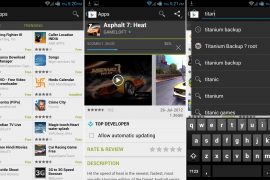
Google Play 3.7.15 Screenshots




109 responses to “Updated Google Play APK 3.7.15 — Installation Instructions”
dont wrk for samsung galaxy attain metropcs
What’s the android OS version on your device?
I am on ICS 4.0.4, NOT rooted. I can install and open Google Play 3.7.15, but when I try to download or update an app, GP force closes. I clear the data for GP, then go back and try to download and it forces closes again. What is the fix?
search with google howto root your phone, because i have a HTC Magic device and with the old android 1.5, Yahoo messenger and some other app refuse to install. I received a message like ” Messenger could not be installed on this phone” Since i’ve rooted my device, now i have Yahoo Mess and Mail and many app. (Android 2.2.1)
dont wrk for samsung galaxy attain metropcs
What’s the android OS version on your device?
dont wrk for samsung galaxy attain metropcs
What’s the android OS version on your device?
I am on ICS 4.0.4, NOT rooted. I can install and open Google Play 3.7.15, but when I try to download or update an app, GP force closes. I clear the data for GP, then go back and try to download and it forces closes again. What is the fix?
search with google howto root your phone, because i have a HTC Magic device and with the old android 1.5, Yahoo messenger and some other app refuse to install. I received a message like ” Messenger could not be installed on this phone” Since i’ve rooted my device, now i have Yahoo Mess and Mail and many app. (Android 2.2.1)
I am on ICS 4.0.4, NOT rooted. I can install and open Google Play 3.7.15, but when I try to download or update an app, GP force closes. I clear the data for GP, then go back and try to download and it forces closes again. What is the fix?
search with google howto root your phone, because i have a HTC Magic device and with the old android 1.5, Yahoo messenger and some other app refuse to install. I received a message like ” Messenger could not be installed on this phone” Since i’ve rooted my device, now i have Yahoo Mess and Mail and many app. (Android 2.2.1)
Worked Fantastic! Thanks a lot. It fixed a crucial bug.”Waiting for Network” on Play Store,in 4G and Internet pass through.
Worked Fantastic! Thanks a lot. It fixed a crucial bug.”Waiting for Network” on Play Store,in 4G and Internet pass through.
Worked Fantastic! Thanks a lot. It fixed a crucial bug.”Waiting for Network” on Play Store,in 4G and Internet pass through.
I am on ICS 4.0.4, NOT rooted. I can install and open Google Play 3.7.15, but when I try to download or update an app, GP force closes. I clear the data for GP, then go back and try to download and it forces closes again. What is the fix?
I am on ICS 4.0.4, NOT rooted. I can install and open Google Play 3.7.15, but when I try to download or update an app, GP force closes. I clear the data for GP, then go back and try to download and it forces closes again. What is the fix?
I am on ICS 4.0.4, NOT rooted. I can install and open Google Play 3.7.15, but when I try to download or update an app, GP force closes. I clear the data for GP, then go back and try to download and it forces closes again. What is the fix?
when I downloaded the file it came up as a txt file (downloaded from phone) which I found to be really weird. I had lost play store in a borked rom, so I renamed the file to apk and it seems to be working just fine (EVO 3D running MeanICS)
when I downloaded the file it came up as a txt file (downloaded from phone) which I found to be really weird. I had lost play store in a borked rom, so I renamed the file to apk and it seems to be working just fine (EVO 3D running MeanICS)
when I downloaded the file it came up as a txt file (downloaded from phone) which I found to be really weird. I had lost play store in a borked rom, so I renamed the file to apk and it seems to be working just fine (EVO 3D running MeanICS)
but is stopps workinking when i sign in to it
but is stopps workinking when i sign in to it
but is stopps workinking when i sign in to it
after installed when you open it it says that an account needs to be setup but when i click it the app just closes
Hmm… do this.. go to settings, accounts and sync and then add a gmail account of yours there…. then open the play store app. Hope it works, let me know. And btw, what’s your android os version?
after installed when you open it it says that an account needs to be setup but when i click it the app just closes
Hmm… do this.. go to settings, accounts and sync and then add a gmail account of yours there…. then open the play store app. Hope it works, let me know. And btw, what’s your android os version?
after installed when you open it it says that an account needs to be setup but when i click it the app just closes
Hmm… do this.. go to settings, accounts and sync and then add a gmail account of yours there…. then open the play store app. Hope it works, let me know. And btw, what’s your android os version?
thanks a lot
thanks a lot
thanks a lot
application not installed appears!!
Me too 🙁
Help please !
application not installed appears!!
Me too 🙁
Help please !
Me too 🙁
Help please !
application not installed appears!!
Me too 🙁
Help please !
thanks it worked
thanks it worked
thanks it worked
I downloaded the Google play app, however when I click on it I get the following message “you must add an account to the device to continue” and then it goes to the main app menu….what to do? Please help
Then add a gmail account first in settings – accounts and sync.
So I downloaded the app. Signed into my google account everything. But now everytime I try to install an app, I get a message with ‘unfortunately google play has closed’, and then the app closes. Then every time if I try to open it, I get the same message, until I reboot my tablet. I get the same thing when I try to install it via the computer. My Android version is something with 4… 4.0 or something like that 😛 Can someone help me/does someone has the same problem?? It sucks goes Google Play has like the best apps >_> btw rebooting my tablet doesnt help, cause even if I reboot it and start up Google Play, everything is fine…untillll I try to install an app 😛
Go to Settings – Apps – find Play Store and do “clear data”. Hope it helps. Let me know.
Hmm it didnt work, but I think I found the solution, I had a internet connection with a cable, and I believe it only works if you connect with WiFi, but my tablet’s wifi is messed up so I can only connect with a cable for now on -.-‘ Thanks anyway!
I downloaded the Google play app, however when I click on it I get the following message “you must add an account to the device to continue” and then it goes to the main app menu….what to do? Please help
Then add a gmail account first in settings – accounts and sync.
I downloaded the Google play app, however when I click on it I get the following message “you must add an account to the device to continue” and then it goes to the main app menu….what to do? Please help
Then add a gmail account first in settings – accounts and sync.
So I downloaded the app. Signed into my google account everything. But now everytime I try to install an app, I get a message with ‘unfortunately google play has closed’, and then the app closes. Then every time if I try to open it, I get the same message, until I reboot my tablet. I get the same thing when I try to install it via the computer. My Android version is something with 4… 4.0 or something like that 😛 Can someone help me/does someone has the same problem?? It sucks goes Google Play has like the best apps >_> btw rebooting my tablet doesnt help, cause even if I reboot it and start up Google Play, everything is fine…untillll I try to install an app 😛
Go to Settings – Apps – find Play Store and do “clear data”. Hope it helps. Let me know.
Hmm it didnt work, but I think I found the solution, I had a internet connection with a cable, and I believe it only works if you connect with WiFi, but my tablet’s wifi is messed up so I can only connect with a cable for now on -.-‘ Thanks anyway!
So I downloaded the app. Signed into my google account everything. But now everytime I try to install an app, I get a message with ‘unfortunately google play has closed’, and then the app closes. Then every time if I try to open it, I get the same message, until I reboot my tablet. I get the same thing when I try to install it via the computer. My Android version is something with 4… 4.0 or something like that 😛 Can someone help me/does someone has the same problem?? It sucks goes Google Play has like the best apps >_> btw rebooting my tablet doesnt help, cause even if I reboot it and start up Google Play, everything is fine…untillll I try to install an app 😛
Go to Settings – Apps – find Play Store and do “clear data”. Hope it helps. Let me know.
Hmm it didnt work, but I think I found the solution, I had a internet connection with a cable, and I believe it only works if you connect with WiFi, but my tablet’s wifi is messed up so I can only connect with a cable for now on -.-‘ Thanks anyway!
downloaded GP 3.1.15 on my ematic eglide tablet. it installed fine. every time open it it says process com.android.vending has stopped unexpectedly. id really like this to work since the “app market” that came on the tablet has no apps on it.
Go to Settings – Apps – find Play Store and do “clear data”. Hope it helps. Let me know.
downloaded GP 3.1.15 on my ematic eglide tablet. it installed fine. every time open it it says process com.android.vending has stopped unexpectedly. id really like this to work since the “app market” that came on the tablet has no apps on it.
Go to Settings – Apps – find Play Store and do “clear data”. Hope it helps. Let me know.
downloaded GP 3.1.15 on my ematic eglide tablet. it installed fine. every time open it it says process com.android.vending has stopped unexpectedly. id really like this to work since the “app market” that came on the tablet has no apps on it.
Go to Settings – Apps – find Play Store and do “clear data”. Hope it helps. Let me know.
i downloaded it but everytime i try to click on it in my file manager, a message appears saying ‘There is a problem parsing the package’
Help me please!
Which Android Version you are on?
I’m not sure – my phone says:
Firmware version: 2.1-update 1
I don’t know what this means!
i downloaded it but everytime i try to click on it in my file manager, a message appears saying ‘There is a problem parsing the package’ and gives me no other option…
Thanks!
Which Android Version you are on?
I’m not sure – my phone says:
Firmware version: 2.1-update 1
I don’t know what this means!
i downloaded it but everytime i try to click on it in my file manager, a message appears saying ‘There is a problem parsing the package’
Help me please!
Which Android Version you are on?
I’m not sure – my phone says:
Firmware version: 2.1-update 1
I don’t know what this means!
i downloaded it but everytime i try to click on it in my file manager, a message appears saying ‘There is a problem parsing the package’ and gives me no other option…
Thanks!
Which Android Version you are on?
I’m not sure – my phone says:
Firmware version: 2.1-update 1
I don’t know what this means!
hi i have a gadmei t 883 3D tablet which is modified using the DIY Firmware 1.1.I am unable to connect to google play store ..installed GP 3.7.15 and cleared data also …but does not connect…
hi i have a gadmei t 883 3D tablet which is modified using the DIY Firmware 1.1.I am unable to connect to google play store ..installed GP 3.7.15 and cleared data also …but does not connect…
hi i have a gadmei t 883 3D tablet which is modified using the DIY Firmware 1.1.I am unable to connect to google play store ..installed GP 3.7.15 and cleared data also …but does not connect…
showing there was a problem parsing the file
showing there was a problem parsing the file
showing there was a problem parsing the file
it says my deice isn’t compatible with this version?? help!