

- The short version
- Are Google’s Intelligent Eyewear glasses always recording?
- How can I tell when Google smart glasses are recording?
- What happens if someone covers or tampers with the glasses’ recording light?
- What does Google save or use from the glasses’ camera and Gemini chats?
- Can the glasses recognize faces?
- Where do photos and videos go?
- Can you turn off the camera?
- What recording rules must people using the glasses agree to?
- What do Google’s other services ban?
- FAQs
The short version
Google’s Intelligent Eyewear glasses combine a camera with Gemini assistance, but Google’s FAQ says they do not continuously record and store everything the wearer sees or hears. Google’s Safety Center says gallery capture requires the wearer’s instruction, while Google’s FAQ describes lights and sounds that accompany photos and videos. Google’s privacy post says the glasses are designed to prevent capture when the recording light is covered and automatically redact nearby people’s faces before images reach Gemini.
Privacy protections for wearers and people nearby
| Protection | What Google says it does | Who it protects | Source |
|---|---|---|---|
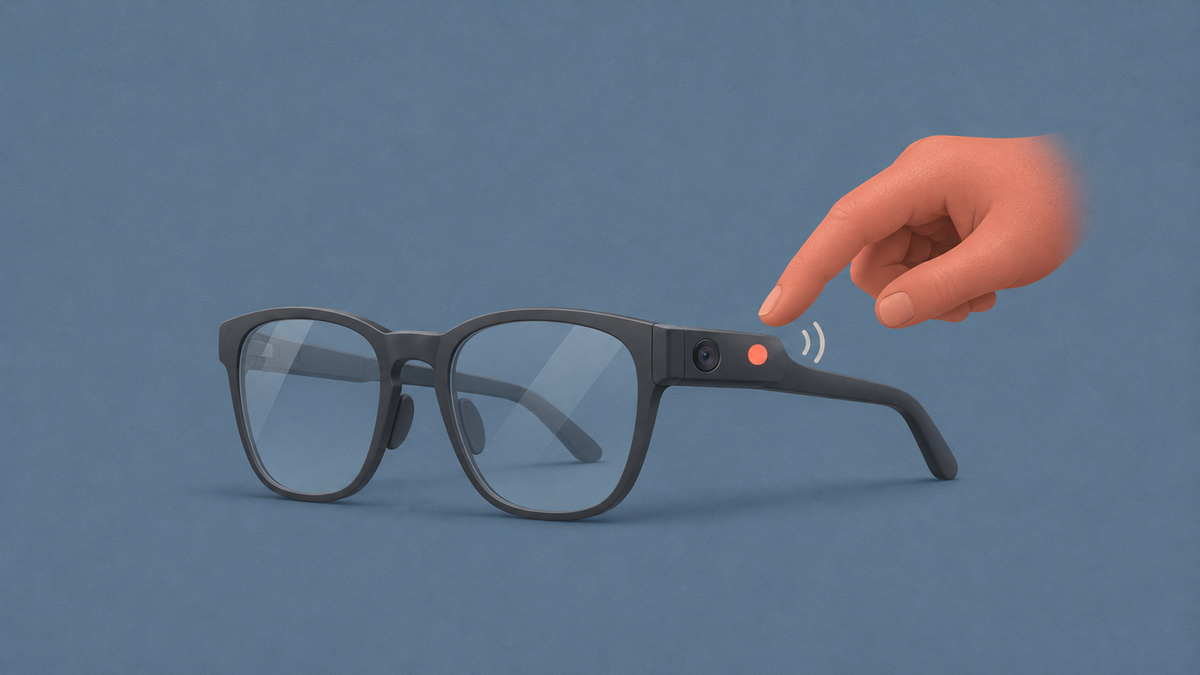
| Outer indicator light | The outward light flashes for a photo and keeps pulsing during video capture; sounds accompany photos and the start and end of recordings. | People nearby | Google’s FAQ |
| Light-blocking check | Sensors are designed to keep checking for obstructions, stop an active recording and prevent further photo or video capture while the light is covered. | People nearby | Google’s Safety Center |
| Tamper detection | Hardware defenses are designed to detect changes or damage to the light’s wiring or internal parts and disable photo and video capture. | People nearby | Google’s Safety Center |
| Face redaction before Gemini | The glasses are designed to automatically redact bystanders’ faces before Gemini processes camera imagery. | People nearby | Google’s privacy post |
| No face recognition by Gemini | Gemini on the glasses is designed to avoid recognizing nearby people’s faces. | People nearby | Google’s Safety Center |
| Voice focus | Gemini is designed to prioritize the wearer’s voice by default, using directional microphones rather than focusing on other voices nearby. | Wearer and people nearby | Google’s privacy post |
| Camera imagery excluded from Gemini History | Visuals used for Gemini assistance stay out of Gemini History. | Wearer and people nearby | Google’s Safety Center |
| No camera imagery for AI training or ads | Visuals captured for Gemini assistance are excluded from AI model training and advertising targeting. | Wearer and people nearby | Google’s privacy post |
| Encryption | Data held on the glasses is encrypted, as is data traveling from them to a phone or cloud processing. | Wearer and people nearby | Google’s privacy post |
| Per-app permissions | The wearer controls camera and microphone access separately for each app and can withdraw access. | Wearer | Google’s Safety Center |
| Physical off switch | The power switch shuts down the glasses, including their camera and microphones. | Wearer and people nearby | Google’s Safety Center |
| Gallery captures sent to the phone | Photos and videos taken for the gallery go directly to the phone; the wearer chooses whether to back them up elsewhere. | Wearer | Google’s Safety Center |
| Adult account requirement | Setup is designed to require a compatible Google Account belonging to someone aged 18 or older. | Wearer | Google’s privacy post |
Are Google’s Intelligent Eyewear glasses always recording?
Google’s FAQ says no: Gemini is designed to remain on standby until it detects an activation, such as “Hey Gemini.” Google’s FAQ says Gemini does not transmit what the wearer is saying to Google or anyone else while on standby.
Google’s FAQ says activation ends standby and sends the request to Google’s servers. Google’s FAQ also warns that a similar-sounding noise can trigger an activation.
Google’s Safety Center says gallery photos and videos are designed to require an instruction from the wearer, either through the camera button or a request to Gemini. Google’s Safety Center also says the wearer can activate Gemini through touch or voice.
How can I tell when Google smart glasses are recording?
Google’s FAQ says a photo makes both indicator lights, inside and outside the frames, flash while a capture sound plays.
Google’s FAQ says both lights keep pulsing throughout video recording, with an audible tone at the beginning and another when recording ends. Google’s Safety Center describes the outward light as an indicator for photos and videos captured for the gallery.
What happens if someone covers or tampers with the glasses’ recording light?
Google’s Safety Center says the glasses are designed to stop an ongoing recording and prevent photo or video capture when something obstructs the outer light.
Google calls this obstruction check Thwart protection: sensors are designed to monitor continuously for anything covering the light, including tape, paint or hair.
Google’s Safety Center separately describes Tamper detection, with hardware defenses designed to identify compromised or modified wiring and internal components in the light and automatically disable photo and video capture. Google’s FAQ likewise says blocked lights or compromised internal parts are designed to halt capture.
What does Google save or use from the glasses’ camera and Gemini chats?
Google says camera imagery used to answer Gemini questions stays out of Gemini History and is excluded from AI model training and advertising targeting.
Google’s privacy post says those visuals are used to answer requests or provide assistance. Google separately says a photo or video requested for the gallery is stored there.
Google says information stored on the glasses is encrypted, and information leaving them for phone or cloud processing is encrypted during transmission. Google’s privacy post says Private AI Compute is coming to the glasses to provide an additional protected environment for processing.
Google says Gemini chats are saved in Gemini History, where the wearer can review conversations, delete selected chats or remove them all. Google also says settings let the wearer choose whether chat text contributes to improvements in generative AI models.
Google’s Gemini Apps activity guidance says that with Keep Activity disabled, conversations are still retained with the account for up to 72 hours so Google can operate the service and handle feedback. Google says this temporary activity does not appear in Gemini Apps Activity.
Google’s guidance says automatic deletion removes Gemini Apps activity once it is older than 18 months by default. Google lets users disable automatic deletion or select a retention period of 3 or 36 months instead.
Can the glasses recognize faces?
Google’s Safety Center says Gemini on the glasses is designed to avoid recognizing the faces of nearby people.
Google’s privacy post says the glasses are designed to automatically redact bystanders’ faces before Gemini receives the imagery for processing.
Google says Gemini is designed to prioritize the wearer’s voice by default, using directional microphones instead of focusing on other speakers nearby. Google’s Safety Center also says Gemini has safety guardrails and is designed to avoid responses that could lead to harm or offense.
Where do photos and videos go?
Google’s Safety Center says photos and videos captured for the gallery are transferred directly to the wearer’s phone.
Google says the wearer can choose to back up those captures to Google Photos or another photo app. Google distinguishes these gallery captures from the camera imagery used for Gemini assistance, which stays out of Gemini History.
Can you turn off the camera?
Google’s FAQ says sliding the physical toggle shuts down the camera, microphones and Gemini, allowing the frames to serve as ordinary glasses.
Google’s Safety Center says the wearer can also manage camera and microphone permissions for individual apps. Google says an app must request permission before its first camera access, and the wearer can later revoke that permission.
What recording rules must people using the glasses agree to?
Google’s Safety Center says wearers must accept three conditions before using the glasses:
- Google requires permission from other people before recording them.
- Google prohibits recording in sensitive spaces.
- Google prohibits covering the outward indicator light.
Google says breaking these requirements violates its Terms of Service and can result in the loss of glasses functionality. Google’s Safety Center also says the Glasses app provides guidance about respecting people nearby and being considerate in sensitive settings.
What do Google’s other services ban?
Google describes additional restrictions across its app store, advertising services and video platform:
- Google Play policies prohibit camera access for social live-streaming and real-time identification of faces.
- Google Play policies also prohibit apps from disabling the outer light or altering how it behaves.
- Google Ads and Google Shopping prohibit promotion of products or services that conceal or disable smart-glasses recording lights.
- Google says YouTube’s rules against harassment and unwanted sexualization apply to footage from the glasses, with violating videos removed.
FAQs
Can someone record me secretly with the glasses?
Google’s FAQ says gallery photos produce a flash from both indicator lights and a capture sound, while videos keep both lights pulsing and play tones when recording begins and ends. Google’s Safety Center says its obstruction sensors are designed to stop recording and prevent capture if the outer light is covered.
Does Google see everything the wearer sees?
Google’s FAQ says the glasses do not continuously record and store the wearer’s entire visual and audio surroundings, and Gemini does not transmit what the wearer is saying to Google or anyone else during standby. Google says an activation sends the request to its servers, while its privacy post describes camera imagery being processed by Gemini when the wearer asks about their surroundings.
Can Gemini on the glasses recognize my face?
Google’s Safety Center says Gemini is designed to avoid recognizing nearby people’s faces. Google’s privacy post says the glasses are also designed to automatically redact bystanders’ faces before Gemini processes camera imagery.
Are photos and videos from the glasses automatically uploaded to Google?
Google’s Safety Center says gallery captures go directly to the wearer’s phone, with backup to Google Photos or another photo app left to the wearer’s choice. Google separately says camera imagery used for Gemini assistance can be processed in the cloud, but is excluded from Gemini History, AI model training and advertising targeting.
How do I turn off the glasses’ camera and microphones?
Google’s FAQ says to slide the physical toggle, which turns off the camera, microphones and Gemini together. Google’s Safety Center says the switch powers down the glasses so the wearer can use them as ordinary eyewear.
Can kids use the glasses?
Google’s Safety Center requires a Google Account for someone aged 18 or older. Google’s privacy post says the glasses are designed to accept only compatible adult accounts during setup.
Google also limits use to Google Accounts from the United States or South Korea.
Can apps access the glasses’ camera without asking?
Google’s Safety Center says an app must ask permission before its first camera access. Google says the wearer can revoke that access later and manage camera and microphone permissions separately for each app.
Can apps use the glasses’ camera for social live-streaming?
Google Play policies prohibit apps from using the camera for social live-streaming. Google’s product page separately describes sharing the camera view during a Google Meet video call, which requires the Google Meet app.
Google’s pre-order post says the wearer can say “Hey Gemini, open Aira Explorer” to send live camera video directly to a professionally trained human interpreter who provides visual assistance in real time. Google says Aira requires pairing with a compatible Android phone at launch and may require a subscription or membership.



Leave a Reply