
Topic
new features
-

iOS 26 Introduces Charging Limit Override!
This highly anticipated feature lets you quickly charge past your set limit, perfect for those moments when you need every drop of battery.
-

Here’s how the new notification for ‘fully charged’ AirPods looks like on iOS 26
iOS 26 brings “Smart Charge Notifications” for AirPods, signaling a fully charged status and potentially extending battery life.
-

36 new features in iOS 26 that you might have missed but Apple made sure you knew
Beyond the major reveals, iOS 26 delivers 36 powerful, often-overlooked features. Discover these subtle enhancements that refine your iPhone experience, from productivity to personalization,…
-

Instagram Unveils ‘Blend’—A Personalized Shared Reels Feed for Groups and Friends, Rolling Out After Year-Long Testing
Instagram launches ‘Blend’, a new feature that lets you and your friends share a personalized Reels feed in DMs. The invite-only feed updates daily…
-

Message Threads Are Coming to WhatsApp
WhatsApp is gearing up to revolutionize your chat experience with a new threaded reply feature. This update promises to simplify conversations, especially in chaotic…
-

iOS 18.4 Brings Your Lock Screen Experience with ‘Priority Notifications’
With iOS 18.4, Apple Intelligence might use AI to analyze notification relevance, sorting critical alerts into a dedicated Lock Screen section for improved focus…
-

Whatsapp Is Changing Its ‘Typing’ Indicator
WhatsApp’s new typing indicator shows three dots in a wavy message bubble directly within the chat box, instead of at the top of the…
-

Windows 11 Taskbar Gets Microsoft 365 Companions for Instant Contacts, Files, and Calendar Access
What to know Microsoft added Microsoft 365 Companions to Windows 11, bringing contacts, files, and calendar events to the taskbar. You can now access…
-

How to Use the Drafts Feature on WhatsApp
In an era where messaging apps play a crucial role in maintaining our social and professional connections, WhatsApp has finally introduced a feature that…
-

Whatsapp Adds Drafts, You Can Use It to Get More Sticky Posts at the Top
What to know WhatsApp has launched a new “Message Drafts” feature that helps users manage unfinished messages on both Android and iOS devices. The…
-

Microsoft Trials Universal Share Button in Windows 11
What to know: Microsoft is adding a universal Share button to Windows 11’s Start menu and taskbar for easier content sharing. Users will be…
-
Quickly Check Out All the New iOS 18 Home Screen Customization Features in Under 30 Seconds
iOS 18 comes with a slew of customization options for the iPhone’s Home Screen. These include rearranging apps and widgets, changing their size, and…
-

6 Best New Features in YouTube (May 2024)
What to know YouTube has added and updated several features on the different platforms. Some of the new features for viewers include the ability…
-

How to Star Something in Apple Music
What to know The easiest way to favorite an item in Apple Music is by using the Quick Actions menu. To use the same, Find…
-

Microsoft’s Big OneDrive Overhaul: New UI, Copilot Integration, and More
What to know Microsoft rolled out the 3rd generation of its OneDrive cloud storage on 3rd October, 2023. It integrates the new AI-driven Copilot…
-

Google Pixel 8 Pro Features That Are a ‘FIRST’ for Smartphones
What to know: Pixle 8 Pro comes with AI-powered camera features like Best Take and Magic Editor. There is also Audio Magic Eraser and…
-

‘End Task’ Option in Taskbar on Windows 11: All You Need to Know
Frozen or unresponsive programs are easy enough to kill from the Task Manager. But Microsoft has recently given users the convenience of killing these…
-
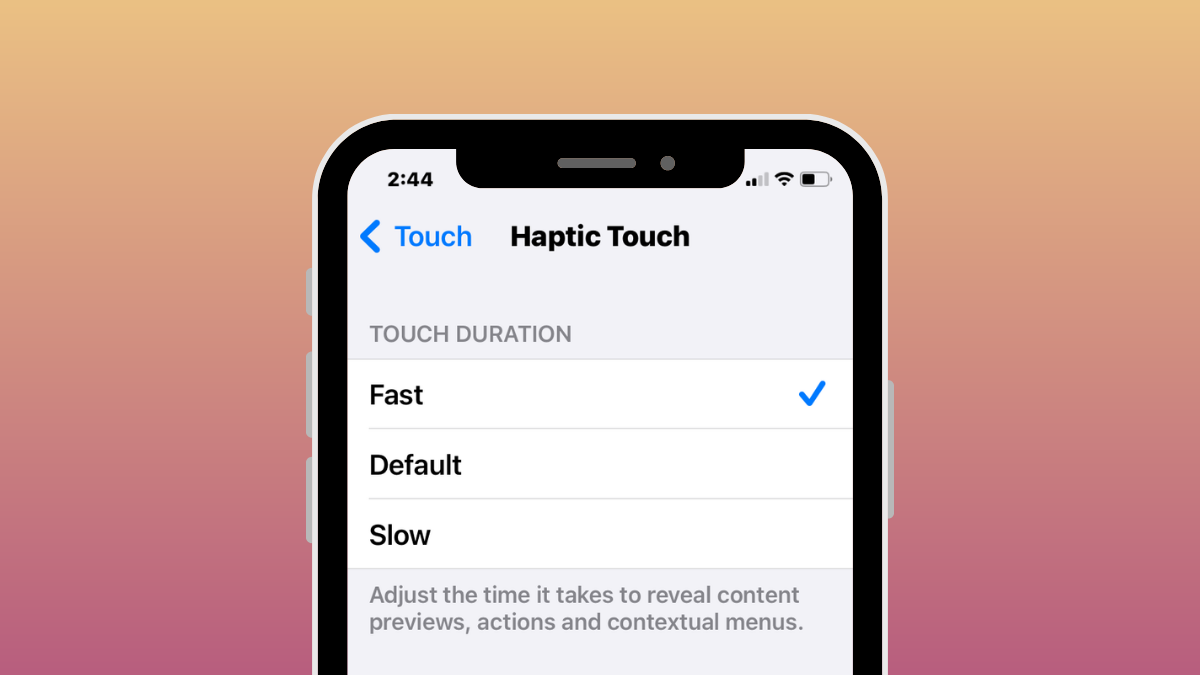
iOS 17: How to Enable “Fast” Haptic Touch on iPhone
What to know In iOS 17, Apple has made its Haptic Touch feature on the iPhone quicker with a new ‘Fast’ option. It works…

