
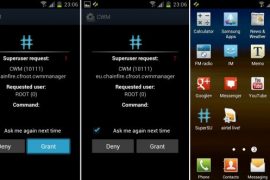
Here is the required procedure for obtaining root and installing clockworkmod (CWM) recovery on XXLPQ, the official Ice Cream Sandwich Android 4.0 firmware, released for the Galaxy S2 i9100 via Samsung PC software, Kies.
Thanks to Chainfire, who as always didn’t take much time after the release of the firmware to come out with a rooted and CWM-enabled CF-Root kernel for it. Be fully aware that this root and clockworkmod recovery installation guide is only for XXLPQ firmware and not any other firmware. So, make sure you have XXLPQ installed on your Galaxy S2 international version, i9100.
Compatibility
This procedure is compatible only and only with Samsung Galaxy S2, model number i9100. It’s not compatible with any other device. Check your device’s model number in: Settings » About phone. Also, make sure you are on XXLPQ firmware as well.
Warning!
Read everything carefully and thoroughly. The methods and procedures discussed here are considered risky and you should not attempt anything if you don’t know completely what it is. If any damage occurs to you or your device, we won’t be held liable.
How to Root XXLPQ Firmware and Install Clockworkmod (CWM) Recovery
- Download CF-Root kernel from the original download page → here.
Filename: CF-Root-SGS2_XX_XEO_LPQ-v5.3-CWM5.zip - Unzip the downloaded file once. You will get a .tar file – CF-Root-SGS2_XX_XEO_LPQ-v5.3-CWM5.tar.
DO NOT extract the .tar file (this might show up as a zip file as well, but do not extract it). You need to flash the .tar file using Odin to gain root access and install the ClockWorkMod Recovery (CWM) alongside. (If you’re getting a zImage file, it means you’ve extracted the .tar file too! — and that’s not a right thing to do. Use 7-zip (free software) to extract.) - Download Odin3 v1.83 from → here
Filename: Odin3-v1.83.exe | Size: 416 KB. - Switch off your phone. Wait for vibration to confirm complete switch off.
- Now, put the Galaxy S2 in Download Mode — press and hold these keys together: Volume Down + Home + Power. You’ll see a Warning! screen.. press Volume Up to continue.
- Open Odin now by double clicking on Odin3 v1.83.exe file you got in step 3.
- Connect your phone to PC now. You should get the message “Added! !” under Odin’s message box in the bottom left (Check screenshot after step 9). If you don’t get this message, then probably there is a problem with drivers. Make sure you’ve the drivers installed.
- On Odin, click the PDA tab and select the .tar file you got in step 2 — CF-Root-SGS2_XX_XEO_LPQ-v5.3-CWM5.tar.
- Important! Do not touch any other button or make any other changes in Odin except selecting the required file in PDA tab as given in step 8. Your Odin’s screen should look like this:

- Click the Start button on Odin to flash the CF-Root kernel (after double checking the ODIN screen). After flashing is complete, you’ll get a PASS message (with green background). Upon successful flashing, your ODIN screen will look like this:

IMPORTANT Note: If ODIN gets stuck and doesn’t seem to be doing anything, or you get a FAIL message (with red background) in ODIN, do the following:Disconnect the phone from the PC, close ODIN, remove battery, re-insert it, turn phone on in Download mode again, and do the procedure again from Step 6. - After CF-Root is installed, phone will restart automatically. When the Galaxy S2 logo shows up on phone, you can disconnect the cable from phone.
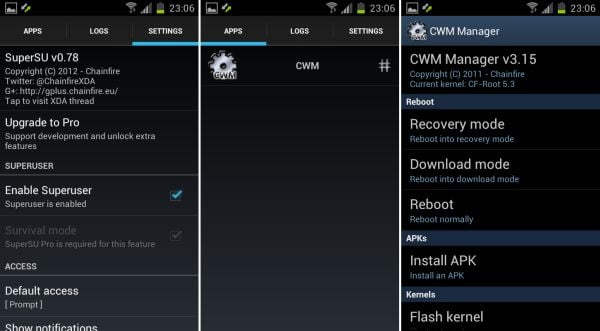
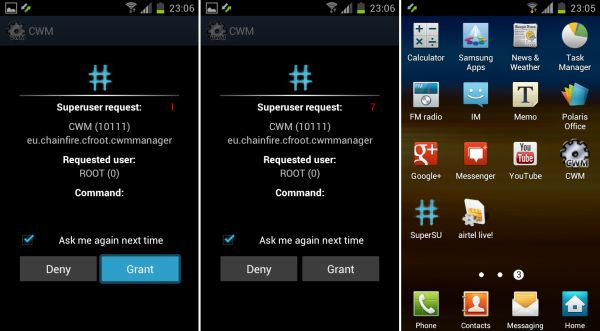
- Your phone is rooted now. Note that this time around it’s the new SuperSU app — alternative to good old superuser app — is included with the root and clockworkmod recovery. It allows you to give root access to applications and control their access. Also, CWM based recovery has been automatically installed too. Use the CWM app in app drawer to boot into recovery and do ROM backups and restore, installations, and much more.
- If you run into any problems while flashing CF-Root, let us know and we’ll try to help you out.
You have successfully rooted and obtained ClockworkMod recovery on XXLPQ Ice Cream Sandwich Android 4.0 firmware. Let us know your thoughts on it in the comments.






202 responses to “Galaxy S2 XXLPQ Root and Clockworkmod Recovery [Guide]”
How to install Cyanogen mode
Great lathund (instrux). I seek an answer to the following: If one only roots, using these steps. Is that phone still compatible with samsungs standard kies updates?
PEACE
Great lathund (instrux). I seek an answer to the following: If one only roots, using these steps. Is that phone still compatible with samsungs standard kies updates?
PEACE
Great lathund (instrux). I seek an answer to the following: If one only roots, using these steps. Is that phone still compatible with samsungs standard kies updates?
PEACE
hi, i cannot capture screenshot (volume – + power) and info appeared “couldn’t capture screenshot”. pls help
hi, i cannot capture screenshot (volume – + power) and info appeared “couldn’t capture screenshot”. pls help
hi, i cannot capture screenshot (volume – + power) and info appeared “couldn’t capture screenshot”. pls help
I’ve long time been looking to root my XXLPQ with no success until now 🙂
This guide is sooooo straight forward that even my 4yo doughter can do
Thanks!
I’ve long time been looking to root my XXLPQ with no success until now 🙂
This guide is sooooo straight forward that even my 4yo doughter can do
Thanks!
I’ve long time been looking to root my XXLPQ with no success until now 🙂
This guide is sooooo straight forward that even my 4yo doughter can do
Thanks!
It will not reboot in to system, just stops. Help please
Do steps 11.1 to 11.4.
It will not reboot in to system, just stops. Help please
Do steps 11.1 to 11.4.
It will not reboot in to system, just stops. Help please
Do steps 11.1 to 11.4.
thanks for the guide. landed here out of desperation since another site’s instructions was getting me nowhere. now a happy bunny!! it all works!
Glad for ya!! 😀
thanks for the guide. landed here out of desperation since another site’s instructions was getting me nowhere. now a happy bunny!! it all works!
Glad for ya!! 😀
thanks for the guide. landed here out of desperation since another site’s instructions was getting me nowhere. now a happy bunny!! it all works!
Glad for ya!! 😀
Hi, I got the green pass message, but the phone did not booted. It got stuck in the black screen with the yellow exclamation mark.Please help . I exactly followed the stpes you provided.
You sure you were on XXLPQ firmware on Galaxy S2 i9100? I think you applied it on a firmware different than XXLPQ, and that’s why you are stuck now. It’s okay, all is not lost, just install XXLPQ now and and then root that firmware using the above guide. It should do perfect.
Install XXLPQ from here — nerdschalk.com/xxlpq/
Hi, I got the green pass message, but the phone did not booted. It got stuck in the black screen with the yellow exclamation mark.Please help . I exactly followed the stpes you provided.
You sure you were on XXLPQ firmware on Galaxy S2 i9100? I think you applied it on a firmware different than XXLPQ, and that’s why you are stuck now. It’s okay, all is not lost, just install XXLPQ now and and then root that firmware using the above guide. It should do perfect.
Install XXLPQ from here — nerdschalk.com/xxlpq/
Hi, I got the green pass message, but the phone did not booted. It got stuck in the black screen with the yellow exclamation mark.Please help . I exactly followed the stpes you provided.
You sure you were on XXLPQ firmware on Galaxy S2 i9100? I think you applied it on a firmware different than XXLPQ, and that’s why you are stuck now. It’s okay, all is not lost, just install XXLPQ now and and then root that firmware using the above guide. It should do perfect.
Install XXLPQ from here — nerdschalk.com/xxlpq/
Hi i Downloaded CF-root but cant seem to find it with odin its an z-image and i dont know what to do with 7-zip help
Don’t use extract here option in 7-zip. Use the “Extract to …” option to extract it to the folder, this should get you .tar file. Your software is extracting the .tar fiel too, which contains the zimage file. Try this, you’ll get it. Use 7-zip only.
Hi i Downloaded CF-root but cant seem to find it with odin its an z-image and i dont know what to do with 7-zip help
Don’t use extract here option in 7-zip. Use the “Extract to …” option to extract it to the folder, this should get you .tar file. Your software is extracting the .tar fiel too, which contains the zimage file. Try this, you’ll get it. Use 7-zip only.
Hi i Downloaded CF-root but cant seem to find it with odin its an z-image and i dont know what to do with 7-zip help
Don’t use extract here option in 7-zip. Use the “Extract to …” option to extract it to the folder, this should get you .tar file. Your software is extracting the .tar fiel too, which contains the zimage file. Try this, you’ll get it. Use 7-zip only.
Thx. Worked like a charm. Downloaded CF-Root-SGS2_XX_XEO_LPQ-PROPER-v5.4-CWM5 in stead of version 5.3,
Thx. Worked like a charm. Downloaded CF-Root-SGS2_XX_XEO_LPQ-PROPER-v5.4-CWM5 in stead of version 5.3,
Thx. Worked like a charm. Downloaded CF-Root-SGS2_XX_XEO_LPQ-PROPER-v5.4-CWM5 in stead of version 5.3,
my phone jst got bricked i guess!!:(:( it is stock at the “samsung galaxy SII GT-l9100G” logo…nd i cant do anything!! plzzzz help me!
You applied the root meant for i9100 on your i9100G.
You can it back working from our guide here on Android 4.0 for i9100G – https://nerdschalk.com/i9100gxxlpq-ice-cream-sandwich-update-for-i9100g-galaxy-s2-finally-arrives/
To root it, follow the guide linked in there in step 16.
You applied the root meant for i9100 on your i9100G.
You can it back working from our guide here on Android 4.0 for i9100G – https://nerdschalk.com/i9100gxxlpq-ice-cream-sandwich-update-for-i9100g-galaxy-s2-finally-arrives/
To root it, follow the guide linked in there in step 16.
my phone jst got bricked i guess!!:(:( it is stock at the “samsung galaxy SII GT-l9100G” logo…nd i cant do anything!! plzzzz help me!
You applied the root meant for i9100 on your i9100G.
You can it back working from our guide here on Android 4.0 for i9100G – https://nerdschalk.com/i9100gxxlpq-ice-cream-sandwich-update-for-i9100g-galaxy-s2-finally-arrives/
To root it, follow the guide linked in there in step 16.
my phone jst got bricked i guess!!:(:( it is stock at the “samsung galaxy SII GT-l9100G” logo…nd i cant do anything!! plzzzz help me!
You applied the root meant for i9100 on your i9100G.
You can it back working from our guide here on Android 4.0 for i9100G – https://nerdschalk.com/i9100gxxlpq-ice-cream-sandwich-update-for-i9100g-galaxy-s2-finally-arrives/
To root it, follow the guide linked in there in step 16.
COULD ANYONE HELP ME.
2 days after the official upgrade to ICS from Bouygtel, done on the moment without problem, my SGS2 is frozen. With a black screen on which appears “Accueil s’est arrêté OK” (welcome is blocked OK). Impossible to get an answer from the icones, impossible to answer to a call.
I am not root. I can access via Kies to the files. I cannot access to debug USB command.
BUT i have got the official ICS ROM by Bouygues I could copy in the SGS2
Could anyone tell me how to try to restaure via Recovery this Rom :
Where to place the rom (via Windows Explorer) Ext card or in which folder ?
To wipe or no to wipe before to do it, and which kind of wipe (wipe data/factory reset or.and wipe Cache partition)…
Could the saver give me an answer on my personal email : [email protected]
It should be fantastic, I cannot for very important and personal reasons stay a day without this phone.
Big thanks to the readers and to my future saver ???
Regards
Serge
GO TO RECOVERY AND FIX PERMISSIONS
OR INTALL ROM MANAGER APPLICATION AND THAN FIX PERMISSIONS IT MIGHT TAKE TIME
COULD ANYONE HELP ME.
2 days after the official upgrade to ICS from Bouygtel, done on the moment without problem, my SGS2 is frozen. With a black screen on which appears “Accueil s’est arrêté OK” (welcome is blocked OK). Impossible to get an answer from the icones, impossible to answer to a call.
I am not root. I can access via Kies to the files. I cannot access to debug USB command.
BUT i have got the official ICS ROM by Bouygues I could copy in the SGS2
Could anyone tell me how to try to restaure via Recovery this Rom :
Where to place the rom (via Windows Explorer) Ext card or in which folder ?
To wipe or no to wipe before to do it, and which kind of wipe (wipe data/factory reset or.and wipe Cache partition)…
Could the saver give me an answer on my personal email : [email protected]
It should be fantastic, I cannot for very important and personal reasons stay a day without this phone.
Big thanks to the readers and to my future saver ???
Regards
Serge
GO TO RECOVERY AND FIX PERMISSIONS
OR INTALL ROM MANAGER APPLICATION AND THAN FIX PERMISSIONS IT MIGHT TAKE TIME
COULD ANYONE HELP ME.
2 days after the official upgrade to ICS from Bouygtel, done on the moment without problem, my SGS2 is frozen. With a black screen on which appears “Accueil s’est arrêté OK” (welcome is blocked OK). Impossible to get an answer from the icones, impossible to answer to a call.
I am not root. I can access via Kies to the files. I cannot access to debug USB command.
BUT i have got the official ICS ROM by Bouygues I could copy in the SGS2
Could anyone tell me how to try to restaure via Recovery this Rom :
Where to place the rom (via Windows Explorer) Ext card or in which folder ?
To wipe or no to wipe before to do it, and which kind of wipe (wipe data/factory reset or.and wipe Cache partition)…
Could the saver give me an answer on my personal email : [email protected]
It should be fantastic, I cannot for very important and personal reasons stay a day without this phone.
Big thanks to the readers and to my future saver ???
Regards
Serge
GO TO RECOVERY AND FIX PERMISSIONS
OR INTALL ROM MANAGER APPLICATION AND THAN FIX PERMISSIONS IT MIGHT TAKE TIME
can you please help with this matter……I installed the XXLPQ firmware by odin successfully but after that I wanted to root the device using the same method. But when I plug the phone with download mode the odin doesn’t get yellow means not recognizing the device, on the other hand when I plug the phone with normal mode it works fine, I can browse all the things via kies. Any ideas about that ??
OR…should I copy the root cernel file to phone internal storage and select the “install from zip” while in downloading mode ?
Please help me !!
can you please help with this matter……I installed the XXLPQ firmware by odin successfully but after that I wanted to root the device using the same method. But when I plug the phone with download mode the odin doesn’t get yellow means not recognizing the device, on the other hand when I plug the phone with normal mode it works fine, I can browse all the things via kies. Any ideas about that ??
OR…should I copy the root cernel file to phone internal storage and select the “install from zip” while in downloading mode ?
Please help me !!
can you please help with this matter……I installed the XXLPQ firmware by odin successfully but after that I wanted to root the device using the same method. But when I plug the phone with download mode the odin doesn’t get yellow means not recognizing the device, on the other hand when I plug the phone with normal mode it works fine, I can browse all the things via kies. Any ideas about that ??
OR…should I copy the root cernel file to phone internal storage and select the “install from zip” while in downloading mode ?
Please help me !!
Hi, first thanks for this amazing tutorial, my question is… is there any need of backups before trying to root my i9100 XXLPQ (im sure this is the model i already checked on the configuration option)? because im very lazy of doing so, i have allmost all my memory used, thanks!
Hi, first thanks for this amazing tutorial, my question is… is there any need of backups before trying to root my i9100 XXLPQ (im sure this is the model i already checked on the configuration option)? because im very lazy of doing so, i have allmost all my memory used, thanks!
Hi, first thanks for this amazing tutorial, my question is… is there any need of backups before trying to root my i9100 XXLPQ (im sure this is the model i already checked on the configuration option)? because im very lazy of doing so, i have allmost all my memory used, thanks!
thanks very much.. after beating around a lot of bushes.. this was what did it for me !
thanks very much.. after beating around a lot of bushes.. this was what did it for me !
thanks very much.. after beating around a lot of bushes.. this was what did it for me !
CAN I USE IT FOR Build version XXLPX ?
CAN I USE IT FOR Build version XXLPX ?
CAN I USE IT FOR Build version XXLPX ?
I just rooted my Galaxy S II using the above method. But, now I am unable to turn the Bluetooth ON. Bluetooth seems to have stopped working. Please help me on how I can enable the Bluetooth.
Try this: Boot into recovery mode and do “fix permissions” under the advanced option. To boot into recovery: first power off phone, then hold Volume UP + Home + Power key together until you see Samsung logo. Let me know.
I just rooted my Galaxy S II using the above method. But, now I am unable to turn the Bluetooth ON. Bluetooth seems to have stopped working. Please help me on how I can enable the Bluetooth.
Try this: Boot into recovery mode and do “fix permissions” under the advanced option. To boot into recovery: first power off phone, then hold Volume UP + Home + Power key together until you see Samsung logo. Let me know.
I just rooted my Galaxy S II using the above method. But, now I am unable to turn the Bluetooth ON. Bluetooth seems to have stopped working. Please help me on how I can enable the Bluetooth.
Try this: Boot into recovery mode and do “fix permissions” under the advanced option. To boot into recovery: first power off phone, then hold Volume UP + Home + Power key together until you see Samsung logo. Let me know.
thousand likes…works perfectly.
thousand likes…works perfectly.
thousand likes…works perfectly.
know what…… WiFi failed to connect…….the CWM so annoying asking for grant everytime and stuck..
Try this: Boot into recovery mode and do “fix permissions” under the advanced option. To boot into recovery: first power off phone, then hold Volume UP + Home + Power key together until you see Samsung logo. Let me know.