

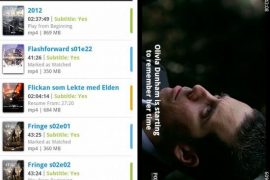
Finding subtitles can’t get easier than this on your android phone. With the mVideoPlayer app, you just need to search for it, right from your phone and the app will find it for you. We know we told you about another app for subtitles, the Soul Movie, but that required you to copy the downloaded subs from the PC. So, the mVideo Player does have an upper hand here.
Features:-
- Supports variety of subtitles / captions formats: subrip (.srt), Sub Station Alpha(.ssa), Advanced Sub Station Alpha(.ass), MPL2(.mpl/.txt), MicroDVD(.sub/.txt), SubViewer2.0(.sub), PowerDivX(.psb/.txt), TMPlayer(.txt), SAMI(.smi/.sami)
- Impressive UI plus it supports gestures and remembers exit times for resuming later
- Search, Download and playback subtitles within the app, 10 seconds claimed for the whole process!
- Supports IMDB too. One can make a search at IMDB and get the info right from the app. Cool!
- Want more? Try the app yourself !
Download the mVideoPlayer for FREE.





2 responses to “Search and Download Subtitles Right From Your Android Phone with mVideoPlayer. It’s the Easiest Way!”
Hi there!
I also use SubLoader to search and download my subtitles.
The search is definately more accurate than mVideoPlayer and it’s much easier to pair the subtitles with a video.
https://market.android.com/details?id=com.sregg.android.subloader
Hi there!
I also use SubLoader to search and download my subtitles.
The search is definately more accurate than mVideoPlayer and it’s much easier to pair the subtitles with a video.
https://market.android.com/details?id=com.sregg.android.subloader