

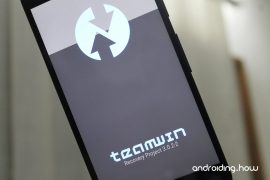
Bootloader / Fastboot mode allows you to flash any partition on a device, be it system, boot, recovery, cache or any other. And not just the partition images from OEMs, you can also flash the custom-built .img files via fastboot. For example, a custom recovery like TWRP.
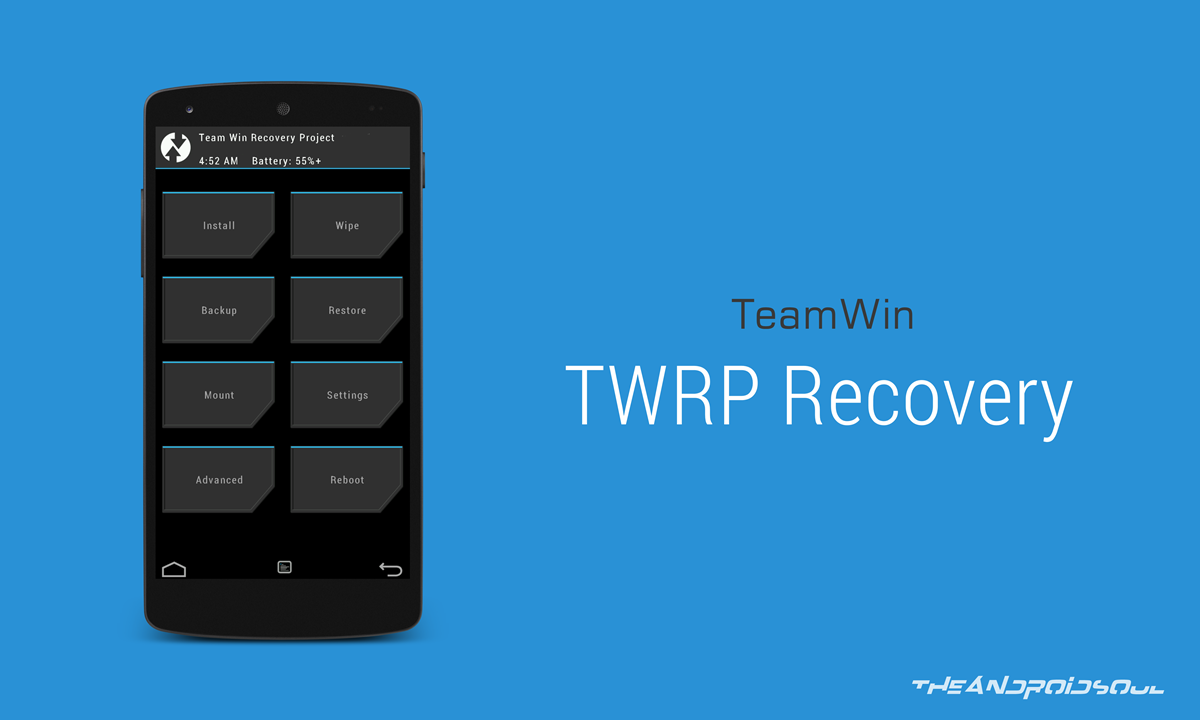
For the unknown, TWRP recovery is a custom recovery for Android devices developed and maintained by the folks at TeamWin. It lets you do a host of things on your Android phone that neither Google nor your device manufacturer built support for. For example, a full device (nandroid) backup. Using TWRP recovery you can take a full backup of your Android phone, which you can restore to even repair a soft-bricked device.
Other than a backup, TWRP also allows flashing unsigned zip files which include rooting scripts, custom ROMs / MODs and other similar stuff.
Since not all Android devices are same, TWRP is built differently for each. Also, you might find the recovery available as both official and unofficial builds, on the internet. This is because TWRP recovery is an open source project and anyone with knowledge can compile a TWRP recovery build for any Android device.
You can find and download the official TWRP recovery build for your device over at TeamWin’s website. We’ve linked all officially supported devices below in the table. For most devices, you will only find the Fastboot flashable .img files of TWRP. However, if you have a Samsung Galaxy device, you’ll also find a .tar file, and we recommend using the .tar file to install TWRP using Odin (a PC software to install/flash stuff on Samsung devices).
If you already have TWRP recovery .img file for your device, skip straight to the TWRP installation instructions below the TWRP download section.
[icon name=”hand-o-right” class=”” unprefixed_class=””] Download TWRP Recovery
If you couldn’t find TWRP recovery image for your device on the official channels, do a search on our website for an unofficial build. We cover unofficial TWRP recovery builds for all sorts of Android devices that appear on various Android communities like XDA.
When you have the TWRP recovery .img file downloaded for your device, follow the instructions below to flash TWRP recovery via Fastboot.
How to Install TWRP via Fastboot
Note: This guide assumes that your device has an unlocked bootloader. If not, follow our detailed guide on How to Unlock Bootloader via Fastboot on Android.
- Get a TWRP recovery .img file compatible with your device and save to a separate folder on your PC.
- Setup ADB and Fastboot on your PC, follow this link [icon name=”external-link” class=”” unprefixed_class=””].
- Enable USB debugging on your device:
- Open Settings on your device.
- Go to About phone and tap seven times on Build number, this will enable Developer options.
- Now go back to Settings and you’ll see Developer options there, open it.
- Tick the USB Debugging checkbox.
- Open the folder where you saved TWRP Recovery .img file in Step 1 above.
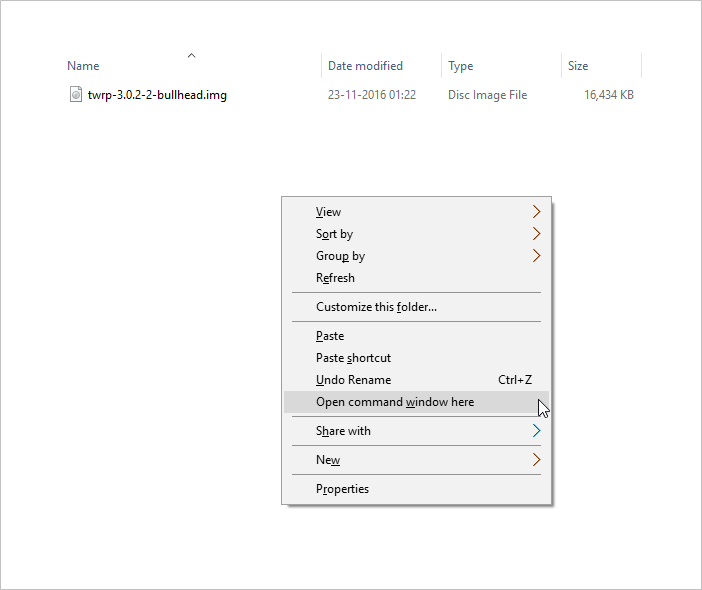
- Now open a command window inside that folder. To do that, “Shift + Right click” on any empty white space inside the folder and then select “Open command window here” from the context menu.
- Connect your device to the PC. And type the following into the command window we opened in Step 5 above to boot your device into bootloader/fastboot mode:
adb reboot bootloader
└ If you get a permission dialogue on your device to “Allow USB debugging”, tap OK.
- Once your device boots into bootloader mode, issue the following command into command window to flash the TWRP recovery .img file:
fastboot flash recovery twrp.img
└ Here modify twrp.img with the name of your TWRP recovery .img file, OR change your TWRP recovery filename to twrp.img and use the command above.
- Once TWRP is successfully flashed on your device, issue the following command to reboot:
fastboot reboot
That’s all. TWRP recovery should be installed on your device now. To boot into the freshly installed recovery, simply issue the adb reboot recovery command from PC command line when your device boots into the system.
Happy Androiding!



103 responses to “How to Install TWRP Recovery via Fastboot on Android”
[…] How to Install TWRP Recovery via Fastboot […]
[…] Flash TWRP recovery .img file via Fastboot using this step-by-step guide . […]
Not useful for me.please explain me in long.
First step:
adb wait-for-device
Not useful for me.please explain me in long.
First step:
adb wait-for-device
El comando me dice que no son ejecutables podrían hacer un vídeo o explicar de una mas explicita.
Gracias
El comando me dice que no son ejecutables podrían hacer un vídeo o explicar de una mas explicita.
Gracias
I’m running a sm-n910w8 on 5.1.1 I believe it’s bootloader is not unlocked. How can I install twrp when the bootloader is not unlocked. Thank you in advance for your help.
You can’t, You need to unlock your bootloader to install twrp or cwm.
I’m running a sm-n910w8 on 5.1.1 I believe it’s bootloader is not unlocked. How can I install twrp when the bootloader is not unlocked. Thank you in advance for your help.
You can’t, You need to unlock your bootloader to install twrp or cwm.
Thanks for the Guide Bro …!!! Worked as you said. Keep it up !!
Thanks for the Guide Bro …!!! Worked as you said. Keep it up !!
Phew, had a scare there, flashing new os, accidentally wiped twrp and bricked, you saved me aha thanks 😉
Phew, had a scare there, flashing new os, accidentally wiped twrp and bricked, you saved me aha thanks 😉
where to put recovery file?
The same folder as your adb / fastboot apps, in the android sdk – folder sdkplatform-tools
where to put recovery file?
The same folder as your adb / fastboot apps, in the android sdk – folder sdkplatform-tools
yu yunique yu4711 stuck on “cyanogen fastboot” mode. there is no rom installed in my phone.
can’t flash any recovery…
what to do help plz…
yu yunique yu4711 stuck on “cyanogen fastboot” mode. there is no rom installed in my phone.
can’t flash any recovery…
what to do help plz…
i have on my huawei p7 l10 5.1.1 b853, does not work, i see on my phone PHONE Locked, what should i do?
Thanks.
its not working bro…
plz see this bro…
i have on my huawei p7 l10 5.1.1 b853, does not work, i see on my phone PHONE Locked, what should i do?
Thanks.
its not working bro…
plz see this bro…
hey dude, i tried this with several different twrp downloads, the fastboot reboot works and i unlocked my bootloader using a command prompt, however when i try to use the “fastboot flash recovery twrp.img”(which i changed all the different twrp downloads to and tried using their original names, it says “error: cannot load ‘twrp.img’”
got the same problem
hey dude, i tried this with several different twrp downloads, the fastboot reboot works and i unlocked my bootloader using a command prompt, however when i try to use the “fastboot flash recovery twrp.img”(which i changed all the different twrp downloads to and tried using their original names, it says “error: cannot load ‘twrp.img’”
got the same problem
Thanks for taking the time!
Thanks for taking the time!
showing device not found
showing device not found
Won’t flash the twrp.. Keeps saying it’s null and cant load.. Help plz
Won’t flash the twrp.. Keeps saying it’s null and cant load.. Help plz
Can’t get twrp to flash @ step 8. Freezes at waiting for device.
Any solutions?
I’m having the exact same problem. I hope to hear something soon.
Same
Can’t get twrp to flash @ step 8. Freezes at waiting for device.
Any solutions?
I’m having the exact same problem. I hope to hear something soon.
Same
Thank you so much. Been fighting this all day until I found your fix. Worked like a charm.
Thank you so much. Been fighting this all day until I found your fix. Worked like a charm.
hey guys i’m in big problem..
in previous 1 week i was install custom recovery TWRP for rooting device.. after that my cell get an update just for bugs fixing. when downloading complete i was just click on restart and update now my cell phone get in TWRP recovery and start updating after this my mobile get restart and just stuck on honor logo..
and my developer options is off..
please guys help me..
full new mobile i get this mobile 2 weeks ago just
help me
hey guys i’m in big problem..
in previous 1 week i was install custom recovery TWRP for rooting device.. after that my cell get an update just for bugs fixing. when downloading complete i was just click on restart and update now my cell phone get in TWRP recovery and start updating after this my mobile get restart and just stuck on honor logo..
and my developer options is off..
please guys help me..
full new mobile i get this mobile 2 weeks ago just
help me
Maybe here is a guy who knows what to to…..
I’ve done all steps as mentioned until step 7…
When I type in:
adb reboot bootloader
my phone is restarting and shows me the normal LG logo and after 10-15 seconds it is asking for the PIN of the SIM-card.
During this reboot I’m typing in:
fastboot flash recovery twrp-2.8.7.3.img
but only is shown….
The whole package (ADB and Fastboot) is downloaded and installed. The USB-Debugging option is enabled. The phone is rooted. I don’t know the old already installed TWRP-version…. Is it not possible to install a newer version of TWRP ?
Sorry…..
During this reboot I’m typing in:
fastboot flash recovery twrp-2.8.7.3.img
but only [ waiting for device] is shown….
Maybe here is a guy who knows what to to…..
I’ve done all steps as mentioned until step 7…
When I type in:
adb reboot bootloader
my phone is restarting and shows me the normal LG logo and after 10-15 seconds it is asking for the PIN of the SIM-card.
During this reboot I’m typing in:
fastboot flash recovery twrp-2.8.7.3.img
but only is shown….
The whole package (ADB and Fastboot) is downloaded and installed. The USB-Debugging option is enabled. The phone is rooted. I don’t know the old already installed TWRP-version…. Is it not possible to install a newer version of TWRP ?
Sorry…..
During this reboot I’m typing in:
fastboot flash recovery twrp-2.8.7.3.img
but only [ waiting for device] is shown….
sending ‘recovery’ (9190 KB)…
FAILED (data transfer failure (Too many links))
finished. total time: 0.261s
Why do I get this? Thanks
sending ‘recovery’ (9190 KB)…
FAILED (data transfer failure (Too many links))
finished. total time: 0.261s
Why do I get this? Thanks
sending ‘recovery’ (9190 KB)…
FAILED (data transfer failure (Too many links))
finished. total time: 0.261s
Why do I get this? Thanks
sending ‘recovery’ (12396 KB)…
OKAY [ 0.409s]
writing ‘recovery’…
FAILED (remote:
partition ‘recovery’ not support flash)
finished. total time: 0.458s
im getting this too did anybody get find the fix?
fastboot flash recovery twrp-3.0.2-0-RC1-fastboot-sailfish.img
target reported max download size of 536870912 bytes
sending ‘recovery’ (26588 KB)…
OKAY [ 0.866s]
writing ‘recovery’…
(bootloader) Flashing active slot “_a”
FAILED (remote: partition [recovery] doesn’t exist)
finished. total time: 0.968s
sending ‘recovery’ (12396 KB)…
OKAY [ 0.409s]
writing ‘recovery’…
FAILED (remote:
partition ‘recovery’ not support flash)
finished. total time: 0.458s
im getting this too did anybody get find the fix?
fastboot flash recovery twrp-3.0.2-0-RC1-fastboot-sailfish.img
target reported max download size of 536870912 bytes
sending ‘recovery’ (26588 KB)…
OKAY [ 0.866s]
writing ‘recovery’…
(bootloader) Flashing active slot “_a”
FAILED (remote: partition [recovery] doesn’t exist)
finished. total time: 0.968s
sending ‘recovery’ (12396 KB)…
OKAY [ 0.409s]
writing ‘recovery’…
FAILED (remote:
partition ‘recovery’ not support flash)
finished. total time: 0.458s
[…] […]
[…] […]
ive been trying to root my Axon 7 and i keep getting FAILED (remote: unknown command) when i put the flashboot flash recovery twrp.img command
ive been trying to root my Axon 7 and i keep getting FAILED (remote: unknown command) when i put the flashboot flash recovery twrp.img command
ive been trying to root my Axon 7 and i keep getting FAILED (remote: unknown command) when i put the flashboot flash recovery twrp.img command
I made the first step and restarted the device, but when you type the command to install TWRP he is looking for the device “Waiting device” and does not leave this screen.
I’m using Windows 10 and I disabled the signing of drivers.
you can help
I made the first step and restarted the device, but when you type the command to install TWRP he is looking for the device “Waiting device” and does not leave this screen.
I’m using Windows 10 and I disabled the signing of drivers.
you can help
I made the first step and restarted the device, but when you type the command to install TWRP he is looking for the device “Waiting device” and does not leave this screen.
I’m using Windows 10 and I disabled the signing of drivers.
you can help
I’m having trouble getting the twrp to install. I’ve done everything correctly but cannot get it to install. I have to MOTO X Pure Edition running the latest MM. When I try to go into recovery I get the little dead green android with the ! inside a red triangle. Yes my bootloader is unlocked and I have the SuperSU by Chainfire on my SD Card root
I’m having trouble getting the twrp to install. I’ve done everything correctly but cannot get it to install. I have to MOTO X Pure Edition running the latest MM. When I try to go into recovery I get the little dead green android with the ! inside a red triangle. Yes my bootloader is unlocked and I have the SuperSU by Chainfire on my SD Card root