News

How to Install TWRP Recovery via Fastboot on Android

Bootloader / Fastboot mode allows you to flash any partition on a device, be it system, boot, recovery, cache or any other. And not just the partition images from…

Bootloader / Fastboot mode allows you to flash any partition on a device, be it system, boot, recovery, cache or any other. And not just the partition images from…

103 Comments
Shivam Malani

Shivam Malani Shivam is our resident designer and web developer who also enjoys writing. He loves to meditate, drive on the freeways and hunt for snipers during his Call Of Duty playtime.

Email: [email protected]

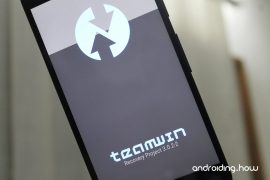
Bootloader / Fastboot mode allows you to flash any partition on a device, be it system, boot, recovery, cache or any other. And not just the partition images from OEMs, you can also flash the custom-built .img files via fastboot. For example, a custom recovery like TWRP.

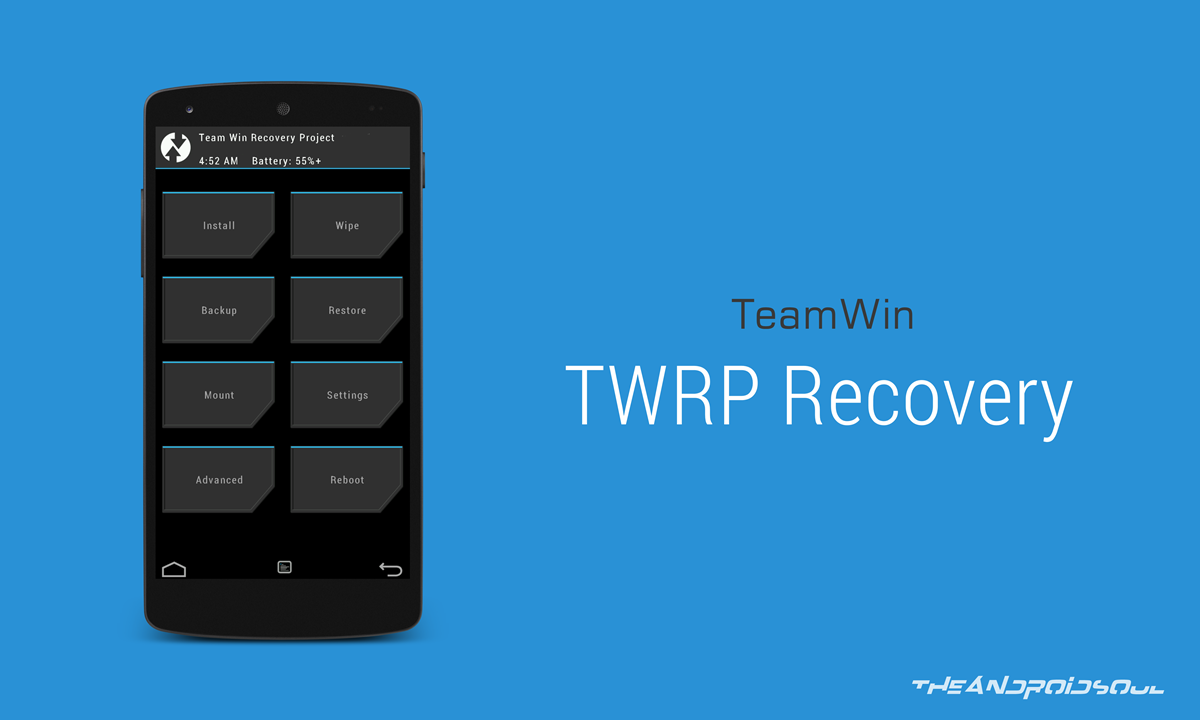
For the unknown, TWRP recovery is a custom recovery for Android devices developed and maintained by the folks at TeamWin. It lets you do a host of things on your Android phone that neither Google nor your device manufacturer built support for. For example, a full device (nandroid) backup. Using TWRP recovery you can take a full backup of your Android phone, which you can restore to even repair a soft-bricked device.

Other than a backup, TWRP also allows flashing unsigned zip files which include rooting scripts, custom ROMs / MODs and other similar stuff.

Since not all Android devices are same, TWRP is built differently for each. Also, you might find the recovery available as both official and unofficial builds, on the internet. This is because TWRP recovery is an open source project and anyone with knowledge can compile a TWRP recovery build for any Android device.

You can find and download the official TWRP recovery build for your device over at TeamWin’s website. We’ve linked all officially supported devices below in the table. For most devices, you will only find the Fastboot flashable .img files of TWRP. However, if you have a Samsung Galaxy device, you’ll also find a .tar file, and we recommend using the .tar file to install TWRP using Odin (a PC software to install/flash stuff on Samsung devices).

If you already have TWRP recovery .img file for your device, skip straight to the TWRP installation instructions below the TWRP download section.

[icon name=”hand-o-right” class=”” unprefixed_class=””] Download TWRP Recovery

If you couldn’t find TWRP recovery image for your device on the official channels, do a search on our website for an unofficial build. We cover unofficial TWRP recovery builds for all sorts of Android devices that appear on various Android communities like XDA.

When you have the TWRP recovery .img file downloaded for your device, follow the instructions below to flash TWRP recovery via Fastboot.

How to Install TWRP via Fastboot

Note: This guide assumes that your device has an unlocked bootloader. If not, follow our detailed guide on How to Unlock Bootloader via Fastboot on Android.

  1. Get a TWRP recovery .img file compatible with your device and save to a separate folder on your PC.
  2. Setup ADB and Fastboot on your PC, follow this link [icon name=”external-link” class=”” unprefixed_class=””].
  3. Enable USB debugging on your device:
    1. Open Settings on your device.
    2. Go to About phone and tap seven times on Build number, this will enable Developer options.
    3. Now go back to Settings and you’ll see Developer options there, open it.
    4. Tick the USB Debugging checkbox.
  4. Open the folder where you saved TWRP Recovery .img file in Step 1 above.
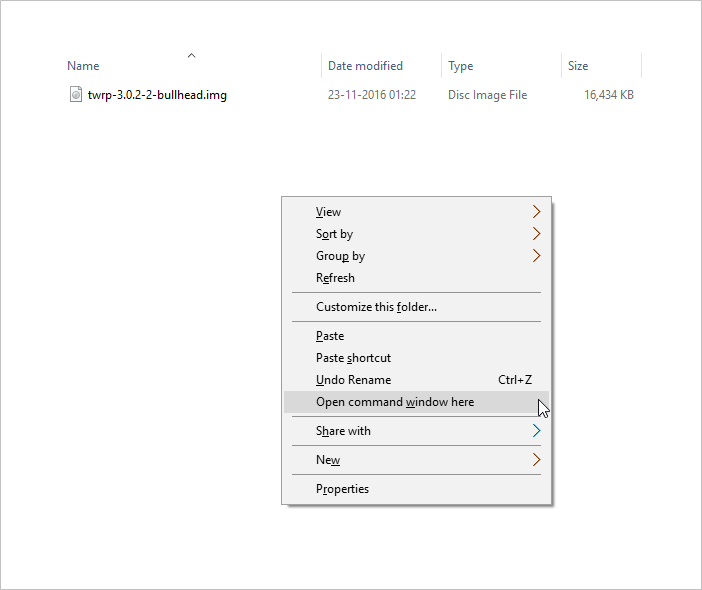
  5. Now open a command window inside that folder. To do that, “Shift + Right click” on any empty white space inside the folder and then select “Open command window here” from the context menu.
  6. Connect your device to the PC. And type the following into the command window we opened in Step 5 above to boot your device into bootloader/fastboot mode:
    adb reboot bootloader

    └ If you get a permission dialogue on your device to “Allow USB debugging”, tap OK.

  7. Once your device boots into bootloader mode, issue the following command into command window to flash the TWRP recovery .img file:
    fastboot flash recovery twrp.img

    └ Here modify twrp.img with the name of your TWRP recovery .img file, OR change your TWRP recovery filename to twrp.img and use the command above.

  8. Once TWRP is successfully flashed on your device, issue the following command to reboot:
    fastboot reboot

That’s all. TWRP recovery should be installed on your device now. To boot into the freshly installed recovery, simply issue the adb reboot recovery command from PC command line when your device boots into the system.

Happy Androiding! 

103 responses to “How to Install TWRP Recovery via Fastboot on Android”

  1. Guest Avatar

    […] How to Install TWRP Recovery via Fastboot […]

  2. Guest Avatar

    […] Flash TWRP recovery .img file via Fastboot using this step-by-step guide . […]

  3. Guest Avatar

    Not useful for me.please explain me in long.

    1. Guest Avatar

      First step:

      adb wait-for-device

  4. satyam Avatar

    Not useful for me.please explain me in long.

    1. amingholami Avatar
      amingholami

      First step:

      adb wait-for-device

  5. Guest Avatar

    El comando me dice que no son ejecutables podrían hacer un vídeo o explicar de una mas explicita.

    Gracias

  6. JASON Avatar

    El comando me dice que no son ejecutables podrían hacer un vídeo o explicar de una mas explicita.

    Gracias

  7. Guest Avatar

    I’m running a sm-n910w8 on 5.1.1 I believe it’s bootloader is not unlocked. How can I install twrp when the bootloader is not unlocked. Thank you in advance for your help.

    1. Guest Avatar

      You can’t, You need to unlock your bootloader to install twrp or cwm.

  8. Lee Avatar

    I’m running a sm-n910w8 on 5.1.1 I believe it’s bootloader is not unlocked. How can I install twrp when the bootloader is not unlocked. Thank you in advance for your help.

    1. Sebastian Skov Avatar
      Sebastian Skov

      You can’t, You need to unlock your bootloader to install twrp or cwm.

  9. Guest Avatar

    Thanks for the Guide Bro …!!! Worked as you said. Keep it up !!

  10. Kesav Avatar

    Thanks for the Guide Bro …!!! Worked as you said. Keep it up !!

  11. Guest Avatar

    Phew, had a scare there, flashing new os, accidentally wiped twrp and bricked, you saved me aha thanks 😉

  12. Dave Avatar

    Phew, had a scare there, flashing new os, accidentally wiped twrp and bricked, you saved me aha thanks 😉

  13. Guest Avatar

    where to put recovery file?

    1. Guest Avatar

      The same folder as your adb / fastboot apps, in the android sdk – folder sdkplatform-tools

  14. اركر Avatar
    اركر

    where to put recovery file?

    1. Vick Avatar

      The same folder as your adb / fastboot apps, in the android sdk – folder sdkplatform-tools

  15. Guest Avatar

    yu yunique yu4711 stuck on “cyanogen fastboot” mode. there is no rom installed in my phone.
    can’t flash any recovery…

    what to do help plz…

  16. Kausik Kumar Avatar
    Kausik Kumar

    yu yunique yu4711 stuck on “cyanogen fastboot” mode. there is no rom installed in my phone.
    can’t flash any recovery…

    what to do help plz…

  17. Guest Avatar

    i have on my huawei p7 l10 5.1.1 b853, does not work, i see on my phone PHONE Locked, what should i do?
    Thanks.

    1. Guest Avatar

      its not working bro…

      plz see this bro…

  18. MOHAMED Avatar

    i have on my huawei p7 l10 5.1.1 b853, does not work, i see on my phone PHONE Locked, what should i do?
    Thanks.

    1. kausik kumar Avatar
      kausik kumar

      its not working bro…

      plz see this bro…

  19. Guest Avatar

    hey dude, i tried this with several different twrp downloads, the fastboot reboot works and i unlocked my bootloader using a command prompt, however when i try to use the “fastboot flash recovery twrp.img”(which i changed all the different twrp downloads to and tried using their original names, it says “error: cannot load ‘twrp.img’”

    1. Guest Avatar

      got the same problem

  20. gavin Avatar

    hey dude, i tried this with several different twrp downloads, the fastboot reboot works and i unlocked my bootloader using a command prompt, however when i try to use the “fastboot flash recovery twrp.img”(which i changed all the different twrp downloads to and tried using their original names, it says “error: cannot load ‘twrp.img’”

    1. DadaBaba Avatar
      DadaBaba

      got the same problem

  21. Guest Avatar

    Thanks for taking the time!

  22. Anthony Avatar

    Thanks for taking the time!

  23. Guest Avatar

    showing device not found

  24. Aniket Avatar

    showing device not found

  25. Guest Avatar

    Won’t flash the twrp.. Keeps saying it’s null and cant load.. Help plz

  26. Jae Avatar

    Won’t flash the twrp.. Keeps saying it’s null and cant load.. Help plz

  27. Guest Avatar

    Can’t get twrp to flash @ step 8. Freezes at waiting for device.
    Any solutions?

    1. Guest Avatar

      I’m having the exact same problem. I hope to hear something soon.

    2. Guest Avatar

      Same

  28. Kris Avatar

    Can’t get twrp to flash @ step 8. Freezes at waiting for device.
    Any solutions?

    1. Taylor Avatar

      I’m having the exact same problem. I hope to hear something soon.

      1. Ryan Avatar

        Same

  29. Guest Avatar

    Thank you so much. Been fighting this all day until I found your fix. Worked like a charm.

  30. Clyde Avatar

    Thank you so much. Been fighting this all day until I found your fix. Worked like a charm.

  31. Guest Avatar

    hey guys i’m in big problem..
    in previous 1 week i was install custom recovery TWRP for rooting device.. after that my cell get an update just for bugs fixing. when downloading complete i was just click on restart and update now my cell phone get in TWRP recovery and start updating after this my mobile get restart and just stuck on honor logo..
    and my developer options is off..
    please guys help me..
    full new mobile i get this mobile 2 weeks ago just
    help me

  32. muneeb Avatar

    hey guys i’m in big problem..
    in previous 1 week i was install custom recovery TWRP for rooting device.. after that my cell get an update just for bugs fixing. when downloading complete i was just click on restart and update now my cell phone get in TWRP recovery and start updating after this my mobile get restart and just stuck on honor logo..
    and my developer options is off..
    please guys help me..
    full new mobile i get this mobile 2 weeks ago just
    help me

  33. Guest Avatar
    Guest

    Maybe here is a guy who knows what to to…..

    I’ve done all steps as mentioned until step 7…
    When I type in:
    adb reboot bootloader
    my phone is restarting and shows me the normal LG logo and after 10-15 seconds it is asking for the PIN of the SIM-card.
    During this reboot I’m typing in:
    fastboot flash recovery twrp-2.8.7.3.img
    but only is shown….

    The whole package (ADB and Fastboot) is downloaded and installed. The USB-Debugging option is enabled. The phone is rooted. I don’t know the old already installed TWRP-version…. Is it not possible to install a newer version of TWRP ?

    1. Guest Avatar
      Guest

      Sorry…..

      During this reboot I’m typing in:
      fastboot flash recovery twrp-2.8.7.3.img
      but only [ waiting for device] is shown….

  34. Hubert Avatar
    Hubert

    Maybe here is a guy who knows what to to…..

    I’ve done all steps as mentioned until step 7…
    When I type in:
    adb reboot bootloader
    my phone is restarting and shows me the normal LG logo and after 10-15 seconds it is asking for the PIN of the SIM-card.
    During this reboot I’m typing in:
    fastboot flash recovery twrp-2.8.7.3.img
    but only is shown….

    The whole package (ADB and Fastboot) is downloaded and installed. The USB-Debugging option is enabled. The phone is rooted. I don’t know the old already installed TWRP-version…. Is it not possible to install a newer version of TWRP ?

    1. Hubert Avatar
      Hubert

      Sorry…..

      During this reboot I’m typing in:
      fastboot flash recovery twrp-2.8.7.3.img
      but only [ waiting for device] is shown….

  35. Kingsley Avatar

    sending ‘recovery’ (9190 KB)…
    FAILED (data transfer failure (Too many links))
    finished. total time: 0.261s

    Why do I get this? Thanks

  36. Guest Avatar

    sending ‘recovery’ (9190 KB)…
    FAILED (data transfer failure (Too many links))
    finished. total time: 0.261s

    Why do I get this? Thanks

  37. Guest Avatar

    sending ‘recovery’ (9190 KB)…
    FAILED (data transfer failure (Too many links))
    finished. total time: 0.261s

    Why do I get this? Thanks

  38. Asif Khan Avatar
    Asif Khan

    sending ‘recovery’ (12396 KB)…
    OKAY [ 0.409s]
    writing ‘recovery’…
    FAILED (remote:
    partition ‘recovery’ not support flash)
    finished. total time: 0.458s

    1. sofaking Avatar
      sofaking

      im getting this too did anybody get find the fix?

      fastboot flash recovery twrp-3.0.2-0-RC1-fastboot-sailfish.img
      target reported max download size of 536870912 bytes
      sending ‘recovery’ (26588 KB)…
      OKAY [ 0.866s]
      writing ‘recovery’…
      (bootloader) Flashing active slot “_a”
      FAILED (remote: partition [recovery] doesn’t exist)
      finished. total time: 0.968s

  39. Guest Avatar

    sending ‘recovery’ (12396 KB)…
    OKAY [ 0.409s]
    writing ‘recovery’…
    FAILED (remote:
    partition ‘recovery’ not support flash)
    finished. total time: 0.458s

    1. Guest Avatar
      Guest

      im getting this too did anybody get find the fix?

      fastboot flash recovery twrp-3.0.2-0-RC1-fastboot-sailfish.img
      target reported max download size of 536870912 bytes
      sending ‘recovery’ (26588 KB)…
      OKAY [ 0.866s]
      writing ‘recovery’…
      (bootloader) Flashing active slot “_a”
      FAILED (remote: partition [recovery] doesn’t exist)
      finished. total time: 0.968s

  40. Guest Avatar

    sending ‘recovery’ (12396 KB)…
    OKAY [ 0.409s]
    writing ‘recovery’…
    FAILED (remote:
    partition ‘recovery’ not support flash)
    finished. total time: 0.458s

  41. Guest Avatar

    […] […]

  42. Guest Avatar

    […] […]

  43. tehking157 Avatar

    ive been trying to root my Axon 7 and i keep getting FAILED (remote: unknown command) when i put the flashboot flash recovery twrp.img command

  44. Guest Avatar

    ive been trying to root my Axon 7 and i keep getting FAILED (remote: unknown command) when i put the flashboot flash recovery twrp.img command

  45. Guest Avatar

    ive been trying to root my Axon 7 and i keep getting FAILED (remote: unknown command) when i put the flashboot flash recovery twrp.img command

  46. Rondinele Alves Avatar

    I made the first step and restarted the device, but when you type the command to install TWRP he is looking for the device “Waiting device” and does not leave this screen.

    I’m using Windows 10 and I disabled the signing of drivers.

    you can help

  47. Guest Avatar

    I made the first step and restarted the device, but when you type the command to install TWRP he is looking for the device “Waiting device” and does not leave this screen.

    I’m using Windows 10 and I disabled the signing of drivers.

    you can help

  48. Guest Avatar

    I made the first step and restarted the device, but when you type the command to install TWRP he is looking for the device “Waiting device” and does not leave this screen.

    I’m using Windows 10 and I disabled the signing of drivers.

    you can help

  49. bobby Avatar

    I’m having trouble getting the twrp to install. I’ve done everything correctly but cannot get it to install. I have to MOTO X Pure Edition running the latest MM. When I try to go into recovery I get the little dead green android with the ! inside a red triangle. Yes my bootloader is unlocked and I have the SuperSU by Chainfire on my SD Card root

  50. Guest Avatar

    I’m having trouble getting the twrp to install. I’ve done everything correctly but cannot get it to install. I have to MOTO X Pure Edition running the latest MM. When I try to go into recovery I get the little dead green android with the ! inside a red triangle. Yes my bootloader is unlocked and I have the SuperSU by Chainfire on my SD Card root

  51. Guest Avatar

    I’m having trouble getting the twrp to install. I’ve done everything correctly but cannot get it to install. I have to MOTO X Pure Edition running the latest MM. When I try to go into recovery I get the little dead green android with the ! inside a red triangle. Yes my bootloader is unlocked and I have the SuperSU by Chainfire on my SD Card root

  52. Alex Bakarbessy Avatar
    Alex Bakarbessy

    Hello, same here (when upgrading Jiayu s3 a to 7.1 the devices is bricked), everything installed on my pc, device in fastboot mode, but no succes. Why no connection between pc and Phone? I want to install TWRP and then the rom 7.1
    Anybody knows what to do to fix the bricked Phone? Only fastboot mode is working, Phone doesn’t start up anymore, in a loop. Only logo Jiayu shows up and then the Phone turns of and on again and off and on again….

    How can i make it work again?

  53. Guest Avatar

    Hello, same here (when upgrading Jiayu s3 a to 7.1 the devices is bricked), everything installed on my pc, device in fastboot mode, but no succes. Why no connection between pc and Phone? I want to install TWRP and then the rom 7.1
    Anybody knows what to do to fix the bricked Phone? Only fastboot mode is working, Phone doesn’t start up anymore, in a loop. Only logo Jiayu shows up and then the Phone turns of and on again and off and on again….

    How can i make it work again?

  54. Guest Avatar

    Hello, same here (when upgrading Jiayu s3 a to 7.1 the devices is bricked), everything installed on my pc, device in fastboot mode, but no succes. Why no connection between pc and Phone? I want to install TWRP and then the rom 7.1
    Anybody knows what to do to fix the bricked Phone? Only fastboot mode is working, Phone doesn’t start up anymore, in a loop. Only logo Jiayu shows up and then the Phone turns of and on again and off and on again….

    How can i make it work again?

  55. murali Avatar

    if u dont mine pls tell me how to download the recovery file….

  56. Guest Avatar

    if u dont mine pls tell me how to download the recovery file….

  57. Guest Avatar

    if u dont mine pls tell me how to download the recovery file….

  58. Guest Avatar

    thank you so much !

  59. Guest Avatar

    thank you so much !

  60. Fallou Fall Avatar
    Fallou Fall

    thank you so much !

  61. Guest Avatar
    Guest

    Many data recovery problem can be solved by RecoveryTool.

  62. LiraCassidy Avatar
    LiraCassidy

    Many data recovery problem can be solved by RecoveryTool.

  63. Guest Avatar

    i just reset my phone, how do i unlock the bootloader

  64. the 1stgeek Avatar
    the 1stgeek

    i just reset my phone, how do i unlock the bootloader

  65. Guest Avatar

    I have a bin file for the TWRP and it doesnt seem to work What can I do?

  66. Death Row Avatar
    Death Row

    I have a bin file for the TWRP and it doesnt seem to work What can I do?

  67. Guest Avatar

    Thanks!!!!!!!!!!!!!

  68. avaishnavi Avatar
    avaishnavi

    It worked for MIUI* on my MI Mix. But i upgraded to Global Stable MIUI9 ROM and now when i try to TWRP, it doesnt work. Is there a different way for TWRP for MIUI9 for mi mix?

  69. seb c Avatar

    on last oreo, there is a security, it seems that google prevent booting from a different recovery

    when u are prompt to reboot after flash (after fastboot reboot), u got the message

    “error mode attention
    please update your system again

    FUNC NO 11 recovery image
    FUNC NO 2 load failed”

    and only the stock recovery is launched then (if u have the chance to not hard brick ur system after that)

    i had uninstall all on my device before doing that :
    – fingerprint
    – delete all google account
    – debug usb on
    – oem unlock

    – bootloader unlock
    – FRP unlock

    i got a P8 LITE 2017, and only the “erecovery” from huawei is available

    how to bypass that security ?

  70. Krishna Gopal Avatar
    Krishna Gopal

    stuck into fastboot loop, cant goto twrp after installation of twrp succesfully
    Android 9
    Realme 2 RMX 1805

  71. Fadli Avatar

    My devices currently on bootloop state with no single recovery installed
    I still can boot into fastboot mode
    But it says the FRP is Locked
    When im trying to flash the twrp.img it show an error
    FAILED (remote: necessary to unlock FRP!)
    Can you help me fix this?

  72. Ava Avatar

    Samsung S2 SM-T813 Android nougat
    running adb & fastboot on windows 7
    adb works but fastboot hangs on “waiting for devices”
    Any ideas?

  73. Ava Avatar

    Samsung S2 SM-T813 Android nougat

    running adb on windows 7

    adb devices
    ed3b5398045e6f4c device

    adb reboot bootloader –>works

    But

    fastboot flash recovery recovery.img

    says
    < waiting for any device >

    Nothing happens. Does fastboot work for Samsung tablets?

  74. Tasha W Avatar
    Tasha W

    I’ve used odin to install TWRP but TWRP gets overridden by the OS on the next boot. So I tried the steps above. I execute
    adb reboot bootloader
    it responds
    * daemon not running. starting it now on port 5037 *
    * daemon started successfully *

    I execute
    fastboot flash recovery recovery.img
    it responds
    < waiting for device >

    I’ve been waiting for 30 minutes. Me thinks it is not going to work. Any ideas?

  75. vipul Avatar

    give me the problems slove

  76. vipul Avatar

    abb bolo ye kay hai

  77. vipul Avatar

    C:UsersadminDesktopNew folder (3)>fastboot flash recovery twrp.img
    error: cannot load ‘twrp.img’

    1. Δημητρης Παναγιωτιδης Avatar
      Δημητρης Παναγιωτιδης

      bro dont rename it to twrp.img else you must write twrp.img.img … just rename the file into twrp
      then write the command again :

      fastboot flash recovery twrp.img

      1. rowenwolff Avatar
        rowenwolff

        what id this doesn’t work?

  78. Sourav Samant Avatar
    Sourav Samant

    Bas itna karne so twrp install ho jayega ??

  79. avaishnavi Avatar
    avaishnavi

    It worked for MIUI* on my MI Mix. But i upgraded to Global Stable MIUI9 ROM and now when i try to TWRP, it doesnt work. Is there a different way for TWRP for MIUI9 for mi mix?

  80. Guest Avatar

    Thanks!!!!!!!!!!!!!

  81. Guest Avatar

    I have a bin file for the TWRP and it doesnt seem to work What can I do?

  82. Guest Avatar

    i just reset my phone, how do i unlock the bootloader

  83. Guest Avatar

    Many data recovery problem can be solved by RecoveryTool.