


If you have an Android device that is bootloader unlockable and have a custom recovery for itself, then congratulations! Your device is eligible for the world’s easiest method to get root access.
SuperSU is a superuser manager app by developer Chainfire, which manages root permissions on your device once it’s rooted. And thankfully, Chainfire has also created a recovery flashable zip file for SuperSU which contains the SuperSU app and the binaries required to get root access. What this means is you can flash the SuperSU zip via a custom recovery and get root access on any Android device.
Grab the latest SuperSU file from the link below and follow the instructions on how to flash it using TWRP recovery.
→ Download SuperSU v2.82 SR5 (.zip)
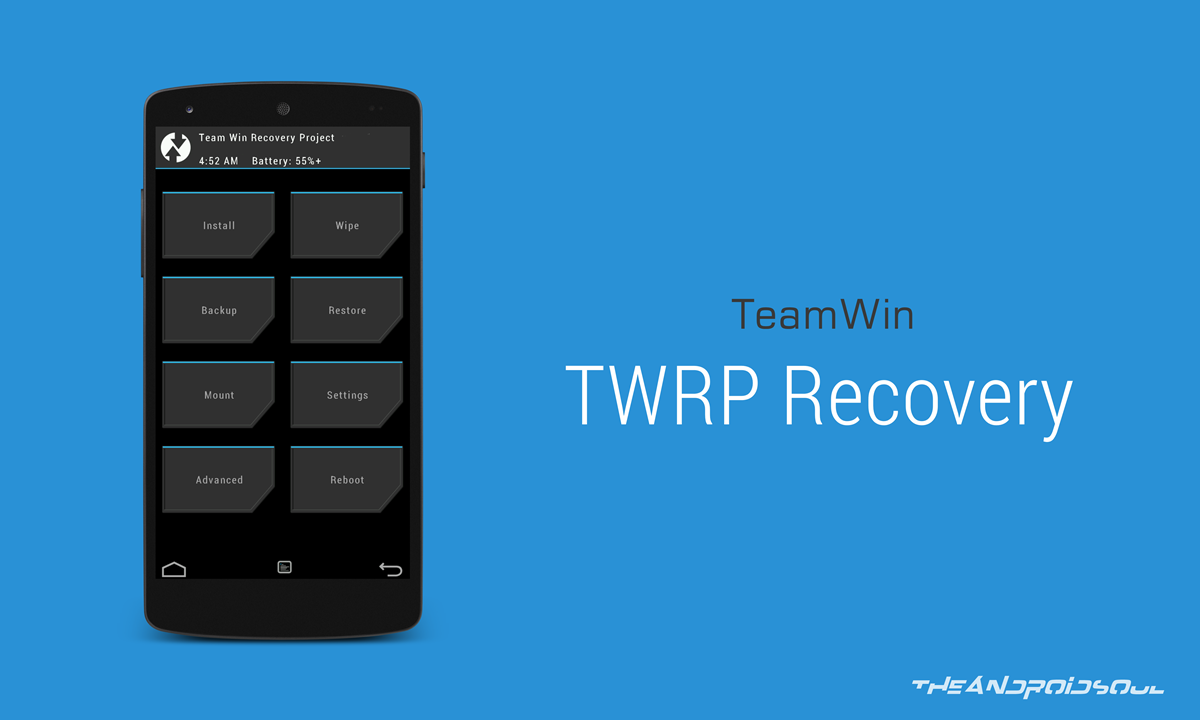
How to Flash SuperSU zip via TWRP Recovery
- Download and transfer the SuperSU zip file from the download link above to your device’s storage.
- Boot your device into TWRP recovery.
- Tap on Install and select the SuperSU zip file that you transferred to your device in Step 1.
- After selecting the .zip file, do Swipe to Confirm Flash on the bottom of screen to begin the flashing process.
- Once SuperSU is flashed, you’ll get Reboot System option, select it.
Congratulations! Your device should be rooted now. Look for the SuperSU app in app drawer.
To verify root access, you can download this Root Checker app from Play Store.


55 responses to “How to Flash SuperSU using TWRP recovery and Root any Android device [v2.82 SR5]”
How to I flash it with the other one? (not TWRP)
Hi
my mobile not root successful
How root my mib.
Samsung galaxy grand quattro gt i8522
u must unlock the bootloader first
You can’t flash TWRP file without unlocking the bootloader other website has assumed that you have unlocked bootloader flashed TWRP and downloaded the SuperSU.zip from the link to yoiu SD card
Yup , because you have to unlock the boot loader that will allow you to run twrp
it’s not work for galaxy s3,s4,s5,s6
it’s work with TWRP recovery. without TWRP recovery not root.
ty……have tried everything to root ZTE Zmax and this was the eaisest and worked well TY
Unable to root Gigabyte tm105 tried every possible way but failed everytime.
Supersu
thanks a lot!!! working GREAT!!!
I flashed it and installed SuperSU in recovery mode but it is not shown in the system and its not rooted. I have tried installing many times but it is of no use.
Did you mount the external card, if not first mount the card then you will see the zip file
I do not get an install option in recovery mode. LG G3 6.0 Verizon.
Its most likely called different when you dont have TWRP
Likewise includes both paid and free apls and games.You may get many days of outdoor enjoy.
During the right hand side menu, yyou will discover
a “music” resolution.root my andrkid phone (freetrialtips.com)
This one work for me. SM-N910C
Thank you my friend.
dear,
once (fastboot flash recovery twrp.img) see the problem (failed) (remot: server not allowed) how to solve this problems please help.
So, Ive almost gotten to the end, to flash the SuperSU zip, but everytime I try to enter recovery, I get the dead Andi with “No Command”. Any thoughts? Thanks.
Moto X Pure edition
You are now on stock recovery. Flash TWRP first.
HELP! I did everything, the supersu zip file is in /storage/emulated/0 but when I enter recovery mode I just CANT FIND ANY ZIP FILE!!! ? I tried to put it at different places like in /storage/android/data (this is the only location my recovery mode is leting me access!) I am usin a Moto E2 (LTE) with android 6.0 Marshmallow.
hey thats nt work on my galaxy j7 …. supersu has failed what should i do??
Any tool to install twrp recovery in OPPO f1
Plsss help me … For installing twrp recovery in OPPO f1
i uh failed some how with the supersu part and now im stuck 🙁 please help
Buen trabajo, instalado y funcionando, gracias.
I have followed the instructions and when I try to boot it I get a failed message. It says it can not verify whole-file signature. What do I do now?
Thanks for this. I’m just getting into rooting, and wondering your opinion on TWRP verses Titanium backup pro. My main purposes for rooting are not to flash custom ROMS, but rather to be able to create complete back ups including system and app settings, and all internal data and links to data on the external sd card. Will I have to use both TWRP manager and Titanium or just one of them to achieve this?
I also hope to synchronize everything between two identical devices. Perhaps you can suggest a good complete synchronisation software beyond one of these two backup apps if that would be more suited for that part.
Works well on Android 7.1 Nougat device. Thanks. ?
Not working.. i have super su and it is stopped on the yu logo… by the way i m using yu yunique
I followed the instructions and got to the part where i reboot into TWRP mode and install the supersu zip and it just says “install failed”
This worked For me. Thanks
Thank you. It’s working.
Very well written easy to follow instructions. Thanks for writing this. I now have SuperSU installed on my Samsung Galaxy and have root access. Once again, thank you.
This has been so easy and informative as I followed through these guidelines and managed to install a superUS, which enabled my phone to have root access. Thanks for these guidelines.
How to root lenovo k3 note please say something
I did try but it didn’t work. My phone is Huawei Mate 9
Same here. Huawei changed something in an update to keep device encrypted.
I really want my LG Stylo 2 Plus “ROOTED”. Someone please help!
I don’t get it. I have to be Rooted already to install TWRP. Twrp can only be installed on a rooted phone, it says !. So why would one then install SuperSU to get root ?
There is another way of getting TWRP without root using odin. Another reason for you following this tutorial could be because SuperSU is the best and most powerful root for android, but cant be installed without recovery. You could flash TWRP with a different root app, like KingRoot (I hate KingRoot), remove it and then flash SuperSU.
You can also install TWRP in ADB and FASTBOOT mode
however be aware that each TWRP image is phone specific and if you flash the wrong one you could brick your phone
Binary got messed up after I tried installing Magisk. This post helped me out. Thank you 🙂
Is there a way to root vivo y55s I tried almost everything all the apps kingroot, kingo root, iroot etc also is their an official custom recovery for I really can’t find one
When I flash su then ok after mobile reboot there is no su and no root
what if i root my device from ‘kingroot’ app? will it make any difference and will i still be able to flash roms and GAapps?
use supersu its bettter than kingroot
i think i just bricked my device
crap.
hahaha
How long does it take? Because I am waiting since almost 1 hour.
its not showing in app drawer , neither root checker is verifying any root. i flashed zip file through twrp .. i mentioned sucess and on reboot nothing. now i cant even install it through any app or some thing .. how can i uninstall it ????
Does it will format my phone after rooting
nope