

- The short version
- Can you gift GTA 6 digitally on PS5 and Xbox?
- How do you send GTA 6 as a gift on Xbox or through a web browser?
- How do you gift GTA 6 on PS5 and redeem the PlayStation Store gift card?
- What if an Xbox gift does not arrive or will not redeem?
- What if someone already owns GTA 6 or wants an Xbox gift refund?
- When is the GTA 6 release date on PS5 and Xbox?
- FAQs
The short version
- You can give someone Grand Theft Auto VI (GTA 6) digitally: Xbox’s gifting guide describes sending the game itself when gifting is available, while PlayStation’s gift card page directs PS5 buyers to a PlayStation Store gift card.
- Xbox Support’s gift help page identifies eligible products by the Buy as gift option on their product pages.
- PlayStation’s gift card page confirms that the credit can also pay for digital pre-orders.
Gifting GTA 6 on Xbox and PS5 at a glance
| Detail | Xbox | PS5 |
|---|---|---|
| What you send | A digital game gift, where the product offers gifting | A PlayStation Store gift card |
| Where you buy it | Microsoft Store or Xbox Store | A gift card seller linked from PlayStation’s gift card page |
| How it reaches the person | A console message and email for the console gifting route; email for web purchases | An emailed digital voucher or a printable PDF you give them |
| What they do | Select Redeem code | Redeem the card, then spend the credit on PlayStation Store |
| Region rule | Buyer and recipient must share a country or region | The voucher’s region must match the account’s region |
| If something goes wrong | Check junk email and the buyer’s order history; contact Microsoft Store Support after 12 hours without delivery | Check the voucher’s region and whether it was already redeemed; use PlayStation’s voucher troubleshooting help |
Can you gift GTA 6 digitally on PS5 and Xbox?
Yes, with different routes: Xbox’s gifting guide describes direct game gifts for eligible products, while PlayStation’s gift card page identifies store credit as its digital-game gifting route. For GTA 6 Xbox gifting, Xbox Support’s eligibility rule means checking the game’s product page for Buy as gift.
Can you gift GTA 6 on Xbox Series X|S?
Xbox Support makes the product page the eligibility check: look for Buy as gift on the GTA 6 page in Microsoft Store. According to the same help page, a missing option can mean the product is ineligible for digital gifting.
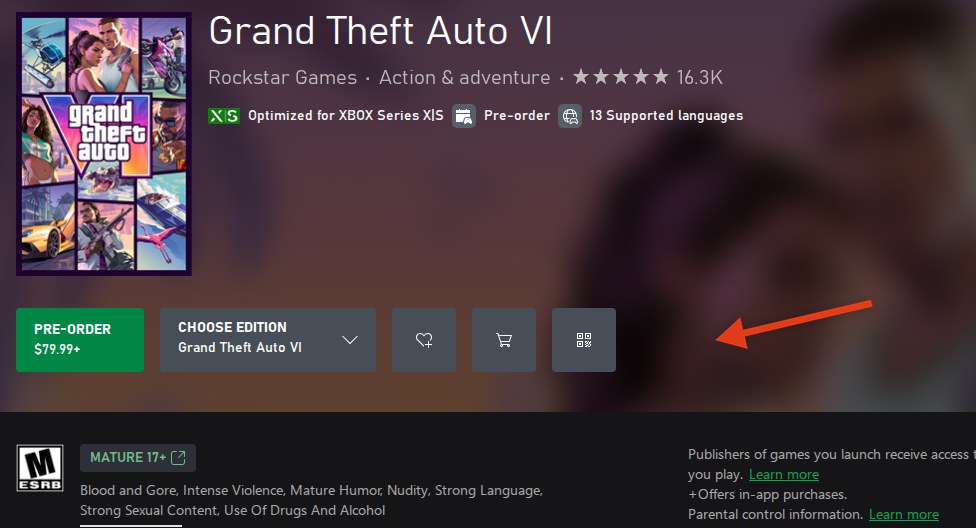
When we checked the US GTA 6 Xbox Store page while signed out on November 18, 2026, it showed “PRE-ORDER $79.99+”, “Choose edition”, wishlist, cart and code (QR) buttons, but no “●●●” (more options) button. Before trying to send GTA 6 as a gift, look for the “●●●” menu with “Buy as gift”, which Xbox Support says appears on product pages for digital products that can be gifted.
When choosing what to buy, see our GTA 6 buying guide.
How do you send GTA 6 as a gift on Xbox or through a web browser?
Xbox’s gifting guide provides console and web purchase routes, with an additional route through the Xbox app on PC. For GTA 6, Xbox Support’s rule still applies: proceed with a game gift when its product page offers Buy as gift.
How do you send GTA 6 as a gift on an Xbox console?
Follow the console purchase sequence in Xbox’s gifting guide when the game offers gifting:
- Launch Microsoft Store on your Xbox.
- Find GTA 6 and open its product page.
- Select the gift wrap icon.
- Under Buy as gift, choose a friend from your friends list or enter the recipient’s email address.
- Select how you want to pay and purchase the gift.
Xbox’s gifting guide requires the recipient to live in your country. For a buyer in the United States, that means sending to someone in the United States.
How do you send GTA 6 as a gift from the Xbox app on PC or a web browser?
Xbox’s gifting guide gives this sequence for the Xbox app on PC:
- Find GTA 6 in the app.
- Open the … menu and select Buy as Gift, when available.
- Choose an Xbox friend or enter an email address, then finish purchasing the gift.
For ROG Xbox Ally, the same Xbox guide applies this sequence through the Store tab within the Xbox Full Screen Experience.
For a browser purchase, Xbox’s gifting guide provides these steps:
- Visit Xbox Store online or Microsoft Store online and find GTA 6.
- Open the … menu next to the purchase button.
- Select Buy as a gift, when available, and enter the recipient’s email address.
- Sign in with your Microsoft account, select a payment method and finish the purchase.
Xbox’s web instructions offer email delivery only.
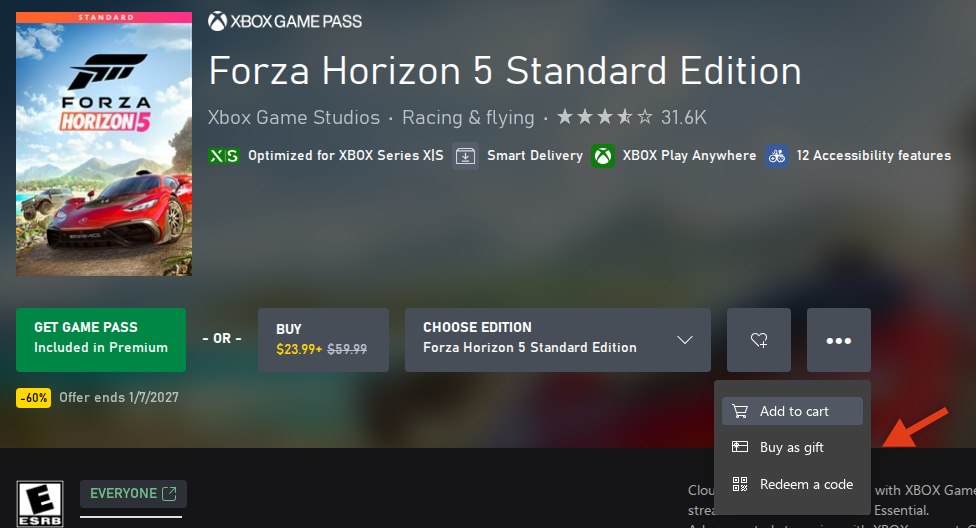
This Forza Horizon 5 Standard Edition screenshot shows where “Buy as gift” appears in the “●●●” menu beside the buy button on a game that can be gifted.
How do you send GTA 6 as a gift through Microsoft Store on Windows?
Xbox’s gifting guide also provides a Microsoft Store route on Windows, with email as the only recipient option:
- Open Microsoft Store on Windows and find GTA 6.
- When gifting is available, select the Buy as a Gift icon beside the purchase button on its right.
- Sign in with your Microsoft account.
- Provide the recipient’s email address and choose how to pay, then finish the purchase.
What does the person do with an Xbox gift?
Xbox’s console gifting instructions describe delivery through an Xbox console message and the email address connected to the recipient’s Xbox account. In that guide, the recipient selects Redeem code to claim the gift.
Xbox Support directs you to Microsoft Store Support if delivery is still pending after 12 hours.
How do you gift GTA 6 on PS5 and redeem the PlayStation Store gift card?
For GTA 6 PS5 gifting, PlayStation’s gift card page points you toward a PlayStation Store gift card that the recipient spends on the game. The same page identifies this route for PS5 Pro and PS4 as well.
PlayStation’s gift card page describes these delivery choices:
- A printable PDF that you can give to the recipient.
- A digital voucher delivered by email, with a custom design and message.
According to PlayStation’s gift card page, the credit can purchase digital items available on PlayStation Store, including digital pre-orders.
The same PlayStation page also identifies local retailers as places to buy gift cards.
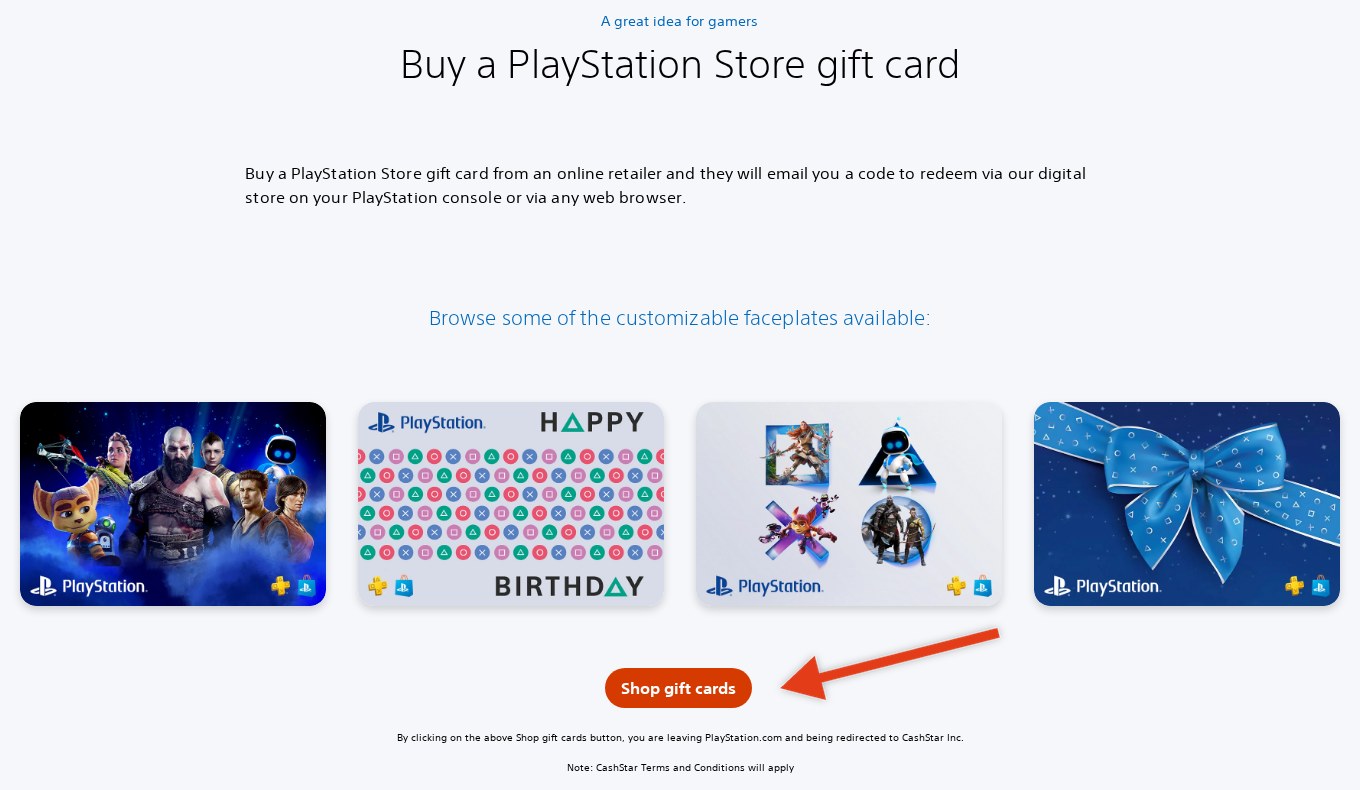
On PlayStation’s gift card page, select “Shop gift cards” under “Buy a PlayStation Store gift card” to visit CashStar Inc.
PlayStation’s gift card guidance notes that some codes need activation when purchased, with an activation notice printed on both sides of the card.
How does the person redeem a PlayStation gift card?
PlayStation’s gift card instructions describe redemption through these options:
- PlayStation Store on PS5.
- PlayStation Store on PS4.
- PlayStation App.
- A web browser.
For browser redemption, PlayStation’s voucher page gives this sequence:
- Sign in to PlayStation Store and open your profile.
- Choose Redeem Code.
- Type the voucher’s 12-digit code and select Continue.
For redemption directly on PS5, PlayStation’s voucher page gives these steps:
- Open PlayStation Store and press the triangle button.
- Choose … (More), then Redeem Code.
- Enter the 12-digit code and select Redeem.
On PS4, the same PlayStation voucher instructions give this route:
- Open PlayStation Store and move to the sidebar’s bottom.
- Select Redeem Codes.
- Enter your 12-digit voucher code.
- Select Continue, followed by Confirm or Yes.
For PlayStation App redemption, PlayStation’s voucher page provides these steps:
- Tap the PS Store icon.
- Open the menu using its icon on the screen’s right.
- Choose Redeem Code.
- Enter your 12-digit voucher code and select Continue.
At checkout, the same PlayStation page also offers redemption through Redeem Codes and Gift Cards in the menu for payment methods.
PlayStation’s voucher page requires a region match between the code and the account, and permits only one redemption per code. Under PlayStation’s gift card guidance, the recipient then uses the credited balance to buy GTA 6 on PlayStation Store.
If redemption fails, PlayStation’s voucher page directs you to voucher troubleshooting help. That page also warns that funds cannot move between accounts, so redeem the card on the intended account.
How do PlayStation gift cards work for a child account?
PlayStation’s voucher page directs wallet top-ups for children to the family manager’s account. Under the same PlayStation guidance, the family manager can then set a monthly limit on the child’s spending.
What if an Xbox gift does not arrive or will not redeem?
Xbox Support’s gift help page directs you to Microsoft Store Support when a gift remains undelivered after 12 hours. The same help page gives these checks for delivery and redemption problems:
- Ask the recipient to look in their email’s junk folder.
- Find the purchase in your order history and select View gift code. For a code that remains active, use Copy and send the code yourself by email.
- If the code has already been redeemed, check whom you sent it to in the order details.
- Check the country or region. A code purchased for a different region cannot be redeemed; the buyer and recipient must share a country or region. For that mismatch, Xbox Support allows the buyer to return the gift for a refund.
- For a child or teen account, an age restriction may prevent the download. A parent or responsible adult can adjust the maturity setting through Microsoft family settings.
- If you cannot send another gift, you may have reached the digital gifting limit. You might need to wait up to 30 days before another attempt.
What if someone already owns GTA 6 or wants an Xbox gift refund?
Xbox Support allows the recipient to pass an unwanted gift code to someone else or ask the buyer to request a refund. Under the same help page’s rules, the recipient cannot return or exchange the code themselves.
Can you get a refund on an Xbox gift?
Yes, Xbox Support gives the buyer 14 days from purchase to request a refund for a gift that remains unredeemed. The same help page rules out refunds after redemption, even during that 14-day window.
Xbox Support directs the buyer to xbox.com/refunds to sign in and submit the request.
When is the GTA 6 release date on PS5 and Xbox?
Rockstar Games Customer Support sets the GTA 6 release for November 19, 2026, at local midnight across all regions on PlayStation 5 and Xbox Series X|S.
Rockstar’s November 3, 2026 post puts the pre-load’s storage requirement at up to 212 GB, depending on the device.
For download help, see GTA 6 Not Downloading on PS5 or Xbox?
FAQs
Can you gift GTA 6 digitally?
Yes, through the applicable console route: Xbox’s gifting guide describes direct gifts for eligible games, while PlayStation’s gift card page points to store credit. Xbox Support’s eligibility check is whether the GTA 6 product page offers Buy as gift.
Can you gift GTA 6 on PS5?
Yes, using the gift card route described by PlayStation: send a PlayStation Store gift card that the recipient redeems and spends on GTA 6.
Can you gift GTA 6 on Xbox?
Xbox Support makes eligibility depend on the product page displaying Buy as gift. Check the GTA 6 page in Microsoft Store for that option before arranging a direct game gift.
How do I check whether GTA 6 can be gifted on Xbox?
Xbox Support identifies giftable digital products by the Buy as gift option on their product pages. Look for it on GTA 6 in Microsoft Store; the same help page identifies product ineligibility as a possible reason for a missing gifting option.
How does someone receive and redeem an Xbox gift?
Xbox’s console gifting guide describes a message arriving on the recipient’s Xbox and at the email address associated with their Xbox account. Following that guide, they select Redeem code to claim it.
Can I gift GTA 6 to someone in another country on Xbox?
No, Xbox Support requires matching countries or regions for the buyer and recipient. Its gift help page explains that a code purchased for another region will fail redemption.
Can I use a PlayStation Store gift card to pre-order GTA 6?
Yes, PlayStation’s gift card page includes digital pre-orders among the purchases supported by PlayStation Store gift card credit.
Can I redeem a PlayStation Store gift card from another region?
No, PlayStation’s voucher page requires the code’s region to match your account’s region. The same page permits a code to be redeemed only once.
What if my Xbox gift never arrived?
Xbox Support recommends checking junk email first. Its gift help page also lets the buyer retrieve an active code from order history through View gift code and email it to the recipient; contact Microsoft Store Support if delivery remains pending after 12 hours.
Can I get a refund on an Xbox gift?
Yes, Xbox Support permits the buyer to request a refund within 14 days of purchase while the gift remains unredeemed. Under the same rules, redemption makes the gift ineligible for a refund, and the recipient cannot return or exchange it themselves.
When does GTA 6 launch on PS5 and Xbox Series X|S?
Rockstar Games Customer Support gives November 19, 2026, as the launch date on both platforms, with release at local midnight in every region.
Related on NerdsChalk


Leave a Reply