


- The short version
- Do you need a PS5 update to play GTA 6?
- How do you fix GTA 6 crashing or freezing on PS5?
- What if other PS5 games have problems too?
- What should you try if GTA 6 won’t start or gets stuck while starting on PS5?
- What should you check if GTA 6 has a padlock on PS5?
- How do you restore licenses on PS5?
- How do you start PS5 Safe Mode and rebuild the database?
- How do you fix GTA 6 crashing or freezing on Xbox Series X|S?
- Where do you get GTA 6 help from Rockstar?
- Which PS5 and Xbox Series X|S troubleshooting steps delete data?
- FAQs
The short version
If Grand Theft Auto VI (GTA 6) keeps crashing on PS5, start with the system software update that PlayStation Support US described as required before playing in its November 18, 2026 post. Sony’s crash troubleshooting page and Xbox Support’s troubleshooting page provide general console checks to work through before the PS5 reinstall and reset steps. The same Xbox Support page directs GTA 6 questions to Rockstar Games Customer Support.
GTA 6 crash and freeze fixes by console
| What to try | On PS5 (PlayStation Support) | On Xbox Series X|S (Xbox Support) |
|---|---|---|
| Update the console’s system software | Settings > System > System Software > System Software Update and Settings | Not on this list as its own step; update if prompted during the network test |
| Restart the game | Not on this list | Xbox button > highlight the game > Menu button > Quit |
| Restart or power cycle the console | PS button > Power > Restart PS5 | Hold the console’s Xbox button for at least 10 seconds |
| Check the game is fully installed and updated | Options button > Information > Download Status; Options button > Check for Update | Not on this list |
| Restore licenses | Settings > Users and Accounts > Other > Restore Licenses | Not on this list |
| Fix the profile or save data | Start without an existing game save to test it | Try another profile; remove and re-add your profile; clear the local save and resync with the cloud |
| Clear the cache and rebuild the database | Safe Mode > Clear Cache and Rebuild Database | Not on this list |
| Delete the game and download it again | Delete and re-download; wired connection if possible | Not on this list |
| Reset the console | Last step; erases console data; back up first | Not on this list |
Do you need a PS5 update to play GTA 6?
Yes. PlayStation Support US stated on November 18, 2026 that players need a PS5 system software update before playing GTA 6.
In that post, PlayStation Support US advised installing it before midnight on November 19, 2026 to prepare for the game’s launch that day.
Sony’s crash page also recommends keeping the console software current. PlayStation’s start-issues guide gives this route: Settings > System > System Software > System Software Update and Settings.
How do you fix GTA 6 crashing or freezing on PS5?
Sony’s crash page recommends checking installation and updates before moving to save testing or reinstalling a digital game. PlayStation Support gives this troubleshooting sequence:
- Highlight GTA 6 and press the Options button. Open Information > Download Status to check whether installation has finished.
- With the game highlighted, press the Options button and choose Check for Update.
- Check that the PS5 system software is current.
- Start a fresh game without loading an existing save to test whether the problem involves that save.
- Delete GTA 6 from the console, then download and install it again.
- Leave a console reset until last. Back up your game data before choosing System > System Software > Reset Options > Reset Your Console. This erases everything saved in console storage.
What if other PS5 games have problems too?
Sony’s crash page identifies a possible console issue when trouble persists across more than one game and directs readers to PlayStation Repairs.
For online-play troubleshooting, the same Sony page recommends testing other games and services. If several games are affected, PlayStation Support directs you to connection troubleshooting.
What should you try if GTA 6 won’t start or gets stuck while starting on PS5?
PlayStation’s start-issues guide recommends storage checks, restarting the console and checking for current PS5 system software. Work through its options below, with a system software reinstall as the final step:
- Check for a system update through Settings > System > System Software > System Software Update and Settings.
- If GTA 6 is on USB extended storage, move its game data into the PS5’s internal storage. For the storage question, see Can GTA 6 Run From a USB Drive on PS5 and Xbox Series X|S?
- Press the PS button. Choose Power > Restart PS5.
- Restore the game’s licenses.
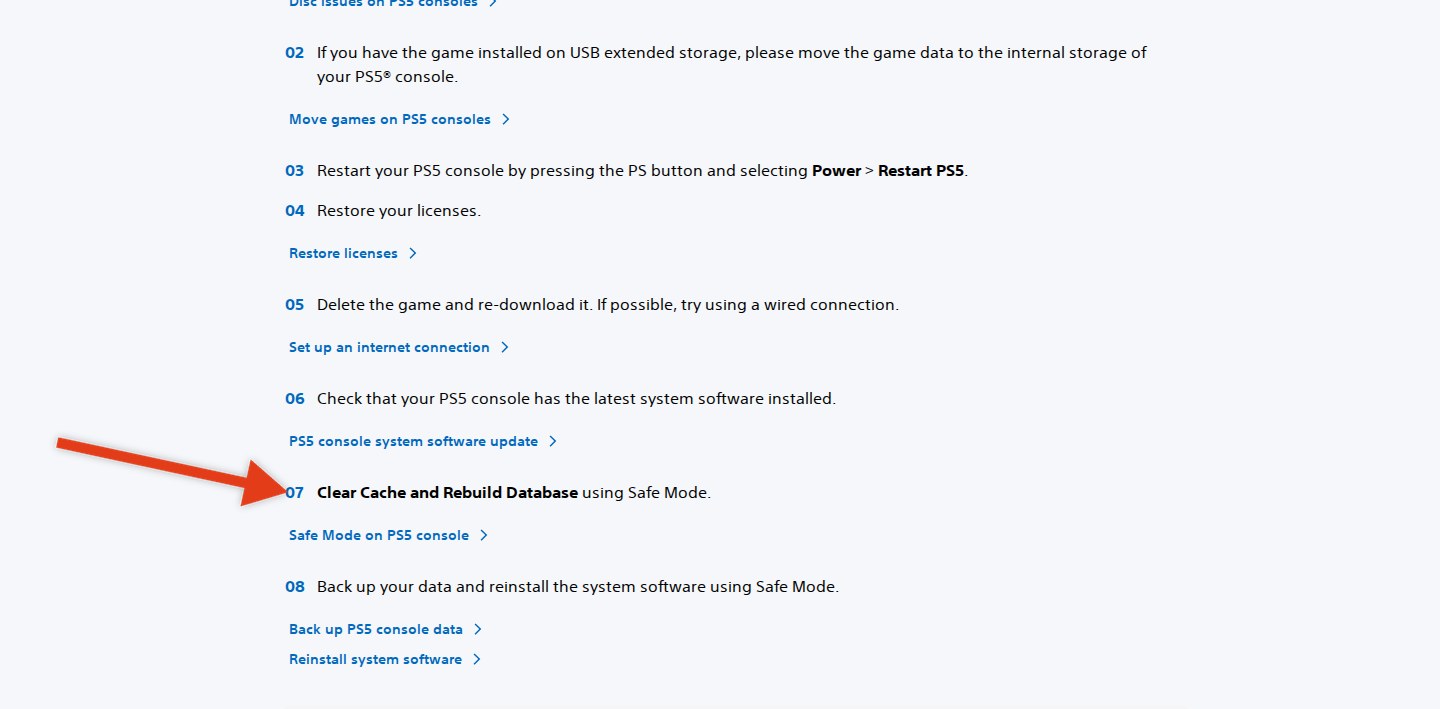
- Start Safe Mode and select Clear Cache and Rebuild Database.
- Delete GTA 6 and download it again. Use a wired connection if possible.
- As the final step, back up your data before reinstalling the system software through Safe Mode.
PlayStation Support’s startup troubleshooting list includes clearing the cache and rebuilding the database, marked by the arrow.
What should you check if GTA 6 has a padlock on PS5?
Sony’s start-issues guide describes a padlock beside a game as a possible license problem. If the lock covers the entire game image, PlayStation Support directs you to your Family Manager to change it.
For game-access checks, Sony’s start-issues guide recommends these steps:
- Sign in with the purchasing account. Review its transaction history to confirm the purchase succeeded.
- If another person on the console owns the game, check that they have enabled Console Sharing and Offline Play.
- Check the PlayStation status page. When it shows an alert, wait for the service to recover before trying again.
How do you restore licenses on PS5?
Sony’s license-restoration guide gives these steps:
- Open Settings > Users and Accounts > Other > Restore Licenses.
- Select whichever licenses you need to restore.
Sony’s guide shows where to restore PS5 licenses and notes that doing so won’t affect your data.

PlayStation Support also provides a shortcut: highlight the game on the home screen or in the game library, press the Options button and choose Restore License. The same Sony guide includes crashing games among the reasons to try license restoration and states that your data stays unaffected.
How do you start PS5 Safe Mode and rebuild the database?
Sony’s Safe Mode guide provides a power-button sequence for entering Safe Mode, where you can choose Clear Cache and Rebuild Database:
- Hold down the console’s power button for three seconds to switch it off.
- After shutdown, hold down the power button again. Let go at the second beep, which sounds about seven seconds after the first.
- Use a USB cable to connect the controller, then press its PS button.
- Select Clear Cache and Rebuild Database, then choose the relevant option.
PlayStation Support describes the two choices this way:
- Clear System Software Cache is suggested when system features have problems or performance drops.
- Rebuild Database scans console storage and builds a fresh database covering its content.
Sony warns that certain Safe Mode choices can cause data loss. PlayStation Support identifies Reset PS5 as deleting all user data and advises backing up before destructive Safe Mode actions.
A manual system update may be needed after a long stretch offline or an interrupted internet connection during an update, according to Sony’s Safe Mode guide. PlayStation Support offers the manual download directly to the console or through a USB drive.
How do you fix GTA 6 crashing or freezing on Xbox Series X|S?
Xbox Support’s troubleshooting page starts with service checks before moving through restarts and profile troubleshooting. The same Xbox Support page gives this general sequence for Xbox Series X|S:
- Check the Xbox status page for service problems. Also check Xbox Support’s known-issues page for game launches.
- Restart GTA 6. Press the Xbox button on the controller and highlight the game. Press the Menu button, select Quit and launch it again. If the freeze prevents you from reaching Home, continue to the power-cycle step.
- Power cycle the console. Hold its front Xbox button for at least 10 seconds to turn it off. Switch it back on with the Xbox button on the console or controller.
- Test the connection. Press the Xbox button and navigate to Profile & system > Settings > General > Network settings. Choose Test network connection. Select Yes if a console software update is offered.
- Try another profile. Open the guide and choose Profile & system > Add or switch, then select a different profile.
- Remove your profile and add it again. Open Profile & system > Settings > Account > Remove accounts. Choose your account and select Remove. Return to Profile & system > Add or switch > Add new, then sign in using the same Microsoft account. Avoid Get a new account.
- Clear the game’s local save and resync from the cloud. Open My games & apps > See all > Games. Highlight GTA 6 and press the Menu button. Choose Manage game and add-ons > Saved data, then Delete all. Afterward, hold the controller’s Xbox button and select Restart console.
Xbox Support states that power cycling preserves games and data. The same Xbox Support page explains that saved games go into cloud storage automatically while the console is connected to the Xbox service.
Where do you get GTA 6 help from Rockstar?
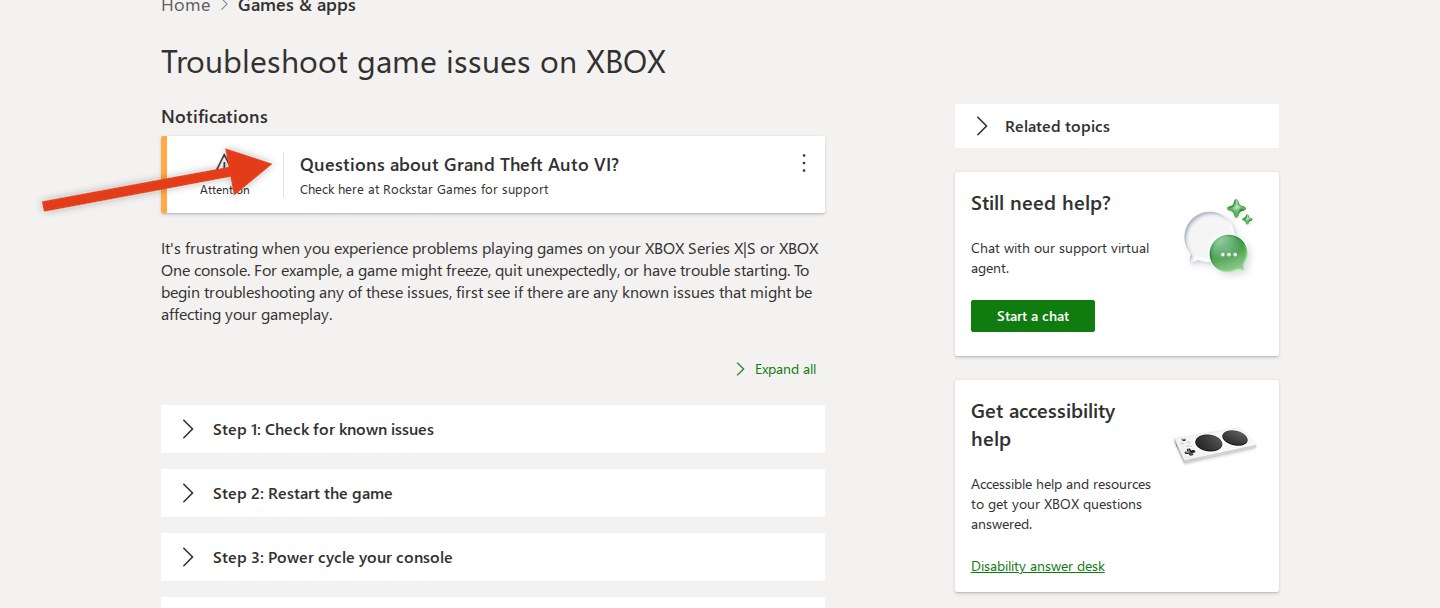
Xbox Support’s troubleshooting page specifically sends GTA 6 questions to Rockstar Games Customer Support. Rockstar’s GTA VI support page organizes help under these categories:
- Purchase
- Activation
- Installation
- Error Code
- Questions & Answers
Sony’s general advice for an online-play problem affecting a single game is to ask its publisher about known issues.
Xbox Support’s page directs GTA 6 questions to Rockstar Games, with the arrow marking the support notice.
Which PS5 and Xbox Series X|S troubleshooting steps delete data?
Sony identifies console resets as destructive, while Xbox Support’s final save-troubleshooting step removes the local save before cloud resync.
- PlayStation Support states that restoring licenses leaves your data unaffected.
- Sony’s Safe Mode guide identifies Repair Console Storage as an option that preserves data.
- The same Sony guide states that Restore Default Settings retains installed games and saved data.
- PlayStation Support describes Rebuild Database as scanning storage and building a fresh content database.
- Sony identifies Reset PS5 as deleting every user’s data. PlayStation Support’s Reset PS5 (Reinstall System Software) option also removes the system software.
- Xbox Support states that a power cycle preserves games and data.
- The same Xbox Support page instructs you to delete the local game save before restarting for cloud resync.
PlayStation Support advises backing up your data before a console reset.
FAQs
Why does GTA 6 keep crashing on PS5?
PlayStation Support’s digital-game troubleshooting recommends this sequence:
- Check whether installation has finished through the game’s Information > Download Status screen.
- Use Check for Update from the game’s Options menu.
- Update the PS5 system software.
- Test a fresh game without loading an existing save.
- Delete the game and install it again.
- Back up your data before considering a console reset as the final step.
What can you try if GTA 6 is stuck loading on PS5?
PlayStation Support’s start-issues guide provides these options, including a system software check and reinstallation steps:
- Check for current system software through Settings > System > System Software > System Software Update and Settings.
- Move game data from USB extended storage into internal console storage if necessary.
- Restart through the PS button’s Power > Restart PS5 menu.
- Restore licenses.
- Use Safe Mode’s Clear Cache and Rebuild Database option.
- Delete and download the game again, using a wired connection if possible.
- Back up your data before reinstalling the system software in Safe Mode as the final step.
How do I fix GTA 6 crashing on Xbox Series X|S?
Xbox Support’s general game-troubleshooting sequence is:
- Check the Xbox status page and the known-issues page for game launches.
- Quit GTA 6 through its Menu button options, then launch it again.
- Hold the console’s Xbox button for at least 10 seconds to power it off, then turn it back on.
- Open Profile & system > Settings > General > Network settings > Test network connection. Accept a console update if prompted.
- Try a different profile through Profile & system > Add or switch.
- Remove your profile through Profile & system > Settings > Account > Remove accounts. Use Profile & system > Add or switch > Add new to sign back into the same Microsoft account. Avoid Get a new account.
- Open My games & apps > See all > Games. Highlight GTA 6 and press the Menu button. Choose Manage game and add-ons > Saved data and select Delete all to remove its local save. Hold the controller’s Xbox button and choose Restart console for cloud resync.
Xbox Support explains that saves are stored automatically in the cloud while you are connected to the Xbox service.
Do I need a PS5 update for GTA 6?
Yes. PlayStation Support US stated on November 18, 2026 that a PS5 system software update is required before playing GTA 6. Sony’s update-checking route is Settings > System > System Software > System Software Update and Settings.
How do I check that GTA 6 is fully installed on PS5?
Sony’s crash guide provides these steps:
- Highlight GTA 6.
- Press the Options button.
- Select Information > Download Status to check installation progress.
How do I restore licenses on PS5?
PlayStation Support gives this route:
- Open Settings > Users and Accounts > Other > Restore Licenses.
- Choose the licenses to restore.
Sony also offers a game-specific shortcut: highlight the game on Home or in the library, press the Options button and choose Restore License. PlayStation Support’s license guide states that this leaves your data unaffected.
What does Rebuild Database do on PS5?
Sony’s Safe Mode guide describes Rebuild Database as scanning the drive and building a fresh database covering the console’s content.
Will rebuilding the PS5 database delete my GTA 6 save?
PlayStation Support describes Rebuild Database as a drive scan that builds a fresh content database. Sony separately identifies Reset PS5 as the option that deletes all user data and advises backing up before destructive Safe Mode actions.
Does power cycling an Xbox Series X|S delete games or saves?
No. Xbox Support states that power cycling preserves games and data. The same Xbox Support page instructs you to hold the console’s Xbox button for at least 10 seconds, then switch the console back on.
Where do I contact Rockstar about GTA 6?
Xbox Support directs GTA 6 questions to Rockstar Games Customer Support’s GTA VI page. Rockstar groups its help there by purchase and activation issues, with separate installation and error-code categories plus Questions & Answers.
For download or installation trouble, see GTA 6 Not Downloading on PS5 or Xbox? What Should You Check?
Related on NerdsChalk



Leave a Reply