

Being able to share your Android device’s mobile data with friends and family members is one cool feature about Android, and it really sucks when carriers sort of bully users by blocking that by default. On Android 6.0 Marshmallow too, carriers can easily block tethering.
So, what do we do? Well we hack and enable the tethering option ourselves. Well, not exactly hacking, it’s just running a simple command that enables tethering your own Android device, not others.
What you are gonna need for this are proper drivers installed, so that your PC and device communicate properly, over ADB specially.
You are gonna need access to ADB shell for this. We’ve covered everything below, right from proper drivers to access to the end, so let’s see how to enable tethering on Marshmallow update on Nexus 5, Nexus 6, Nexus 7 and Nexus 9.
How To
- Nexus driver / OEM driver (OEM driver: Samsung, LG, HTC, Sony, etc. install their own driver, not that of Nexus)
- ADB drivers (a must!)
- Go to Settings > About device, and tap on build no. around 7 times or until you get ‘You’re now a developer’ message.
- Go back to Settings, and into Developer options. Use the toggle button to enable USB debugging. Then tap on OK button to accept warning.
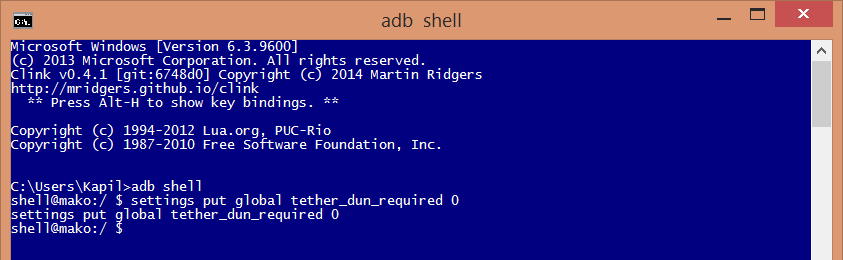
adb shell

You will see the location change from your windows PC to that of device. In my case above, from directory Kapil
settings put global tether_dun_required 0
Need help?
Let us know via comments below if need any assistance with this.







36 responses to “How to enable tethering on Marshmallow update [Android 6.0]”
One needs to be rooted for this procedure?
No. Root access is not required.
Hi Krishna,
I’m using HTC Desire EYE, i don’t see option i.e developer for enabling USB debugging. Before that I tried installing HTC_Driver_4.16.0.001.exe, but no installation happened. Ugrading Android 6.0.1 version into my device which disabled my Smart Network Sharing option(Internet Pass through).
Please help in enabling the Internet pass through option into my device.
Thanks
thx. So this enables it global right? Meaning Wifi tether as well with a third party app
Yes.
One needs to be rooted for this procedure?
No. Root access is not required.
Hi Krishna,
I’m using HTC Desire EYE, i don’t see option i.e developer for enabling USB debugging. Before that I tried installing HTC_Driver_4.16.0.001.exe, but no installation happened. Ugrading Android 6.0.1 version into my device which disabled my Smart Network Sharing option(Internet Pass through).
Please help in enabling the Internet pass through option into my device.
Thanks
thx. So this enables it global right? Meaning Wifi tether as well with a third party app
Yes.
tried wifi tether and failed as well as FoxFi .Nexus 6 MRA58K
tried wifi tether and failed as well as FoxFi .Nexus 6 MRA58K
Did not work. Verified setting with:
settings list global
before and after restarting, then tried and just got told to go pay my provider
Did not work. Verified setting with:
settings list global
before and after restarting, then tried and just got told to go pay my provider
Will not work on AT&T.
Which device you tried this on?
Will not work on AT&T.
Which device you tried this on?
Tried this on my wifi-only Nexus 7. I’m not sure what the expected results would be, but following the directions here, it did not work.
I’m starting to think it has something to do with them removing the functionality of the tether completely.
Tried this on my wifi-only Nexus 7. I’m not sure what the expected results would be, but following the directions here, it did not work.
I’m starting to think it has something to do with them removing the functionality of the tether completely.
I’m using a Google play store nexus 6 with 6.01 on Verizon and it didn’t work either. It is still checking subscription status
I’m using a Google play store nexus 6 with 6.01 on Verizon and it didn’t work either. It is still checking subscription status
followed procedure , still asking for subscription , and tried foxfi as well. no dice
followed procedure , still asking for subscription , and tried foxfi as well. no dice
htc m8
i did try it was fine but after restart still cant see the option for tethering to my phone thu lan internet connection
htc m8
i did try it was fine but after restart still cant see the option for tethering to my phone thu lan internet connection
Hi, thank you so much for your hard work, but this didn’t work for me. Everything went pretty much like your screenshots, except that my command window never said “adb shell at the top. When I entered the adb shell command, I got a line that read “ shell@surnia_uds:/ $”. When I typed the “settings put…” Command, I got a line that repeated the command and then another with “shell@surnia_uds:/ $”. I restarted the phone but still did not get internet through the device.
I’m pretty sure the PC was communicating with the moto e2 because I got a message on the screen asking permission for the PC to debug.
Can anyone help? Thanks so much.
Hi again. I checked settings with “settings list global”. I can see “ tether_dun_required=0” then “tether_mode_on=0”.
Hi, thank you so much for your hard work, but this didn’t work for me. Everything went pretty much like your screenshots, except that my command window never said “adb shell at the top. When I entered the adb shell command, I got a line that read “ shell@surnia_uds:/ $”. When I typed the “settings put…” Command, I got a line that repeated the command and then another with “shell@surnia_uds:/ $”. I restarted the phone but still did not get internet through the device.
I’m pretty sure the PC was communicating with the moto e2 because I got a message on the screen asking permission for the PC to debug.
Can anyone help? Thanks so much.
Hi again. I checked settings with “settings list global”. I can see “ tether_dun_required=0” then “tether_mode_on=0”.
It says in command prompt that abd is not recognized as an internal or external command when i type in abd shell
It says in command prompt that abd is not recognized as an internal or external command when i type in abd shell
Not working on my MOTO E 1st gen too, i am using cm13 on it.
Not working on my MOTO E 1st gen too, i am using cm13 on it.