

Google introduced factory reset protection to Android devices last year with the release of Android Lollipop build. However, it’s only now that manufacturers and carriers are rolling out the feature to their devices.
The Factory Reset Protection works by securing your device using your Google account credentials, so when someone steals your phone and factory reset it, the user will still need to verify the registered Google account on the phone prior to Factory reset to setup and use the device. This makes it pointless for the thief to steal your phone.
However, if you didn’t steal but bought the phone off Craigslist or other similar market, and you’re now stuck with account verification after a factory reset of the phone. Well, in that case, you might find a little hacker’s magic helpful.
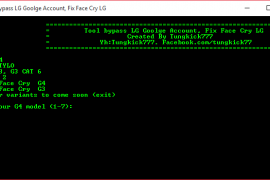
Developer tungkick over at xda has created a simple batch script tool that can bypass factory reset protection (FRP) on a number of LG devices, check the full list of supported devices below:
- LG G4
- LG G3
- LG G Flex 2
- LG G Stylo
Support for more devices coming soon..
You can grab tungkick’s Factory Reset Protection bypass tool for LG devices from the download link below:
[ecko_button target=”blank” size=”6″ radius=”3″ style=”ghost” background=”#a161bf” color=”#333333″ url=”http://downloadmirror.co/android/ux/toolbypass_google_account_g4.rar”]Download Bypass Tool LG Factory Reset Protection[/ecko_button]
How to Bypass Account Verification on LG Devices
- Put your LG device into download mode and connect it to PC.
- Download and extract the bypass tool by tungkick on your PC.
- Double-click/Run Tool.exe file » Select your LG device from the list and let the tool do its work.
- Once bypass tool is done, reboot your phone.
That’s it. You shouldn’t see account verification anymore on your LG device.
Happy Androiding!
via xda





295 responses to “How to Bypass Google Account Verification on LG G4, G3 and other LG devices”
How to use this tool to by bypass Face Cry on LG G Pro 2 (F350S) Korean version.
help please.. when clicking tool.exe ,it says win32 not supported or something like tHAT.. i really dont know what to do about this
please i really need your help
help please.. when clicking tool.exe ,it says win32 not supported or something like tHAT.. i really dont know what to do about this
please i really need your help
help please.. when clicking tool.exe ,it says win32 not supported or something like tHAT.. i really dont know what to do about this
please i really need your help
when I hit number 2 for the lg g stylo its starts then the app closes right after I hit enter any help out there
when I hit number 2 for the lg g stylo its starts then the app closes right after I hit enter any help out there
when I hit number 2 for the lg g stylo its starts then the app closes right after I hit enter any help out there