

Samsung’s recent announcement that the Ice Cream Sandwich (ICS) update for the Galaxy S2 i9100 will be delayed to April may have disappointed a few people, but to offset that, an ICS firmware has been leaked for the Galaxy S2, XXLPJ. Maybe it’s a coincidence, or maybe it’s just Samsung’s way to make people a little less sad, but the important part is that the users get to try a new firmware which they always welcome.
The last ICS leak was XXLPH and had the build date of 9th February, while XXLPJ has a build date of 14th February, so there probably aren’t many improvements and changes, but still, it’s a newer release and worth the attention. Of course, as it’s a leaked firmware and not officially complete, expect bugs and issues to be present.
Read on to find out how you can install XXLPJ firmware on your Galaxy S2 i9100.
Compatibility
This ROM and the guide below is compatible only and only with Galaxy S2, model number i9100. It’s not compatible with any other device. Check your device’s model number in Settings » About phone.
Warning!
The methods and procedures discussed here are considered risky and you should not attempt anything if you don’t know completely what it is. If any damage occurs to you or your device, we won’t be held liable — you only will be responsible, you’ve been warned!
Pre-Installation Requirements/Tips
- This procedure will wipe all your apps, data and settings (but it will NOT touch your SD cards, so don’t worry about those). Backup your Apps and important data — bookmarks, contacts, SMS, APNs (internet settings), etc. This Android backup guidewould help you.
- If you have Samsung’s PC software Kies installed, un-install it first because it may interrupt the flashing process.
- Drivers! — it’s important you’ve the proper drivers installed. Download links below.
32 bit (x86) Windows | 64-bit (x64) Windows
How to Install XXLPJ on Galaxy S2 i9100
- Download XXLPJ firmware.
Download Link | Filename: I9100XXLPJ_I9100XXLPJ_OXA.zip | Size: 376.9 MB [Link Updated] - Extract the downloaded file I9100XXLPJ_I9100XXLPJ_OXA.zip(from step 1) to get these 5 files:
- GT-I9100-MULTI-CSC-OXALPJ.tar.md5
- I9100_CODE_I9100XXLPJ_CL140368_REV02_user_low_ship.tar.md5
- logo.png (to be ignored.. no use here)
- MODEM_I9100XXLPJ_REV_02_CL1105553.tar.md5
- Odin3_v1.85.zip
- Extract the Odin3_v1.85.zipfile to get Odin3 v1.85.exe, ignore other files but don’t delete the .ini file if you get it. Open Odin3 v1.85.exe file when asked in step 6 below.
- Disconnect your phone if it’s connected to PC. Switch Off your phone. Wait for vibration to confirm complete switch off.
- Now, put the Galaxy S2 in Download Mode — press and hold these keys together: Volume Down + Home + Power. You’ll get a Warning! screen.. press Volume upto continue to enter download mode
- Open Odin (from step 3) — double-click the Odin3 v1.83.exe.
- Connect your phone to PC now. You should get the message “Added! !” under Odin’s message box in the bottom left. If you don’t get this message, then probably there is a problem with drivers. Make sure you’ve proper drivers installed. See point 3 above under Pre-Installation Requirements.
- Select these files in Odin at respective tabs:
- Click the PDA Tab, and select I9100_CODE_I9100XXLPJ_CL140368_REV02_user_low_ship .tar.md5 (from step 3.2)
- Click the Phone Tab, and select MODEM_I9100XXLPJ_REV_02_CL1105553.tar.md5 (from step 3.3)
- Click the CSC Tab, and select GT-I9100-MULTI-CSC-OXALPJ.tar.md5 (from step 3.1)
- Important! Do not touch any other button or make any other changes in Odin except selecting the required files as given in step 8. Your Odin’s screen should look like this:

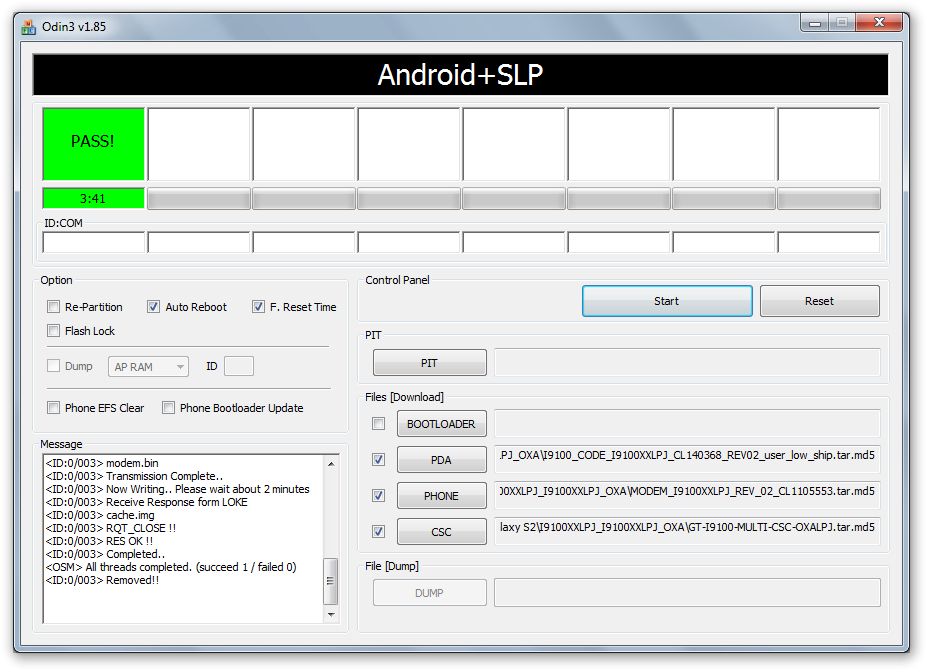
- Now, hit the START button to start flashing XXLPJ. When the flashing procedure is finished, your phone will automatically reboot — and when you see the Samsung logo, you can safely unplug the cable. Plus, you’ll get a PASS (with green background) message in the left-most box at the very top of the Odin. Screen would look like this (below) on successful flashing of XXLPJ.

IMPORTANT Note: If ODIN gets stuck and doesn’t seem to be doing anything, or you get a FAIL message (with red background) in ODIN, do the following:Disconnect the phone from the PC, close ODIN, remove battery, re-insert it, turn phone on in Download mode again, and do the procedure again from Step 6. - When it has restarted, your Galaxy S2 will be running Ice Cream Sandwich (ICS) with version being Android 4.0.3, build being XXLPJ and Samsung’s custom UI TouchWiz 4 atop it. Check out your Galaxy S2’s Android version here: Settings » About Phone. Also, if data network (3G, GPRS, etc.) isn’t working for you, you gotta fill in APN Settings meant for your carrier in Mobile and Network settings. Here’s a full list of carriers and their APN settings » Link
- In case you encounter any roadblocks flashing XXLPJ, let us know in comments below and we’ll try to help you out.

Your Galaxy S2 is now running the latest Ice Cream Sandwich Android 4.0.3 based firmware, XXLPJ. Let us know your thoughts on the firmware and how it works out for you, in the comments.
Update: Root your Galaxy S2 on XXLPJ using CF kernel. Search for “root xxlpj” on our site or click here.






82 responses to “Update Galaxy S2 to Ice Cream Sandwich with Latest Leak XXLPJ”
Question?
Is that
possible to downgrade to 2.3.6 if dont like this one?
Tnx
Yes.. simply install xxkh3 or xxkg1 firmware to go back to Gingerbread.
i have this one now Kapil!
Back up XXKL1
Its ok?
Yeah…. it’s okay.
When ICS gets officially released by Samsung will that ROM be up and available for download off this site?
It could be but it could easily turn out to be another version that hits Kies as official update.
Question?
Is that
possible to downgrade to 2.3.6 if dont like this one?
Tnx
Yes.. simply install xxkh3 or xxkg1 firmware to go back to Gingerbread.
i have this one now Kapil!
Back up XXKL1
Its ok?
Yeah…. it’s okay.
When ICS gets officially released by Samsung will that ROM be up and available for download off this site?
It could be but it could easily turn out to be another version that hits Kies as official update.
Question?
Is that
possible to downgrade to 2.3.6 if dont like this one?
Tnx
Yes.. simply install xxkh3 or xxkg1 firmware to go back to Gingerbread.
i have this one now Kapil!
Back up XXKL1
Its ok?
Yeah…. it’s okay.
When ICS gets officially released by Samsung will that ROM be up and available for download off this site?
It could be but it could easily turn out to be another version that hits Kies as official update.
Any Feedback of What working and whats not!!!!
Everything is working, I guess.
is it necessary to wipe cache partition ?
No… just do what is said above and you’ll be good.
Any Feedback of What working and whats not!!!!
Everything is working, I guess.
Any Feedback of What working and whats not!!!!
Everything is working, I guess.
Hi
is it possible to flash the nordic release I9100OXXLPD on my UK phone
Yes it is — install the firmware XXLPQ from here, https://nerdschalk.com/xxlpq
Yes it is — install the firmware XXLPQ from here, https://nerdschalk.com/xxlpq
is it necessary to wipe cache partition ?
No… just do what is said above and you’ll be good.
is it necessary to wipe cache partition ?
No… just do what is said above and you’ll be good.
Simple guide, very effective and easy to follow. No problems on the update, will post later if I find any issues, otherwise looking forward to enjoying some fresh ICS on my GS2 🙂
Confirmed, all working well, full H+ internet access, calendar, contacts, sync has been improved, and the google account sync actually now re-establishes all apps, shortcuts, and settings when the phone is restarted from the user setup screen. Have not tried camera or video yet, but seeing the state of the phone at this stage, most impressed. Face unlock is very cool. One very happy and satisfied customer right here.. 🙂
Thanks man !!!
Hi
is it possible to flash the nordic release I9100OXXLPD on my UK phone
Yes it is — install the firmware XXLPQ from here, https://nerdschalk.com/xxlpq
Hi
is it possible to flash the nordic release I9100OXXLPD on my UK phone
Yes it is — install the firmware XXLPQ from here, https://nerdschalk.com/xxlpq
Simple guide, very effective and easy to follow. No problems on the update, will post later if I find any issues, otherwise looking forward to enjoying some fresh ICS on my GS2 🙂
Confirmed, all working well, full H+ internet access, calendar, contacts, sync has been improved, and the google account sync actually now re-establishes all apps, shortcuts, and settings when the phone is restarted from the user setup screen. Have not tried camera or video yet, but seeing the state of the phone at this stage, most impressed. Face unlock is very cool. One very happy and satisfied customer right here.. 🙂
Simple guide, very effective and easy to follow. No problems on the update, will post later if I find any issues, otherwise looking forward to enjoying some fresh ICS on my GS2 🙂
Confirmed, all working well, full H+ internet access, calendar, contacts, sync has been improved, and the google account sync actually now re-establishes all apps, shortcuts, and settings when the phone is restarted from the user setup screen. Have not tried camera or video yet, but seeing the state of the phone at this stage, most impressed. Face unlock is very cool. One very happy and satisfied customer right here.. 🙂
Thanks man !!!
what about G version?
what about G version?
what about G version?
so after this update my device will be rooted or no? Thanks updating manual very easy and helpfull 😉
It will not be rooted already. You can root it of you want.
android market doesnt work it keepps saying server error
so after this update my device will be rooted or no? Thanks updating manual very easy and helpfull 😉
It will not be rooted already. You can root it of you want.
so after this update my device will be rooted or no? Thanks updating manual very easy and helpfull 😉
It will not be rooted already. You can root it of you want.
android market doesnt work it keepps saying server error
android market doesnt work it keepps saying server error
Download error??
Download error??
Download error??
how long it takes to finish this process????
how long it takes to finish this process????
how long it takes to finish this process????
hi i had upgraded my galaxy s2 ….with firmware xxlq it it doesnt work and my phone is hang….now its not working plz help me out in this
Flash the XXLPQ firmware – nerdschalk.com/xxlpq/
hi i had upgraded my galaxy s2 ….with firmware xxlq it it doesnt work and my phone is hang….now its not working plz help me out in this
Flash the XXLPQ firmware – nerdschalk.com/xxlpq/
hi i had upgraded my galaxy s2 ….with firmware xxlq it it doesnt work and my phone is hang….now its not working plz help me out in this
Flash the XXLPQ firmware – nerdschalk.com/xxlpq/
plz help me out ..my phone is not working when i booted it
I have samsung Galaxy R.. plz recommend the firmware for this one as well..
Nothing worth flashing and upgrading to is available. 🙁
plz help me out ..my phone is not working when i booted it
plz help me out ..my phone is not working when i booted it
I have samsung Galaxy R.. plz recommend the firmware for this one as well..
Nothing worth flashing and upgrading to is available. 🙁
I have samsung Galaxy R.. plz recommend the firmware for this one as well..
Nothing worth flashing and upgrading to is available. 🙁
Just did this last night, everything works fine except for the GPS; it doesn’t lock on anymore. Any ideas? I tried Faster Fix on the market but it didn’t work.
Just did this last night, everything works fine except for the GPS; it doesn’t lock on anymore. Any ideas? I tried Faster Fix on the market but it didn’t work.
Just did this last night, everything works fine except for the GPS; it doesn’t lock on anymore. Any ideas? I tried Faster Fix on the market but it didn’t work.