
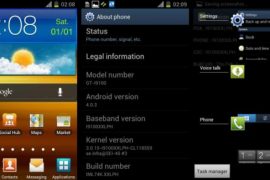
Ice Cream Sandwich treats all around for Samsung owners! Just a few hours ago, ICS was leaked for the Galaxy Note, and now it’s the Galaxy S2’s turn. Again! This is XXLPH firmware we’re talking about, guys, based on Android 4.0.3.
Samsung took their time after the last leak in XXLPB, but it’s that time again when you got your Galaxy S2 i9100 device out for another ICS flashing feast.
Do thank Samsung for this, even though they take time to release the firmware officially — they are still bringing lots of smiles — and taking hell lot of feedback out of this, too – by leaking firmware after firmware after firmware after… you get it.
Here’s a look at the changes in XXLPH:
- Battery better than earlier ICS firmware
- Touch not as good as previous XXLPB firmware
- More stable than XXLPB
Goes without saying you’ll all Galaxy S2 ICS Roms updated t o XXLPH pretty soon now. Read on to find out how to flash it on your Galaxy S2 i9100. Yes, on i9100, that mean do not try it on Galaxy S2 at AT&T and T-Mobile.
Warning!
The methods and procedures discussed here are considered risky and you should not attempt anything if you don’t know completely what it is. If any damage occurs to you or your device, we won’t be held liable — you only will be responsible, you’ve been warned!!!
Compatibility
This rom and the guide below is compatible only and only with Galaxy S2, model number i9100. It’s not compatible with any other device. Check your device’s model number in Settings » About phone.
Pre-Installation tips:
- This procedure will wipe all your apps, data and settings (but it will NOT touch your SD cards, so don’t worry about those). Backup your Apps and important data — bookmarks, contacts, SMS, APNs (internet settings), etc. This Android backup guide would help you.
- If you have Samsung’s PC software Kies installed, un-install it first because it may interrupt the flashing process.
- Drivers! — it’s important you’ve the proper drivers installed. Download links below:
32 bit (x86) Windows | 64-bit (x64) Windows
How to Install XXLPH on Galaxy S2 i9100 [Step By Step Guide]:
- Download XXLPH firmware. Filename: I9100XXLPH.zip. Size: 377 MB
Download Link - Download Odin 1.83. Filename: Odin3 v1.83.exe.
Download Link - Extract the downloaded file ‘I9100XXLPH.zip’ (from step 1) to get these 3 files:
- GT-I9100-MULTI-CSC-OXALPH.tar.md5
- I9100_APBOOT_I9100XXLPH_CL118559_REV02_user_low_ship.tar.md5
- I9100_CODE_I9100XXLPH_CL118559_REV02_user_low_ship.tar.md5
- MODEM_I9100XXLPH_REV_02_CL1104396.tar.md5
- Odin3_v1.85.zip [ignore this]
- Disconnect your phone if it’s connected to PC. Switch Off your phone. Wait for vibration to confirm complete switch off.
- Now, put the Galaxy S2 in Download Mode — press and hold these keys together:Volume Down + Home + Power. You’ll get a ‘Warning!‘ screen.. press Volume up to continue to enter download mode
- Open Odin (from step 2) — double-click the Odin3 v1.83.exe.
- Connect your phone to PC now. You should get the message “Added! !” under the Odin’s message box in the bottom left. If you don’t get this message, then probably there is a problem with drivers. Make sure you’ve proper drivers installed. See point 3 above under ‘pre-installation tips’.
- Select these files in Odin at respective tabs:
- Click the Bootloader Tab, and select I9100_APBOOT_I9100XXLPH_CL118559_REV02_user_low_ship.tar.md5 (from step 3.2)
- Click the PDA Tab, and select I9100_CODE_I9100XXLPH_CL118559_REV02_user_low_ship.tar (from step 3.3)
- Click the Phone Tab, and select MODEM_I9100XXLPH_REV_02_CL1104396.tar (from step 3.4)
- Click the CSC Tab, and select GT-I9100-MULTI-CSC-OXALPH.tar (from step 3.1)
- Important! On Odin, make sure Auto Reboot and F. Reset Time checkboxes are selected. Do not touch any other check box or tab or anything, except as wasrequired in step 8 above.
- Double check everything said in step 8 and 9 above. Your ODIN screen should look similar to this after selecting the required files. Your Odin’s screen should look like this before flashing of XXLPH:

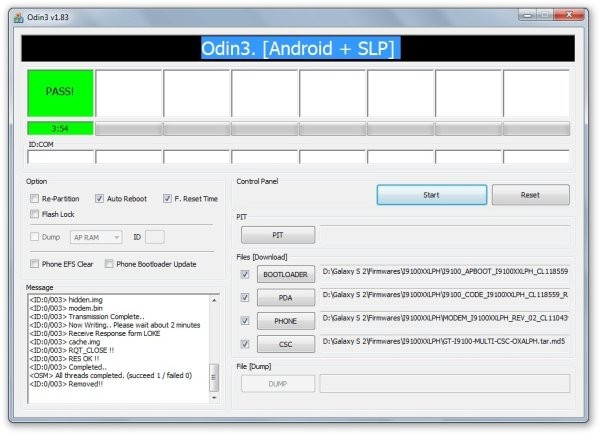
- Now, hit the START button to start flashing XXLPH on your Galaxy S2. When the flashing procedure is finished, your phone will automatically reboot — and when you see the Samsung logo, you can safely unplug the cable. Plus, you’ll get a PASS (with green background) message in the left-most box at the very top of the Odin.
IMPORTANT Note: If ODIN gets stuck and doesn’t seem to be doing anything, or you get a FAIL message (with red background) in ODIN, do the following:
Disconnect the phone from the PC, close ODIN, remove battery, re-insert it, turn phone on in Download mode again, and do the procedure again from Step 6.
On successful flashing, Odin’s s screen would look like this:
- When it has restarted, your Galaxy S2 will be running Ice Cream Sandwich (ICS) with version being Android 4.0.3, build being XXLPH and Samsung’s custom UI TouchWiz 4 atop it. Check out your Galaxy S2’s Android version here: Settings » About Phone.Also, if data network (3G, GPRS, etc.) isn’t working for you, you gotta fill in APN Settings meant for your carrier in Mobile and Network settings. Here’s a full list of carriers and their APN settings » Link


The latest Android 4.0.3 ICS firmware is now up and running on your Galaxy S2 i9100. Do try it out and let us know your thoughts and problems (if any) in the comments below and we’ll do our best to help you out.
Want to root XXLPH?
Well, we got you covered, search this site for a link to guide on rooting XXLPH.. OR → click here.






322 responses to “XXLPH: New Galaxy S2 Ice Cream Sandwich Firmware Leaked!”
i have a korean version of the galaxy s2.. can i flash it with this rom?
model: shw-250k
kernel: 2.6.35.7-m250k.ee05.0315-cli86865
thanks for your advice
i have a korean version of the galaxy s2.. can i flash it with this rom?
model: shw-250k
kernel: 2.6.35.7-m250k.ee05.0315-cli86865
thanks for your advice
I flashed this ROM. Working perfectly, but I can’t figure out just one thing. How do I take a screenshot? I tried the power button and home button way, and also long pressing the power button to see if there was a ‘Screenshot’ option, as in CM9. Please help. Thank you. 🙂
Hold power and home key together to take screenshot.
To take a screenshot:
Simply hold down the Volume Down button and Power button for about a second.
http://alexsleat.co.uk/2011/11/28/how-to-take-screenshots-in-ice-cream-sandwich-android-4-0-x/
I flashed this ROM. Working perfectly, but I can’t figure out just one thing. How do I take a screenshot? I tried the power button and home button way, and also long pressing the power button to see if there was a ‘Screenshot’ option, as in CM9. Please help. Thank you. 🙂
Hold power and home key together to take screenshot.
To take a screenshot:
Simply hold down the Volume Down button and Power button for about a second.
http://alexsleat.co.uk/2011/11/28/how-to-take-screenshots-in-ice-cream-sandwich-android-4-0-x/
hello…… i face some problem when i upgrade the firmware………..
Check MD5.. Do not unplug the cable.. Please wait.. I9100_CODE_I9100XXLPH_CL118559_REV02_user_low_ship.tar.md5 is valid. MODEM_I9100XXLPH_REV_02_CL1104396.tar.md5 is valid. GT-I9100-MULTI-CSC-OXALPH.tar.md5 is valid. Checking MD5 finished Sucessfully.. Leave CS.. Odin v.3 engine (ID:6).. File analysis.. SetupConnection..
After Setup connection it is stuck and Odin did not response.
I try to this in 3 pc and 1 laptop…. samsung usb drive that u give could not work….then i install kies and reinstall it……. but still same problem………
so what should i do???
Put on usb debugging mode this is very important to use with ODIN this is why you can setup connection with the phone.
Dont forget to uninstall Kies because Kies conflict with ODIN
I used a different version of odin and worked pefectly had the same problem.
hello…… i face some problem when i upgrade the firmware………..
Check MD5.. Do not unplug the cable.. Please wait.. I9100_CODE_I9100XXLPH_CL118559_REV02_user_low_ship.tar.md5 is valid. MODEM_I9100XXLPH_REV_02_CL1104396.tar.md5 is valid. GT-I9100-MULTI-CSC-OXALPH.tar.md5 is valid. Checking MD5 finished Sucessfully.. Leave CS.. Odin v.3 engine (ID:6).. File analysis.. SetupConnection..
After Setup connection it is stuck and Odin did not response.
I try to this in 3 pc and 1 laptop…. samsung usb drive that u give could not work….then i install kies and reinstall it……. but still same problem………
so what should i do???
my android version- 2.3.5 gingerbread
Put on usb debugging mode this is very important to use with ODIN this is why you can setup connection with the phone.
Dont forget to uninstall Kies because Kies conflict with ODIN
I used a different version of odin and worked pefectly had the same problem.
why there isnt vibration sound mode
the vibration only comes with the silent mode
I have the same problem, and so far i didn’t find uot how to solve it
and when i skip to the last page it should bring me back to the first page
hello…… i face some problem when i upgrade the firmware………..
Check MD5.. Do not unplug the cable.. Please wait.. I9100_CODE_I9100XXLPH_CL118559_REV02_user_low_ship.tar.md5 is valid. MODEM_I9100XXLPH_REV_02_CL1104396.tar.md5 is valid. GT-I9100-MULTI-CSC-OXALPH.tar.md5 is valid. Checking MD5 finished Sucessfully.. Leave CS.. Odin v.3 engine (ID:6).. File analysis.. SetupConnection..
After Setup connection it is stuck and Odin did not response.
I try to this in 3 pc and 1 laptop…. samsung usb drive that u give could not work….then i install kies and reinstall it……. but still same problem………
so what should i do???
Put on usb debugging mode this is very important to use with ODIN this is why you can setup connection with the phone.
Dont forget to uninstall Kies because Kies conflict with ODIN
I used a different version of odin and worked pefectly had the same problem.
hello…… i face some problem when i upgrade the firmware………..
Check MD5.. Do not unplug the cable.. Please wait.. I9100_CODE_I9100XXLPH_CL118559_REV02_user_low_ship.tar.md5 is valid. MODEM_I9100XXLPH_REV_02_CL1104396.tar.md5 is valid. GT-I9100-MULTI-CSC-OXALPH.tar.md5 is valid. Checking MD5 finished Sucessfully.. Leave CS.. Odin v.3 engine (ID:6).. File analysis.. SetupConnection..
After Setup connection it is stuck and Odin did not response.
I try to this in 3 pc and 1 laptop…. samsung usb drive that u give could not work….then i install kies and reinstall it……. but still same problem………
so what should i do???
my android version- 2.3.5 gingerbread
Put on usb debugging mode this is very important to use with ODIN this is why you can setup connection with the phone.
Dont forget to uninstall Kies because Kies conflict with ODIN
I used a different version of odin and worked pefectly had the same problem.
why there isnt vibration sound mode
the vibration only comes with the silent mode
I have the same problem, and so far i didn’t find uot how to solve it
and when i skip to the last page it should bring me back to the first page
why there isnt vibration sound mode
the vibration only comes with the silent mode
I have the same problem, and so far i didn’t find uot how to solve it
and when i skip to the last page it should bring me back to the first page
I instaled XXLPH, everything is ok only that my phone is not vibrating when i recive a call, i trayed all the setings and nothing, also when i recive a notification ther is no vibrating, can somebody help me with this problem?
I instaled XXLPH, everything is ok only that my phone is not vibrating when i recive a call, i trayed all the setings and nothing, also when i recive a notification ther is no vibrating, can somebody help me with this problem?
I instaled XXLPH, everything is ok only that my phone is not vibrating when i recive a call, i trayed all the setings and nothing, also when i recive a notification ther is no vibrating, can somebody help me with this problem?
Ihave been using it for three days. There are bugs here and there but still suitable for daily use.
Ihave been using it for three days. There are bugs here and there but still suitable for daily use.
Ihave been using it for three days. There are bugs here and there but still suitable for daily use.
feb 2 leak had bugs. going to try my luck with PH now..
Any problems with flashing repeatedly?
No, no problem.
feb 2 leak had bugs. going to try my luck with PH now..
Any problems with flashing repeatedly?
No, no problem.
feb 2 leak had bugs. going to try my luck with PH now..
Any problems with flashing repeatedly?
No, no problem.
F you samsung. For uglifying ics with touchwiz. atleast update touchwiz for the love of god
Will that work with my S2X (Hercules) ?!?
Nope 🙁
F you samsung. For uglifying ics with touchwiz. atleast update touchwiz for the love of god
F you samsung. For uglifying ics with touchwiz. atleast update touchwiz for the love of god
Will that work with my S2X (Hercules) ?!?
Nope 🙁
Will that work with my S2X (Hercules) ?!?
Nope 🙁
Works soooo much better than two others I’ve tried no problems so far. Really nice thanks
Ok well it’s been about 6 days, so I’d like to say that everything works fine there’s just one small problem, sometimes when you go to open a webpage link, it just goes to the last page that you looked at not the one you just tried even if you use the google voice search this can do the same thing.
Works soooo much better than two others I’ve tried no problems so far. Really nice thanks
Ok well it’s been about 6 days, so I’d like to say that everything works fine there’s just one small problem, sometimes when you go to open a webpage link, it just goes to the last page that you looked at not the one you just tried even if you use the google voice search this can do the same thing.
Works soooo much better than two others I’ve tried no problems so far. Really nice thanks
Ok well it’s been about 6 days, so I’d like to say that everything works fine there’s just one small problem, sometimes when you go to open a webpage link, it just goes to the last page that you looked at not the one you just tried even if you use the google voice search this can do the same thing.
Thanks for my new system in my phone. The flashing was without any problems and it can work so perfect… yet 😀 The next step will be rooting, so I hope, that it will work good too! Thanks for your guide manual 🙂 Prefectly written! 🙂
Dear Mr. Kapil the vibrator is not working when receive on notifications call,text etc… please suggest
Thanks for my new system in my phone. The flashing was without any problems and it can work so perfect… yet 😀 The next step will be rooting, so I hope, that it will work good too! Thanks for your guide manual 🙂 Prefectly written! 🙂
Thanks for my new system in my phone. The flashing was without any problems and it can work so perfect… yet 😀 The next step will be rooting, so I hope, that it will work good too! Thanks for your guide manual 🙂 Prefectly written! 🙂
Dear Mr. Kapil the vibrator is not working when receive on notifications call,text etc… please suggest
Dear Mr. Kapil the vibrator is not working when receive on notifications call,text etc… please suggest
How I can make working adhoc net on his version of Android? Could you help me please?
How I can make working adhoc net on his version of Android? Could you help me please?
How I can make working adhoc net on his version of Android? Could you help me please?
Phone and Contacts button do not work. what can i do to fix??
Phone and Contacts button do not work. what can i do to fix??
Phone and Contacts button do not work. what can i do to fix??
UNEXPECTED END TO FILE!
Got the same :S
This one works!
http://hotfile.com/dl/146748985/809318f/I9100XXLPH.zip.html
UNEXPECTED END TO FILE!
Got the same :S
This one works!
http://hotfile.com/dl/146748985/809318f/I9100XXLPH.zip.html
UNEXPECTED END TO FILE!
Got the same :S
This one works!
http://hotfile.com/dl/146748985/809318f/I9100XXLPH.zip.html
Been running for a couple of days now, loving it.
Only experiencing the no vibration when sound is on issue. But something that can be tolerated until our Carriers get off their bums
This one is the most stable I tried. Everything is working fine. Thanks!
If you are experiencing some problem, try to reset to the factory setup. Located on “Back up and reset” section on main configuration menu.
Been running for a couple of days now, loving it.
Only experiencing the no vibration when sound is on issue. But something that can be tolerated until our Carriers get off their bums