
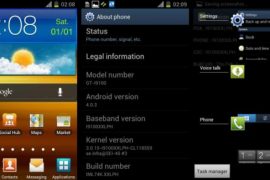
Ice Cream Sandwich treats all around for Samsung owners! Just a few hours ago, ICS was leaked for the Galaxy Note, and now it’s the Galaxy S2’s turn. Again! This is XXLPH firmware we’re talking about, guys, based on Android 4.0.3.
Samsung took their time after the last leak in XXLPB, but it’s that time again when you got your Galaxy S2 i9100 device out for another ICS flashing feast.
Do thank Samsung for this, even though they take time to release the firmware officially — they are still bringing lots of smiles — and taking hell lot of feedback out of this, too – by leaking firmware after firmware after firmware after… you get it.
Here’s a look at the changes in XXLPH:
- Battery better than earlier ICS firmware
- Touch not as good as previous XXLPB firmware
- More stable than XXLPB
Goes without saying you’ll all Galaxy S2 ICS Roms updated t o XXLPH pretty soon now. Read on to find out how to flash it on your Galaxy S2 i9100. Yes, on i9100, that mean do not try it on Galaxy S2 at AT&T and T-Mobile.
Warning!
The methods and procedures discussed here are considered risky and you should not attempt anything if you don’t know completely what it is. If any damage occurs to you or your device, we won’t be held liable — you only will be responsible, you’ve been warned!!!
Compatibility
This rom and the guide below is compatible only and only with Galaxy S2, model number i9100. It’s not compatible with any other device. Check your device’s model number in Settings » About phone.
Pre-Installation tips:
- This procedure will wipe all your apps, data and settings (but it will NOT touch your SD cards, so don’t worry about those). Backup your Apps and important data — bookmarks, contacts, SMS, APNs (internet settings), etc. This Android backup guide would help you.
- If you have Samsung’s PC software Kies installed, un-install it first because it may interrupt the flashing process.
- Drivers! — it’s important you’ve the proper drivers installed. Download links below:
32 bit (x86) Windows | 64-bit (x64) Windows
How to Install XXLPH on Galaxy S2 i9100 [Step By Step Guide]:
- Download XXLPH firmware. Filename: I9100XXLPH.zip. Size: 377 MB
Download Link - Download Odin 1.83. Filename: Odin3 v1.83.exe.
Download Link - Extract the downloaded file ‘I9100XXLPH.zip’ (from step 1) to get these 3 files:
- GT-I9100-MULTI-CSC-OXALPH.tar.md5
- I9100_APBOOT_I9100XXLPH_CL118559_REV02_user_low_ship.tar.md5
- I9100_CODE_I9100XXLPH_CL118559_REV02_user_low_ship.tar.md5
- MODEM_I9100XXLPH_REV_02_CL1104396.tar.md5
- Odin3_v1.85.zip [ignore this]
- Disconnect your phone if it’s connected to PC. Switch Off your phone. Wait for vibration to confirm complete switch off.
- Now, put the Galaxy S2 in Download Mode — press and hold these keys together:Volume Down + Home + Power. You’ll get a ‘Warning!‘ screen.. press Volume up to continue to enter download mode
- Open Odin (from step 2) — double-click the Odin3 v1.83.exe.
- Connect your phone to PC now. You should get the message “Added! !” under the Odin’s message box in the bottom left. If you don’t get this message, then probably there is a problem with drivers. Make sure you’ve proper drivers installed. See point 3 above under ‘pre-installation tips’.
- Select these files in Odin at respective tabs:
- Click the Bootloader Tab, and select I9100_APBOOT_I9100XXLPH_CL118559_REV02_user_low_ship.tar.md5 (from step 3.2)
- Click the PDA Tab, and select I9100_CODE_I9100XXLPH_CL118559_REV02_user_low_ship.tar (from step 3.3)
- Click the Phone Tab, and select MODEM_I9100XXLPH_REV_02_CL1104396.tar (from step 3.4)
- Click the CSC Tab, and select GT-I9100-MULTI-CSC-OXALPH.tar (from step 3.1)
- Important! On Odin, make sure Auto Reboot and F. Reset Time checkboxes are selected. Do not touch any other check box or tab or anything, except as wasrequired in step 8 above.
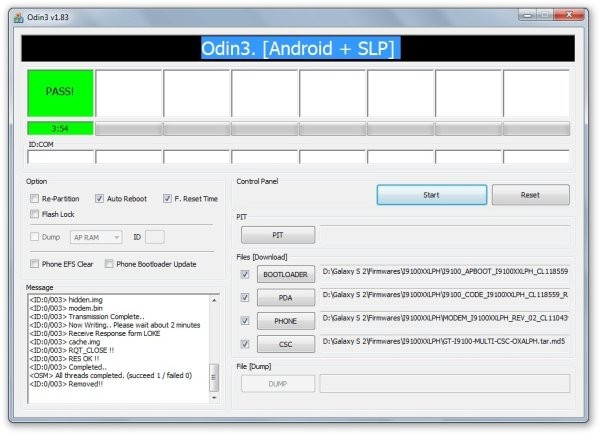
- Double check everything said in step 8 and 9 above. Your ODIN screen should look similar to this after selecting the required files. Your Odin’s screen should look like this before flashing of XXLPH:

- Now, hit the START button to start flashing XXLPH on your Galaxy S2. When the flashing procedure is finished, your phone will automatically reboot — and when you see the Samsung logo, you can safely unplug the cable. Plus, you’ll get a PASS (with green background) message in the left-most box at the very top of the Odin.
IMPORTANT Note: If ODIN gets stuck and doesn’t seem to be doing anything, or you get a FAIL message (with red background) in ODIN, do the following:
Disconnect the phone from the PC, close ODIN, remove battery, re-insert it, turn phone on in Download mode again, and do the procedure again from Step 6.
On successful flashing, Odin’s s screen would look like this:
- When it has restarted, your Galaxy S2 will be running Ice Cream Sandwich (ICS) with version being Android 4.0.3, build being XXLPH and Samsung’s custom UI TouchWiz 4 atop it. Check out your Galaxy S2’s Android version here: Settings » About Phone.Also, if data network (3G, GPRS, etc.) isn’t working for you, you gotta fill in APN Settings meant for your carrier in Mobile and Network settings. Here’s a full list of carriers and their APN settings » Link


The latest Android 4.0.3 ICS firmware is now up and running on your Galaxy S2 i9100. Do try it out and let us know your thoughts and problems (if any) in the comments below and we’ll do our best to help you out.
Want to root XXLPH?
Well, we got you covered, search this site for a link to guide on rooting XXLPH.. OR → click here.






322 responses to “XXLPH: New Galaxy S2 Ice Cream Sandwich Firmware Leaked!”
wow..great but I just upgraded to XXLPB today.After a few hour it leaks…I am dying Have to download again.
It’s worth it 🙂
What About the APN settings? It works?, ’cause the last XXLPB (I think had some issues with the APN setting) my data network plan never show up into my Galaxy S2, if the APN works, then I want to upgrade too, Thanks
Hi Kapil……I had a problem after downloading XXLPB the 3G connection keeps getting disconnecting in between downloads, and this problem is still there even if I go back to XXKI3(2.3.5)……Is there any solution for this???
I’ve tried deleting the old APN settings and re-downloading them but this problem is still there.
ThanQ
Hi, i am using XWKL1 2.3.6 ( indian rom ) i totally love the battery life as battery is lasting me almost a full day with moderate use on the current rom.
just wondering all you guys out there that is using this XXLPH, can you please advise how the battery life is? and does everything work as in GPS,3G, Modem and Basic day to day functions?
cheers
joel
So it has been full 2 days and i am finding this XXLPH is quite shit to be honest. Cell network is bad.. data network is awefull.
phone network drops out intermittently..
i am in AU btw
hey somewhere in thread i read that not use bootloader file for upgrade this new leak….
I flashed it with bootloader file on my S2, and it’s working fine.
Can you guide us with links or anything, about what you read? Would like to look into it.
http://forum.xda-developers.com/showthread.php?t=1500816
IN THIS LINK 1 ST POST
What do you mean with touch not as good as xxlpb? I have the xxlpb should i upgrade?
I’ll edit the post above regarding that.. touch is very good on xxlph, I’m using it for more than 12 hrs now and it’s awesome. Must upgrade from xxlpb.
wow..great but I just upgraded to XXLPB today.After a few hour it leaks…I am dying Have to download again.
It’s worth it 🙂
What About the APN settings? It works?, ’cause the last XXLPB (I think had some issues with the APN setting) my data network plan never show up into my Galaxy S2, if the APN works, then I want to upgrade too, Thanks
Hi, i am using XWKL1 2.3.6 ( indian rom ) i totally love the battery life as battery is lasting me almost a full day with moderate use on the current rom.
just wondering all you guys out there that is using this XXLPH, can you please advise how the battery life is? and does everything work as in GPS,3G, Modem and Basic day to day functions?
cheers
joel
So it has been full 2 days and i am finding this XXLPH is quite shit to be honest. Cell network is bad.. data network is awefull.
phone network drops out intermittently..
i am in AU btw
Hi Kapil……I had a problem after downloading XXLPB the 3G connection keeps getting disconnecting in between downloads, and this problem is still there even if I go back to XXKI3(2.3.5)……Is there any solution for this???
I’ve tried deleting the old APN settings and re-downloading them but this problem is still there.
ThanQ
wow..great but I just upgraded to XXLPB today.After a few hour it leaks…I am dying Have to download again.
It’s worth it 🙂
What About the APN settings? It works?, ’cause the last XXLPB (I think had some issues with the APN setting) my data network plan never show up into my Galaxy S2, if the APN works, then I want to upgrade too, Thanks
Hi, i am using XWKL1 2.3.6 ( indian rom ) i totally love the battery life as battery is lasting me almost a full day with moderate use on the current rom.
just wondering all you guys out there that is using this XXLPH, can you please advise how the battery life is? and does everything work as in GPS,3G, Modem and Basic day to day functions?
cheers
joel
So it has been full 2 days and i am finding this XXLPH is quite shit to be honest. Cell network is bad.. data network is awefull.
phone network drops out intermittently..
i am in AU btw
Hi Kapil……I had a problem after downloading XXLPB the 3G connection keeps getting disconnecting in between downloads, and this problem is still there even if I go back to XXKI3(2.3.5)……Is there any solution for this???
I’ve tried deleting the old APN settings and re-downloading them but this problem is still there.
ThanQ
Thanks for sharing this tutorial ! I tried it on my Galaxy Darling. Works Perfectly.
hey somewhere in thread i read that not use bootloader file for upgrade this new leak….
I flashed it with bootloader file on my S2, and it’s working fine.
Can you guide us with links or anything, about what you read? Would like to look into it.
http://forum.xda-developers.com/showthread.php?t=1500816
IN THIS LINK 1 ST POST
hey somewhere in thread i read that not use bootloader file for upgrade this new leak….
I flashed it with bootloader file on my S2, and it’s working fine.
Can you guide us with links or anything, about what you read? Would like to look into it.
http://forum.xda-developers.com/showthread.php?t=1500816
IN THIS LINK 1 ST POST
Just mix the icecream wid S2 & am loving dis firmware thanks abhijeet ♥
why you guys shows odin method to install roms why not directly from sd card with cwn
That’s because this update has not been packaged as a CWM flashable zip.
hy guys!i need some help please!i have 2.3.6 on sgs2 !!does it worth it to upgrade this 4.0.3 that is no official or is better to wait for the official one in kies??please a sincerly answer:D:D
You can upgrade… It’s pretty good firmware, fit to be your daily driver.
This is an excellent leak very smooth all working well
Right!! It’s the best leak so far of any ICS firmware for any phone.
What do you mean with touch not as good as xxlpb? I have the xxlpb should i upgrade?
I’ll edit the post above regarding that.. touch is very good on xxlph, I’m using it for more than 12 hrs now and it’s awesome. Must upgrade from xxlpb.
What do you mean with touch not as good as xxlpb? I have the xxlpb should i upgrade?
I’ll edit the post above regarding that.. touch is very good on xxlph, I’m using it for more than 12 hrs now and it’s awesome. Must upgrade from xxlpb.
Thanks for sharing this tutorial ! I tried it on my Galaxy Darling. Works Perfectly.
Thanks for sharing this tutorial ! I tried it on my Galaxy Darling. Works Perfectly.
Just mix the icecream wid S2 & am loving dis firmware thanks abhijeet ♥
Just mix the icecream wid S2 & am loving dis firmware thanks abhijeet ♥
why you guys shows odin method to install roms why not directly from sd card with cwn
That’s because this update has not been packaged as a CWM flashable zip.
why you guys shows odin method to install roms why not directly from sd card with cwn
That’s because this update has not been packaged as a CWM flashable zip.
hy guys!i need some help please!i have 2.3.6 on sgs2 !!does it worth it to upgrade this 4.0.3 that is no official or is better to wait for the official one in kies??please a sincerly answer:D:D
You can upgrade… It’s pretty good firmware, fit to be your daily driver.
hy guys!i need some help please!i have 2.3.6 on sgs2 !!does it worth it to upgrade this 4.0.3 that is no official or is better to wait for the official one in kies??please a sincerly answer:D:D
You can upgrade… It’s pretty good firmware, fit to be your daily driver.
Finally downloading a leaked ICS update for my SGS2–Time to move on from CheckROM Revo HD and try LPB out
Oops–I meant LPH
Cool, but btw, that’s LPH 😀
Oops! didn’t see this :/
This is an excellent leak very smooth all working well
Right!! It’s the best leak so far of any ICS firmware for any phone.
This is an excellent leak very smooth all working well
Right!! It’s the best leak so far of any ICS firmware for any phone.
this is the best so far will keep you informed
the best so far i’m enjoying it
thank u Samsunk
i cannot get pattern,face,code locks on this firmware ! WHY?
this is really ics firmware ?
not a full version because that has yet to be released but yeah this is just as good from what i’ve seen, it does say android 4.0.3
Finally downloading a leaked ICS update for my SGS2–Time to move on from CheckROM Revo HD and try LPB out
Oops–I meant LPH
Oops! didn’t see this :/
Cool, but btw, that’s LPH 😀
Finally downloading a leaked ICS update for my SGS2–Time to move on from CheckROM Revo HD and try LPB out
Oops–I meant LPH
Oops! didn’t see this :/
Cool, but btw, that’s LPH 😀
this is the best so far will keep you informed
this is the best so far will keep you informed
the best so far i’m enjoying it
the best so far i’m enjoying it
thank u Samsunk
thank u Samsunk
i cannot get pattern,face,code locks on this firmware ! WHY?
i cannot get pattern,face,code locks on this firmware ! WHY?
this is really ics firmware ?
not a full version because that has yet to be released but yeah this is just as good from what i’ve seen, it does say android 4.0.3
this is really ics firmware ?
not a full version because that has yet to be released but yeah this is just as good from what i’ve seen, it does say android 4.0.3
best site to look for an update is http://WWW.wanamlite.com — firmware download for galaxy s2
My previous Firmware was XXKL1 and i just upgrade to XXLPH and i found that theirs no incoming ringing tone, notification sound ang screen lock..please can you help me…thanks
That’s all in the settings, you can get everything done yourself from settings.
Thank sir kapil…i already solve the toe problems.The other problems that i found is that i can’t the lock wallpaper is not functioning and still the screen lock is not ok.i hope you can help me step by step for what i’m going to do.thanks in advance for those who can help me..
My previous Firmware was XXKL1 and i just upgrade to XXLPH and i found that theirs no sound when someone is calling, notification sound and screen lock..any body can you help me please…thanks
That’s all in the settings, you can get everything done yourself from settings.
Thank sir kapil…i already solve the two problems.The other problems that i found is that the lock wallpaper is not functioning and still the screen lock(pattern,Slide and Face lock) is not ok.i hope you can help me steps by steps for what i’m going to do.thanks in advance for those who can help me..
best site to look for an update is http://WWW.wanamlite.com — firmware download for galaxy s2
My previous Firmware was XXKL1 and i just upgrade to XXLPH and i found that theirs no incoming ringing tone, notification sound ang screen lock..please can you help me…thanks
That’s all in the settings, you can get everything done yourself from settings.
Thank sir kapil…i already solve the toe problems.The other problems that i found is that i can’t the lock wallpaper is not functioning and still the screen lock is not ok.i hope you can help me step by step for what i’m going to do.thanks in advance for those who can help me..
My previous Firmware was XXKL1 and i just upgrade to XXLPH and i found that theirs no sound when someone is calling, notification sound and screen lock..any body can you help me please…thanks
That’s all in the settings, you can get everything done yourself from settings.
Thank sir kapil…i already solve the two problems.The other problems that i found is that the lock wallpaper is not functioning and still the screen lock(pattern,Slide and Face lock) is not ok.i hope you can help me steps by steps for what i’m going to do.thanks in advance for those who can help me..
i have a korean version of the galaxy s2.. can i flash it with this rom?
model: shw-250k
kernel: 2.6.35.7-m250k.ee05.0315-cli86865
thanks for your advice
I flashed this ROM. Working perfectly, but I can’t figure out just one thing. How do I take a screenshot? I tried the power button and home button way, and also long pressing the power button to see if there was a ‘Screenshot’ option, as in CM9. Please help. Thank you. 🙂
Hold power and home key together to take screenshot.
To take a screenshot:
Simply hold down the Volume Down button and Power button for about a second.
http://alexsleat.co.uk/2011/11/28/how-to-take-screenshots-in-ice-cream-sandwich-android-4-0-x/