
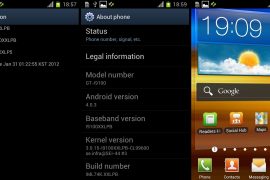
So, it took a little more time than usual, but we finally have another Ice Cream Sandwich Android 4.0.3 firmware leak for the Galaxy S2, after XXLP6, that we covered a few days ago. This time it’s firmware version XXLPB, and here’s some info on the changes in it:
- Interface: Kind of 3D effect when scrolling.
- Battery: Seems better than earlier firmware.
Warning!
The methods and procedures discussed here are considered risky and you should not attempt anything if you don’t know completely what it is. If any damage occurs to you or your device, we won’t be held liable — you only will be responsible, you’ve been warned!!!
Compatibility
This rom and the guide below is compatible only and only with Galaxy S2, model number i9100. It’s not compatible with any other device. Check your device’s model number in Settings » About phone.
Pre-Installation tips:
- This procedure will wipe all your apps, data and settings (but it will NOT touch your SD cards, so don’t worry about those). Backup your Apps and important data — bookmarks, contacts, SMS, APNs (internet settings), etc. This Android backup guide would help you.
- If you have Samsung’s PC software Kies installed, un-install it first because it may interrupt the flashing process.
- Drivers! — it’s important you’ve the proper drivers installed. Download links below:
32 bit (x86) Windows | 64-bit (x64) Windows
Step by Step Instructions:
- Download XXLPB firmware. Filename: I9100XXLPB_I9100OXXLP5_OXX.rar. Size: 336 MB
Download Link. [password: samfirmware.com] - Download Odin 1.83. Filename: Odin3 v1.83.exe.
Download Link - Extract the downloaded file ‘I9100XXLPB_I9100OXXLP5_OXX.rar’ to get these 3 files:
- GT-I9100-MULTI-CSC-OXXLP5_RST.tar
- I9100_CODE_I9100XXLPB_CL99600_REV02_user_low_ship.tar
- MODEM_I9100XXLPB_REV_02_CL1101286.tar
- Disconnect your phone if it’s connected to PC. Switch Off your phone. Wait for vibration to confirm complete switch off.
- Now, put the Galaxy S2 in Download Mode — press and hold these keys together: Volume Down + Home + Power. You’ll get a ‘Warning!‘ screen.. press Volume up to continue
- Open Odin (from step 2) — double-click the Odin3 v1.83.exe.
- Connect your phone to PC now. You should get the message “Added! !” under the Odin’s message box in the bottom left. If you don’t get this message, then probably there is a problem with drivers. Make sure you’ve proper drivers installed. See point 3 above under ‘pre-installation tips’.
- Select these files in Odin at respective tabs:
- Click the PDA Tab, and select I9100_CODE_I9100XXLPB_CL99600_REV02_user_low_ship.tar (from step 3.2)
- Click the Phone Tab, and select MODEM_I9100XXLPB_REV_02_CL1101286.tar (from step 3.3)
- Click the CSC Tab, and select GT-I9100-MULTI-CSC-OXXLP5_RST.tar (from step 3.1)
- Important! On Odin, make sure Auto Reboot and F. Reset Time checkboxes are selected. Do not touch any other check box or tab or anything, except as was required in step 8 above.
- Double check everything said in step 8 and 9 above. Your ODIN screen should look similar to this after selecting the required files.

- Now, hit the START button to start flashing XXLPB on your Galaxy S2. When the flashing procedure is finished, your phone will automatically reboot — and when you see the Samsung logo, you can safely unplug the cable. Plus, you’ll get a PASS (with green background) message in the left-most box at the very top of the Odin.
In case it says FAILS (with red background) or nothing seems to be happening, check the Important Note below after step 12 to know what to do. Your odin’s screen should look like this upon successful flashing of XXLPB:

- When it has restarted, your Galaxy S2 will be running Ice Cream Sandwich (ICS) with version being Android 4.0.3, build being XXLPB and Samsung’s custom UI TouchWiz 4 atop it. Check out your Galaxy S2’s Android version here: Settings » About Phone.
Also, if data network (3G, GPRS, etc.) isn’t working for you, you gotta fill in APN Settings meant for your carrier in Mobile and Network settings. If you took backup of APN settings as said under Pre-Installation Tips above, you’re in luck, otherwise you know its worth now.
IMPORTANT NOTE: If Odin doesn’t seem to be progressing/doing anything for more than a minute, or fails to complete the process, do the following:


Disconnect the phone from the PC, close ODIN, remove battery, re-insert it, turn phone on in Download mode again, and do the procedure again from Step 6.
That’s it, you should have XXLPB Android 4.0.3 running on your Galaxy S2. Share your comments and queries in the comments section below, and we’ll do our best to help you out! Enjoy!
Update:
Root XXLPB Firmware on Your Galaxy S2 and Install Clockworkmod Recovery too
If you’re looking to root your newly flashed XXLPB firmware on Galaxy S2, here’s a handy guide → how to root XXLPB Android 4.0.3 firmware on Galaxy S2.






119 responses to “XXLPB — Another Android 4.0.3 Firmware Leaks for Galaxy S2 i9100”
Sorry my this rom don’t work network and I don’t know how to fixe this problem, I must back to android 2.3.6?
Install xxkh3 — search on this site.
do manual entry in your APN setting for your network
i had same problem but tht way i fixed n its workin fine now
XXLPB works very well in comparison to all the previous builds but once
again motion gaming is not working in this release as well even after
calibration.
XXLPB works very well in comparison to all the previous builds but once
again motion gaming is not working in this release as well even after
calibration.
XXLPB works very well in comparison to all the previous builds but once
again motion gaming is not working in this release as well even after
calibration.
how much time this process will take
Hey, newer and better leaked samsung firmware is available, called xxlph – https://nerdschalk.com/xxlph – install this, and not xxlpb.
Hey, newer and better leaked samsung firmware is available, called xxlph – https://nerdschalk.com/xxlph – install this, and not xxlpb.
how much time this process will take
Hey, newer and better leaked samsung firmware is available, called xxlph – https://nerdschalk.com/xxlph – install this, and not xxlpb.
how much time this process will take
Hey, newer and better leaked samsung firmware is available, called xxlph – https://nerdschalk.com/xxlph – install this, and not xxlpb.
Enter CS for MD5.. Check MD5.. Do not unplug the cable.. Please wait.. I9100_CODE_I9100XXLPB_CL99600_REV02_user_low_ship.tar.md5 is valid. MODEM_I9100XXLPB_REV_02_CL1101286.tar.md5 is valid. GT-I9100-MULTI-CSC-OXXLP5_RST.tar.md5 is valid. Checking MD5 finished Sucessfully.. Leave CS.. Odin v.3 engine (ID:8).. File analysis.. SetupConnection.. Initialzation.. Get PIT for mapping.. Firmware update start.. boot.bin Complete(Write) operation failed. All threads completed. (succeed 0 / failed 1)hai guy’swhy i can’t install it? and now my phone show some phone and pc pic with simbol of ! ?so what i can do now to fix it.?
Enter CS for MD5.. Check MD5.. Do not unplug the cable.. Please wait.. I9100_CODE_I9100XXLPB_CL99600_REV02_user_low_ship.tar.md5 is valid. MODEM_I9100XXLPB_REV_02_CL1101286.tar.md5 is valid. GT-I9100-MULTI-CSC-OXXLP5_RST.tar.md5 is valid. Checking MD5 finished Sucessfully.. Leave CS.. Odin v.3 engine (ID:8).. File analysis.. SetupConnection.. Initialzation.. Get PIT for mapping.. Firmware update start.. boot.bin Complete(Write) operation failed. All threads completed. (succeed 0 / failed 1)hai guy’swhy i can’t install it? and now my phone show some phone and pc pic with simbol of ! ?so what i can do now to fix it.?
Enter CS for MD5.. Check MD5.. Do not unplug the cable.. Please wait.. I9100_CODE_I9100XXLPB_CL99600_REV02_user_low_ship.tar.md5 is valid. MODEM_I9100XXLPB_REV_02_CL1101286.tar.md5 is valid. GT-I9100-MULTI-CSC-OXXLP5_RST.tar.md5 is valid. Checking MD5 finished Sucessfully.. Leave CS.. Odin v.3 engine (ID:8).. File analysis.. SetupConnection.. Initialzation.. Get PIT for mapping.. Firmware update start.. boot.bin Complete(Write) operation failed. All threads completed. (succeed 0 / failed 1)hai guy’swhy i can’t install it? and now my phone show some phone and pc pic with simbol of ! ?so what i can do now to fix it.?
is it compatible with my device gt-i9100g. i’ve read the review about the difference between gt-i9100 and gt-i9100g.. just confused about the compatibility
is it compatible with my device gt-i9100g. i’ve read the review about the difference between gt-i9100 and gt-i9100g.. just confused about the compatibility
is it compatible with my device gt-i9100g. i’ve read the review about the difference between gt-i9100 and gt-i9100g.. just confused about the compatibility
Sir my device is not starting and not even going to download mode what to do
Install this one, XXLPH – https://nerdschalk.com/xxlph – It’s much better than XXLPB. And, follow the guide correctly, it should be easy. Btw, Your device is Galaxy S2, right?
Install this one, XXLPH – https://nerdschalk.com/xxlph – It’s much better than XXLPB. And, follow the guide correctly, it should be easy. Btw, Your device is Galaxy S2, right?
Sir my device is not starting and not even going to download mode what to do
Install this one, XXLPH – https://nerdschalk.com/xxlph – It’s much better than XXLPB. And, follow the guide correctly, it should be easy. Btw, Your device is Galaxy S2, right?
Sir my device is not starting and not even going to download mode what to do
Install this one, XXLPH – https://nerdschalk.com/xxlph – It’s much better than XXLPB. And, follow the guide correctly, it should be easy. Btw, Your device is Galaxy S2, right?
hi there! i bought a Samsung Galaxy S2 and found out that mine is GT i9100G! Do you have Android 4.0 for this model. Please help to develop more stuff for this model! Many thanks!
hi there! i bought a Samsung Galaxy S2 and found out that mine is GT i9100G! Do you have Android 4.0 for this model. Please help to develop more stuff for this model! Many thanks!
hi there! i bought a Samsung Galaxy S2 and found out that mine is GT i9100G! Do you have Android 4.0 for this model. Please help to develop more stuff for this model! Many thanks!
Great tutorial, but do you know if this will work with the 9100m (bell canada) version?
It might but I’m not sure. People here on this page seems to say that – http://forum.xda-developers.com/showthread.php?t=1476302
The hacks for i9100 don’t work on i9100G because there is a change in processor — former has a Exynos one while latter has OMAP. But I guess since i9100M uses the same Exynos processor, it would work fine.
Great tutorial, but do you know if this will work with the 9100m (bell canada) version?
It might but I’m not sure. People here on this page seems to say that – http://forum.xda-developers.com/showthread.php?t=1476302
The hacks for i9100 don’t work on i9100G because there is a change in processor — former has a Exynos one while latter has OMAP. But I guess since i9100M uses the same Exynos processor, it would work fine.
Great tutorial, but do you know if this will work with the 9100m (bell canada) version?
It might but I’m not sure. People here on this page seems to say that – http://forum.xda-developers.com/showthread.php?t=1476302
The hacks for i9100 don’t work on i9100G because there is a change in processor — former has a Exynos one while latter has OMAP. But I guess since i9100M uses the same Exynos processor, it would work fine.